


 Видео конвертер Ultimate
 Устройство записи экрана
 Видео ремонт
 Безопасная загрузка
Полные способы эффективного удаления водяного знака фильтра Picsart на ваших видео
В наши дни крайне важно иметь надежное программное обеспечение для редактирования визуального контента на компьютере, такое как Picsart. С его помощью вы можете немного подкорректировать изображение и превратить обычный снимок в эффектную фотографию, которой еще никто не видел! Яркая картинка, созданная вами, поможет привлечь больше клиентов или зрителей. Но у использования Picsart есть один недостаток — это водяной знак, который добавляется при экспорте. Водяной знак сильно раздражает и может отвлекать внимание от изображения, если его не убрать. Поэтому, если вам нужно само ПО и руководство по удалению водяного знака фильтра Picsart, продолжайте читать эту статью и узнайте больше!

Часть 1. Как удалить водяной знак Picsart Filter с помощью бесплатного программного обеспечения на рабочем столе
FVC Video Converter Ultimate — лучшее средство для удаления водяных знаков на Windows и Mac
Начнем знакомство с программой с нашего варианта номер один, который поможет вам и научит, как убрать водяной знак Picsart. FVC Video Converter Ultimate — это незаменимый инструмент в вашем арсенале, который позволит с легкостью удалить водяной знак с видео и при этом получить профессиональный результат. Благодаря высокой производительности и уникальным функциям многие пользователи уже опробовали его, и инструмент их не разочаровал. Если вам нужна помощь в удалении водяного знака с видео, вы можете повторить шаги, приведенные ниже, и выполнить их по инструкции.
Шаг 1. Загрузите это мощное программное обеспечение на свое устройство, нажав соответствующую кнопку скачивания ниже. После этого установите программу на компьютер и нажмите «Start Now», чтобы открыть ее.
Бесплатная загрузкаДля Windows 7 или более поздних версийБезопасная загрузка
Бесплатная загрузкаДля MacOS 10.7 или более поздних версийБезопасная загрузка
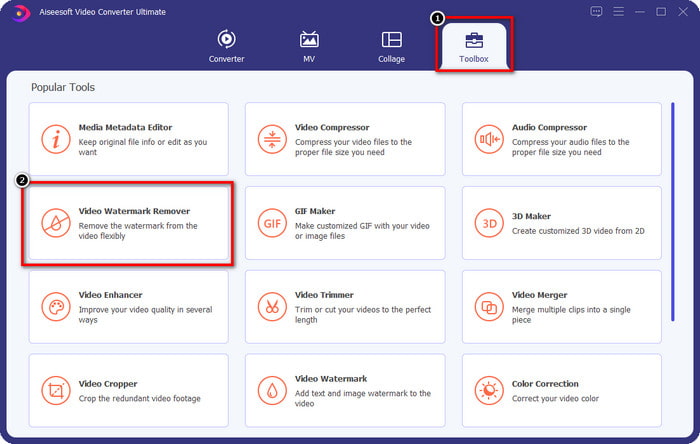
Шаг 2. В разделе Toolbox вы увидите дополнительные функции, которые помогут вам придать вашему видео завершенный и эффектный вид. Но сегодня щелкните по пункту Video Watermark Remover.
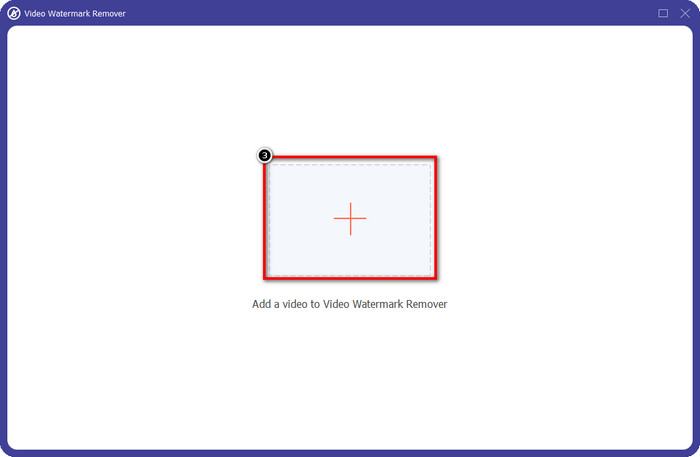
Шаг 3. Загрузите видео, отредактированное в Picsart, нажав на значок +. Найдите нужный файл в папке, которая появится на экране, затем нажмите Open.
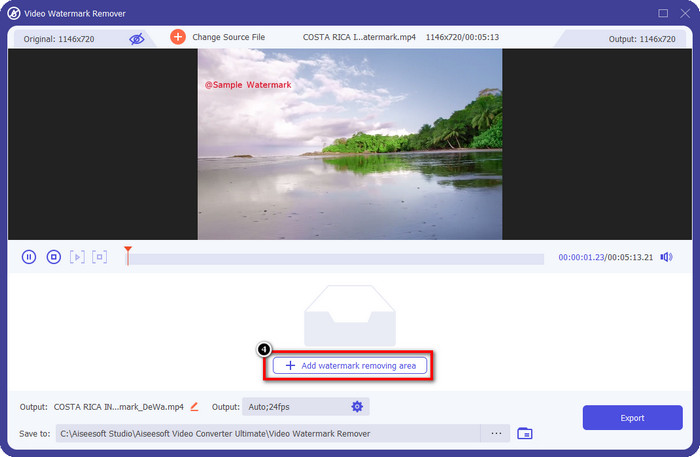
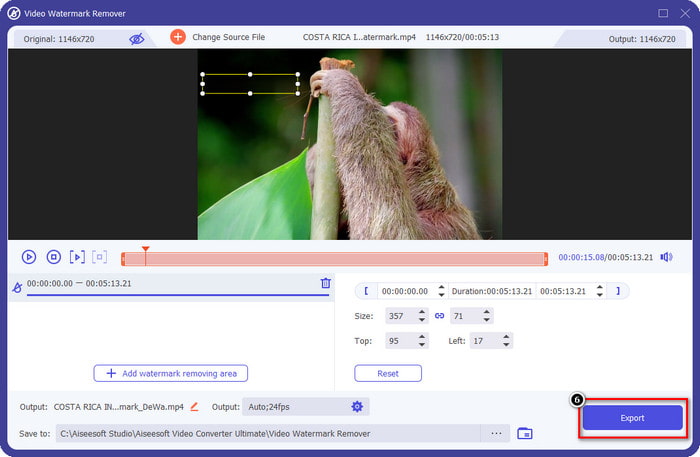
Шаг 4. Нажмите Add Watermark Removing Area, чтобы обозначить область удаления водяного знака, встроенного в загруженное видео.
Шаг 5. Удерживайте и переместите рамку выделения на водяной знак, чтобы полностью его закрыть. При необходимости вы можете увеличить или уменьшить размер рамки по своему усмотрению.
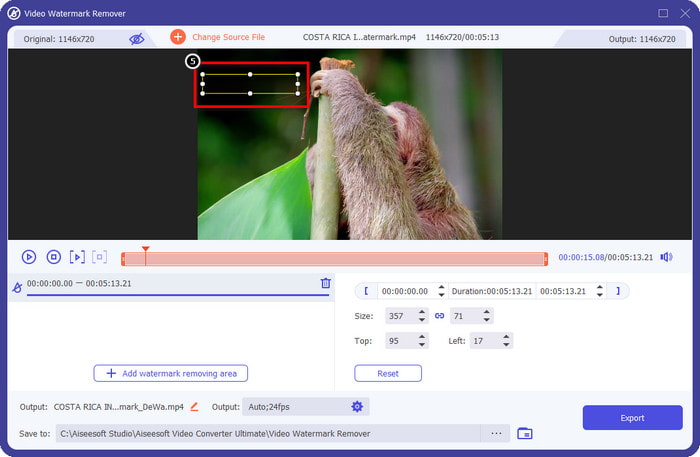
Шаг 6. Когда вы полностью закрыли водяной знак рамкой выделения, нажмите Export, чтобы сохранить конечный результат на локальный диск.
Фотографии на Windows — водяной знак на обложке с 3D-дизайном
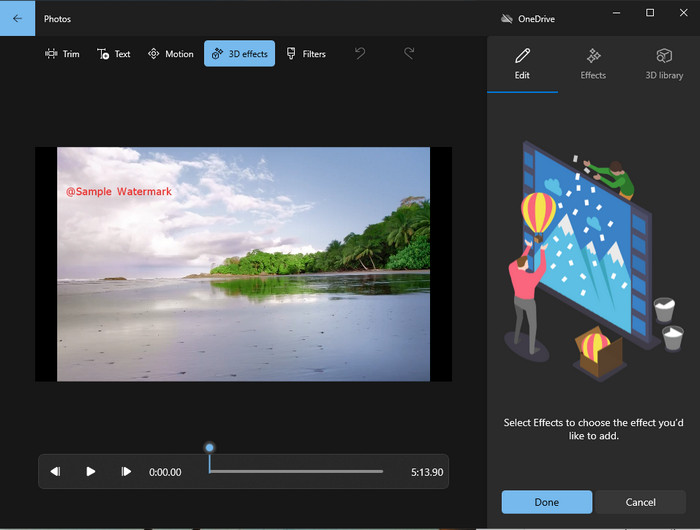
Если скачивание программ не для вас и вы пользуетесь Windows, попробуйте использовать приложение Photos, чтобы отредактировать водяной знак на видео. Освоить, как убрать водяной знак Picsart с помощью этого инструмента, получится еще быстрее, потому что вам не придется проходить этап загрузки дополнительного приложения. Этот инструмент не удаляет водяной знак из видео, но вы можете закрыть его 3D-элементами. Тем не менее, качество работы этой стандартной программы для просмотра и редактирования медиафайлов довольно высокое. Не уверены? Тогда ознакомьтесь с приведенными ниже шагами и следуйте им, если хотите попробовать.
Шаг 1. Нажмите кнопку Windows на панели задач и введите в поиске Photos, чтобы открыть это приложение.
Шаг 2. После открытия встроенного редактора нажмите на значок +, чтобы загрузить сюда видео, которое вы хотите редактировать.
Шаг 3. Перейдите в раздел 3D Effects, нажмите 3D Library и подберите дизайн, которым вы хотите закрыть водяной знак. Разместите выбранный 3D-объект в той части кадра, где находится водяной знак.
Шаг 4. Нажмите Finish Video, чтобы сохранить итоговый файл на локальный диск Windows.
PickFrom Blur Video Online

Сервис PickFrom Blur Video Online может помочь вам удалить водяной знак PicsArt на видео, которое у вас находится в интернете. Этот инструмент малоизвестен, но сегодня мы познакомим вас с ним. Мы включили его в список благодаря эффективности при удалении водяных знаков с загруженных видео. Его интерфейс прост и понятен, поэтому вы не запутаетесь, даже если пользуетесь им впервые. Если хотите убрать водяной знак, переходите к шагам ниже.
Шаг 1. Откройте браузер, введите название сервиса в поиске и перейдите по первой ссылке, чтобы запустить онлайн‑инструмент удаления водяных знаков.
Шаг 2. Нажмите «Click to Add File», чтобы загрузить сюда свое видео.
Шаг 3. Отметьте пункт Blur Part of the Video, затем переместите рамку выделения на область с водяным знаком.
Шаг 4. Нажмите Start, чтобы скачать видео уже без водяного знака.
Часть 2. Как удалить водяной знак Picsart, купив премиум-версию
Вы должны приобрести программное обеспечение, если не хотите проблем с удалением водяного знака Picsart gold. Это будет стоить вам определенную сумму, потому что вам нужно будет заплатить за это, прежде чем вы сможете его использовать, а затем экспортировать видео без встроенного водяного знака. Итак, если вы хотите получить пошаговое руководство по покупке Picsart, вы должны следовать следующему руководству, которое мы добавляем.
Шаг 1. Откройте официальный сайт Picsart и войдите в свою учетную запись. Если у вас еще нет аккаунта, создайте его, нажав Sign Up.
Шаг 2. На главной странице сайта нажмите Pricing и ознакомьтесь с ценами на доступные продукты.
Шаг 3. Выберите подходящий тариф — помесячный или годовой — и нажмите Go to Payment.
Шаг 4. Введите платежные данные, заполнив все необходимые поля, затем нажмите Purchase Now.
Связанный материал:
Удаление водяного знака Lumion
Удалить водяной знак с выпускных фотографий
Часть 3. Часто задаваемые вопросы о том, как удалить водяной знак Picsart
Могу ли я навсегда приобрести Picsart Gold?
Он не поддерживает единовременный платеж или план, поэтому, если вы хотите использовать Picsart Gold, вам нужно будет воспользоваться ежемесячным или годовым планом. Узнать стоимость каждого плана можно на официальном сайте.
Могу ли я создать индивидуальную подписку на Picsart?
Да, вы можете создать подписку для команды в Picsart. Вы можете установить количество людей, которые будут использовать приложение.
Где я могу получить доступ к Picsart?
Вы можете скачать Picsart на Windows, Android и iOS. К сожалению, сейчас у приложения нет версии для Mac, но не расстраивайтесь, потому что вы можете использовать другое программное обеспечение для редактирования мультимедиа, доступное в вашей системе.
Заключение
Учебное пособие, которое мы преподавали ранее, дает вам представление об удалении водяных знаков с помощью PicsArt и лучших средств для удаления водяных знаков, которые вы можете использовать. Теперь вы можете наслаждаться видео, которое редактируете в Picsart, не беспокоясь о водяном знаке продукта, который он добавляет к конечному результату. Так что, если вы все еще не уверены в инструментах, которые мы представляем, обязательно сначала попробуйте их, особенно FVC Video Converter Ultimate. Нажмите кнопку загрузки и бесплатно установите его на свой Windows и Mac, а затем наслаждайтесь предоставляемыми им возможностями и функциями, которыми вы можете воспользоваться.
-
 Как удалить водяной знак Pond5 с помощью Ultimate Tools
 Узнайте, как удалить водяной знак Pond5, выполнив простые шаги ниже. Вы можете легко удалить водяной знак Pond5 с изображения с помощью этих впечатляющих инструментов.
-
 2 мощных способа удалить водяной знак Dxtory
 Узнайте, как удалить водяной знак Dxtory, следуя двум лучшим методам. Если вы ищете наиболее подходящий инструмент для удаления водяного знака Dxtory, читайте здесь.
-
 Выдающиеся средства для удаления водяных знаков Arnold Maya, которые нельзя пропустить
 Многие средства для удаления водяных знаков могут удалить водяной знак Arnold Maya. Но если вы хотите узнать, какие средства для удаления водяных знаков Arnold Maya являются лучшими, прочитайте эту страницу.
