


 Видео конвертер Ultimate
 Устройство записи экрана
 Видео ремонт
 Безопасная загрузка
Как окончательно удалить водяной знак из видео, экспортированного Renderforest
Renderforest — это полный набор отличных анимированных шаблонов для заставок, концовок, заголовков, рекламы и тому подобного. Вы можете начать с нуля или использовать доступные здесь шаблоны. Даже если вы не являетесь экспертом в редактировании видео, вы все равно можете справиться с этим, используя эту веб-платформу. Из-за ее использования и оптимального преимущества многие пользователи выбрали эту платформу для создания высококачественного, эффективного, совместимого и надежного дизайна, если вы воспользуетесь подпиской.
Таким образом, вы можете бесплатно скачать отредактированное здесь видео после регистрации, но с водяным знаком. Водяной знак создаёт проблему для многих из нас, кто уже экспортирует видео здесь, а также для тех, кто не может оплатить подписку на этот инструмент. Ниже мы приведём инструкции по тому, как удалить водяной знак Renderforest с помощью наиболее эффективных средств, которые мы собрали в ходе нашего исследования. Мы поделимся ими с вами, если вы продолжите читать следующую часть этой статьи.

Часть 1. 3 эффективных способа удаления водяных знаков с видео Renderforest
FVC Видеоконвертер Ultimate
FVC Video Converter Ultimate — это выдающаяся программа для удаления водяных знаков с видео, которая поможет вам пошагово убрать водяной знак Renderforest. Вы можете смело полагаться на этот инструмент, чтобы без лишних хлопот удалить водяной знак с вашего видео. Если сравнивать этот мощный инструмент с аналогами, он умеет убирать водяной знак с видео при поддержке ИИ‑технологий. Кроме того, это один из лучших инструментов для удаления водяных знаков с видео любого формата, который вы загружаете. В чём его преимущество? Вам не нужно разбираться в технических тонкостях: просто следуйте несложной инструкции ниже, и вы сможете удалить водяной знак, который Renderforest накладывает на видео.
Шаг 1. Загрузите программу на компьютер, нажав соответствующую кнопку загрузки. Откройте загруженный файл, установите программу и нажмите «Start Now», чтобы сразу запустить её.
Бесплатная загрузкаДля Windows 7 или более поздних версийБезопасная загрузка
Бесплатная загрузкаДля MacOS 10.7 или более поздних версийБезопасная загрузка
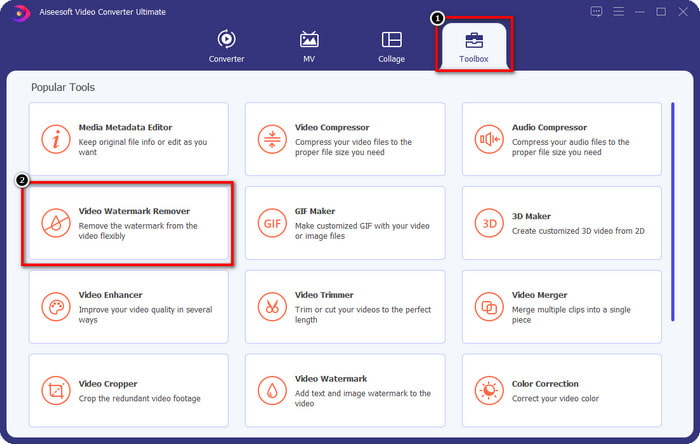
Шаг 2. После запуска программы откройте раздел Toolbox, затем выберите в нём Video Watermark Remover.
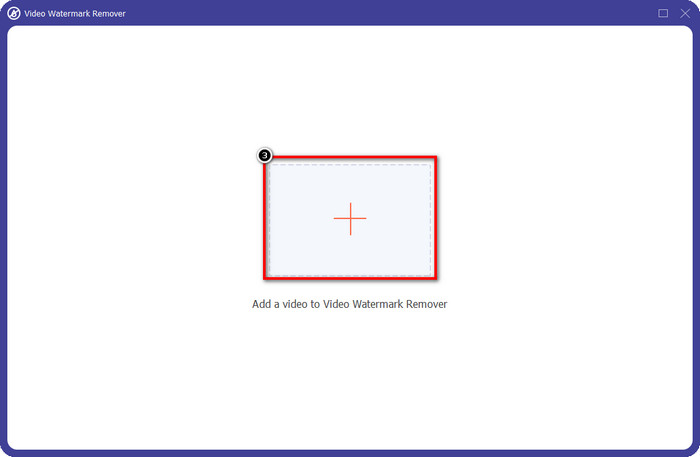
Шаг 3. Нажмите на значок + на экране, чтобы загрузить видео из Renderforest, которое вы экспортировали с водяным знаком.
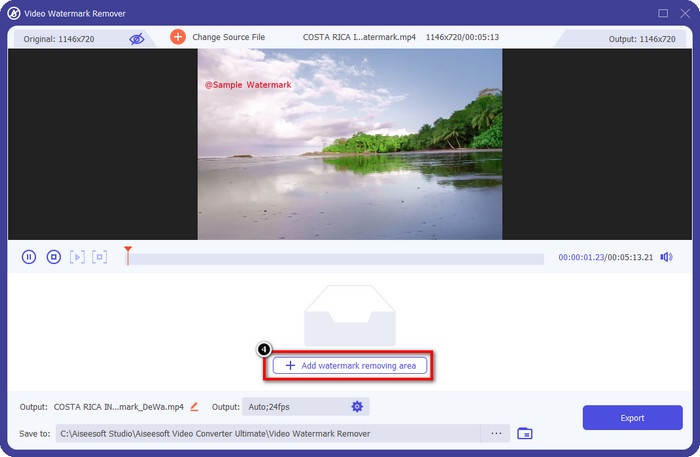
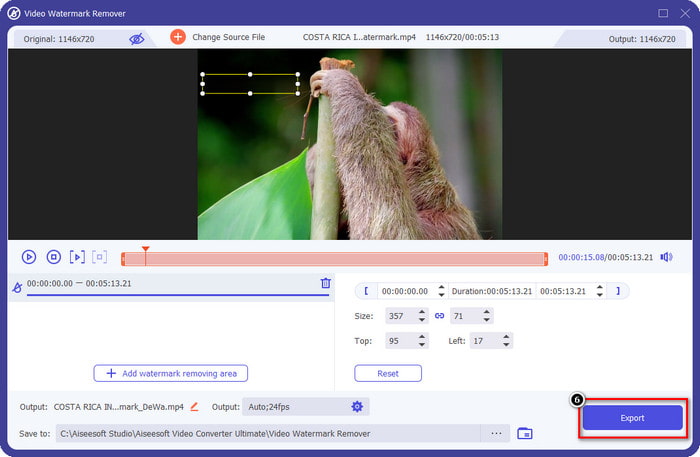
Шаг 4. Нажмите Add Removing Watermark Area, чтобы приступить к удалению водяного знака Renderforest.
Шаг 5. В новом окне на экране перетащите рамку выделения, подгоняя её под водяной знак. При необходимости вы можете свободно изменять размер и положение рамки выделения.
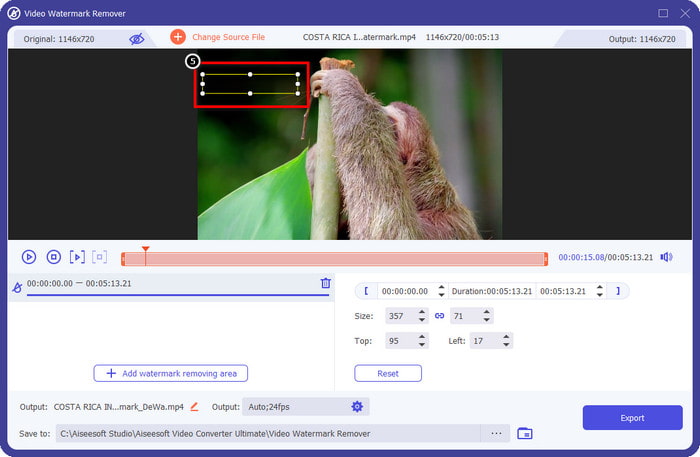
Шаг 6. Когда рамка выделения зафиксирует водяной знак на вашем видео, нажмите Export, чтобы начать удаление и сохранить видео без водяного знака. Обработка пройдёт очень быстро, и вы сможете использовать ролик уже без навязчивого водяного знака.
Связанный материал:
Удалить водяной знак DeviantArt
Удалить водяной знак Video Helper
Удалить логотип сейчас
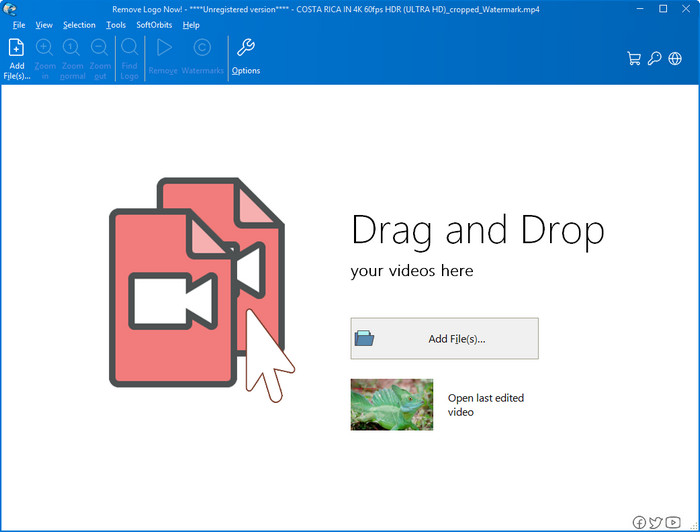
Далее в нашем списке — Remove Logo Now, программа, которая заслужила отличную репутацию за удаление наложенных водяных знаков в Windows. С этим инструментом вам не понадобятся специальные навыки, чтобы понять, как удалить водяной знак Renderforest на ПК. После удаления водяного знака, если присмотреться, можно заметить следы на месте его расположения. Но если не вглядываться, вы не заметите ни водяного знака, ни его остаточного следа на экспортированном видео. Инструкция ниже расскажет, как удалить водяной знак с видео на устройствах под управлением Windows.
Шаг 1. Скачайте и установите Remove Logo Now на свой компьютер, затем следуйте подсказкам установщика.
Шаг 2. Запустите программу и нажмите Add Files, чтобы загрузить сюда видео. Для более удобной и быстрой загрузки файлов вы также можете перетащить видео в окно программы.
Шаг 3. Выберите инструмент, с помощью которого вы хотите выделить водяной знак. После выбора выделите водяной знак и нажмите Remove.
Шаг 4. Нажмите Start, чтобы запустить процесс удаления водяного знака, который выполняет эта программа.
Удаление водяных знаков с видео онлайн

Если вы не хотите устанавливать программы на компьютер, но всё же хотите узнать, как удалить водяной знак Renderforest, попробуйте использовать Video Watermark Remover Online. Этот полностью автоматический онлайн‑сервис позволяет удалить водяной знак с вашего видео бесплатно, без скачивания на компьютер. Как и описанные выше инструменты, он прост в освоении даже для начинающих в видеомонтаже и удалении водяных знаков — вы быстро научитесь им пользоваться. Ознакомьтесь с инструкцией ниже, чтобы понять, как это делается.
Шаг 1. Откройте онлайн‑сервис для удаления водяных знаков, найдя его в вашем любимом браузере.
Шаг 2. На главной странице нажмите значок облака загрузки, чтобы добавить видео, которое вы экспортировали из Renderforest.
Шаг 3. Дождитесь окончания загрузки — сервис автоматически удалит водяной знак с вашего видео, после чего нажмите Download, чтобы скачать ролик уже без водяного знака.
Часть 2. Часто задаваемые вопросы о том, как удалить водяной знак Renderforst
Сколько стоит подписка на Renderforest?
Renderforest поддерживает три различных типа ценообразования, которыми вы можете воспользоваться; $ 14,99 для Lite, $24,99 для Pro и $29,99 для Business каждый месяц. Эти цены имеют разные цели; вы можете перейти на его основной веб-сайт, чтобы узнать, какие подписки доступны в подписке, которой вы хотите воспользоваться.
Можно ли удалить водяной знак с видео Renderforest без инструмента?
Да, вы можете удалить водяной знак в вашем Renderforest без использования инструмента, и этот способ заключается в покупке программного обеспечения за ежемесячную или годовую плату. Чтобы при экспорте видеофайла к нему не добавлялся водяной знак.
Какой план лучше всего подходит для Renderforest; Ежемесячно или ежегодно?
Ежемесячная подписка является хорошим выбором, если вы хотите использовать инструмент несколько раз, но если вы решите использовать программное обеспечение в течение длительного времени, лучше воспользоваться годовым планом, поскольку он будет стоить вам меньше, чем продление подписки. каждый месяц. Но прежде чем воспользоваться, вы можете использовать Renderforest бесплатно, войдя в свою учетную запись здесь, а затем попробуйте использовать другие шаблоны, которые он предоставляет бесплатно.
Заключение
Действительно, эта статья предоставляет веские доказательства того, что водяной знак Renderforest можно удалить бесплатно с помощью трех наиболее полезных средств для удаления водяных знаков, которые вы можете использовать. Если вы являетесь пользователем Windows и хотите удалить водяной знак со своего рабочего стола, попробуйте использовать функцию «Удалить логотип сейчас». Но если вам не нравится загружать программное обеспечение, вы должны попробовать использовать Video Watermark Remover Online, потому что вы можете использовать этот инструмент для эффективного удаления водяных знаков.
Но если вы являетесь пользователем Windows или Mac и хотите эффективное средство для удаления водяных знаков, то, без сомнения, лучшим средством для удаления водяных знаков, которое вы можете использовать, является FVC Video Converter Ultimate. Это идеальное средство для удаления водяных знаков, которое вы можете использовать для эффективного и профессионального удаления водяных знаков, которые мешают вашему видео Renderforest.
-
 2 способа быстро удалить водяной знак VSDC на Windows и Mac
 Вы ищете способ удалить водяной знак VSDC на своих видео? В этой статье мы предоставляем инструменты, которые вы можете использовать, чтобы избавиться от водяного знака.
-
 Удалите водяной знак Animoto на видео легко и эффективно
 Как убрать водяной знак Animoto на видео? Продолжайте читать эту статью, поскольку мы предоставили полное руководство о том, как это сделать.
-
 Как удалить водяной знак из видео с помощью Final Cut Pro [Полное руководство]
 Есть проблема с водяным знаком на видео? Больше ничего не сказал, потому что мы предоставили руководство о том, как удалить водяной знак из видео с помощью Final Cut Pro.
