


 Видео конвертер Ultimate
 Устройство записи экрана
 Видео ремонт
 Безопасная загрузка
Лучшие приемы, как удалить текст Snapchat со снимка экрана
Хотите узнать, как убрать текст Snapchat со скриншота? Вы по адресу. В этой статье вы найдете самые простые способы удаления текста Snapchat с ваших фото и видео. Эти методы очень легко применять, они идеально подходят и для непрофессионалов. Если вас интересуют такие простые методы, прекратите то, чем сейчас заняты, и сосредоточьтесь на прочтении этого полезного материала.

Часть 1: Как удалить текст и подписи Snapchat с изображений
Лучшее, что вы можете сделать, чтобы убрать текст Snapchat с фотографии, – использовать средство удаления водяных знаков. Так вы сможете удалять любые элементы с фото: текст, логотипы, водяные знаки и т.д. Если вы ищете отличный и надежный инструмент, вы можете воспользоваться программой FVC Free Watermark Remover. Она поможет мгновенно удалить текст Snapchat с картинок онлайн. Благодаря понятному интерфейсу, подробным подсказкам и простым кнопкам разобраться с этим сервисом очень легко.
Кроме того, FVC Free Watermark Remover поддерживает часто используемые форматы входных и выходных файлов изображений, такие как PNG, JPG, JPEG, BMP и другие. Кроме того, этот инструмент доступен в Windows 7,8,10,11 и macOS 10.7 и выше. Наконец, это приложение обещает гарантировать конфиденциальность каждого пользователя, поэтому вам не нужно беспокоиться о своих фотографиях или информации. Если вы хотите удалить текст Snapchat со своих фотографий, следуйте простому руководству ниже.
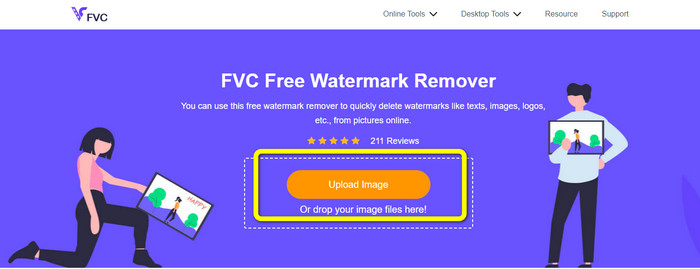
Шаг 1: Перейдите на сайт FVC Free Watermark Remover. Нажмите кнопку Upload Image и добавьте фотографию с текстом Snapchat, который хотите удалить.
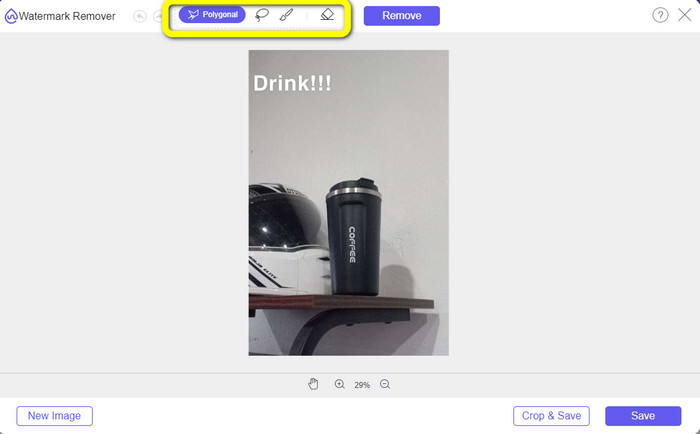
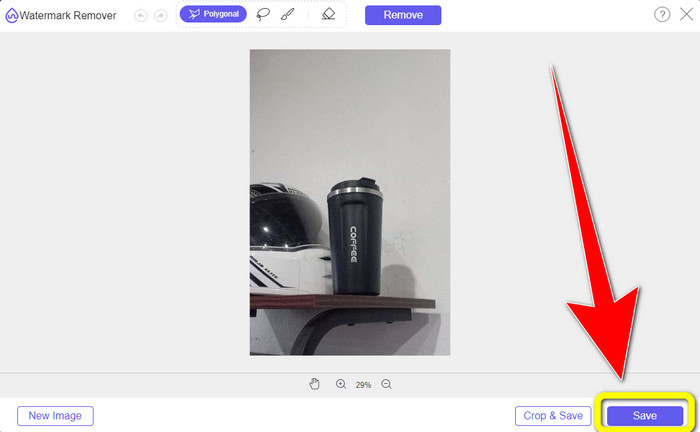
Шаг 2: После загрузки фото вы можете использовать инструменты удаления водяных знаков: многоугольный инструмент, лассо и кисть.
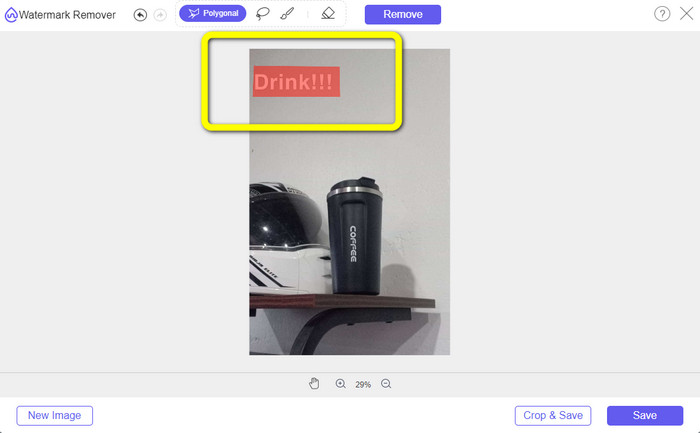
Шаг 3: С помощью этих инструментов выделите текст, который хотите удалить.
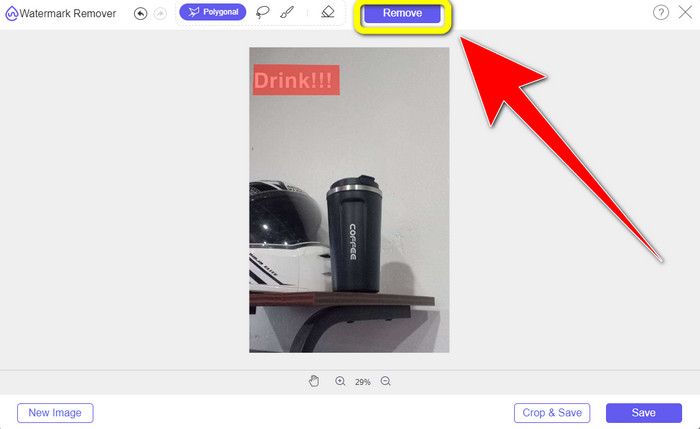
Шаг 4: Когда вы закончите выделять текст на фото, нажмите кнопку Remove, чтобы удалить его. Затем дождитесь окончания процесса удаления.
Шаг 5: После удаления текста с фото нажмите кнопку Save, чтобы скачать изображение без надписи.
Часть 2: Как удалить текст Snapchat из видео
После того как вы удалили текст Snapchat с фотографии, мы также можем подсказать, как убрать текст Snapchat с видео. В этой части лучшим приложением для вас будет Video Converter Ultimate. С его помощью можно удалять ненужные объекты с роликов, такие как текст, водяные знаки, логотипы и т.п. Вы можете убрать текст двумя простыми способами: с помощью инструмента video watermark remover и с помощью инструмента кадрирования видео (video cropper). Если текст Snapchat находится в углу или по краю видео, используйте инструмент обрезки видео. А если текст расположен в середине кадра, используйте инструмент удаления водяного знака с видео.
Кроме того, это приложение имеет различные инструменты редактирования, которыми вы можете наслаждаться, такие как видео-улучшитель, видеокомпрессор, видео-реверс, добавление и удаление водяных знаков, видео-триммер, обрезка, ротатор, создание GIF и многое другое. Он также поддерживает множество форматов видеофайлов, таких как MP4, FLV, MKV, MOV и т. д. Кроме того, вы можете использовать это приложение на своем Mac и Windows, что удобно для пользователей. Если вы хотите удалить текст Snapchat из своих видео двумя простыми способами, вы должны выполнить следующие простые шаги.
Использование функции удаления водяных знаков с видео
Шаг 1: Скачайте Video Converter Ultimate на компьютер с Windows или Mac. Запустите приложение после установки.
Бесплатная загрузкаДля Windows 7 или более поздних версийБезопасная загрузка
Бесплатная загрузкаДля MacOS 10.7 или более поздних версийБезопасная загрузка
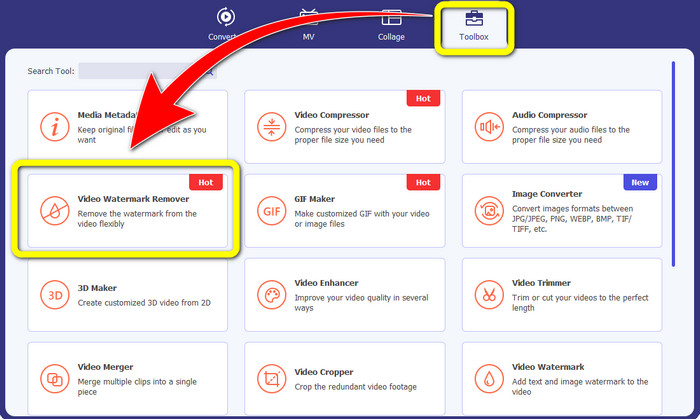
Шаг 2: Затем в верхней части интерфейса вы увидите четыре раздела. Нажмите вкладку Toolbox и выберите инструмент Video Watermark Remover.
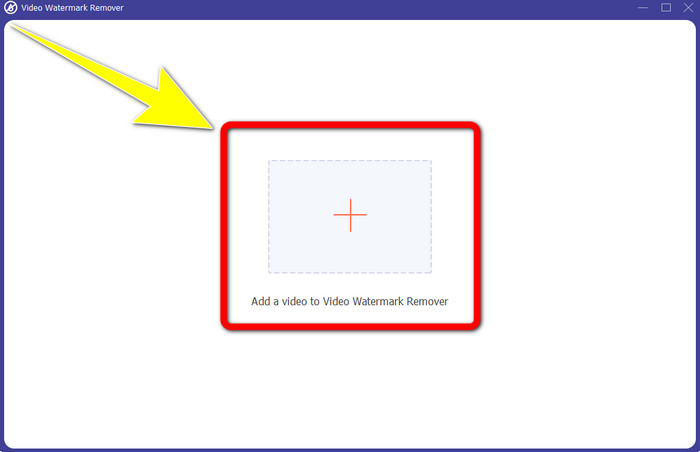
Шаг 3: После этого на экране появится новое окно. Нажмите значок + и добавьте видео с текстом Snapchat.
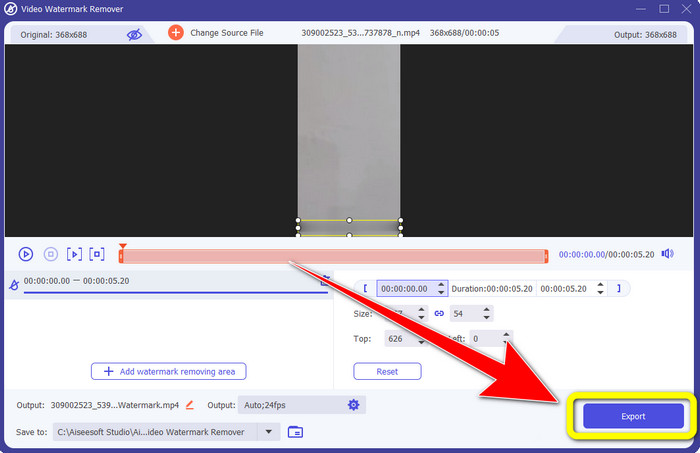
Шаг 4: После загрузки видео нажмите функцию Add Watermark Removing Area. На видео появится небольшое окошко, которое нужно перетащить так, чтобы оно закрывало текст Snapchat.
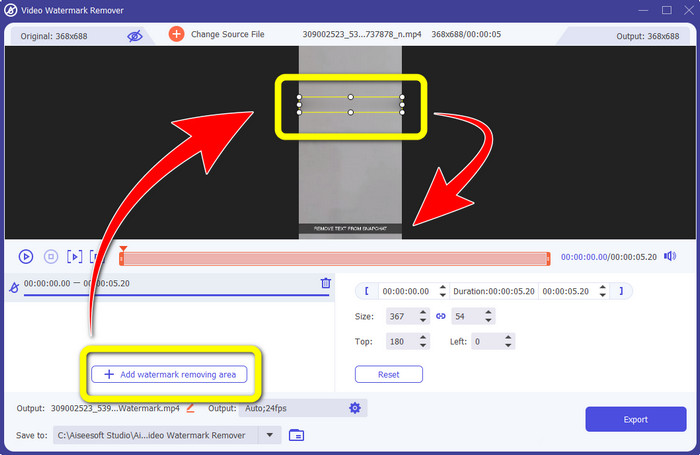
Шаг 5: После того как вы перетащите мини‑окно на область с текстом Snapchat, вы увидите, что надпись исчезла. Нажмите кнопку Export, чтобы сохранить видео целиком.
Использование функции обрезки видео
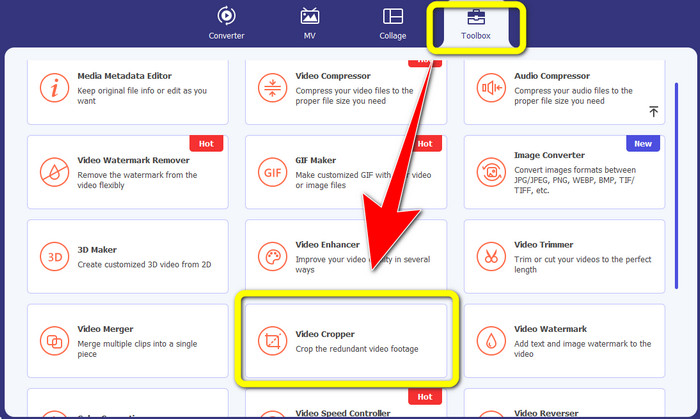
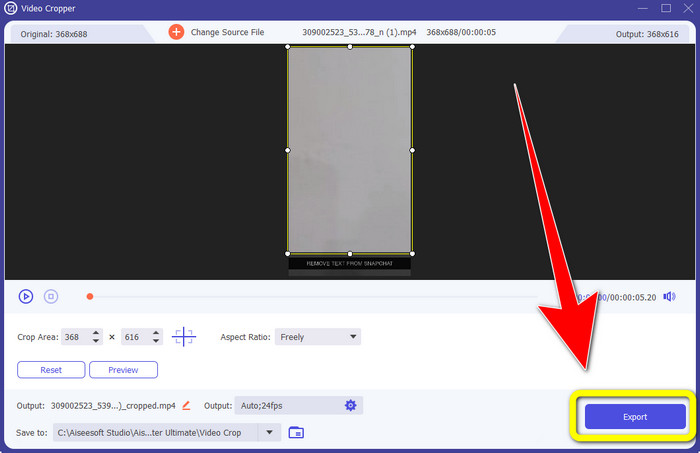
Шаг 1: Откройте Video Converter Ultimate на компьютере. Выберите вкладку Toolbox и перейдите к инструменту Video Cropper.
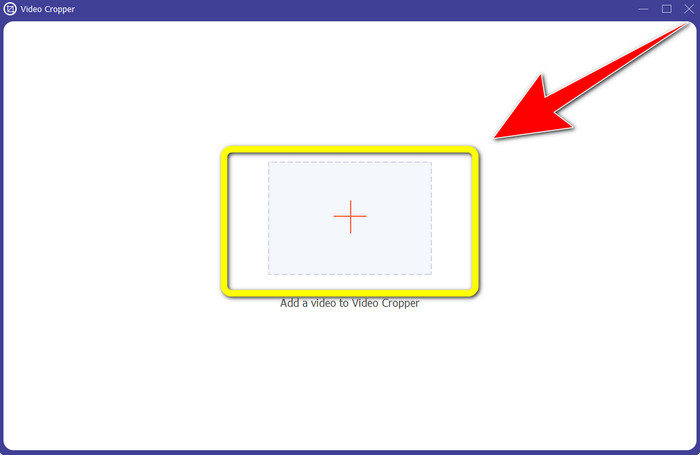
Шаг 2: После нажатия на инструмент Video Cropper на экране появится новый интерфейс. Нажмите кнопку +, чтобы импортировать видео с текстом Snapchat, который вы хотите удалить.
Шаг 3: На этом этапе вы можете обрезать видео, чтобы убрать текст Snapchat, перетаскивая границы кадра мышью. Так вы сможете срезать края ролика.
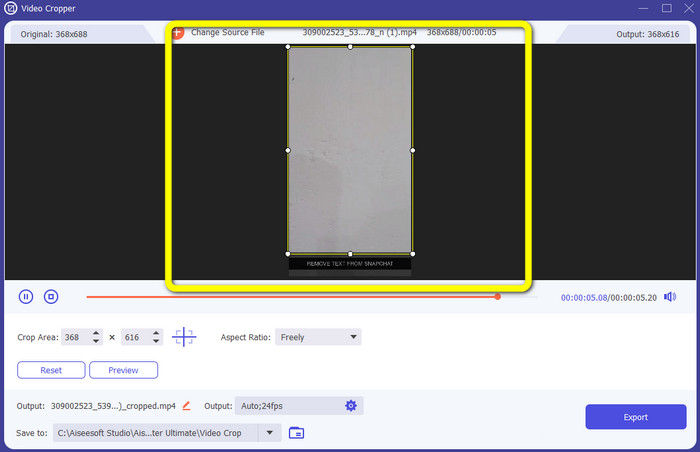
Шаг 4: На последнем шаге можете нажать кнопку Export, чтобы сохранить видео без текста Snapchat.
Часть 3: Часто задаваемые вопросы об удалении текста Snapchat из фотографий и видео
Могу ли я также удалить текст Snapchat с фотографий с помощью моего телефона?
Да, ты можешь. Вы можете использовать множество приложений для удаления водяных знаков, таких как PicLab, Photo Retouch-Object Removal, Airbrush и другие.
Могу ли я удалить текст Snapchat с моей фотографии без потери качества моего изображения?
Если вы не хотите потерять качество фотографии после удаления текста Snapchat, используйте FVC Free Watermark Remover. После завершения обработки вы сохраните исходное качество изображения.
Как отключить подписи в Snapchat?
Подписи к Snapchat загружаются издателем вручную, что позволяет повысить точность подписей. Переключатель всплывающих окон в нижней части экрана можно использовать для включения или выключения субтитров.
Какое лучшее приложение для удаления водяных знаков я могу использовать для своего рабочего стола?
Если вы ищете программу для работы с видео, используйте Video Converter Ultimate. Это приложение позволяет легко удалять водяные знаки с видеороликов. Кроме того, в нем есть множество дополнительных функций.
Что такое водяной знак на фото или видео?
Водяные знаки — это подписи, логотипы и тексты, которые вы видите на фото или видео. Он только сообщает другим людям, кто является фактическим владельцем изображений или видео. Водяной знак — один из лучших способов защитить фотографию и продвинуть название продукта.
Заключение
Как видите, лучший способ удалить текст Snapchat с фотографий и видео – воспользоваться качественным приложением для удаления водяных знаков. В этой статье показано, как удалить текст Snapchat с фотографий с помощью FVC Free Watermark Remover. Также здесь объясняется, как убрать текст Snapchat с видео с помощью Video Converter Ultimate, который предлагает два удобных способа: использование инструмента удаления водяного знака с видео и инструмента обрезки видео.
-
 Как удалить логотип из видео с помощью Windows Movie Maker
 Если вы хотите узнать об удалении логотипов из видео с помощью Windows Movie Maker и других альтернативных способов, прочитайте эту статью. У нас есть простые способы для вас.
-
 Как легко удалить логотип VideoScribe с видео
 Вам больше не нужно беспокоиться об удалении логотипа VideoScribe из ваших видео. Эта статья даст безотказные методы. Прочтите этот пост, чтобы узнать больше
-
 Самый быстрый способ удалить логотип с видео в Adobe Premiere Pro
 Попробуйте эти простые и быстрые способы удаления логотипов из видео в Adobe Premiere Pro. Эта статья предложит вам лучшие способы использования вашего устройства.
