


 Видео конвертер Ultimate
 Устройство записи экрана
 Видео ремонт
Как быстро удалить водяной знак из видео
Нужно легко удалить водяной знак с видео? Для этого нужен подходящий инструмент. Например, пользователи хотят убрать этот текстовый водяной знак или логотип, чтобы смотреть видео в полном формате. Однако эта задача кажется сложной для некоторых редакторов, потому что не все из них имеют эффективный модуль удаления водяных знаков. Как правило, для такой задачи приходится покупать дорогой редактор, и при этом далеко не все из них работают хорошо. Но сегодня мы представим лучшее решение вашей проблемы — независимо от того, используете ли вы компьютер или устройство iOS. Кроме того, всё предлагаемое программное обеспечение было тщательно отобрано. Итак, без лишних слов, давайте перейдём к статье и узнаем, как удалить водяной знак с любого видео.

Часть 1. Окончательное решение для удаления водяных знаков из любых видео на Windows и Mac
Освоить удаление водяного знака с видео очень просто с помощью лучшего видеоредактора Video Converter Ultimate. Вам не нужно иметь большой опыт в монтаже, потому что этот инструмент предлагает понятный, удобный интерфейс. Более того, он также предоставляет множество дополнительных функций, таких как склейка, обрезка, цветокоррекция, реверсирование, улучшение качества и многое другое.
На сегодняшний день многие пользователи уже скачали этот инструмент, и все они довольны тем, что сделали это. Впечатляет, правда? Хотите попробовать использовать этот инструмент? В этом случае давайте проверим шаги ниже и посмотрим, является ли этот инструмент лучшим решением нашей проблемы с водяным знаком.

FVC Видеоконвертер Ultimate
5 689 200+ загрузок- Это лучший выбор для всех, кто хочет удалить свой водяной знак на любом видео.
- Этот совершенный инструмент является единственным, который функционирует как преобразователь, обрезка, слияние, обрезка.
- Доступно для загрузки на всех настольных платформах, таких как Windows и Mac.
- Он прост в использовании, но в их видео он наиболее часто используется в отношении проблемы.
Бесплатная загрузкаДля Windows 7 или более поздних версийБезопасная загрузка
Бесплатная загрузкаДля MacOS 10.7 или более поздних версийБезопасная загрузка
Шаг 1. Скачайте эту мощную программу на компьютер, выбрав, используете ли вы Windows или Mac. После загрузки выполните установку и нажмите Start Now, чтобы запустить программу на вашем устройстве.
Бесплатная загрузкаДля Windows 7 или более поздних версийБезопасная загрузка
Бесплатная загрузкаДля MacOS 10.7 или более поздних версийБезопасная загрузка
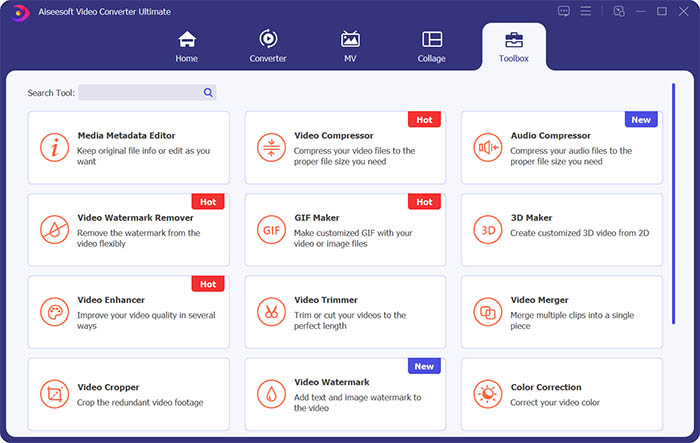
Шаг 2. Перейдите в раздел Toolbox и нажмите Video Watermark Remover, чтобы удалить водяной знак с видео.
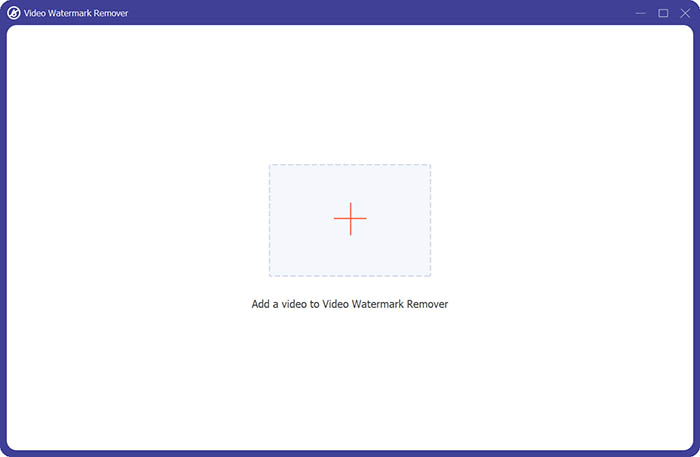
Шаг 3. Затем нажмите на центральный значок плюса, чтобы импортировать видео, с которого нужно убрать водяной знак.
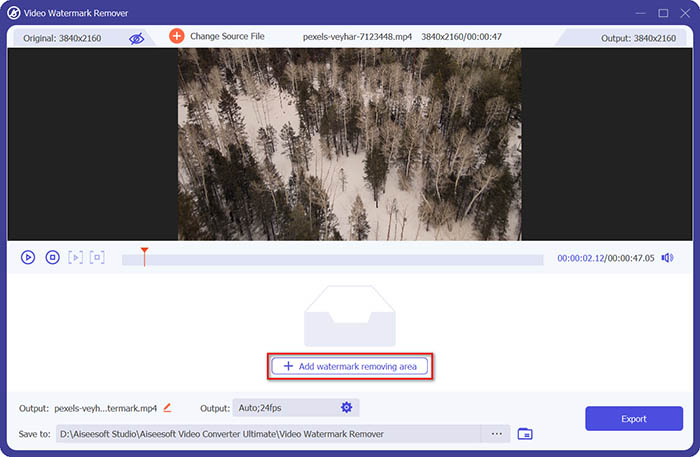
Шаг 4. После добавления видео в модуль удаления водяного знака нажмите кнопку Add watermark removing area, чтобы выделить область водяного знака.
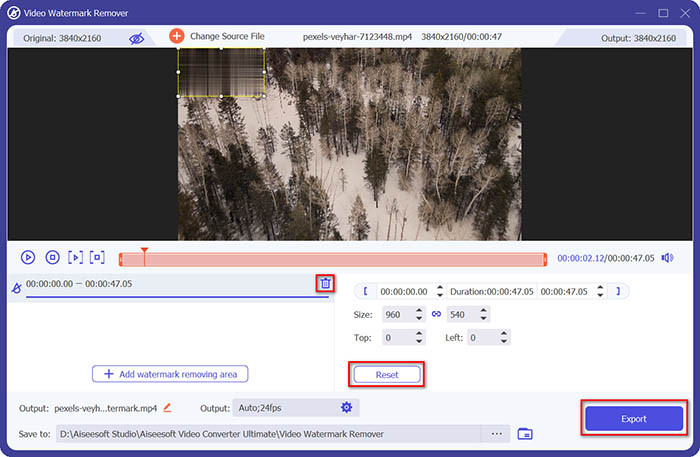
Шаг 5. Наконец, нажмите кнопку Export, чтобы получить видео без водяного знака.
Часть 2. Как удалить водяной знак из любого видео на iPhone
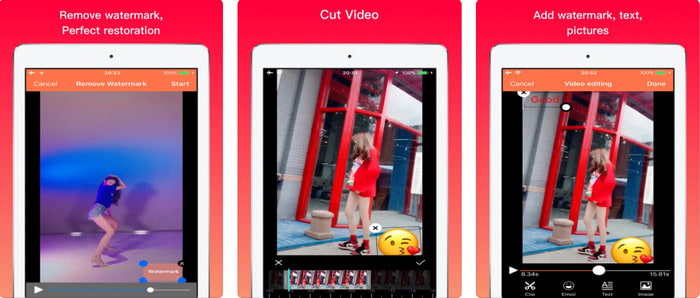
Приложение Video Eraser - Remove Logo 4+ уже помогает многим пользователям iOS решать проблемы, связанные с водяными знаками. Это приложение можно бесплатно скачать в App Store, но в нём предусмотрены встроенные покупки для приобретения PRO‑версии. Хотя инструмент предлагает эффективный способ удаления водяного знака, с ним всё же возникают некоторые трудности: качество видео после экспорта может отличаться от исходного, водяной знак скорее размывается, чем полностью удаляется. Кроме того, загрузка файла может вызывать проблемы: она занимает много времени, даже если длительность видео менее 30 секунд. Но если вы хотите узнать, как удалить водяной знак с видео на iPhone, выполните шаги ниже.
Шаг 1. Скачайте приложение в App Store, затем откройте его и нажмите +, чтобы импортировать видео с водяным знаком.
Шаг 2. Нажмите кнопку information и выберите Remove Watermark, затем коснитесь водяного знака и нажмите Start.
Шаг 3. После завершения обработки водяной знак будет удалён с видео.
Часть 3. Как избавиться от водяного знака на любых видео в Интернете
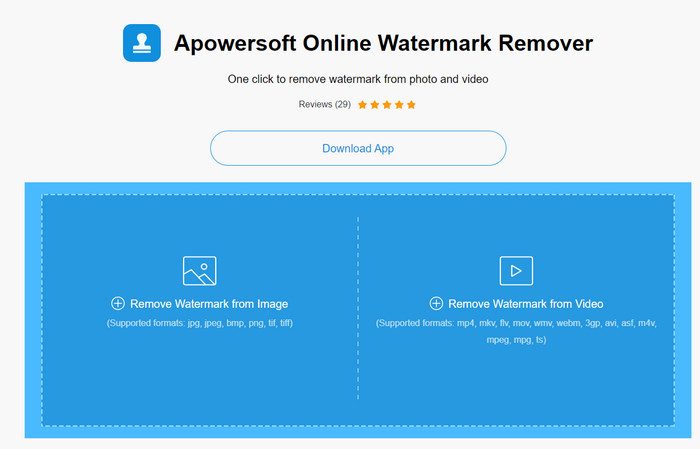
Apowersoft Online Watermark Remover — это бесплатный и доступный онлайн‑инструмент для удаления водяных знаков. Этот веб‑сервис позволяет эффективно удалять водяные знаки, при этом ничего не нужно устанавливать, так как он работает в браузере. Несмотря на эффективность, для завершения процесса требуется стабильное интернет‑соединение, иначе процедуру придётся повторять. Поэтому, если у вас ограниченный бюджет и вы хотите узнать, как удалить водяной знак с видео онлайн, этот инструмент подойдёт вам лучше всего.
Шаг 1. Найдите Apowersoft Online Watermark Remover в вашем любимом браузере и откройте сервис.
Шаг 2. Нажмите Remove Watermark from Video, чтобы загрузить файл с водяным знаком. Дождитесь окончания загрузки.
Шаг 3. На видео зажмите левую кнопку мыши и протяните выделение по водяному знаку; когда он окажется внутри пунктирной рамки, отпустите кнопку. Нажмите Erase, чтобы начать удаление, затем нажмите Download, чтобы сохранить файл на компьютер.
Часть 4. Часто задаваемые вопросы об удалении водяных знаков из видео
Почему мне нужно избавиться от водяного знака на видео?
Нам нужно удалить раздражающий водяной знак, чтобы наслаждаться видео в целом. Он применим только для личного использования, но могут быть последствия, если вы используете его, чтобы получить преимущество, если вы разместите его в Интернете и получите выгоду от работы другого.
Каковы другие способы удаления водяных знаков?
Вы можете скрыть водяной знак или заменить его своим водяным знаком, если хотите. Этот процесс накладывается; это работает лучше всего, только если водяной знак маленький или сбоку от видео. Или вы можете вырезать видео с водяным знаком, а затем объединить его с другим видео. Этот процесс резки работает лучше всего, только если водяной знак всплывающий. Есть два разных способа удаления водяных знаков: размытие и обрезка видео. Эти две работы с инструментами, которые мы представили выше.
Как добавить водяной знак в Photoshop?
Если вы хотите добавить водяной знак в Photoshop, нажмите на эту ссылку и внимательно прочитайте материал, чтобы лучше понять процесс.
Заключение
С инструментами, представленными в этой статье, вы можете легко удалить водяной знак с видео бесплатно или воспользоваться мощной настольной программой и при желании приобрести её. Хотя все описанные здесь средства для удаления водяных знаков просты в использовании, мы по‑прежнему считаем, что Video Converter Ultimate предлагает самый простой, но при этом максимально эффективный интерфейс. Поэтому, если вы хотите получить такой инструмент, нажмите кнопку загрузки выше, чтобы протестировать его и понять, подходит ли он вам.
-
 2 лучших способа конвертировать DivX в формат MKV [решено]
 Зачем мне конвертировать DivX в MKV? Какие преобразователи я могу использовать? У вас есть такая же мысль? Тогда эта статья поможет вам узнать больше о DivX и MKV.
-
 2 Ultimate MPG Converters для бесплатного преобразования MPG в WMV
 Вы хотите конвертировать MPG в WMV бесплатно? В этом случае вам повезло, потому что мы обнаружили, что есть два инструмента, которые вы можете использовать для преобразования файлов MPG.
-
 Как изменить iTunes M4V на MKV на Mac и Windows [Самый быстрый способ]
 Если вам нужно конвертировать M4V в MKV на Mac, вы должны прочитать эту статью. Поскольку мы предоставляем факты о преобразователях, которые помогут вам в процессе преобразования.
