


 Видео конвертер Ultimate
 Устройство записи экрана
 Видео ремонт
 Безопасная загрузка
Полное руководство по удалению водяного знака Weibo, которое вам нужно знать
Weibo — это известная платформа социальных сетей, используемая для обмена, распространения и получения информации, такой как Twitter, которую вы часто можете использовать в Китае. Вы также можете публиковать и загружать миниатюры, фотографии и видео здесь. Однако после экспорта будет водяной знак. Многие пользователи хотят удалить его, потому что он мешает визуальному восприятию контента.
Несмотря на то, что существует тысячи программ для удаления водяных знаков, лишь немногие действительно справляются с этой задачей эффективно. Поэтому, если вам не нравится водяной знак на загруженных вами медиафайлах, в этой статье собраны лучшие инструменты для его удаления. Мы протестировали их, чтобы подтвердить, что они действительно работают и практичны для удаления водяных знаков. Чтобы объяснить вам, как удалить водяной знак Weibo, читайте эту статью до конца.

Часть 1. Как удалить водяной знак из видео Weibo с помощью Ultimate Watermark Remover
Водяной знак Weibo часто становится проблемой для других инструментов, потому что большинство из них оставляют размытие или след от надписи. Но если вы используете FVC Video Converter Ultimate, никаких следов не останется. Независимо от того, большой водяной знак или маленький, этот инструмент эффективно удаляет его, не оставляя и следа. Так вы сможете наслаждаться просмотром видео, которое экспортируете в Weibo. Иными словами, удаление водяного знака с помощью этого инструмента — проста́я задача.
Кроме того, вы также можете использовать этот инструмент для других целей, таких как вырезание, слияние, сжатие, обрезка, создание GIF-файлов и многое другое. И если вы хотите добавить водяной знак на свое видео, чтобы никто не мог украсть его у вас, вы можете использовать это программное обеспечение для этого. Это универсальное программное обеспечение, необходимое на вашем рабочем столе. Хотите знать, как удалить водяной знак из видео Weibo? Вы можете выполнить следующие шаги, поскольку мы объясним, как это сделать шаг за шагом.
Бесплатная загрузкаДля Windows 7 или более поздних версийБезопасная загрузка
Бесплатная загрузкаДля MacOS 10.7 или более поздних версийБезопасная загрузка
': Прежде чем выполнять следующие шаги, убедитесь, что вы экспортировали видео Weibo, на котором хотите удалить водяной знак, чтобы вы могли легко найти его в папке.
Шаг 1. Прежде всего скачайте программу на компьютер и выберите версию в соответствии с вашей операционной системой. После установки программы следуйте шагам настройки WinRAR, которые появятся на экране, нажмите «Start Now», чтобы запустить её, и продолжайте.
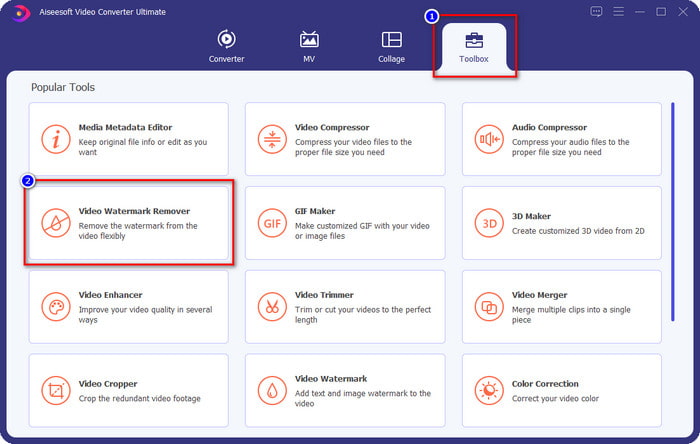
Шаг 2. Перейдите в раздел Toolbox и найдите Video Watermark Remover; щёлкните по нему.
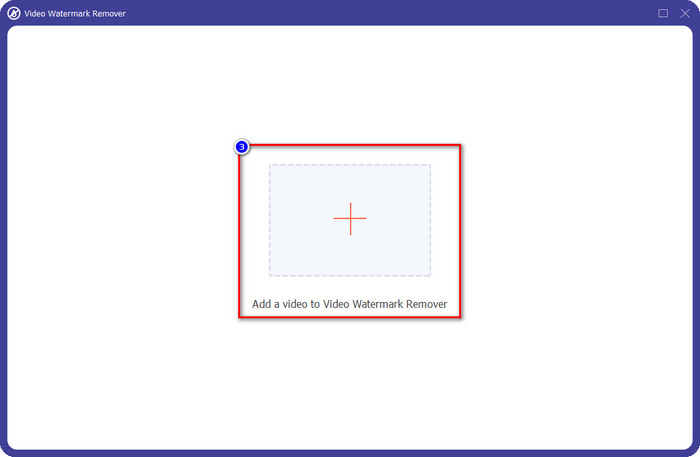
Шаг 3. Нажмите кнопку +, найдите в папке скачанное ранее видео с водяным знаком Weibo, щёлкните по файлу и нажмите Open, чтобы загрузить его.
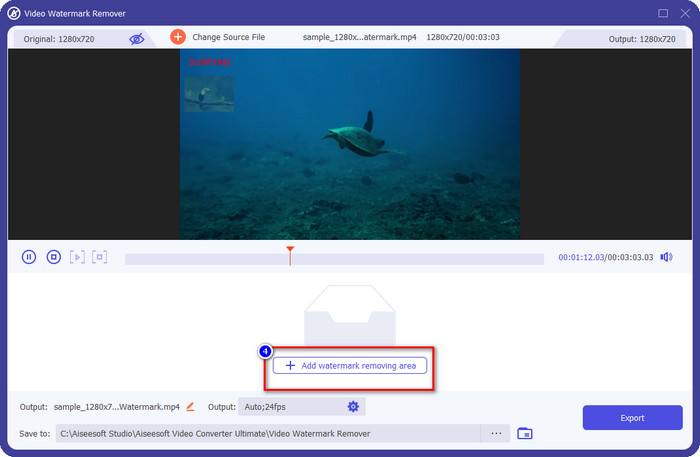
Шаг 4. В новом окне, которое откроется, нажмите Add Watermark Removing Area, чтобы перейти к удалению водяного знака.
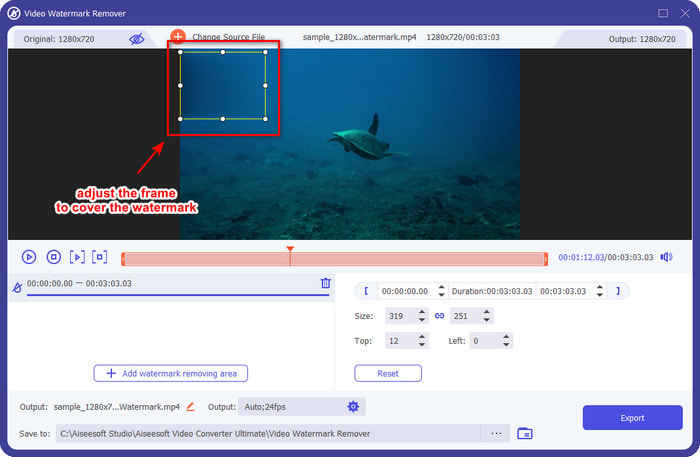
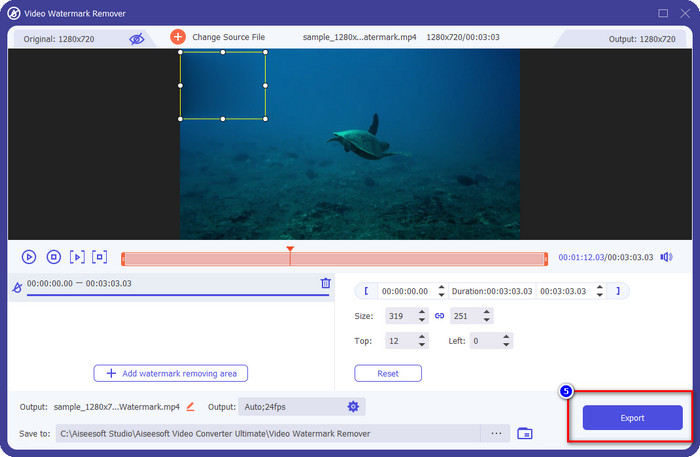
Шаг 5. Перетащите и удерживайте рамку выделения так, чтобы она закрывала водяной знак; вы также можете увеличить или уменьшить её по своему усмотрению и полностью накрыть ею водяной знак перед экспортом.
Шаг 6. После того как вы расположите рамку выделения поверх водяного знака, нажмите Export, чтобы удалить водяной знак с загруженного видео. Ждать почти не придётся, так как поддерживается сверхбыстрая обработка; уже через несколько секунд у вас будет видео с Weibo без водяного знака.
Часть 2. Как удалить водяной знак с фотографии Weibo с помощью бесплатной версии в Интернете
Как сохранить фотографии из Weibo без водяного знака? Нельзя сохранить изображение без водяного знака напрямую из Weibo. Однако вы можете использовать FVC Free Watermark Remover, чтобы стереть водяной знак с изображений. Это полноценный онлайн‑инструмент для удаления водяных знаков с картинок. Если говорить о функциональности, можно сказать, что этот инструмент значительно лучше многих других онлайн‑сервисов для удаления водяных знаков. Так что, если вы хотите убрать водяной знак с изображения, это первый вариант, который стоит попробовать. Хотя он отлично справляется с удалением водяных знаков с изображений, удалять их с видео, как это делает «ultimate»‑версия, он не умеет.
Тем не менее, его можно использовать бесплатно, а его веб-интерфейс чист, так что вы даже не увидите никакой рекламы, которая может вас беспокоить. Хотите знать, как использовать этот веб-инструмент? Затем выполните указанные ниже шаги, чтобы попробовать это на себе.
Примечание. Как и в случае с видео, обязательно загрузите изображение Weibo, которое вы хотите иметь, и убедитесь, что вы поместили его в видимую и легкодоступную папку.
Шаг 1. Чтобы открыть онлайн‑инструмент для удаления водяных знаков, нажмите на эту ссылку.
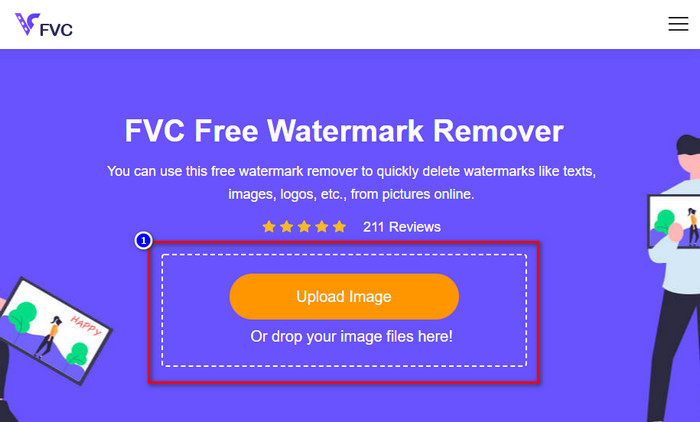
Шаг 2. В веб‑интерфейсе нажмите Upload Image, после чего на экране появится окно проводника; найдите нужное изображение и нажмите Open, чтобы загрузить его.
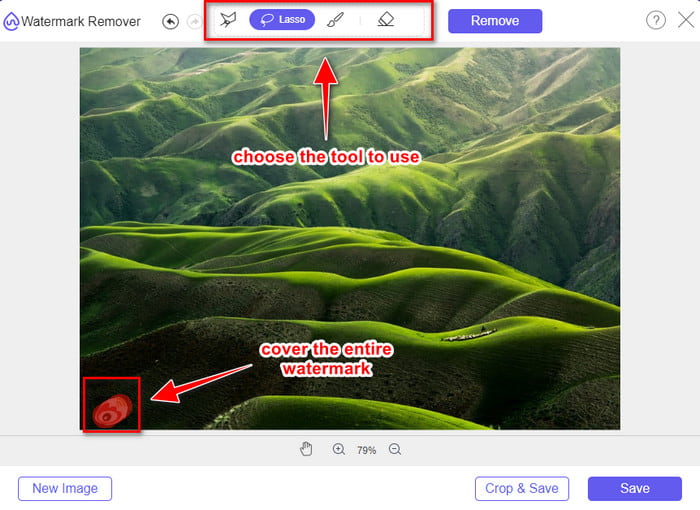
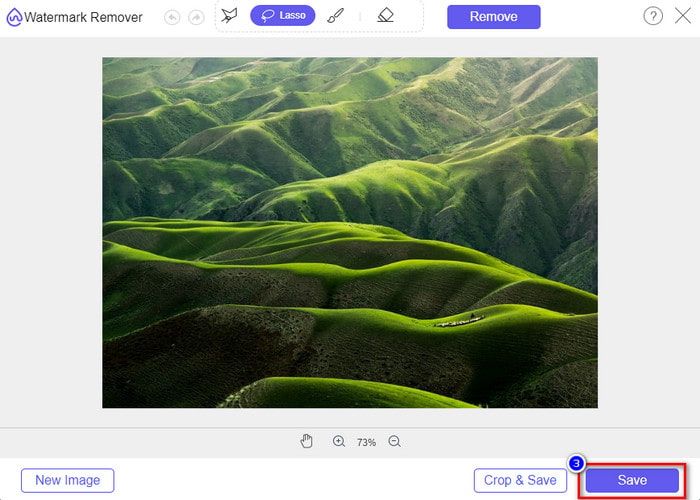
Шаг 3. Здесь вы можете обвести водяной знак, чтобы удалить его; проследите, чтобы каждая часть водяного знака оказалась внутри области обводки.
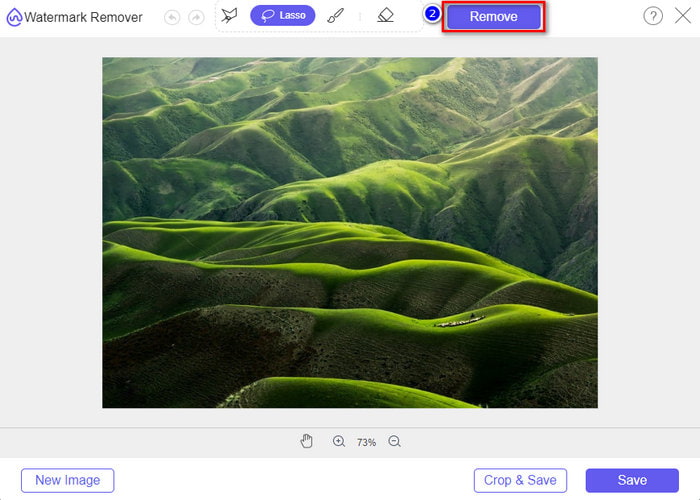
Шаг 4. Нажмите Remove, чтобы стереть водяной знак с изображения.
Шаг 5. После удаления водяного знака с изображения Weibo нажмите Save, чтобы скачать картинку без водяного знака.
Связанный материал:
Как удалить водяной знак TikTok
Как добавить водяной знак на видео
Часть 3. Часто задаваемые вопросы о том, как удалить водяной знак Weibo
Почему водяной знак Weibo стал размытым после его экспорта?
Некоторые инструменты размывают водяной знак, чтобы его нельзя было увидеть на визуальных носителях, которые они экспортировали на Weibo. Но не все инструменты размывают водяные знаки; некоторые удаляют водяной знак на визуальном носителе без следа. Итак, если вы хотите удалить водяной знак на Weibo, не размывая его, вы должны знать упомянутый выше инструмент, который поможет вам удалить его.
Могу ли я скрыть логотип Weibo в экспортированном файле?
Да, ты можешь. Таким образом, вы не увидите водяной знак Weibo на файле. Тем не менее, вмешательство в него затронет некоторые части файла, поэтому вместо того, чтобы помочь вам, это может ухудшить файл. Таким образом, для удаления водяного знака файла необходимо средство для удаления водяных знаков.
Все ли файлы, экспортированные на Weibo, имеют водяной знак?
Экспорт файлов любого типа на этой платформе микроблогов оставит след. Что бы это ни было, в файл добавляются водяные знаки. Тем не менее, вы можете удалить его с помощью инструмента, о котором мы упоминали ранее в этой статье.
Заключение
Впечатляет, не так ли? У FVC есть инструменты, которые помогут вам мгновенно удалить водяной знак Weibo с видео и изображений. Даже если у вас нет опыта и вы не профессионал в такого рода редактировании, с вышеупомянутыми инструментами это вполне по силам. Поэтому, если хотите удалить водяной знак с изображения — независимо от того, было ли оно экспортировано из Weibo или нет, — FVC Free Watermark Remover — это инструмент, который вам понадобится. А вот для видео и GIF‑файлов нужно использовать профессиональное, но простое и доступное программное обеспечение, такое как FVC Video Converter Ultimate. Чего же вы ждёте? Удалите водяные знаки с ваших медиафайлов, чтобы наслаждаться ими без лишних отметок.
-
 Лучший способ добавить водяной знак в видео в Photoshop на Windows и Mac
 Хотите знать, как добавить водяной знак на видео в Photoshop? В этом случае эта статья предоставит вам одну или две вещи, которые вам нужно знать.
-
 3 лучших решения о том, как легко удалить водяной знак из видео
 Хотите убрать надоедливый водяной знак на видео? В этом блоге вы можете узнать о различных идеях удаления водяных знаков на видео.
-
 4 лучших способа удалить водяной знак из GIF [онлайн и оффлайн]
 Нужно удалить водяной знак из GIF? С помощью инструмента в этой статье вы изучите различные стили с помощью различных средств удаления водяных знаков, доступных на вашей платформе.
