


 Video Dönüştürücü Ultimate
 Ekran kaydedicisi
 Video Onarımı
Android'deki Yardımcı Uygulamalar ile Android'deki Videoları Hızlandırın [2025]
Nowadays phones are the most versatile technology that we use every day. This device helps us to communicate, record, edit things like cropping, trimming, speeding up and more even if we don't have a lot of equipment to set-up. So today we will be going to know how to speed up video on Android with the help of a third-party app that you can download. Additional information, your Android phone has no built-in speed up video that you can use to make watch a video faster. So if you want to have one then continue reading this article as we accumulate different apps you can rely on.

Bölüm 1. Android'de Videoyu Hızlandırma
1. FilmoraGo
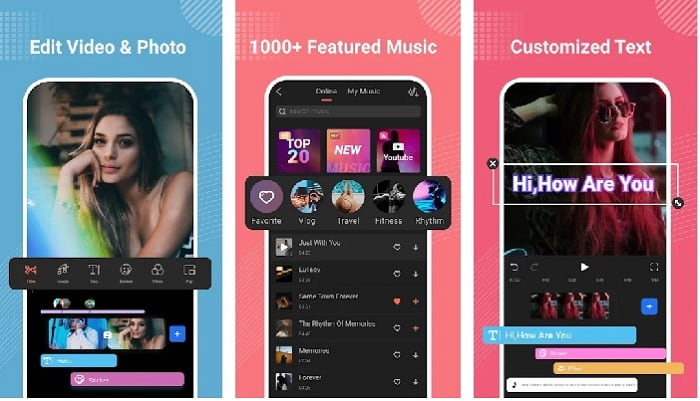
Filmora developed an app that can be downloaded to your Android to experience the almost same features the tool on desktop provides. Filmora Go is one of the best free video editors you can use to make a splendid video. Moreover, this tool has an all-out feature you will likely use even if you don't have experience on editing videos. However, the free version only supports the sample features you can use. Like the speed up video on Android this feature is free but it has a limitation. Although the tool looks perfect, there are some concerns the users would like to be solved on the review of the app.
Artıları
- Android cihazlarınızda kullanabileceğiniz ücretsiz ama güçlü bir video düzenleyicidir.
- Araç, gördüğümüz en iyi incelemelerden birini ve 4,6 yıldız alıyor.
- Araç şimdiden masaüstündeki en iyi editörlerden biri olarak ün kazandı.
Eksileri
- Dosyaları kaybetmek bazen burada oluyor.
- Bazen, düzenleseniz bile dosyaları dışa aktarmak karışık hale gelir.
- Çoğu zaman ses ve video senkronize olmaz.
2. Hiper Zaman Atlamalı
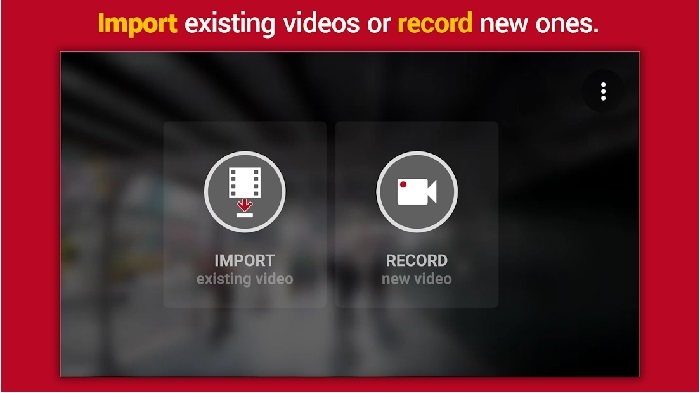
Hyper Timelapse is one of the speeds up video playback on Android you can download for free. This app already reached a 4.1 star rating which is great. However, reviews on this app are terrible to read because they have a lot of complaints. And when we try to use the app, the interface is not so bad, the speed up is great but when we export it the app crashes. Then we try to use the time lapse as the file size of the video becomes larger every minute passes. Basically, you can't take a long video of a time lapsed video in here.
Artıları
- Yeni başlayan biri olsanız bile uygulamanın kullanımı çok basittir.
- Yerleşik bir zaman atlamalı vardır.
- Aracın arayüzü iyi değil.
Eksileri
- Bu araçta hala çökmeler ve hatalar oluyor.
- Son çıktıyı kaydetmez çünkü her yaptığınızda çöker.
3. Geç
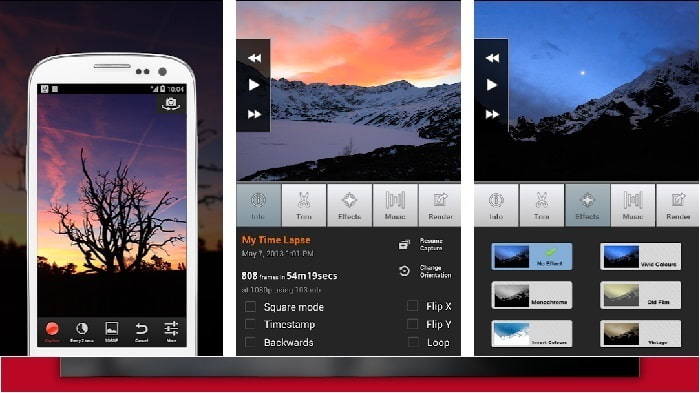
If you're looking for an app to speed up video on Android then try to use Lapse It. This tool is the combination of the two tools above because you can do time lapse, stop motion and editing features. Although the tool sounds great to be used on Android it still got the lowest start in this article. The app got only 3.5 starts and a lot of the comments on the review thinks this app is good for nothing. And some comments say that this tool is their go to app when it comes to making a splendid video but now there are a lot of apps better than this tool.
Artıları
- Birçok kullanıcının kullanmayı sevdiği benzersiz ve güçlü bir özelliğe sahiptir.
- Bu uygulama Android'de en iyi işlemeye sahip olabilir.
- Videoyu özelleştirme, Android'deki bu uygulamanın yardımıyla kolayca yapılabilir.
Eksileri
- Güncelleme yapıldıktan sonra bile çökmeler ve hatalar meydana geldiği için araç S sınıfından D'ye değişti.
- Talimatlar nasıl yürütüleceği konusunda net değil.
- Biten her videoda her zaman bir pop-up reklam gelir.
Bölüm 2. Daha Profesyonel Bir Hız Kontrol Cihazı mı İstiyorsunuz? Video Converter Ultimate'ı deneyin!
Video Converter Ultimate is the most unique tool you are most likely to use if you want to have an amazing output. Speeding up a video here can be easily done with the help of this tool. Also, the overall features of this tool are superb than this android tool. However, this software can't be used on Android devices because it is not supported. Although it can be used on your phone still you will never encounter freezing, crashing and bugs while using this tool. So, if you want to learn how to speed up a video on Android then follow the steps below.
Step 1. The first thing you should do is to download the tool. Install it to next after the downloading process is done then do the quick set-up and click finish to proceed.
Ücretsiz İndirWindows 7 veya üstü içinGüvenli İndirme
Ücretsiz İndirMacOS 10.7 veya üstü içinGüvenli İndirme
Step 2. Next, go to the Toolbox and locate the Video Speed Controller, click it to be opened.
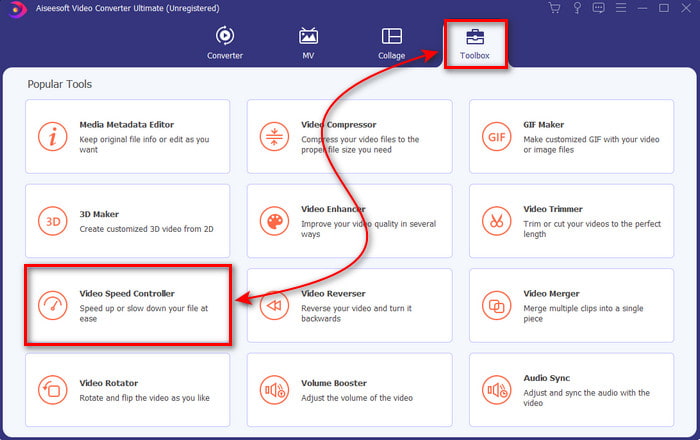
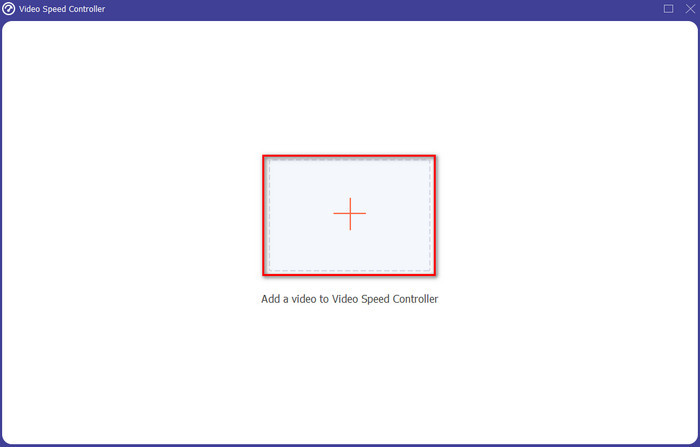
Step 3. And an interface will show next, click the + button to insert the file. After clicking it a folder will show then select the file you want to speed up and click Open.
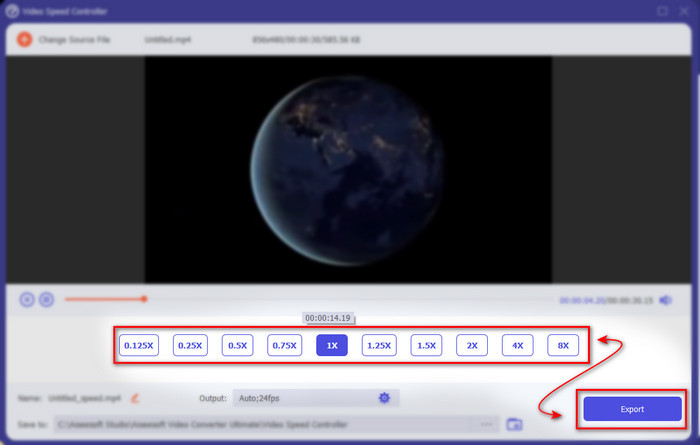
Step 4. A new interface again will show up, then select the speed you want on these small boxes. If you are now ready to export the speed up file then click the Export.
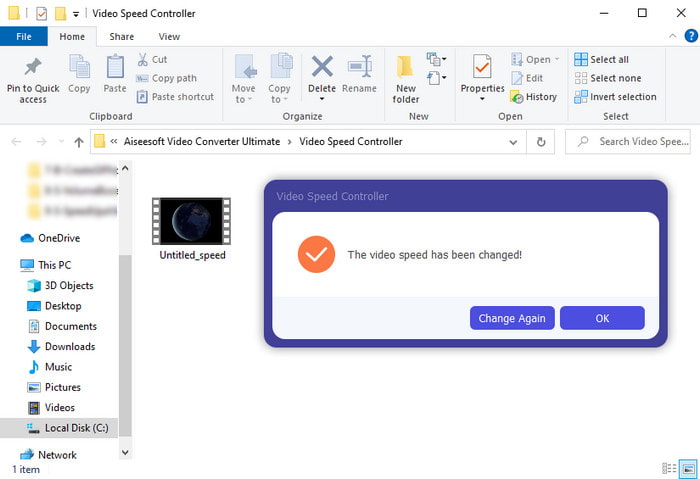
Step 5. Wait for a short time and if the video is done a folder will show next containing the speed up file you just made. Click the video file to watch the speed up version.
Bölüm 3. Android'de Video Hızlandırma hakkında SSS
Videomu hızlandırmak kalitesini bozar mı?
Bir videoyu hızlandırmak üzereyseniz, videonun kalitesinde bir değişiklik beklemeyin. Ancak, kullandığınız uygulama yüksek kaliteli video çıkışını desteklemiyorsa, video çıkışının otomatik olarak azalmasını bekleyin.
Ağır çekimde video izleyebilir miyim?
Definitely yes! with the help of the 5 Best Slow Motion Video Players click this link to proceed to a new write up.
Neden videomu hızlandırmam gerekiyor?
There are a lot of reasons why you need to play a video into 2x or up. So, if you want to find out that reason then try to read this article talking about what is 2x video.
Sonuç
To end, all of the presents in here are great to be used if you have an Android phone however there is a tool that stands out the most. And the phenomenal tool is the Video Converter Ultimate because if you use this tool, you will never experience bugs and issues. But this tool is not available on Android phones so if you want to try it then download it now to your desktop. To enjoy the full feature of this magnificent software.
-
 iPad 2025'te MKV Dosyaları Nasıl Oynatılır
 MKV dosyaları iPad 2'de nasıl oynanır? iPad Pro/Air/2'de oynamak için MKV'yi MP4'e dönüştürebilir miyim? Bu gönderi, iPad'de MKV oynamanın 2 kolay yolunu paylaşıyor.
-
 [Çözüldü] VLC DVD Oynatmıyor, Nasıl Onarılır
 VLC DVD oynatabilir mi? VLC neden DVD'mi oynatmıyor? Windows 10'da DVD oynatmak için VLC'yi nasıl edinebilirim? Bu gönderi, VLC'nin DVD oynatmama sorununu düzeltmek için 3 ipucu paylaşıyor.
-
 [Çözüldü] Chromebook 2025'te MP4 Dosyalarını Oynatın
 Chromebook'ta video oynatabiliyor musunuz? MP4 dosyaları Chromebook'ta USB'den nasıl oynanır? Bu gönderi, Chromebook'ta MP4 oynamanın 3 yolunu paylaşıyor.
