


 Video Dönüştürücü Ultimate
 Ekran kaydedicisi
 Video Onarımı
3GP'yi AVI'ye Çevrimiçi ve Çevrimdışı Olarak Dönüştürmek için Kullanabileceğiniz En İyi Dönüştürücülerin En İyisi
3GP formatı, ses ve video akışlarını GSM üzerinden 3. nesil cep telefonuna aktaran esnek bir formattır. Dosyanın daha hızlı iletimi için 3G bağlantısıyla uyumludur. Bu format, çok amaçlı olması ve hızlı aktarılabilmesi nedeniyle en çok eski telefon sürümlerinde kullanılmıştır. Ancak günümüzde 3GP dosyaları yerel medya oynatıcınızda oynatılamaz, çünkü bu format yeni medya oynatıcıların yapısını anlamasına izin vermez. Bu yüzden, telefonunuzda veya masaüstünüzde tüm 3GP dosyalarınızı izlemenin en iyi yolu, onları dönüştürmektir. Artık internette hangi dönüştürücünün en iyi olduğunu aramak yerine, içinden seçim yapabileceğiniz dört dönüştürücüyü bir araya getirdik. Aşağıda belirtilen araçlar mükemmeldir ve hiçbir kalite kaybı olmadan 3GP’yi AVI’ye dönüştürebilir.

Bölüm 1. Ultimate Dönüştürücü ile 3GP'yi AVI Çevrimdışına Dönüştürün
FVC Video Dönüştürücü Ultimate
3GP dosyalarınızı dönüştürürken hiç uğraşmak istemiyorsanız, FVC Video Converter Ultimate kullanmanızı kesinlikle öneririz. Bu yazılım, dosya dönüştürme konusunda en iyi seçeneklerden biridir ve dosyayı sadece birkaç saniye içinde dönüştürecek kadar hızlıdır. Dahası, bu yazılımı kullanan birçok kullanıcı deneyimlerini paylaşırken aynı görüşü dile getirmiştir. Özetle, bu aracın dönüştürme sorunlarını bir göz açıp kapayıncaya kadar çözmeye yardımcı olduğunu açıkça ifade etmişlerdir.
Daha fazla açıklama, bu araç yalnızca dosyayı dönüştürmede en iyisi değil; ayrıca denemek isteyeceğiniz en gelişmiş özelliklere sahiptir. Örnekler düzenleyici, GIF oluşturucu, ses yükseltici, ses ve videoyu senkronize etme, geri alma ve daha fazlasıdır. Bu aracı satın alırsanız, bahsedilen araçların tümüne daha önce sahip olacaksınız ve ortaya çıkacak daha çok şey var. Şimdi, kalitesini kaybetmeden Mac ve PC'de 3GP'yi AVI'ye dönüştürmek için adım adım deneyelim ve izleyelim.
Adım 1. İndirme düğmesine tıklayın ve PC mi yoksa Mac kullanıcısı mı olduğunuzu seçin, ardından yüklemeyi gerçekleştirin.
Ücretsiz İndirWindows 7 veya üstü içinGüvenli İndirme
Ücretsiz İndirMacOS 10.7 veya üstü içinGüvenli İndirme
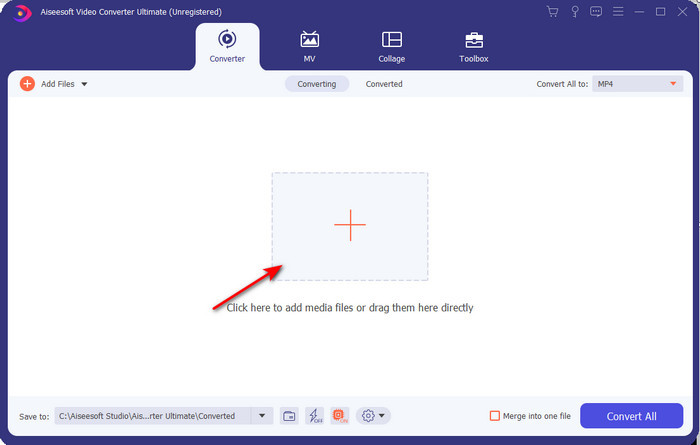
Adım 2. Aracı başlatın, arayüzün ortasındaki + simgesine tıklayın, klasörünüzden .3gp dosyasını seçin ve Open’a tıklayın. Ayrıca isterseniz burada toplu dönüştürme de yapabilirsiniz; daha fazla dosya eklemek için Add Files’a tıklayın.
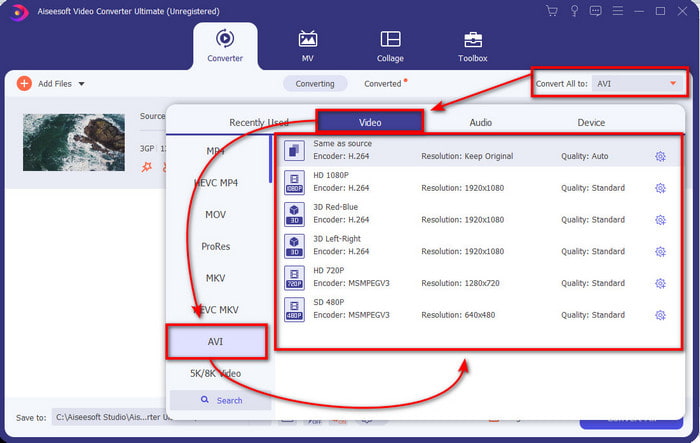
Adım 3. 3GP’yi değiştirmek için, Convert All seçeneğine tıklayın ve Video kategorisi altında AVI formatını seçin.
Adım 4. Dönüştürme işlemini başlatmak için Convert All’a tıklayın; böylece 3GP dosyalarınızı dönüştürme süreci başlayacaktır.

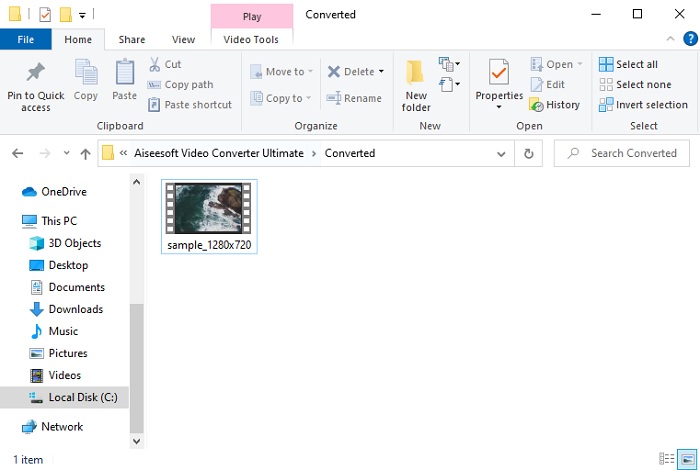
Adım 5. Dönüştürme tamamlandıktan sonra, ekranda dönüştürülmüş 3GP dosyasının bulunduğu bir klasör belirecektir. Yeni dönüştürdüğünüz AVI dosyasına tıklayarak onu izleyebilir ve isterseniz daha sonra düzenleyebilirsiniz.
Bölüm 2. 3GP'yi AVI'ye Dönüştürmek için 3 Mevcut Çevrimiçi Dönüştürücü
1. FVC Ücretsiz Video Dönüştürücü Çevrimiçi

Bu listedeki aracın en iyi çevrimiçi 3GP’den AVI’ye dönüştürücü olduğundan eminiz; o da FVC Free Video Converter Online’dır. Bir çevrimiçi dönüştürücüde görmek isteyeceğiniz tüm özellikler burada mevcuttur. Verimlilik, güvenli dönüştürme süreci ve hiç reklam olmaması gibi tüm açılardan sözünü ettiğimiz en iyi çevrimiçi dönüştürücüdür. Her ne kadar web aracı harika görünse ve gayet iyi çalışsa da, yalnızca orta düzeyde format desteği sunar. FVC Video Converter Ultimate kullanırken karşılaşabileceğiniz gelişmiş özellikler burada yoktur. Ancak yazılım sürümüne göre avantajı, tamamen ücretsiz olmasıdır. Daha fazla gecikmeden, dosyanızı yeni bir sürüme dönüştürme adımlarına geçelim.
Adım 1. Siteye gitmek için bu bağlantıya tıklayın.
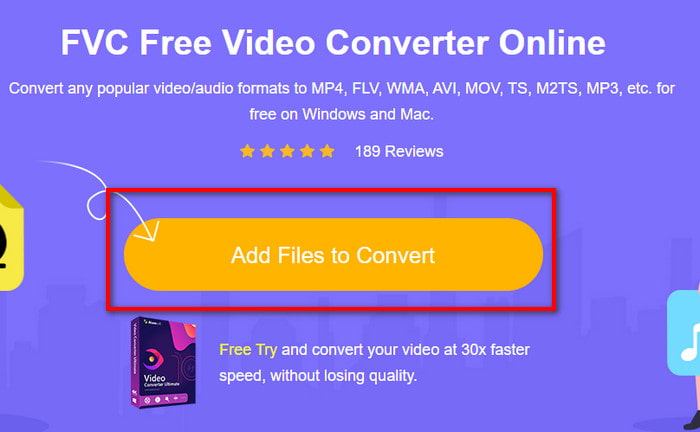
Adım 2. Çevrimiçi aracı başlatmak için Add Files to Convert düğmesine basın; bir klasör açılacak, ardından .3gp dosyasını arayın. Bu aracı ilk kez kullanıyorsanız, önce Add Files to Convert’e tıklayarak başlatıcıyı indirmeniz, ardından aracı başlatmak için yeniden tıklamanız gerekir.
Adım 3. Dosya seçimi tamamlandıktan sonra, aşağıdaki bölümden AVI formatını seçin.
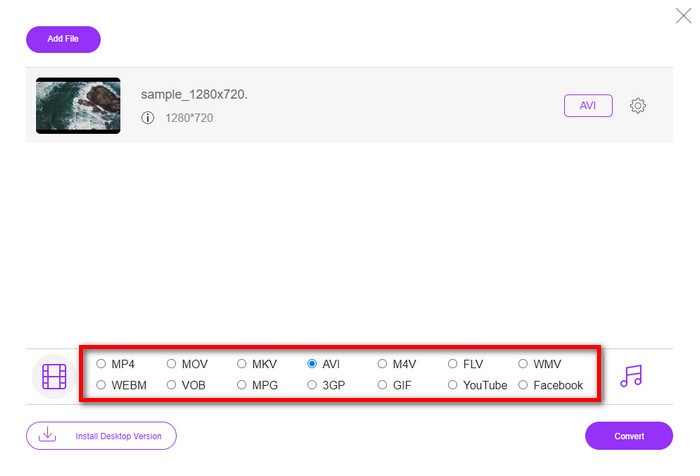
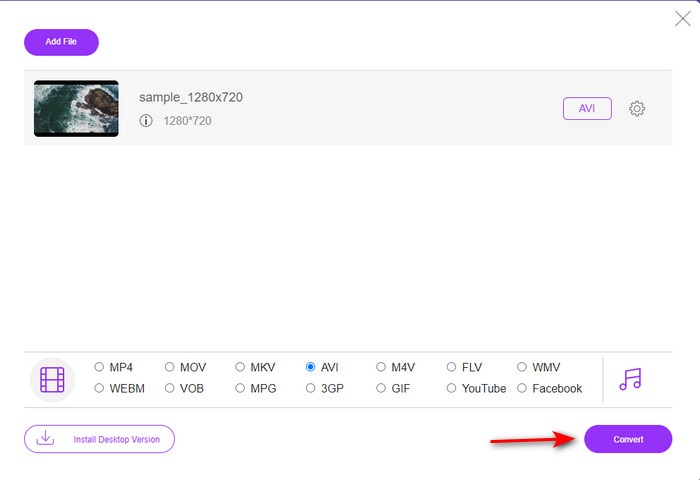
Adım 4. Dosyayı dönüştürmeye hazırsanız, Convert düğmesine tıklayın.
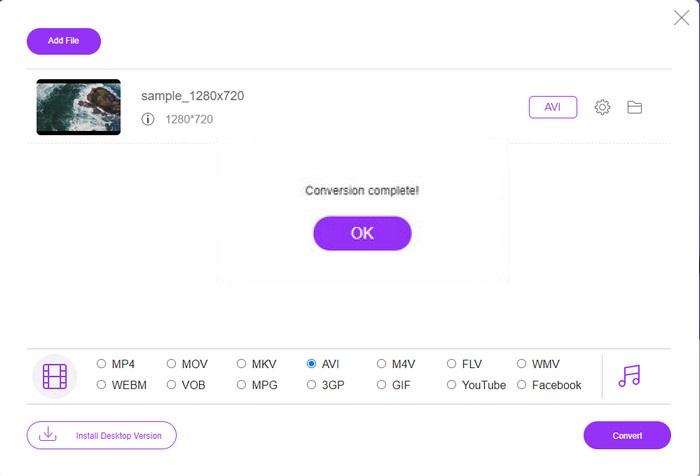
Adım 5. Dönüştürme işleminden sonra tekrar bir klasör açılacaktır; bu kez içinde az önce dönüştürdüğünüz dosya yer alacaktır.
2. Fconvert.com
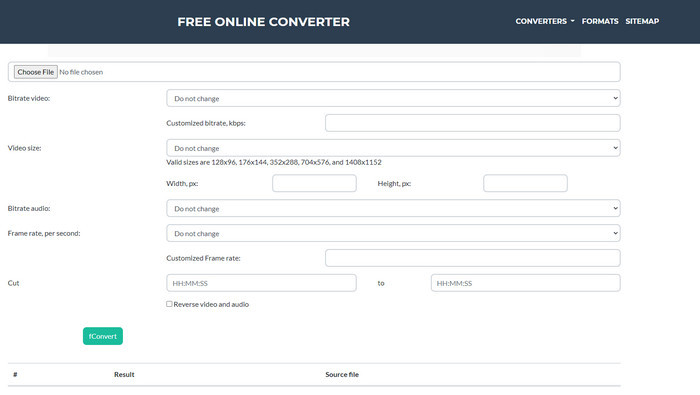
Dosya dönüştürme araçları arasında Fconvert.com mutlaka listede yer almalıdır; çünkü bu web aracı, ücretsiz olarak kullanabileceğiniz harika dönüştürücülerden biridir. Bu dönüştürücü, bildiğiniz hemen hemen tüm formatları ve muhtemelen sizdeki dosyalardan birini dönüştürebilir. Ancak, bu araçla ilgili bir sorun vardır: reklamlar. Çünkü sitede neye tıklarsanız tıklayın, önce bir reklam görünür, sonra tıkladığınız şeye yönlendirilirsiniz. Reklamlar sinir bozucu olsa da, bu uygulama yine de düzenli bir görünüme sahiptir ve format dönüştürme konusunda gayet iyi performans gösterir. Bu aracın ne kadar iyi olduğunu deneyimlemek istiyorsanız, aşağıdaki adımları izleyin ve 3GP’yi ücretsiz olarak AVI’ye dönüştürmeyi öğrenin.
Adım 1. Tarayıcınızda bu aracın ana web sitesini arayın.
Adım 2. video altında AVI’ye tıklayın, ardından Choose File’a tıklayın, .3gp dosyasını bulun, sayfayı aşağı kaydırın ve fConvert’e tıklayın.
Adım 3. Sayfayı aşağı kaydırın ve Result bölümünü göreceksiniz; dosyayı indirmek için bu dosyaya tıklayın.
3. Herhangi bir dönüşüm
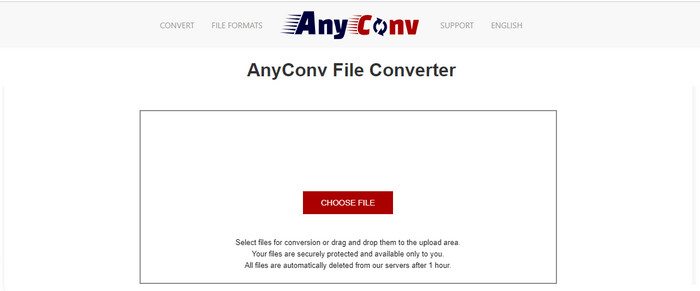
Format dönüştürme konusunda uzmanlaşmış bir diğer araç ise Anyconv’dur. Bu web aracı Fconvert.com’dan oldukça farklıdır; çünkü bu araç çok daha iyi ve daha hızlıdır. Ayrıca, önceki araca göre daha az reklama sahiptir. Reklam sayısı daha az olsa da, boyutları Fconvert.com’dakilere göre daha büyüktür; fakat performans açısından bakıldığında bu araç oldukça iyi iş çıkarır. Daha fazla vakit kaybetmeden, 3GP’yi ücretsiz olarak AVI’ye dönüştürmede işe yarayıp yaramadığını görmek için bu aracı test edelim.
Adım 1. Arama motorunuzu açın ve Anyconv web sitesini bulun.
Adım 2. Choose File düğmesine basın; bir klasör açılacak, .3gp dosyasını web aracına ekleyin ve devam edin. Formatı değiştirmek için drop-down düğmesine tıklayıp AVI’yi bulun. Dönüştürme sürecini başlatmak için Convert’e tıklayın.
Adım 3. İşlemin bitmesini bekleyin, ardından dönüştürülmüş dosyayı indirmek için Download AVI’ye tıklayın.
Bölüm 3. Hangi Format En İyisidir; 3GP veya AVI
3. Nesil telefon kullanıyorsanız ve yüksek kaliteli video depolamak istiyorsanız, 3. telefon neslinde daha hızlı aktarın, o zaman işin formatı 3GP'dir. Ancak 3. nesil telefonlara AVI formatı göndermeye çalışırsanız bu format desteklenmediği için dosya açılmayacaktır. Ancak bugünün durumunda, AVI çok daha iyi. 3GP'ye kıyasla tüm medya oynatıcılardan ve editörlerden zaten çok fazla destek aldı. AVI formatı bugün en iyi seçim olmasına rağmen, dosya boyutu 3GP'ye kıyasla çok büyük ve onu telefonunuza kaydetmek üzere olsaydınız, çok fazla yer kaplardı. Ayrıca, her iki format da harikadır, ancak farklı amaçları ve kullanımları vardır.
Bölüm 4. 3GP ve AVI hakkında SSS
3GP'yi AVI'ye dönüştürmek için FFmpeg kullanabilir miyim?
3GP dosyanızı dönüştürmek için FFmpeg kullanabilirsiniz; ancak bu zor bir işlemdir, yine de zaman ayırırsanız yönetilebilir. İlk adım, bilgisayarınıza FFmpeg’in zip dosyasını indirmek ve sıkıştırmasını açmaktır. İkinci adım, araçla iletişim kurmak için CMD’yi açmaktır. Ardından komut istemini kullanarak dosyanızı bulun, ffmpeg -i input.3gp -vn -ar 44100 -ac 2 -b:a 192k output.avi bu kodu kopyalayıp CMD’ye yapıştırın ve dönüştürme işlemini başlatmak için Enter’a basın.
4. nesil telefonlarda 3GP oynanabilir mi?
Bu format 3. nesil telefonlarda kullanılır ve bazı 4. nesil telefonlarda da 3GP formatındaki videoları hâlâ oynatabilirsiniz, ancak hepsinde değil. Çünkü daha önce de söylediğimiz gibi, 3GP 3. nesil içindir ve bazı 4. nesil telefonlar için değildir. Ya da videolarınızın keyfini çıkarmak için profesyonel 3GP oynatıcılarına başvurabilirsiniz.
Hangi format daha iyi: 3GP veya MP4?
Kalite ve en çok desteklenen format açısından MP4 bu alanda çok daha iyidir. Ancak 3GP çok daha küçüktür ve bu dosya formatının daha hızlı aktarımı için 3G ağlarında daha iyi çalışır. MP4’ü 3GP’ye veya tersine dönüştürmek mi istiyorsunuz, daha fazla ayrıntı öğrenmek için buraya tıklayın.
Sonuç
Her yolculuğun bir sonu olmalı ve şimdi yukarıda belirtilen araçların yardımıyla 3GP'yi AVI'ye kolayca dönüştürebilirsiniz. Ayrıca, yukarıda sunulan tüm araçlar, hadi FFmpeg'i dahil edelim, harika çalışıyor. Yine de en iyi seçim her zaman FVC Video Converter Ultimate'a düşer. Bu araç, dönüştürme ve daha birçok açıdan çevrimiçi dönüştürücülerin yapabileceği tüm özellikleri geride bırakıyor. Şimdi, yazılımı edinmek istiyorsanız, indirme düğmesine tıklayın ve dönüştürmeyi hızlı bir şekilde yapın.
-
 [Çevrimiçi ve Ücretsiz] MP4'ü Sorunsuz 3GP'ye Dönüştürmenin 3 Yöntemi
 MP4'ü 3GP'ye hızlı ve kolay bir şekilde dönüştürmek ister misiniz? Burada, çeşitli cep telefonlarında oynatmak için MP4'ü 3GP'ye çevirmek için 3 MP4'ten 3GP'ye dönüştürücüleri paylaşacağız.
-
 Windows / Mac'te FLV'yi 3GP'ye Dönüştürmenin En İyi 3 Ücretsiz Yolu
 FLV dosyalarını akıllı telefon veya tablette açamıyor musunuz? Merak etme! Burada, mobilde oynamak için kaliteyi kaybetmeden FLV'yi 3GP'ye dönüştürmek için üç yöntemi paylaşıyoruz.
-
 MKV'yi AVI Formatına Dönüştürmek için Mükemmel Seçim
 Size özel sağlanan kolay adımlarla MKV videolarını nasıl dönüştüreceğinizi öğrenin. Nasıl olduğunu bilmek ister misin? Daha sonra daha fazlasını öğrenmek için bu bağlantıya tıklayın.
