


 Video Dönüştürücü Ultimate
 Ekran kaydedicisi
 Video Onarımı
TRP'yi AVI'ye Dönüştürmede Kabul Edilecek Mükemmel Yöntemler [2021]
High-definition video files stored in the MPEG-2 Part 1 transport format is known as TRP files. Multiplexing digital video and audio streams synchronizing the output are performed with this software. It also incorporates error-correcting functions. TRP is a term that is frequently heard in digital video broadcasting. TRP files often contain video and audio data in the H.264 and AC3 formats. They can be seen and played back using a variety of video playback applications. With this new video format that might sound strange to some users, you can ponder how you will convert this new file to another format like TRP to AVI? Continue reading this article because we will present the possible solution that might resolve your problem in this issue you're having.

Bölüm 1. TRP ve AVI Video Formatlarıyla İlgili Ayrıntılara Giriş
TRP dosya formatı, MPEG-2 video kodlama gereksinimlerine uyan bir dijital video dosyası türüdür. .trp dosya uzantısı, TRP dosyaları için kullanılır. Alternatif olarak, bu TRP dosyalarına MPEG-2 yüksek tanımlı video dosyaları denir. Ek olarak, bir TRP dosyası A3C kodlu dijital ses içerir. Bu .trp dosyaları, DVD (dijital video yayını) akışları için yüksek çözünürlüklü aktarım protokollerini içerir. Belirli set üstü televizyon cihazları ve dijital video kaydediciler, DVD içeriğini yayınlamak için bu TRP dosyalarını kullanır. Bu .trp dosyaları, Video LAN Proje Ekibinin VLC medya oynatıcısı gibi video oynatıcılar ve multimedya araçlarının yardımıyla görülebilir ve oynatılabilir. Ek dijital video dönüştürücüler ve düzenleme araçları, TRP dosyalarını oluşturabilir, açabilir, düzenleyebilir ve diğer standart dijital video formatlarına dönüştürebilir.
However, Audio and Video Interleaved (AVI) information can be stored digitally in the AVI file format for playback. All Microsoft's Windows platforms include built-in support for the AVI format. The file extension.avi is used to identify AVI files. The AVI format is supported by all major operating systems, save for Windows. Video and audio files made using various codecs, such as DivX or XviD, can be stored in an AVI file container. Here, we've discussed the advantages and disadvantages of the AVI file format, along with a brief history, structure, and conversion of the format.
Bölüm 2. TRP'yi AVI Çevrimdışına Dönüştürme
Starting with converting TRP to AVI offline, this best tool is reliable in restoring a wide range of formats. Video Converter Ultimate can convert TRP to AVI in the fastest way possible. Plus, you can change the quality output of the video before you upload the file. This converter also has different tools that can help you improve your video file to the next level. Since it supports many video formats, you won't have to worry about converting unfamiliar video formats to your desired format. Now that you have learned about this best converter, you can learn the procedures given below:
Adım 1. Öncelikle, indirme işlemini başlatmak için aşağıdaki Ücretsiz İndir düğmesine tıklayın. İndirme tamamlandıktan sonra, isterseniz yazılımı Windows veya Mac için indirebilirsiniz. Programı doğrudan çalıştırmadan önce, bilgisayarınızın masaüstüne kurmanız ve başlamak için Şimdi Başlat düğmesine tıklamanız gerekir.
Ücretsiz İndirWindows 7 veya üstü içinGüvenli İndirme
Ücretsiz İndirMacOS 10.7 veya üstü içinGüvenli İndirme
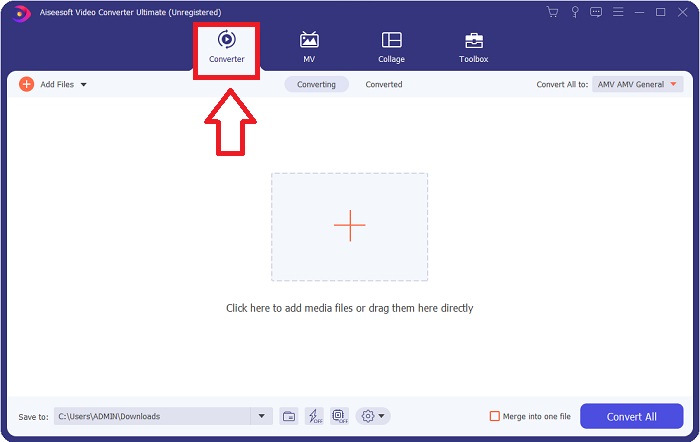
Adım 2. İndirilen uygulamayı başlatın. Programı ilk açtığınızda, dönüştürücü arayüzünün bulunduğu bir pencere açılacaktır. Video dosyanızı buraya ekleyecek ve dönüştürme işlemine burada başlayacaksınız.
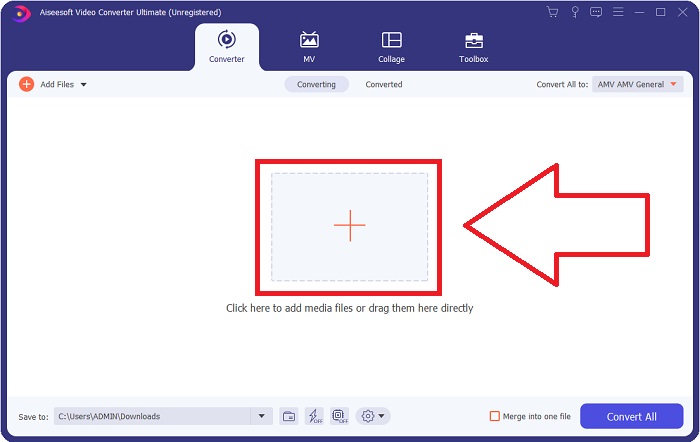
Step 3. Import your files into the software by dragging the video file or by clicking the + icon.
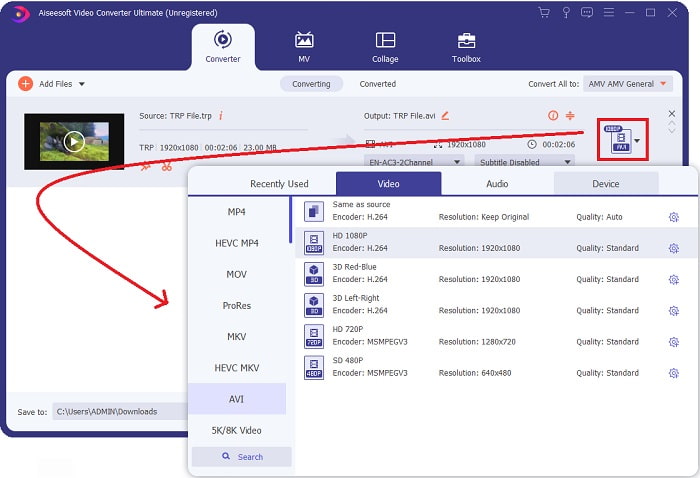
Step 4: In the upper-right corner, click the arrow-down icon next to the Convert All to option to open a panel. Then, go to the category list of Video, and select the AVI video format. However, if your preferred video output isn't listed, you can change the quality settings to suit your needs. You can alter the display's resolution, frame rate, and even audio quality by clicking the gear icon. To keep your changes, click the Create New button.
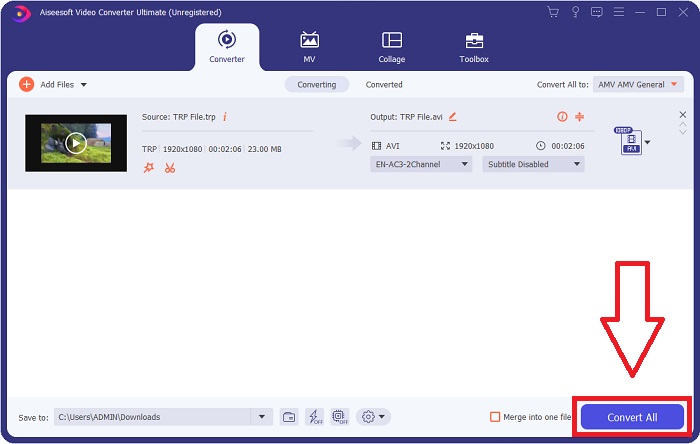
Adım 5. Videoyu düzenlemeyi tamamladığınızda ve dönüştürmeye hazır olduğunda, bilgisayarınıza aktarma sürecini başlatmak için Tümünü Dönüştür düğmesine tıklayın.
Bölüm 3. TRP'yi AVI Online'a Dönüştürme
If you don't have time to download the Video Converter Ultimate, you can also use this online version of the software. Free Video Converter Online is the best online web tool you can access on the internet that can convert a variety of formats in a fast manner. Other than an online converter, this converter doesn't limit formats it can support; that's why it is recommended for some beginner users. To know more about this online web tool, here are the procedures are given below.
Step 1. Navigate to the main website of the FVC converter by clicking on this link.
Step 2. If this is your first time using it, click the Add Files to Convert button to download the launcher for your computer. It will automatically launch when it has been downloaded once more. Select the file from your folder and click Open after it has been downloaded once again.

Step 3. Before the conversion process begins, select the AVI format from the drop-down menu below by clicking on it.
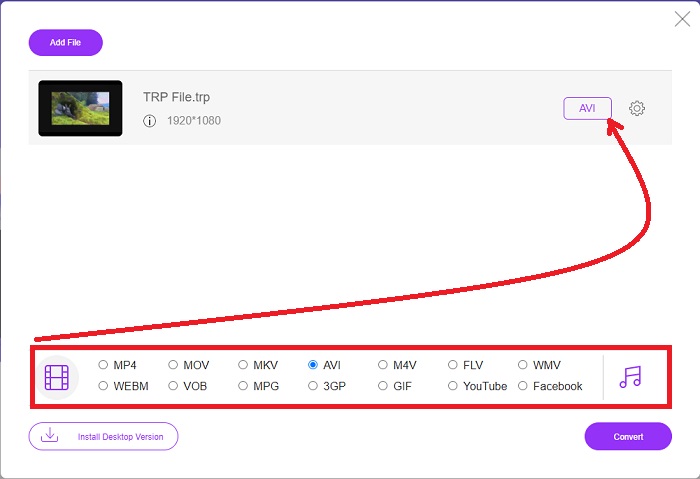
Adım 4. Bir biçim seçtikten sonra, biçimi başka bir biçime dönüştürme sürecini başlatmak için Dönüştür düğmesine tıklayın.
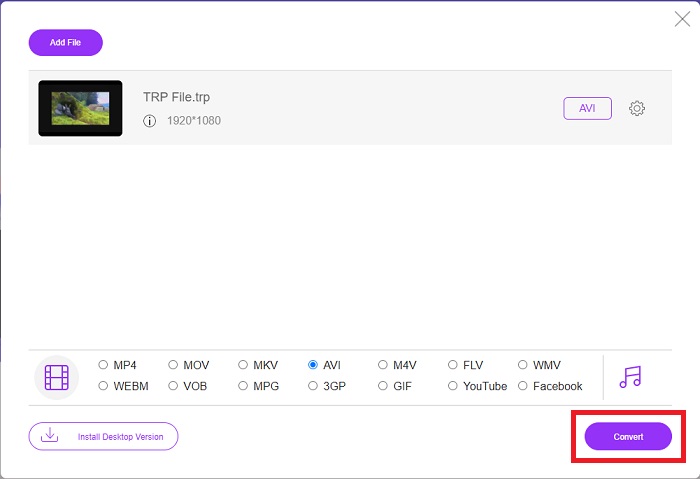
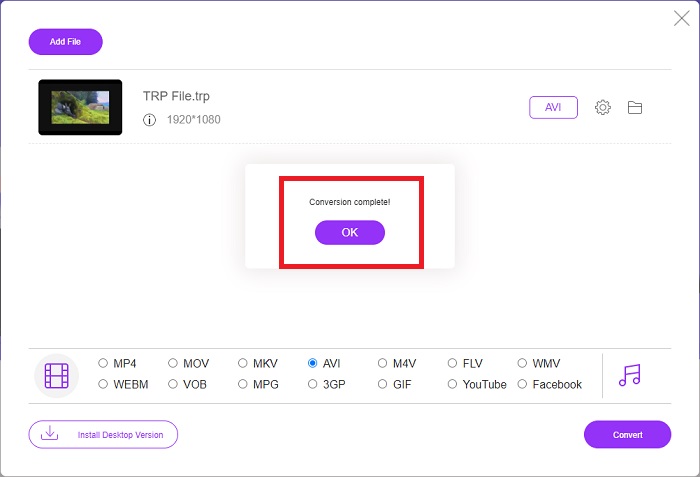
Adım 5. Birkaç dakika sonra, dönüştürülmüş dosyayı içeren bir klasör belirecektir; izlemeye başlamak için üzerine tıklamanız yeterlidir.
Bölüm 4. TRP ve AVI arasındaki karşılaştırma
| Özellikleri | FVC Video Dönüştürücü Ultimate | FVC Bedava Video Dönüştürücü |
| Toplu Dönüştürme |  |  |
| Donanım ve Dönüşüm Hızlandırma | | |
| İnternet bağlanabilirliği | | |
| Video Geliştirme veya Düzenleme | | |
| Desteklenen Program | Web Tabanlı Araç | Masaüstü Tabanlı Araç |
Bölüm 5. TRP'den AVI'ye Dönüştürme hakkında SSS
AVI'nin kullanımı nedir?
AVI is an acronym that stands for Audio Video Interleaved. AVI is a video and audio file format used to store audio and video information digitally for playback. It is also used to store video information. The AVI format is supported by default in all versions of Microsoft's Windows operating system. The file extension for AVI files is .avi.
AVI'nin dezavantajları nelerdir?
Poor compression and the loss of aspect ratios when the media player window is enlarged are the most common concerns faced by AVI file format users. It's possible to convert an AVI file to an MP4 file. Therefore if you're working with AVI files, you should know the importance of doing so.
TRP'nin faydası nedir?
Bir kanalın TRP'sinin popülaritesi, işletmelerin kitleleri popülerliklerine göre hedeflemesine ve yatırım getirilerini ölçmesine olanak tanır. Bu yöntemi kullanarak, yayın kuruluşları, daha popüler şovlar yayınlandığında reklamverenlerden daha mükemmel fiyatlar talep edebilir.
Sonuç
Given these points, we learned that Video Converter Ultimate is the best converter you should consider using among these other online tools. Since it has a fast converted process and various supported formats, it is considered a recommended tool or software to convert unfamiliar video formats like TRP.
-
 TS'yi AVI / MKV / MOV / WMV'ye Çevrimiçi ve Win / Mac'te Ücretsiz Dönüştürme
 TS dosyalarını hızla AVI / MKV / MOV / WMV'ye dönüştürmek ister misiniz? Bu makale, çevrimiçi ve çevrimdışı video dönüştürücülerini eksiksiz bir kılavuzla birlikte gösterir. Belki de en iyi ücretsiz TS dönüştürücüyü buradan edinebilirsiniz.
-
 [Ücretsiz ve Çevrimiçi] Mac/Windows Bilgisayarda MTS'yi AVI'ye Dönüştürmenin 7 Yolu
 MTS'yi AVI'ye kolaylıkla dönüştürmek nasıl? Bu kılavuzda, kalite kaybı olmadan Windows veya Mac'te MTS dosyalarını AVI'ye dönüştürmenin 7 ücretsiz ve kolay yolunu bulacaksınız.
-
 MP4'ü 7 Ücretsiz Video Dönüştürücüyle AVI Dosyalarına Dönüştürme Eğitimi
 AVI'yi MP4 videoya dönüştürmenin tüm ücretsiz yollarını almak ister misiniz? Bu makaleyi kaçırmamalısınız. AVI dosyalarını Windows, Mac, iPhone, Android ve çevrimiçi olarak ücretsiz olarak MP4'e dönüştürmenin 7 yolu.
