


 Video Dönüştürücü Ultimate
 Ekran kaydedicisi
 Video Onarımı
SWF'yi MOV'a Dönüştüren Bilmeniz Gereken Kullanışlı Araçlar [Çözüldü]
Video ve vektör tabanlı animasyonlar, Adobe Flash yazılımı ile oluşturulan SWF dosyalarında bulunabilir. ShockWave Format, Small Web Format ifadesinin diğer adıdır ve tam kısaltmasıdır. SWF dosyaları, multimedya içeriklerini internet üzerinden etkili bir şekilde dağıtmak için yaygın olarak kullanılır. Küçük web uygulamaları, bu biçimde saklanabilen ActionScript’lerden fayda sağlar. Verilen biçimdeki bir dosyayı oynatamadığınız için, acaba ücretsiz bir SWF’den MOV’a dönüştürücü var mı diye merak ediyorsanız, bu makale tam size göre. Burada, video dosyalarını dönüştürürken kullanabileceğiniz en iyi ve en verimli araçlar sunulmaktadır. Hadi başlayalım!
Bölüm 1. Önsöz: SWF ve MOV
SWF, internet üzerinden metin, video, vektör grafikler ve ActionScript aktarmak için kullanılan bir dosya türüdür. SWF dosyalarını kullanmak için Adobe Flash Player gereklidir. SWF dosya biçimi, yalnızca grafik aktarmak için değil, aynı zamanda kenar yumuşatma (anti-aliasing) ve ekranda görüntüleme gibi pek çok işlem için kaynak dostu bir aktarım formatı olarak tasarlanmıştır. Anti-aliasing, bitmap’lerin ve bunların etkileşimli düğmeler, gölgelendirme ve animasyon gibi ilişkili özelliklerinin hızlı bir şekilde işlenmesi için çok önemlidir.
Buna karşılık, MOV dosyaları Apple QuickTime Movie kodlama ilkeleri ve veri sıkıştırma standartları kullanılarak kodlanır ve bu biçimde üretilen video dosyalarının uzantısı .mov’dur. Dijital filmler ve diğer video klipler için standart ve sıkıştırma kriterleri, yalnızca Apple tarafından geliştirilmiştir. Bu MOV dosyaları çapraz uyumluluk desteğiyle kodlandığından, hem Mac hem de Windows tabanlı dijital video oynatıcılarda da oynatılabilir. Windows Media Player da bu MOV dosyaları için oynatma işlevselliğine sahiptir; bu dosyalar hem Mac hem de Windows platformlarında Apple QuickTime Player veya VLC Media Player kullanılarak açılabilir ve izlenebilir.
| Dosya uzantısı | SWF | MOV |
| Dosya tipi | ShockWave Flaş Filmi | Apple QuickTime Filmi |
| Tarafından geliştirilmiş | Adobe Sistemleri | elma |
| Artıları | Web animasyonu, özgürce yazılabilen bir görsel formatın kullanılmasıyla mümkün kılınmıştır. Grafikler vektör tabanlı olduğu için zorlanmadan yeniden boyutlandırılabilirler. kısa sürede yüklenir; | Her dosya, bağımsız parçalara kaydedilen ve hem zaman hem de içerik için düzenlenebilen yüksek kaliteli ses ve video bileşenlerine sahiptir. Dosyalar birçok farklı ücretsiz video oynatıcı tarafından görüntülenebilir. |
| Eksileri | Yoğun CPU kullanımı; Flash eklentisi bilgisayara yüklenene kadar bir SWF videosu oynatılamaz; diğer şeylerin yanı sıra yapmak için pahalı yazılımlar gerekir; | QuickTime ortamı daha istikrarlı performans sağlar; yine de, a.mov dosyasını açmak için belirli bir codec bileşeni gerekebilir. |
Bölüm 2. SWF'yi MOV'a Dönüştürmede Kullanılacak 3 Etkili Araç
Seçenek 1. Çevrimiçi Ücretsiz Video Dönüştürücü
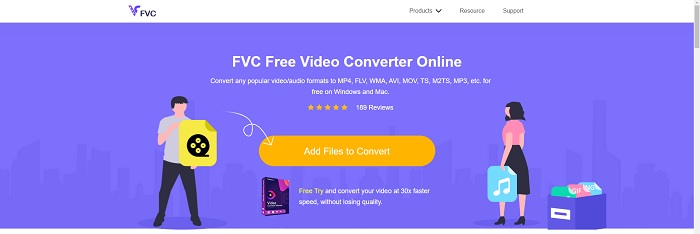
FVC Free Video Converter Online ile çok çeşitli video ve ses formatlarını dönüştürmek mümkündür. Yüksek çözünürlüklü videolar, kalite kaybı olmadan MP4, FLV ve WMV gibi kodeklere kolaylıkla dönüştürülebilir. Birçok video veya ses dosyasını dönüştürürken kalite kaybı yaşayacağınızdan endişe etmenize gerek yoktur. Bu ücretsiz video dönüştürücü aracı, kullanıcıların videolarını istedikleri gibi özelleştirmelerine olanak tanıyan dönüştürme ve düzenleme yetenekleriyle tanınır.
Artıları
- Çok sayıda video dosyası formatını destekler.
- Dönüştürülen çıktılar yüksek kalitededir.
Eksileri
- Çevrimiçi bir web aracı olduğundan, büyük dosya boyutundaki videoyu dönüştürmek için daha hızlı bir bağlantıya ihtiyaç duyar.
Seçenek 2. Çevrimiçi Ücretsiz Dönüştürme
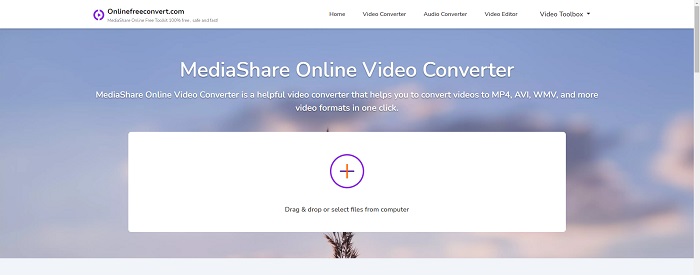
Videonuzu kodlarken, bu ücretsiz çevrimiçi uygulama en iyi seçenektir. Bu uygulama, işleri basit ve kullanımı kolay tutmak için iki seçenek sunar: dosya türü ve çözünürlük. Bu çevrimiçi dönüştürücüyü kullanmak için ekrandaki talimatları izleyin.
Artıları
- Erişilebilir ve kullanıcı dostu bir arayüze sahiptir.
- Video kalitesini artırabilecek başka araçlar sunar.
Eksileri
- Desteklediği pek çok video formatı yok.
Seçenek 3. Herhangi Bir Dönş.
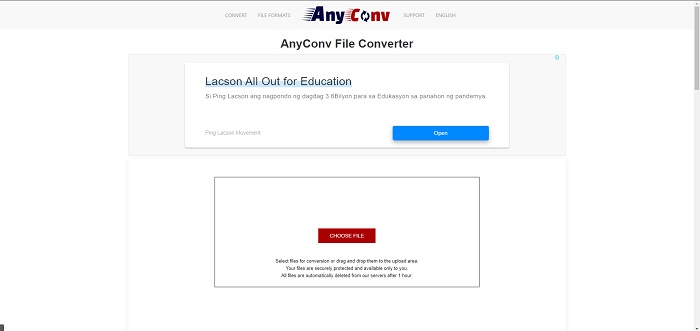
AnyConv, Hollandaca kullanıcı arayüzüne sahip çevrimiçi bir dönüştürücüdür. Bu uygulamanın ticari sürümü bile ücretsizdir. AnyConv ayrıca saatte 60 dosya dönüştürme kısıtlaması içerir. Çevrimiçi dönüştürücüyü kullanarak, boyutu 50 MB'a kadar olan dosyaları dönüştürebilir ve 300'den fazla farklı çıktı biçimi arasından seçim yapabilirsiniz.
Artıları
- Geniş bir format yelpazesine sahiptir; belgeler gibi video olmayan ve ses formatlarını bile destekler.
- Bu dönüştürücüyü kullanmak için yönergeler sağlar.
Eksileri
- Dönüştürme işlemine veya içeriğin kendisine yardımcı olmayan veya uygun olmayan reklamları gösterir.
Bölüm 3. Mac'te SWF'yi MOV'a Dönüştürme
Bu yazı, SWF’yi MOV’a dönüştürmek isteyen Mac kullanıcıları için Video Converter Ultimate programını önermektedir. Yazılımın hem Windows hem de Mac sürümleri ücretsiz olarak indirilebilir. Kullanımı kolay araçları ve sade arayüzü sayesinde çok geniş bir kullanıcı kitlesi tarafından kullanılabilir. Bu program ile dosyalarınızı bir video biçiminden diğerine yaklaşık bir dakika içinde dönüştürebilirsiniz; bu özellik, onu diğer dönüştürme uygulamaları ve çevrimiçi kaynaklardan ayırır. Ek olarak, yazılım videonuzu daha da geliştirmenize yardımcı olabilecek bir dizi ekstra özellikle birlikte gelir. Yazılımın açıklamasını okuduğunuzu varsayarak, başlayalım:
Adım 1. İndirme işlemine başlamak için, aşağıda verilmiş olan Ücretsiz İndir simgesine sağ tıklamanız yeterlidir. Bu yazılım hem Windows hem de Mac işletim sistemlerini çalıştıran bilgisayarlarla uyumludur. Yazılımı indirmeyi tamamladıktan sonra, kurulumunu yapabilir ve yazılımın ana ekranındaki Şimdi Başlat düğmesini seçerek kullanmaya başlayabilirsiniz.
Ücretsiz İndirWindows 7 veya üstü içinGüvenli İndirme
Ücretsiz İndirMacOS 10.7 veya üstü içinGüvenli İndirme
Adım 2. Yazılımı indirdikten sonra onu başlatmalısınız. Yazılım ilk kez açıldığında bu bilgiler bir pencerede görüntülenecektir.
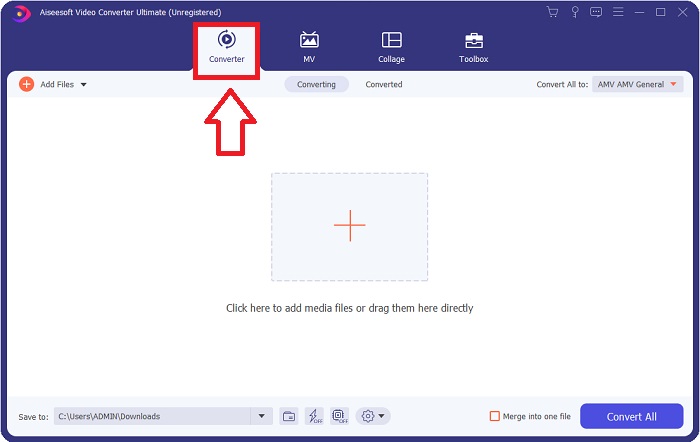
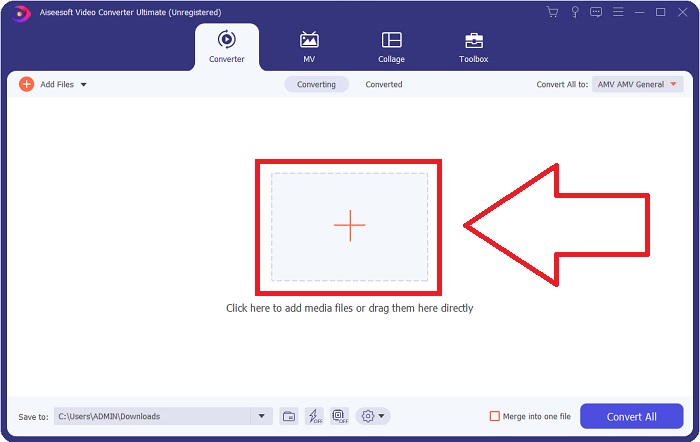
Adım 3. Dönüştürme işlemi, dönüştürücüye dönüştürmek istediğiniz dosyaları yüklemekle başlar. Dönüştürme sürecini başlatmak için dönüştürmek istediğiniz videoyu + işaretinin üzerine sürükleyip bırakın.
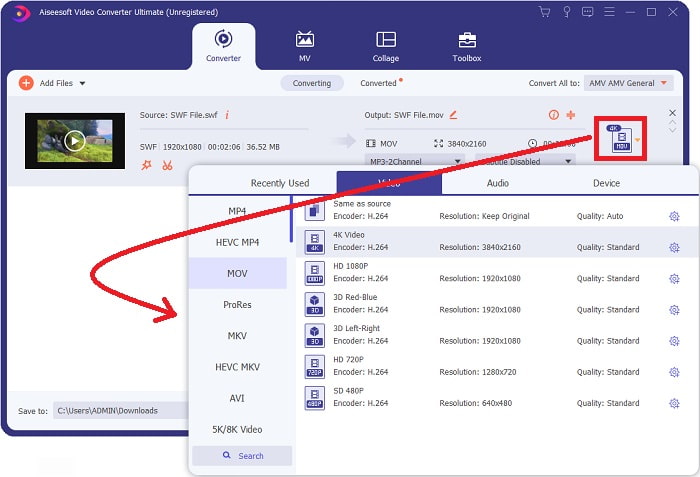
Adım 4. Ekranın sağ üst kısmında bir seçenek menüsü belirir; buradan bir video biçimi seçebilirsiniz. Açılan açılır listeden video biçimi olarak MOV’u seçin. Seçtiğiniz MOV dosyasına bağlı olarak, çeşitli video kalite seçeneklerinden birini seçebileceksiniz. İstediğiniz video çıktısı mevcut değilse, kalite ayarlarını Windows üzerinden değiştirebilirsiniz. Sağ üst köşedeki dişli simgesini seçerek ekranın kare hızını ve ses kalitesini ayarlayabilirsiniz. Değişikliklerinizi yaptıktan sonra bunları kaydetmek için Yeni Oluştur düğmesini kullanın.
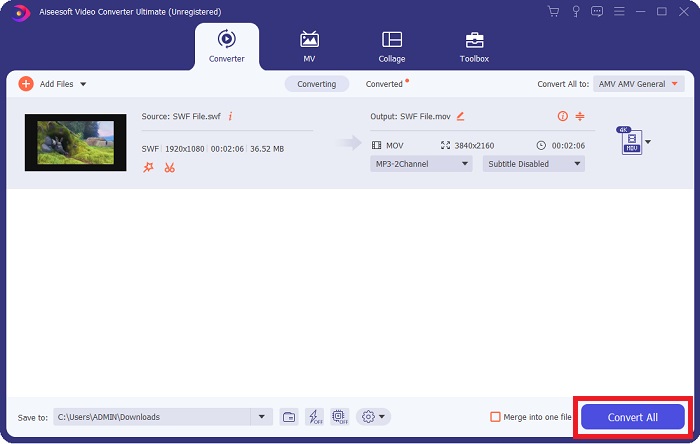
Adım 5. Videoyu düzenlemeyi bitirdiğinizde ve dönüştürmeye hazır olduğunda, dönüştürme işlemini başlatmak için Tümünü Dönüştür düğmesine tıklayın.
İlgili:
Bölüm 4. SWF'den MOV'a Dönüştürme hakkında SSS
SWF bir video formatı mıdır?
Adobe Flash yazılımı ile oluşturulan SWF dosyalarında video ve vektör tabanlı animasyonlar bulunabilir. Ancak, SWF'nin tam kısaltması olan Shockwave Format olarak da bilinir. Başlangıçta Macromedia tarafından geliştirilen bu dosya biçimi artık Adobe'ye aittir.
SWF dosyaları güvenli mi?
Özellikle Flash, çok çeşitli ve farklı güvenlik açıklarına eğilimlidir. SWF dosyasının istemcilere indirilmesi ve bilgisayarlarında çalıştırılması nedeniyle sunucunuz bir tehlike oluşturmaz. Ancak, SWF dosyalarında kötü amaçlı yazılım olup olmadığını kontrol etmeye çalışsanız bile, yalnızca minimum düzeyde koruma alırsınız.
Hangi tarayıcı hala Flash 2021'i destekliyor?
Adobe Flash, tarayıcının bir sonraki ana sürümü olan Firefox 84'te kullanımdan kaldırılacaktır. Hızı ve güvenliği artırmak için Firefox 85 (26 Ocak 2021'de yayınlanması planlanıyor) Adobe Flash desteğini kaldıracak.
Sonuç
Sonuç olarak, bu makalede ele alınan tüm noktalar, yukarıda bahsedilen yazılımı kullanırken dikkate alınmalıdır. Video Converter Ultimate, video dosyalarını kolaylıkla dönüştürmenizi sağlar ve genel olarak kaliteli bir çalışma sunar. İnternette bulunan diğer araç veya yazılımlardan farklı olarak, bu yazılım size hem erişilebilir hem de oldukça başarılı bir kullanım deneyimi sunar.
-
 SWF'den MP4'e: SWF'yi MP4 Online'a ve PC'ye Ücretsiz Dönüştürme
 SWF dosyası Adobe Flash Player olmadan nasıl açılır? SWF'yi MP4'e çevrimiçi olarak ve PC / Mac'te 3 adımda ücretsiz değiştirmek için ücretsiz ilk 3 SWF'den MP4'e dönüştürücüyü kullanın.
-
 [2 Çözüm] SWF'yi GIF Dosyalarına Ücretsiz Olarak Kolayca Dönüştürme
 GIF formatını Flash yazılımı aracılığıyla dışa aktaramadığınızda, dosyaları ilk önce SWF formatında kaydetmeyi deneyebilirsiniz. O zaman bu makaleden SWF'yi GIF dosyalarına dönüştürmenin 2 kolay yolunu öğrenebilirsiniz.
-
 Hareketli GIF'i MOV Formatına Dönüştürmek İçin En İyi GIF Dönüştürücü [2021]
 Video dosyasının kalitesini etkilemeden GIF'inizi MOV formatına zahmetsizce dönüştürün. Adımlar ve farklı araçlarla da.
