


 Video Dönüştürücü Ultimate
 Ekran kaydedicisi
 Video Onarımı
Erişimi Kolay XviD Dönüştürücü: XviD dosyalarını MOV Formatına Dönüştürme
XviD dosyası, DivX’e rakip olmak için kullanılan en bilinen kodektir. Ayrıca bu kodek, B‑frame’ler, parlaklık maskeleme (lumi masking), global ve çeyrek piksel hareket telafisi, trellis nicemleme, özel nicemleme matrisleri ve H.263 gibi özellikler içeren MPEG‑4 ASP kullanır. Sırf bu yüzden XviD, DivX’ten daha popüler bir kodlayıcı haline gelmiştir. Diyelim ki XviD kodeği kullanan bir dosyayı iOS cihazınıza aktardınız. Dosya oynatılmazsa şaşırmayın; çünkü bu kodek iOS gibi mobil cihazları ve bazı diğer aygıtları desteklemez. Çözümsüz gibi görünse de her sorunun bir çözümü vardır; biz de XviD altındaki dosyayı AVI formatına dönüştürerek bir çözüm sunuyoruz. Eğer XviD dosyaları MOV’a nasıl dönüştürülür bilmek istiyorsanız, bu makaleyi takip edin.

Bölüm 1. XviD ve MOV'un Tanıtımı
Daha önce de söylediğimiz gibi, XviD’i kullanarak dosyanızı sıkıştırırsanız, kalitesini bozmadan boyutunu küçültebilir ve hızlıca açabilirsiniz. Her ne kadar XviD tescilli olmayan (non‑proprietary) bir sıkıştırıcı olsa da bu kodeğin uyumluluğu, özellikle taşınabilir cihazlar ve kurgu (montaj) açısından sınırlıdır. Bu yüzden XviD kodekli videoyu izlemek veya düzenlemek istiyorsanız, dosyayı MOV’a dönüştürmeniz şarttır. Peki neden MOV? Çünkü bu format; altyazı veya metin gibi verilerle birlikte ses ve video dâhil olmak üzere ortam dosyalarını ve üstveriyi (metadata) bir arada barındırabilir. Bununla da kalmayıp, bu format iOS cihazlarında ve diğer pek çok aygıtta da oynatılabilir. Öyleyse şimdi, XviD dosyanızla ilgili sorununuzu çözmek için, aşağıda sunulan bu aracın yardımıyla XviD nasıl MOV’a dönüştürülür öğrenelim.
Bölüm 2. Windows ve Mac'te XviD'yi MOV'a Dönüştürmek İçin En İyi Dönüştürücü
FVC Video Dönüştürücü Ultimate
XviD’i MOV’a bir göz açıp kapayıncaya kadar dönüştürebilecek en iyi dönüştürücüyü mü arıyorsunuz? O hâlde aradığınız tek araç FVC Video Converter Ultimate. Kullanıcılara sunduğu 30 kat hızlı dönüştürmenin yanı sıra, videonuzu daha etkileyici hâle getirmek için düzenleme, birleştirme, kesme ve çok daha fazlasını yapabilirsiniz. Araç gelişmiş özellikler sağlasa da, onu indirmek ve kullanmak için süper güçlü bir bilgisayar toplamanıza gerek yoktur.
Buna ek olarak, bu yazılım ayrıca dönüştürme deneyiminizi daha hızlı ve daha iyi hale getirmek için donanım hızlandırma ve hızlı dönüştürme içerir. Ve şimdi, bu araç yardımıyla Xvid dosyalarını MOV'a nasıl dönüştüreceğinizi öğrenmek istiyorsanız, o zaman aşağıdaki öğreticiye geçelim.
FVC Video Converter Ultimate ile XviD’i MOV’a Dönüştürme Adımları:
Adım 1. Bu yazılım tüm PC veya Mac OS sistemlerine indirilebilir; bu yüzden aşağıdaki indir butonuna basmanız yeterli. Yazılımı indirdikten sonra dosyaya tıklayın, kurulumu hızlıca yapın ve aracı hemen açmak için Start Now düğmesine tıklayın.
Ücretsiz İndirWindows 7 veya üstü içinGüvenli İndirme
Ücretsiz İndirMacOS 10.7 veya üstü içinGüvenli İndirme
Adım 2. .xvid dosyasını içe aktarmak için + düğmesine tıklayın, klasörden dosyayı bulun ve Open seçeneğine tıklayın. Ancak .xvid dosyası ikiden fazlaysa, dosyaları doğrudan arayüze sürükleyip bırakmanızı öneririz.
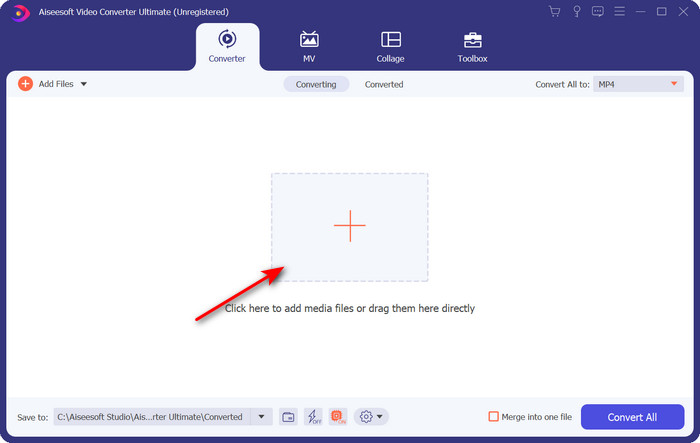
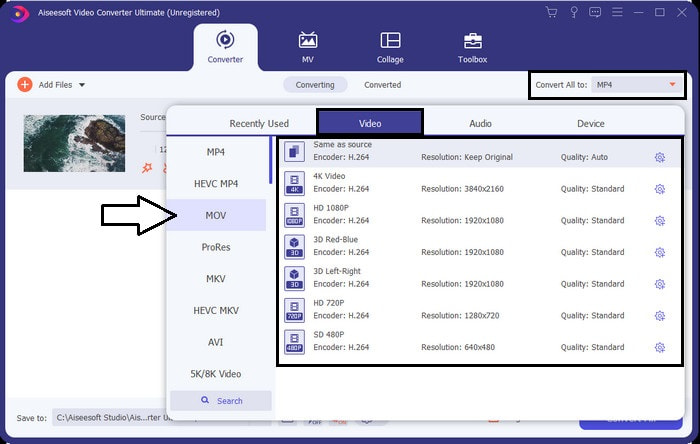
Adım 3. Arayüzün sağ üst kısmındaki açılır menü düğmesine tıklayın ve listeden MOV formatını bulun.
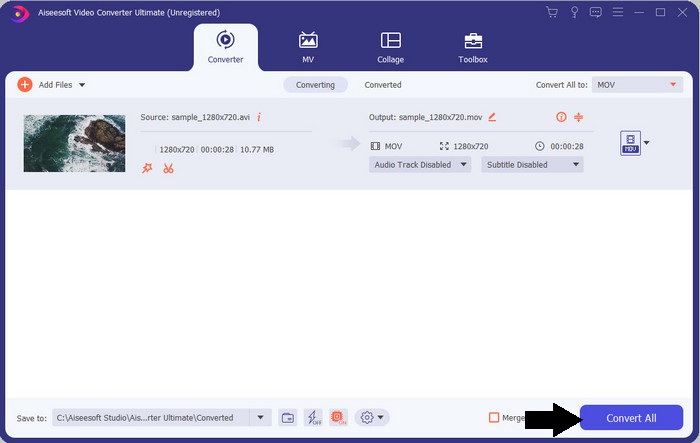
Adım 4. XviD dosyalarınızı MOV’a dönüştürmeye başlamak için Convert All düğmesine tıklayın.
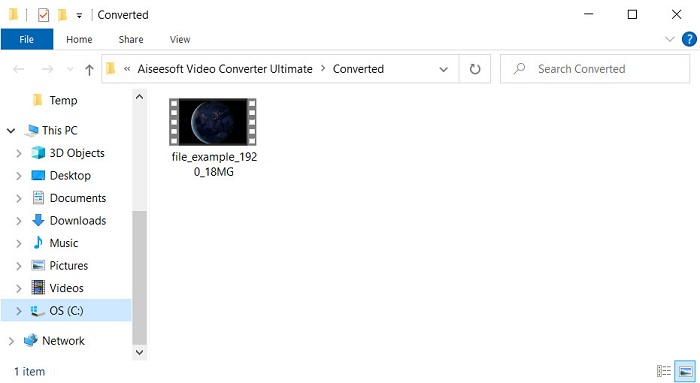
Adım 5. İşlemin bitmesi için birkaç saniye bekleyin. Ekranınızda .mov dosyasını içeren bir klasör belirecektir; dosyaya tıklayıp yerel medya oynatıcınızda oynatın ve keyfini çıkarın.
Bölüm 3. Xvid'i MOV'a Dönüştürmek İçin En İyi Çevrimiçi Dönüştürücü
FVC Ücretsiz Video Dönüştürücü Çevrimiçi
Depolama alanınız dolu olduğundan bilgisayarınıza yazılım indirmekle uğraşmak istemiyor ve yalnızca tek bir dosyayı çevrimiçi dönüştürmek mi istiyorsunuz? FVC Free Video Converter Online tüm web tarayıcılarında kullanılabilir. Bu aracın yardımıyla XviD dosyasını dönüştürme işlemi bir dakika içinde tamamlanacaktır. Ayrıca bu araç için hesap açmanız gerekmez ve arayüzünde reklam yoktur. İnternette erişebileceğiniz en sade çevrimiçi dönüştürücüdür. Ancak internet bağlantınız yoksa bu araca erişemezsiniz; çünkü ağ bağlantısına bağımlıdır. Bunun yanında, seçip kullanabileceğiniz orta düzeyde geniş bir format yelpazesini de destekler. Ayrıca bir dönüştürücü indirmek istemiyorsanız, bu çevrimiçi XviD’den MOV’a dönüştürücüyü mutlaka kullanmalısınız.
FVC Free Video Converter Online Yardımıyla XviD Dosyaları Çevrimiçi Olarak MOV Formatına Dönüştürme Adımları:
Adım 1. Çevrimiçi dönüştürücünün ana web sayfasına gitmek için bu bağlantıya tıklamanız gerekir.
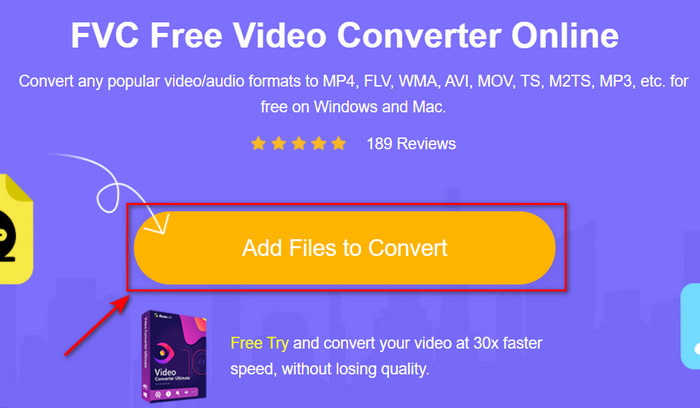
Adım 2. Aracı başlatmak için Add Files to Convert düğmesine basın; ardından dönüştürmek istediğiniz XviD dosyasını bulabileceğiniz bir klasör açılacaktır ve devam etmek için Open düğmesine tıklayın.
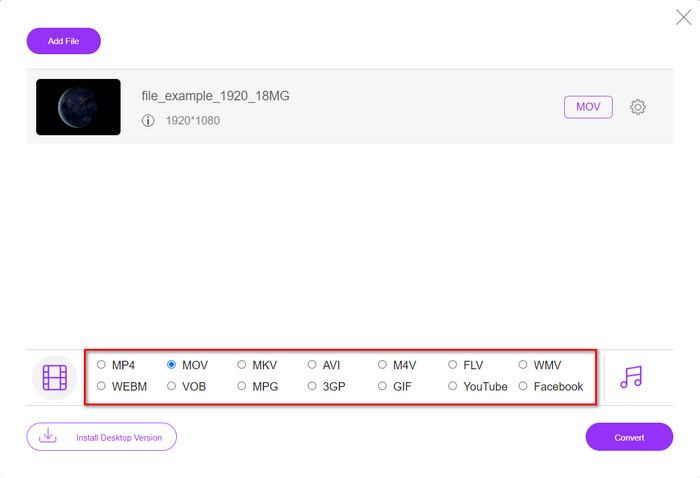
Adım 3. XviD dosyasını ekledikten sonra yeni bir arayüz açılacaktır; alttan MOV formatını veya istediğiniz başka bir formatı seçin.
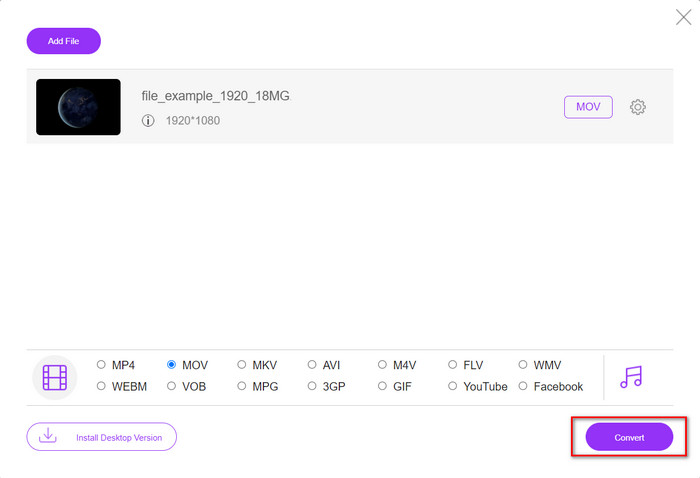
Adım 4. Format değiştirme işlemini başlatmak için Convert düğmesine tıklayın.
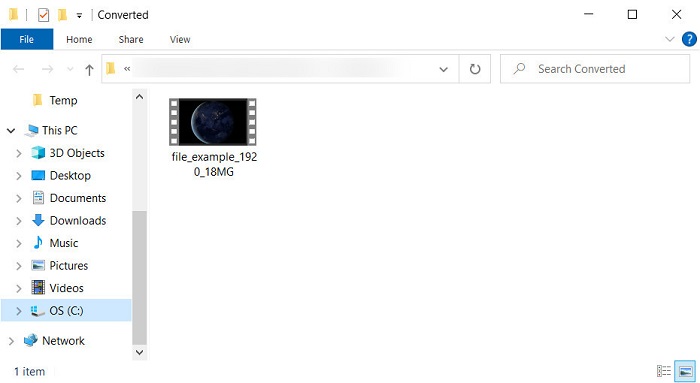
Adım 5. Dosyanın dönüştürülmesi, diğer çevrimiçi dönüştürücülere kıyasla çok daha az zaman alacaktır; işlem bittiğinde dönüştürülmüş dosyanın bulunduğu bir klasör gösterilecektir.
Bölüm 4. XviD'den MOV'a Dönüştürme hakkında SSS
XviD videolarını nereden izleyebilirim?
XviD dosyalarını oynatmak için VLC Media Player’ı kullanabilirsiniz. İndirmek istemiyorsanız, tüm Windows sürümlerinde hazır bulunan Windows Media Player’dan yararlanın. Mac kullanıcıları ise QuickTime kullanabilir. Ancak yüksek çözünürlüklü bir XviD video izlemek istiyorsanız, XviD dosyalarını izlemek için kullanabileceğiniz tüm olası XviD oynatıcılarını derlediğimiz bu makaleyi okuyun.
XviD ücretsiz mi değil mi?
XviD ücretsizdir ve web üzerinden hızlı aktarım için dosyalarını kullanmak ve sıkıştırmak isteyen veya biraz yer kazanmak isteyen herkes tarafından kullanılabilir. Tüm bunlar GPL ücretsiz yazılım lisansı sayesindedir, bu nedenle ücretsiz olarak yapılmıştır.
XviD videolarını neden düzenleyemiyorum?
Bu tür bir codec bileşeni altında videoları düzenleyememenizin ana nedenlerinden biri, desteklenmemesidir. Bu durumda, minimal video düzenleyiciler, karmaşıklığı nedeniyle yalnızca bu tür kod çözücüyü destekler. Bu formatta bir videoyu düzenlemek istediğinizi varsayalım, önce onu dönüştürmeyi düşünmelisiniz. Bu durumda, XviD dosyalarını MP4, AVI, MOV veya benzerlerine dönüştürebilen çok amaçlı bir dönüştürücünün olması şarttır. Ardından dosyayı dönüştürdükten sonra, istediğiniz düzenlemeyi yapmak için düzenleyiciye yükleyin.
Sonuç
Bu makaleyi okuduktan sonra XviD hakkındaki bilgimiz genişledi ve artık XviD’e farklı açılardan bakabiliyoruz. Artık iOS cihazınızda bir videoyu kaydetmek veya oynatmak istiyorsanız, dosyayı önce MOV formatına dönüştürmeniz gerektiğini biliyorsunuz. Daha önce tartıştığımız üzere, bahsedilen iki dönüştürücü de dosyayı MOV formatına dönüştürme konusunda oldukça başarılıdır. Her iki araç da kusursuz görünse de, FVC Video Converter Ultimate’ın hız ve performansı benzersizdir ve mevcut masaüstü ya da web tabanlı herhangi bir araçtan daha iyidir. Ancak ücretsiz ve güvenli bir çevrimiçi dönüştürme istiyorsanız, FVC Free Video Converter Online’ı tercih edin.
-
 Kolay Adımlar ve Araçlarla AVI'yi MOV'a Dönüştürme
 AVI'yi oynanabilir bir MOV'a nasıl dönüştüreceğinizi bilmek ister misiniz? Bunu nasıl yapacağınızı ve başarılı bir dönüşüm elde etmek için ipuçlarını öğrenmek için bu makaleyi izlemelisiniz.
-
 AVI'yi iMovie Desteklenen Biçime [2021] Aktarın ve Dönüştürün
 AVI dosyanızı iMovie'ye aktaramadığınız için sorun mu yaşıyorsunuz? Bu makaleyi okuduysanız, bu sorun için doğru çözümü zaten seçtiniz.
-
 TS'yi AVI / MKV / MOV / WMV'ye Çevrimiçi ve Win / Mac'te Ücretsiz Dönüştürme
 TS dosyalarını hızla AVI / MKV / MOV / WMV'ye dönüştürmek ister misiniz? Bu makale, çevrimiçi ve çevrimdışı video dönüştürücülerini eksiksiz bir kılavuzla birlikte gösterir. Belki de en iyi ücretsiz TS dönüştürücüyü buradan edinebilirsiniz.
