


 Video Dönüştürücü Ultimate
 Ekran kaydedicisi
 Video Onarımı
M2TS'yi FLV'ye Dönüştürürken Göz önünde bulundurmanız Gereken İlerleme Kılavuzu [Çevrimdışı ve Çevrimiçi]
VOB, WMV ve MOV gibi medya dosyaları, M2TS’e örnek olarak gösterilebilir. Peki M2TS tam olarak nedir? Aslında M2TS, MPEG-2 Transparent Stream ifadesinin kısaltmasıdır. Blu-ray disklerdeki, AVCHD vb. yüksek çözünürlüklü videolar bu kapsayıcı (container) formatında saklanabilir. FLV ise .flv uzantılı bir dosyadır ve Flash Video’nun kısaltmasıdır. FLV dosya uzantısı, Adobe Flash Player veya Adobe Air kullanılarak internet üzerinden iletilen video ya da ses dosyalarını ifade eder. Bu iki video dosya türü kulağınıza yabancı gelebilir; ancak M2TS’yi FLV’ye dönüştürmek için önce bu iki video formatının kullanım alanlarını ve dönüştürme sırasında göz önünde bulundurmanız gereken tüm seçenekleri bilmeniz gerekir. Okuyacağınız her bilgiyle zihninizi hazırlayın ve aydınlatın.

Bölüm 1. Windows ve Mac'te M2TS'yi FLV'ye Dönüştürme
Video Converter Ultimate ile hem Windows hem de Mac'te M2TS'yi FLV'ye dönüştürmek çocuk oyuncağı. MP4/MOV/M4V/FLV/M4K/MTS/M2TS/ASF/MP3/VOB/AAC, bu güçlü programın desteklediği birçok popüler video formatı ve ses formatından sadece birkaçıdır. Yüksek çözünürlüklü videolarınız, orijinal kalitelerini korurken birkaç saniye içinde FLV gibi popüler biçimlere dönüştürülebilir. Birçok dosyayı kaliteden ödün vermeden dönüştürmenizi sağlayan toplu dönüştürme özelliğine sahiptir. Yazılıma zaten aşina olduğunuzu varsayarsak, artık başarılı bir şekilde dönüştürmek için gerekli tüm adımları öğrenebilirsiniz:
1. Adım: Öncelikle, yazılımı bilgisayarınıza indirmek için aşağıdaki Ücretsiz İndir düğmesine tıklayın. Yazılımı indirmeyi tamamladıktan sonra bilgisayarınıza kurun; ekranınızda, yazılımın kullanıma hazır olduğunu bildiren bir pencere açılacaktır. Yazılımı çalıştırmak için Şimdi Başlaya tıklayın.
Ücretsiz İndirWindows 7 veya üstü içinGüvenli İndirme
Ücretsiz İndirMacOS 10.7 veya üstü içinGüvenli İndirme
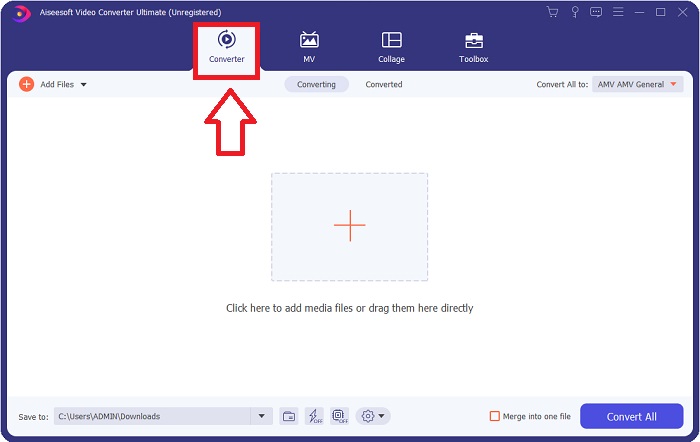
2. Adım: Yazılımı çalıştırdıktan sonra, sizi yazılımın ana arayüzüne, yani Dönüştürücü menüsüne yönlendirecektir.
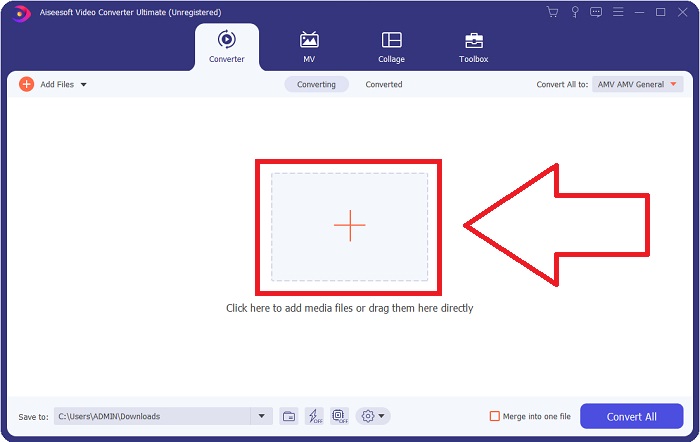
3. Adım: Bir dosya yüklemek için, arayüzün ortasındaki + simgesine tıklayın ya da bilgisayarınızdan bir videoyu sürükleyip bırakın.
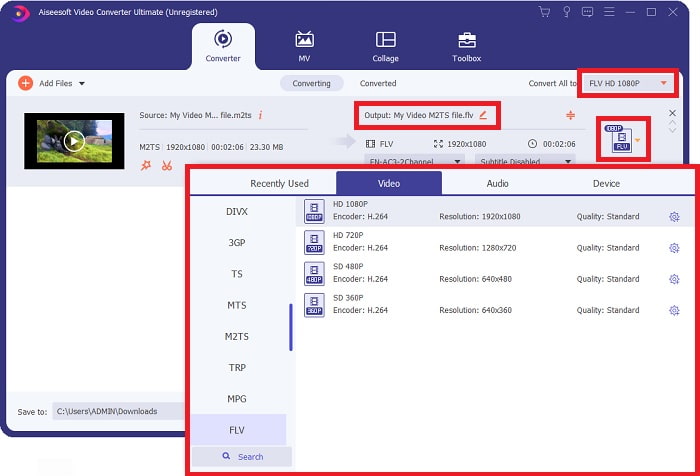
4. Adım: Bir M2TS dosyasını dönüştürücüye yükledikten sonra, pencerenin sağ üst köşesindeki Tümünü Dönüştür menüsüne gidin ve tıklayın. Yazılımın desteklediği tüm farklı formatların gösterildiği yeni bir pencere açılacaktır; ardından Video kategori listesinden FLV video formatını seçin.
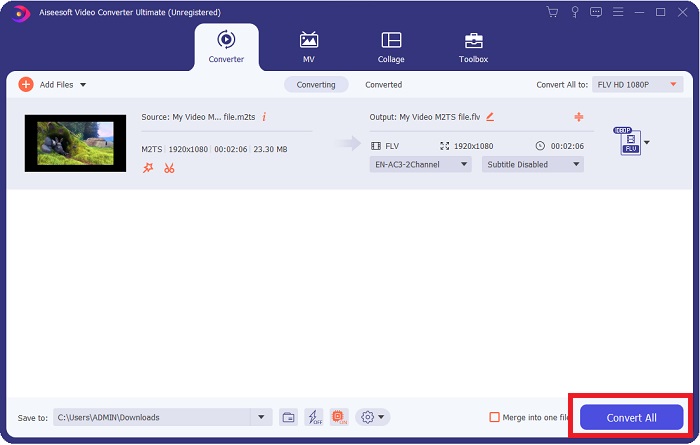
5. Adım: Hâlâ hangi kaliteyi kullanacağınıza karar veremiyorsanız ve aradığınız kalite seçenekler arasında yoksa, dişli simgesine tıklayarak bit hızı, çözünürlük, kare hızı vb. tüm ayarları değiştirebilirsiniz. Tüm değişikliklerden memnun kaldığınızda, video dosyanızı dönüştürmeyi başlatmak için artık Tümünü Dönüştüre tıklayabilirsiniz.
Bölüm 2. M2TS'yi FLV Online'a Dönüştürmenin Diğer Ücretsiz ve Etkili Yolları
Ücretsiz Çevrimiçi Video Dönüştürücü, FLV, MP4, MOV, MKV, MTS, ASF, VOB vb. video formatlarını, diğer dönüştürme platformlarına kıyasla daha yüksek hızla dönüştürmek için uygun bir çevrimiçi araçtır. Kısa süren dönüştürme işlemine rağmen, bu çevrimiçi araç, video dosyasını kalitesinde herhangi bir sorun olmadan dışa aktarır. Daha fazla açıklamaya gerek yok; şimdi uymanız gereken tüm adımlara geçelim:
1. Adım: Ücretsiz Çevrimiçi Video Dönüştürücü’nün ana sitesine gitmek için bu bağlantıya tıklayın.
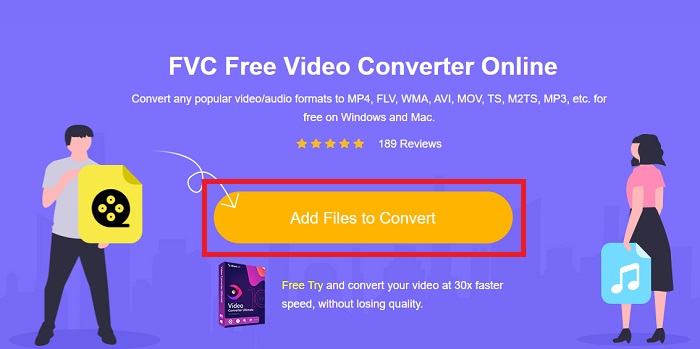
2. Adım: Ardından, FLV video formatına dönüştürmek istediğiniz M2TS video dosyasını yüklemek için Dönüştürülecek Dosyaları Ekle düğmesine tıklayın.
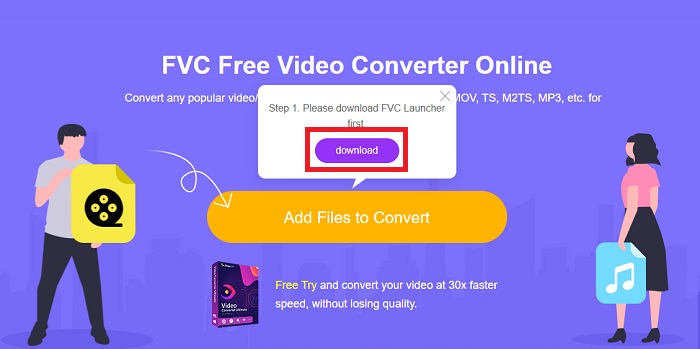
3. Adım: Bir dosya yükledikten sonra, çevrimiçi aracı kullanabilmeniz için başlatıcıyı indirmenize izin vermenizi isteyen bir açılır pencere göreceksiniz. İndirilen başlatıcıya tıklayarak bilgisayarınıza kurun ve dönüştürmeye başlayın.
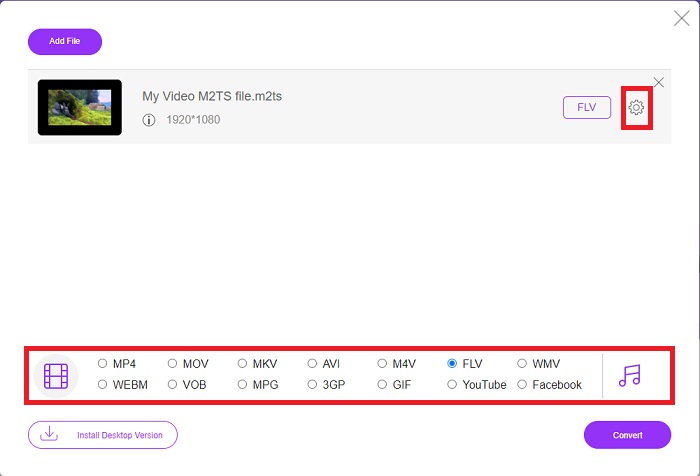
4. Adım: Arayüzün alt kısmındaki format seçenekleri arasından FLV video formatını seçin. Ayrıca, seçtiğiniz video formatının yanındaki dişli simgesine tıklayarak video çıktınızın kalitesini düzenleyebilirsiniz. Bit hızı, çözünürlük ve kare hızını içeren başka bir pencere açılacaktır. Bunları ayarlamaya başlayın ve ayarlamayı bitirdiğinizde Tamama tıklayın ve dönüştürme işlemine devam edin.
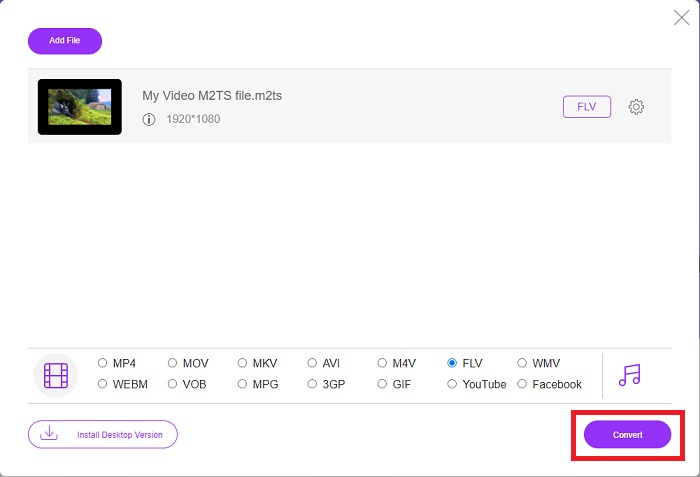
5. Adım: Artık pencerenin sağ alt köşesindeki Dönüştür düğmesine tıklayarak dosyayı dönüştürebilirsiniz.
Bölüm 3. M2TS ve FLV Arasındaki Karşılaştırma
Video kapsayıcı biçimi M2TS, yüksek tanımlı videoları Blu-ray Diskler, AVCHD, sabit sürücüler ve MPEG-2 aktarım akışını destekleyen diğer cihazlarda depolamak için kullanılır. Blu-ray Disk Audio-Video (BDAV), Blu-ray disklerde yaygın olarak kullanılmasından dolayı bu formata verilen isimdir. Veri boyutunu küçültmek adına. M2TS dosyalarında bulunan yüksek kaliteli ses ve video içeriği nedeniyle CBR aktarım akışlarını kullanmak yerine VBR aktarım akışları kullanılır (sabit hız); VideoStudio Pro, M2TS dosyalarını düzenlemek için mükemmel bir uygulamadır.
| Dosya uzantısı | M2TS | FLV |
| Dosya tipi | Blu-ray Disk Ses-Video MPEG-2 Aktarım Akışı | Flash Video Dosyası |
| Tarafından geliştirilmiş | Blu-ray Disk Birliği | Adobe Sistemi |
| Artıları | MPEG-2 aktarım akışı tabanlı yüksek tanımlı Blu-ray BDAV video dosyası; video verilerini Blu-ray disklerde depolamak için kullanılır; 720p/1080i çözünürlükleri destekler. | Yaygın bir video formatı olan FLV, on binlerce web sitesi tarafından kullanılır, çok çeşitli ek özellikler sunar ve diğer video formatlarının çoğundan daha küçük dosya boyutları üretir. FLV dosyaları, yüksek kaliteli videoyu hızlı bir şekilde sunmak için mükemmeldir. |
| Eksileri | Bir m2ts dosyası bölüm içeremez. Bluray klasör yapısında başka bir yerde tutulurlar. | Flash dosya dosyalarını çevrimiçi oynatmak için flash eklentilerinin yüklü olması gerekir. |
| Programlar Video Formatını açar | ◆ALLOyuncu ◆MPlayer ◆VLC Medya Oynatıcı ◆PotPlayer | ◆VLC Medya Oynatıcı ◆Adobe Flash Player |
Bölüm 4. M2TS'yi FLV'ye Dönüştürme Hakkında SSS
Bir M2TS dosyasını nasıl oynatırım?
Windows Media Player, SMPlayer, 5KPlayer, Splash ve File Viewer Plus, M2TS dosyalarını oynatabilir. Bazı M2TS oynatıcılar çeşitli işletim sistemleriyle uyumludur. Örneğin VideoLAN VLC medya oynatıcı, Windows, Mac ve Linux'ta M2TS dosyalarını oynatabilir.
FLV uygun bir kayıt formatı mı?
Adobe Flash Player, FLV dosya formatını kullanır. Tüm video platformları ve tarayıcıları tarafından desteklenen, en popüler ve çok yönlü video formatlarından biridir. YouTube gibi çevrimiçi video akış platformları, FLV formatını kullanmaktan fayda sağlar. Küçük dosya boyutları sayesinde indirmeleri de oldukça kolaydır. Kullanılabilir FLV kaydediciler hakkında daha fazla bilgi edinmek için buraya tıklayın.
FLV hala kullanılıyor mu?
Videolar, banner reklamlar, animasyonlar ve canlı yayınların tümü seçeneklerdir. Flash filmlerin üzerinden çok zaman geçti ve internette klipler kullanıyorlar. Ancak FLV formatı çıkış yolunda olsa da dünya çapındaki internet kullanıcıları için bir video standardı olmaya devam ediyor.
Sonuç
Tartışmayı bitirmek için, hepimiz M2TS'yi FLV'ye dönüştürmek için kullanılabilecek hiçbir dönüştürücü olmadığını düşünüyoruz. Yine de, bu makale sonuçta, kullanmayı düşünmeniz gereken en iyi iki dönüştürücüyü, Free Video Converter Online veya Video Converter Ultimate'ı tanıtarak sizi düzeltecektir. Bu iki dönüştürücü, isteyebileceğiniz hiçbir şey değildir, çünkü size bir dosyayı dönüştürmekten bir dosyayı daha iyi görünüme dönüştürmeye kadar tüm olası profesyonel araçlar ve özellikler sunar.
-
 PC/Mac'te WMV Dosyalarını FLV'ye Dönüştürmenin En Kolay 2 Yolu
 WMV'yi FLV'ye nasıl dönüştürebilirsiniz? Öncelikle tavsiyemizi okumanız ve favori yönteminizi bulmanız ve ardından işi hızlı bir şekilde yapmak için kılavuzumuzu takip etmeniz gerekir.
-
 FLV'yi Kayıpsız Olarak PSP'ye Dönüştürme Konusunda 3 Çözüm
 FLV'yi PSP'ye nasıl dönüştürebilirim? Burada, Windows ve Mac'te Flash videoları PSP destekli biçimlere (WMV, MP4, AVI, FLV, vb.) dönüştürmek için adım adım kılavuz bulacaksınız.
-
 FLV'yi WMA Audio'ya Dönüştürmenin 2 Yöntemi [Ücretsiz ve Çevrimiçi]
 FLV videodan WMA sesini çıkarmak ister misiniz? İşte Mac OS X ve Windows 10/8/7'de hızlı dönüştürme hızıyla FLV'yi (Flash Video) WMA'ya (Windows Media Audio) dönüştürmek için 2 ücretsiz WMA ses çıkarıcı.
