


 Video Dönüştürücü Ultimate
 Ekran kaydedicisi
 Video Onarımı
AMV'yi Güvenilir ve Güvenilir Yollarla FLV'ye Dönüştürme
Bilmeyenler için, AMV “Anime Music Video”nun kısaltmasıdır. .amv dosya uzantısı, sıkıştırılmış video dosyalarını kullanır. Çin’de üretilen taşınabilir medya oynatıcılar, AMV dosyalarını kullanma olasılığı en yüksek olanlardır. Düşük çözünürlüklü video dosyaları, oynatma sırasında videonun görüntülendiği medya oynatıcının ekranına uyacak şekilde ayarlanır. Bununla birlikte, Adobe Systems FLV (Flash Video File) dosya biçimini üretir ve bu biçim kısa bir başlık, iç içe geçmiş ses, video, üstveri paketleri ile SWF dosyalarında depolanan ses ve video verilerini içerir. Video akışları, Adobe uygulamalarında ve Flash eklentilerinde Flash Video kullanılarak gömülebilir. Artık bu iki biçim hakkında biraz giriş bilgisi öğrendiğinize göre, dönüştürücülere dalmaya hazırlanın. AMV’yi FLV’ye dönüştürmeyi düşünmelisiniz.

Bölüm 1. AMV'yi FLV'ye Dönüştürmede Kullanılacak En Mükemmel Dönüştürücü
Video Converter Ultimate, video dönüştürme işlemlerinizi halledebilecek profesyonel bir programdır. Hem Windows hem de Mac bilgisayarlarda zahmetsiz ve kayıpsız FLV’den MOV’a dönüştürmeyi destekler ve ücretsiz olarak sunulur. Ayrıca, yüksek çözünürlüklü dosyalar da dahil olmak üzere 100’den fazla farklı format arasında dönüştürme yapabilir. Kırpma, kesme, bölme, filigran ekleme ve özel efektler kullanmanıza imkân tanıyan eksiksiz bir video düzenleyici de sunar. Video dönüştürmenin yanı sıra, Video Converter Ultimate video indirme, video aktarma ve diğer işlevleri de destekler. Bu yazılımı nasıl kullanacağınızı öğrenmek için bu bölümde verilen talimatlara aşina olmanız gerekir.
Adım 1: Yazılıma erişmek için önce onu bilgisayarınıza indirmeniz gerekir. Bunu yapmak için, bu adımın alt kısmında bulunan Ücretsiz İndir düğmesine tıklayın. Gördüğünüz gibi, yazılımı indirirken iki seçeneğiniz var: Windows veya Mac. İndirme tamamlandıktan sonra yazılımı bilgisayarınıza kurun ve ardından programı başlatın.
Ücretsiz İndirWindows 7 veya üstü içinGüvenli İndirme
Ücretsiz İndirMacOS 10.7 veya üstü içinGüvenli İndirme
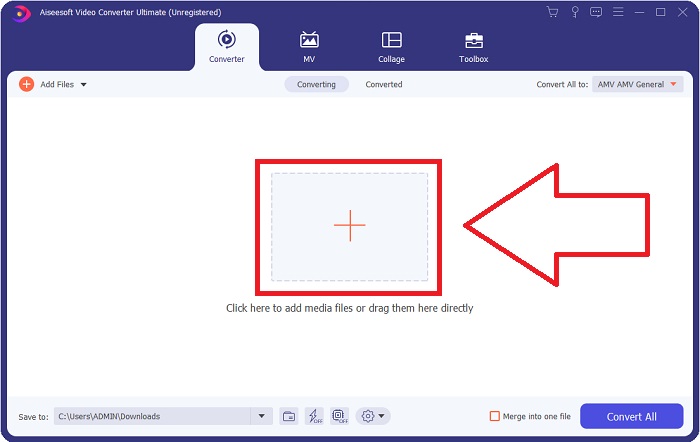
Adım 2: Yazılımı başlattıktan sonra bir pencere açıldığını göreceksiniz. Ekranınızda Dönüştürücü arayüzü ve yükleme alanı görüntülenir. Devam etmek için + düğmesine tıklayın veya masaüstünüzden herhangi bir video dosyasını sürükleyin.
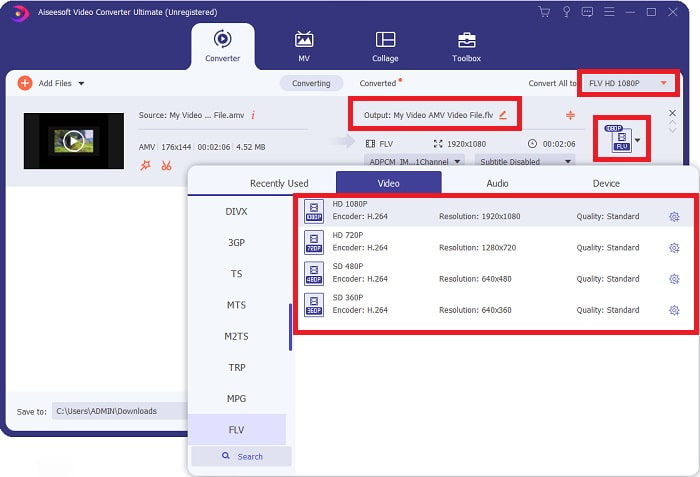
Adım 3: AMV video biçimini FLV’ye dönüştürmek için, yazılıma dosya yükledikten sonra biçim seçimine gidin ve FLV biçimini seçin. Ardından dilediğiniz video kalitesini seçme imkânınız da vardır.
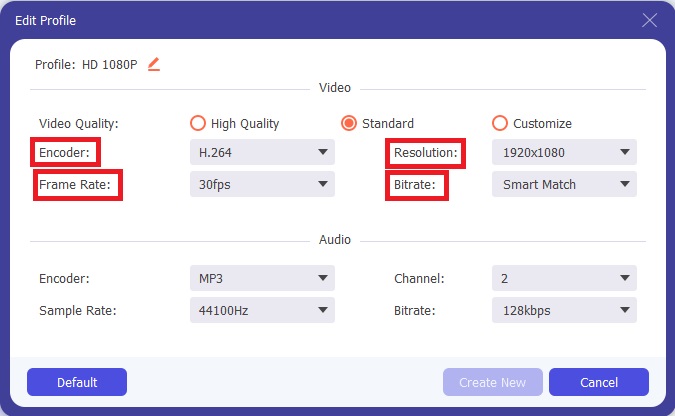
Adım 4: Tercih ettiğiniz şekilde yeni bir video kalitesi oluşturmanız veya özelleştirmeniz gerekirse, video kalite seçeneklerinin yanındaki dişli simgesine tıklayabilirsiniz.
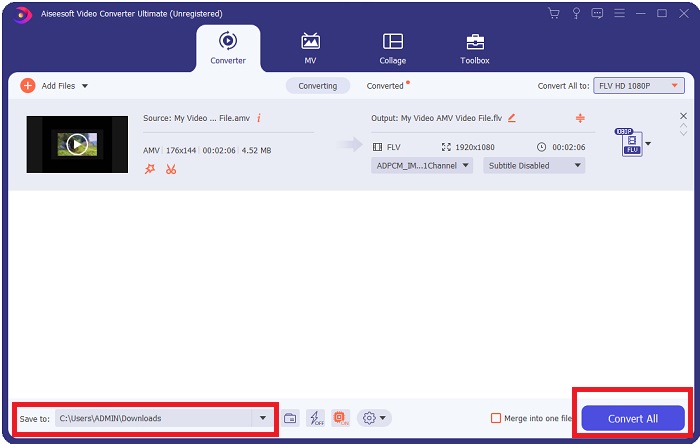
Adım 5: Neredeyse bitti! Artık tüm özellikleri ve ayarlamaları istediğiniz gibi düzenlediğinize göre, pencerenin alt köşesindeki Şuraya kaydet alanının yanındaki klasör simgesine tıklayarak dönüştürülen dosyanızın konumunu seçebilirsiniz. Şimdi, Tümünü Dönüştür düğmesine tıklayarak video dosyanızı dönüştürebilirsiniz.
Bölüm 2. AMV'yi FLV'ye Dönüştürmede Kullanmayı Düşünülmesi Gereken Çevrimiçi Araç
Çevrimiçi dönüştürücüleri kullanmak kolaydır çünkü herhangi bir yazılım indirip kurmanız gerekmez. Free Video Converter Online, AMV’yi FLV’ye hızlı ve kolay bir şekilde dönüştürebilen harika bir örnektir. Bu programı kullanarak çok çeşitli ses ve video formatlarını dönüştürebilirsiniz ve tamamen ücretsizdir. Dönüştürme için programa iki dosya yükleyebilirsiniz ve işlem tamamlandığında dönüştürülen dosya otomatik olarak sabit diskinize kaydedilir. Şimdi size bu harika çevrimiçi aracı kullanırken bilmeniz gereken tüm adımları tanıtacağım.
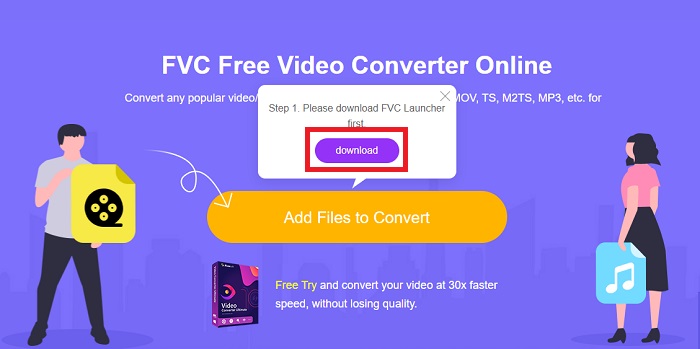
Adım 1: Çevrimiçi araca ait ana web sayfasına erişmek için bu bağlantıya tıklayın. Devam ettikten sonra, Dönüştürülecek Dosyalar Ekle düğmesine tıklayarak bir dosyayı dönüştürmeye başlayın. Ardından ekranınızın üst köşesinde indirme düğmesi görünecektir. Başlatıcı kurulumu tamamladıktan sonra, bilgisayarınızdan bu araca bir dosya yüklemeye başlayabilirsiniz.
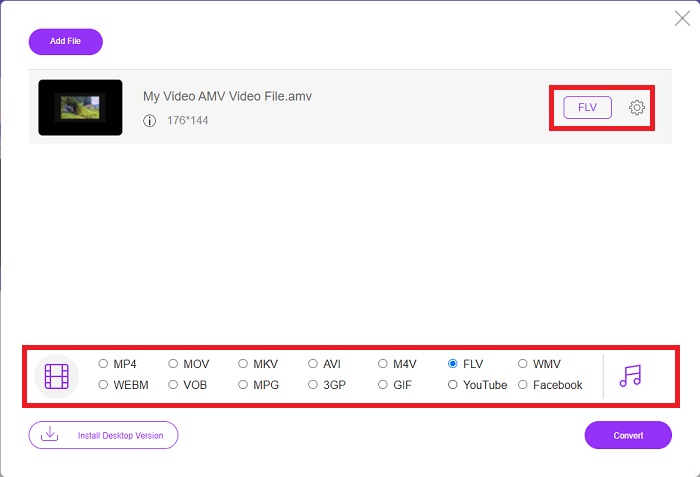
Adım 2: Artık içe aktarılan dosyanız hazır olduğuna göre, aşağıda bulunan FLV video biçimine tıklayın. Yazılımda olduğu gibi, dişli simgesine tıklayarak çıktı videonuzun tüm özelliklerini de ayarlayabilirsiniz.
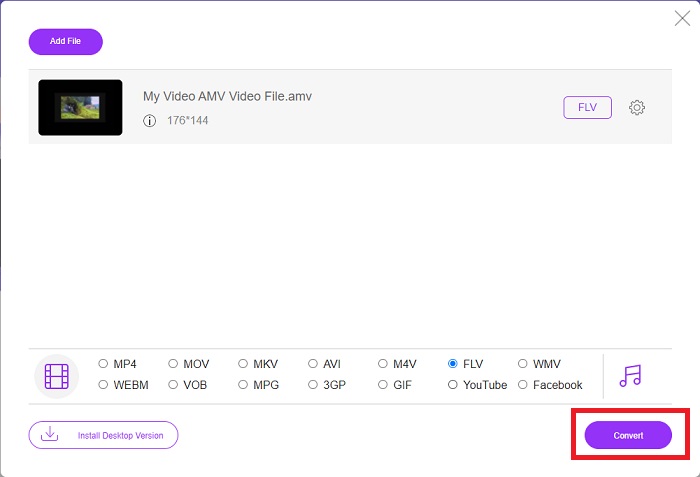
Adım 3: Son olarak, AMV dosyalarınızı FLV biçimine dönüştürmek için Dönüştür düğmesine tıklayın.
İlgili:
Bölüm 3. AMV ve FLV hakkında Genişletilmiş Bilgi
AMV, düşük çok yönlü medya oynatıcıları, yavaş CPU'lara ve S1 MP3 oynatıcı gibi küçük ekranlara sahip optimize eder. Video codec bileşeni, sabit niceleme tablolarına sahip Motion JPEG'dir. Ses codec bileşeni, her çerçevenin ilk 8 baytının kaynak (16 bit), dizin (16 bit) ve şifrelenmiş 16 bitlik örneklerin (32 bit) miktarı olduğu IMA ADPCM'dir. Bu basitleştirilmiş kodekler için kod çözme yükü ihmal edilebilir düzeydedir. Video sıkıştırması düşüktür (4 piksel/bayt ve MPEG-2 için 10 piksel/bayt üzerinde), ancak dosya boyutları azaltılmış çözünürlük (208x176'ya eşit veya daha yüksek 96x96) ve fps (10, 12, veya 16 kare/sn). 128x96 piksele ve 12 kare/sn'ye sıkıştırılmış 30 dakikalık bir video 80 MB olacaktır.
Ancak, internet üzerinden Adobe Flash Player veya Adobe Air'den video veya ses akışı yapmak istiyorsanız FLV dosya uzantısını kullanabileceğiniz extension.flv'ye sahip bir video dosyası. Uzun bir süre boyunca Flash Video, YouTube, Hulu ve sayısız diğer sitelerdekiler de dahil olmak üzere neredeyse tüm çevrimiçi videolar için varsayılan video formatıydı. Bu nedenle, akış hizmetleri ve yazılım geliştiricileri artık Adobe'nin tescilli Flash biçimini kullanmamaktadır. Belirtilen tüm bu karşılaştırmalarla, işte size küçük bir yardım, bu makale size bir karşılaştırma tablosu sağladı:
| Dosya uzantısı | AMV | FLV |
| Dosya adı | Anime Müzik Videosu | Flash Video Dosyası |
| Tarafından geliştirilmiş | Jim Kaposztas | Adobe System Incorporated |
| Artıları | ◆ AMV, bugüne kadarki en popüler hayran yapımı anime müzik videolarından biridir. ◆ Dosya boyutu küçüktür. | Dinamik ve etkileşimli web sayfaları için Adobe Flash büyük bir avantaj olabilir. Bu basit bir süreç olsa da, sonuçlar önemli olabilir. Flash, bir zamanlar basit video oyunları için de popüler bir seçimdi. |
| Eksileri | ◆ Çoğu medya oynatıcı ve cihazla uyumlu değildir; Düşük kalite. | FLV'nin popülaritesindeki düşüş bir dezavantaj oldu. FLV içeriği oluşturmak zaman alıcı ve pahalı olabilir. iOS cihazlarda Flash desteğinin olmaması, yeni kullanıcıları çekme yeteneğini ciddi şekilde sınırlandırıyor. |
| Dosyayı destekleyen programlar | ◆ VLC Medya Oynatıcı ◆ iOrgsoft AMV Dönüştürücü | ◆ Gerçek Oyuncu ◆ Apple QuickTime Oynatıcı ◆ VLC Medya Oynatıcı ◆ MPlayer |
Bölüm 4. AMV'den FLV'ye Dönüştürme hakkında SSS
AMV'nin amacı nedir?
Bir AMV'deki senkronizasyon ve birlik, çeşitli video düzenleme stilleri sağlayabilir. Basit yakınlaştırma ve uzaklaştırma 'efektleri' ve basit geçiş geçişleri ile ham düzenleme elde etmek mümkündür. Birçok örnek arasında aşağıdaki gibidir.
AMV'ler nasıl yapılır?
Bir AMV'nin başarılı olması için, konuyla yakından ilgili ve onu neredeyse mükemmel şekilde tanımlayan bir şarkı kullanmalıdır. Bunu okuyan herkes, 'Vay canına, bu harika! Bu şarkı onun, onun tema şarkısı. Bu nedenle, iyi bir parça seçtiniz.
FLV daha kaliteli mi?
FLV Formatı ve MP4, yüksek kaliteli video ve ses dijital kodlamasını depolayabilir. FLV dosyalarının kalitesi bir tartışma konusudur, ancak FLV'nin yararları ve sakıncaları dosya biçimini tartışabilir. MP4'te daha yüksek sıkıştırma oranları, daha az kalite kaybıyla sonuçlanır.
Sonuç
Sonuç olarak, AMV'yi FLV'ye dönüştürmede en iyi dönüştürücüyü seçmenin önemini bileceksiniz. Diğerleri, dönüşümden geçen videodan sonra düşük kaliteli ve senkronize olmayan videolar üretecektir. Ancak bu makalenin önerdiği iki dönüştürücü, vereceği kalite konusunda endişelenmenize gerek olmayan birinci sınıf dönüştürücüdür.
-
 AMV'yi AVI'ye Dönüştürmede Kullanılacak En İyi Yöntem [Onaylandı]
 AMV formatındaki video dosyanızı AVI'ye dönüştürmekte zorlanıyor musunuz? Yalnızca bu makalede bulabileceğiniz bazı ipuçları.
-
 AMV'yi MOV Formatına Dönüştürmek için Mevcut 3 En Yeni AMV Dönüştürücü [2022]
 AMV dosyalarınızı MOV formatına nasıl dönüştüreceğinizi bilmiyor musunuz? O halde bu makale, çevrimiçi veya çevrimdışı olarak kullanabileceğiniz 3 AMV'den MOV'a dönüştürücülerden bahseder.
-
 Masaüstünde / Çevrimiçi Olarak TS'yi FLV'ye Dönüştürmek İçin 4 Doğrulanmış Yöntemler
 Varsayılan olarak bilgisayarınızda veya cep telefonunuzda TS'yi açamazsınız. Video dosyalarını izlemenin tek yolu, somut kılavuzumuzla TS'yi FLV'ye veya diğer formatlara dönüştürmektir.
