


 Video Dönüştürücü Ultimate
 Ekran kaydedicisi
 Video Onarımı
TRP'yi FLV'ye Dönüştürmede Çevrimdışı ve Çevrimiçi Araçlar Hakkında Bilmeniz Gerekenler
TRP, kaydedilmiş televizyon dosyalarını depolamak için kullanılan bir dosya biçimidir. Orijinal hâlindeki bu dosya türünü çok az oynatıcı desteklediğinden, dosyanızı izlemeden önce başka bir formata dönüştürmeniz gerekebilir. TRP dosyalarının FLV dosyalarına dönüştürülmesini desteklemek için doğru yazılım aracını kullanmanız gerekir. Neyse ki, bizim yazılımımızı veya ona karşılık gelen çevrimiçi aracı kullanarak bunu yapmak çok daha kolaydır ve tüm dönüştürme süreci boyunca size herhangi bir zorluk çıkarmaz. Sağlayacağımız adımları izleyerek TRP videolarınızı başarıyla FLV formatına dönüştürebilirsiniz.

Bölüm 1. TRP'yi FLV'ye Dönüştürmenin Çevrimdışı Yöntemi
TRP dosya biçimi, çoğu video kullanıcısı için pek yaygın değildir ve içerik üreticileri tarafından da sık kullanılmaz. Bu nedenle, çoğu yazılım ve çevrimiçi araç bu tür video dosyalarını desteklemez. İşte bu yüzden, biçimden biçime video dönüştürmeniz gerektiğinde Video Converter Ultimate mutlaka göz önünde bulundurulması gereken bir araçtır. Bu yazılım, TRP dosyanızı tek tıkla dilediğiniz herhangi bir formata dönüştürebilir.
Bu video dönüştürücü aracı, gelişmiş düzenleme özellikleri sağlar ve herhangi bir teknik bilgi veya beceriye sahip olmasanız bile kullanımı basit bir grafik arayüze sahiptir. Bu uygulamanın yardımıyla dosyaları dönüştürebilir ve süper hızlı dönüştürme sürelerinden ve yüksek kaliteli çıktılardan yararlanabilirsiniz. Burada size izlemeniz gereken basit adımları sunuyoruz:
Adım 1: Kullandığınız işletim sistemine uygun olarak aşağıdaki Ücretsiz İndir düğmesine tıklayarak .exe dosyasını indirin. İndirmeyi bitirdiğinizde dosyayı açın ve kurulum işlemine başlayın. Kurulum tamamlanana kadar bekleyin ve ardından yazılımı başlatın.
Ücretsiz İndirWindows 7 veya üstü içinGüvenli İndirme
Ücretsiz İndirMacOS 10.7 veya üstü içinGüvenli İndirme
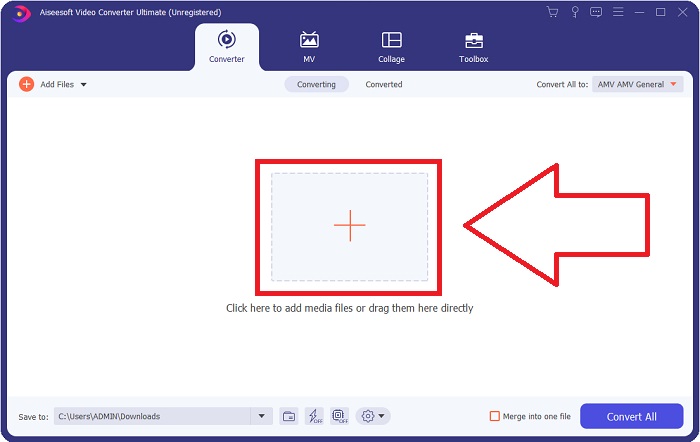
Adım 2. Yazılım çalıştığında bir arayüz görünecektir. Buradan, ortadaki + düğmesine tıklayarak dönüştürmek istediğiniz video dosyasını içe aktarmaya başlayın ya da dosyayı doğrudan sürükleyip bırakın.
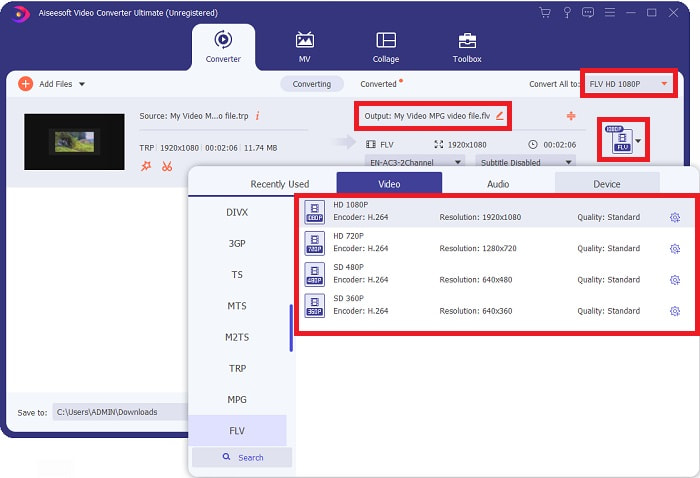
Adım 3: Dosyanın sağ tarafında videonuzun mevcut biçimini göreceksiniz. Videonun hangi formata dönüştürüleceğini seçmek için bu biçime tıklayın; ardından tüm kullanılabilir formatlar görünecektir. FLV biçimini bulun veya arama çubuğuna adını yazın. Sağ tarafta ayrıca sizin için farklı video kalite seçenekleri de yer alır.
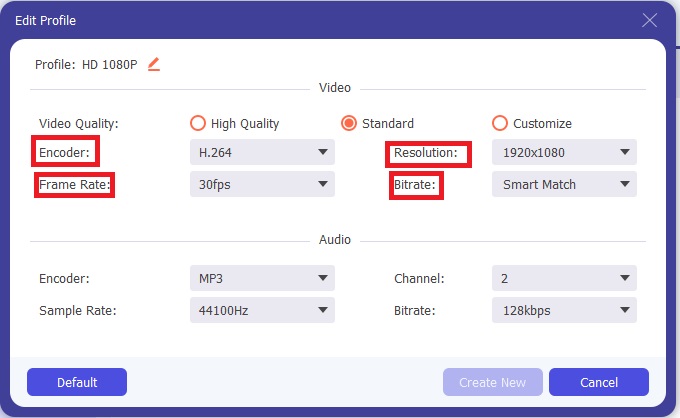
Adım 4: Bahsettiğimiz ek işlevler için, seçtiğiniz video kalitesinin sağındaki dişli simgesine tıklayın; yeni bir arayüz açılacaktır. Buradan, ihtiyaçlarınıza uygun çeşitli video ve ses ayarlarını düzenleyebilirsiniz. Değişiklikleri kaydetmek için Yeni Oluştur düğmesine tıklayın.
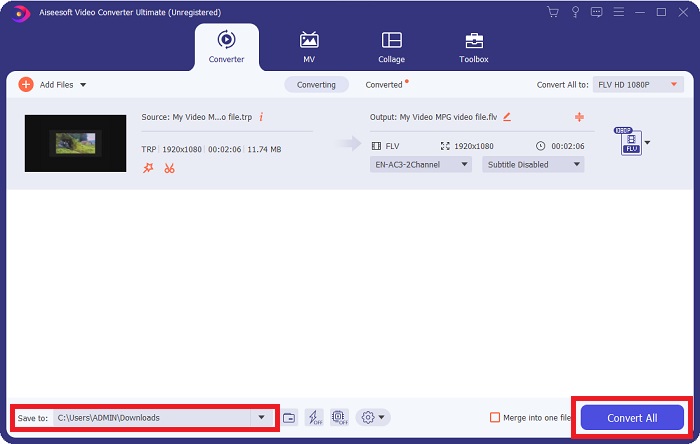
Adım 5: Tüm düzenlemeleri yapmayı bitirdiğinizde, dönüştürme işlemini başlatmak için arayüzün sağ alt köşesindeki Tümünü Dönüştür düğmesine tıklayın ve tamamlanmasını bekleyin.
Bölüm 2. TRP'yi FLV'ye Dönüştürmenin Çevrimiçi Yöntemi
Video dosyalarını dönüştürmek, işi bir web aracını ziyaret ederek ve tam yazılımı yüklemeden halletmek istediğinizde de göz önünde bulundurulması gereken bir seçenektir. Bu durumda, yazılımın çevrimiçi bir karşılığı da bulunmaktadır - FVC Free Video Converter Online. Bu çevrimiçi araç, yazılımdaki ek seçeneklerin çoğunu sunar ancak tüm özellikleri içermez. Yine de, amacını yerine getirir ve bunu yapmak için gereken makul bir süre içinde çalışır. Bu web aracını kullanmak için aşağıdaki adımları izleyin:
Adım 1: Bu bağlantıya tıklayarak dönüştürücüye doğru şekilde gidin. Buradan, dosyalarınızı içe aktarmak için ihtiyaç duyduğunuz başlatıcıyı indirerek başlayabilirsiniz. İşleme başlamak için sayfanın ortasındaki Dönüştürülecek Dosyalar Ekle düğmesine tıklayın.
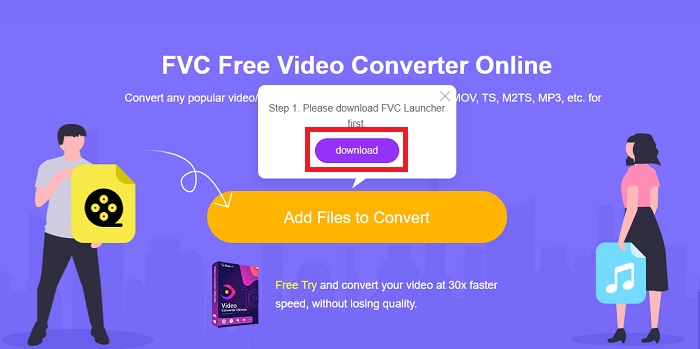
Adım 2: Aynı düğmeye tekrar tıklayın ve dönüştürmek istediğiniz video dosyasını yükleyin. Bir dosyayı içe aktardıktan sonra, seçebileceğiniz tüm mevcut formatları gösteren yeni bir arayüz açılacaktır. Bu durumda, FLV formatını seçin.
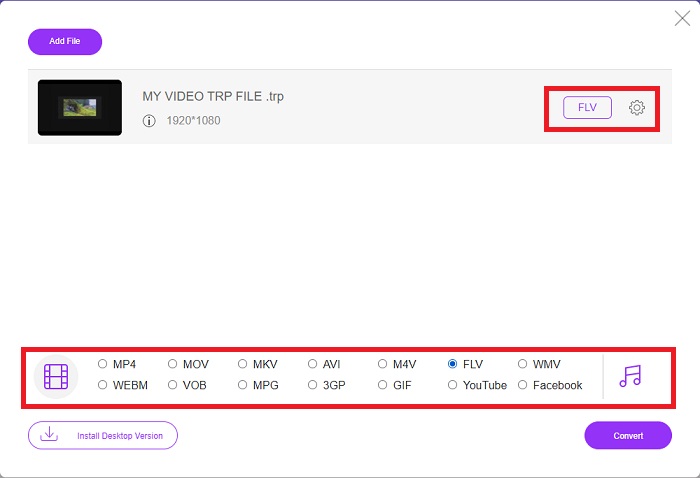
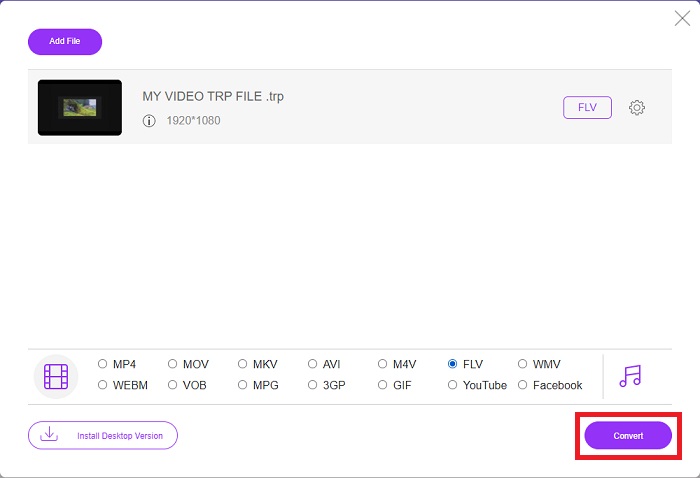
Adım 3: Yazılımın kendisinde olduğu gibi, ek seçenekler için sağ taraftaki dişli simgesine tıklayın. Çözünürlük, kare hızı ve daha birçok açıdan videonuzu daha ayrıntılı biçimde düzenlemenize imkân tanıyan video ve ses ayarları görünecektir. İşiniz bittiğinde, değişiklikleri kaydetmek için Tamam düğmesine tıklayın. Son olarak, sağ alt köşedeki Dönüştür düğmesine tıklayarak dönüştürme işlemini başlatın.
İlgili:
Bölüm 3. Genişletilmiş TRP ve FLV Bilgisi
Bahsedilen iki format hakkında daha fazla bilgi edinmek için size kısa bilgiler ve ikisinin karşılaştırmasını sunuyoruz.
TRP dosyaları genellikle VideoLAN'ın VLC'si ile ilişkilendirilir. TRP dosya adı uzantısı, yüksek çözünürlüklü filmleri tutan MPEG-2 Bölüm 1 ile toplanabilir. TRP dosyaları, dijital video yayın ağları, radyo frekansları veya video kaydediciler gibi doğrusal kayıt cihazları arasında dijital video ve ses olarak gönderilen veri paketlerini içerebilir ve saklayabilir. Bir TRP dosyasına birden fazla ses ve video akışı ile hata düzeltme kodu dahildir. Kullanıcılar ayrıca dosyanın içeriğine yakalama süresi, kamera kimliği ve kaynak gibi meta veriler ekleyebilir.
Öte yandan, .flv uzantılı bir dosya Flash Video anlamına gelir. FLV dosya uzantısı, Adobe Flash Player veya Adobe Air kullanılarak internet üzerinden gönderilen bir video veya ses dosyasını ifade eder. Flash Video, YouTube, Hulu ve diğer çeşitli sitelerdeki videolar da dahil olmak üzere, internetteki neredeyse tüm gömülü videolar için uzun süredir birincil video formatı olmuştur. Öte yandan akış sağlayıcıları ve yazılım geliştiricileri, Adobe'nin resmi olarak sona ermesinden bu yana Flash'ı HTML5 ve diğer formatlar lehine terk etti.
| TRP | FLV | |
| Dosya uzantısı | .trp | .flv |
| Geliştirici | VideoLAN Proje Ekibi | Adobe Systems Incorporated |
| Destekleyici Programlar | ◆ SMPlayer ◆ VLC Medya Oynatıcı ◆ Apple QuickTime Oynatıcı | ◆ Gerçek Oyuncu ◆ Apple QuickTime Oynatıcı ◆ Oyuncu ◆ VLC Medya Oynatıcı |
Bölüm 4. TRP'den FLV'ye Dönüşüm hakkında SSS
VLC kullanarak TRP video formatı nasıl açılır?
VLC Media Player bilgisayarınıza yüklendikten sonra, sabit sürücünüzdeki TRP video dosyasını bulun ve farenin sağ tuşuyla seçin. 'Birlikte aç' açılır menüsünden 'VLC medya oynatıcı'yı seçin. Sistem bu programdan oynatılacak olan video dosyasını başlatıldığı anda açacaktır.
Bir FLV dosyasını Windows Media Player'a nasıl dönüştürebilirim?
Önce dönüştürmek istediğiniz FLV dosyasını seçmelisiniz. FLV dosyanızı dönüştürmek istediğiniz format olarak WMV'yi seçebilirsiniz. FLV dosyanızı dönüştürmek için açılır menüden 'Dönüştür'ü seçin.
TRP'yi her yerde oynayabilir miyim?
TRP dosyalarını her yerde ve herhangi bir cihazda veya medya oynatıcıda oynatmak istiyorsanız, TRP'yi yaygın olarak bilinen MP4, AVI, MOV, MKV, FLV, WMV ve diğer formatlara dönüştürmek önerilen bir seçenektir.
Sonuç
Genel olarak, Video Converter Ultimate ve çevrimiçi aracı muadili, ihtiyacınız olan tüm gerekli özellikleri sağlarken tüm dönüştürme sürecini tamamlamak için aradığınız şeydir. Rahatsızlık yaratmaz, ayrıca masaüstünüzde yazılımın kurulu olması durumunda günün herhangi bir saatinde kullanılabilir. Bunun gibi bir dönüştürücüye ne zaman ihtiyaç duyacağınızı asla bilemezsiniz, bu yüzden bu yazılımı kolaylık sağlamak için kullanmanızı öneririz.
-
 Windows ve Mac'te TRP'yi AVI'ye Dönüştürme Konusunda En Kolay Kılavuz
 Belki TRP video formatına aşina değilsiniz ve TRP'yi AVI'ye nasıl dönüştüreceğinizi merak ediyorsunuz? Konuyla ilgili ayrıntıları öğrenmek için bu makaleyi de okuyun.
-
 MTS'yi Ücretsiz ve Çevrimiçi FLV'ye Dönüştürmek için 3 Çözüm
 MTS'yi FLV'ye dönüştürmek ister misiniz? Mac OS X ve Windows 10/8/7'de MTS'yi FLV'ye dönüştürmeyi deneyebileceğiniz 3 ücretsiz MTS'den FLV'ye dönüştürme yazılımı.
-
 VOB'u FLV'ye Dönüştürmenin En İyi Yolları [Ücretsiz ve Çevrimiçi Dahil]
 Bir VOB dosyasını bir FLV dosyasına dönüştürmek ister misiniz? Görevi masaüstü veya çevrimiçi dönüştürücülerle kolayca tamamlayabilirsiniz. Bu kılavuzu okuyun ve VOB'u FLV'ye nasıl kolay ve hızlı bir şekilde dönüştüreceğinizi öğrenin.
