


 Video Dönüştürücü Ultimate
 Ekran kaydedicisi
 Video Onarımı
Çevrimiçi ve Çevrimdışı Dönüştürme Süreci: SWF'den WMV'ye
SWF is a legacy file format created by Adobe for the Shockwave Flash player. Flash is no longer supported by many browsers, was never supported by iOS devices, and the SWF file format is seldom used these days due to performance and security problems. On the other hand, WMV is a set of video compression codecs created for early internet video streaming and physical media such as HD-DVD and Blu-Ray. Video in this file format is natively viewable on Windows devices, so you may wish to convert SWF files to WMV because Flash players are becoming more unsupported, and you can no longer play SWF files. Hence, we provide you with two options to convert your SWF to WMV.

Bölüm 1. Windows ve Mac'te SWF'yi WMV'ye Kolayca Dönüştürme
Video Converter Ultimate is a multimedia converter that converts practically all major video and audio files to your desired output format. It can convert video files in batches, making it more potent than it seems. It does not stop at converting; it also enables users to modify their videos with the help of helpful editing tools. Furthermore, this video converter supports various formats, including the most widely used nowadays. More significantly, it converts at a faster rate than comparable software. To use this particular software, follow these simple steps:
Step 1: Click the Free Download button to download the .exe file you will need to install the software. Wait for it to finish, open it, and follow the installation process promptly. Click Start Now and launch the software.
Ücretsiz İndirWindows 7 veya üstü içinGüvenli İndirme
Ücretsiz İndirMacOS 10.7 veya üstü içinGüvenli İndirme
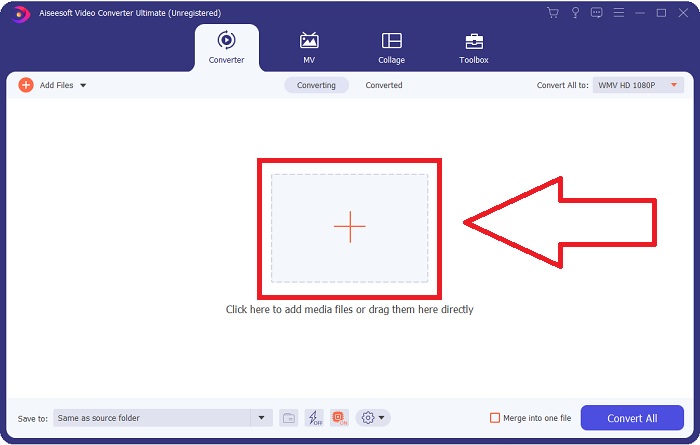
Step 2: Upload the video file you wish to convert by clicking the + button in the middle of the interface. Alternatively, drag the file from your desktop and drop it on the interface, and it will automatically import.
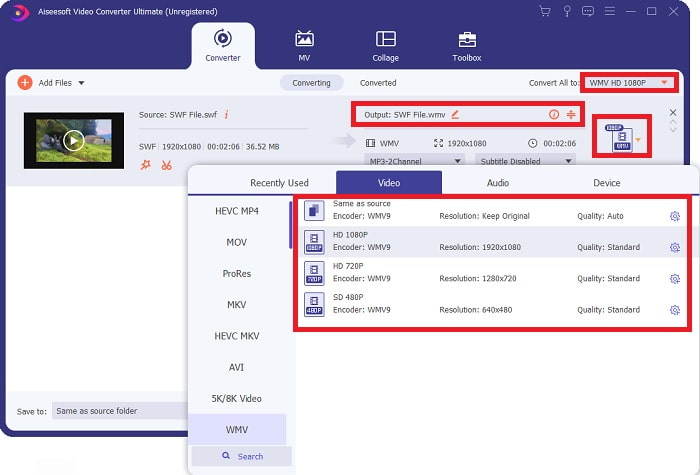
Step 3: Click the drop-down arrow on the right in which you will see the current format your video is in, and it will show you all the available formats to choose. In this case, scroll down and select WMV or just type it in the search bar. All video qualities are also available to choose from on the right panel.
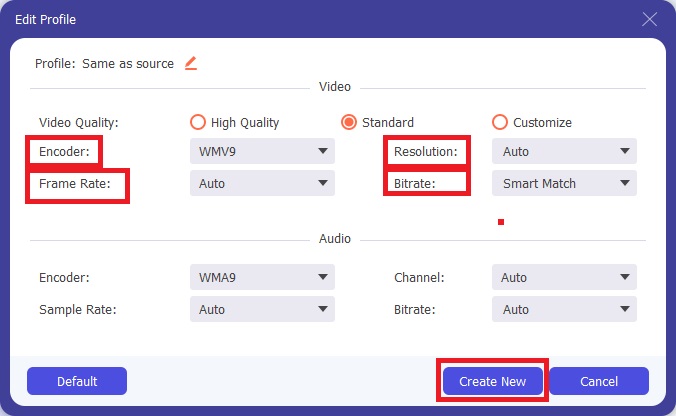
Step 4: To further edit your video, click on the gear icon on the right to show all the handy editing tools. From there, you can make all the necessary adjustments that best suit your needs. Just click the Create New button once you are finished.
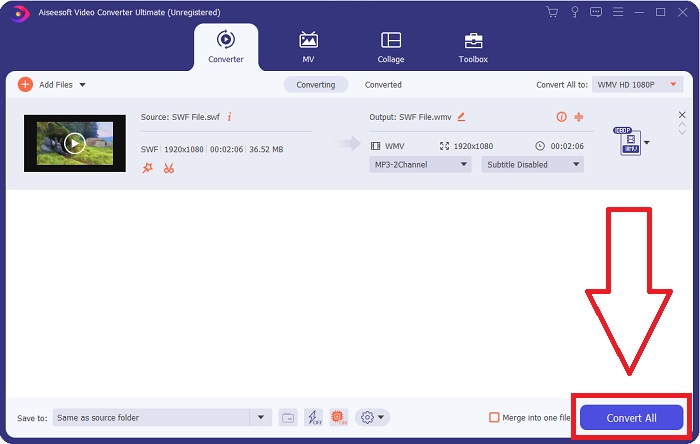
Step 5: Finish the conversion process by finally clicking the Convert All button on the window's bottom right corner and waiting for it to finish.
Bölüm 2. SWF'yi WMV Online'a Dönüştürmek İçin Başka Bir İpucu
FVC Free Video Converter her zaman ücretsizdir ve kayıt gerektirmez. Bazı ücretsiz çevrimiçi video dönüştürücüler, dönüştürme zaman çerçevelerini veya dosya boyutunu kısıtlar. Tüm ücretsiz dönüştürme sürelerinizi kullandıysanız veya dosyanız çok büyükse, videoları nadiren dönüştürseniz bile bir plan satın almanız gerekir. Ancak FVC Free Video Converter'ın böyle bir kısıtlaması yoktur ve videoları herhangi bir zamanda dönüştürebilir.
Ayrıca, bu hizmetin daha büyük dosyaları dönüştürmek için kayıt olması gerekmez, çoğu çevrimiçi video dönüştürücünün aksine 1 GB'den büyük videoları dönüştürmek için kayıt gerekir. İşte bu harika araç için izlemeniz gereken adımlar:
Step 1: To go to the website, click this link. Then, download the launcher quickly by clicking the Add Files to Convert button and waiting for it to finish.
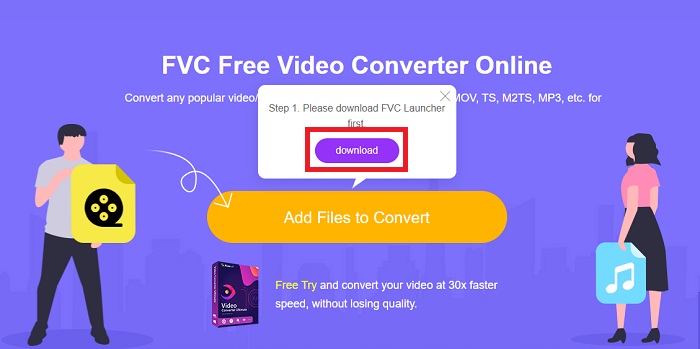
Step 2: Click the said button again, and this time, it will allow you to upload the video file you wish to convert. After that, select WMV among all the available formats.
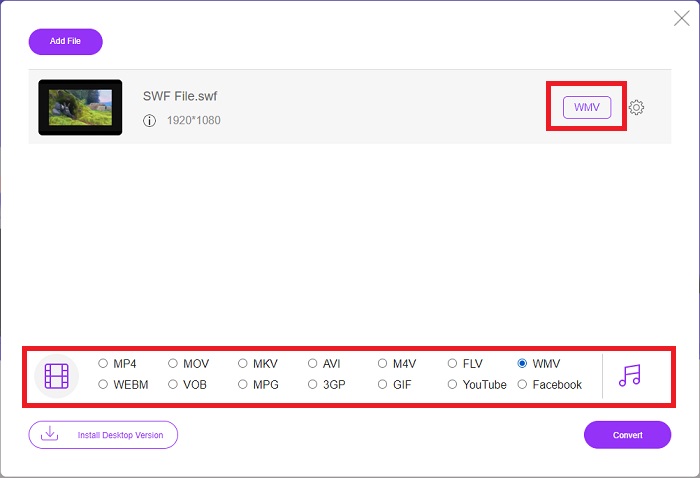
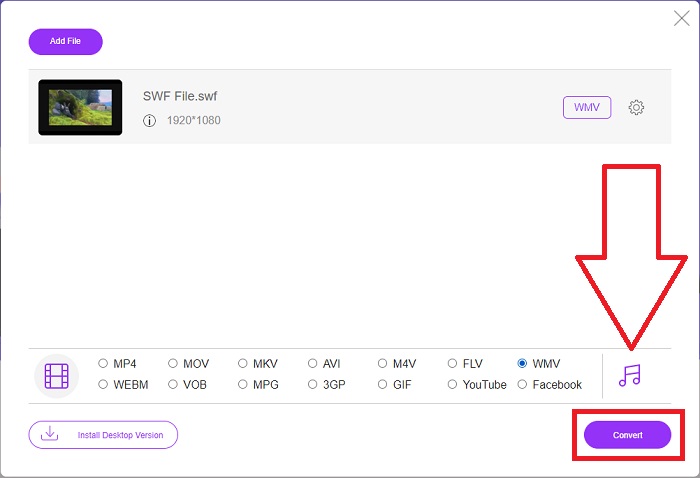
Step 3: You can still use handy editing tools like the software itself. Just click the gear icon, and it will show you all the adjustments you can make. To save the changes made, click OK and once you finish adjusting, click Convert to start the process.
İlgili:
Bölüm 3. SWF ve WMV Formatları Hakkında Kapsamlı Bilgi
İki format hakkında daha fazla bilgi edinmek istiyorsanız, bu makaleyi okumaya devam edin. Arka plan olarak ihtiyaç duyabileceğiniz tüm gerekli ve temel bilgileri sağlıyoruz.
Adobe, filmleri ve vektör tabanlı animasyonları depolamak için SWF dosya biçimini kullanır. Küçük Web Formatı kısaltmadır; ancak ShockWave Formatı olarak da bilinir. Genellikle internet üzerinden video yayınlamak için kullanılır, özellikle tarayıcı tabanlı oyunlar. Ne yazık ki Adobe, performans ve güvenlik sorunları nedeniyle 2020'nin sonunda Flash biçimini desteklemeyi bırakacağını belirtti.
Öte yandan, bir WMV dosyası, bir veya daha fazla Microsoft video sıkıştırma biçimini kullanarak sıkıştırabilen bir Windows Media Video dosyasıdır. Windows'ta popüler bir video depolama biçimidir, bu nedenle bazı üçüncü taraf uygulamalar tarafından kısa animasyonlar gibi şeyler için kullanılır. Windows Media Player ve Movies & TV gibi Microsoft medya oynatıcılarıyla çalışmak üzere tasarlanmıştır. Dijital Haklar Yönetimi (DRM) sistemleriyle kullanım için WMV dosyaları şifrelenebilir.
| Küçük Web Formatı | Windows Medya Videosu | |
| Dosya uzantısı | .swf | .wmv |
| Geliştirici | Adobe Systems Incorporated | Microsoft |
| Destekleyici Programlar | ◆ Adobe Flash Player ◆ Adobe Flash ◆ Profesyonel CC ◆ GOM Oynatıcı ◆ Adobe Dreamweaver 2020 | ◆ VLC Medya Oynatıcı ◆ MPlayer ◆ Medya Oynatıcı Klasik ◆ Windows Media Player |
Bölüm 4. SWF ve WMV'yi Dönüştürme Hakkında SSS
WMV dosyalarının kullanımı nedir?
WMV video dosyaları, video materyallerini çevrimiçi olarak veya HD DVD ve Blu-ray Diskler aracılığıyla satmak için en iyi formattır.
SWF dosyasının kullanımı nedir?
Flash dosyaları veya SWF dosyaları, multimedya bilgilerinin internet üzerinden verimli bir şekilde dağıtılması için sıklıkla kullanılır.
SWF dosyaları düzenlenebilir mi?
Adobe Flash, Adobe tarafından kullanılan bir dosya biçimidir. Diğer multimedya dosyalarından farklı olarak ve SWF dosyası, bir web tarayıcısını görüntülemek için Flash Player eklentisini gerektirir. Ayrıca, Kullanıcılar SWF dosyalarını doğrudan düzenleyemezler.
Sonuç
FVC Video Converter Ultimate, video dönüştürme konusunda acemi veya amatör iseniz sizin için mükemmel bir seçenektir. Video formatlarını çok sık dönüştürmüyorsunuz. Sabit video formatı dönüştürme, karşılaştırılabilir programlara kıyasla hızlı video dosyası dönüştürme, basit kullanım, çeşitli formatlar için destek ve benzeri gibi faydaları, oradaki en iyi video dönüştürücü olmasına yardımcı olur. Video dönüştürme söz konusu olduğunda, Video Converter Ultimate ve çevrimiçi eşdeğeri en kabul edilebilir seçeneklerdir.
-
 [2 Çözüm] SWF'yi GIF Dosyalarına Ücretsiz Olarak Kolayca Dönüştürme
 GIF formatını Flash yazılımı aracılığıyla dışa aktaramadığınızda, dosyaları ilk önce SWF formatında kaydetmeyi deneyebilirsiniz. O zaman bu makaleden SWF'yi GIF dosyalarına dönüştürmenin 2 kolay yolunu öğrenebilirsiniz.
-
 En İyi 5 En İyi Ücretsiz SWF'den AVI'ye Dönüştürücüler [Web ve Masaüstü Tabanlı]
 SWF dosyanızı AVI'ye nasıl dönüştüreceğinizi bilmek ister misiniz? Değilse, SWF sorununu dönüştürmenize ilişkin bir çözüm sağladığımız için bu makaleyi okuyun.
-
 [Ücretsiz ve Kolay] SWF'yi MOV'a Dönüştürmede Kullanılacak Olağanüstü Araçlar
 Videoları düzenleyemediğiniz için SWF'yi MOV'a dönüştürmeyi denediniz mi? Video düzenleyiciniz''un uyumsuzluğundan kim sorumlu? Çözümünüz için okumaya devam edin.
