


 Video Dönüştürücü Ultimate
 Ekran kaydedicisi
 Video Onarımı
 MOD'u MP4, MOV, AVI, MP3 vb. herhangi bir formata dönüştürün.
MOD Formatını Kolayca Çevirmek için Platformunuzda Bulunan 7 Ücretsiz MOD Dönüştürücü
MOD dosyanızı değiştirmeniz mi gerekiyor? Durum böyleyse, artık endişelenmenize ve farklı dönüştürücüler denerken zorlanmanıza gerek yok. Stres yapmayın, çünkü bugün sizin için bir çözümümüz var. Hemen şimdi, MOD dosyasını MP4, MOV, MPEG2, DVD veya istediğiniz herhangi bir video formatına dönüştürmenin en iyi yollarını, adım adım takip edebileceğiniz şekilde anlatacağız.

Bölüm 1. MOD Dosyalarını Çevrimiçi ve Çevrimdışı Dönüştürmek için En İyi 7 Ücretsiz MOD Dönüştürücü
1. FVC Video Converter Ultimate – Windows ve Mac'te En İyi MOD Dönüştürücü
Listemizde ilk sırada, platformlar arasında en çok tercih edilen MOD dönüştürücüsü olan FVC Video Converter Ultimate bulunuyor. Bu dönüştürücü, kullanıcılara son derece hızlandırılmış bir dönüştürme süreci sunar ve her zaman olduğu gibi onları hayal kırıklığına uğratmaz. Araçla dönüştürme hızlı olsa da, kalite değişmez; çünkü format dönüştürülürken korunur.
Şimşek hızındaki sürecinden daha fazlası nedir? Ayrıca MOD, MP4, MOV, MKV, FLV, WMV ve daha fazlası gibi içe veya dışa aktarabileceğiniz devasa biçimleri de destekler. Desteklenen format nedeniyle, müşteriler araca düşkün oldu ve çoğu, formatlarını dönüştürmesi gereken diğer kullanıcılara bunu tavsiye ediyor. Bu nedenle, MOD'u MP4'e veya istediğiniz herhangi bir video formatına dönüştürmek için yardıma ihtiyacınız varsa, bu araç, aşağıda belirtilen adımları izleyerek mükemmel bir yardımcıdır.
Adım 1. Dönüştürücüyü masaüstünüze indirmek için lütfen aşağıdaki indirme düğmesine tıklayın ve şu anda kullandığınız platformu seçin. Ardından kurulum sürecini hızlıca takip edin ve yazılımı çalıştırın. Dönüştürme işine yeniyseniz korkmayın, burada verilen adımlar MOD dosyasını doğru şekilde dönüştüreceğinizden emin olmanızı sağlayacaktır.
Ücretsiz İndirWindows 7 veya üstü içinGüvenli İndirme
Ücretsiz İndirMacOS 10.7 veya üstü içinGüvenli İndirme
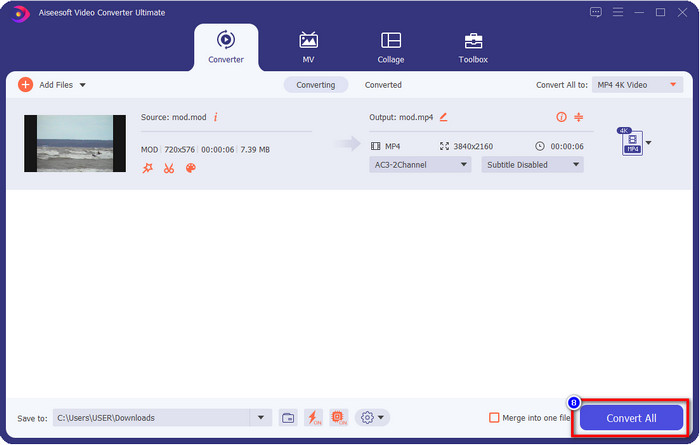
Adım 2. MOD dosyasını yüklemek için Dosya Ekle’ye tıklayın veya arayüzün ortasındaki büyük + düğmesine basın. Bundan sonra, ekranda bilgisayar klasörü açılacaktır; bu aşamada göz atın, MOD dosyasını seçin ve bir sonraki adıma geçmek için Aç’a basın.
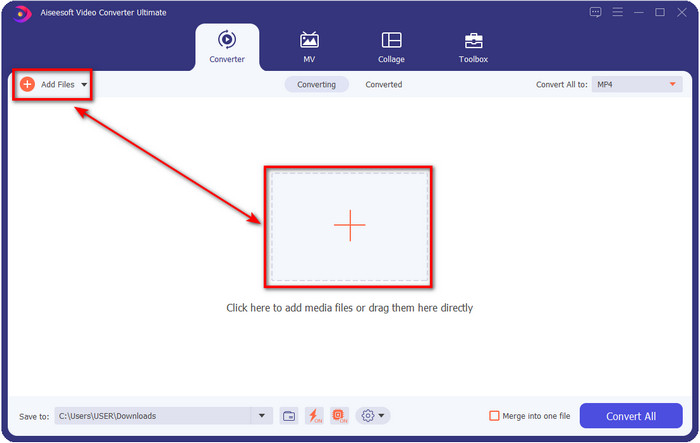
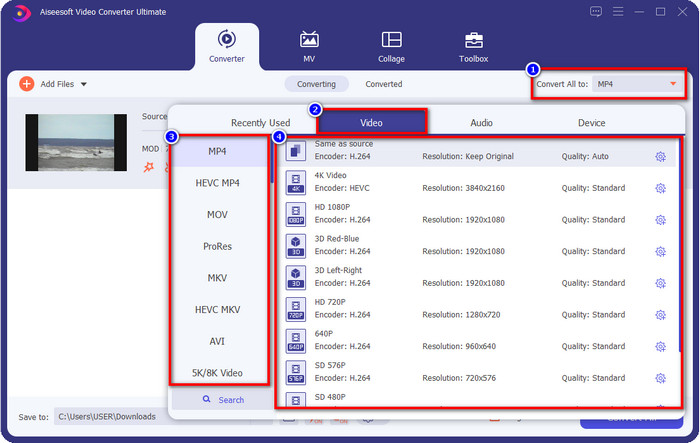
Adım 3. Formatı MP4, MOV, MKV ya da ihtiyaç duyduğunuz başka bir formata çevirmek için Tümünü Dönüştür seçeneğine tıklayın ve seçiminizi yapın.
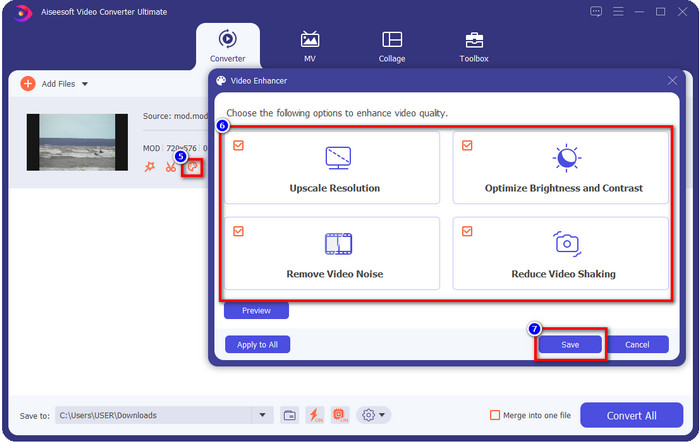
İsteğe bağlı. Bu aracın sunduğu harika özelliklerden biri de geliştirme (enhancer) özelliğidir. boya tepsisi simgesine tıklarsanız yeni, küçük bir arayüz açılır; buradan kutucukları işaretleyerek videonuz üzerinde önemli ayarlamalar yapabilirsiniz. MOD videonuzda yaptığınız değişiklikleri uygulamak için Kaydet’e tıklayın.
Adım 4. Tüm işlemler tamamlandıktan sonra, artık Hepsini Dönüştür düğmesine tıklayarak MOD dönüştürme zamanı gelmiş demektir. 1-2-3 kadar kolay adımlarla, MOD formatını yeni bir formata dönüştürmeyi öğrenmiş olursunuz.
Artıları
- MOD'u MP4, MOV, MKV, FLV, AVI'ye veya etkin bir şekilde kullanılabilen 200+ formata dönüştürün.
- Gelişmiş düzenleme özellikleri, kırpma, kesme, kırpma ve daha fazlasını içerir.
- İndirmek güvenlidir ve kötü amaçlı yazılım içermez.
- Windows ve Mac gibi tüm masaüstü platformlarında indirilebilir.
Eksileri
- Tüm gelişmiş özelliklerden yararlanmak için aracı satın almanız gerekir.
2. iMovieSoft Ücretsiz TOD Dönüştürücü
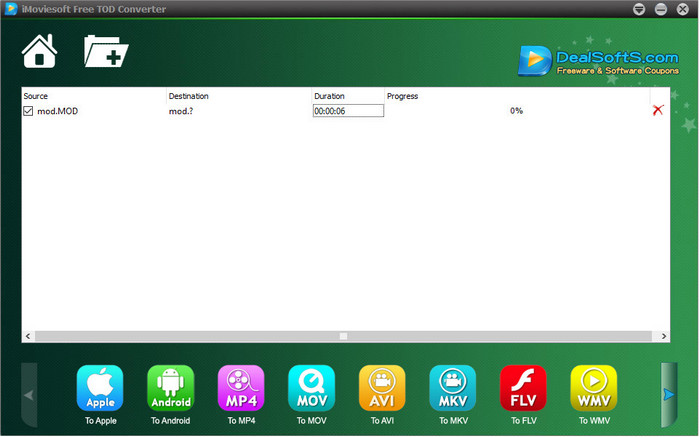
Masaüstünüze indirebileceğiniz bir diğer dönüştürücü ise iMoiveSoft Free TOD Converter. Bununla MOD formatınızı kolayca mevcut formatlara dönüştürebilirsiniz. Ancak bu aracın desteklediği format sayısı fazla değildir; buna rağmen bilinen popüler formatlar mevcuttur. Ayrıca, aracın ana web sitesi güvenli bir bağlantıya sahip değildir; uyarı olmasına rağmen, burada MOD dosyalarını MOV, MP4, AVI vb. formatlara dönüştürme adımlarını sunabilmek için sistemimize indirip denedik.
Adım 1. Dönüştürücüyü masaüstünüze indirin ve açın.
Adım 2. Klasör simgesine tıklayın ve eklenecek MOD dosyalarını bulun.
Adım 3. Aşağıdaki formatı seçin ve Convert (Dönüştür) düğmesine basın.
Artıları
- Windows ve Mac'te indirmek ücretsizdir.
- Kullanımı kolay.
- Temel düzenleme özellikleri mevcuttur.
Eksileri
- Ana web sitesi bağlantı güvenli değil.
- Seçebileceğiniz bir format seçeneğine sahiptir.
- Kullanıcı arayüzünün iyileştirilmesi gerekiyor.
3. iOrgSoft Dönüştürücü
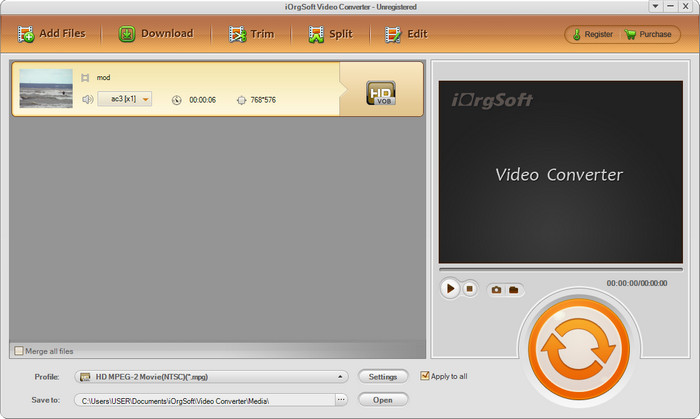
iOrgSoft Converter, MOD’u kolayca MPEG2’ye dönüştürmek istiyorsanız bir seçenek olabilir. Bu dönüştürücünün ana web sitesi de iMovieSoft gibi korumasız bir bağlantıya sahiptir. Programı indirmek için harici bir bağlantı da kullanabilirsiniz. Araç bazı seçenekler sunsa da, kullanıcı arayüzüne daha az öncelik verilmiştir; yani çok da iyi görünmeyen bir arayüz beklemelisiniz. Ayrıca, dönüştürme sırasında çökme ve takılmalar yaşanabilmektedir.
Adım 1. Dönüştürücünün ana web sayfasını aratın ve oradan indirin.
Adım 2. Dönüştürücüyü açın, MOD dosyalarını eklemek için Dosya Ekle’ye tıklayın, ardından format tepsisine tıklayıp istediğiniz formatı seçin.
Adım 3. Dönüştürmeyi başlatmak için dönüştür (convert) düğmesine tıklayın.
Artıları
- iMovieSoft'tan daha fazla formatı destekler.
- Kullanımı basit ve anlaşılması kolay.
- Windows ve Mac'te indirin.
Eksileri
- Ana web sitesine güvenli olmayan bağlantı.
- Kullanıcıların arayüzü korkunç.
4. FFmpeg
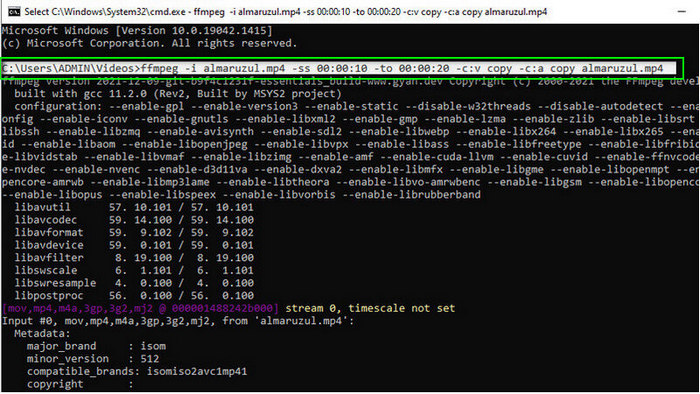
Diyelim ki ücretsiz bir MOD’dan MOV’a dönüştürücüye ihtiyacınız var; işte bu noktada FFmpeg yardımınıza koşuyor. Bu listedeki diğer dönüştürücülerin aksine, araçla metin üzerinden iletişim kurduğunuz bir CLI tabanlı arayüz kullanır. Bize çok tanıdık gelmese de, bazı kullanıcılar hâlâ bunu dönüştürücü olarak kullanıyor. Eğer bu dönüştürücü ilginizi çektiyse, aşağıdaki adımları izleyin.
Adım 1. FFmpeg’i indirin ve exe dosyasını çalıştırın.
Adım 2. CMD’yi açın; artık araçla bu komut penceresi üzerinden iletişim kurabilirsiniz.
Adım 3. Komut istemini kullanarak dosyanın konumunu bulun. Ardından şu metni kopyalayıp yapıştırın: ffmpeg -i input.mod -vn -ar 44100 -ac 2 -b:a 192k output.mp4 ve MP4 olarak dönüştürün. Formatı MOV, MKV, AVI ve daha fazlasına da değiştirebilirsiniz. İşlemi başlatmak için klavyenizde Enter tuşuna basın.
Artıları
- Çoğu platformda bulunan benzersiz video dönüştürücü.
- Kullanıma uygun.
- Biçiminizi dönüştürmede güvenilirdir.
Eksileri
- Kullanımı çok kolay değil.
- Yeni başlayanlar veya yeni başlayanlar için formatı dönüştürmek için en iyi seçim değildir.
5. Bulut Dönüştürme
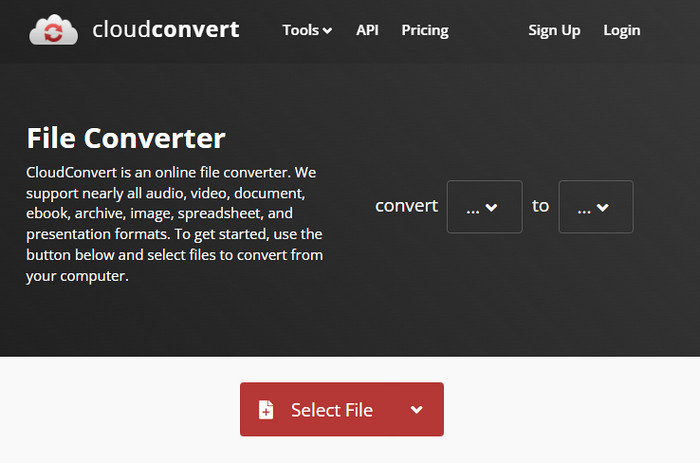
Masaüstünüze dönüştürücü indirmek istemiyor musunuz? Öyleyse, MOD formatını yine de çevrimiçi olarak CloudConvert ile dönüştürebilirsiniz. Bu çevrimiçi araç, kullanıcılara basit ama etkili bir dönüştürme süreci sunar. Ayrıca PDF, Arşiv, E-kitaplar ve diğer dosya türlerini de yeni formatlara dönüştürmeyi destekler.
Adım 1. Tarayıcınızda CloudConvert’i aratın.
Adım 2. Select File (Dosya Seç) düğmesine tıklayarak MOD dosyasını yükleyin. Açılır liste düğmesine basıp ideal formatınızı seçin. Ardından Convert (Dönüştür)’e tıklayın.
Adım 3. Yükleme tamamlandıktan sonra, yeni dosya formatını sürücünüze kaydetmek için Download (İndir)’a tıklayın.
Artıları
- Aracı indirmek gerekli değildir.
- Ücretsiz çevrimiçi web aracı.
- Kullanıcı dostu.
Eksileri
- Ağa bağlı.
- Sürecin seyri internetinizin hızına bağlı olacaktır.
6. Dönüştürücü365
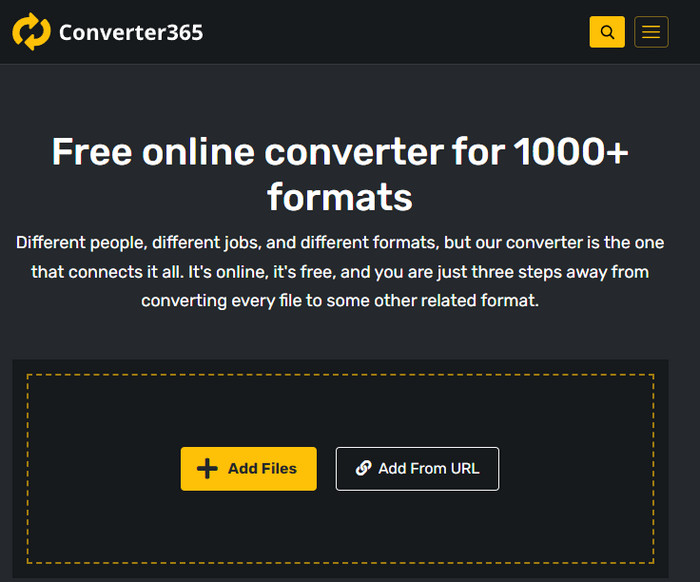
Kullanabileceğiniz bir diğer çevrimiçi, ücretsiz MOD’dan MP4’e dönüştürücü ise Converter365. Zarif görünümlü bir arayüze sahip olduğunu söyleyebileceğimiz çevrimiçi araçlardan biridir. Bu nedenle, bu aracı kullanmak profesyonel bir his verir; ancak video dosyalarını dönüştürürken çökme sorunları yaşadık. Yine de MOD dosyanızı kolayca dönüştürmeniz gerekiyorsa, bu araç işinize yarayabilir.
Adım 1. Tarayıcınızı açın ve Converter365’i aratın.
Adım 2. Dosya Ekleye tıklayın, ardından .mod dosyasını bulun. Dosyayı bulduktan sonra, açılır liste düğmesine tıklayarak formatı seçin.
Adım 3. Dönüştürmeyi Başlat düğmesine basın ve dönüştürme işlemi başlayacaktır.
Artıları
- Dönüştürücüye web üzerinden erişilebilir.
- Basit ama etkili bir dönüşüm sağlar.
- Kullanıcı arayüzü profesyonel görünüyor.
Eksileri
- Kullanmak için bir internet bağlantısına ihtiyacı var.
- Bazen biçimi dönüştürürken hatalar meydana gelir.
7. Zamzar
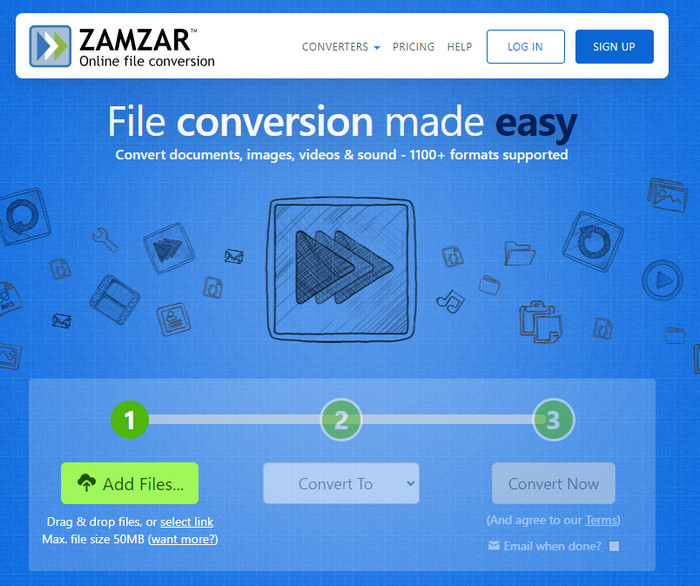
Kolay ve pratik bir çevrimiçi MOD dönüştürücüye ihtiyacınız varsa, Zamzar iyi bir yardımcıdır. Bu araç, .mod dosyalarınızı dönüştürmek için son derece net ve doğrudan bir süreç sunar. Ayrıca internetteki en güvenli dönüştürücülerden biri olduğu da kesindir. Bu aracı denemek isterseniz, aşağıdaki adımları takip edebilirsiniz.
Adım 1. Favori tarayıcınızda arama yaparak Zamzar’a erişin.
Adım 2. Dönüştürmeniz gereken MOD dosyasını eklemek için Add File (Dosya Ekle)’a basın. Convert To (Şuna Dönüştür) seçeneğine tıklayıp ihtiyacınız olan formatı seçin.
Adım 3. Convert Now (Şimdi Dönüştür)’a tıklayın ve işlemin tamamlanmasını bekleyin. Ardından, bilgisayarınızdaki sürücüye kaydetmek için İndir’e tıklayın.
Artıları
- Bir formatı dönüştürmeniz gerekiyorsa en iyi seçeneklerden biri.
- Basit bir dönüştürme işlemi sağlar.
- Tüm web tarayıcılarında mevcuttur.
Eksileri
- İnternete bağlı, internet yok, kullanamazsınız.
- Daha az format seçeneğini destekler.
İlgili:
Bölüm 2. MOD Dönüştürücüler hakkında SSS
MOD nedir?
MOD, standart dijital müzik izleme uygulamaları için ses olarak kullanılabilecek iki yönlü bir formattır. Nota kalıpları, enstrüman numaraları ve örnek sesler için farklı parçalara sahip mesaj denetleyicileri içerir. Bahsedildiği gibi iki yönlüdür; bunu Panasonic ve JVC tarafından üretilen dijital video kameralar için bir video formatı olarak da kullanabilirsiniz. Bu format bilinen markalardan destek alsa da, diğer video kapsayıcı ile karşılaştırmak üzere olsaydık, biraz modası geçmiş.
Medya oynatıcılar .mod uzantısını destekliyor mu?
Tüm medya oynatıcılar bu formatı desteklemez, özellikle oynatıcınızın içinde MPEG-2 video codec bileşeni yoksa. Bu herkes için oldukça sorunludur; Oynatmak için ihtiyacınız varsa bir MPEG-2 video uzantısı indirebilirsiniz. Ancak dosyayı desteklenen bir biçime platformlarınıza da dönüştürebilirsiniz, bu şimdiye kadarki en kolay ve en güvenli yoldur. Şimdi, MOD dosyanızı dönüştürmeniz gerekiyorsa, bunun yerine FVC Video Converter Ultimate'ı kullanmak isteyebilirsiniz. Alet hakkında hiçbir fikrin yok mu? Bu durumda, yukarıdaki ayrıntıları okuyun.
MOD, DVD oynatıcıyla uyumlu mu?
DVD oynatıcı ile uyumlu değildir; ancak DVD oynatıcıyla uyumlu hale getirmek için DVD'ye yazabilirsiniz.
Sonuç
Bu yedi araç, performansları ve verimlilikleri nedeniyle MOD dönüştürücüye ihtiyacınız olduğunda en iyi seçeneklerdir. Tüm yazılımları dikkatlice denedik ve FVC Video Converter Ultimate’ın diğer araçların geçemediği, olağanüstü çıktı ve özellikler sunduğunu gördük. Dolayısıyla, aracın sunduğu bu üstün deneyimi yaşamak isterseniz, önce masaüstünüze indirip dilediğiniz gibi kullanabilirsiniz.

FVC Video Dönüştürücü Ultimate
2.999.368+ İndirme- MOD'u herhangi bir popüler formata dönüştürün.
- Video kalitesini doğal olarak artırın
- Yüksek kaliteli çıktıyla sorunsuz video kolajı yapın
- Kırpma, döndürme, filtre ekleme vb. dahil olmak üzere videoları bir profesyonel gibi düzenleyin.
Ücretsiz İndirWindows 7 veya üstü içinGüvenli İndirme
Ücretsiz İndirMacOS 10.7 veya üstü içinGüvenli İndirme
-
 MPG'yi WMV'ye Ücretsiz Dönüştürmek için 2 Ultimate MPG Dönüştürücü
 MPG'yi WMV'ye ücretsiz dönüştürmek ister misiniz? Bu durumda şanslısınız çünkü MPG dosyalarınızı dönüştürmek için kullanabileceğiniz iki araç olduğunu öğrendik.
-
 Mac ve Windows'ta iTunes M4V'yi MKV'ye En Hızlı Şekilde Değiştirme
 Mac'te M4V'yi MKV'ye dönüştürmeniz gerekiyorsa bu makaleyi okumalısınız. Dönüştürme işleminizde size yardımcı olacak dönüştürücüler hakkında gerçekleri sağladığımız için.
-
 Tüm Platformlarda Bulunan En İyi 5 Ücretsiz MPEG - MKV Dönüştürücü
 Mevcut MPEG'den MKV'ye Dönüştürücüler nelerdir? Platformunuzda bulunan MPEG dönüştürücüler hakkında daha fazla bilgiye mi ihtiyacınız var? O zaman bu makale tam size göre.
