


 Video Dönüştürücü Ultimate
 Ekran kaydedicisi
 Video Onarımı
[Çözüldü] Videonuzu Mükemmel Bir Şekilde Geliştirmek için Video Filtreleri Nasıl Kullanılır
Görsel medyanızın diğerlerinden daha çarpıcı görünmesini sağlamak için bir video filtresi kullanın. Bu filtreler tonu güçlendirebilir, tutarlılık yaratabilir, hava katabilir ve daha fazlasını yapabilir. Piyasada pek çok farklı filtre uygulaması olmasına rağmen, filtre ekleme gibi düzenlemeleri hep Video Converter Ultimate içinden yapmayı umarız. Ancak nihai aracı nasıl kullanacağınıza dair eğitime geçmeden önce, önce video filtresinin ne olduğuna ve mükemmel bir video oluşturmanıza yardımcı olabilecek filtre türlerine bakalım. Konu hakkında fikir edinmek için önce bunlara göz atın.

Bölüm 1. Video Filtresi Nedir?
Video Filtresi, tüm webde popüler olan ve kullanıcıların özel efekt eklemeden daha detaylı görsel medya oluşturmalarına yardımcı olan bir özelliktir. Bu filtreler yerleşiktir; yani tonu, parlaklığı, derinliği, sıcaklığı vb. iyileştirerek görsel imgeye farklı tasarımlar katarlar. Filtreler videonuzu geliştirmenize yardımcı olsa da amaçları birbirinin aynısı değildir. Örneğin, bir portre çekmeye çalışıyorsanız buna uygun bir filtreye ihtiyacınız olacaktır. Aşağıdaki bilgiler, indirebileceğiniz veya kullanabileceğiniz en iyi video filtre uygulamasını seçerken dikkat etmeniz gereken standartları anlatacaktır.
Buradaki liste farklı filtreler değil, filtrelerin süreçleri, faydaları ve standartları hakkında konuşacak.
1. Ayarlanabilir Renk Düzeltme
Renk Düzeltme, filme gidecek ışık miktarını kontrol etme işlemidir. Bir fotoğrafçı olarak amacınız, her şeyi sıralayarak dengeleyerek mükemmel görüntülere sahip olmaktır. Ancak, fotoğrafçılığınızı daha iyi hale getirebilecek her şeyde her zaman ideal karışıma sahip olmayacaksınız. Ancak, siyah ışıklı sahneyi, parlaklığı ve kontrastı filtreleyerek videografinizi dengelemek için Renk Düzeltme Filtresi ile.
2. Mükemmel İş için Filtreler
Piyasada birçok farklı video yüz filtresi var, ancak bazıları diğerleri kadar iyi değil. Video düzenleyicilerin bir dizi filtreleri olsa da, özellikle bu filtreler hakkında geniş bir fikriniz yoksa mükemmel filtreyi aramayı anlamak zor olabilir. Hepsini deneyebilseniz bile, bunu yaparsanız biraz zaman alacaktır. Bu nedenle, video düzenleyicide en çok seçilen filtreler hakkında daha fazla fikir edinmek istiyorsanız, ikinci bölüme gidebilirsiniz.
3. Hareket Halindeki En İyi Video Düzenleyici
Seçmeniz gereken araç, kesmenize, birleştirmenize, kırpmanıza ve daha fazlasını yapmanıza yardımcı olacak video düzenleme özelliklerine sahip olmalıdır. Ancak, düzenlemek için bir araç seçerseniz, aşağıdakileri göz önünde bulundurmalısınız. Profesyonel veya yeni başlayan biriyseniz, en iyi video düzenleyiciye sahip olmak için standartlarınıza bakmalısınız.
Profesyoneller için:
◆ Bir video düzenleyici, karmaşık bir görevi tek seferde yapmanıza yardımcı olmak için gelişmiş video düzenleme işlemi gerçekleştirir.
◆ Almak ve vermek için farklı dosya türlerini destekler.
◆ Kameralardan, cep telefonlarından veya DSLR'lerden ham video dosyalarının içe aktarılmasını destekler.
Başlangıç seviyesindekiler için:
◆ Video düzenlemeyi verimli bir şekilde gerçekleştirmek için kullanımı kolay olmalıdır.
◆ Profesyonel bir araç olarak iyi olmasa da, yeni başlayanların ihtiyaç duyduğu en iyi düzenleme araçlarına sahip olmalıdır.
◆ Araç özelliklerinde karışıklığı önlemek için GUI daha az ağır olmalıdır.
Bölüm 2. Kullanabileceğiniz En İyi Video Filtreleri Nelerdir?
Burada listelenen ayrıntılar, videoyu yükseltmenize yardımcı olması için kullanabileceğiniz filtrelerdir. Filtrelerin video kalitesini değiştiremeyeceğini ancak videonuzun mükemmel görünmesine yardımcı olabileceğini lütfen unutmayın.
1. Hayvanlar Yüz Filtresi

Çoğu kullanıcı, benzersiz oldukları ve bizi güldürdükleri için videolarda köpek veya kedi filtreleri kullanmayı sever. Bu filtre, diğer filtrelerin aksine farklı bir hayvanı ve diğer komik şeyleri canlandırıyor. Fotoğrafçılığınızı geliştirmese de, farklı bir amaç için animasyonlu bir filtreye sahip olmak istiyorsanız bunu kullanabilirsiniz. Ayrıca, indirebileceğiniz en iyi filtreleme uygulaması, kullanıcıları için zaten animasyonlu filtreler ekledi.
2. Gri Filtre
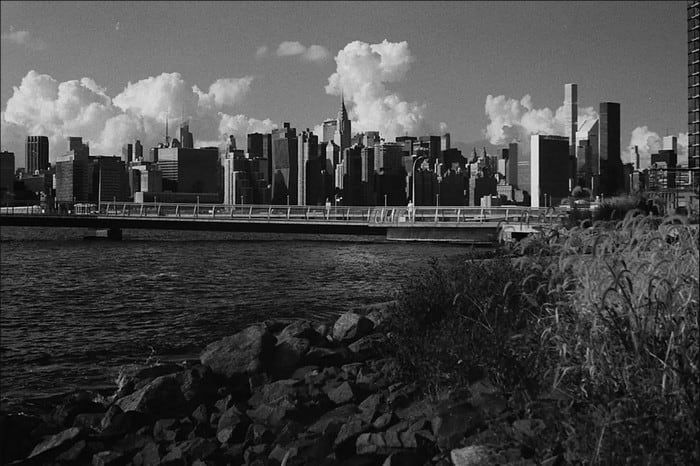
90’ları özleyip siyah beyaz bir video mu çekmek istiyorsunuz? O hâlde Gri Filtre 90’lar tarzında bir video elde etmenize yardımcı olabilir. Bu filtre, yüksek kontrast ve canlı renkler kullanan diğer filtreler gibi değildir; 90’lar havası vermek için siyah ve beyaz renk kombinasyonunu kullanır.
3. Güzellik Filtresi

Video çekmek ve cildi pürüzsüzleştiren bir video filtresine sahip olmak ister misiniz? Bir güzellik filtresi, kendi fotoğrafınızı geliştirmenize yardımcı olabilir. Bu filtre ile orijinal ve geliştirilmiş fotoğrafçılık arasındaki birçok farkı görebilirsiniz. Bazı etkileyiciler ve sanatçılar, filmlerini ve resimlerini geliştirmek için bu filtreyi seçer.
4. Sıcak Filtre

Bir diğer filtre ise soluk görünüme sıcaklık katabilir ve mavi ton fazlasını emebilir. Sıcak Filtre, videonuzu, elektronik ışıkta ve dış mekân gölgesinde bile ten tonlarınızın iyileşebileceği bir seviyeye taşır. Mavi ton fazlasını emse de çok derin mavi tonları tamamen gideremeyebilir. Yine de gökyüzüne yönelik videolar çekmek istiyorsanız bu filtre en iyi seçeneklerden biridir.
5. Düz Filtre

Düz Filtre, çektiğiniz video için yumuşak bir etki sağlayabilir. Bu filtre, ham videoya göre daha yumuşak kenarlar ve daha aydınlık renkler sunar. Her ne kadar bir filtre olsa da videoya çok fazla etki etmez; orijinali korur ama hafifçe iyileştirir. Videonuza fazla filtre eklemek istemiyor, asıl görüntüyü öne çıkarmak istiyorsanız en iyi sonucu verir.
Tüm filtrelerden bahsetmemiş olsak da, bunlar herhangi bir video filtreleme uygulamasında en sık kullanılan filtrelerdir. Bununla birlikte, adları farklı araçlara göre değişebilir, ancak filtrelerindeki görünüm aynı olacaktır.
Bölüm 3. Windows ve Mac'te Herhangi Bir Videoya veya Klibe Video Filtresi Eklemek İçin İndirilecek En İyi Program
Yukarıda bahsedilen dört filtrenin tamamını ve daha fazlasını Video Converter Ultimate’ı indirerek edinebilirsiniz. Bu yazılım, kamera ve telefon gibi herhangi bir cihazla çektiğiniz videolara filtre eklemenin en verimli yolunu sunar; hatta DSLR kullanıyorsanız bile klibi bu araca aktarabilir ve üzerine filtre ekleyebilirsiniz. Diğer filtreleme uygulamalarının aksine, bu uygulama yalnızca yeni başlayanlar için değil; profesyonel olsanız bile güvenebileceğiniz bir araçtır.
Ayrıca, Windows ve Mac'te en iyi video düzenleyiciye sahip olmak istiyorsanız, neyse ki bunu kullanabilirsiniz. Şimdi, bir video filtresi ekleyecekseniz, herhangi bir videoya başarılı bir şekilde filtre eklemek için aşağıdaki izlemesi kolay öğreticiyi izleyin.
Adım 1. Aşağıdaki indirme düğmesine tıklayarak video düzenleyiciyi masaüstünüze indirin. Aracı indirdikten sonra kurulum adımlarını izleyerek yükleyin ve açın.
Ücretsiz İndirWindows 7 veya üstü içinGüvenli İndirme
Ücretsiz İndirMacOS 10.7 veya üstü içinGüvenli İndirme
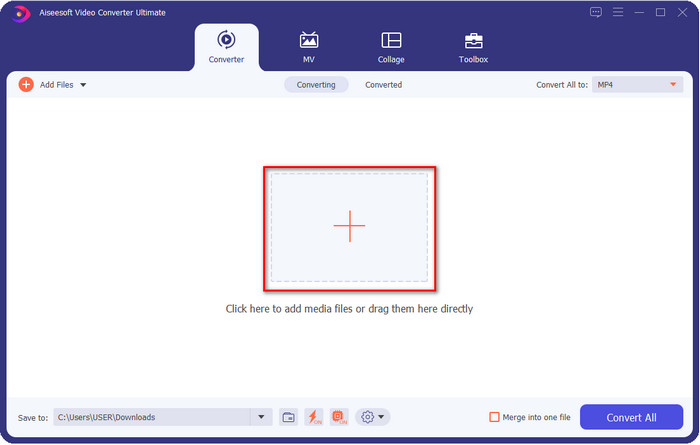
Adım 2. Dosyayı video düzenleyiciye eklemek için + düğmesine tıklayın. Ekranınızda açılacak klasörden video dosyasını seçin ve filtreleme sırasına eklemek için Open’a tıklayın.
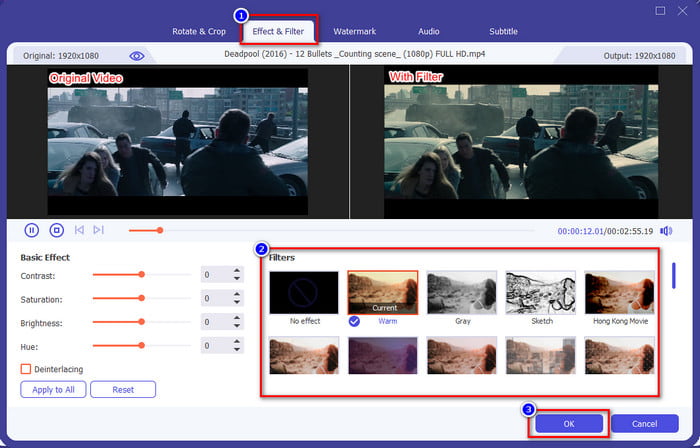
Adım 3. sihirli değnek düğmesine tıklarsanız, düzenleme yapabileceğiniz yeni bir pencere açılır. Üst bölümdeki Effects & Filters seçeneğine tıklayın, kullanmak istediğiniz filtreyi seçin, isterseniz hepsini tek tek deneyin ve seçtiğiniz filtreden memnun kaldığınızda OK’ye tıklayın.
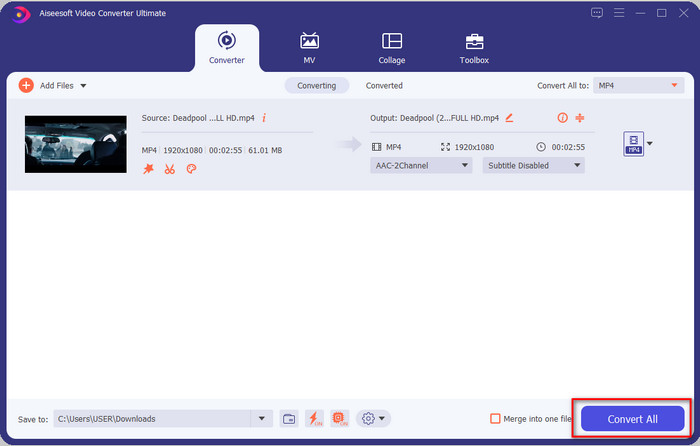
Adım 4. Düzenleyicide videoyu dışa aktarmak için Convert All seçeneğine tıklayın. Video dosyasının bilgisayarınıza indirilmesi için birkaç saniye bekleyin ve işte bu kadar; artık Windows ve Mac’te kullanabileceğiniz en iyi video düzenleyici sayesinde en iyi şekilde filtrelenmiş bir videoya sahipsiniz.
İlgili:
Bölüm 4. Video Filtreleri hakkında SSS
Bir video filtresi uygulamasını indirmek güvenli midir?
İndirdiğiniz web sitesine bağlıdır. Web'de bir video düzenleyici indirmek güvenli olsa da, ziyaret ettiğiniz web sitesinin güvenli olduğundan emin olmanız gerekir. Veya bazıları verilerinizi ve sizinle ilgili özel bilgileri alabilir.
Filtreler video kalitesini düşürür mü?
Eklediğiniz filtrenin etkileri nedeniyle video kalitesi değişebilir. Bu nedenle, yüksek kaliteli çözünürlüğü korumak istiyorsanız, video kalitesini değiştireceği için hangi filtreyi kullandığınızı düşünmelisiniz. Ancak pikselli bir filtre kullanırsanız, video kalitesini etkiler.
Filtreyi ekledikten sonra biçim neden değişti?
Kullandığınız araçtaki biçim, en baştan itibaren varsayılan standart biçim olarak ayarlanmıştır. Bunun olmasını engellemek için, Video Converter Ultimate ile şu adımları izlemeniz gerekir. Filtreyi ekledikten sonra Convert All to bölümüne gidin ve orijinal biçimi arayıp tıklayın. Son adımı da uyguladıktan sonra, videonuza eklediğiniz filtreyle birlikte özgün biçiminiz korunmuş olur.
Sonuç
Artık video filtreleri ve en çok tercih edilen filtreler hakkında bilgi sahibi olduk. Ne olduklarını ve hangi filtreleri kullanabileceğinizi açıkladığımıza göre, şimdi videonuza filtre ekleyip harika görünmesini sağlamak için Video Converter Ultimate’ı indirme zamanı. Bu araç, yalnızca videonuza filtre eklemenize değil, aynı zamanda onu karmaşık olmayan bir şekilde düzenlemenize de yardımcı olur. Bu harika araca, indirme düğmesine tıklayıp satın alarak ulaşabilir ve sunduğu tüm özelliklerin keyfini çıkarabilirsiniz.
-
 Bilgisayarınızda / Telefonunuzda Ücretsiz Olarak Videoya Ses ve Müzik Ekleme
 Bu makale, videoya ücretsiz olarak ses eklemenin 4 kolay yolunu gösterir. Videonuza eklemek istediğiniz ses parçası ne olursa olsun, burada tatmin edici sonuçlar elde edebilirsiniz.
-
 GIF'i Video Formatına Dönüştürün: GIF Mem'lerini Videoya Dönüştürün [2021]
 Aşağıda listelenen araçlar yardımıyla GIF'in video formatına nasıl dönüştürüleceğini belirleyin. Hangisini seçin ve onlar hakkında yeterli kanıt topladıkça nasıl yapılacağını öğrenin.
-
 Android ve iOS Cihazlar için Video Uygulamalarına Muhteşem GIF
 Telefonunuzu kullanarak GIF'leri istediğiniz herhangi bir video formatına dönüştürebileceğinizi biliyor muydunuz? Android veya iOS'unuzdaki en iyi uygulamaları seçin.
