


 Video Dönüştürücü Ultimate
 Ekran kaydedicisi
 Video Onarımı
WebM Dosyasını WMV'ye Kolayca Dönüştürme
WebM is a media file format supported by most web browsers like Google Chrome, Mozilla Firefox, Microsoft Edge, Opera, and more. It is being used on HTML5 videos and HTML5 audios for streaming purposes. However, WebM files do not support Mac and iOS devices without using other tools. Therefore, if you want to open WebM files on any device, we recommend converting it to a WMV file widely supported by almost all devices and players. In this article, we listed the best WebM to WMV Converters for you to try.

Bölüm 1. WebM'yi Kayıpsız WMV Dosyasına Dönüştürmek için En İyi 3 Araç
FVC Video Dönüştürücü Ultimate
FVC Video Converter Ultimate is widely popular on the entire web when talking about file converters. This file converter allows you to convert your WebM file to a WMV file easily. It also has unique features in which you can edit your file, enhance, and even compress your file without the quality being ruined. In addition to that, this tool supports varieties of conversion that you need, including WMV files. Therefore, if you want to convert a WebM file to WMV efficiently, this is the app for you.
Artıları
- Dosyanızı düzenlemenize, geliştirmenize ve sıkıştırmanıza olanak tanır.
- WebM, WMV, MP4, M4V, MOV, AVI ve daha fazlası dahil olmak üzere çeşitli dosya formatlarını dönüştürebilir.
- Kullanımı kolay arayüz.
Eksileri
- Kullanmadan önce uygulamayı indirmeniz gerekir.
FVC Bedava Video Dönüştürücü
FVC Free Video Converter is a free online converter that allows you to convert various file formats, including WebM to WMV, MP4, FLV, MOV, and more. This converter is also easy-to-use, because of its simple interface. Moreover, this converter does not need to be downloaded because it is web-based. However, since it is an online converter, you may experience slow conversion because it is an internet-dependent converter. Nevertheless, many have used this converter and approved it as one of the best online converters to convert your WebM to WMV free online.
Artıları
- Rahatsız edici reklamlar içermemelidir.
- WebM, WMV, MP4, FLV, WMA ve daha fazlası dahil olmak üzere birçok dosya biçimini dönüştürmenize olanak tanır.
- Uygulamayı indirmenize gerek yok.
Eksileri
- Dönüştürmek yavaş olabilir.
- Sadece sınırlı özelliklere sahiptir.
SavetheVideo.com
SavetheVideo.com is a free online converter that converts major video file formats. With this converter, you can convert videos from famous social media applications like Facebook, Twitter, Instagram, TikTok, and more. Despite that, you may encounter converting files, mainly if the file is not supported.
Artıları
- Herhangi bir cihazda videoları 420+ formata kadar dönüştürebilir.
- Android ve iphone cihazlardan dönüştürebilirsiniz.
Eksileri
- Takip edilmesi zor bir arayüze sahiptir.
- Yavaş dönüşümle karşılaşabilirsiniz.
Bölüm 2. FVC Video Converter Ultimate Kullanarak WebM'yi WMV'ye Dönüştürme
This part of the article will show you how to convert WebM files to WMV file format using the FVC Video Converter Ultimate. Because this converter is what we think is the best among the converters that trend in the market nowadays. Among other WebM to WMV converters available today, this online free converter shows promising performance, especially with its great features.

FVC Video Dönüştürücü Ultimate
5.689.200+ İndirme- WebM'yi birkaç tıklamayla WMV, MP4, MOV, MKV veya 200'den fazla formata dönüştürmeyi destekler.
- Aynı anda birden fazla WebM dosyasını dönüştürmek için toplu dönüştürme sunar.
- Ultra Hızlı Dönüştürme, birkaç saniye içinde yıldırım hızında dönüştürme işlemine sahip olmanızı sağlar.
- Döndürebileceğiniz, kesebileceğiniz, birleştirebileceğiniz ve daha fazlasını yapabileceğiniz düzenleme özelliklerine sahiptir.
Ücretsiz İndirWindows 7 veya üstü içinGüvenli İndirme
Ücretsiz İndirMacOS 10.7 veya üstü içinGüvenli İndirme
Steps in converting WebM to WMV using FVC Video Converter Ultimate:
Step 1. For you to download this converter, click the download button below. Follow the installation process, then open the app.
Ücretsiz İndirWindows 7 veya üstü içinGüvenli İndirme
Ücretsiz İndirMacOS 10.7 veya üstü içinGüvenli İndirme
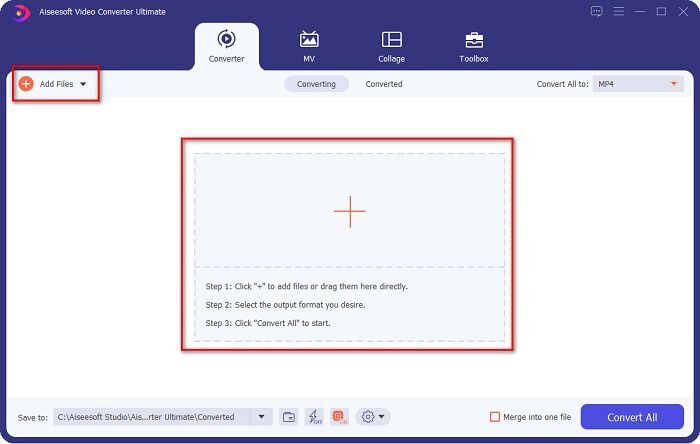
Step 2. After opening the application, click the Add Files button, or you may also click the + button to upload your WebM file in the tool's main interface. And a computer folder will appear, where you will locate your WebM file. Then press the Open button to upload your file. Additionally, you can add more WebM files because this tool supports batch conversion.
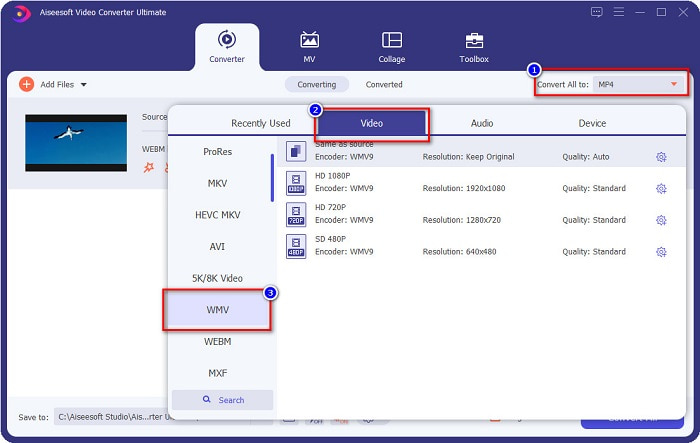
Step 3. In the upper right corner of the software, you will see the Convert All to button, click it, then select the WMV format on the list to change the file format from WebM to WMV format.
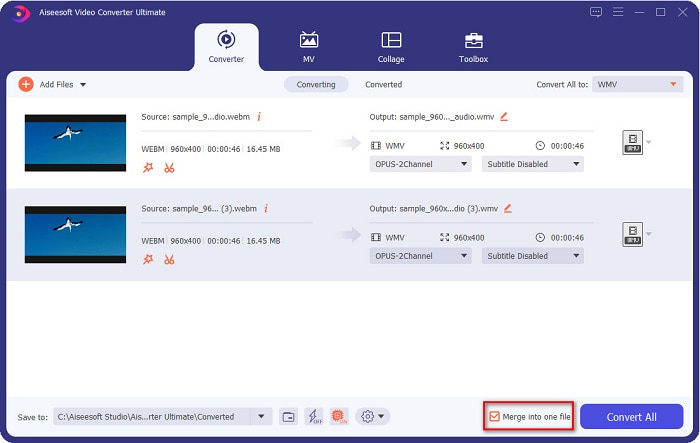
Optional. Do you want to know how to merge multiple WebM files into one? This ultimate tool has a compelling feature to merge them into one file. To do this, tick the box located in the bottom right corner of your software. In doing so, when you convert your files, they will automatically merge into one file. But if you do not wish to merge your files, you can skip this part and proceed to the next step.
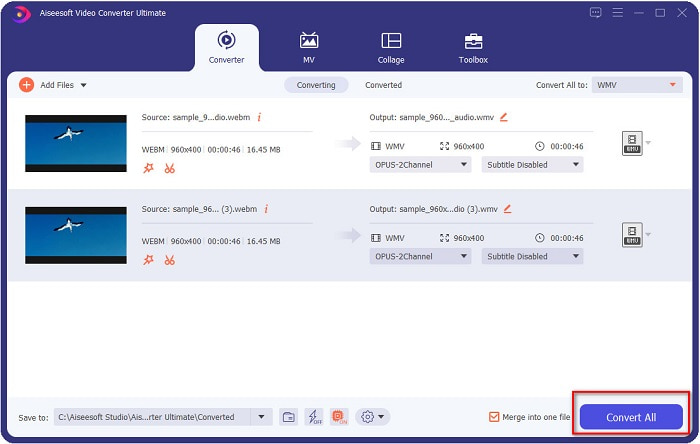
Step 4. When you select the file format that you want, click the Convert All button to start converting your WebM file to WMV. And voila! Your WebM file is now converted to a WMV file!
Bu basit adımlarla WebM dosyanızı kolayca bir WMV dosyasına dönüştürebilirsiniz.
Bölüm 3. WebM ve WMV hakkında Genişletilmiş Bilgi
Bu iki dosyayı daha iyi anlamak için makalenin bu bölümünde bunları ele alacağız.
WebM file is a video file format that widely supports web browsers. HTML5 websites use this format for video streaming purposes. Moreover, this type of file contains video streams compressed with VP8 or VP9 codecs. While on the other hand, Windows develops WMV or Windows Media Video; therefore, Windows System usually plays this type of file. Many encoders also support this type of file. In addition to that, this file format uses a compressor that helps your file make it smaller in size without ruining the quality.
Bölüm 4. WebM'yi WMV'ye Dönüştürme Hakkında SSS
Nihai video dönüştürücü, WebM dosyalarını MP4 dosya formatına dönüştürebilir mi?
Certainly. Using FVC Video Converter Ultimate can convert your WebM file into MP4. You can click this link and read thoroughly for more information about converting your WebM file to MP4 file format.
QuickTime, WebM dosyalarını destekliyor mu?
QuickTime does not support WebM file formats. Because QuickTime does not contain many codecs like other media players, you can convert your WebM file to file formats like MOV, which is supported by the codecs of QuickTime. To have more Infos about converting WebM to MOV, click this link.
Internet Explorer WebM dosyalarını destekliyor mu?
Evet. Internet Explorer, WebM dosyalarını destekler. Öyle olsa bile, Internet Explorer zaten aşamalı olarak kullanımdan kaldırılmıştır.
Sonuç
To sum it all up, the WebM to WMV converters presented above will help you convert your WebM files to WMV files easily. Moreover, the tools shown above have different features which allow you to do more when converting. But we believe that FVC Video Converter Ultimate is the best tool that helps you meet your needs. Still can't decide which converter to use? Download it now, and try it!
-
 Ses Kalitesini Kaybetmeden WebM'yi MP3'e Dönüştürmenin 3 Yolu
 WebM dosyalarının kaydettiğiniz sesi çalmak için kullanılamaması nedeniyle bir sorun mu yaşıyorsunuz? WebM'yi MP3'e dönüştürerek etkili bir yardım sağladığımız için bu makaleyi okuyun.
-
 WebM Dosyasını AVI Formatına Dönüştürmek İçin Kullanılan 3 Çarpıcı Yazılım
 WebM'yi AVI'ye nasıl dönüştüreceğiniz konusunda hiçbir fikriniz yok mu? O zaman bu makaleyi okumaya başlayalım. WebM'deki tüm detayları ve dönüştürmek için kullanabileceğiniz üç dönüştürücüyü belirttiğimiz gibi.
-
 Web ve Masaüstünde En Çok Tercih Edilen WebM'den FLV'ye Dönüştürücü Ücretsiz
 Akıllı telefonlarınızda WebM dosyalarını oynatırken de aynı sorunu yaşıyor musunuz? Ardından, WebM'yi FLV'ye nasıl dönüştüreceğinizi öğrenmek için bu makaleyi okuyarak 5 dakika geçirin.
