


 Video Dönüştürücü Ultimate
 Ekran kaydedicisi
 Video Onarımı
Dosyalarınızı Hızla Dönüştürebilen En İyi Ücretsiz MKV - WMV Dönüştürücüler
MKV (Matroska), kapsamlı ses ve video dosyalarını barındırabilen standart bir kapsayıcıdır. Yaygın bir dosya biçimi olmasına rağmen, yine de WMV gibi yaygın şekilde desteklenen bir video biçimine dönüştürmeniz gerekir. Bu nedenle, eğer bir ücretsiz MKV'den WMV'ye dönüştürücü arıyorsanız, bu makale tam size göre.

Bölüm 1. Neden MKV'yi WMV'ye Dönüştürmeniz Gerekiyor?
MKV (Matroska), ücretsiz bir standart kapsayıcı olduğu için çok miktarda görüntü, ses ve multimedya dosyası barındırır. Yaygın bir dosya biçimi olmasına rağmen, sektör standardı değildir. Bu yüzden bazı medya oynatıcılar bu tür dosyaları desteklemeyebilir. Buna karşılık, WMV ya da Windows Media Video, hemen her cihazda bulunan pek çok medya oynatıcı tarafından geniş ölçüde desteklenen bir dosya biçimidir. Ayrıca, dosya boyutunu sıkıştıran bir kodektir; bu da onu birçok medya oynatıcı için en yaygın ve uygun dosya biçimlerinden biri yapar.
Bölüm 2. Yıldırım Hızında Dönüştürücü Kullanarak MKV'yi WMV'ye Dönüştürün
MKV'yi WMV dosyalarına dönüştürmek söz konusu olduğunda FVC Video Converter Ultimate'ın sizin için en iyi araç olduğuna şüphe yok. Bu ücretsiz ve ultra hızlı dönüştürücü, kaliteyi kaybetmeden MKV'yi WMV'ye dönüştürmenize olanak tanır. Bu dönüştürücü aynı zamanda birden fazla dosyayı düzenlemenize, geliştirmenize ve hatta bir dosyada birleştirmenize olanak tanıyan etkileyici özelliklere sahiptir. Ayrıca, MKV gibi çeşitli dosya biçimlerini WMV, MP4, M4V, AVI, MOV ve daha fazlasına dönüştürmenize olanak tanır.

FVC Video Dönüştürücü Ultimate
5.689.200+ İndirme- Aynı anda birden fazla dosyayı dönüştürmek için toplu dönüştürmeyi destekler.
- MKV dosyalarınızı ultra hızlı dönüştürmenizi sağlayan bir özelliğe sahiptir.
- MKV, WMV, MP4, AVI, MPG, MOV, VOB ve daha fazlasını içeren 200+ destekler.
- Windows ve Mac gibi çeşitli platformlarda mevcuttur.
Ücretsiz İndirWindows 7 veya üstü içinGüvenli İndirme
Ücretsiz İndirMacOS 10.7 veya üstü içinGüvenli İndirme
FVC Video Converter Ultimate ile dosyalarınızı nasıl dönüştürebilirsiniz
1. Adım. FVC Video Converter Ultimate'ı kurmak için aşağıdaki İndir düğmesine tıklayın. Ardından kurulum adımlarını izleyin ve uygulamayı açın.
Ücretsiz İndirWindows 7 veya üstü içinGüvenli İndirme
Ücretsiz İndirMacOS 10.7 veya üstü içinGüvenli İndirme
2. Adım. Uygulamayı açtıktan sonra, dönüştürme işlemine başlamak için kuyruğa dosya yüklemek üzere Dosya Ekle ya da + düğmesine tıklayın.
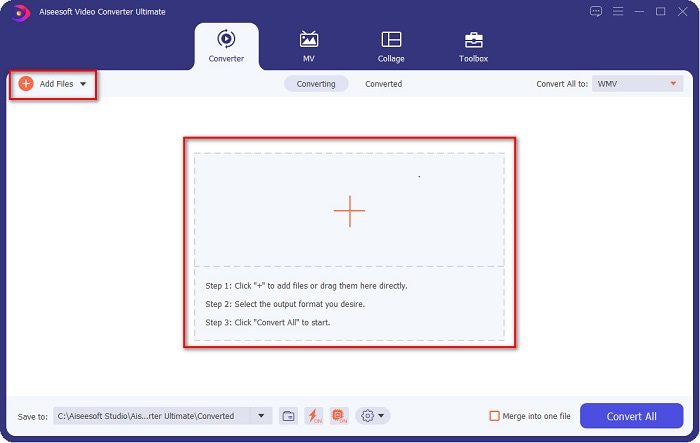
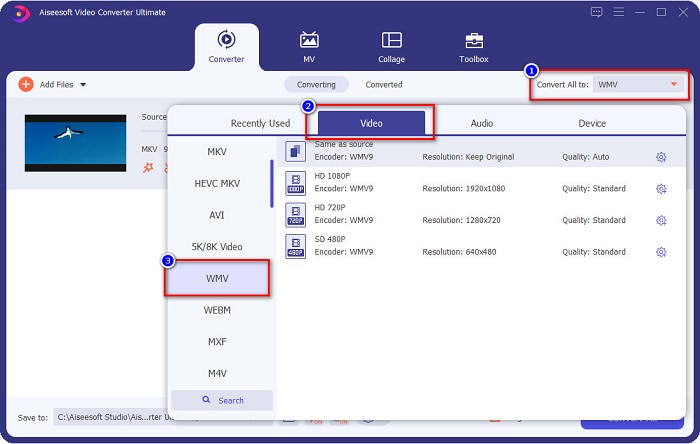
3. Adım. Sonraki adım olarak, yazılım arayüzünün sağ üst köşesinde bulunan Tümünü Dönüştür düğmesine tıklayın. Bir dosya biçimi listesi görünecektir, buradan WMV dosyasını seçin.
4. Adım. İstediğiniz dosya biçimini seçtikten sonra, MKV dosyanızı WMV dosya biçimine dönüştürmek için Tümünü Dönüştür düğmesine tıklayın. Birkaç saniye bekleyin, ardından WMV dosyanız hazır!
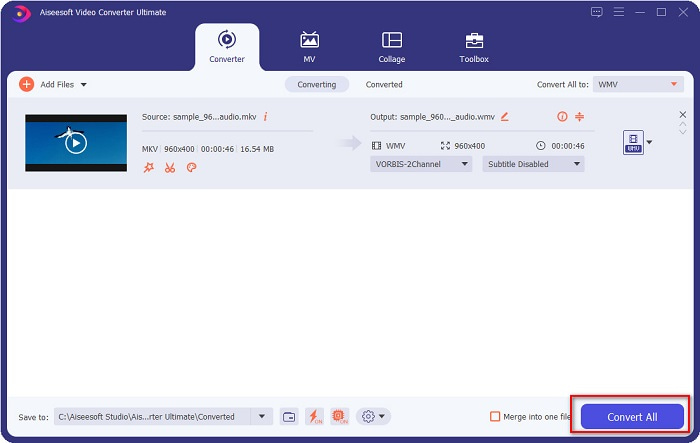
FVC Video Converter Ultimate kullanımındaki bu kolay adımları izleyerek, bu MKV'yi WMV dönüştürücüye hızla dönüştürebilirsiniz.
Bölüm 3. VLC Media Player Dönüştürücüyü Kullanarak MKV'yi WMV'ye Dönüştürün
MKV dosyanızı bir WMV dosyasına dönüştürebileceğiniz başka bir yol da ücretsiz bir dönüştürücü kullanmaktır. VLC Media Player sadece bir video oynatıcı değildir; ayrıca MKV gibi dosyaları WMV, WebM, MP4'e dönüştürebilir. Ancak arayüzünü anlamak biraz zor. Bununla birlikte, bu dönüştürücü birçok kullanıcı tarafından kullanılmaktadır.
VLC Media Player Converter'ın nasıl kullanılacağına dair hızlı kılavuz:
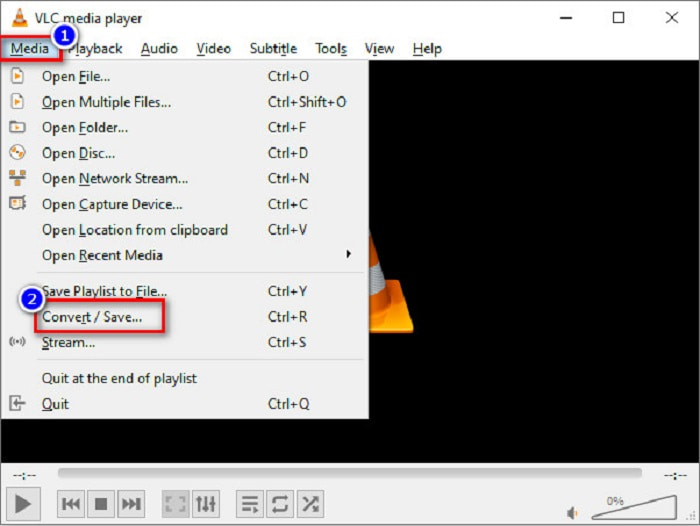
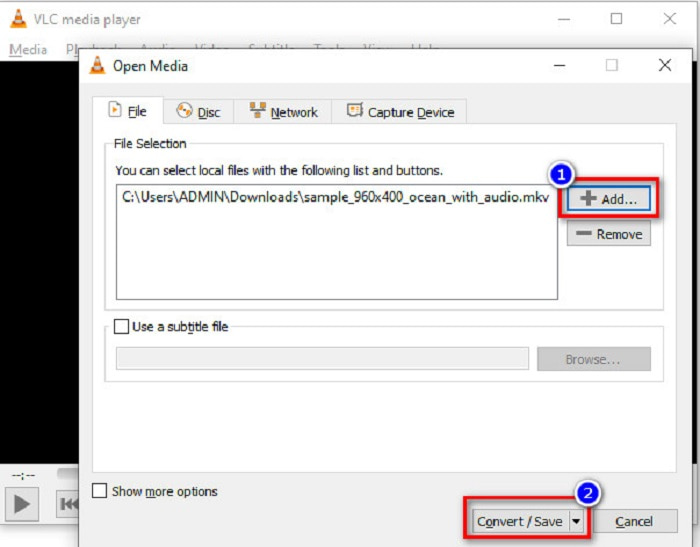
1. Adım. VLC Media Player'ı açın ya da henüz bilgisayarınıza indirmediyseniz VLC Media Player'ı aratın, kurulum adımlarını izleyin. Ardından ekranınızın sol üst köşesinde bulunan Ortam seçeneklerine tıklayın ve Dönüştür/Kaydet düğmesine basın.
2. Adım. Dönüştür/Kaydet düğmesine tıkladıktan sonra, yüklediğiniz yerel dosyaların listesini görebileceğiniz yeni bir arayüz açılacaktır. Dosya yüklemek için + Ekle düğmesine tıklayıp MKV dosyanızı seçin. Sonraki adıma geçmek için alttaki Dönüştür/Kaydet düğmesine basın.
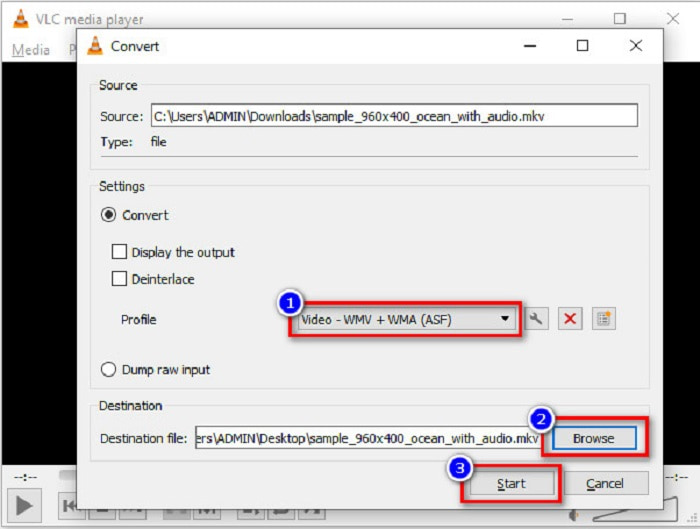
3. Adım. Son olarak, dosya biçimi olarak WMV'yi seçin. Dönüştürme işlemi bittiğinde dosyanızın kaydedileceği konumu seçmek için Gözat düğmesine tıklayın. Ve son olarak, MKV dosyanızı WMV dosyasına dönüştürmeyi başlatmak için Başlat düğmesine tıklayın.
Bölüm 4. Ücretsiz Çevrimiçi Dönüştürücü Kullanarak MKV'yi WMV'ye Dönüştürün
FVC Free Video Converter Online, MKV'yi WMV'ye dönüştürebilen, ayrıca MKV'den WMV'ye, AVI, MPG, MOV, MP4, MP3 ve daha birçok ses ve video biçimini dönüştürmenize izin veren ücretsiz çevrimiçi bir dönüştürücüdür. Bu dönüştürücüde video bit hızını, kare hızını ve hatta dosyanızın çözünürlüğünü düzenleyebileceğiniz bir özellik de bulunur. Harika bir çevrimiçi dönüştürücü olmasına rağmen, internete bağımlı bir dönüştürücü olduğu için internet bağlantınıza bağlı olarak yavaş dönüştürme ile karşılaşabilirsiniz. Yine de son derece iyi bir performans sunar ve birçok kişi tarafından en iyiler arasında görülür.
MKV dosyanızı FVC Free Video Converter Online kullanarak WMV'ye dönüştürmenin adımları şunlardır:
1. Adım. Tarayıcınızda FVC Free Video Converter Online'ı aratın ve sitelerine gidin.
2. Adım. Sitelerine gittikten sonra, Dönüştürülecek Dosyaları Ekle düğmesine tıklayın ve başlatın. Bilgisayarınızdaki dosyalar görünecek; buradan MKV dosyanızı seçin.
Dosyaları toplu dönüştürmek için Masaüstü Sürümü indirin.
3. Adım. Yazılımın ikinci arayüzünde, aşağıda dosya biçimlerinin bir listesini göreceksiniz. WMV dosyasının yanındaki daireyi işaretleyin.
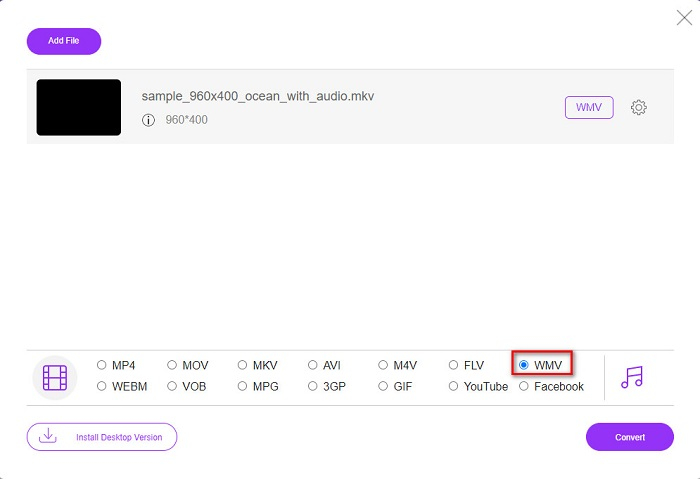
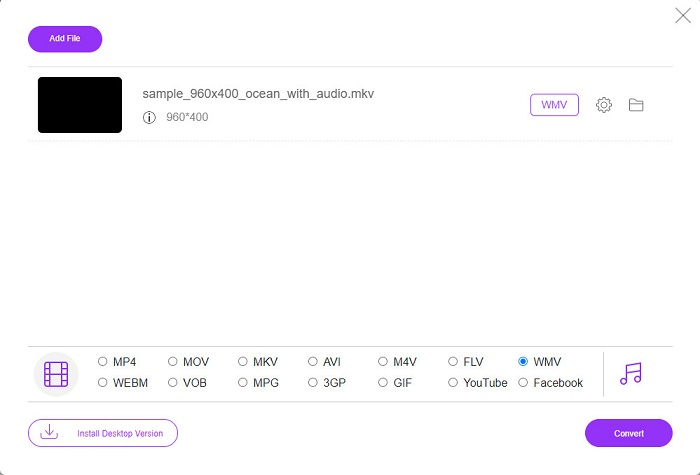
4. Adım. Son adım olarak, yazılımın sağ alt köşesinde bulunan Dönüştür düğmesine tıklayın. Ardından MKV dosyanızın dönüştürülmesi başlayacaktır.
MKV ve WMV
2002'de piyasaya sürülen Matroska multimedya kap formatı, bir dizi video, ses, görüntü ve altyazı parçasını içerebilen açık kaynaklı bir formattır. Böylece kısa video klipleri, TV şovlarını ve filmleri kolayca saklamak için kullanabilirsiniz. Anime hayran aboneliği için oldukça popülerdir.
Microsoft tarafından üretilen WMV, 2000'lerde en yaygın video formatlarından biriydi. Web üzerinden görülebilir ve Windows'ta çeşitli medya oynatıcılar tarafından oynatılabilir. Ayrıca Windows Media Player'ın varsayılan video dosyası biçimidir. Ancak son zamanlarda diğer formatlar tarafından devralındı.
Bölüm 5. MKV'yi WMV'ye Dönüştürme Hakkında SSS
Dosyanızın kalitesini kaybetmeden MKV'yi WMV olarak değiştirebilir misiniz?
Kesinlikle. FVC Video Converter Ultimate'ı kullanarak, dosyanızın kalitesini kaybetmeden MKV dosyanızı WMV'ye dönüştürebilirsiniz.
MKV dosyanızı dönüştürmek için en iyi dosya formatı nedir?
Yukarıda belirtildiği gibi, bazı medya oynatıcılar bu dosya biçimini desteklemez. Bu nedenle, birçok medya oynatıcı tarafından geniş şekilde desteklenen bir biçime dönüştürmeniz gerekir. Bunlardan biri MP4 biçimidir. Bu konu hakkında daha fazla bilgi edinmek için şu makaleyi okuyun: [Çevrimiçi ve Ücretsiz] Windows/Mac'te MKV'yi MP4'e Nasıl Dönüştürebilirim.
Windows Media Player MKV dosyalarını oynatabilir mi?
Windows Media Player, MKV dosya biçimlerini desteklemez. Bu yüzden bir MKV dosyasını Windows Media Player'da oynatmaya çalıştığınızda yalnızca ses çalar. İhtiyacınıza uygun oynatıcıyı bulmak için En İyi MKV Oynatıcı yazısını okuyun.
Sonuç
MKV dosyanızı WMV'ye nasıl dönüştürebileceğinizin birçok yolu vardır. Yukarıda sunulan dönüştürücüler, onları birbirinden ayıran farklı özelliklere sahiptir.
Listelenen en iyi MKV'den WMV'ye dönüştürücüler arasında, FVC Video Converter Ultimate'ı kullanmanızı öneriyoruz çünkü bu dönüştürücü daha verimli ve kullanımı daha kolaydır. Ayrıca, dosyanızı iyileştirmenize yardımcı olabilecek benzersiz özelliklere sahiptir. Hâlâ emin değil misiniz? Bu ultra hızlı dönüştürücüyü deneyimlemek için hemen indirin.
-
 MKV'den MOV'a - MKV'yi MOV'a Dönüştürme
 Mac'te MKV'yi MOV'a nasıl dönüştürebilirim? İMovie, MKV'yi okuyabilir mi? MOV formatı ne anlama geliyor? Bu gönderi, ücretsiz çevrimiçi ve profesyonel video dönüştürücülerle MKV'yi MOV'a dönüştürmenize yardımcı olacak 2 basit yolu anlatıyor.
-
 Photoshop/FFmpeg olmadan MKV Videolarını Animasyonlu GIF'lere Dönüştürme
 MKV filmlerini bilgisayarınıza indirip izledikten sonra, harika anları arkadaşlarınızla veya internette GIF olarak paylaşmak isteyebilirsiniz. Bu makalede, MKV'yi GIF'e dönüştürmenin en kolay 2 yolunu öğrenebilirsiniz.
-
 MKV Dosyalarını MP3'e Dönüştürme İle İlgili İpuçları ve Püf Noktaları [2021]
 MKV'den MP3'e doğru dönüştürücüyü seçmekte sorun mu yaşıyorsunuz? Ardından, bir soruna farklı çözümler sunduğumuzdan bu yazıyı okumaya devam edin.

