


 Video Dönüştürücü Ultimate
 Ekran kaydedicisi
 Video Onarımı
Mac ve Windows'ta WMV'yi MKV'ye Kolayca Dönüştürme Üzerine Hızlı Kılavuz
Bir film tutkunuysanız ve altyazılı çeşitli ses parçalarını işleyebilecek bir dosya formatı istiyorsanız, WMV dosyanızı MKV dosyasına dönüştürmek isteyebilirsiniz. Windows ve Mac ile uyumlu bir WMV - MKV dönüştürücü ararken sorun yaşıyorsanız, çevrimiçi ve çevrimdışı olarak kullanabileceğiniz en iyi dönüştürücüleri bulduk. Bu makale, Mac ve Windows'ta WMV'yi MKV'ye dönüştürmek için en iyi dönüştürücüleri sunar.

Bölüm 1. Neden WMV'yi MKV'ye Dönüştürün
WMV veya Windows Media Video, neredeyse tüm medya oynatıcıların yaygın olarak desteklediği bir dosya biçimidir. Video klipleri, animasyonları, TV bölümlerini ve filmleri depolayabilen bir dosya biçimidir. Ayrıca sıkıştırılmış bir dosyadır; bu nedenle, küçük bir dosya boyutuna sahiptir. Öyleyse neden WMV'yi MKV'ye dönüştürmeniz gerekiyor? MKV veya Matroska, sınırsız ses, video ve altyazı parçalarını birleştirebilen bir dosya kabıdır.
Ayrıca, bu dosya formatı geleceğe yöneliktir, bu da gelecekte eski olmayacağı anlamına gelir. Ayrıca birçok dilde birden fazla altyazı akışını ve ses parçasını da işleyebilir. Bu nedenle, bir film tutkunuysanız, WMV dosyanızı MKV dosya formatına dönüştürmek isteyebilirsiniz.
Bölüm 2. En İyi Çevrimdışı Dönüştürücüyü Kullanarak WMV'yi MKV'ye Dönüştürün
Bu dönüştürücünün, piyasada bulunan en iyi çevrimdışı dönüştürücü olduğu kanıtlanmıştır. FVC Video Converter Ultimate, hiç zorlanmadan profesyonel düzeyde çıktılar sağlayabilen ücretsiz bir çevrimdışı araçtır. Ayrıca WMV dosyanızı MKV, AVI, MP4, MOV, FLV ve daha birçok biçime dönüştürmek için çeşitli dosya formatlarını da destekler. Hâlâ sunduklarından memnun değil misiniz? Bu dönüştürücüyle gelişmiş video düzenleme özelliklerini kullanarak videonuzu da düzenleyebilirsiniz. Bu WMV'yi MKV'ye dönüştürücüyü ücretsiz olarak nasıl kullanacağınızı öğrenmek için aşağıdaki basit adımları izleyin.
Adım 1. Aşağıdaki İndir düğmesine tıklayarak uygulamayı indirin. Mac veya Windows için indirme yapabileceğiniz iki seçenek vardır. Ardından uygulamayı açın.
Ücretsiz İndirWindows 7 veya üstü içinGüvenli İndirme
Ücretsiz İndirMacOS 10.7 veya üstü içinGüvenli İndirme
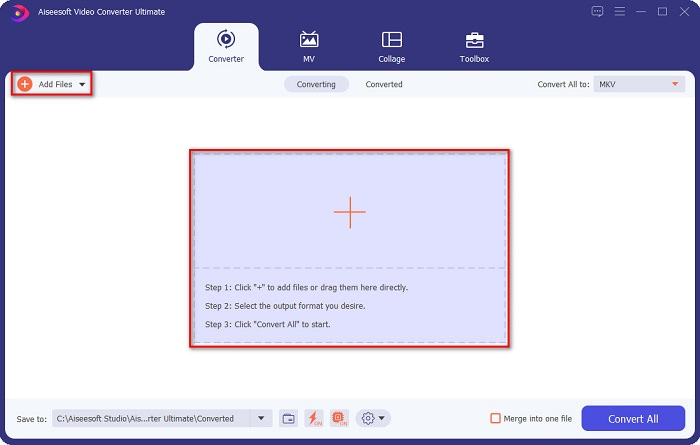
Adım 2. Uygulamayı açtıktan sonra, yazılımın ilk arayüzüne dosyanızı yüklemek için Dosya Ekle düğmesine veya + düğmesine tıklayın. Ardından, WMV dosyanızı seçeceğiniz yeni bir pencere açılacaktır.
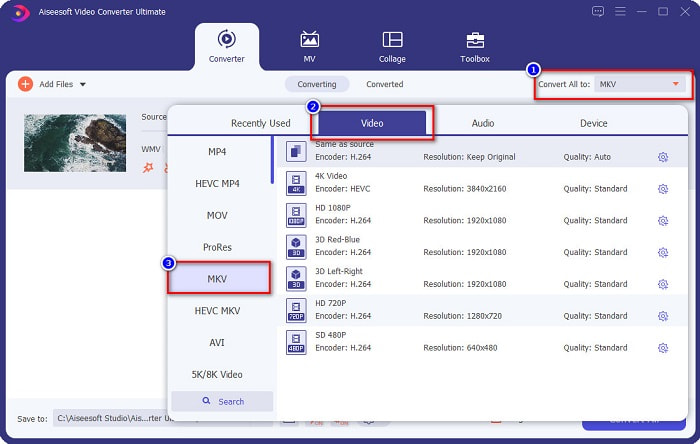
Adım 3. Ardından, istediğiniz çıktı formatını seçmek için Tümünü Dönüştür düğmesine tıklayın. Sizin durumunuzda, MKV formatını seçin.
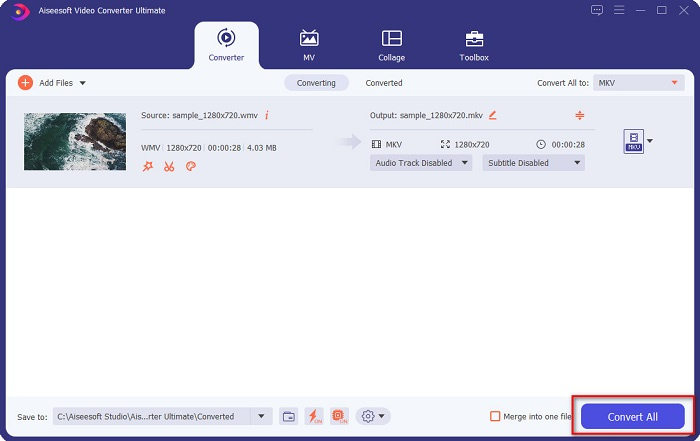
Adım 4. Son olarak, WMV dosyanızı MKV dosyasına dönüştürmek için Tümünü Dönüştür düğmesine tıklayın. Sonra sadece birkaç saniye bekleyin. Hepsi bu kadar! Bu arada, bu basit adımları izleyerek WMV'yi MOV dosyalarına dönüştürebilirsiniz.
Bölüm 3. En İyi 3 Çevrimiçi Aracı Kullanarak WMV'yi MKV'ye Dönüştürün
Hiç şüphe yok ki, çevrimiçi araçlar kolaylık sağlamak için en iyisidir çünkü hiçbir şey indirmeniz gerekmeyecektir. Bu bölüm, web'de bulunan en iyi WMV'den MKV'ye dönüştürücüleri sunar.
FVC Ücretsiz Çevrimiçi Video Dönüştürücü
FVC Free Online Video Converter, kullanımı kolay bir arayüze sahip çevrimiçi bir dönüştürücüdür. Çeşitli dosya formatlarını destekler ve WMV'yi MKV, AVI, MOV, MP4, MP3, TS ve daha fazlasına dönüştürebilir. Ancak bu kodlayıcı internete bağımlıdır; yani dönüştürme hızınız internet bağlantınıza bağlıdır. Yine de, çevrimiçi WMV'den MKV'ye dönüştürücüler arasında tartışmasız en iyilerden biridir.
FVC Free Online Video Converter aracılığıyla WMV'yi MKV dosyalarına dönüştürme adımları şunlardır:
Adım 1. Bu bağlantıya tıklayarak web sayfalarına gidin veya tarayıcınızda FVC Free Online Video Converter araması yapın.
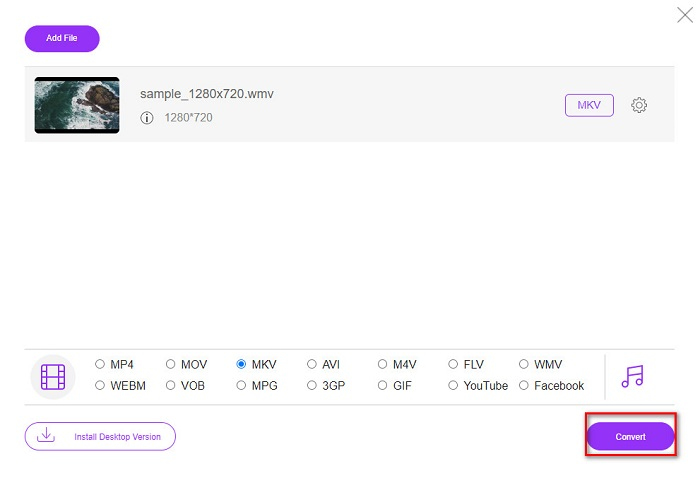
Adım 2. Bir sonraki adımda, Dönüştürülecek Dosyaları Ekle düğmesine tıklayın ve ardından uygulamayı başlatın. Uygulama başlatıldıktan sonra, bilgisayarınızdaki dosyalar göründüğünde WMV dosyanızı seçin.
Dosyaları toplu dönüştürmek için Masaüstü Sürümü indirin.
Adım 3. Ardından, istediğiniz çıktı dosyası formatını seçmek için yazılımın ikinci arayüzünün altında bulunan MKV'ye tıklayın.
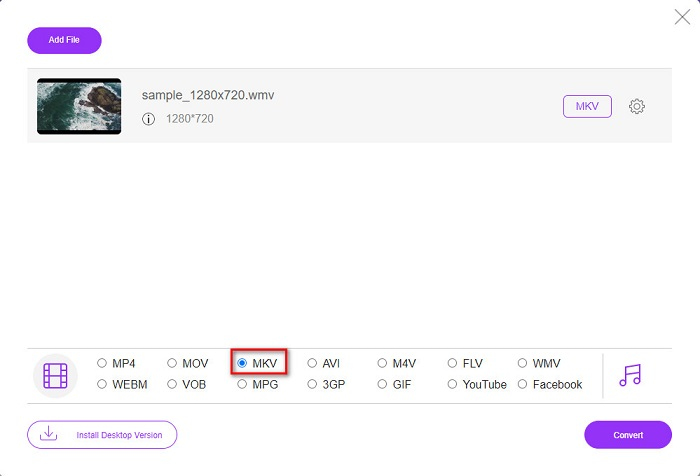
Adım 4. Bitirmek için, Dönüştür düğmesine tıklayın ve WMV'den MKV'ye dosyanızın dönüştürülmesi başlayacaktır. Dönüştürme işleminizin tamamlanmasını bekleyin, hepsi bu! Bu adımları izleyerek WMV'yi çevrimiçi olarak kolayca MKV'ye dönüştürebilirsiniz.
Convertio
Webde trend olan bir başka çevrimiçi dönüştürücü ise Convertio'dur. Bu ücretsiz çevrimiçi dönüştürücü de kullanımı kolaydır. Ancak buna rağmen, bu dönüştürücü sizi rahatsız edebilecek reklamlar içerir. Yine de WMV dosyanızı MKV'ye dönüştürürken kullanımı oldukça pratiktir.
Adım 1. Tarayıcınızda Convertio araması yapın. Ardından, WMV dosyanızı seçmek için yazılımın ana arayüzündeki Dosya Seç düğmesine tıklayın.

Adım 2. Daha sonra, çıktı formatı olarak MKV dosyasını seçmek için açılır düğmeye tıklayın.
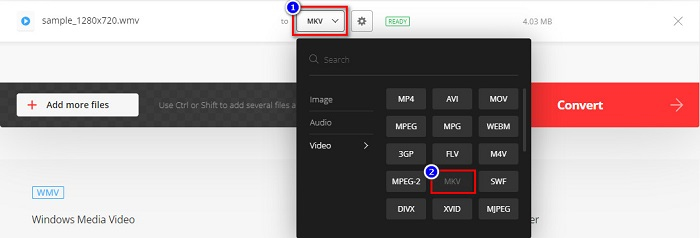
Adım 3. Son adım olarak, yazılımın arayüzünün sağ alt köşesinde bulunan Dönüştür düğmesine tıklayın. Ardından dosyanız dönüştürülmeye başlayacaktır.

MDönüştürücü
MConverter, çeşitli ses, video ve resim dosyalarını destekleyen çevrimiçi bir WMV'den MKV'ye dönüştürücüdür. WMV'nizi MKV dosyasına dönüştürmek için basit adımlara sahiptir. Ancak, bu dönüştürücüyü kullanırken bir dosya boyutu sınırı vardır. Yine de WMV dosyanızı kolaylıkla etkili bir şekilde MKV'ye dönüştürebilir.
Adım 1. Kullandığınız tarayıcıya MConverter yazın, ardından web sayfalarına yönlendirileceksiniz.
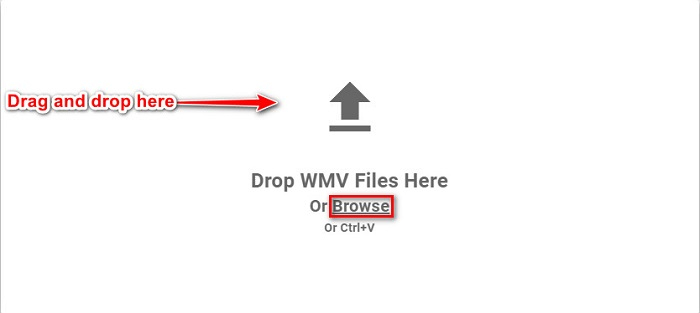
Adım 2. Daha sonra, WMV dosyanızı dikdörtgen kutunun üzerine sürükleyip bırakın veya WMV dosyanızı seçmek için göz at kelimesine tıklamayı tercih edebilirsiniz.
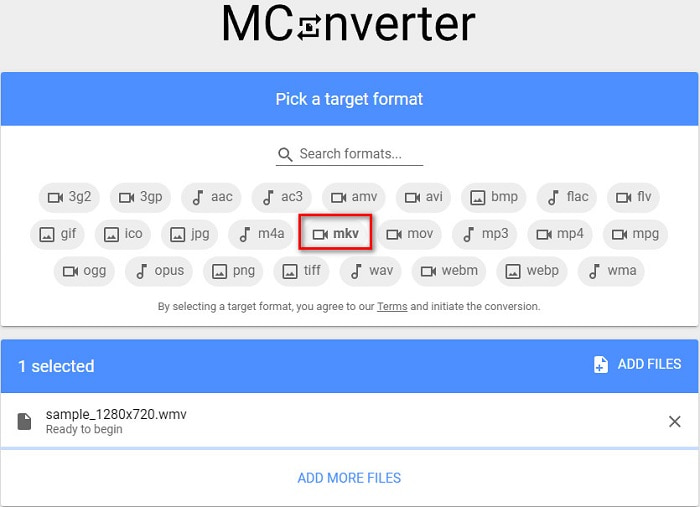
Adım 3. WMV dosyanızı seçtikten sonra, MKV düğmesine tıklayarak çıktı dosyası formatı olarak MKV dosyasını seçin. MKV'ye tıkladığınız anda WMV'den MKV'ye dönüştürme işleminiz başlayacaktır. Ardından dosyanızın dönüştürülmesini bekleyin.
WMV ve MKV
Microsoft tarafından üretilen WMV, 2000'lerde en yaygın video formatlarından biriydi. Web üzerinden görülebilir ve Windows'ta çeşitli medya oynatıcılar tarafından oynatılabilir. Ayrıca Windows Media Player'ın varsayılan video dosyası biçimidir. Ancak son zamanlarda diğer formatlar tarafından devralındı.
2002'de piyasaya sürülen Matroska multimedya kap formatı, bir dizi video, ses, görüntü ve altyazı parçasını içerebilen açık kaynaklı bir formattır. Böylece kısa video klipleri, TV şovlarını ve filmleri kolayca saklamak için kullanabilirsiniz. Anime hayran aboneliği için oldukça popülerdir.
Bölüm 4. WMV'yi MKV'ye Dönüştürme Hakkında SSS
Mac'te MKV oynayabilir misiniz?
Hayır. MacOS, MKV dosya formatını desteklemez. Ancak, üçüncü taraf bir oynatıcı kullanabilir veya MKV dosyanızı Mac'in desteklediği bir dosya formatına dönüştürebilirsiniz. MP4, Mac'in desteklediği en yaygın dosya formatlarından biridir. MKV'yi MP4'e dönüştürme hakkında daha fazla bilgi için bu bağlantıya tıklayın.
MKV dosyalarının dosya boyutunu sıkıştırabilir misiniz?
Evet. Dosyalarınızı bir sıkıştırıcı kullanarak küçültebilirsiniz. FVC Video Converter Ultimate ayrıca dosya sıkıştırma özelliğine de sahiptir.
Window Media Player MKV dosyalarını destekliyor mu?
Windows Media Player, MKV dosyalarını desteklemez. Windows Media Player'da bir MKV dosyası oynatırken yalnızca ses çalınması veya oynatma sorunlarıyla karşılaşabilirsiniz. Windows Media Player'da MKV dosyalarını oynatmak için MKV codec indirip yüklemeniz gerekir.
Sonuç
Özetlemek gerekirse, Mac ve Windows'ta WMV'yi MKV'ye dönüştürmenin sayısız yolu vardır. Yukarıda sunulan çevrimiçi ve çevrimdışı araçlar, WMV dosyalarınızı MKV'ye dönüştürme konusunda umut verici bir performans göstermektedir. Ancak, muhteşem bir çıktı formatına sahip olmanızı sağlayan bir dönüştürücü istiyorsanız, dosyaları dönüştürürken ihtiyaç duyduğunuz tüm özel özelliklere sahip olduğundan FVC Video Converter Ultimate'ı kullanın.
-
 WMV'den MP3'e – Videoyu Ücretsiz Olarak Sese Dönüştürme [Masaüstü/Çevrimiçi ]
 Bir WMV videosu izlerken ses kısmını büyüleyici buluyorsunuz. Böylece MP3 çalarınızda çalmak istiyorsunuz. Ama açıkçası oynatıcınız WMV formatını desteklemiyor. Bu, WMV'yi MP3'e dönüştürmenin bir yolu olup olmadığını merak etmenizi sağlar.
-
 PC/Mac'te WMV Dosyalarını FLV'ye Dönüştürmenin En Kolay 2 Yolu
 WMV'yi FLV'ye nasıl dönüştürebilirsiniz? Öncelikle tavsiyemizi okumanız ve favori yönteminizi bulmanız ve ardından işi hızlı bir şekilde yapmak için kılavuzumuzu takip etmeniz gerekir.
-
 [2 Çözüm] WMV Videolarını Ücretsiz Olarak GIF Dosyalarına Dönüştürme
 WMV videolarının harika kısımlarını kırpmak ve onlardan GIF yapmak istiyorsanız, bu makalede WMV videolarını GIF'lere aktarmanın 2 kolay yöntemini öğrenebilirsiniz.

