


 Video Dönüştürücü Ultimate
 Ekran kaydedicisi
 Video Onarımı
[Kanıtlanmış] Windows ve Mac'te Kullanılabilecek En İyi 2 Etiket Düzenleyici
Windows üzerinde kaydettiğimiz ses dosyalarının çoğu WMA formatındadır ve bunların meta verilerini bir WMA meta veri düzenleyici kullanarak düzenleyebilirsiniz. Ancak, masaüstünüzde kullanabileceğiniz doğru meta veri düzenleyicisini seçmek bireyler için biraz zor bir görev olabilir. Fakat bugün, Windows ve Mac’te kullanabileceğiniz iki düzenleyicinin yardımıyla bu görev sandığınız kadar zor değil. Bu ikisinin ne olduğunu bilmek ister misiniz? Okumaya devam ederseniz, indirebileceğiniz bu iki yazılım arasında tarafsız bir inceleme sunacak ve hangisinin daha iyi olduğunu göreceksiniz. 2022’de kesinlikle kaçırmamanız gereken bu iki mükemmel aracı öğrenmek için bu blog yazısını okumaya devam edin ve keyif alın.

Bölüm 1. WMA Etiketlerini Düzenlemek için Windows ve Mac'te Bulunan Ultimate WMA Etiket Düzenleyicisini Kullanın
Listemizde ilk sırada, herkesin sevdiği etiketleri için güçlü bir düzenleyici sunan araç olan en iyi WMA meta veri düzenleyicisi FVC Video Converter Ultimate var. Bu araçla, WMA etiketlerinizi düzenleme deneyiminiz olmasa bile bu sorunu bir profesyonel gibi kolayca halledebilirsiniz. Diğer etiket düzenleyicilerin aksine, nasıl kullanılacağına dair bu meta veri düzenleyici hakkında çok fazla bilgiye ihtiyacınız olmayacak; birkaç tıklama ve saniyenin bir bölümü içinde, WMA'nızı hiç ter dökmeden etiketleyeceksiniz.
Daha fazlasını mı istiyorsunuz? Bu aracın sunduğu en iyi özelliklerden biri, diğer araçların size sağlayamadığı birçok işlemi yapabildiğiniz Araç Kutusu’dur; örneğin sıkıştırma, kırpma, filigran ekleme veya kaldırma, videoyu tersine çevirme ve çok daha fazlası. Böylece aklınıza gelebilecek her türlü medya dosyası görevi, bu aracın size sağlayacağı yardım sayesinde kolayca üstesinden gelebileceğiniz bir hale gelir. Buna ek olarak, ultra hızlı dönüştürme süreci sayesinde WMA formatınızı hızlıca 1000’den fazla yeni formata dönüştürebilirsiniz. Dikkate değer, değil mi? İşte nihai aracın yapabildikleri bunlar. Ve bir WMA etiketini (tag) nasıl ekleyeceğinizi öğrenmek için, aşağıdaki adımlar bunu bir uzman gibi yapmanıza yardımcı olacaktır.
Adım 1. Öncelikle, aşağıdaki indirme düğmesine tıklayın, şu anda Windows mu yoksa Mac mi kullandığınızı seçin. Hızlıca kurun ve işlem tamamlandıktan sonra programı başlatın.
Ücretsiz İndirWindows 7 veya üstü içinGüvenli İndirme
Ücretsiz İndirMacOS 10.7 veya üstü içinGüvenli İndirme
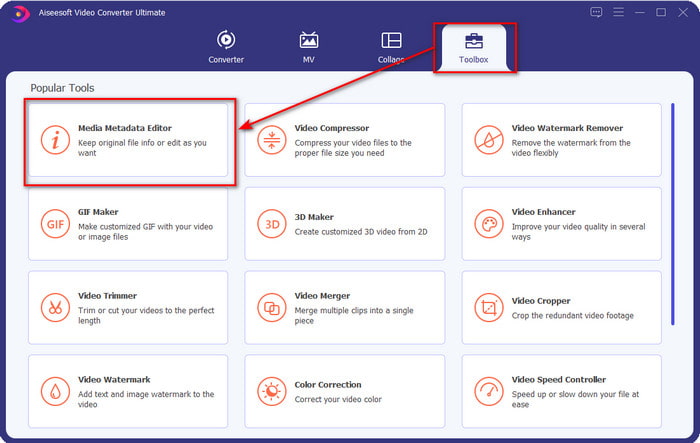
Adım 2. Üst bölümde Araç Kutusuna tıklayın ve ardından aynı işlemi Ortam Meta Veri Düzenleyici üzerinde yapın.
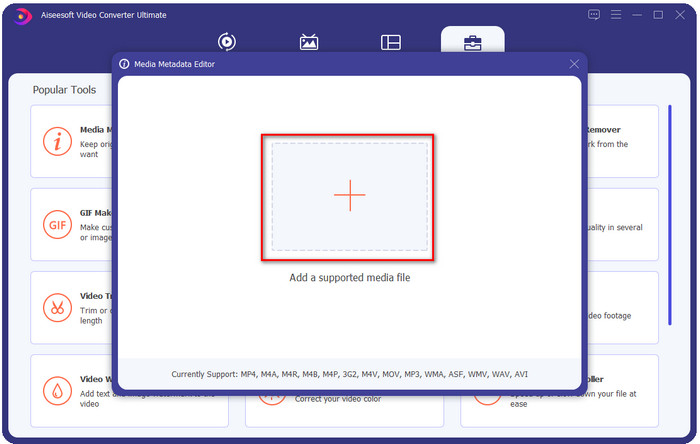
Adım 3. Açılacak olan mini penceredeki + simgesine tıklayarak dosyayı ekleyin, klasördeki WMA dosyasını bulun ve bir sonraki işleme geçmek için Aça basın.
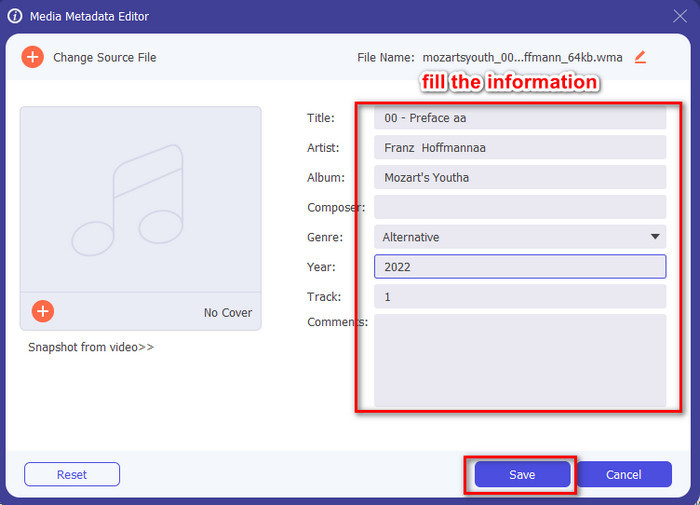
Adım 4. Bu alanda, WMA dosyanızın meta verilerini veya etiketlerini düzenleyebilir ve metin kutularını buna göre doldurabilirsiniz. Tüm bunlardan sonra, ses dosyanızda yaptığınız değişiklikleri uygulamak için Kaydet’e tıklayın. Böylece ses dosyanıza meta verileri 1-2-3 kadar hızlı bir şekilde etiketlemiş olursunuz.
Bölüm 2. WMA Meta Verilerini Değiştirmek için Windows ve Mac'te Bulunan Ücretsiz WMA Etiket Düzenleyicisini Kullanın
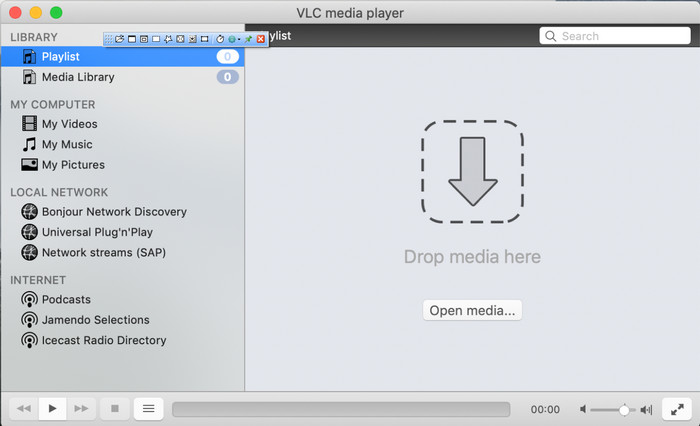
VLC Player, Windows ve Mac üzerinde ücretsiz olarak indirebileceğiniz bir diğer WMA etiket düzenleyicisidir. Bu medya oynatıcı, video ve ses dosyası etiketlerinizi düzenlemenize yardımcı olabilir. Bahsedilen ilk yazılımın aksine, bu araç herhangi bir medya dosyasına meta veri eklemek için özel olarak tasarlanmamıştır. Asıl amacı, orijinal ya da yerel medya oynatıcının ek bir codec indirilmeden oynatamayacağı farklı medya dosyalarını oynatmaktır. Araç etiket ekleyebilse de, yine de bu işe adanmış diğer etiket düzenleyiciler kadar etkili değildir.
Ayrıca, bu araç bize birçok şeyi kanıtladı çünkü indirmesi güvenilir ve güvenli. Bu özelliklere ek olarak, bu araç aynı zamanda dönüştürme, basit düzenleme ve gerekirse ekran kaydı yapma yeteneğine de sahiptir. Diğer işlevlerde bu kadar mükemmelliği sağlamayan çok amaçlı bir araç olduğunu ancak video oynatma konusunda şüphesiz piyasanın en iyisi olduğunu söyleyebiliriz.
Bölüm 3. Ücretsiz ve Ultimate WMA Etiket Düzenleyici Arasındaki Karşılaştırma Tablosu
İncelemeyi anlamamızı daha da kolaylaştırmak için, sürücünüze hangi aracın indirilmesinin çok daha iyi olduğunu bilmek için bir karşılaştırma tablosu ekliyoruz. FVC Video Converter ve VlC Player'ı karşılaştırmak ve karşılaştırmak için lütfen baştan sona okuyun ve en iyi WMA meta veri düzenleyicisi olan karar verin.
| FVC Video Dönüştürücü Ultimate | VS | VLC Oynatıcı |
 | Windows ve macOS'ta kullanılabilir | |
| Etiketleri Düzenlemek için Geniş Bir Format Aralığını Destekler |  |
| Kırpma, kesme, düzenleme ve daha fazlası gibi Çok Amaçlı İşlevler | |
| Kullanıcı dostu | |
| En İyi Grafik Kullanıcı Arayüzü | |
Bölüm 4. WMA Meta Veri Düzenleyicisi hakkında SSS
VLC'de WMA oynayabilir miyim?
Evet, WMA dosyasını VLC’de kolayca oynatabilirsiniz çünkü bu format desteklenmektedir. VLC hakkında daha fazla bilgi edinmek istiyorsanız, bu makaleyi okuyabilirsiniz; bu bağlantıya dokunarak VLC ve mevcut diğer alternatifleri hakkında bilgi sahibi olabilirsiniz.
WMA nedir?
WMA, Microsoft tarafından bestecisi Stan LePard’ın da katkısıyla geliştirilmiş, bir dizi ses codec’ini depolamak için kullanılan bir ses formatıdır. Bu ses formatı, standart ses formatı MP3'ün ünlü rakiplerinden biridir. Ancak, format beklediğiniz kadar popüler değildir; bu nedenle, .wma uzantılı bir dosyayı aktarmak isterseniz, karşı taraftaki kullanıcılar Windows kullanmıyorsa bir üçüncü taraf uygulamasına ihtiyaç duyacağınızı öngörmelisiniz. Peki ne yapmalısınız? Alıcının cihazıyla uyumlu hale getirmek için WMA’yı MP3'e dönüştürebilir misiniz? Bu makalenin yardımıyla, Windows, Mac ve Çevrimiçi ortamda WMA’yı MP3’e nasıl dönüştürebileceğinizi öğreneceksiniz.
WMA oynamak için ek bir codec bileşenine ihtiyacım var mı?
Şu anda kullanmakta olduğunuz programa bağlıdır; Windows kullanıcısıysanız, ses dosyasını masaüstünüzde oynatmak için ek bir codec bileşeni indirmeniz gerekmez. Ancak, hepsi Windows kullanıcısı değildi, bu nedenle ses dosyasını dönüştürmek, WMA'yı cihazlarınızla uyumlu hale getirmenin en iyi yoludur. Bir dönüştürücü arıyorsanız, Windows ve Mac'te indirebileceğiniz en iyi ses dönüştürücüsü olan FVC Video Converter Ultimate'ı seçmenizi öneririz. Bilgi edinmek istiyorsanız bu adımları izleyin. Aracı masaüstünüze indirin, ardından yükleyin. Aracı açın ve WMA dosyasını yüklemek için + simgesine tıklayın; sağ üst tarafta, Tümünü Dönüştür'e tıklayın ve listede bulunan ses biçimini seçin. Dönüştürme işlemini başlatmak için Tümünü Dönüştür'e basın. Bu kadar kolay.
Sonuç
Artık FVC Video Converter Ultimate ve VLC oynatıcı hakkında bir fikrimiz olduğuna göre, kullanmanız gereken en iyi WMA etiket düzenleyicisini seçmenin zamanı geldi. Bu araçlar, WMA dosyalarınızın etiketlerini düzenlemek için harikadır, bu nedenle, tercih ederseniz, etiketleri hızlı bir şekilde düzenleyebilirsiniz. Ancak bu görevi üstlenecek profesyonel bir araç istiyorsanız, nihai aracı seçin. İndirme düğmesine basarak, WMA etiketlerinizi ayarlamak için bunu her iki işletim sisteminde de kullanabilirsiniz.
-
 Meta Veri Nedir: Meta Veriler Hakkında Temel Bilgileri Öğrenin
 Meta Veri nedir? Bu önemli mi? Meta verinin bölümleri nelerdir? Aynı soru var mı? Bu yazıda metadata hakkında temel bilgileri öğreneceksiniz.
-
 Çevrimiçi ve Çevrimdışı En İyi 4 Meta Veri Görüntüleyicisi [2025 Güncellemesi]
 Dosyamın meta verilerini kontrol edebilir miyim? Evet, yapabilirsiniz, bu yazının yardımıyla size kullanabileceğiniz farklı meta veri görüntüleyicilerini tanıtacağız.
-
 Snapchat'te En Sevilen 6 Snapchat Hareketli Snapchat Filtresi
 Snapchat videolarına filtre eklemenin en iyi yollarını bilmek ister misiniz? Pekala, buna tıklayabilir ve Snapchat videolarına uygulamak için kullanabileceğiniz farklı filtreleri öğrenebilirsiniz.
