


 Video Dönüştürücü Ultimate
 Ekran kaydedicisi
 Video Onarımı
Windows ve Mac'te MP3 Meta Verilerini Düzenlemek veya Düzeltmek için 4 Yöntem
Herkes Musicphile, yani müziği seviyoruz çünkü şarkıcıların ve yazarların duygularını görsel olarak görmesek de hissetmemize yardımcı oluyor. Müzik sayesinde herkes bağlantıda kalabilir ve stresi azaltmamıza, IQ'muzu geliştirmemize ve her gün üretken olmamıza yardımcı olabilir. Müziğin çoğu MP3 formatındadır çünkü bunun için standart ses kabıdır. MP3'ü cihazınızda çalabilmenize rağmen, meta veriler yanlışsa uygun düzenlemeyi doğru şekilde çalamazsınız. Müzik kitaplığınız dağınıksa doğru ruh halini ayarlayamazsınız, o zaman ne yapmalısınız? Etiketleri doğru bir şekilde düzenlemek için neden düzeltmeye çalışmıyorsunuz? Windows ve Mac'te MP3 meta verilerinin nasıl düzenleneceğini bilmek istiyorsanız, kullanabileceğiniz dört farklı yöntemi gösterdiğimiz için bu makale sizin için doğru makaledir.

Bölüm 1. Windows ve macOS'ta MP3 Meta Verilerini Düzeltmenin veya Düzenlemenin En İyi Yöntemi [Önerilir]
FVC Video Converter Ultimate, Windows ve Mac’inizde MP3 etiketlerini düzeltmek için en iyi programlardan biri olma yolunda şimdiden önemli bir adım atmış durumda. Bu araç, aynı meta veri sorununu gidermek için MP3, WAV, WMA, AAC ve daha birçok ses formatını yüklemeyi destekler. Diğer etiket düzenleyicilerle erişemediğiniz gizli meta verileri kaldırmanız da mümkündür.
Sadece bu değil, isterseniz MP3'ü başka bir ses formatına dönüştürebilir ve ayrıca Toolbox'ın içinde bulunan birçok işlev ve özellik sunar; indirirseniz inceleyebilirsiniz. Birkaç dakika içinde, bu programın sorunu olabildiğince hızlı çözmesini sağlayabilirsiniz. Doğru olup olmadığından emin değil misiniz? Neyse ki, aşağıdaki yazılı eğitim, dediğimiz gibi, hızlı bir şekilde yapabileceğinizi kanıtlamak için MP3 meta verilerinin nasıl düzenleneceğini öğretecek.
Adım 1. Aşağıdaki indirme düğmesine tıklayın, hemen altında şu anda kullandığınız iki işletim sisteminden hangisi ise onu seçin. İndirdikten sonra hızlıca kurun, aracı açın ve bir sonraki adıma geçin.
Ücretsiz İndirWindows 7 veya üstü içinGüvenli İndirme
Ücretsiz İndirMacOS 10.7 veya üstü içinGüvenli İndirme
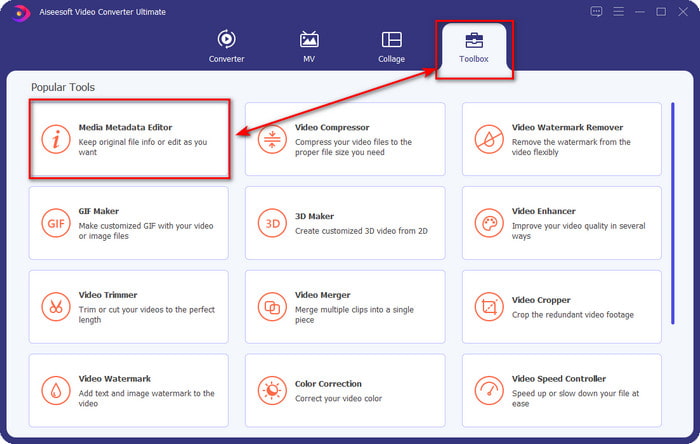
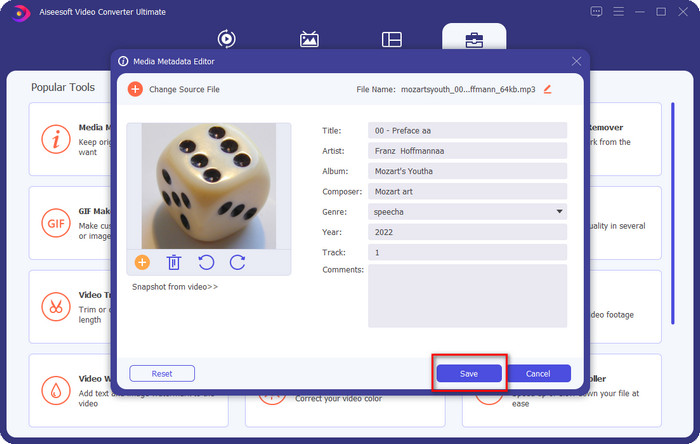
Adım 2. Araç Kutusunu seçin ve altında yer alan Ortam Meta Verisi Düzenleyiciye tıklayın. Giriş kısmında da söylediğimiz gibi, Araç Kutusu’nda diğer düzenleyicinin sunmadığı birden fazla işlevi kullanabilirsiniz.
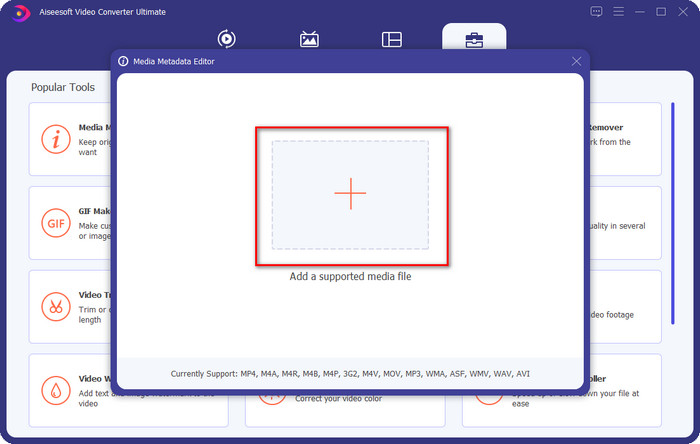
Adım 3. Ekranınızda küçük pencereler görünecektir; + simgesine tıklayın. Görüntülenen klasörde ses veya MP3 dosyasını bulun, dosyaya tıklayın ve yüklemek için Open (Aç) düğmesine basın.
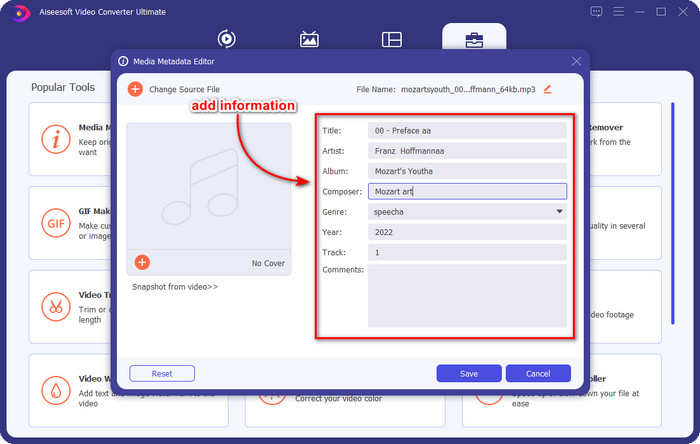
Adım 4. İhtiyaçlarınıza göre meta verileri düzenleyip düzeltin; bilgi eklemek için her bir metin kutusuna tıklayın.
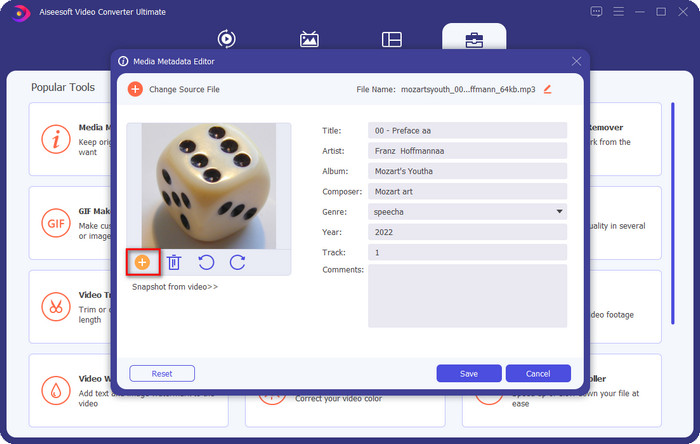
İsteğe bağlı. Bu araçla ayrıca, MP3 dosyanızdaki MP3 albüm kapağı meta verisini + simgesine tıklayarak ekleyebilir veya düzeltebilirsiniz; klasörden kapak olarak kullanmak istediğiniz görseli seçin ve devam etmek için Open (Aç) düğmesine tıklayın.
Adım 5. MP3 dosyanızın meta verilerini ekleme ve düzeltme işini tamamladıysanız, ses dosyanızda yaptığınız değişiklikleri kaydetmek için Save (Kaydet) düğmesine basın. İşte bu kadar; böylece nihai aracın yardımıyla ses etiketlerini zahmetsizce düzeltmiş oldunuz.
Bölüm 2. Masaüstünde MP3 Etiketlerini Değiştirmenin 3 Ücretsiz Yöntemi
iTunes
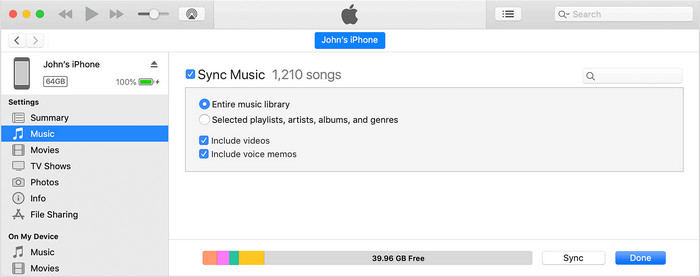
iTunes, macOS X’te MP3 etiketlerini düzenlemenize yardımcı olabilecek yerleşik bir araçtır. Ses dosyanızın meta verilerini düzenleme konusunda Groove Music ile aynı işi yapar. Ancak bu araçla müzik satın alabilir ve bunları mümkün olduğunca hızlı bir şekilde burada çalabilirsiniz. Ayrıca bu uygulamadan gelen müziklerin zaten etiketleri bulunur ve indirdiğiniz müziklerin etiketi yoksa, etiket eklemek için bu aracı kullanabilirsiniz. Nasıl yapacağınızı öğrenmek için aşağıdaki adımları izleyin.
Adım 1. Mac’inizde iTunes’u açın.
Adım 2. Ses dosyasına tıklayın ve Get Info (Bilgi Al) seçeneğini seçin.
Adım 3. Etiketleri düzeltin ve değişiklikleri kaydetmek için Tamam’a (OK) tıklayın.
MP3 Etiketi
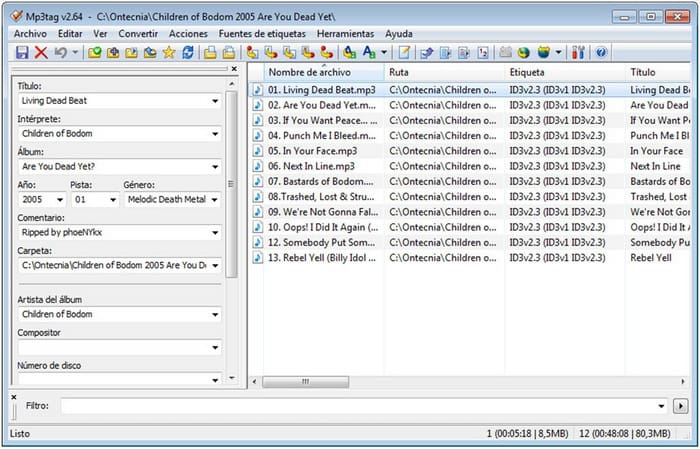
MP3 Tag, Windows’unuza indirebileceğiniz, MP3 etiketlerini düzeltmeye adanmış en iyi araçlardan biridir. Bu araçla, doğru meta verilere sahip olmak için müzik veritabanına otomatik olarak erişebilirsiniz. Araç diğer yerleşik yazılımlara benzemese de, ortalama düzeyde desteklenen formatlarla meta verileri ayarlamanın hâlâ mümkün olduğunu görüyoruz. Bu aracı indirmek ve kullanmak isterseniz, aşağıdaki adımları izleyin.
Adım 1. Yazılımı bilgisayarınıza indirin ve açın.
Adım 2. MP3 dosyasını ortaya sürükleyip bırakın, ses dosyasına tıklayın ve sol tarafta etiketleri düzenleyebilirsiniz.
Adım 3. Yaptığınız düzenlemeleri kaydetmek için kaydet simgesine tıklayın.
Groove Müzik
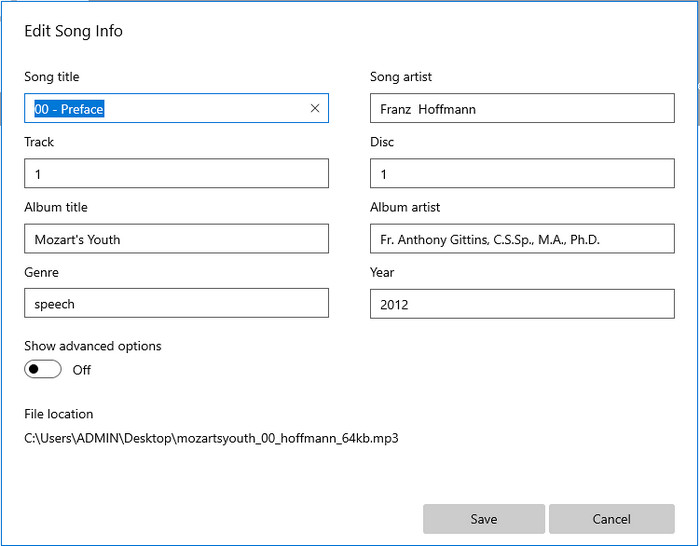
Diyelim ki sürücünüzde yeterli alan yok. Windows 10’da MP3 etiketlerini düzenlemeyi öğrenmeniz mümkün mü? İşte bu noktada Groove Music, Windows kullanıcılarına ses dosyalarındaki etiketleri değiştirmede yardımcı olmak için devreye giriyor. Bu araçla, sürücünüze kaydedilmiş neredeyse tüm ses dosyalarını rahatlıkla çalabilirsiniz. Bu yerleşik uygulamayı nasıl kullanacağınızı öğrenmek istiyorsanız aşağıdaki adımları izleyin.
Adım 1. Ekrandaki windows simgesine tıklayın ve açmak için Groove Music yazın. Tıkladıktan sonra araç otomatik olarak kurulumu yapacaktır.
Adım 2. Ses dosyasına sağ tıklayın ve Edit Info (Bilgiyi Düzenle) seçeneğine gidin.
Adım 3. Şarkı Bilgisini Düzenle meta verilerini değiştirin ve hepsini bitirdiğinizde Save (Kaydet) düğmesine tıklayın.
Bölüm 3. MP3'te Meta Verileri Düzenleme hakkında SSS
MP3 meta verilerini çevrimiçi düzenlemek güvenli midir?
Evet, isterseniz MP3'ünüzdeki meta verileri çevrimiçi olarak düzenleyebilirsiniz. Ancak, güvenli olmayan bir ağa sahip web siteleri olduğunu unutmayın, bu nedenle oturum açmak vereceğiniz kötü bir karardır. Bundan kaçınmak için, mp3 meta verilerinizi güvenli bir şekilde düzeltmek için yukarıda sunduğumuz araçları kullanmalısınız.
Meta veriler önemli mi?
Elbette öyle. Meta veriler, sahip olduğumuz her medya dosyasında önemli bir rol oynar. Bununla birlikte, bir dosyanın içinde neler olduğunu; konum, saat, tarih, bilgi ve daha fazlasını kolayca belirleyebilirsiniz. Ayrıca burada eklediğimiz bilgiler meta verilerle ilgili yalnızca basit fikirlerdir; meta veriler hakkında daha fazla bilgi edinmek istiyorsanız, bu bağlantıya tıklayıp meta verinin ne olduğunu okuyabilirsiniz.
MP3'ümdeki meta verileri görüntüleyebilir miyim?
Kesinlikle, evet, yapabilirsiniz; eğer meta verileri nasıl görüntüleyeceğinizi bilmiyorsanız, bu makaleyi okuyup onları doğru şekilde görüntülemek için belirtilen adımları takip edebilirsiniz.
Sonuç
Gerçekten de, en iyi dört .mp3 etiket düzeltici artık elinizin altında; bu da aracınızı kendi tercihlerinize göre seçebileceğiniz anlamına geliyor. Bu makalede sunduğumuz gerçekçi bilgilerle, MP3 dosyalarımızdaki etiketleri kolayca düzenleyip düzeltebiliyoruz. Sağladığımız yöntemler en iyileri olsa da, biz yine de yerleşik yazılımlar veya üçüncü taraf uygulamalar yerine FVC Video Converter Ultimateı seçiyoruz. Çünkü bu araç, fazla çaba harcamanıza gerek kalmadan ihtiyaç duyacağınız en gelişmiş ve en güçlü etiket düzenlemeyi sunuyor. Dolayısıyla araca sahip olmak istiyorsanız, indirme düğmesine tıklayın ve yukarıda yazdığımız adımları izleyin.
-
 En Üstteki 5 MP4 Meta Veri Düzenleyicisi [Güncelleme 2022]
 MP4 meta verilerimi nasıl değiştirebilirim? MP4'ünüzün meta verilerini değiştirmenin en iyi yolu, aşağıda listelediğimiz örnek gibi MP4 formatını destekleyen bir etiket düzenleyici kullanmaktır.
-
 2022 için En İyi 5 Kullanıcının Seçimi AVI Video Etiket Düzenleyicileri
 Kullanabileceğim en iyi AVI etiket düzenleyicisi nedir? AVI dosyaları için etiket düzenleyici pazarı çok geniştir. Bu yüzden bugün 2022 yılında en çok seçilen beş editörü sunacağız.
-
 Windows ve macOS için 4 Etkili MKV Meta Veri Düzenleyicisi
 Piyasada bir MKV meta veri düzenleyicisi bulamıyorum. Ne kullanmalıyım? Aynı sorunu mu yaşıyorsunuz? Öyleyse, kullanılacak araçları öğrenmek için bu blogu okumaya devam edin.
