


 Video Dönüştürücü Ultimate
 Ekran kaydedicisi
 Video Onarımı
Dosyanın Saatini ve Tarihini Düzenlemek için En İyi Dosya Tarihi Değiştirici [Mücadelesiz]
Dosyanın tarihi bize yardımcı olabilir, özellikle de dosyaları oluşturulma tarihine göre sıralamak istediğinizde. Ancak bir video veya görüntü dosyasını bir editörde düzenlediğimizde, oluşturulma tarihi dosyayı düzenlediğiniz tarihe değişir. Bu da herkes için pek hoş değildir! Bu yüzden, böyle bir durumla karşılaşırsanız, düzenlediğiniz medya dosyasının özgün saat ve tarih ayarını geri döndürmek için mutlaka güvenilir bir dosya tarihi değiştirme aracı kullanmalısınız.

Windows'ta Oluşturma veya Değiştirme Tarihini Değiştirmek için En İyi Dosya Veri Değiştiricisinin Bölüm 1. 2'si
FMS Dosyası Tarih Değiştirici
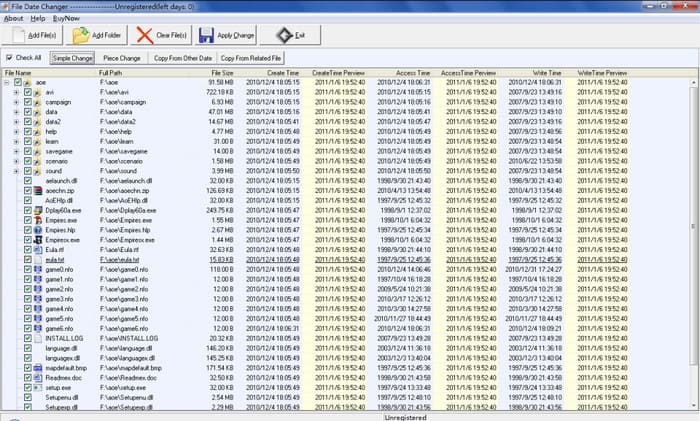
FMS File Date Changer, dosyanın oluşturulma tarihini değiştirmenize izin veren Windows tabanlı bir etiket düzenleyicisidir. Bu araçla, aracın oluşturulma tarihini, en son erişildiğini veya son değişikliği adlandırarak bunları tek tek veya gerekirse bir bütün olarak damgalayabilirsiniz. Yüksek kaynak tüketimi kullanan diğer yazılımlardan farklı olarak, bu araç, üst düzey bir sistem birimine sahip olmanızı gerektirmez. Düşük bir sürüm için çalışır ve sisteminizde çalışırken minimum CPU ve RAM tüketir. Bu nedenle, kullanırken çökme, takılma veya hatalarla karşılaşmazsınız.
Ayrıca, yazılım GUI'si çok basittir, bu nedenle saat ve tarih gibi meta verileri düzenleme konusunda herhangi bir deneyimi olmayan kullanıcılar tarafından kullanılabilir. Ancak bazı kullanıcılar, profesyonel bir meta veri düzenleyicisi olma beklentisine ulaşmadığını fark etti. Bu nedenle, kullanıcılar bunu indirdikten sonra silme eğilimindedir, ancak silmek diğeri kadar basit değildir. Tüm yazılımı sisteminizden tamamen silmek için bir süreci izlemeniz gerekecek.
Toplu Dosya Değiştirici
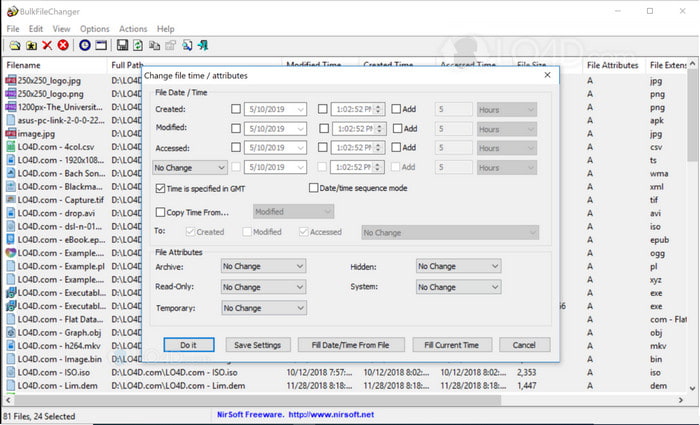
BulkFireChanger'ı kullanarak bir dosyada oluşturulan tarihi nasıl değiştireceğinizi hızlı bir şekilde öğrenebilirsiniz. Bu küçük yardımcı programla, kolayca değiştirebilir, oluşturabilir ve dosyanın tarihine erişebilir ve hatta isterseniz dosyanın özniteliğini değiştirebilirsiniz. Diğer yazılımlardan farklı olarak, her Windows'un flash sürücüsünde çalışabileceğinden, düzenleyiciyi yüklemeniz ve bilgileri çıkarmanız gerekmez. Bu nedenle, aracı indirmek istiyorsanız, resmi web sitesini ziyaret etmeli, ardından isterseniz onlara bağışta bulunmalısınız.
Üstelik araç basit ve küçük görünüyor; GUI küçük olsa da, bakmak güzel. Daha önce de söylediğimiz gibi, yazılımı kompakt olduğu için yüklemeniz gerekmeyecek; diğer yazılımlardan farklı olarak, görevi gerçekleştirmeden önce yükleme işlemini beklemeniz gerekecektir. Aracın avantajı hakkında söylenecek fazla bir şey yok çünkü birincil amacı olan tarih meta verilerini değiştirme amacına hizmet ediyor. Başka bir görevi bitirmek istiyorsanız, bu araç, ilgili olmayan başka bir görevle ilgili olarak size yardımcı olmayacaktır.
Bölüm 2. Windows'ta Yerleşik Kullanarak Dosya Tarihini Değiştirmenin Diğer Yolları
Windows 10 veya Mac’te dosyaların tarihini değiştirmek istiyorsanız bilgisayarınızda Sistem Saati bölümüne gidebilirsiniz. Bu uygulama, diğer uygulamaların doğru saat ve tarihe erişmesine izin verir. Listedeki UCT zaman sistemine göre de ayarlanabilir. Bu yöntem, Windows, Mac ve Linux gibi işletim sistemlerinde meta verilerdeki saat ve tarihi serbestçe değiştirmek için kullanılabilir.
Yukarıdaki araçtan farklı olarak bu araç, kullanabileceğiniz özel bir tarih ve saat düzenleyicisi değildir. Çünkü dosyayı değiştirmek istiyorsanız, önce saatini değiştirmelisiniz, ardından mevcut saati tarih ve saatinize kaydetmek için Farklı Kaydet'e tıklamanız gerekir. Aracı indirmemiş olsanız bile, medya dosyasının tarih ve saatini düzenlemede yine de bir seçimdir.
Bölüm 3. Windows ve Mac'te Dosya Tarihini Düzenlemek için Nihai Yazılım [En Kolay Yol]
Yukarıda bahsedilen aracın aksine, FVC Video Converter Ultimate dosyanın tarihini değiştirme konusunda en uyumlu araçtır. Bu araçla dosyaya yalnızca tarih ve saat etiketi eklemekle kalmaz, aynı zamanda yazar adı, başlık, parçalar, tür, yorumlar vb. bilgileri ve hatta dosya için bir kapak görseli de ekleyebilirsiniz. Bu araç, Windows ve Mac gibi her iki sistemde de indirilebilen, pazardaki en rekabetçi yazılım haline gelmiştir.
Yazılımın güçlü yönleri ve uyumluluğu ile ilgili tüm video ve ses görevlerini tamamlayabilirsiniz. Video oynatmayı hızlandırmak istiyorsanız, bu iş için doğru araç bu, ancak bunun yerine ağır çekim yapmak mümkün mü? Evet, bu yazılımla. Bahsedilen araçlardan farklı olarak, meta verileri düzenlemek dışında bir şeyler yapamayacakları için bunu yapamazlar. Ve şimdi, tarih meta verilerini değiştirmek için nihai yazılımı nasıl kullanacağınızı merak ediyorsanız. Adımları takip ederek, profesyonel bir çıktı ile Mac ve Windows'ta bir dosyada oluşturulan tarihin nasıl değiştirileceğini hemen öğreneceksiniz.
Adım 1. Nihai aracı masaüstünüze indirin, Windows mu yoksa Mac mi kullandığınızı seçin ve ardından yükleyin. Adımları takip edin ve başlatmak için açın.
Ücretsiz İndirWindows 7 veya üstü içinGüvenli İndirme
Ücretsiz İndirMacOS 10.7 veya üstü içinGüvenli İndirme
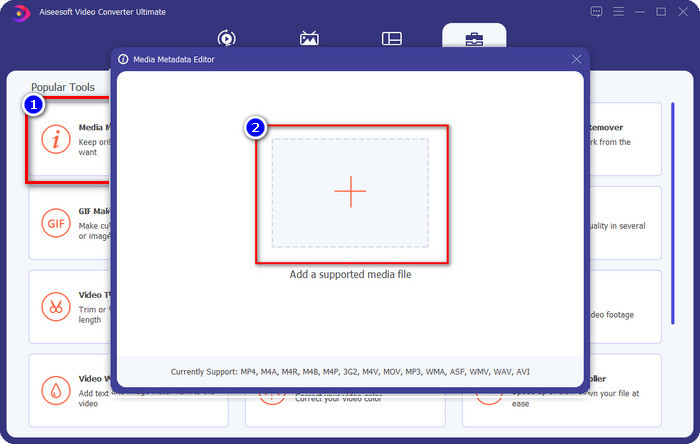
Adım 2. Araç açıkken Araç Kutusuna, ardından Ortam Meta Veri Düzenleyicine tıklayın. Yeni bir mini pencere açılacaktır, tarih ve saat meta verilerini değiştirmek istediğiniz medya dosyasını eklemek için + düğmesine tıklayın ve devam etmek için Aç’a tıklayın.
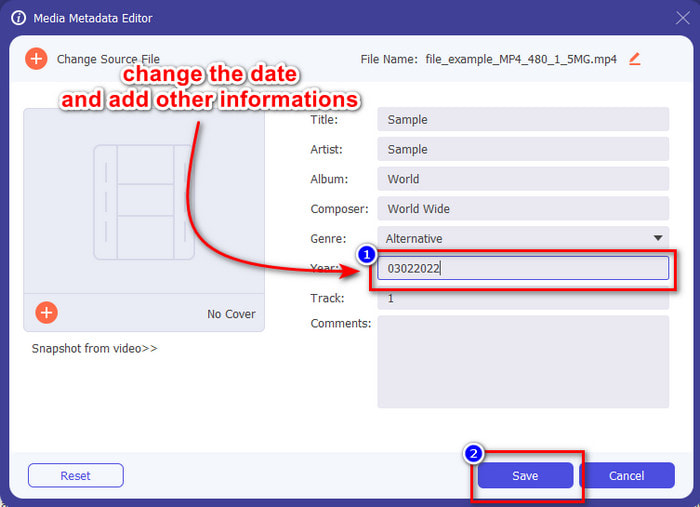
Adım 3. Yüklediğiniz medya dosyasının tarihini artık yıl kısmından değiştirebilir ve işiniz bittiğinde Kaydete tıklayabilirsiniz. Unutmayın, isterseniz Kaydet düğmesine basmadan önce diğer meta verileri de değiştirebilirsiniz. Kolay değil mi? Bu nihai araç, meta veri düzenleme konusunda harika bir deneyim yaşamak isteyen kullanıcılara çok iyi bir kullanıcı deneyimi sunar.
Bölüm 4. Dosya Tarihi Değiştirici hakkında SSS
Tarih ve saat meta verileri nasıl görüntülenir?
Bu makaledeki talimatları okur ve takip ederseniz tarih ve saat etiketlerini görüntülemek kolaydır. Dosyaların meta verilerini görüntüleme hakkında daha fazla bilgi edinmek isterseniz bu bağlantıya tıklayıp dikkatle okuyabilirsiniz.
Meta veri eklemek bu kadar önemli mi?
Evet, önemlidir; dosya hakkında basit bilgilerle, dosyayı açmadan önce içinde ne olduğunu anlamamıza yardımcı olabiliriz. Ya da bu meta verileri, dosyaları düzgün biçimde düzenlemek için kullanabilirsiniz. Meta verinin tüm kapsamına ihtiyaç duyuyorsanız bu bağlantıya tıklayabilirsiniz.
Saat ve tarih etiketlerim neden kayboluyor?
Saat ve tarihteki meta verilerimizin kaybolmasının milyonlarca nedeni vardır. Her şeyden önce, medya dosyası web'den indirilirse, dosyanın asıl sahibi tarafından saat ve tarih bilgisi kaldırılabilir. Ancak medya dosyasını indirmediyseniz ve kendiniz aldıysanız, sorun dosyayı kaydetme işlemi olabilir. Kesin tarih ve saati hatırlamak istiyorsanız, saat ve tarih etiketlerinin ne kadar önemli olduğunu öğrenmek için bu makaleyi okumalısınız.
Sonuç
Zaman ve tarihi değiştirmek için doğru bir dosya tarihi değiştirme aracı kullanmak önemlidir; bu incelemede görevi tamamlamak için en iyi seçeneği bulduk. Artık size en uygun olduğunu düşündüğünüz yöntemi seçmelisiniz. Hepsi iyi performans gösterse de, bu görev söz konusu olduğunda FVC Video Converter Ultimate hâlâ rakipsizdir. Neden rakipsiz? Bunu yalnızca yazılımı indirip kullandığınızda öğrenebilirsiniz. Ne bekliyorsunuz? Bu sorun için en iyi aracı kullanmak üzere yukarıdaki adımları şimdi uygulamalısınız.
-
 Windows/Mac/iOS/Android'de En İyi ID3 Etiket Düzenleyicileri [Kanıtlanmış]
 ID3 etiketlerini düzenlemek sizin için bir sorun mu? Eğer öyleyse, bu makale tam size göre. Kullanılacak ID3 etiket düzenleyicileri hakkında aşağıdaki tüm ayrıntıları okuyun.
-
 Windows 10/11'de Dosya Ayrıntıları Nasıl Değiştirilir [En Kolay Yol]
 Windows 10/11'de dosya ayrıntılarını nasıl değiştireceğinizi bilmeniz mi gerekiyor? Eğer öyleyse, önemli ayrıntılar ve kullanılacak araçlarla birlikte okumanız gereken doğru makale bu.
-
 Medya/Fotoğraflar/Belgeler için En İyi 7 Meta Veri Düzenleyicisi [Web ve Çevrimdışı]
 En iyi meta veri düzenleyicisini bilmek ister misiniz? Neyse ki bu makale, her dosyadaki etiketleri kolayca değiştirmek için kullanabileceğiniz en iyi meta veri düzenleyicisini sağlar.
