


 Video Dönüştürücü Ultimate
 Ekran kaydedicisi
 Video Onarımı
 Güvenli İndirme
Videolarınızdan Picsart Filtre Filigranını Etkili Bir Şekilde Kaldırmanın Eksiksiz Yolları
Günümüzde, masaüstünüzde Picsart gibi güvenebileceğiniz bir görsel medya düzenleme yazılımına sahip olmak adeta ihtiyaç duyulan bir silahtır. Onunla, birkaç ayar üzerinde oynayarak normal bir görüntünüzü daha önce hiç görülmemiş bir fotoğrafçılık eserine dönüştürebilirsiniz! Oluşturduğunuz göz alıcı görsellerle daha fazla müşteri ya da izleyici çekebilirsiniz. Ancak Picsart kullanırken bir sorun vardır: Dışa aktardıktan sonra eklediği filigran. Bu filigran oldukça sinir bozucudur ve kaldırılmadığı takdirde görüntüde dikkat dağıtıcı hâle gelebilir. Bu yüzden, eğer yazılıma ve Picsart filtre filigranını kaldırma hakkında bir eğitime ihtiyacınız varsa, bu makaleyi okumaya devam edin ve daha fazlasını öğrenin!

Bölüm 1. Masaüstünde Ücretsiz Yazılımı Kullanarak Picsart Filtre Filigranını Kaldırma
FVC Video Converter Ultimate - Windows ve Mac'te Bir Numaralı Filigran Sökücü
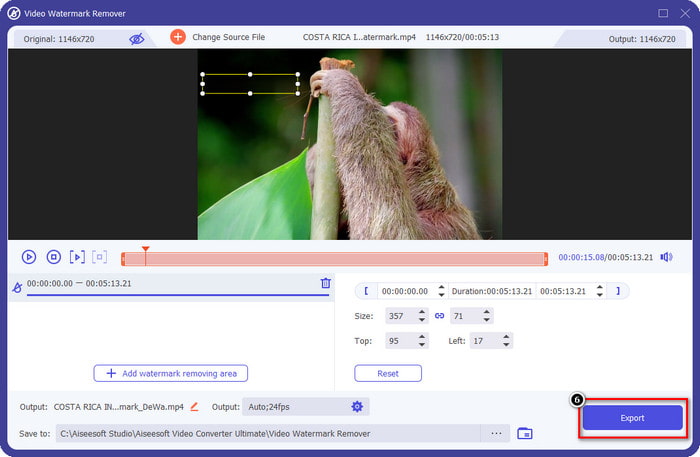
Yazılımı tanıtmaya, Picsart filigranını nasıl kaldıracağınızı öğretip bu konuda size yardımcı olabilecek bir numaralı tercihimizle başlayalım. FVC Video Converter Ultimate, filigranı videolardan kolayca kaldırırken profesyonel bir çıktı almanız için cephaneliğinizde bulunması gereken vazgeçilmez bir araçtır. Performansı ve benzersiz özellikleri sayesinde pek çok kullanıcı tarafından denenmiş ve kullanıcılarını hayal kırıklığına uğratmamıştır. Videonuzdan filigranı kaldırmak için yardıma ihtiyacınız varsa, aşağıya eklediğimiz adımları kopyalayarak uygulamayı deneyebilirsiniz.
Adım 1. Aşağıdaki uygun indirme düğmesine tıklayarak bu üstün yazılıma cihazınızda sahip olabilirsiniz. Ardından, yazılımı bilgisayarınıza kurmalı ve yazılımı açmak için Şimdi Başlat’a tıklamalısınız.
Ücretsiz İndirWindows 7 veya üstü içinGüvenli İndirme
Ücretsiz İndirMacOS 10.7 veya üstü içinGüvenli İndirme
Adım 2. Araç Kutusu bölümünde, videonuza etkileyici bir dokunuş katmanıza yardımcı olabilecek diğer özellikleri göreceksiniz. Ancak bugün, Video Filigran Kaldırıcı seçeneğine tıklayın.
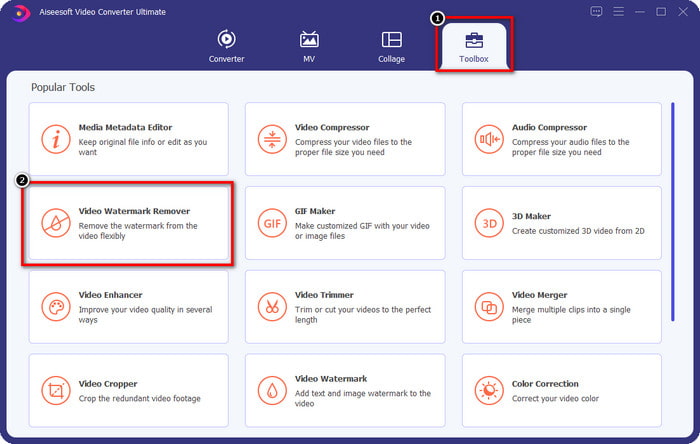
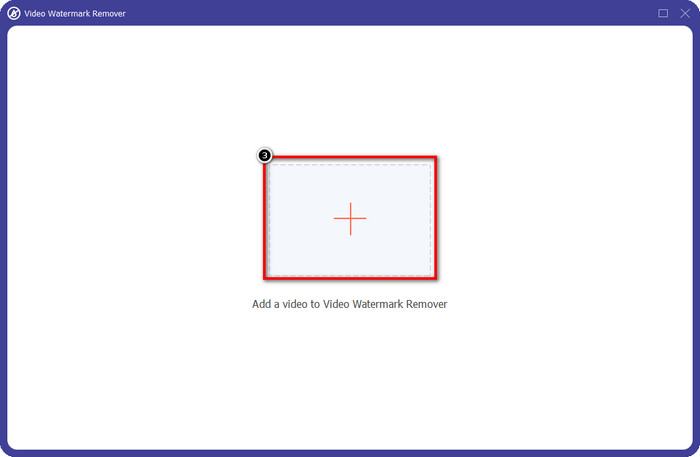
Adım 3. Picsart’ta düzenlediğiniz videoyu yüklemek için + simgesine tıklayın. Ekranınızda açılacak klasör içinde dosyayı arayın ve ardından Aç’a tıklayın.
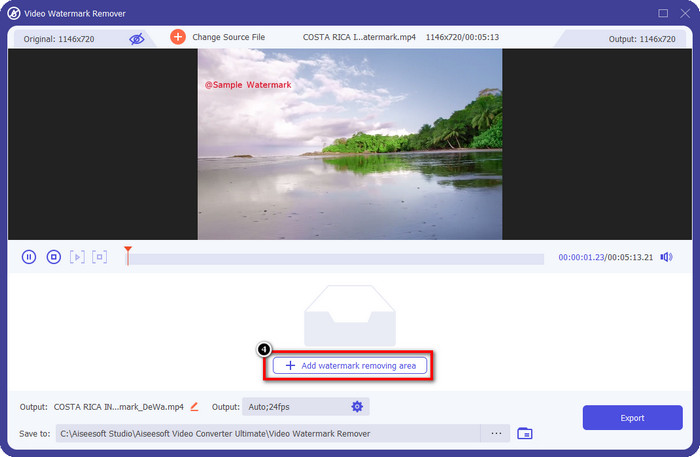
Adım 4. Yüklediğiniz videoya gömülü filigranı kaldırmak için Filigran Kaldırma Alanı Ekle düğmesine basın.
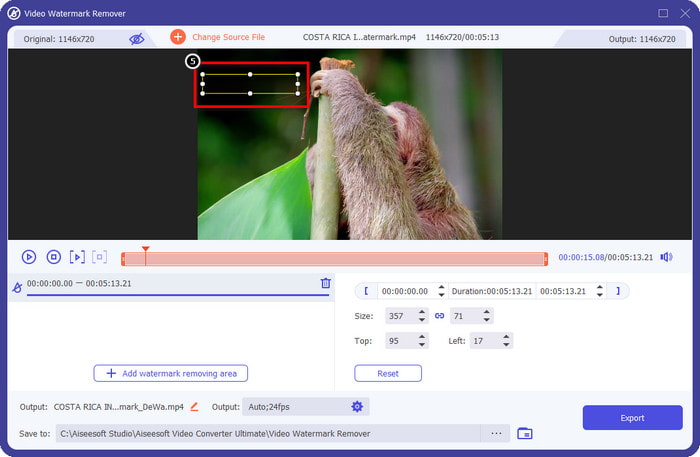
Adım 5. Seçim kutusunu filigranın üzerine getirip yerleştirin ve kapatın. Kutu boyutunu tercihlerinize göre büyütebilir veya küçültebilirsiniz.
Adım 6. Artık seçim kutusuyla filigranı kapatma işlemini bitirdiğinize göre, son çıktıyı yerel sürücünüze kaydetmek için Dışa Aktar’a tıklayın.
Windows'ta Fotoğraflar - 3D Tasarımlı Kapak Filigranı
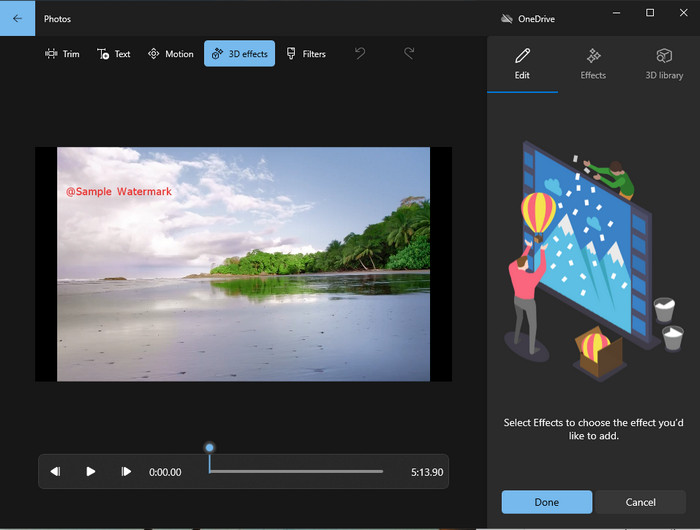
Yazılım indirmek size göre değilse ve bir Windows kullanıcısıysanız, videonuzdaki filigranı düzenlemek için Fotoğraflar uygulamasını kullanmayı denemelisiniz. Bu araçla Picsart filigranını kaldırmayı öğrenmek daha da hızlı olacaktır, çünkü uygulamayı indirme aşamasına geçmenize gerek kalmaz. Araç videodaki filigranı tamamen kaldırmaz, ancak filigranı 3D tasarımlarla kapatabilirsiniz. Yine de bu varsayılan görsel medya görüntüleyici ve düzenleyicinin performansı gayet iyidir. Emin değil misiniz? O hâlde aşağıdaki adımları okuyup uygulamayı deneyebilirsiniz.
Adım 1. Görev çubuğundaki Windows düğmesine tıklayın ve açmak için Fotoğraflar uygulamasının adını aratın.
Adım 2. Yerleşik düzenleyiciyi açtıktan sonra, burada düzenlemek istediğiniz videoyu yüklemek için + işaretine tıklamalısınız.
Adım 3. 3D Efektler bölümüne gidin, 3D Kitaplığına tıklayın ve filigranı kapatmak için kullanmak istediğiniz tasarımı arayın. Seçtiğiniz tasarımı filigranın bulunduğu kısma yerleştirin.
Adım 4. Son çıktıyı Windows yerel sürücünüze kaydetmek için Videoyu Bitir’e basın.
PickFrom Blur Video Çevrimiçi
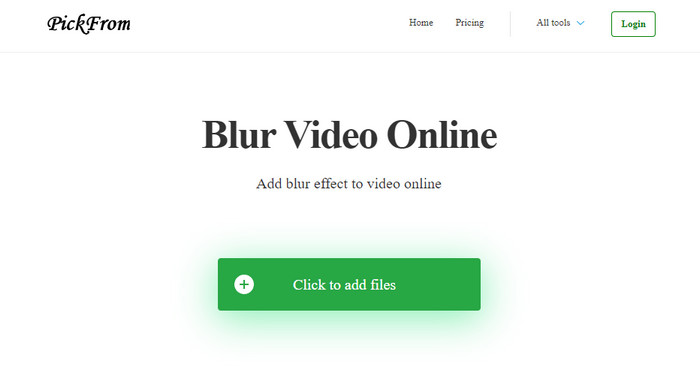
PickFrom Blur Video Online, internetteki videolarınızdan PicsArt filigranını kaldırmanızda size yardımcı olabilir. Araç pek çok kişi tarafından bilinmiyor, ancak biz onu bugün tanıtacağız. Yüklediğiniz videolardaki filigranı kaldırmadaki verimliliği nedeniyle bu yazılımı dahil ettik. Arayüzü (GUI) basit ve sade olduğundan, bu yazılımı kullanırken kaybolmazsınız. Öyleyse filigranı kaldırmak istiyorsanız, aşağıdaki işleme geçelim.
Adım 1. Web tarayıcınızı açın, adını aratın ve çevrimiçi filigran kaldırıcıyı açmak için ilk sonuca tıklayın.
Adım 2. Buraya videoyu yükleyebilmek için Dosya Ekle’ye Tıklayın düğmesine tıklayın.
Adım 3. Videonun Bir Kısmını Bulanıklaştır seçeneğini işaretleyin ve ardından seçim kutusunu filigranın üzerine yerleştirin.
Adım 4. Videoyu filigransız olarak indirmek için Başlat’a basın.
Bölüm 2. Premium Sürümü Satın Alarak Picsart Filigranını Kaldırma
Picsart altın filigranını kaldırmakla sorun yaşamak istemiyorsanız yazılımı satın almalısınız. Size belirli bir miktara mal olacak çünkü kullanmadan önce bunun için ödeme yapmanız ve ardından videoyu herhangi bir gömülü filigran olmadan dışa aktarmanız gerekecek. Bu nedenle, Picsart'ı satın alma konusunda adım adım bir eğitim istiyorsanız, eklediğimiz bir sonraki öğreticiyi izlemelisiniz.
Adım 1. Picsart’ın resmi web sitesini açın ve hesabınızla giriş yapın. Eğer hesabınız yoksa, buradan Kaydolarak bir hesap oluşturmalısınız.
Adım 2. Ana sitede, Fiyatlandırma’ya tıklayın ve mevcut her ürün için fiyatları görün.
Adım 3. Aylık ya da yıllık istediğiniz planı seçin ve ardından Ödemeye Git’e tıklayın.
Adım 4. Gerekli bilgileri doldurarak fatura ayrıntılarını ekleyin ve ardından Şimdi Satın Al’a tıklayın.
İlgili:
Mezuniyet Fotoğraflarından Filigranı Kaldır
Bölüm 3. Picsart Filigranı Nasıl Kaldırılır Hakkında SSS
Picsart Gold'u kalıcı olarak satın alabilir miyim?
Tek seferlik ödeme esasını veya planı desteklemez, bu nedenle Picsart Gold'u kullanmak istiyorsanız, aylık veya yıllık plandan yararlanmanız gerekir. Resmi web sitesine giderek her planın fiyatını kontrol edin.
Picsart'ta özelleştirilmiş bir abonelik oluşturabilir miyim?
Evet, Picsart'ta bir ekip için abonelik oluşturabilirsiniz. Uygulamayı kullanacak kişi sayısını belirleyebilirsiniz.
Picsart'a nereden erişebilirim?
Picsart'ı Windows, Android ve iOS'ta indirebilirsiniz. Ne yazık ki, uygulamanın şu anda bir Mac sürümü yok ama üzülmeyin çünkü sisteminizde bulunan diğer medya düzenleme yazılımlarını kullanabilirsiniz.
Sonuç
Daha önce öğrettiğimiz öğretici, PicsArt ve kullanabileceğiniz en iyi filigran çıkarıcıları kullanarak filigranları kaldırma konusunda size bir fikir verir. Artık Picsart'ta düzenlediğiniz videonun, nihai çıktıya eklediği ürün filigranı ile uğraşmadan keyfini çıkarabilirsiniz. Bu nedenle, sunduğumuz araçlardan hala ikna olmadıysanız, önce bunları, özellikle de FVC Video Converter Ultimate'ı denemeniz bir zorunluluktur. İndir düğmesini tıklayın ve Windows ve Mac'inizde ücretsiz olarak bulundurabilir, ardından yararlanabileceğiniz özelliklerin ve işlevlerin keyfini çıkarın.
-
 Nihai Araçları Kullanarak Pond5 Filigranı Nasıl Kaldırılır
 Aşağıdaki basit adımları izleyerek Pond5 filigranını nasıl kaldıracağınızı öğrenin. Bu etkileyici araçları kullanarak görüntünüzdeki Pond5 filigranını kolayca kaldırabilirsiniz.
-
 Dxtory Filigranını Kaldırmanın 2 Güçlü Yolu
 En iyi iki yöntemi izleyerek Dxtory Filigranını Nasıl Kaldıracağınızı öğrenin. Dxtory filigranını kaldırmak için en uygun aracı arıyorsanız, burayı okuyun.
-
 Kaçırmamanız Gereken Olağanüstü Arnold Maya Filigran Sökücüler
 Birçok filigran kaldırıcı, Arnold Maya filigranını kaldırabilir. Ancak en iyi Arnold Maya filigran çıkarıcıların ne olduğunu bilmek istiyorsanız, bu sayfayı okuyun.
