


 Video Dönüştürücü Ultimate
 Ekran kaydedicisi
 Video Onarımı
 Güvenli İndirme
Birkaç Dakikada GIF'i DivX'e Dönüştürmenin Harika Yolları
Nowadays, different file formats are used on the internet. One of the popular file formats for web graphics that we have now is the GIF, which is usually entertaining to view. However, there are some instances where a GIF file format is not supported on other devices. Sometimes, you need a file format supported by many devices like DivX. In that case, if you want to dig deeper into this post, you must read this article to get a piece of information about how to convert GIF to DivX instantly.

Bölüm 1: GIF ve DivX'e Giriş
Graphics Interchange Format, or GIF, is a popular format for web graphics. It can be animated, often used primarily to display basic animation on your websites. GIFs also include transparent pixels, letting them blend with other colors. In addition, if you observe some pictures moving repeatedly, then there is a possibility that the image is a GIF format. DivX file is another file format recognized by other electronic consumer devices, video playback software, and DVD Players. This file is also known as the DivX-Encoded Movie File, which is classified as a video file. Other devices also support it. Therefore, read the other essential points below if you want to convert GIF to Divx.
Bölüm 2: Kaliteyi Kaybetmeden GIF ve DivX Dönüştürme Programı
Suppose you are looking for a good and fantastic converter that can convert GIF to DivX without losing the quality. In that case, the best application you can use is Video Converter Ultimate. This reliable application can support different file formats, such as MKV, MOC, GIF, MTS, M2TS, MPEG, FLV, XVID, MTS, DivX, AVI, and more. In addition, aside from converting, this application has many different features and tools you can use, like a video speed controller, video watermark remover, video enhancer, GIF maker, collage maker, video reverser, video trimmer, audio compressor, video compressor, and more. Moreover, this application is free and accessible on both Windows and Mac. Lastly, Video Converter Ultimate is easy to utilize and has a simple interface, which is suitable for new users.
Ana Özellikler
Uygulama sadece dosyaları dönüştürmede harika değil, aynı zamanda keyfini çıkarabileceğiniz birçok özelliğe de sahip.
◆ Videoları/sesi iyileştirmek için birçok seçenek sunar.
◆ Videonuzu özelleştirin.
◆ Videonuzun bit hızını düzenlemenizi sağlar.
◆ Videonuzun çözünürlüğünü ve kare hızını düzenlemenizi sağlar.
Artıları
- Yeni başlayanlar için uygundur.
- Hızlı bir tasarruf işlemine sahiptir.
- Dönüşüm kararlı ve güvenlidir.
- Filigran uygulanmadı.
- Hem Windows hem de Mac'te kullanılabilir.
- Kullanımı kolay.
Eksileri
- Daha gelişmiş özellikler için yazılımı satın alın.
Mac veya Windows'unuzu kullanarak GIF dosyanızı DivX'e dönüştürmek istiyorsanız, aşağıdaki basit ve kolay adımları izleyin.
Step 1: Download the Video Converter Ultimate on your Mac or Windows. After the process, launch the application.
Ücretsiz İndirWindows 7 veya üstü içinGüvenli İndirme
Ücretsiz İndirMacOS 10.7 veya üstü içinGüvenli İndirme
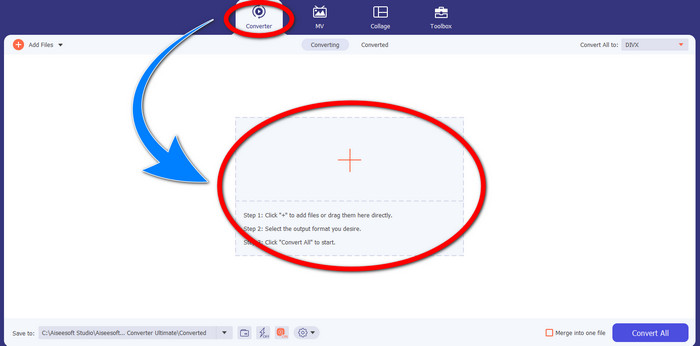
Step 2: After you open the Video Converter Ultimate, click the Converter > Plus sign button to attach the GIF file you want to convert.
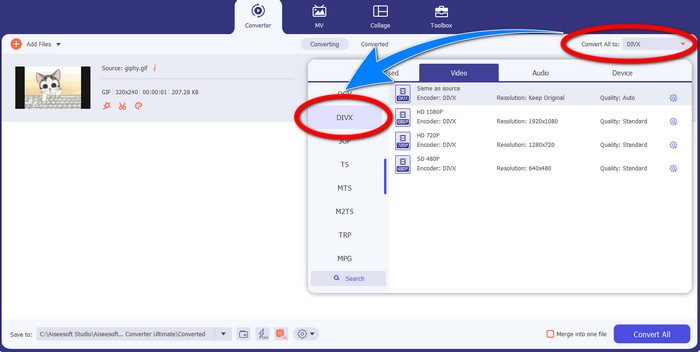
Step 3: When you have already added the GIF, click the Convert All to button, then choose the DivX file with your selected quality, such as 480p, 720p, and 1080p.
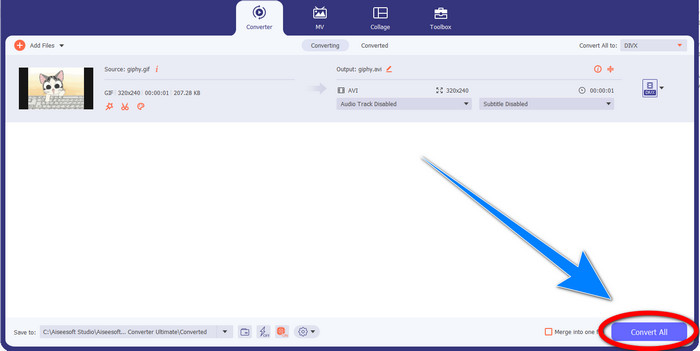
Step 4: After changing the file format from GIF to DivX, click the Convert All button to save your final output.
Bölüm 3: GIF'i DivX'e Değiştirmek İçin Çevrimiçi Dönüştürücü
Convertio is an online tool you can use to convert GIFs to DivX file format. This software is capable of converting a specific file format to different formats. Moreover, it has many features, especially converting, like an audio converter, image converter, font converter, ebook converter, presentation converter, and more. In addition to that, you can utilize this software for free, and you can also purchase a subscription for more benefits. Also, you don’t need to worry about your files because it is safe and secured. The file you are converting will be automatically deleted after 24 hours. However, the free version is only limited. You can only have a few features that you can use and a limited file size that you can save. If you are interested in knowing about converting GIF to DivX, follow the given steps below.
Step 1: Proceed to the website of Convertio. Then, click the Choose Files button to attach the GIF file you want to convert.
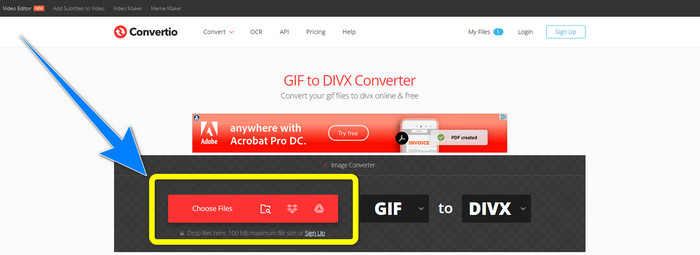
Step 2: After attaching your GIF file, you can change the format to DivX by choosing the format options.
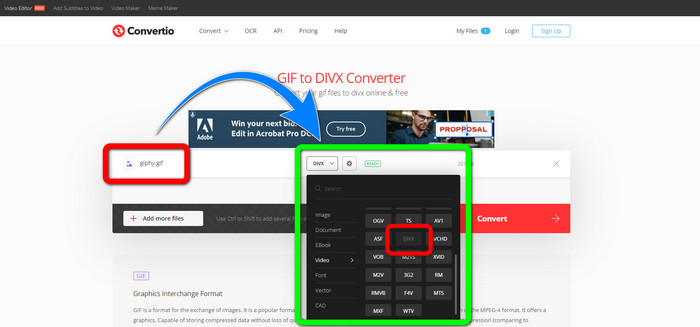
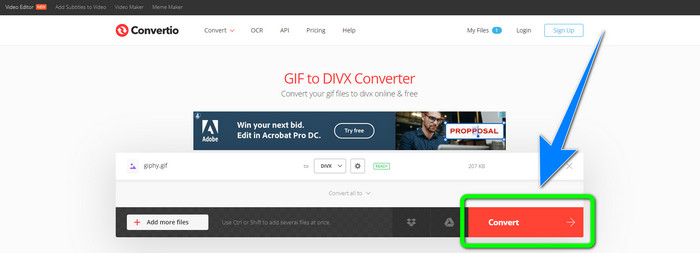
Step 3: When you are done choosing DivX on the format options, click the Convert button to convert the GIF to DivX. Then, you can already save your final output on your device.
İlgili:
[Offline/Online] Most Used AVI to DivX Converters You Should Know
How to Convert MKV to DivX Online and Offline for Free
4. Bölüm: GIF'i DivX'e Dönüştürmeyle İlgili SSS
Belirli bir dosyayı neden diğer dosya biçimlerine dönüştürmeliyim?
Belirli bir dosyayı başka bir dosya formatına dönüştürmenizin gerekliliklerinden biri, cihaz tarafından desteklenmeyen, uyumsuz ve uygunsuz hale gelecek olan dosyaların olmasıdır. Bu şekilde, belirli bir dosyanın formatını kullandığınız cihaza sığdırmak için dönüştürücü içeren bir uygulama gereklidir.
Convertio uygulamasını kullanarak sesimi dönüştürebilir miyim?
Evet elbette. Convertio ayrıca yalnızca görüntü ve video dosyası formatlarını dönüştürmede güvenilir değildir. Bu uygulama aynı zamanda bir ses dönüştürücü olarak da kabul edilebilir.
Mac'im için kullanabileceğim en iyi ve en güvenilir video dönüştürücü nedir?
If you are looking for a great and remarkable application with a file converter, then you must use Video Converter Ultimate. It is suitable for editing and converting your video file using your Mac.
Telefonum için kullanabileceğim harika bir video dönüştürücü uygulaması var mı?
Evet var! Video dönüştürücülü yazılıma yalnızca bilgisayarlar için erişilebilir değil, Android gibi telefonunuzu kullanarak dosyaları dönüştürmek için oyun mağazasında veya tarayıcılarda bulabileceğiniz uygulamalar da var.
iOS cihazım için bir video dönüştürücü var mı?
Kesinlikle evet. iOS'unuz için kullanabileceğiniz bir video dönüştürücü var. Yapılacak en iyi şey, uygulama mağazanıza bakmaktır. Video dönüştürücüyü arayın, sonuçlarda görünen uygulamaları arayın ve deneyin.
Sonuç
As written in the information above, you can conclude that converting a file into a different file format is important. Some formats are incompatible or unsuitable for your devices, so you must convert them to another file format. Also, this article provided two excellent and effective ways to convert GIF to DivX on Windows, Mac, and online. If you desire to convert more files, then the best software you can use is the Video Converter Ultimate. You can utilize this application quickly and convert files faster than other applications.
-
 Mac'te M4V'yi DivX'e Ücretsiz Olarak Dönüştürme [En İyi Araçlar]
 M4V'yi DivX'e ücretsiz dönüştürmenin yollarını mı arıyorsunuz? M4V dosyanızı Mac'te DivX'e dönüştürmeniz için en iyi dönüştürücüleri listeledik.
-
 Ücretsiz WMV - DivX Dönüştürücüler Kullanıcının En İyi Seçimi
 İşte kullanıcıların çoğunlukla kullandığı en iyi ücretsiz WMV - DivX dönüştürücüler. Bu makale, WMV dosyanızı DivX'e dönüştürmenin en iyi yollarını sunar.
-
 Windows ve Mac için En İyi 5 Ücretsiz MPEG - DivX Dönüştürücüler
 En iyi MPEG'den DivX'e dönüştürücüleri kullanarak MPEG dosyanızı kolayca bir DivX dosyasına dönüştürün. Onlar hakkında daha fazla ayrıntı öğrenmek için bu makaleyi okuyun.
