


 Video Dönüştürücü Ultimate
 Ekran kaydedicisi
 Video Onarımı
 Güvenli İndirme
XviD'yi 3GP'ye Dönüştürmek İçin Üstün Araçları Kullanmanın Harika Yolları
Can’t play your .xvid file on your cell phone? Then, maybe it is not supported on your device. To play your video on your phone, you must convert your XviD file to 3GP. When it comes to mobile phones, the most popular format you can use in playing videos is the 3GP format. This post will give you insights regarding the best ways to convert XviD to 3GP quickly and effortlessly using the ultimate tools you can use on your Windows, Mac, and online. Let’s read and learn as much as we can.

Bölüm 1: XviD'yi 3GP'ye Dönüştürmenin En İyi Yolu
The best way to convert XviD to 3GP is using Video Converter Ultimate. This is one of the great converters you can download on your Windows and Mac computers. If you have this application, you don’t have to worry anymore about converting many files because Video Converter Ultimate can convert up to 1000+ formats, including FLV, MKV, DIVX, XviD, 3GP, M4V, MTS, SWF, MP4, and more. In addition, it has a conversion speed of 30x faster than other converters, which is helpful to the users. Also, you can convert multiple files in a single go because it offers a batch conversion process, so you don’t have to convert each file manually. Furthermore, if you want to rotate your XviD video, you can use this tool because it offers a Video Rotator function. With the help of this rotator, you can easily rotate your video. In addition, you can also cut your video to the perfect length using the Video Trimmer tool. With these features, you can say that Video Converter Ultimate is the ultimate tool for converting and editing your videos.
Özellikler
◆ XviD, 3GP, MP4, M4V, DIVX, FLV, AVI, SWF ve 100'den fazla video formatını dönüştürün.
◆ Bir müzik videosu oluşturma yeteneğine sahiptir.
◆ Bir kolaj oluşturmaya yardımcı olabilir.
◆ Video geliştiriciler, renk düzeltme, düzeltici ve daha fazlası gibi harika düzenleme araçlarına sahiptir.
◆ Video hız kontrol cihazını ayarlayın.
◆ Sıkıştırıcıyı kullanarak dosyanın boyutunu değiştirebilir.
Artıları
- Video dosyalarını diğer dönüştürücülerden 30 kat daha hızlı dönüştürebilir.
- Profesyonel olmayan kullanıcılar için uygundur ve basit bir arayüze sahiptir.
- Görüntü formatını JPG, PNG, WEBP, BMP ve TIFF arasında dönüştürebilir.
- Tek seferde birden fazla dosyayı dönüştürebilir.
Eksileri
- Harika özelliklerin keyfini çıkarmak için ücretli sürümü edinin.
Aşağıdaki yardımcı yöntemleri kullanarak XviD dosyanızı 3GP'ye dönüştürelim.
Step 1: You must download the Video Converter Ultimate on your Windows or Mac by Clicking the Download button below. Install the app and launch it.
Ücretsiz İndirWindows 7 veya üstü içinGüvenli İndirme
Ücretsiz İndirMacOS 10.7 veya üstü içinGüvenli İndirme
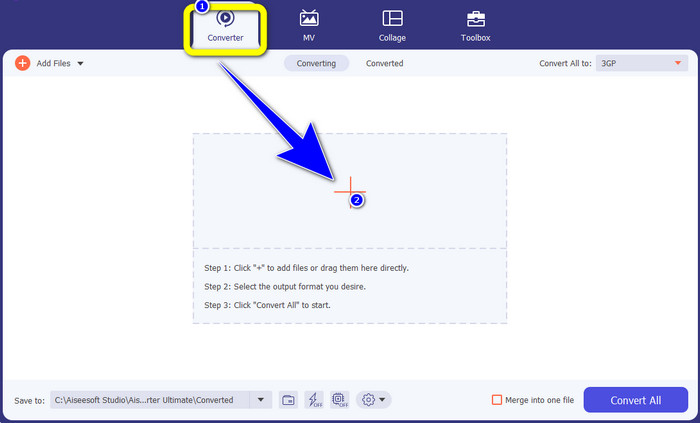
Step 2: There are four options in the upper part of the interface. Converter, MV, Collage, and Toolbox. Select the Converter panel and click the Plus icon to add the XviD file you want to convert.
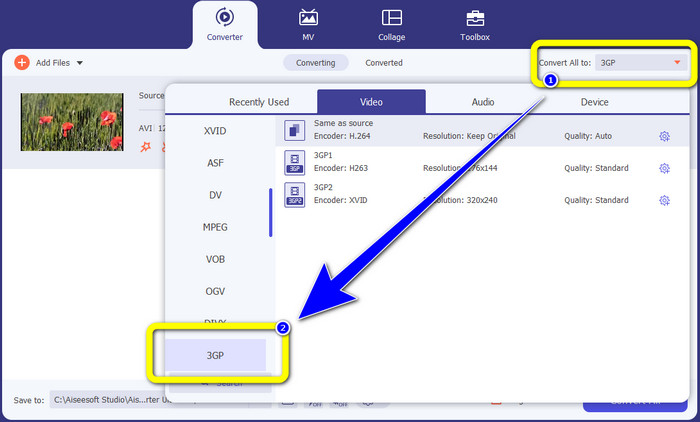
Step 3: After adding your XviD file, look to the right side of the interface and click the Convert all to button. The format options will appear, and select the 3GP file format.
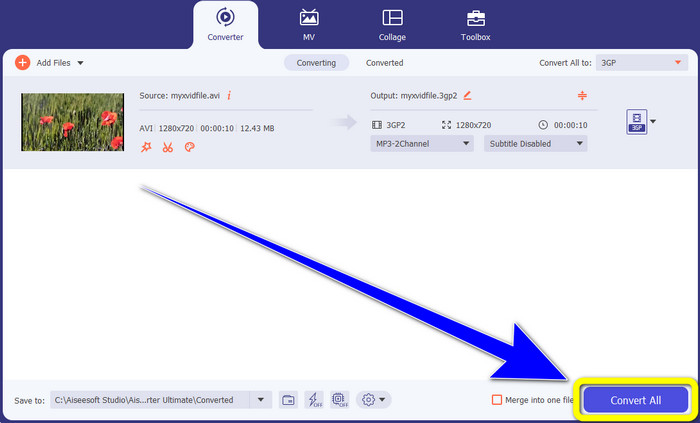
Step 4: For the fourth and last step, Click the Convert All button to convert your XviD file to 3GP. Wait for the conversion process and save your video.
Bölüm 2: XviD'yi 3GP Online'a Dönüştürün
FVC Ücretsiz Video Dönüştürücüyü Çevrimiçi Kullanma
Aside from the best converter you have discovered from the first part, there are also online converters you can use for free. The best online tool is FVC Free Video Converter Online. This useful software lets you convert XviD to 3GP easily. It supports audio and video file formats, such as MP4, M4V, WMV, AVI, MOV, VOB, WEBM, MP3, AAC, AC3, WMA, FLAC, etc. Moreover, this converter is easy to utilize because it only has three easy steps to follow for converting various files. This way, every user won’t have difficulty utilizing this online converter. If you desire to know how to convert XviD to 3GP easily using FVC Free Video Converter Online, let’s use these three easy steps below.
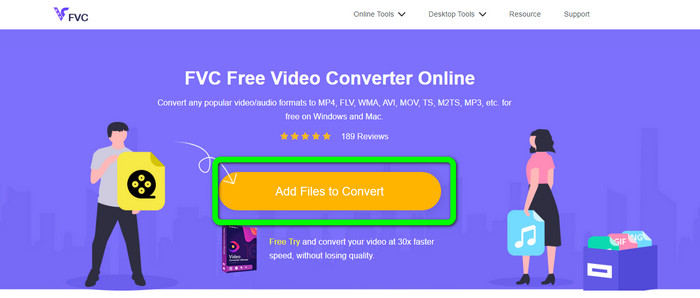
Step 1: Visit the website of FVC Free Video Converter Online. Click the Add Files to Convert button and upload the XviD file you want to convert to a 3GP format.
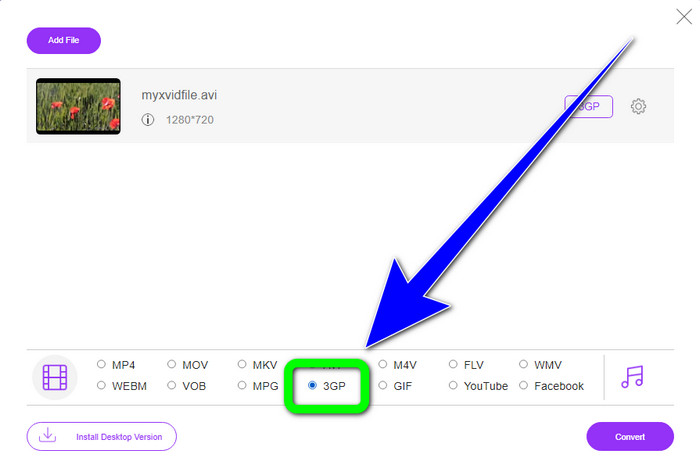
Step 2: When you upload your file, you will see the format options in the lower part of the interface. Choose the 3GP file format.
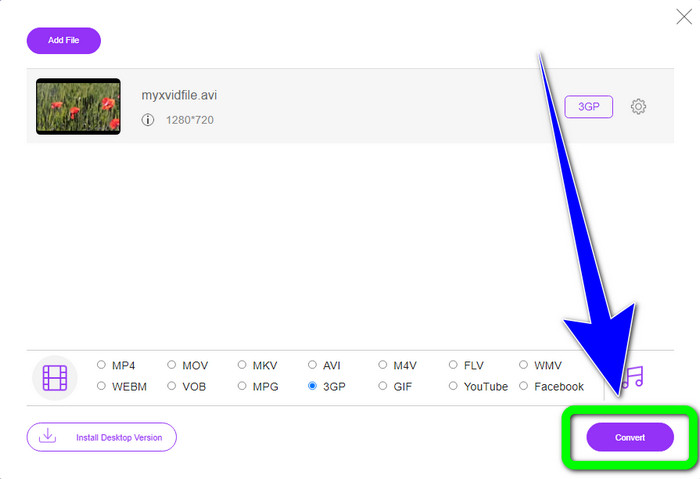
Step 3: You must click the Convert button to convert the XviD file to 3GP. Wait for the process of converting the file and save the final file on your Windows or Mac.
OnlineConvertFree.com'u Kullanma
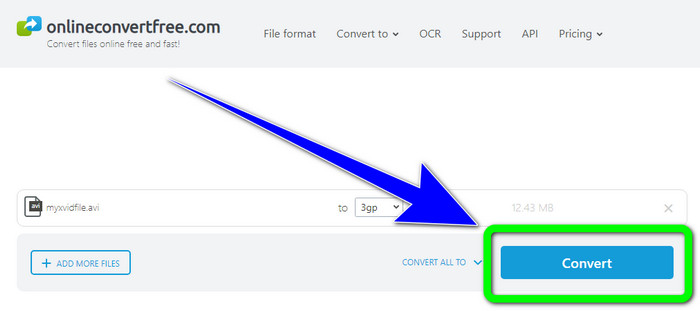
Onlineconvertfree.com is another online tool you can use to convert XviD to 3GP. This application is also good at converting audio, images, documents, and video files, which makes it convenient for anyone. Also, it supports several formats, like AVCHD, MT2S, MPEG, MKV, M4V, MP4, FLV, DIVX, XviD, 3GP, and more. You also don’t need to worry about your file because it is secured in this software. Your video file will be automatically deleted after 24 hours. You also can use this tool to convert XviD to FLV.
Ancak, Onlineconverterfree.com'un web tabanlı bir araç olduğunu ve onu çalıştırmak için hızlı bir internet bağlantınızın olması gerektiğini göz önünde bulundurmalısınız. Ayrıca, bu yazılımın depolama sınırı yalnızca 100Mb'dir, bu nedenle depolama sınırını yükseltmek için bir abonelik satın almanız gerekir. Onlineconverter.com'u kullanarak XviD'yi 3GP'ye dönüştürmek için aşağıdaki adımları izleyin.
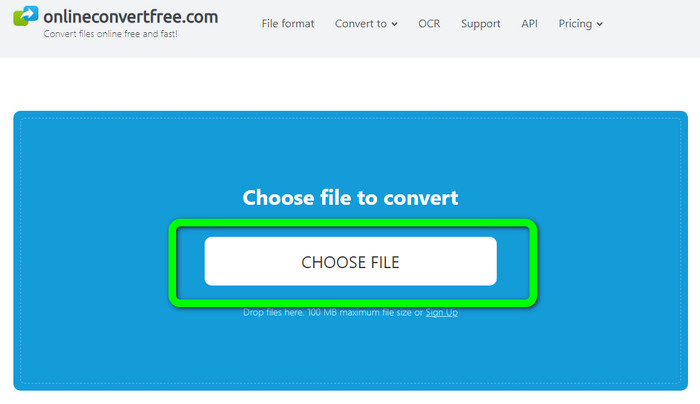
Step 1: Go to the Onlinecovnerter.com website. Click the Choose File button to insert the XviD file
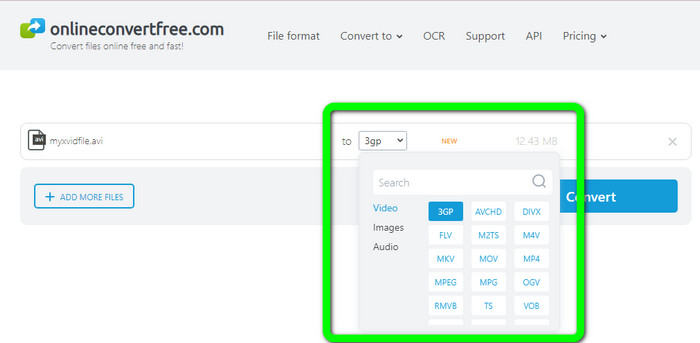
Step 2: Click the 3GP file from the format options.
Step 3: For the final step, click the Convert button. Wait for the conversion process and save your final output on your device. Click here to learn how to convert M4V to 3GP.
Bölüm 3: XviD Hakkında Genişletilmiş Bilgi
XviD nedir?
Bu codec bileşeni XviD, MPEG-4 standardına dayalıdır. Renkleri çarpıtsa da dinamik sahnelerde harika bir tanımı var. Açık kaynaklı bir codec bileşeni olduğu için, ilgili taraflar sürekli güncellemeleri teşvik ederek geliştirilmesine katkıda bulunabilirler. Bir DVD filmi, Xvid'de etkinleştirilen sıkıştırma sayesinde DVD kalitesini korurken bir CD'ye sığacak kadar yeterince sıkıştırılabilir. Xvid programı, video verilerini MPEG-4 ASP'ye sıkıştırır ve açar. .xvid uzantısı, sıkıştırılmış videoyu tutmak için kullanılır. Video dosyaları söz konusu olduğunda Xvid, ZIP ile karşılaştırılabilir. Xvid, videoyu 200:1 veya daha yüksek bir oranda sıkıştırır. Bu, daha hızlı ağ iletimi ve daha etkili disk depolama sağlar.
4. Bölüm: XviD'yi 3GP'ye Dönüştürmeyle İlgili SSS
1. XviD'yi 3GP'ye dönüştürmek için ne kadar beklemeliyim?
Dönüştürme işlemi, kullandığınız dönüştürücüye ve videonun dosya boyutuna bağlı olacaktır. Daha hızlı bir dönüştürücü istiyorsanız, Video Converter Ultimate'ı Windows veya Mac'inize indirin. Bu uygulama, diğer dönüştürücülerden 30 kat daha hızlı dönüştürme hızına sahiptir.
2. Sınırsız dosya depolama ile kullanabileceğim ücretsiz bir dönüştürücü var mı?
Absolutely, Yes! The best free converter you can use is FVC Free Video Converter Online. This online tool allows you to convert unlimited files, so you don't have to worry about the maximum file size.
3. Hangisi daha iyi, Xvid mi yoksa 3GP mi?
İkisi de daha iyi. Bir videoyu 3G cihazında oynatmak istiyorsanız, videoyu 3GP video dosyasıyla oynatmak daha uygundur. Videolarınızı video oynatıcılarda oynatmak istiyorsanız, XviD dosyasına sahip bir video mükemmeldir.
Sonuç
This article provided you with the best techniques to convert XviD to 3GP. To convert more files using your Windows and Mac, you can download Video Converter Ultimate. Also, if you want a free online converter, you can use FVC Free Video Converter Online.
-
 TS'yi 3GP'ye Dönüştürmek İçin En İyi ve Basit Yöntemleri Bulun
 Bu makale, cihazınızda deneyebileceğiniz harika bir TS'den 3GP'ye dönüştürücü ücretsiz indirme sunacak. İhtiyacınız olan daha önemli ayrıntıları keşfetmek için bu makaleyi okuyun
-
 Bu Nihai Dönüştürücüleri Kullanarak MTS'yi 3GP'ye Dönüştürün
 MTS'yi 3GP'ye dönüştürmek için basit bir işlem mi istiyorsunuz? Artık endişelenme! Bu makale, çevrimiçi ve çevrimdışı kullanabileceğiniz MTS'den 3GP'ye dönüştürücüler sunacak
-
 WebM'den 3GP'ye: Bu Araçları Kullanmanın En Etkili Yolları
 Olağanüstü bir WebM'den 3GP'ye dönüştürücü mü arıyorsunuz? Bu makale, WebM'nizi 3GP'ye dönüştürmek için en etkili yöntemleri edinmenizi sağlayacaktır.
