


 Video Dönüştürücü Ultimate
 Ekran kaydedicisi
 Video Onarımı
 Güvenli İndirme
Görüntüleri PNG'ye Dönüştürmenin Mükemmel Yolları
To display high-quality images, people use the PNG file format. PNGs, developed to outperform GIF files, provide lossless compression and a brighter color spectrum. PNG image conversion is essential, especially if you want high-quality images. You're lucky since this post will show you various file conversion methods. You can convert files using online and offline programs. This way, you can then determine which application is best for you. Before anything else, let's read this article to learn the best procedures on how to convert images to PNG.

Bölüm 1: Görüntüleri Çevrimiçi PNG'ye Dönüştürmenin En Kolay Yöntemleri
FVC Free Image Converter Kullanarak Görüntüleri PNG'ye Dönüştürün
FVC Free Image Converter is one of the top online tools to convert images to PNG. This image converter online converts any image file format to PNG. It also provides a straightforward UI and clear options. Both experts and amateurs can use this tool to convert photographs in this way. The input format that this tool can handle includes JPG, PNG, JPEG, TIFF, BMP, ICO, and more. Additionally, it is easy to use. This image to PNG converter only requires a few steps to convert photos. It also guarantees the high quality of the photo. This image converter also enables the batch conversion process. It enables you to convert a large number of photos at once. Follow the steps below to convert the image to a JPG.
Step 1: Visit the official website of FVC Free Image Converter. Select the PNG file format as your output format on the Convert to options.
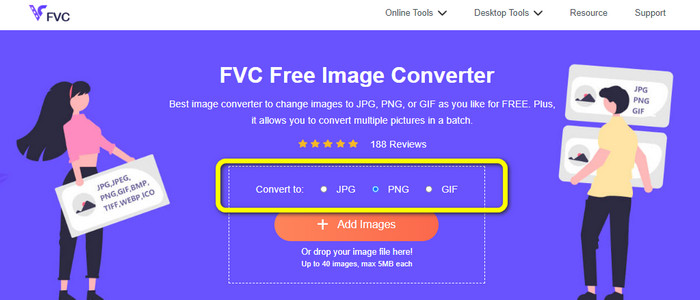
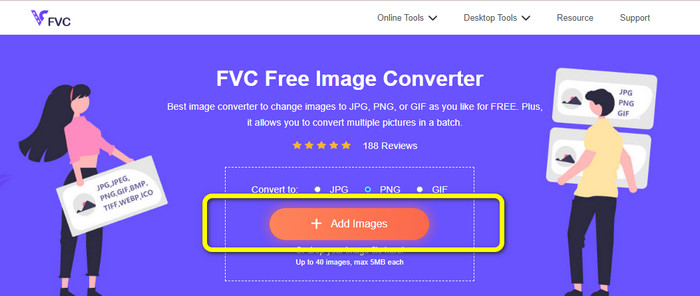
Step 2: The next step is to select the Add Images button. Your computer folder will pop up on your screen, and click the image you need to convert, then click Open. Wait for the conversion process.
Step 3: For the last step, click the Download or Download all button to save your converted images. You can open your downloaded image on your assigned file location.
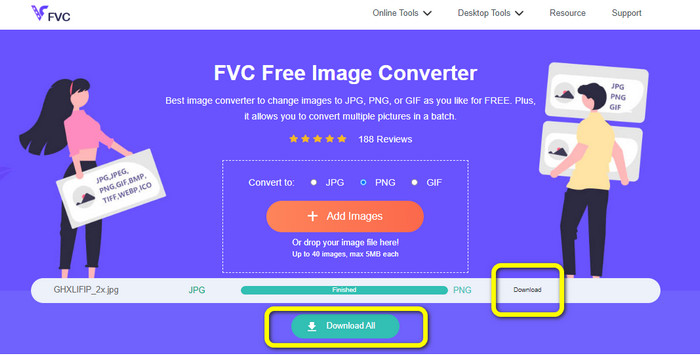
Image Candy Kullanarak Görüntüleri PNG'ye Dönüştürün
Image Candy is another online tool to convert images to PNG. It supports a wide range of image formats like PNG, JPG, GIF, and more. Also, it can convert photos up to 2 GB in size. This converter's use is straightforward. It is also accessible in all browsers. Moreover, your privacy is also protected by this app. This application will delete your photo after 24 hours.
Ancak, yalnızca cihaz tabanlı yüklemelere izin verir. Buluttan veya URL'den resim yükleyemezsiniz. Ayrıca, desteklenen çıktı formatı azdır.
Step 1: Go to the website of Image Candy and click the Add Files button to upload the image.

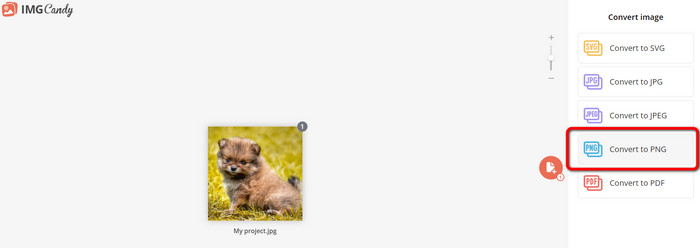
Step 2: Select the Convert to PNG option on the right part of the interface. Then wait for the conversion process.
Step 3: Finally, select the Download File button to save the image on your computer.
Convertio Kullanarak Görüntüleri PNG'ye Dönüştürün
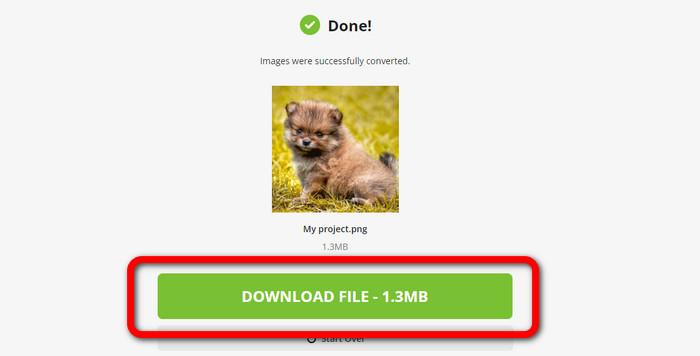
Görüntüleri dönüştürmek için başka bir çevrimiçi araç Convertio'dur. Bu aracı kullanmak kolaydır. Kolay anlaşılır bir arayüze sahiptir. Ek olarak, tüm kullanıcılar için uygun olan basit bir dönüştürme işlemine sahiptir. Ayrıca, dönüştürme işlemi yeterince hızlıdır. Bu şekilde birçok resim dosyasını dönüştürebilirsiniz. Ayrıca JPG, PNG, BMP, TIFF ve daha fazlası dahil olmak üzere neredeyse tüm popüler formatları destekler. Bu uygulama aynı zamanda gizliliğinizi de korur. 24 saat sonra resimlerinizi siler. Ancak, ücretsiz sürümü kullanırken bazı sınırlamalar vardır. Yalnızca en büyük dosya boyutu olan 100 MB ile yükleyebilirsiniz. Sınırsız dosya boyutu yüklemek için bir abonelik planı satın almanız gerekir.
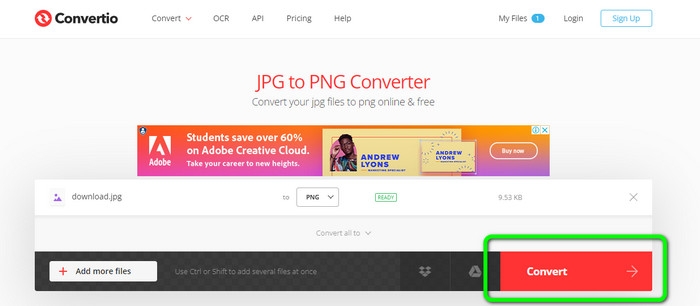
Step 1: Visit the website of Convertio. Click the Choose Files button to upload the image.
Step 2: After uploading the image you want to convert, go to the format options and choose the PNG format.
Step 3: Click the Convert button. Wait for the conversion process and save the converted image.
FreeConvert Kullanarak Görüntüleri PNG'ye Dönüştürün
FreeConvert is an image converter online you can rely on if you want to convert your image to PNG. It has an easy process, and the interface is understandable. Professional and non-professional users can use this app. Also, it can convert more than 500 different image formats like JPG, PNG, WebP, and others. RAW image files from cameras are also possible to convert. Any web browser can access this image converter, like Chrome, Firefox, Edge, Safari, etc. It provides file privacy and security. But, it has some restrictions, especially when using the free version. The largest file size is 1GB. Purchasing the tool is the best thing to do if you want to upload more images. Also, this image converter shows some ads on the web page, which is disturbing for users.
Step 1: Go to the FreeConvert website. Select the Choose Files option to attach the photo you want to convert to PNG format.
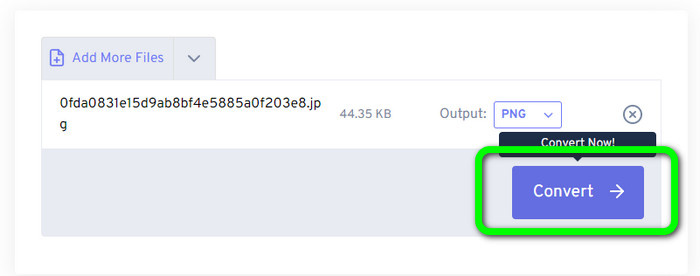
Step 2: Go to the Output option to select your desired output format, the PNG format.
Step 3: For the final step, click the Convert button and wait for the conversion process. Then, save the image with a PNG file.
Bölüm 2: Çevrimdışı Programı Kullanarak Görüntüleri PNG'ye Dönüştürmenin En İyi Yolu
Video Converter Ultimate is the best tool to convert images to PNG format. This image converter offers an understandable interface, making it perfect for all users. Besides, it also has easy procedures you can follow. This way, converting images to PNG is a piece of cake. Aside from PNG, it also supports various image file formats. It supports WEBP, BMP, TIF, TIFF, JPG, and more, which is convenient. You can also access this application on both Windows and Mac.
Ayrıca, görüntüleri dönüştürmenin yanı sıra Video Converter Ultimate daha fazla özellik sunar. Videoları dönüştürebilir, filigranları kaldırabilir, videoyu geliştirebilir ve bir müzik videosu oluşturabilirsiniz. Ayrıca kolaj yapabilir, videoyu kırpabilir ve daha fazlasını yapabilirsiniz. Bu özellikler ile yapabileceğiniz birçok şey var. Bu şekilde videolarınızı ve resimlerinizi mükemmel ve çekici hale getirebilirsiniz.
Step 1: Download the Video Converter Ultimate on your Mac or Windows. Launch the software after the installation process.
Ücretsiz İndirWindows 7 veya üstü içinGüvenli İndirme
Ücretsiz İndirMacOS 10.7 veya üstü içinGüvenli İndirme
Step 2: After opening the application, navigate to the Toolbox panel. Next is to select the Image Converter feature.
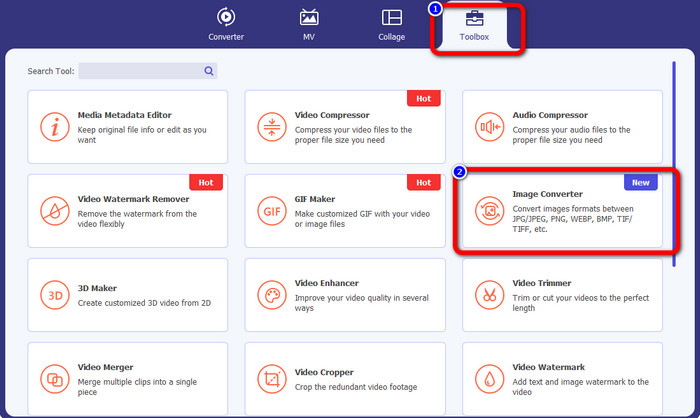
Step 3: Another interface will show up on your screen. Click the + sign button to add the image.
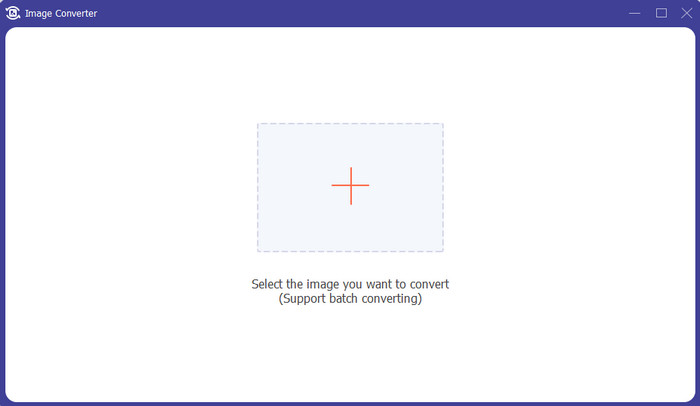
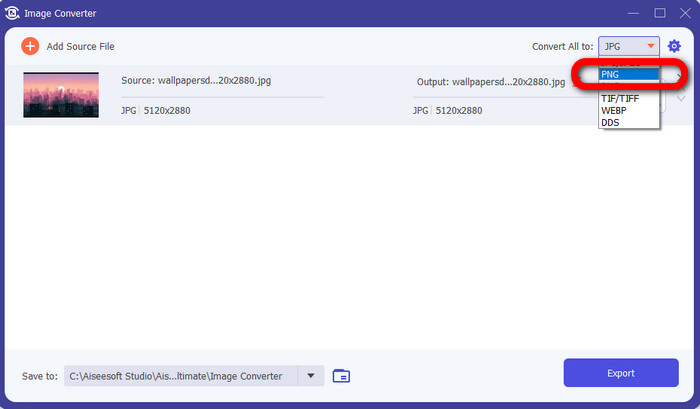
Step 4: After adding the photo, select the format option and click the PNG file format.
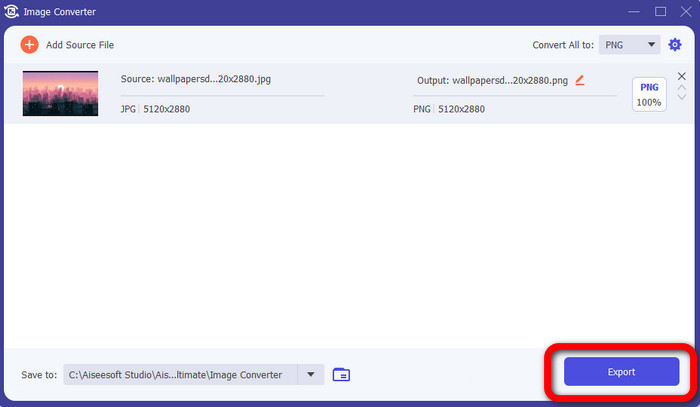
Step 5: Click the Export button on the lower left corner of the interface to save the image. You also can use this software to convert images to JPG.
3. Bölüm: Görüntüleri PNG'ye Dönüştürmeyle İlgili SSS
1. PNG dosyası nedir?
Tarayıcılarda şeffaflığa izin verme özelliği nedeniyle PNG, internette kullanılan standart bir resim formatıdır. PNG, 1990'larda tescilli bir sıkıştırma yöntemi kullanan GIF'in yerini almıştır. PNG erişilebilir bir formattır. GIF ve JPG gibi PNG de 8 bit ve 24 bit renkleri destekler. Ayrıca kayıpsız dosyalar olarak kabul edilirler, yani kalitenin hiçbir etkisi yoktur. Dosyayı kaç kez açıp kaydettiğiniz önemli değil.
2. PNG'nin faydası nedir?
PNG'nin 24 bit renk özelliğine sahip kayıpsız bir format olması en önemli avantajlardan biridir. Bir JPG'den dönüştürüyorsanız, bu dosyaların kayıplı olduğunu unutmayın. İlk sıkıştırmaları bir miktar kalite kaybına neden olmuş olabilir. Yine de PNG kayıpsızdır. Böylece, görüntünün daha fazla açılması veya kaydedilmesi, daha fazla kalite kaybına neden olmaz.
3. PNG neden daha iyi?
PNG dosya formatının üstün olduğu, yukarıda belirtilen faydalarından da anlaşılmaktadır. Kullanılan diğer önemli fotoğraf formatları için daha iyidir. Kayıpsız sıkıştırma en iyi özelliktir. Görüntüleri PNG dosya biçiminde kaydederseniz, kaydetseniz de, açsanız da, yeniden kaydetseniz de dosya biçimine zarar vermez. Burada, sıkıştırma algoritması çalışır. Mükemmel verilerin israf edilmesinin görünürlüğünü azaltmak için birçok yöntem kullanabilirsiniz. PNG dosyaları, JPG ve GIF dosyalarından daha üstün sıkıştırmaya sahiptir.
Sonuç
This guidepost shows you many online and offline ways to convert images to PNG. But, if you want a top-notching web-based tool, use FVC Free Image Converter.
-
 Mac, iPhone ve Online'da HEIC'i PNG'ye Toplu Dönüştürme
 HEIC'i PNG'ye dönüştürmenin yollarını mı arıyorsunuz? Bu makale, HEIC'yi çevrimiçi ve çevrimdışı olarak kolayca PNG'ye dönüştürmenin en iyi yollarını sunar.
-
 PC ve Mac için En İyi 9 HEIC - PNG Dönüştürücü [Çevrimiçi ve Çevrimdışı]
 En iyi çevrimiçi ve çevrimdışı dönüştürücüleri buradan öğrenin. Size Windows ve Mac için en iyi ve ücretsiz HEIC'den PNG'ye dönüştürücüleri sunuyoruz.
-
 Kaçırmamanız Gereken En İyi 5 PNG'den HEIC'ye Dönüştürücüler
 En çok kullanılan PNG'den HEIC'ye dönüştürücüleri bilmek istiyorsanız, size çevrimiçi olarak en iyi PNG'den HEIC'ye dönüştürücüleri sunuyoruz. Daha fazla bilgi için bu makaleyi okuyun.
