


 Video Dönüştürücü Ultimate
 Ekran kaydedicisi
 Video Onarımı
 Güvenli İndirme
M4A ve MP3 İki Ses Formatının Derinlemesine İncelenmesi ve Karşılaştırılması
Dijital müziğin çoğalması nedeniyle, uygun bir ses formatı seçmek artık her zamankinden daha önemli. M4A ve MP3 yaygın olarak kullanılırken, ikisi arasında önemli farklılıklar vardır. MP3, müzik dosyaları için fiili standart olsa da, M4A sıklıkla üstün ses kalitesi için kullanılır.
M4A ve MP3 karşılaştırmasında, M4A ve MP3 dosya formatları arasındaki ince farkları ele alacağız, böylece bilinçli bir karar verebilirsiniz. Ayrıca iki dosya türü arasındaki farklar ve benzerliklerin ayrıntılı bir analizini; ses kalitesi, uyumluluk, dosya boyutu ve daha fazlası açısından sunacağız. Eğer bir müzik tutkunu ya da profesyonel bir müzisyenseniz, sizin için hangi formatın ideal olduğunu öğrenmek adına okumaya devam etmek isteyeceksiniz.

Bölüm 1. M4A ve MP3
Bilgilendirilmiş bir karar için bu formatları farklı önemli açılardan karşılaştıran basit bir tablo. Aşağıdaki tabloya göz atın.
| M4A | MP3 | |
| Ses kalitesi | Yüksek | İyi |
| Dosya boyutu | Büyük | Küçük |
| uyumluluk | Sınırlı | Yaygın Uyumlu |
| meta veri | Destekleniyor | Sınırlı |
| DRM Koruması | Evet | Hayır |
| Popüler Kullanımlar | Müzik, sesli kitaplar, podcast'ler | Müzik, podcast'ler, zil sesleri |
Kısım 2. M4A ve MP3 Girişi
MP3'e karşı M4A savaşından bu kadar yeter. Bir süre ara verelim ve her birini kısaca tanıtarak bu biçimler hakkında daha fazla bilgi edinelim.
M4A Tanıtımı
Apple'ın tescilli dijital ses formatı MPEG-4 Audio'dur (veya kısaca M4A). Müzik, sesli kitaplar ve podcast'ler için harika bir ses formatıdır çünkü birçok bit hızını ve örnekleme hızını barındırabilir. M4A dosyaları iTunes, QuickTime ve diğer medya oynatıcılarda açılabilir, bu da onları Apple cihazları için ideal hale getirir.
MP3 Tanıtımı
'MPEG-1 Audio Layer 3' anlamına gelen MP3, yaygın olarak benimsenmesi ve düşük bit hızlı sıkıştırması nedeniyle sıkıştırılmış ses için standart haline gelen bir dijital ses formatıdır. MP3 dosyaları, diğer ses formatlarına kıyasla kompakt boyutları nedeniyle müzik, podcast'ler ve zil sesleri için harikadır. Birçok farklı cihazda oynanabilir ve internetten hızlı ve kolay bir şekilde indirilebilirler. Öte yandan MP3 dosyaları, genellikle M4A gibi alternatif biçimlerden daha düşük ses kalitesine sahiptir.
Bölüm 3. M4A MP3'ten Daha mı İyi?
M4A ve MP3'ün farklı güçlü ve zayıf yönleri vardır. Üstün ses kalitesi ile tanınan M4A, müzik tutkunları ve profesyoneller tarafından tercih edilmektedir. Öte yandan MP3, daha küçük bir dosya boyutuna sahiptir ve çeşitli cihazlar ve medya oynatıcılarla geniş çapta uyumludur.
M4A ve MP3 arasında seçim yapmak, sizin için neyin daha önemli olduğuna bağlıdır: yüksek ses kalitesi veya daha küçük dosya boyutu ve uyumluluk.
Bölüm 4. MP3 ve M4A Arasındaki Fark
Popüler dijital müzik formatları MP3 ve M4A'nın farklı özellikleri vardır. Aşağıda, MP3 ve M4A arasındaki farkların ayrıntılı bir açıklaması yer almaktadır:
Ses Kalitesi: M4A, MP3 ile karşılaştırıldığında üstün ses kalitesiyle bilinir. M4A daha iyi bir sıkıştırma algoritması kullanır ve daha geniş bir bit oranı ve örnekleme oranı aralığını destekler. M4A ayrıca, orijinal ses kalitesini koruyan kayıpsız sıkıştırmayı da desteklerken, MP3 dosya boyutunu azaltan ancak ses kalitesini de düşüren kayıplı sıkıştırma kullanır.
Dosya Boyutu: MP3 dosyaları, M4A dosyalarına kıyasla daha küçüktür. Bunun nedeni, MP3’ün dosya boyutunu ses kalitesini önemli ölçüde etkilemeden azaltan daha verimli bir sıkıştırma algoritması kullanmasıdır. Öte yandan M4A, daha az verimli bir sıkıştırma algoritması kullandığı için daha büyük dosya boyutlarıyla birlikte daha iyi ses kalitesi sunar.
Uyumluluk: MP3, dijital ses için sektör standardı olarak yaygın şekilde kabul görmüştür ve akıllı telefonlar, tabletler ve bilgisayarlar da dahil olmak üzere çok geniş bir cihaz ve medya oynatıcı yelpazesiyle uyumludur. M4A ise daha sınırlı uyumluluğa sahiptir ve başlıca iTunes ve QuickTime gibi Apple cihazları ve yazılımlarında kullanılır.
Meta Veriler: M4A, MP3’e kıyasla daha geniş bir meta veri yelpazesini destekler. Bu, M4A dosyalarının albüm kapağı, şarkı sözleri ve parça bilgileri gibi ses hakkında daha fazla bilgi depolayabileceği anlamına gelir.
DRM Koruması: M4A, telif hakkı sahiplerinin ses dosyalarının kullanımını ve dağıtımını kontrol etmesini sağlayan Dijital Haklar Yönetimi (DRM) korumasını destekler. MP3 ise DRM korumasını desteklemez.
Bölüm 5. M4A'yı MP3'e veya MP3'ü M4A'ya Dönüştürme
Bu iki ses formatını karşılaştırmak ve incelemekten daha fazlası, M4A'dan MP3'e veya tam tersine nasıl dönüştürüleceğini öğrenmek de önemlidir. İşte kullanabileceğiniz programlardan bazıları:
İnternette olsun ya da çevrimdışı, M4A ve MP3 arasında dönüştürme yapabileceğiniz harika bir araç olan Video Converter Ultimate’ı kullanabilirsiniz. Bu araçtan faydalanabileceğiniz pek çok özellik gelir. Araç, çoklu dosyaları toplu olarak dönüştürme özelliği sunar; bu da bir müzik dosyaları koleksiyonunu dönüştürebileceğiniz anlamına gelir. İlginç olan, ses dosyalarınızın çıktı ayarlarına erişim sağlamasıdır. Aşağıdaki adımlara göz atarak bu aracın nasıl çalıştığını öğrenin.
Adım 1. Ücretsiz İndir düğmelerinden birine tıklayarak indirmeyi başlatın ve ardından ekrandaki talimatları izleyin. Bir sonraki adım, uygulamayı başlatmak ve sade arayüzüne alışmaktır.
Ücretsiz İndirWindows 7 veya üzeri içinGüvenli İndirme
Ücretsiz İndirMacOS 10.7 veya üzeri içinGüvenli İndirme
Adım 2. Ana ekrandaki ekle düğmesine tıklayın ve ardından dönüştürmek istediğiniz ses dosyasını bulun. Yükleme tamamlandıktan kısa bir süre sonra, yüklenen dosyanın bir önizlemesi arayüzde görüntülenecektir. Bir klasör yükleyerek birden fazla M4A dosyasını aynı anda MP3’e dönüştürebilirsiniz.
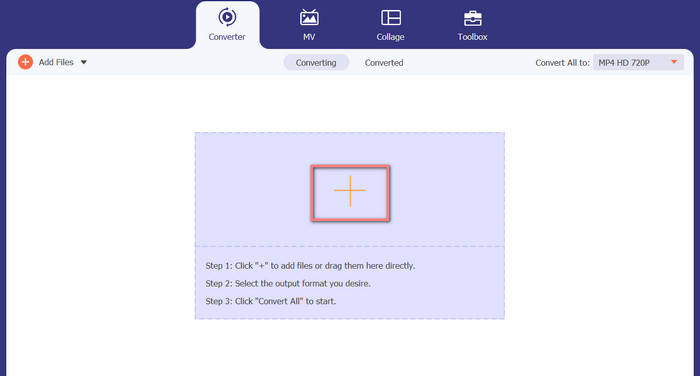
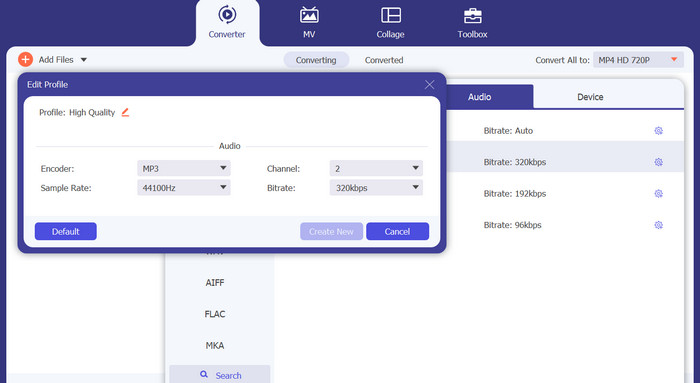
Adım 3. Aracın çıktı formatını değiştirmek için, aracın sağ üst kısmında bulunan Profil menüsündeki Ses sekmesine gidin. Bir M4A dosyasını MP3 dosyasına ve tam tersine dönüştürebilirsiniz.
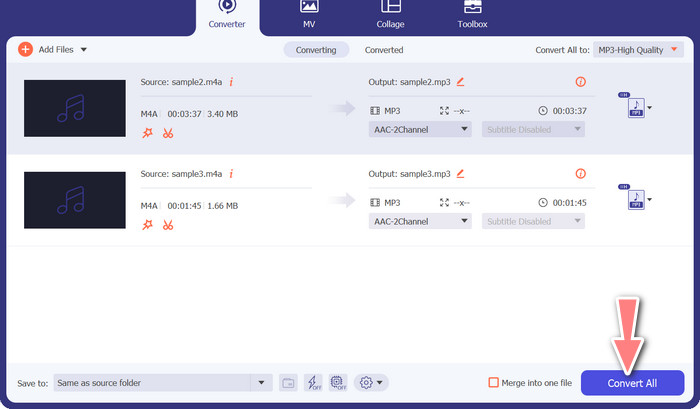
Adım 4. Ekranın en alt kısmında istediğiniz konumu seçin. Dönüştürmeye başlamak için Tümünü Dönüştür seçeneğini işaretleyin.
Çevrimiçi Ücretsiz Video Dönüştürücü (Çevrimiçi)
Yeni bir program indirmek için yer yok mu? İyi haber şu ki, web tabanlı bir dönüştürücü kullanmak, yazılım indirme zahmetini tamamen ortadan kaldırabilir. Free Video Converter Online web aracı, tarayıcı üzerinden dönüştürmeye olanak tanır. Ayrıca çok çeşitli müzik ve video dosya türlerini de destekler. Ek olarak, bu web aracı toplu dönüştürmeleri de destekler. Bunun yanında, kullanıcı son ses dosyasının ayarlarını değiştirebilir. MP3’ü çevrimiçi olarak M4A’ya nasıl dönüştüreceğinizi öğrenin.
Adım 1. Öncelikle tercih ettiğiniz web tarayıcısını açın ve Free Video Converter Online web sitesine gidin.
Adım 2. Dönüştürülecek Dosyalar Ekle seçeneğine tıklayın, ardından dönüştürmek istediğiniz M4A dosyasını bulun ve seçin.
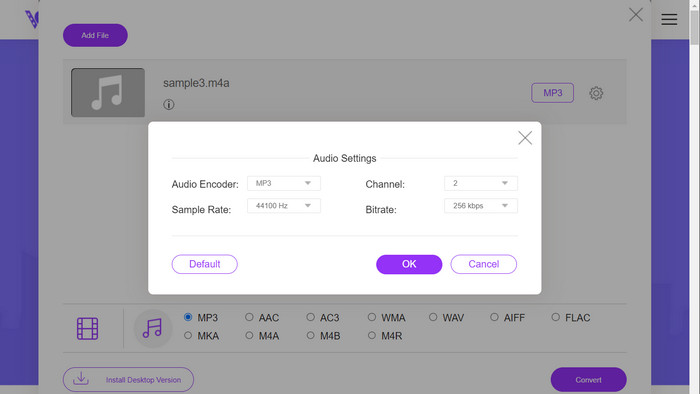
Adım 3. Ses formatı menüsünden çıktı dosya türü olarak MP3’ü seçin. MP3 dosyasının bit oranını yani çıktı kalitesini ayarlamak da mümkündür.
Adım 4. Dönüştürme işlemini başlatmak için Dönüştür düğmesine tıklayın. Web üzerinde M4A’yı MP3’e dönüştürme işlemi bu şekildedir.
Daha Fazla Okuma:
PC ve Mac’te M4A’yı WAV’a Dönüştürme Rehberi
MP3 Dosyalarını Toplu Olarak M4R’ye Dönüştürmek için Kullanabileceğiniz En İyi Araçlar
Bölüm 6. M4A ve MP3 hakkında SSS
Meta veri açısından MP3 ve M4A nedir?
M4A, MP3'ten daha geniş bir meta veri yelpazesini destekler; bu, M4A dosyalarının ses hakkında daha fazla bilgi depolayabileceği anlamına gelir.
MP3 veya M4A dosyalarını düzenleyebilir miyim?
Çeşitli ses düzenleme yazılımlarını kullanarak MP3 ve M4A dosyalarını düzenleyebilirsiniz.
Podcast'ler için hangisi daha iyi, MP3 veya M4A?
MP3, daha küçük dosya boyutu ve daha geniş uyumluluğu nedeniyle podcast'ler için daha iyidir.
Sonuç
MP3 ve M4A karşılaştırmasını anlamak, sizin için en iyi dijital ses formatını seçmenize yardımcı olabilir. İster müzik dinliyor olun ister üretiyor olun, doğru formatı seçmek mümkün olan en iyi ses kalitesi ve uyumluluğu sağlamak açısından kritik öneme sahiptir.
-
 MP3 VS MP4: MP3 ve MP4 Arasındaki Fark Nedir?
 MP3 veya MP4, hangisi daha iyi? MP3 ve MP4 arasındaki fark nedir? Bu makale MP3 ile MP4'ü görüntüleyebileceğiniz tüm yönlerden karşılaştıracaktır.
-
 M4A Player - Android ve Bilgisayar için En İyi 5 M4A Oyuncusu
 M4A dosyaları Android telefonda nasıl oynanır? M4A'yı hangi oyuncu oynayabilir? Bu gönderi Android, Mac ve PC için en iyi 5 ücretsiz M4A oyuncusunu paylaşıyor.
-
 Windows ve Mac'te MP3 Meta Verilerini Düzeltmenin ve Düzenlemenin En İyi 4 Yöntemi
 MP3 meta verilerini kolayca düzenlemenin sırlarını bilmek ister misiniz? Bu blog, kolayca erişebileceğiniz farklı araçlarla size farklı teknikler öğretecek.
