


 Video Dönüştürücü Ultimate
 Ekran kaydedicisi
 Video Onarımı
 Güvenli İndirme
MOV'dan MPG'ye: 2023'te Bu Biçimlerin Nasıl Dönüştürüleceğine İlişkin Hızlı Kılavuz
Kayıtlara geçsin ki, MOV dosyaları bugün övgüye değer tepkiler alıyor; çünkü filmleri depolamak için en uygun formatlardan biri olarak kabul ediliyor. Bu dosya türü, iPhone, iPad ve Macbook gibi Apple ürünleri için varsayılan format olarak geniş çapta tanınmaktadır. Ancak, MOV dosyalarını internete yüklemeye çalıştığınızda zorlanabilirsiniz; çünkü diğer video formatlarına kıyasla daha büyük boyut içerir. Bunu aşmak için, MOV’u MPG’ye dönüştürmeyi tercih edebilirsiniz. Bu yüzden bu rehberde bizimle kalın; bunu nasıl başaracağınızı öğrenmenize yardımcı olacağız.

Bölüm 1. MOV'u MPG'ye Dönüştür
1. Video Dönüştürücü Ultimate
Video Converter Ultimate, MOV’u MPG’ye dönüştürme konusundaki tüm ihtiyaçlarınızı karşılayacak nihai çevrimdışı çözümdür. Sadece birkaç tıklamayla, program dosyalarınızı – boyutu büyük ya da küçük olsun – dönüştürmenize olanak tanır. Ayrıca bu araç, kullanıcıların yüksek kaliteli çıktı formatı elde etmesini ve kendi tercihlerini karşılamasını sağlayan Çıktı Özelleştirme ayarlarıyla donatılmıştır. İşte MOV’u hızla MPG’ye dönüştürmek için basit bir rehberin özeti.
Adım 1. Programı Yükleyin
Başlamak için, aşağıdan cihazınıza uygun İndir düğmesine tıklayın. Ardından, yükleyiciye tıklayın ve programın ekranınızda açılması için çalıştırın.
Ücretsiz İndirWindows 7 veya üstü içinGüvenli İndirme
Ücretsiz İndirMacOS 10.7 veya üstü içinGüvenli İndirme
Adım 2. Dönüştürülecek MOV Dosyalarını Yükleyin
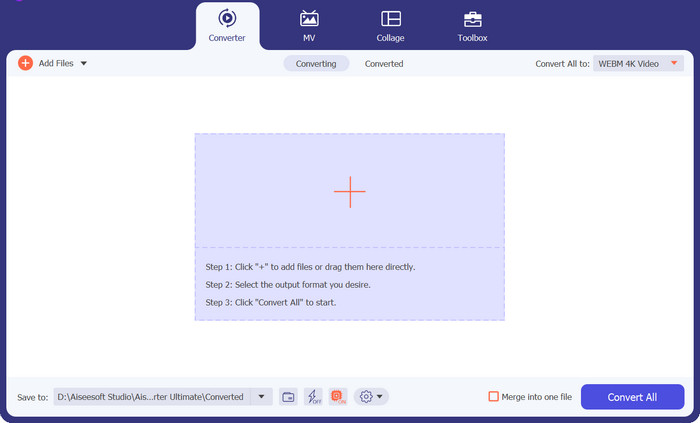
Programı yükledikten sonra, arayüzün ortasındaki Artı düğmesini seçin. Bilgisayar dizini açıldığında, yüklenecek MOV dosyasını seçin. Ayrıca, toplu dönüştürme için birden fazla dosya da yükleyebilirsiniz.
Adım 3. Çıktıyı Seçin
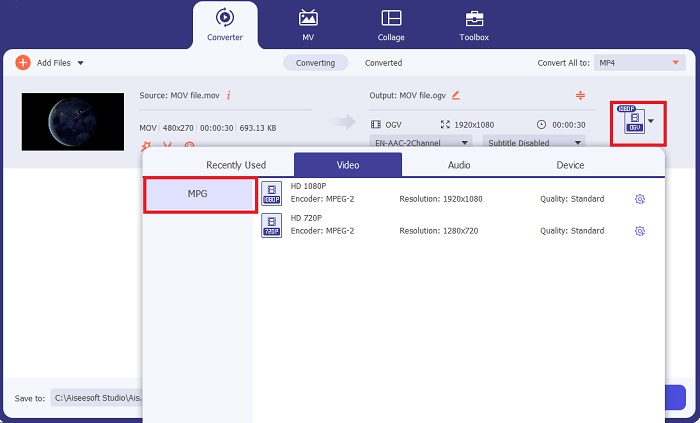
MOV dosyanızın küçük resmi programda görünecek ve yükleme işleminin başarıyla tamamlandığını gösterecektir. Çıktı formatınızı seçmek için Çıktı sekmesini genişletin ve Video paneline tıklayın. Buradan aşağı kaydırarak MPG’yi seçin.
Adım 4. Dönüştürmeyi Başlatın
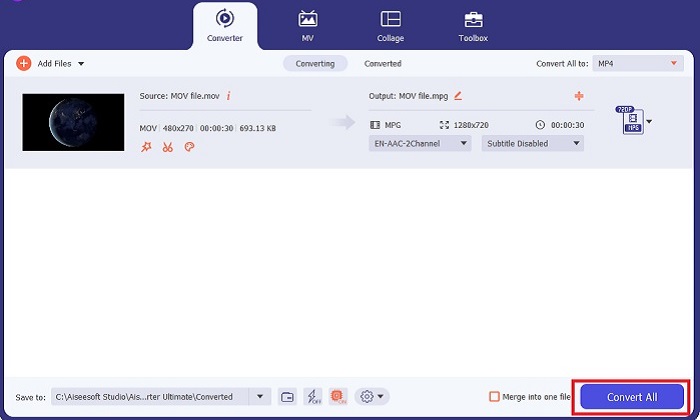
Son olarak, çıktı ayarlarını düzenleyerek çıktı kalitesi gereksinimlerinizi uyarlayın. İşiniz bittiğinde, MOV’u MPG’ye dönüştürme işlemini başlatmak için Dönüştür düğmesine basın.
Ana Özellikler
◆ Kusursuz MOV'dan MPG'ye Dönüştürme: Video Converter Ultimate hakkında sevdiğimiz bir şey, kullanıcı dostu arayüzüdür. Bu araç, yeni başlayan veya yetenekli bir kullanıcı olsun, herkes için en iyisidir.
◆ 50 Kat Daha Hızlı Dönüştürme Hızı: GPU Acceleration kodlama teknolojisinin yardımıyla Video Converter Ultimate, gecikmeler ve çökmeler olmadan hızlı dönüştürmesi sayesinde diğer tüm çevrimdışı dönüştürücüleri zekasıyla geride bırakır.
◆ Toplu Dönüştürme Özelliği: Video Converter Ultimate ile MOV dosyalarından oluşan bir klasörü MPG dışında 100o+ format seçeneklerine de dönüştürebilirsiniz.
2. Ücretsiz Çevrimiçi Video Dönüştürücü
Free Video Converter Online, format dönüştürme işlemini dönüştüren bir diğer yazılımdır. Bu çevrim içi program, çevrimdışı yazılımlarda bulduğumuz kadar kapsamlı araçlar sunmasa da, MOV’u çevrim içi olarak MPG’ye dönüştürmek için güvenilir bir program olma testini geçiyor. Toplu dönüştürme özelliği sunar ve çıktınız üzerinde tam kontrol sağlar.
Adım 1. Önce Free Video Converter Online’ın ana web sitesine gidin. MOV dosyasını yüklemeden önce Dosya Ekle düğmesine tıklayın; öncelikle çevrim içi aracı başlatmanız istenecektir.
Adım 2. Dönüştürmek istediğiniz dosyayı yüklemek için tekrar Dosya Ekle düğmesini seçin ve dosyanızı bir kez daha yükleyin. Sürükle bırak işlevini de kullanabilirsiniz.
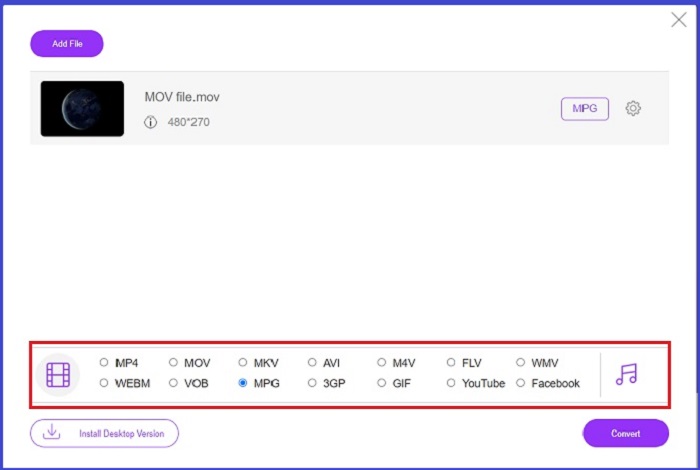
Adım 3. Ham dosyanız göründüğünde, ekranın alt köşesinden çıktı formatınızı seçin. Video panelinde tüm olası formatları göreceksiniz; bizim örneğimizde MPG’yi seçin. Son olarak, Dönüştür düğmesine basın ve dosyanızın indirilmesini bekleyin.
Ana Özellikler
◆ Çok Platformlu Çevrimiçi Dönüştürücü: İster telefonunuzda, ister tabletinizde veya bilgisayarınızda olun, bu araç mükemmel bir şekilde çalışır ve bu da video veya ses dönüştürmeyi mümkün kılar.
◆ Gizlilik Garantisi: Kim özel bilgilerin işgal edilmesini ister? Free Video Converter Online ile bu konuda sıfır ikilemle karşılaşmalısınız. Bu çevrimiçi araç, kullanıcıların kayıt işlemleri gerektirmeden MOV'u MPG'ye ücretsiz dönüştürmesine olanak tanır.
◆ Kurulum Gereksinimi Yok: Bu araç, özellikle dijital alanınız tükendiğinde, yoğun kurulumlardan kurtulmanıza yardımcı olan başka bir sorunsuz dönüştürücüdür.
Bölüm 2. MPG'yi MOV'a Dönüştür
1. Video Dönüştürücü Ultimate
Tekrar belirtmek gerekirse, Video Converter Ultimate, Mac ve Windows cihazlarda MOV’u MPG’ye dönüştürmek için önerebileceğimiz en iyi çözümdür. Bu araç, Samsung, Apple, Sony ve daha birçok cihaza özel olarak hazırlanmış olanlar da dâhil olmak üzere 1000’den fazla video ve ses formatını içerir. Aşağıdaki rehberi izleyerek herhangi bir MPG dosyanızı MOV’a dönüştürebilirsiniz.
Ücretsiz İndirWindows 7 veya üstü içinGüvenli İndirme
Ücretsiz İndirMacOS 10.7 veya üstü içinGüvenli İndirme
Adım 1. MPG dosyasını programa aktarmak için Dosya Ekle düğmesine tıklayın.
Adım 2. Dosyanız ekranda yüklendikten sonra, Çıktı > Video > MOV yolunu izleyerek çıktı formatını seçin. Daha iyi kalite için video parametrelerini de düzenleyebilirsiniz.
Adım 3. Programın dosyaları MPG’den MOV’a dönüştürmesi için Dönüştür düğmesini seçin. Dönüştürme tamamlandığında, çıktıyı program içinde kontrol edebilirsiniz.
2. AnyDönüşüm
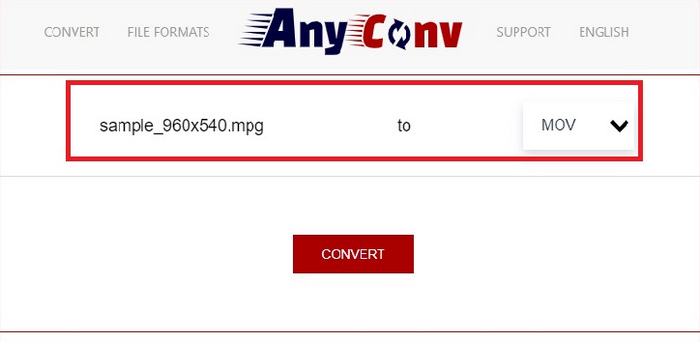
AnyConv, çevrimiçi olarak ücretsiz bir MPG'den MOV'a dönüştürücüdür. Bu program herhangi bir cihazda iyi çalışır ve MPG dosyalarınızı yüklediğinizde bir sürükle ve bırak özelliği sunar. Ayrıca bu çevrimiçi çözüm, dönüştürülen dosyalarını bir saat sonra silerek kullanıcıların verilerini korur. MOV dışında, MPG dosyalarınızı 3GP, AVCHD, MP4, MKV ve daha fazlasına dönüştürebilirsiniz.
Adım 1. Önce AnyConv web sitesini açın. Site ekranınızda belirdikten sonra, Dosya Seç düğmesine tıklayın ve dönüştürmek istediğiniz MOV görüntüsünü seçin.
Adım 2. MOV dosyanız yüklendikten sonra, ortadaki Çıktı sütununda yer alan çıktı formatları listesinden MPG’yi seçin.
Adım 3. Son olarak, Dönüştür düğmesine tıklayın ve dosyanızın indirilmesini bekleyin.
Daha Fazla Okuma:
MPG’yi MP4’e Hızla Dönüştürmenin En İyi 3 Yolu
Kaçırmamanız Gereken En İyi 5 MOV’dan 3GP’ye Dönüştürücü
Bölüm 3. MPG'yi MOV'a Dönüştürme Hakkında SSS
Ücretsiz bir MOV - MPG dönüştürücü var mı?
Kesinlikle evet! Çevrimiçi dönüştürücüler, ücret ödememek için en iyi seçiminizdir. MOV'u ücretsiz olarak MPG'ye dönüştürmek için Ücretsiz Çevrimiçi Video Dönüştürücüyü seçebilirsiniz.
MPG, MOV'dan daha mı iyi?
MOV, tip farklılıkları nedeniyle MPG'den daha iyidir. MOV, tüm orijinal verilerinizi kaydeden bir kap biçimidir. Aynı zamanda MPG, internet üzerinden daha hızlı dosya aktarımı için bir videonun dosya boyutunu küçültmek için kullanılan sıkıştırılmış bir codec bileşenidir.
Bir MOV dosyasının avantajı nedir?
MOV dosyaları düzenleme için uygundur ve en iyi video formatını seçmek için standart olarak kabul edilir. Bu dosyanın bir dezavantajı, yalnızca birkaç medya oynatıcının bu formatı açmasıdır.
MOV to MPG kaliteyi düşürür mü?
Evet. Dosyalarınızı MOV'dan MPG'ye dönüştürmek, yalnızca videonuzun dosya boyutunu küçültmekle kalmaz, aynı zamanda kaliteyi de düşürür. Her iki dosya da ihtiyacınız olabilecek her durumda harikadır.
MOV'u Windows Media Player'da oynatabilir miyim?
Neyse ki, Windows Media Player'daki MOV dosyaları, sürüm 12 veya üzeri olduğu sürece oynatılabilir.
Sonuç
İşte MPG’yi MOV’a veya tam tersine dönüştürmenin olası yolları. Her iki format da farklı ihtiyaçlarınızı en iyi şekilde karşılayacaktır. Çevrim içi dönüştürücülerle son derece basit bir dönüştürme süreci elde edebilirsiniz. Öte yandan, dosyalarınızın kalitesini düzenleyerek iyileştirmek ve hatta düzenleme yapmak isterseniz, Video Converter Ultimate’ı öneriyoruz.
-
 FLV'den MPG'ye - Mac, PC ve Çevrimiçi Ücretsiz'de FLV'yi MPG'ye Dönüştürme
 FLV MPEG dönüştürmek nasıl? FLV'yi ücretsiz olarak MPG'ye dönüştürebilir miyim? Bu gönderi, FLV'yi kalite kaybı olmadan MPG'ye dönüştürmenize yardımcı olacak 3 ücretsiz video dönüştürücüyü paylaşıyor.
-
 Mac'te ve Çevrimiçi Aracı Kullanarak MPG'yi M4V'ye Dönüştürme
 Yeni bir Mac kullanıcısı mısınız ve MPG'yi M4V'ye nasıl dönüştüreceğinizi bilmiyor musunuz? Daha sonra, daha fazla bilgi edinmek ve Mac'inizi kullanarak dosyaları nasıl dönüştüreceğinizi keşfetmek için bu makaleyi okuyabilirsiniz.
-
 QuickTime MOV Dosyalarını Orijinal Kalitede Oynatmak için En İyi 8 MOV Oynatıcı
 Hem Windows hem de Mac için mevcut en iyi 8 MOV oynatıcı hakkında daha fazla bilgi edinin. MOV dosyalarını orijinal kalitede oynatmak için istediğiniz ve uygun olanı seçebilirsiniz.
