


 Video Dönüştürücü Ultimate
 Ekran kaydedicisi
 Video Onarımı
HTML'yi Çevrimiçi MP4'e Dönüştürme: Dikkate Alınması Gereken En İyi 3 Dönüştürücü
İnsanlar çeşitli sebeplerle internetten sık sık HTML videolar indirir. Başlıca neden, bunları daha sonra iyi bir internet bağlantısına ihtiyaç duymadan izlemek istemeleridir. Bu, özellikle seyahat sırasında veya internet erişiminin zayıf olduğu yerlerde çok işe yarar. Bir diğer yaygın neden ise, videoyu saklamak ve çevrim içi kaynağa erişimi olmayan kişilerle paylaşmaktır. Elinizde HTML dosyaları olmasının sebebi ne olursa olsun, bunları MP4 gibi çok daha erişilebilir bir video formatına dönüştürmek gereklidir. Bu da cihaz uyumluluğunu sorunsuz ve problemsiz hâle getirmek içindir. Şimdi, HTML’i MP4’e dönüştürmek için HTML ile çok iyi başa çıkan bir araca ihtiyacınız olacak. Neyse ki, kullanmayı düşünebileceğiniz en iyi çevrim içi dönüştürücüleri bir araya getirdik.

Bölüm 1. HTML Videolarını MP4'e Dönüştürmeye Neden İhtiyaç Var?
Daha önce de belirtildiği gibi, HTML gibi web videolarını MP4 gibi evrensel bir video formatına dönüştürmenin çeşitli nedenleri vardır. Ancak bu ihtiyacı detaylandırmak için burada daha ayrıntılı bir açıklama var. Bir HTML dosyasının içeriğini korumak istediğinizde bu tür bir dönüştürme gerekli olabilir. Bu, özellikle medya oynatıcılar ve farklı platformlar üzerinden evrensel olarak erişilebilen bir formattaki videolar gibi multimedya öğeleri için geçerlidir.
Görüyorsunuz, HTML dosyaları web tarayıcıları tarafından görüntülenebilen çeşitli türde bilgiler içerir, ancak tüm medya oynatıcıları bunları desteklemez. Bu nedenle, verimli dönüştürme için bir HTML'den MP4'e dönüştürücü aramanın ana nedeni, multimedya içeriğini çeşitli oynatıcılarda kolayca oynatılabilen standart bir video formatına yerleştirebilmenizdir. Ayrıca bu dönüşüm, multimedya içeriğinin birden fazla platformda paylaşılması ve tüketilmesi için uygunluğu da sağlar.
Bölüm 2. HTML'yi MP4 Online'a Dönüştürme
HTML dosyalarınızdan en iyi MP4 çıktılarını elde etmenize yardımcı olacak etkili çevrimiçi dönüştürücülerle tanışarak hemen işe koyulalım.
1. Online-Convert.com
Listedeki ilk dönüştürücü Online-Convert.com'dur. HTML dosyalarınızı hızlı bir şekilde çeşitli çıktı formatlarına değiştirmek için web üzerinde kullanabileceğiniz kullanışlı ancak çok işlevli bir dosya dönüştürücüsüdür. HTML dosyalarına dönüştürmenin yanı sıra, doğru ön ayarı seçme ve ekran boyutunu, video bit hızını ve kare hızını değiştirme gibi diğer ayarları da değiştirebilirsiniz. Ayrıca video projenizi döndürmenize, kesmenize, yansıtmanıza, çevirmenize, kırpmanıza ve sesini ayarlamanıza olanak tanır. Elbette, bu HTML'den MP4'e dönüştürücü, farklı ihtiyaçlar için birçok hazır seçenek sunar. En iyi yanı, sizi rahatsız edecek sinir bozucu reklamlar olmadan, kullanımı size bir kuruşa bile mal olmayacak! Ancak dosya boyutu sınırı vardır ve toplu dosya dönüştürmeyi desteklemez. Ne olursa olsun, dönüşümü hızlı bir şekilde gerçekleştirmenin adımları aşağıda verilmiştir.
1. Adım. Ana web sitesinde, bu dönüştürme ihtiyacı için sunduğu doğru dönüştürücü aracını seçin. Şimdi, Dosya Seç düğmesine tıklayarak HTML dosyanızı yükleyin.
2. Adım. Dosya başarıyla yüklendiğinde, çıktıda yapmak istediğiniz düzenlemeleri gerçekleştirmek için alt kısma göz atabilirsiniz. Aksi hâlde, dönüştürme işlemini başlatmak için BAŞLAT düğmesine tıklayın.
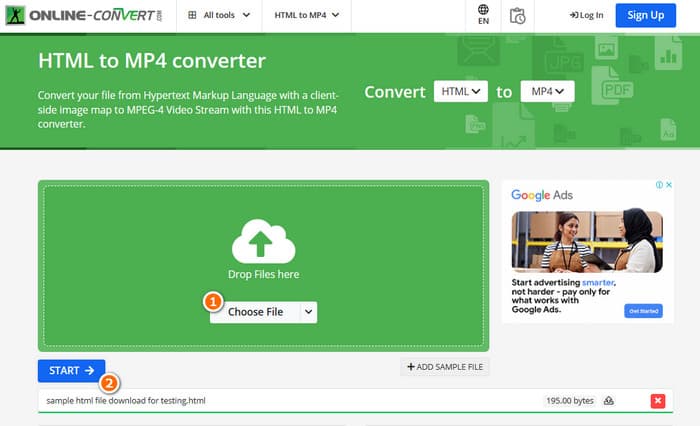
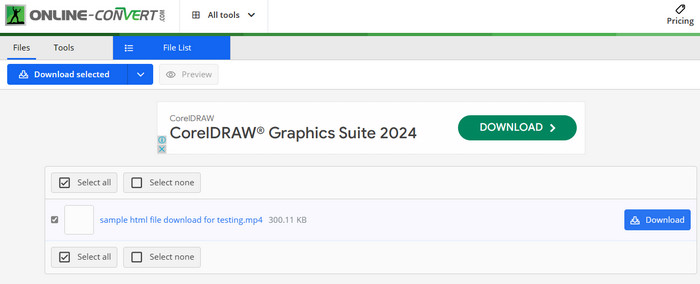
3. Adım. Dönüştürme tamamlandığında, dönüştürülen dosyayı cihazınıza kaydetmek için indirmeniz gerekecek.
2. ADönüştür
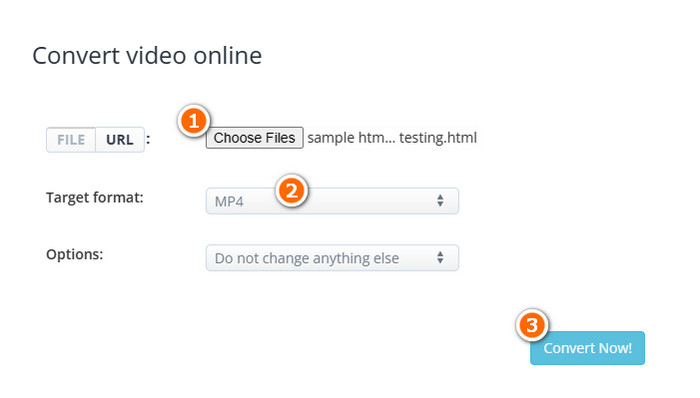
HTML'yi çevrimiçi olarak MP4'e dönüştürmenizi sağlayan bir başka esnek dönüştürücü de AConvert'tir. Bu özel dönüştürücü, çeşitli dosya formatlarını ücretsiz olarak dönüştürmek için kullanımı kolay bir araçtır. Ayrıca AConvert, çevrimiçi dönüştürme hizmetlerine ihtiyaç duyan, deneyimi olan veya olmayan herkese hitap edecek şekilde tasarlanmıştır. Öne çıkan özelliklerinden biri, toplu dönüştürme özelliğidir; bu, size tek seferde birden fazla dosyayı dönüştürme yeteneği vererek, işlenecek çok sayıda dosyanız olduğunda zaman tasarrufu sağlar. Ancak dönüştürme süreci beklenenden biraz daha uzun sürebilir ve sitedeki reklamlar biraz müdahaleci olabilir. Bu arada, AConvert'ı kullanarak HTML dosyalarını dönüştürmenize yardımcı olacak kısa bir kılavuzu burada bulabilirsiniz.
1. Adım. Resmî dönüştürücü aracına ulaştığınızda Dosyaları Seç düğmesine tıklayın. Ardından, dönüştürmek istediğiniz HTML dosyasını seçin.
2. Adım. Bundan sonra, Hedef format bölümüne gidin ve çıktı olarak MP4’ü seçin.
3. Adım. Her şey hazır olduğunda, işlemi başlatmak için Şimdi Dönüştür düğmesine tıklayın. Dönüştürme başarıyla tamamlandığında, dışa aktarmak üzere dönüştürülen dosyayı indirin.
3. Converterpoint - HTML5 Çevrimiçi Video Dönüştürücü
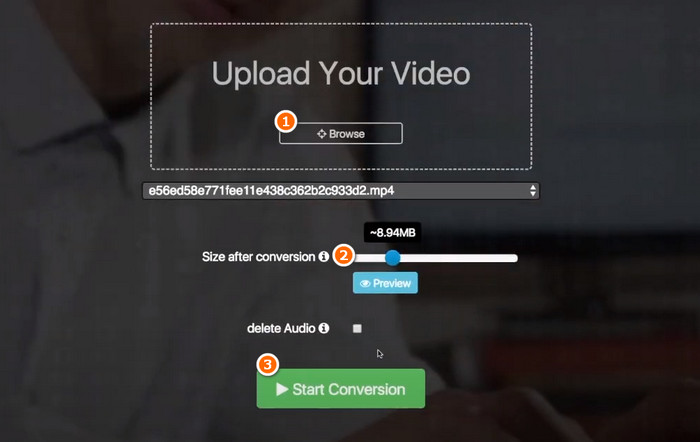
HTML için 3 güçlü çevrimiçi dönüştürücümüzün setini tamamlamak için burada Converterpoint'i bulabilirsiniz. Bu çevrimiçi araç yalnızca sıradan kullanıcılar için değil, aynı zamanda web sitelerinde, sosyal medya platformlarında veya HTML5'i destekleyen diğer dijital kanallarda kullanılmak üzere videoları dönüştürmek isteyen bireyler veya işletmeler için de yararlı olabilir.
1. Adım. Gözat düğmesine tıklayarak videonuzu yükleyin.
2. Adım. Yüklendikten sonra, dönüştürmeden sonra tercih ettiğiniz çıktı dosya boyutunu ayarlayın.
3. Adım. Ardından, işlemi başlatmak için Dönüştürmeyi Başlat düğmesine tıklayın.
Bölüm 3. Bonus İpucu: Medya Formatlarını Ücretsiz Çevrimiçi MP4'e Dönüştürün
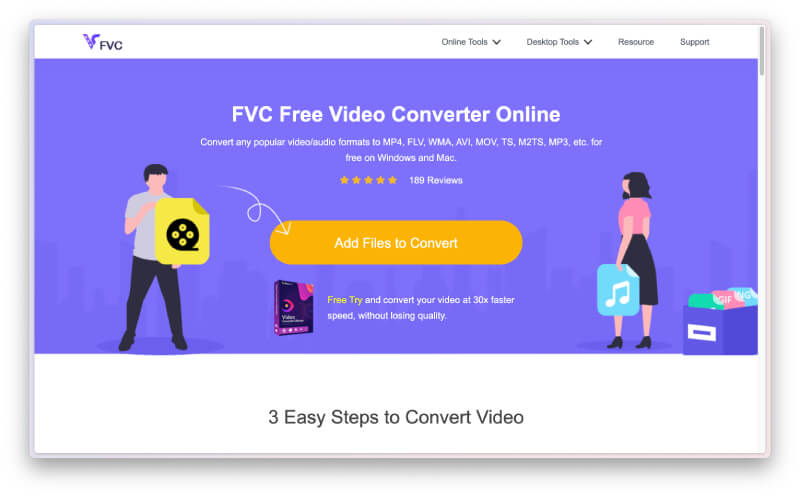
HTML’i çevrim içi olarak MP4'e dönüştürmek için yalnızca bir dönüştürücüden fazlasını mı istiyorsunuz? O hâlde, bu FVC Free Video Converter Online aracının çeşitli video ve ses dosyası dönüştürme görevlerinizde size nasıl yardımcı olduğuna bakın. Bu, herhangi bir kısıtlama olmadan sınırsız dosyayı dönüştürmenize imkân tanıyan mükemmel bir medya dosyası dönüştürücüdür! Ayrıca dönüştürme işlemini gerçekleştirirken, diğerlerine göre çok daha hızlı olmasını sağlayan özel bir teknolojiyle çalıştığı için son derece süratlidir. Dolayısıyla, MP4’e dönüştürmeniz gereken toplu ses veya video dosyalarınız varsa, aşağıdaki adımları izleyin.
1. Adım. Resmî sitesine giriş yaptığınızda Dosya Ekle ve Dönüştür düğmesine tıklayın. Bu, ilk dosyanızı yüklemenizi sağlayacaktır.
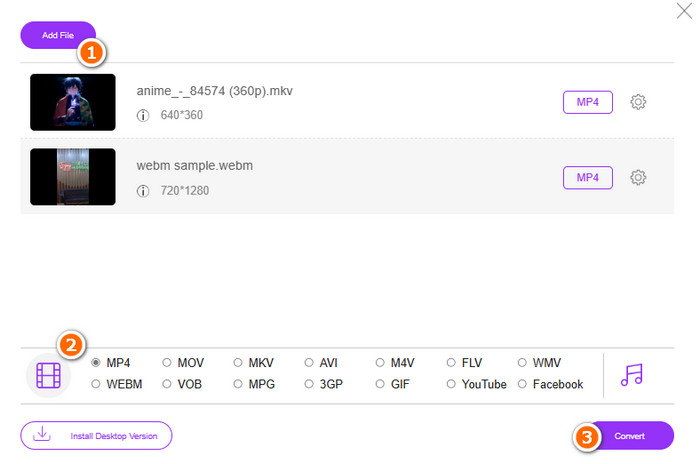
2. Adım. Yüklemek üzere ilk dosyanızı seçtikten sonra, ana penceredeki Dosya ekle düğmesine tıklayarak daha fazla dosya yükleyebilirsiniz. Ardından, alt kısımda bulunan format konumundan MP4’ü seçerek dosyaları MP4 formatına ayarlayın.
3. Adım. Son olarak, toplu dönüştürme işlemini başlatmak için Dönüştür düğmesine tıklayın.
Bölüm 4. HTML Dosyalarının MP4 Dönüşümüne İlişkin SSS
HTML dosyaları MP4 formatına dönüştürülebilir mi?
Evet, HTML dosyaları kendi kopyanızı alıp onu MP4'e dönüştürerek MP4 formatına dönüştürülebilir.
HTML dosyasını MP4 formatına dönüştürmek ne kadar sürer?
Süre her zaman dosya boyutunun büyüklüğü ve dönüştürme aracının ne kadar güvenilir olduğu gibi çeşitli etkenlere bağlıdır.
HTML videosunu kaydedebilir miyim?
Evet, yapabilirsiniz. HTML video oynatılırken kayda yardımcı olması için çevrim içi olarak bulabileceğiniz bazı ücretsiz MP4 kaydediciler de vardır.
Sonuç
Yukarıda, HTML’i MP4'e dönüştürme konusunda ün yapmış çevrim içi dönüştürücüler yer alıyor. Artık dönüştürmeyi yapmak için pek çok seçeneğiniz var. Öte yandan, dönüştürme sürecinde olağanüstü bir performans sergileyen ve yüksek kaliteli çıktılar üreten, ünüyle bilinen bir ses–video dosyası dönüştürücü istiyorsanız, FVC Free Video Converter Online en iyi seçenektir.
-
 RAR'ı Hem Çevrimiçi hem de Çevrimdışı Yollardan MP4'e Dönüştürme
 Etkili bir RAR'dan MP4'e dönüştürücü arıyorsanız, doğru sayfadasınız. Bu gönderi size edinmenin çevrimiçi ve çevrimdışı yollarını sunar.
-
 AVCHD ve MP4 Karşılaştırması: Hangisini Seçmenin Daha İyi Olduğunun İncelenmesi
 Bu AVCHD ve MP4 karşılaştırması gönderisine bakın ve hangi video formatının size en uygun olduğunu öğrenin. Açıklamalarını, farklılıklarını vb. öğrenmek için daha fazlasını araştırın.
-
 HEIC'i MP4'e Verimli Bir Şekilde Dönüştürmenin En İyi Tekniği
 Bilgisayarınızda ve iPhone cihazlarınızda HEIC'den MP4'e dönüştürmeyi gerçekleştirmenin en iyi yollarını öğrenin. Bu gönderi etkili dönüşüm tekniğini içermektedir.
