


 Video Dönüştürücü Ultimate
 Ekran kaydedicisi
 Video Onarımı
 Güvenli İndirme
KB/MB Cinsinden Resim Boyutunu Azaltmanın 3 En Kolay Yolu [2024]
Günümüzde fotoğraf çekmek, bir anı saklamamıza ve değerini bilmemize imkân tanıyan keyifli ve gönül rahatlığı veren bir deneyimdir. Çoğu zaman bu anı, farklı sosyal medya platformlarında veya internet sitelerinde paylaşarak ve yükleyerek bir üst seviyeye taşırız. Genellikle, sitelere görsel yüklerken, en iyi görüntüleme ve daha hızlı yükleme süreleri için belirli görsel boyutları istenir. Bu nedenle, eğer görsel boyutunu KB/MB cinsinden küçültmeye ihtiyaç duyuyorsanız, bu makaleyi baştan sona okuyun ve görsellerinizin boyutunu kolayca küçültmenizi sağlayacak 3 farklı yolu öğrenin. Öyleyse ne bekliyorsunuz? Hadi başlayalım!

Bölüm 1: Kalite Kaybı Olmadan Görüntü Boyutunu KB/MB Cinsinden Azaltın [Tek Tıklama Yolu]
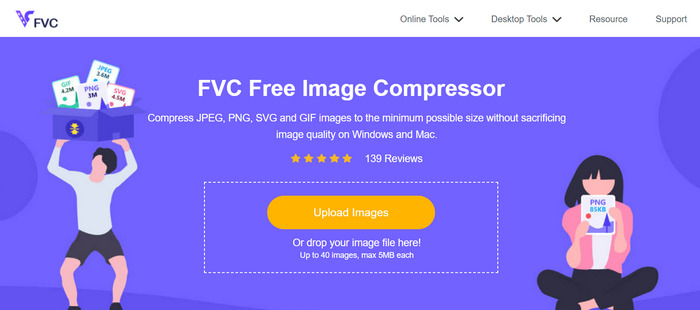
Görsel boyutunu KB/MB cinsinden küçültmek için başvurulabilecek araçlardan biri de FVC Ücretsiz Görsel Sıkıştırıcıdır. Bu araç tek tıkla çalışır. Sadece görsel dosyasını içe aktarmanız yeterlidir; gerisi sorunsuz ve otomatik olarak işlenir.
Bu araçla, JPEG, PNG, SVG fotoğrafları ve animasyonlu GIF'ler gibi farklı türdeki görselleri, kalitelerinden çok fazla ödün vermeden daha küçük boyutlara küçültebilirsiniz. Ayrıca, sıkıştırılacak bir sürü görsel dosyanız varsa, iyi olan şey, bu aracın toplu sıkıştırmayı desteklemesidir; böylece yükledikten sonra bir sürü görseli aynı anda yeniden boyutlandırabilirsiniz. Her biri en fazla 5 MB olmak üzere 40'a kadar görseli sıkıştırmanıza olanak tanır.
Adım 1. Resmi web sitelerine gidin.
Adım 2. Sıkıştırmak istediğiniz fotoğrafları içe aktarmak için Upload Images (Görselleri Yükle) seçeneğine tıklayın.
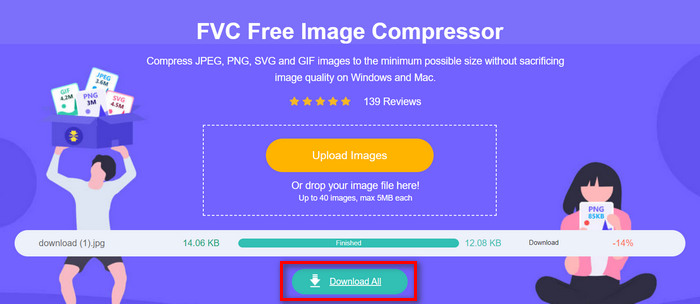
Adım 3. Sıkıştırma işleminin bitmesini bekleyin. İşlem tamamlanınca, bittiğini belirten bir durum çubuğu ile birlikte sıkıştırma öncesi ve sonrası dosya boyutu bilgilerini göreceksiniz. Ardından, görselinizi kaydetmek için Download (İndir) seçeneğine tıklayın.
FVC Free Image Compressor ile, çok basit ama sezgisel kullanıcı arayüzü sayesinde bir görüntüyü sıkıştırmak çabanıza ve zamanınıza mal olmaz. Yani, KB/MB cinsinden görüntü boyutunu küçültmek için yanınızda taşıyabileceğiniz bir araca ihtiyacınız varsa, bu sizin için mükemmeldir.
Bölüm 2: Özel Kalite ve Boyutla Görüntü Boyutunu KB/MB Olarak Azaltın
Photoshop, üstün özellikleri ve yetenekleriyle tanınan bir fotoğraf düzenleme yazılımıdır. Photoshop ile yalnızca fotoğrafları hassas bir şekilde düzenleyip iyileştirmekle kalmaz, aynı zamanda onları çeşitli amaçlar için optimize edebilir, örneğin dosya boyutunu küçültebilirsiniz. Bu yazılım aracıyla görsel boyutunu KB/MB cinsinden küçültmek için kullanabileceğiniz iki yöntem şunlardır:
Görüntü Boyutunu Piksellere Göre Değiştirme
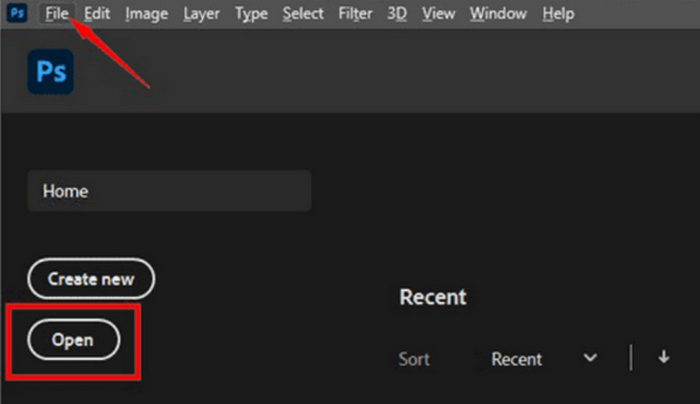
Adım 1. Open (Aç) seçeneğine tıklayarak veya File (Dosya) menüsüne gidip görselinizi seçerek görselinizi Photoshop’ta açın.
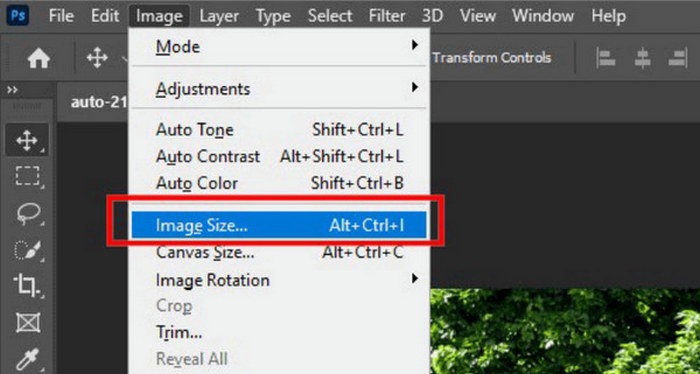
Adım 2. Şimdi üst menüden Image (Görsel) sekmesine gidin ve Image Size (Görsel Boyutu) seçeneğini seçin.
Adım 3. Image Size iletişim kutusunda açılır menüden Pixels’i seçin. Belirli boyutlar ayarlamak için genişlik ve yükseklik kutularına değerleri girin ve resmi yeniden boyutlandırmak için OK’ye tıklayın.
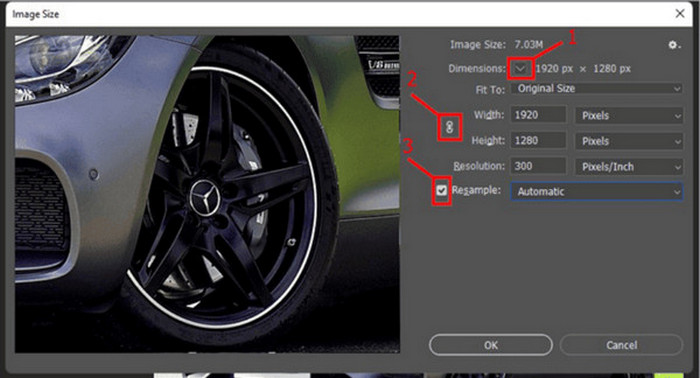
Adım 4. Son olarak, File (Dosya) sekmesine giderek dosyanızı kaydedin. Buradan Save As (Farklı Kaydet) düğmesine tıklayın.
PSD dosyasını kaydetmeden önce JPEG formatında kaydedin.
Görüntü Boyutunu İnç Olarak Değiştirme
Bu ikinci yöntem, görüntü boyutunu inç olarak değiştirerek KB/MB cinsinden boyutu azaltmanıza olanak tanır. Bunu yapmak için aşağıdaki adımları izleyin:
Adım 1. Open (Aç) seçeneğine tıklayarak veya File (Dosya) menüsüne gidip görselinizi seçerek görselinizi Photoshop’ta açın.
Adım 2. Şimdi üst menüden Image (Görsel) sekmesine gidin ve Image Size (Görsel Boyutu) seçeneğini seçin.
Adım 3. Image Size iletişim kutusunda açılır menüden Inches’ı seçin. Belirli boyutlar ayarlamak için genişlik ve yükseklik kutularına değerleri girin ve resmi yeniden boyutlandırmak için OK’ye tıklayın.
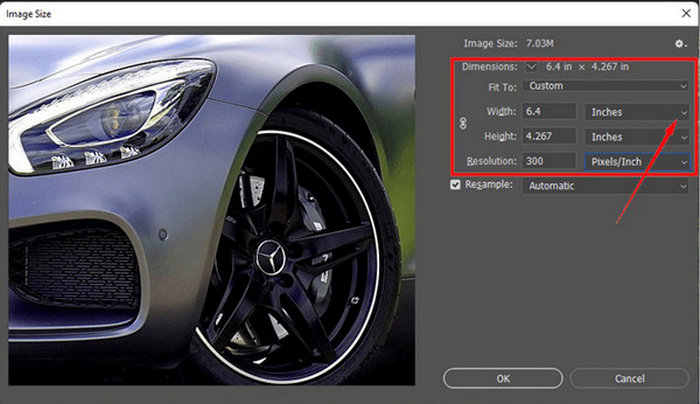
Adım 4. Son olarak, son görseli kaydetmek için File (Dosya) menüsüne gidin ve Save As (Farklı Kaydet) düğmesine tıklayın.
Bu nedenle, görüntünüzün nasıl yeniden boyutlandırılmasını istediğiniz konusunda daha fazla seçeneğe ihtiyacınız olduğunda, Photoshop tam size göre. Sadece aracın nasıl kullanılacağına aşina olmanız gerekir, çünkü bu bazı yeni başlayanlar için bunaltıcı olabilir.
Bölüm 3: Dahili Yazılımla Görüntü Boyutunu KB/MB Cinsinden Azaltın
Windows ve Mac bilgisayarlarınızda yerleşik yazılımı kullanarak resim boyutunu KB/MB olarak azaltmak istiyorsanız bu yöntem aradığınız yöntem olabilir.
Windows'ta Paint Kullanımı
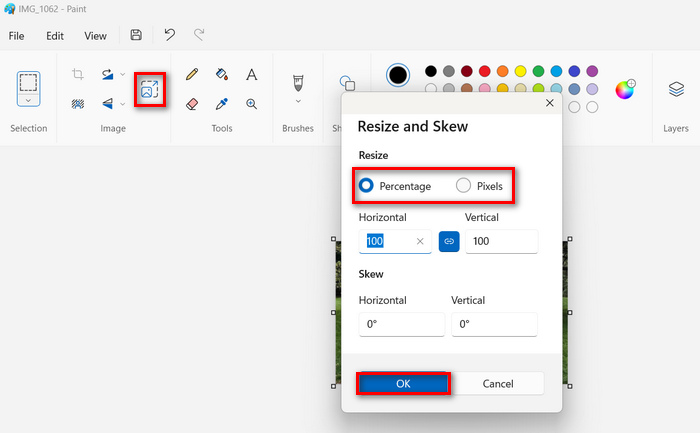
Paint, Windows kullanıcıları için yerleşik bir grafik düzenleyici araçtır ve özellikle bir görsel boyutu küçültücü olarak, görsel boyutunu KB/MB cinsinden azaltmak için harika bir seçenek olabilir. Bu araçla, görseli ister yüzdeye göre ister piksel sayısına göre yeniden boyutlandırabilirsiniz.
Bunu kullanmak için aşağıdaki adımları izleyin:
Adım 1. Cihazınızda Paint uygulamasını başlatın.
Adım 2. Ardından, File (Dosya) simgesine tıklayın ve boyutunu küçültmek istediğiniz görseli eklemek için Open (Aç) seçeneğini seçin.
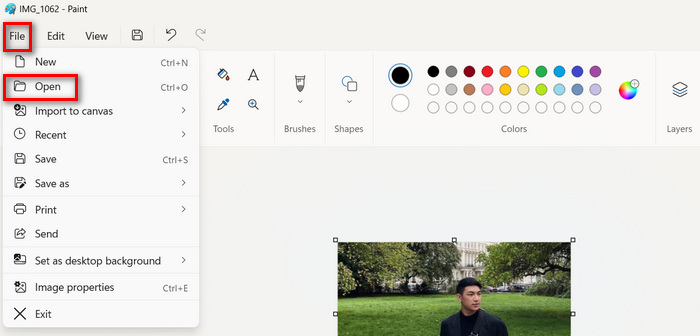
Adım 3. Daha sonra Resize and Skew (Yeniden Boyutlandır ve Eğ) düğmesine tıklayın. Burada, görseli yüzdesini veya piksel boyutunu değiştirerek yeniden boyutlandırabilirsiniz. İstediğiniz boyuta ulaştığınızda OK (Tamam) düğmesine tıklayın.
Adım 4. İşlemi tamamladıktan sonra File (Dosya) menüsüne gidin, Save as (Farklı kaydet) düğmesine tıklayın ve görselinizin nasıl kaydedileceğini seçin.
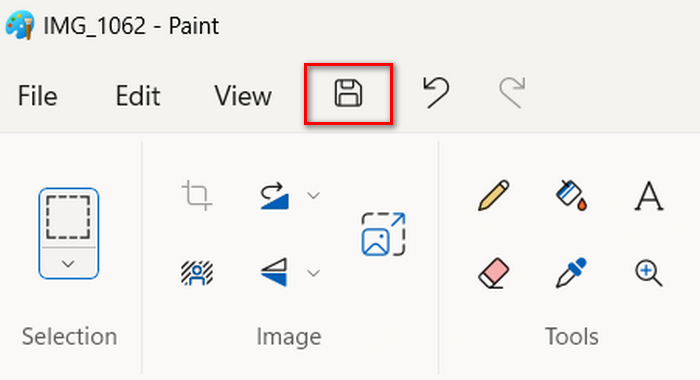
Bu nedenle, Paint'i kullanarak görüntü boyutunu KB/MB'ye düşürerek, Windows kullanıcıları yalnızca kullanıcı dostu arayüzünün keyfini çıkarmakla kalmaz, aynı zamanda görüntüleri yüzde veya piksel olarak yeniden boyutlandırma yeteneğinin de keyfini çıkarabilirler. Ancak, bunlara rağmen, gelişmiş özelliklerden ve özelleştirme seçeneklerinden yoksundur.
Mac'te Preview'ı Kullanma
Mac kullanıcısıysanız, cihazınızda Preview uygulamasını kullanabilirsiniz. Bu yerleşik resim görüntüleme aracı yalnızca farklı resim dosyalarını görüntülemenize izin vermekle kalmayacak, aynı zamanda resim boyutunu KB/MB olarak kolayca küçültmenize de olanak tanıyacaktır.
Bunu yapmak için aşağıdaki adımları izleyin:
Adım 1. Önce Mac cihazınızda Preview (Önizleme) uygulamasını açın.
Adım 2. Ardından, File (Dosya) sekmesine gidip Open (Aç) düğmesine tıklayarak boyutunu sıkıştırmak istediğiniz görsel dosyasını açın.
Adım 3. Şimdi, üstteki menüden Tool (Araçlar) sekmesine gidin ve Adjust Size (Boyutu Ayarla) seçeneğine tıklayın.
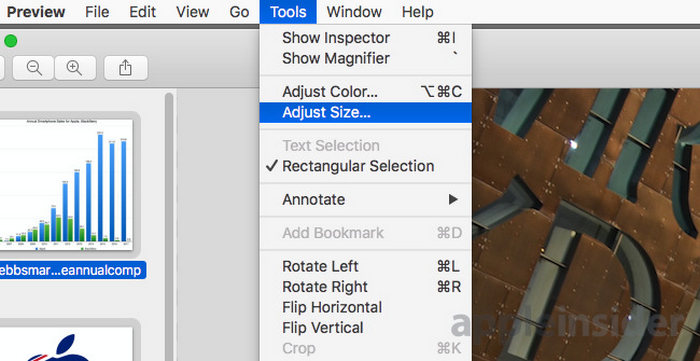
Adım 4. Görsel dosyalarının boyutunu küçültmek istiyorsanız Resample Image (Görseli Yeniden Örnekle) seçeneğini işaretleyin.
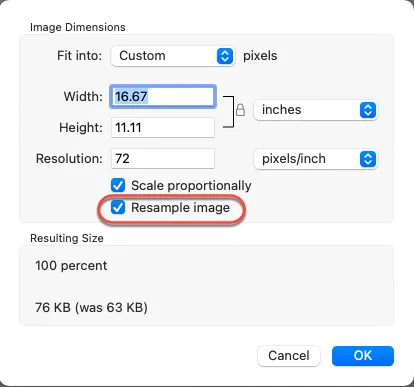
Adım 5. Şimdi Resolution (Çözünürlük) değerini değiştirin. Değişiklik yapıldıktan sonra, altta yeni dosya boyutu gösterilecektir.
Preview, sezgisel arayüzü ve entegre özellikleriyle görselleri yeniden boyutlandırmayı basitleştirir. Kullanıcılar, görsel dosyalarını zahmetsizce açabilir, boyutlarını ayarlayabilir ve ihtiyaç duyduklarında sıkıştırabilirler. Bu, onu Mac aygıtlarında temel görsel düzenleme görevleri için kullanışlı bir araç haline getirir.
Bölüm 4: Görüntü Boyutunu KB/MB Olarak Azaltmanın En İyi Yolu Hangisidir?
Görüntü boyutunu KB/MB cinsinden minimum çabayla azaltmak için hızlı ve kolay bir çözüme ihtiyacınız olduğunda, FVC Free Image Compressor sizin için ideal araçtır. Tek bir tıklamayla, JPEG, PNG, SVG ve GIF'ler dahil olmak üzere en yaygın kullanılan görüntü formatlarından bazılarının boyutunu küçültebilirsiniz; bu da onu verimlilik ve erişilebilirliğin en önemli olduğu durumlar için mükemmel hale getirir.
Bu arada, görüntü kalitesi üzerinde hassas kontrol ve kapsamlı düzenleme yetenekleri arayanlar için Photoshop en iyi seçenektir.
Son olarak, basitlik ve erişilebilirlik istediğinizde, Windows'ta Paint veya Mac'te Preview gibi yerleşik yazılımları kullanmak doğru yoldur. Bu araçlar, görüntüleri hızla yeniden boyutlandırmak için basit çözümler sunar ve bu da onları, özel yazılımların karmaşıklığı olmadan temel düzenleme yeteneklerine ihtiyaç duyan kullanıcılar için ideal hale getirir.
Bölüm 5: KB/MB Cinsinden Görüntü Boyutunu Azaltma Hakkında SSS
Bir resmin boyutunu MB'den KB'ye nasıl değiştirebilirim?
Çeşitli yöntemler kullanarak bir resmi MB'den KB'ye yeniden boyutlandırabilirsiniz. Bir yol, FVC Free Image Compressor gibi bir resim sıkıştırma aracı kullanmaktır. Bu, resminizin boyutunu özgürce ve hızlı bir şekilde küçültmenizi sağlar.
Kalite kaybı yaşamadan resim dosya boyutu nasıl küçültülür?
Kaliteyi kaybetmeden görüntü dosya boyutunu düşürmek, sıkıştırma tekniklerini dikkatli kullanmayı gerektirir. Bunu, dosya boyutunu azaltırken en iyi kaliteyi korumak için sıkıştırma ayarlarını özelleştirmenize olanak tanıyan Photoshop gibi araçları kullanarak yapabilirsiniz. Ayrıca, FVC Free Image Compressor gibi çevrimiçi araçlar, önemli bir kalite kaybı olmadan görüntüleri sıkıştırmak için gelişmiş algoritmalar kullanır.
Resim boyutunu küçültmek için ücretsiz çevrimiçi araç hangisidir?
Görüntü boyutunu KB/MB olarak küçültmek için ücretsiz bir çevrimiçi araç FVC Free Image Compressor'dır. JPEG, PNG, SVG ve GIF'ler dahil olmak üzere çeşitli görüntü türlerini tek bir tıklamayla sıkıştırmanıza olanak tanır. Ayrıca, toplu sıkıştırmayı destekler ve bu da onu aynı anda birden fazla görüntüyü sıkıştırmak için verimli hale getirir.
Sonuç
İşte bu kadar! Artık görsel boyutunu KB/MB cinsinden küçültmek için birçok seçeneğiniz var. Hangi yöntemi seçerseniz seçin, her biri kendi alanında etkili olacaktır. Yalnızca ihtiyaçlarınızı göz önünde bulundurmanız yeterli. İster kullanıcı dostu arayüzüyle Paint’ten yararlanan bir Windows kullanıcısı olun, ister sorunsuz yeniden boyutlandırma özellikleri sunan Preview’dan faydalanan bir Mac kullanıcısı, ihtiyaçlarınıza uygun çeşitli yöntemler mevcut. Hızlı ve zahmetsiz bir sıkıştırma için FVC Ücretsiz Görsel Sıkıştırıcı tek tıklamalık bir çözüm sunarken, Photoshop görüntü kalitesi üzerinde hassas kontrol için gelişmiş düzenleme seçenekleri sağlar. Son olarak, Paint ve Preview gibi yerleşik yazılımlar sadelik ve erişilebilirlik açısından oldukça kullanışlıdır. Öyleyse neden bekleyesiniz? Hemen görsellerinizi sıkıştırmaya başlayın!
-
 Görüntü Nasıl Yeniden Boyutlandırılır – Adobe Görüntü Yeniden Boyutlandırma [Çevrimiçi ve Çevrimdışı]
 Adobe yeniden boyutlandırma görüntüsü arıyorsanız, sizin için bir çözümümüz var. Bilgisayarınızda Adobe kullanarak görüntüleri nasıl yeniden boyutlandıracağınızı öğrenmek için bu gönderiyi baştan sona görüntüleyin.
-
 Yaratıcı GIF Yeniden Boyutlandırma Program Araçları Kolaylıkla Kullanılabilir
 GIF'leri yeniden boyutlandırmak acı verici bir iş olabilir. GIF'lerinizi yeniden boyutlandırmak ve çalışmanızı kusursuz bir şekilde gerçekleştirmek için doğru programları kullanın. Daha fazla bilgi için bu makaleye göz atın.
-
 Kaliteyi Kaybetmeden Twitter İçin Resmi Yeniden Boyutlandırmanın 3 Yolu
 Resmi Twitter için yeniden boyutlandırmak için elinizde bir fotoğraf resizer olması gerekir. Bir tane yok mu? Ardından listeden seçin.
