


 Video Dönüştürücü Ultimate
 Ekran kaydedicisi
 Video Onarımı
 Güvenli İndirme
iMovie'de Ses Nasıl Azaltılır: Mac ve iPhone İçin Eğitim
Geçiş, belirli bir medyada sesin veya görüntünün kademeli olarak artması ya da azalması için kullanılan bir efekttir. Ses düzenlemede geçiş (fade) efektleri eklemeyi öğrenmek çok önemlidir; geçişler için kullanılır ya da yalnızca dinleyicilere sesin yavaşça kısılacağını ya da azalacağını hissettirmek için tercih edilir ve bu da sesin genel sonucuna katkıda bulunur. Kullanıcılar, Apple tarafından medya düzenleme için tasarlanan bir yazılım olan iMovie kullanarak kolayca geçiş efektleri ekleyebilir. Mac ve iPhone’unuzu kullanarak fade efektleri eklemenin yollarını ve sesinize fade eklemek için hepsi bir arada bir alternatif aracı keşfetmek üzere okumaya devam edin.

Bölüm 1. Mac'te iMovie'de Müziği Azaltma
Solma Sapları
iMovie'nin Mac sürümünü kullanarak sese fade efektleri eklemenin ilk yöntemi fade tutamacını kullanmaktır. Bunu yapmanın en kolay yoludur çünkü kullanıcıların yalnızca ses dosyalarını yüklemeleri ve ardından klibin başında ve sonunda görünen fade tutamaklarının her birini sürüklemeleri gerekir.
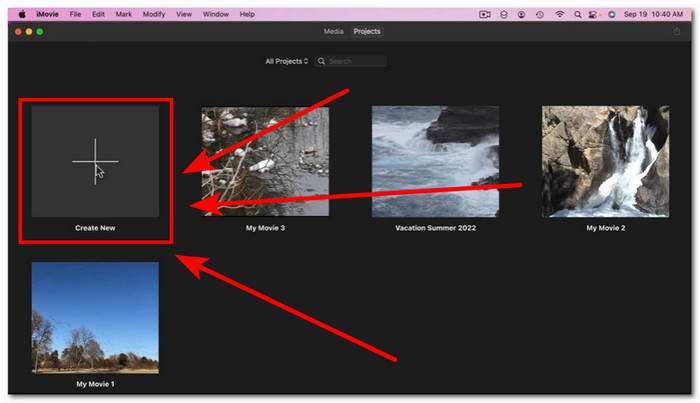
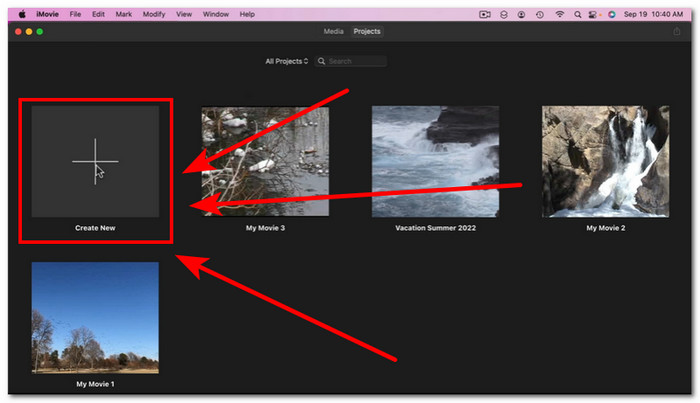
Adım 1. Mac’inizde iMovie uygulamasını başlatın ve düzenlemek istediğiniz ses dosyasını, yazılımın zaman çizelgesi arayüzüne sürükleyip bırakarak içe aktarın.
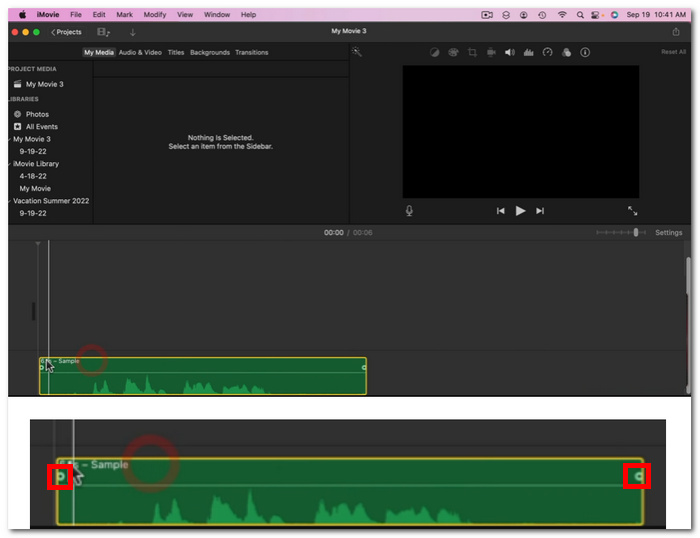
Adım 2. Ses dosyası iMovie zaman çizelgesine geldikten sonra, her parçanın başında ve sonunda küçük bir daire belirir; bu, fade tutamaçlarını kullanarak geçiş efektleri oluşturabileceğinizi gösterir.
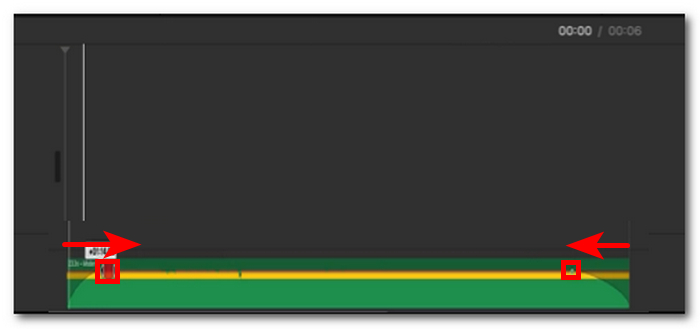
Adım 3. Basitçe, fade tutamaçlarını ses parçasının iç kısmına doğru sürükleyerek bir geçiş efekti oluşturun.
Not: Gördüğünüz gibi, parçada eğim görseli oluşuyor, bu da sesinizde artık bir azalma efekti olduğunu gösteriyor.
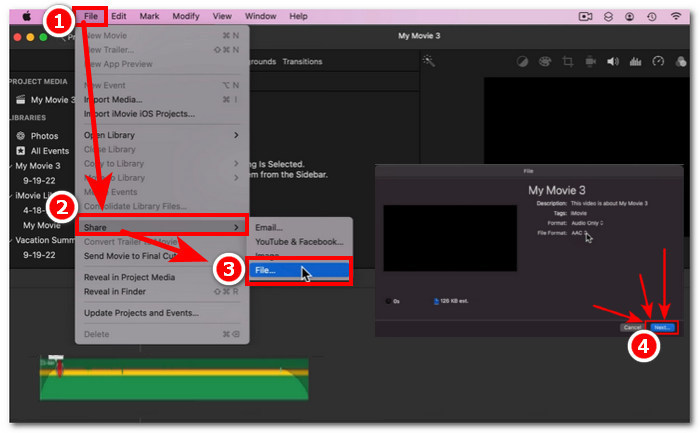
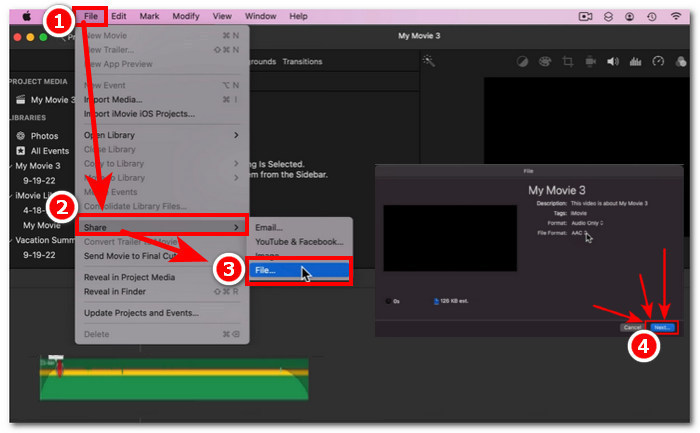
Adım 4. Son olarak, dosyanızı Mac’inizin İndirilenler klasörüne kaydetmek için Dosya > Paylaş > Dosya… ve ardından İleri seçeneğine tıklayın.
Geçişli ses dosyasına sahip videoyu indirdikten sonra, eğer iMovie’de sesin videoyla senkron olmadığını fark ederseniz, bunu düzeltmek için bu yazıdaki adımları takip edebilirsiniz.
Ses Denetçisi
Mac kullanarak iMovie'de sesi azaltmanın bir diğer yolu da Audio Inspector'dır. Bu, Fade Handles ile karşılaştırıldığında çok daha karmaşıktır. Sesinizde fade-in ve fade-out'unuzun olmasını istediğiniz saniye için daha hesaplanmış ve belirli bir zaman süresi gösterimi sağladığı için kullanıcıların fade efektlerini koymada hassas olmalarını sağlar.
Adım 1. Mac’inizi kullanarak, geçiş efektleri eklemek istediğiniz ses dosyasını iMovie yazılımında açın veya yükleyin.
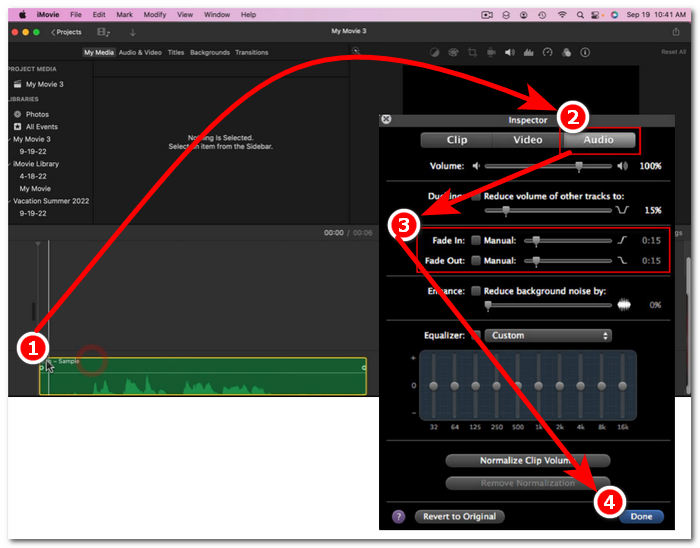
Adım 2. Ses dosyası yazılımın arayüzüne geldikten sonra, zaman çizelgesindeki ses dosyanıza çift tıklayın ve Inspector panelini açmak için Clip Adjustments (Klip Ayarları) seçeneğini seçin.
Adım 3. Inspector paneli açıldığında, Ses bölümüne gidin. Burada parçanızın Fade-in (Giriş Geçişi) ve Fade-out’unu (Çıkış Geçişi) ayarlayabilirsiniz. Geçiş uzunluklarını elle sürükleyerek dilediğiniz gibi ayarlayın ve işlem bittiğinde, değişiklikleri ses dosyanıza kaydetmek için Bitti düğmesine tıklayın.
Adım 4. Her şey ayarlandıktan sonra, ekranınızın üst kısmında bulunan Dosya düğmesine tıklayın ve ardından Paylaş > Dosya > İleri adımlarını izleyerek ses dosyanızı indirebilirsiniz.
Bölüm 2. iPhone'daki iMovie'de Müziği Azaltma
iPhone kullanarak iMovie'de sesi azaltmak nispeten kolaydır, çünkü iPhone kullanıcıları için iMovie'nin mobil sürümü oldukça basittir. Kullanıcılar, teknoloji meraklısı olmayanlar bile, bunu ter dökmeden yapabilir.
Adım 1. Bir ses dosyasına geçiş (fade) efektleri eklemek için, önce ses dosyanızı iPhone’unuzdaki iMovie uygulamasına yüklemeniz gerekir.,
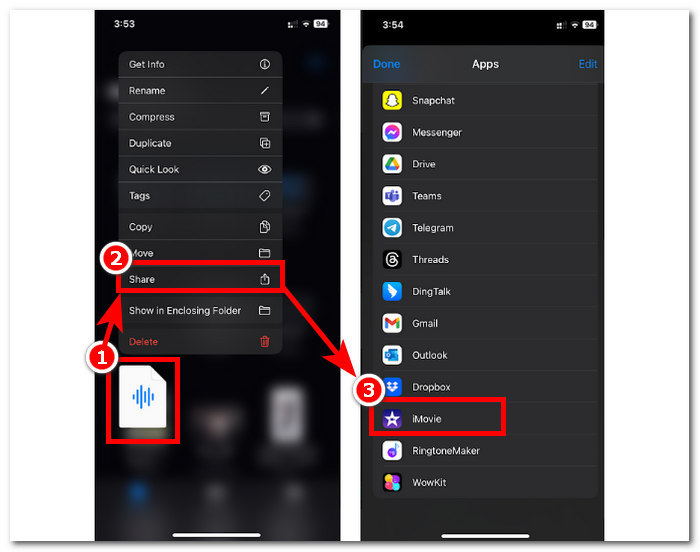
Adım 2. Uygulamanın arayüzüne geldiğinizde, fade çubuklarını açmak için Ses > Geçiş düğmesine dokunun. Fade çubukları göründüğünde, bunları ses dosyasının içine doğru sürükleyin ve dilediğiniz gibi ayarlayın; memnun kaldığınızda, değişiklikleri kaydetmek için Bitti düğmesine dokunun.
Adım 3. Dosyanızı kaydetmek için Paylaş simgesine dokunun ve ardından Videoyu Kaydet veya Paylaş seçeneğini belirleyin.
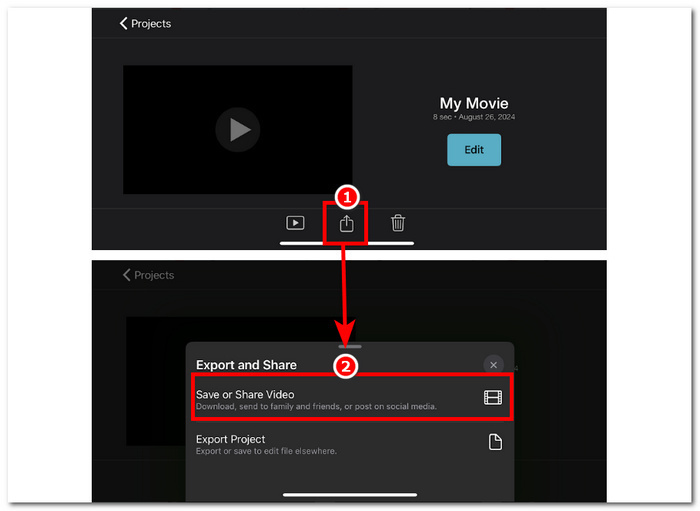
Bölüm 3. Fade Music'e En İyi iMovie Alternatifi
Mac ve iPhone’da yaygın olarak kullanılan bir video düzenleme aracı olan iMovie teknik sorunlarla karşılaştığında, FVC tarafından seçilen Video Converter Ultimate ideal alternatif olarak öne çıkar. Bu yazılım, özel Fade In ve Fade Out işlevi sayesinde videolara geçiş efektlerini sorunsuz şekilde eklemek için özel olarak tasarlanmıştır. Net süre girişiyle kullanıcılar istedikleri geçiş efektlerine tam isabetle ulaşabilir. FVC seçimi Video Converter Ultimate, yalnızca basit ses kırpma veya kesmenin ötesine geçerek çok yönlü bir düzenleme araç seti sunar. Ayrıca, olağanüstü işlem hızı sayesinde düzenlemeyi verimli kılarken kayıpsız ses kalitesini korur ve bu yönüyle diğer yazılımlardan ayrılır.
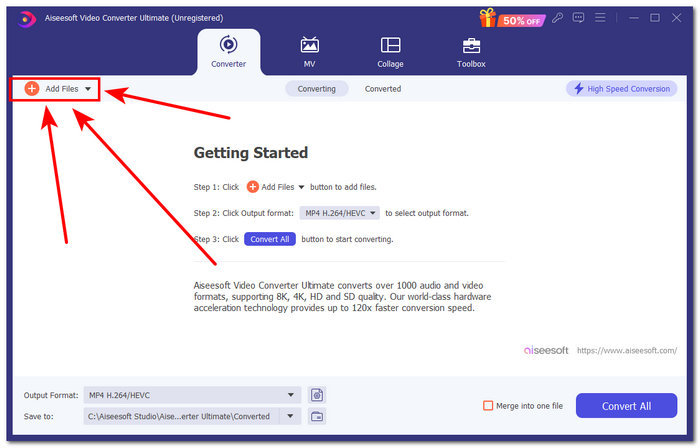
Adım 1. Bilgisayarınızda FVC seçimi Video Converter Ultimate yazılımını indirin ve başlatın. Yazılımın arayüzünde Dosya Ekle düğmesini bulun ve ses dosyasını yüklemek için bu düğmeye tıklayın. Ses dosyasının belirli bölümlerini kırpmak veya kesmek istiyorsanız bu adım önemlidir.
Ücretsiz İndirWindows 7 veya üstü içinGüvenli İndirme
Ücretsiz İndirMacOS 10.7 veya üstü içinGüvenli İndirme
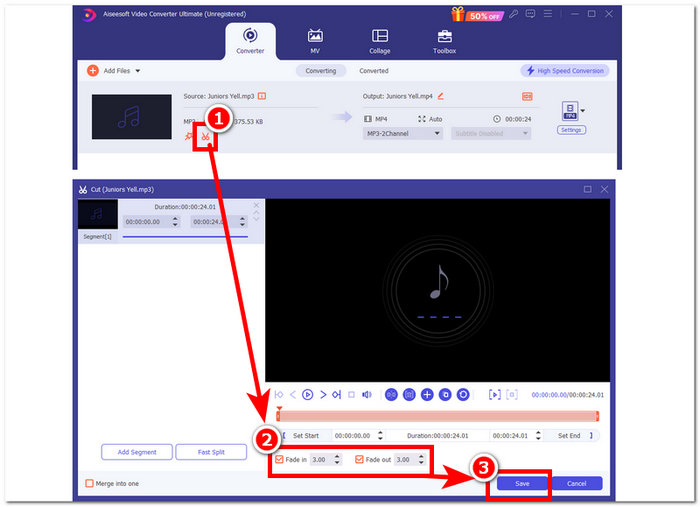
Adım 2. Yazılımın kesme ve kırpma özelliklerine erişmek için makas simgesine tıklayın. Kesme panelinde Fade In & Out kutusunu göreceksiniz. Ses dosyanıza geçiş efektleri eklemek için bu kutucuğu işaretlemeniz yeterlidir.
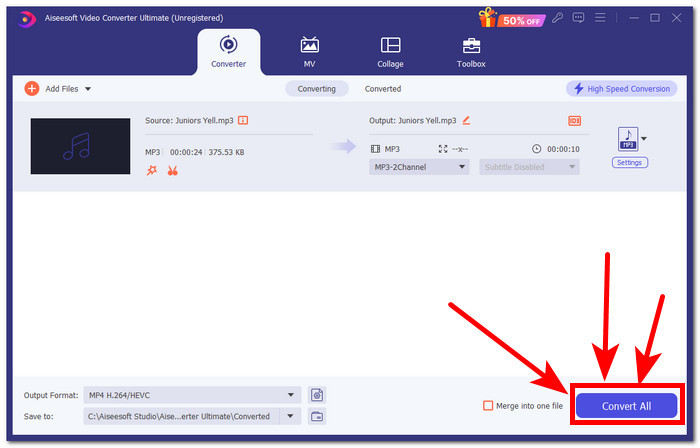
Adım 3. Tümünü Dönüştür düğmesine tıklayın. Bu işlem, yaptığınız düzenlemeleri kaydeder ve dosyayı bilgisayarınızda belirlenen bir klasöre kaydederek değişikliklerinizin güvenle saklanmasını sağlar.
Bölüm 4. iMovie'de Müzik Nasıl Azaltılır Hakkında SSS
Fade-out ve fade-in arasındaki fark nedir?
Fade, sesin tamamen sessizlikten kademeli olarak artması anlamına gelirken, fade out, sesin tamamen sessizliğe ulaştığı noktada ses seviyesinin kademeli olarak azalması anlamına gelir.
iMovie'de fade-in özelliği var mı?
Evet, iMovie'nin, Apple kullanıcılarının projelerinde ses seviyesini kademeli olarak artırma ve azaltmalarını sağlayan fade-in ve out efektleri vardır. Bu nedenle, yalnızca seste kullanılamaz, aynı zamanda iMovie video düzenleyicisine de fade efektleri sunar.
Neden fade-out kullanıyorsunuz?
Bir fade-out efekti, bir projeye ekstra bir lezzet katmanı eklemeye yardımcı olabilir. Yumuşak bir geçiş veya son yaratır, özellikle müzikte duyulması daha rahatsız edici olan ani bir durmayı önler.
Sonuç
Artık Apple kullanıcılarının iMovie’de müziğin nasıl fade-out yapılacağını ayrıca merak etmesine gerek yok, çünkü Mac ve iPhone’daki iMovie bu tür işlemleri kolaylıkla yerine getirebilir. Bir ses dosyasına geçiş efekti ekleme sürecinin sorunsuz olmasına ek olarak, iMovie’nin arızalanması ihtimaline karşı yedek bir yazılım olarak kullanılabilecek alternatif bir yazılımdan da söz edildi. FVC seçimi Video Converter Ultimate, hızlı işlem süreci sunması, hafif bir yazılım olması, kullanım kolaylığı ve kolay fade-in/fade-out işlevleriyle büyük ölçüde yardımcı olur.
-
 Mac ve iPhone'da iMovie Kullanarak Videoya Metin Eklemenin Basit Yolları
 iMovie kullanarak bir videoya metin eklemeniz mi gerekiyor? Ayrıntılı adımlarla iMovie'nize metin başlıklarını nasıl ekleyeceğinizi öğrenmek için tüm blog gönderisini okuyun.
-
 iMovie Eğitimi - iMovie ile Ekran Videosu ve Sesi Nasıl Kaydedilir
 İMovie ile video kaydetmek için ayrıntılı adımları okuyun ve edinin. İMovie kaydıyla ilgili sorunlarla karşılaşırsanız, Windows ve Mac'te filigran olmadan ekran kaydına ücretsiz bir iMovie alternatifi alabilirsiniz.
-
 Mac'te iMovie'de Videoya Filigran Nasıl Eklenir [All Embracing]
 iMovie'de bir videoya filigran eklemenin sırlarını bilmek ister misiniz? Kimsenin üzerine çayı dökmeyin ve bu makaleyi okuyarak öğrenin.
