


 Video Dönüştürücü Ultimate
 Ekran kaydedicisi
 Video Onarımı
 Güvenli İndirme
FLV Video Dosyalarınızı Ücretsiz Olarak 3GP Formatına Dönüştürme
Bu makale size FLV’yi 3GP’ye dönüştürmenin en iyi yollarını gösterecek. Araştırmalara göre piyasada tonlarca video dosya biçimi bulunuyor. Geliştiriciler bunları farklı amaçlar için çıkardılar. Örneğin FLV, Flash Video’nun kısaltmasıdır ve internet üzerinden Adobe Flash Player’da oynatılmak üzere görsel içerikleri depolamak için kullanılır.
3GP ise Üçüncü Nesil Ortaklık Projesi tarafından mobil cihazlarda bant genişliği ve veri kullanımından tasarruf etmek için oluşturulan multimedya formatıdır. Başka bir deyişle, FLV'yi 3GP'ye dönüştürmeniz ve videoları el cihazında izlemeniz daha iyi olur.

Bölüm 1: FLV'yi Masaüstünde 3GP'ye Dönüştürmenin En İyi Yolu
FVC Free FLV Converter güçlü bir video dönüştürücüdür. Adından da anlaşılacağı gibi, FLV’yi 3GP’ye tek kuruş ödemeden dönüştürmenizi sağlar. Ayrıca video ve ses düzenleme gibi birçok kullanışlı işlev sunar. Daha da önemlisi, kullanıcı dostu arayüzü sayesinde aradığınızı hızlıca bulursunuz.
En İyi Ücretsiz FLV Dönüştürücünün Temel Özellikleri
- 1. FLV videolarını 3GP gibi herhangi bir multimedya formatına dönüştürün.
- 2. Aynı anda birden fazla video dosyasını toplu işleyin.
- 3. Mobil cihazlarda oynatmak için FLV dosyalarını dönüştürün.
Ücretsiz İndirWindows 7 veya sonrası içinGüvenli İndirme
Ücretsiz İndirMacOS 10.7 veya sonrası içinGüvenli İndirme
FLV'yi Ücretsiz Olarak 3GP'ye Dönüştürme
Programı bilgisayarınıza kurduktan sonra en iyi ücretsiz FLV dönüştürücüsünü başlatın. Windows 10/8/7 ve Mac OS X ile uyumludur. Açılır dosya iletişim kutusunu tetiklemek için Dosya(ları) Ekle düğmesine tıklayın. Dönüştürmek istediğiniz FLV dosyalarını seçip Aç düğmesine tıklayın. Ardından videolar kitaplık alanında görüntülenecektir.

Adım 2: Çıktı formatını ayarlayın
Alt kısımdaki Profil formatı açılır menüsüne tıklayıp genişletin; profil kutusu karşınıza çıkacaktır. Profil Ara kutusuna 3GP yazın ve klavyenizdeki Enter tuşuna basın. Ardından çıktı formatını seçin. Videoları mobil cihazınızda oynatmak istiyorsanız, üreticiyi seçin ve doğrudan doğru modeli belirleyin.

3. Adım: FLV’yi 3GP’ye dönüştürün
Alt kısımdaki Klasör Aç düğmesine tıklayarak çıktıları depolamak için belirli bir dizin ayarlayın. Son olarak, FLV’den 3GP’ye dönüştürme işlemini başlatmak için Dönüştür düğmesine tıklayın. Birkaç dakika sonra 3GP dosyalarını sabit diskinizde bulacaksınız.

Bölüm 2: FLV'yi Çevrimiçi Olarak 3GP'ye Dönüştürme
Web video dönüştürücü uygulamaları, FLV’yi ücretsiz olarak 3GP’ye dönüştürmenin bir başka popüler yoludur. Ancak çoğunun dosya boyutu sınırı, filigran, güvenlik sorunları ve benzeri çeşitli dezavantajları vardır. Neyse ki, FVC Free Online Video Converter bu sorunları çözmenize yardımcı olabilir. Tamamen ücretsizdir ve herhangi bir kısıtlama içermez. Çıktı kalitesi harikadır.
1. Adım: Bir web tarayıcısında https://www.free-videoconverter.net/free-online-video-converter/ adresini ziyaret edin ve başlatıcıyı edinmek için Dönüştürülecek Dosyaları Ekle düğmesine tıklayın. Bilgisayarınızda yer kaplamayacaktır.
Dosyaları toplu dönüştürmek için Masaüstü Sürümü indirin.
2. Adım: Dosya Ekle menüsüne tıklayın ve dönüştürmek istediğiniz FLV dosyalarını yükleyin. Web uygulaması, videoları toplu olarak aynı anda dönüştürmenizi sağlar.
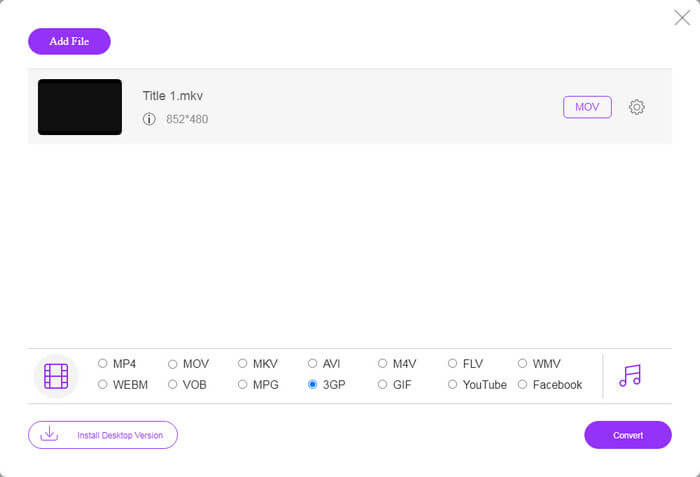
3. Adım: Alta gidin ve profil bölümünde 3GP’yi seçin. FLV’yi çevrimiçi olarak 3GP’ye dönüştürmeyi başlatmak için Dönüştür düğmesine tıklayın. İnternet bağlantınız hızlıysa işlem birkaç saniyede tamamlanır. Ardından 3GP dosyalarını sabit diskinize indirin.
Kaçırmayın:
Bölüm 3: VLC ile FLV'yi 3GP'ye Dönüştürme
Bazen ücretsiz yazılımlar profesyonel yazılımlar kadar güçlüdür. Örneğin VLC, popüler bir açık kaynaklı medya oynatıcıdır. FLV'yi Windows, Mac ve Linux'ta ücretsiz olarak 3GP'ye dönüştürebilir. Tabii ki, kullanımı zor gibi masrafı da aşikar. Bu nedenle, aşağıdaki adımları paylaşıyoruz:
1. Adım: Bilgisayarınızda ücretsiz FLV’den 3GP’ye dönüştürücüyü çalıştırın. Önce kurmanız gerekir. Resmi web sitesi güvenli yükleyici sağlar.
2. Adım: Üst şeritteki Medya menüsüne gidin ve Dönüştür/Kaydet seçeneğini seçin. Ardından ortam açma iletişim kutusu açılacaktır.
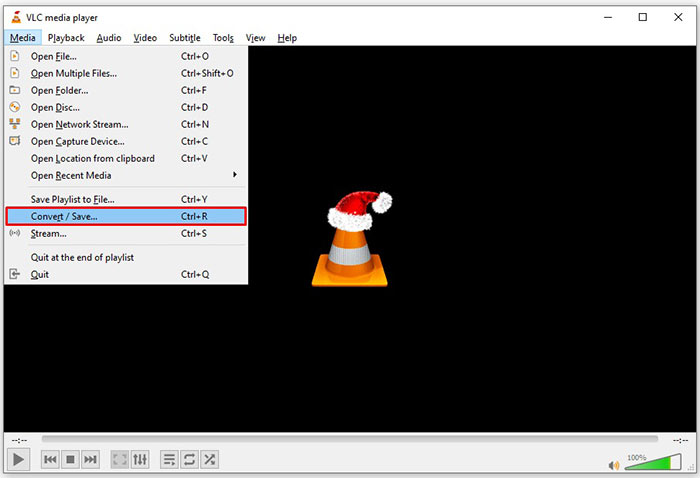
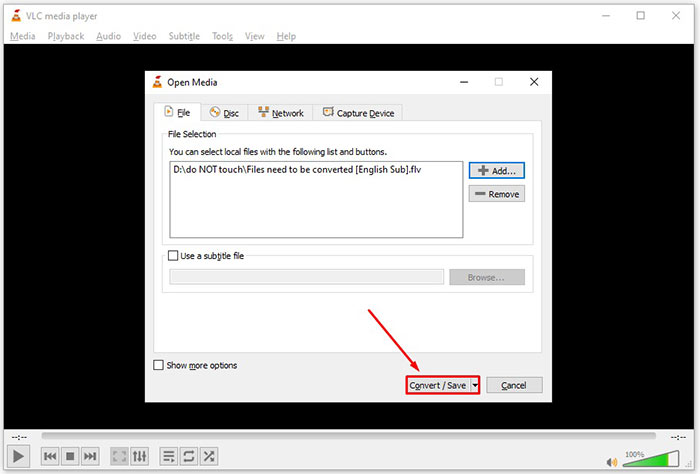
3. Adım: Ekle düğmesine tıklayın, dönüştürmeniz gereken FLV dosyasını bulun ve seçin, ardından Aç düğmesine tıklayın. Sonraki pencereye geçmek için Dönüştür/Kaydet düğmesine basın.
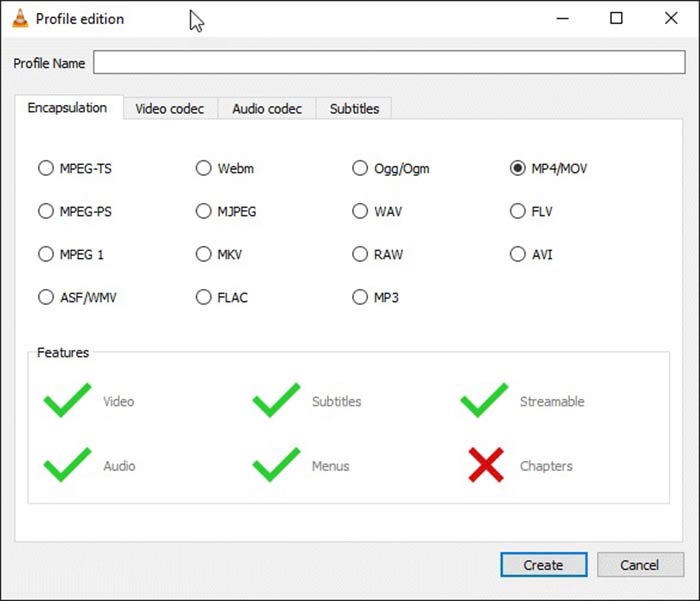
4. Adım: Profil yanındaki açılır listeyi açın ve 3GP ya da ilgili video formatını seçin. Video codec’ini veya diğer parametreleri değiştirmek istiyorsanız, açılır listenin yanındaki Profil Düzenle düğmesine tıklayın ve 3GP ekleyin.
5. Adım: Gözat düğmesine tıklayın ve Hedef bölümünde çıktı 3GP dosyasını kaydetmek için belirli bir klasör seçin.
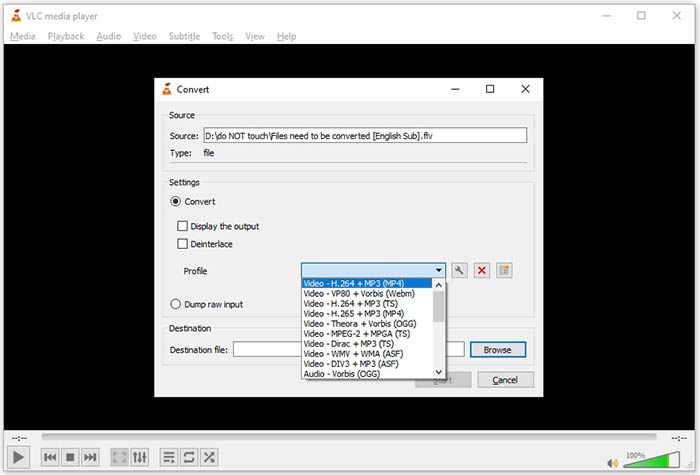
6. Adım: Başlat düğmesine tıkladığınız anda VLC, FLV’yi 3GP’ye dönüştürmeye başlayacaktır.
VLC, orijinal videoyu kaydederek işi yaptığından, dönüştürmenin tamamlanması biraz zaman alır. Bu, işlemin FLV videonuzun uzunluğu kadar harcadığı anlamına gelir.
FLV ve 3GP karşılaştırması
Adobe Flash Player, filmler ve TV şovları gibi video içeriği sunmak için FLV'yi kullandı. Günümüzde Adobe, oynatıcıyı artık geliştirmiyor ve kullanıcılara güvenlik nedenleriyle onu kaldırmasını öneriyor. Ancak, Adobe/Macromedia dışındaki birçok programda FLV biçimini yine de kullanabilirsiniz.
3. Nesil Ortaklık Projesi (3GPP), bir multimedya kapsayıcı formatı olarak 3GP/3GPP formatını üretti. Aslında ISO medya dosyası formatına dayanmaktadır. Bunu genellikle 3G cep telefonları arasında ve çevrimiçi olarak iletilen video/ses akışlarını kaydetmek için kullanırız.
Bölüm 4: FLV'yi 3GP'ye Dönüştürme Hakkında SSS
FLV'yi 3GP'ye dönüştürmek video kalitesine zarar verir mi?
Genel olarak konuşursak, video dönüştürme kalitesini kaybeder. Ancak, güçlü bir video dönüştürücü programı bu sorunu çözebilir ve ileri teknolojiyi kullanarak video kalitesini optimize edebilir.
Bir FLV videosunu dönüştürmek ne kadar sürer?
Video uzunluğu, kullandığınız video dönüştürme yazılımı, donanım performansınız ve daha fazlası gibi çeşitli faktörler tarafından belirlenir. Bir web video dönüştürücü kullanıyorsanız, internet bağlantınız önemli bir unsurdur.
FLV neden iPhone'umda oynatılmıyor?
iPhone, MP4, ASF ve AVI'nin bir parçası olan MOV'u destekler. Bu nedenle, FLV'yi doğrudan iPhone'da açamazsınız. Ancak FLV'yi mobil cihazlarda izlemenin yolları vardır. FLV dosyanız Google Drive gibi internet hizmetleri tarafından barındırılıyorsa, yerleşik medya oynatıcı kullanılabilir. Ayrıca, VLC gibi başka bir medya oynatıcı kullanabilirsiniz.
Sonuç
Bu kılavuz, FLV video dosyalarını bilgisayarda veya çevrimiçi olarak 3GP formatına dönüştürmenin üç ücretsiz yolunu anlattı. FLV videolarını mobil cihazlarda izlemeye hazırlanıyorsanız, FVC Free FLV Converter ile 3GP veya diğer mobil uyumlu video formatlarına dönüştürmeniz daha iyi olur. Sadece kullanımı kolay değil, aynı zamanda video kalitenizi de koruyabiliyor. Daha çok soru? Lütfen aşağıya bir mesaj bırakın.
-
 FLV Video Dosyalarınızı Bir Kuruş Ödemeden MP4'e Dönüştürme
 Bu kılavuz, FLV video dosyalarınızı Windows 10/8/7 / XP ve Mac OS X'te MP4 formatına dönüştürmek için dört ücretsiz yöntemi paylaşır, böylece herhangi bir cihazda videoların keyfini çıkarabilirsiniz.
-
 FLV Videolarınızı Masaüstünde ve Çevrimiçi Olarak MP3 Ses Dosyalarına Dönüştürme
 FLV'yi MP3 dosyasına nasıl dönüştürebilirim? Yapmanız gereken tek şey, bu makaleyi dikkatlice okumak, en sevdiğiniz yöntemi bulmak ve istediğinizi elde etmek için adım adım kılavuzumuzu takip etmektir.
-
 FLV'yi MOV'a Dönüştürmenin En İyi 3 Yolu
 FLV'yi MOV'ye nasıl dönüştürebilirim? Mac'te FLV'yi MOV'a nasıl dönüştürebilirim? FLV'yi MOV'a çevrimiçi dönüştürmenin ücretsiz bir yolu var mı? Bu gönderi, FLV dosyalarını MOV olarak değiştirmek için 3 FLV'den MOV'a dönüştürücüyü paylaşır.

