


 Video Dönüştürücü Ultimate
 Ekran kaydedicisi
 Video Onarımı
 Güvenli İndirme
MPEG Video Dosyalarını Tek Bir Şekilde Birleştirme – Bilmeniz Gereken 2 Nihai Yöntem
How to join MPEG files? You just downloaded an old TV series in the MPEG format, such as 8 short episodes and each of them has a redundant opening and ending. How to merge these MPEG files into one like a movie? Whether you simply need to combine the videos into one, or merge the MPEG files with advanced features, here are 2 efficient methods you should never miss.

Bölüm 1: MPEG Dosyalarını Çevrimiçi Olarak Ücretsiz Olarak Birleştirme
FVC Free Online Video Merger is a free online MPEG combiner that enables you to merge MPEG, MP4, AVI, and more video files without size limitations. It allows you to combine multiple MPEG files to impressive videos with no watermark added. Moreover, the uploaded files will be deleted within 24 hours to protect your privacy.
Step 1: Go to the FVC Free Online Video Merger with any web browser. Click the Upload Videos to Merge button in the middle webpage to get the installer. After that, you can click the button again to upload the MPEG files you want to combine into the online program.

Step 2: When you get into the Merging videos interface, you can arrange the sequence of the MPEG videos you want to merge. It enables you to manage the position of the video, delete the file, or add more MPEG files by clicking the insert new button in the proper place.
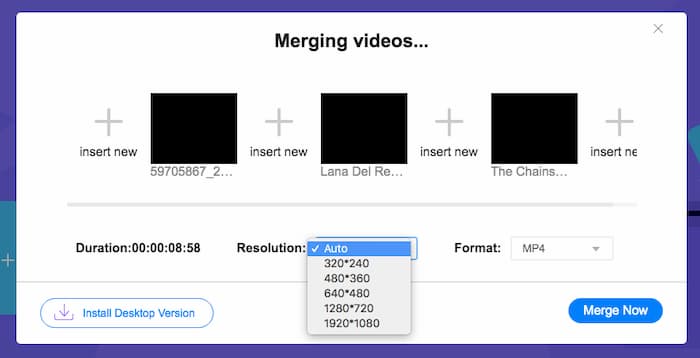
Step 3: After that, you can decide the resolution and format of the output video. You can combine the MPEG files into an MP4 file before clicking the Merge now button to start the process. It enables you to get the desired video within a short period.

Çevrimiçi video birleştiricinin kullanımı kolaydır. Ancak bölümlerin gereksiz açılışlarını ve sonlarını kesmek isterseniz size daha fazla yardımcı olamaz. Daha güçlü bir MPEG birleştirme kullanmanız gerekir.
Daha Fazla Okuma:
Bölüm 2: MPEG Videolarını Birleştirmenin Çok Yönlü Yöntemi
Aiseesoft Video Converter Ultimate is a professional MPEG joiner that enables you to combine the desired parts of MPEG files into one movie. It enables you to trim the desired part of the MPEG files, adjust the video quality, customize the watermark, or even make a movie with different themes.
- 1. MPEG dosyalarını MPEG, MP4 ve 300'den fazla video formatında birleştirin.
- 2. Video çözünürlüğünü ayarlayın, hatta dosya birleştirme için video kalitesini artırın.
- 3. MPEG dosyalarının istediğiniz kısımlarını kesin ve bunları tek bir videoda birleştirin.
- 4. MPEG videolarına efektler ve filtreler ekleyin ve filigranları özelleştirin.
Ücretsiz İndirWindows 7 veya üstü içinGüvenli İndirme
Ücretsiz İndirMacOS 10.7 veya üstü içinGüvenli İndirme
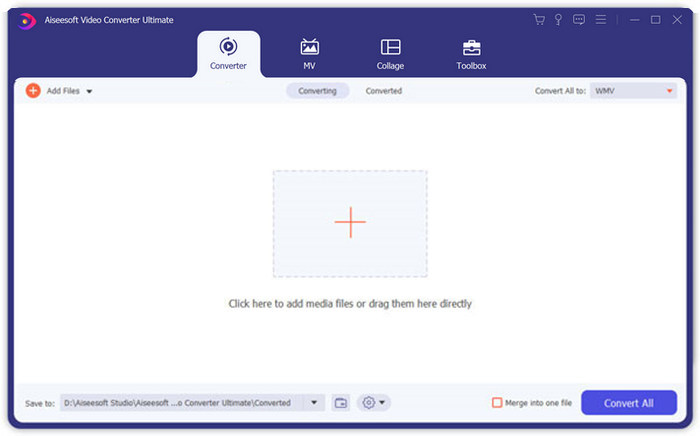
Step 1: Launch the Aiseesoft Video Converter Ultimate on your computer. Go to the Converter menu and click the big “+” button in the middle of the main interface to add the MPEG files you want to merge. Click the Add Files button to import all the files you want to combine.
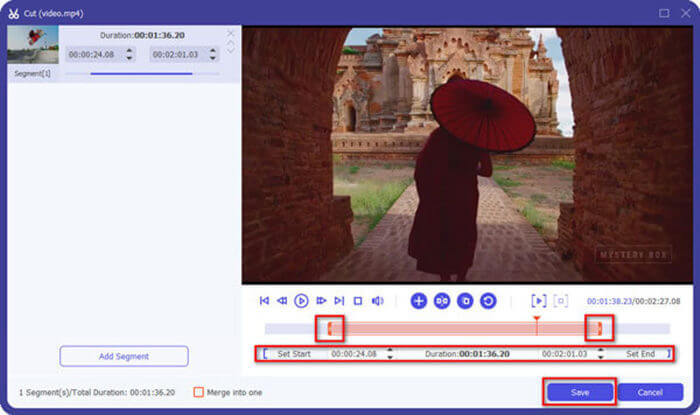
Step 2: For the MPEG clips that need to be trimmed, click the Cut button next to the video. You can set up the start and end points to delete the openings and endings of your MPEG videos. After that, you can click the Save button at the bottom to save the file.
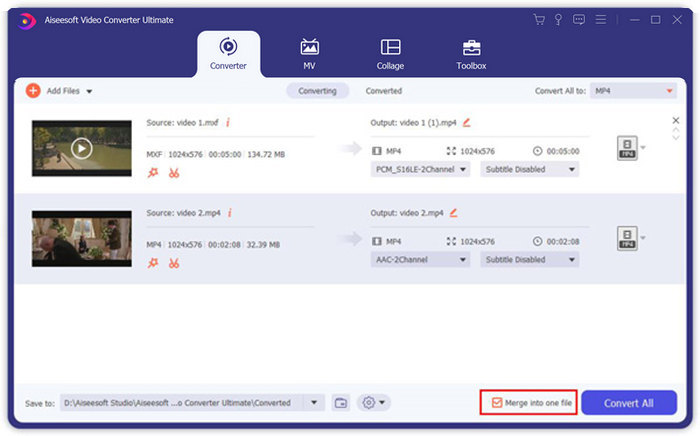
Step 3: After that, you can drag the trimmed video into the program. Adjust the sequence of the MPEG videos. When everything is ready, you need to check the Merge into one file box beside the Convert All. Click the Convert All button to start merging the MPEG files.
Bölüm 3: MPEG Dosyalarına Katılma Hakkında SSS
MPEG dosyaları en iyi kalitede nasıl birleştirilir?
MPEG dosyalarını benzer kalitede birleştirmek istediğinizde, parametreleri orijinal videolar olarak seçebilirsiniz. Ancak MPEG dosyalarının video kalitesi farklıysa, profesyonel video birleştirici ile önceden düşük kaliteli bazı MPEG dosyalarını yükseltmeniz gerekir.
MPEG dosyalarını bir iPhone veya Android telefonla birleştirebilir miyim?
Evet. MPEG dosyalarını birleştirmek için video birleştirici uygulamalarını indirmeden önce, uygulamanın MPEG veya birleştirmek istediğiniz diğer videolarla uyumlu olduğundan emin olmalısınız. Adobe Premiere Clip, Viva Video ve Splice Video, dikkate alabileceğiniz önerilenlerdir.
MPEG dosya formatı nedir?
MPEG, MPEG-1 veya MPEG-2 dosya sıkıştırmasını kullanan bir video dosyası biçimidir. İnternette dağıtılan filmler için popüler bir formattır ve akış ve indirmeyi diğer popüler video formatlarından çok daha hızlı hale getirir.
Sonuç
Bu makale, özellikle fazladan parçaları kırpmanız gerektiğinde, MPEG video dosyalarını birleştirmenin 2 etkili yolunu sunar. FVC Ücretsiz Çevrimiçi Video Birleşmesi, MPEG dosyalarını çevrimiçi olarak birleştirmek için kolay bir yöntemdir, ancak video klipleri düzenleyemezsiniz. Bu nedenle, MPEG videolarını kırpmak ve düzenlemek istiyorsanız, Aiseesoft Video Converter Ultimate nihai çözüm olmalıdır.
-
 MP4 Videolarını Ücretsiz Birleştirmek için En İyi 6 En İyi MP4 Video Birleştirici
 Farklı MP4 klipleri bağlamak için kullanılabilen birçok MP4 birleştirici vardır. Bu yazıda, Windows 10/8/7 ve Mac için bazı ücretsiz MP4 birleştiricileri seçtik.
-
 M4V Dosyaları Nasıl Birleştirilir? İşte En Hızlı 2 Çözüm
 M4V video dosyalarını tek bir dosyada birleştirmek için bir çözüm arıyorsanız, bu bölümü asla kaçırmayın. Burada M4V video dosyalarını birleştirmek için en iyi iki yöntemden bahsedeceğiz.
-
 3GP Videoları Cep Telefonundan Tek Dosyada Nasıl Birleştirilir
 BlackBerry'nizdeki bazı 3GP videolarını tek bir videoda birleştirmek istediğinizde, makaleden 3GP dosyalarını birleştirmek için 2 etkili yöntem hakkında daha fazla bilgi edinebilirsiniz.
