


 Video Dönüştürücü Ultimate
 Ekran kaydedicisi
 Video Onarımı
 Güvenli İndirme
OBS Studio ve Diğer Olası Araçlarda Blu-ray Kaydetmenin Basitleştirilmiş Yolu
Blu-ray disk stores the highest quality a disk can be stored. It can save a video up to 1080 pixels. Same as in audio, it produces a crystal-clear sound rather than CDs. And also, no need to worry about storing high-volume storage on Blu-ray because it has a lot of space. As we proceed, OBS Studio is a free downloadable open-source program. It supports platforms like Windows, macOS, and Linux. In addition, it is perfect for recording audio video on your screen computer. Some users find it troublesome to record Blu-ray in a studio. So, stay still and read the article to know how to record Blu-ray movies with OBS and what expert recorder you should use for taking high-quality video output.

Bölüm 1. OBS Studio ile Blu-ray Filmler Nasıl Kaydedilir
Akışsız, güçlü bir araç olarak bilinen OBS Studio, etkili sponsorları Youtube, Twitch, Facebook, API.video, own3d.pro ve diğer birçok platform nedeniyle düzenli güncellemeler alıyor. Bu büyük platformlar nedeniyle akış konusunda endişelenmenize gerek yok. Öte yandan, kayıt için en karmaşık araç ve daha az rehberlik olarak adını oluşturur. Ancak basit akış istiyorsanız, karmaşık ayarlara dalmanıza gerek yok. Ayrıca OBS Studio ile ilgili adımlar ve detaylar için bu makaleyi okuyarak zoru yönetilebilir hale getirin.
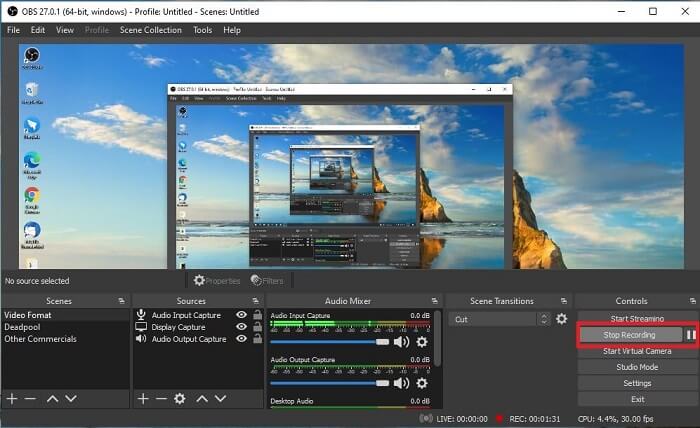
OBS Studio'nun nasıl kullanılacağına ilişkin bazı adımlar:
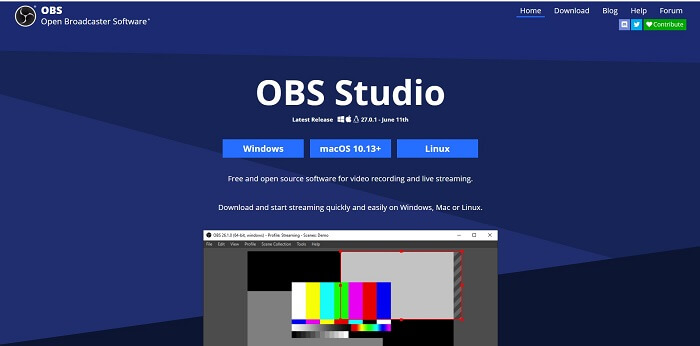
Step 1. Go to your browser. Then choose what OS you are currently using, then download, set it up, install it, and then click Finish to launch the tool.
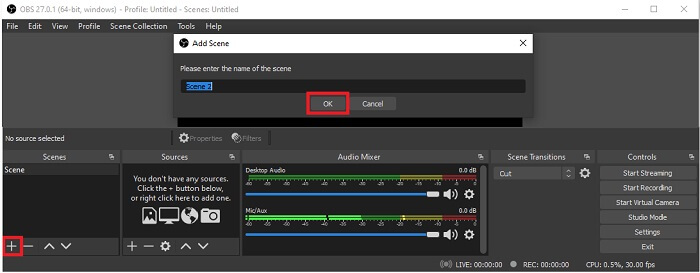
Step 2. Go to the Scenes panel, click the Add icon to add a scene then name it Click OK to proceed.
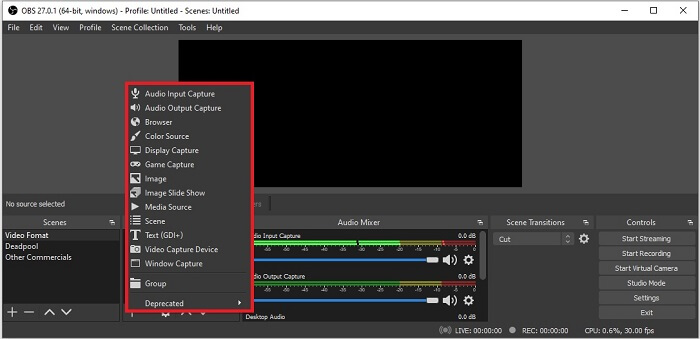
Step 3. Proceed to the source panel. Click the Plus icon then different options will show. Here are some basic options that are enlisted here. The Audio Input Capture to record your voice in the microphone. Next, Audio Output capture to record the sound coming out to your system. And the Display capture to record the entire screen. Lastly, Game Capture to record your montages. Click OK to save. Once all done gathering all the sources needed, adjust the volume in the Audio Mixer tab.
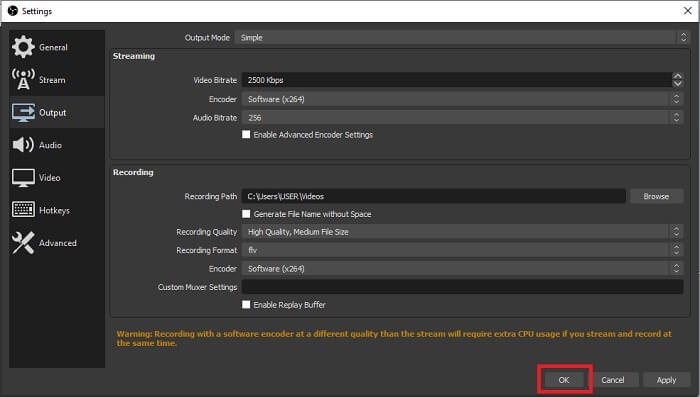
Step 4. Click the Settings button under the Control Panel on the lower right side of the interface. Go to the Output tab, set the format, and adjust the options based on your needs. Set the other options and click OK to save.
Step 5. Click the Start Recording button and start recording. Same as if recording is already finished click the bottom right side where you click the start to record. You may check the recorder in the file explorer.
Artıları
- Herhangi bir videoyu ve canlı akışı kaydetmek için uygun.
- Size ücretsiz bir deneme sunmuyor. Çünkü ücretsiz.
- Seçmek için birçok seçenek sunar.
Eksileri
- Yeni başlayanlar için en iyi seçim değil çünkü kurulacak çok şey var.
- Video düzenlemeyi desteklemiyor, bu nedenle düzenlemek için başka bir araç yüklemeniz gerekecek. Ve aracın kendisi, bir ekran kaydedicinin sahip olduğu en büyük depolama alanı olan 85.6MB'dir.
Bölüm 2. Blu-ray'leri OBS Alternatifiyle Yakalamanın Çevrimiçi Yöntemi
OBS stüdyosu gerçekten de kayıt ve akış için iyi bir seçimdir. Ancak aracın arayüzünde çok şey var, bu nedenle yeni kullanıcının kaydetmesi zor. İşte kullanabileceğiniz alternatif bir çevrimiçi araç.
FVC Ücretsiz Ekran Kaydedici (Çevrimiçi Araç)
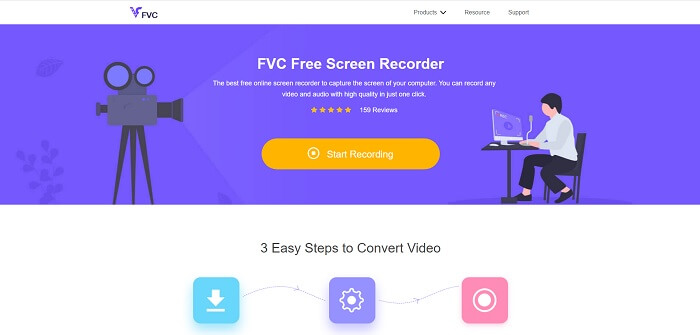
An open-free tool that is less hassle for the user to manage is the FVC Free Screen Recorder. It functions the same as record Blu-ray on OBS studio, easier to use because of its manageable floating toolbar. This on-point detailed tool helps you to record any set of video audio platforms that is available. And with clear sounds and high-definition video output that you may save in the Blu-ray. Instead, to download a large file then use it one time, why don't you try this online tool? Now let's take a tour of how this tool operates. Here are some steps on how to use this online tool.
Step 1. Open your browser and visit https://www.free-videoconverter.net/free-screen-recorder/. Then, click the Start Recording button to launch the online tool. A floating bar will pop up on your screen after launching the tool.
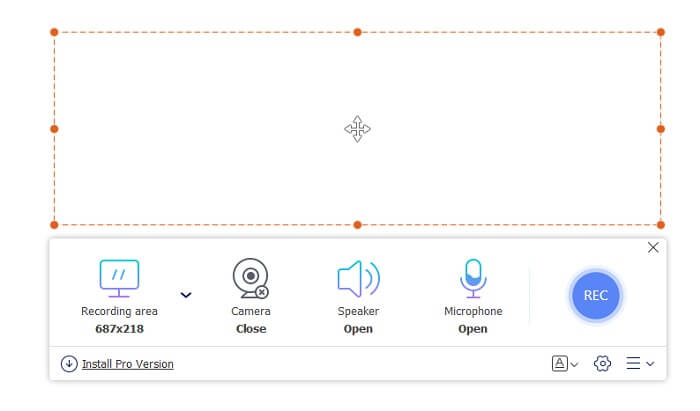
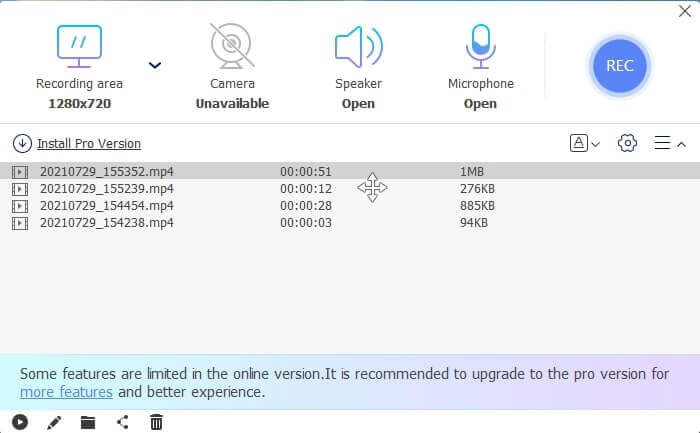
Step 2. In the floating toolbar, there are 4 different panels you may choose. You may adjust the frame size or click the full screen. Next, click the Speaker icon on the system volume. Also, you may add your voice and face if you click to open the Microphone and Webcam. But if you didn't intend to add it you may click it to close. Then click the round REC button to start recording.
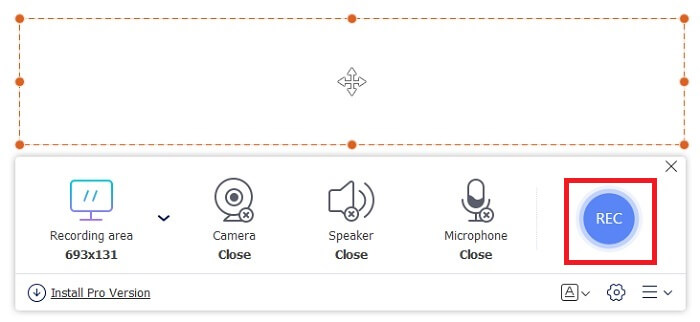
Step 3. When recording is done, Click the square button to stop recording. All the recordings you capture are listed in the history dropdown. Click the first recorded video because that is the latest.
Artıları
- Açık ücretsiz kaynak çevrimiçi. İndirme yok, bu yüzden güçlük yok.
- Tüm platformları destekleyen çevrimiçi hizmetler için en iyi ekran kaydedici.
- Aletin yerinde talimatı nedeniyle kullanımı kolaydır.
Eksileri
- Aracın çalışması için bir internet bağlantısına ihtiyacı var.
- Premium'daki özellikler ücretsiz olarak desteklenmez.
Bölüm 3. Blu-ray Filmleri Kaydetmek İçin En İyi OBS Değişimi
OBS Studio'daki bir başka en iyi Blu-ray kaydı, bu FVC Ekran Kaydedicidir. Çevrimiçi ve çevrimdışı kayıt yapmak ve tüm platformlarda mevcut olmak istiyorsanız, bu tam size göre.
FVC Ekran Kaydedici
OBS Studio'dan farklı olarak bu araç, yönetilebilir bir araç çubuğuyla kullanıcı dostudur. FVC Ekran Kaydedici, kayıt için en iyi alternatiflerden biridir. OBS gibi daha yerinde ve anlaşılması kolay özellikler içerir. Örneğin, ekran, web kamerası, ses ve sistem sesini ve daha fazlasını kaydedin. Bu araç aynı zamanda obs'de olmayan Kilitleme özelliğine de sahiptir. Bunun dışında, bu araç kullanım için ödemelidir. Ayrıca, bu ekran kaydediciden yararlanırsanız, doğru seçimi yapmış olursunuz.
Bu aracı tam olarak nasıl kullanacağınıza ilişkin aşağıdaki adımları izleyin.
Step 1. Click the download button to install the software then set up your desired preference click finish to proceed. Then the tool will launch.
Ücretsiz İndirinWindows 7 veya üzeri içinGüvenli İndirme
Ücretsiz İndirinMacOS 10.7 veya üzeri içinGüvenli İndirme
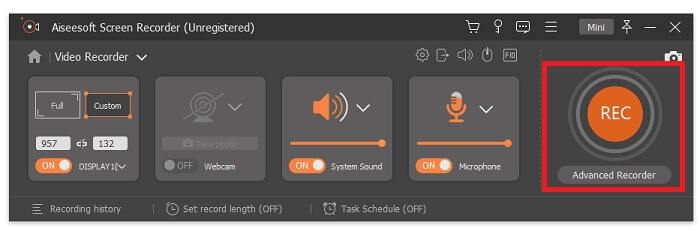
Step 2. Click the Video Recorder. Then 4 different panels will show. In the first panel, you may adjust the frame size to change the aspect ratio or click the Full to record the whole display. The second-panel Webcam is intended to record your face while screen recording. The next panel is System Sound to records the audio of the system. Lastly, a microphone for inputting your sounds to the video. Click the disk shape button to start recording.
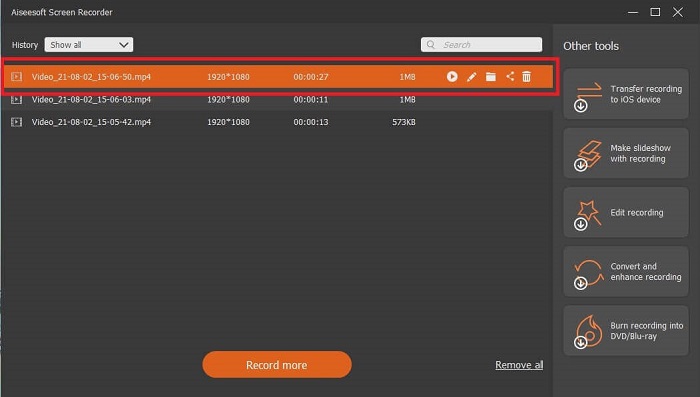
Step 3. If the video recording is finished click the square button to stop. Click the Play button to play the recorded video.
Artıları
- Kayıt sırasında rahatsızlığı önlemek için Kilitleme ekranı dediğimiz bu benzersiz özelliğe sahiptir.
- Herhangi bir ses-görüntü bozukluğu olmadan 24 saat kayıt yapabilir.
- Sıkıştırılmış veri formatı ve yürütmesi kolay bilgiler nedeniyle depolama ve kullanıcı dostu.
Eksileri
- Onu elde etmek için bir ay, bir yıl veya bir ömür boyu ödeme yapılması gerekir.
- Kullanmak için siteden indirilmesi gerekiyor.
Daha fazla okuma
1. Record Screen Video with VLC Media Player
2. Record Screen with Audio on Mac Using QuickTime
Bölüm 4. Blu-ray'i OBS Studio'ya Kaydetmeyle İlgili SSS
Blu-ray, DVD'ler ve CD'ler arasındaki fark nedir?
Her optik disk formatı arasındaki temel fark, çıktı ve kendi başına depolayabileceği depolamadır. Bir CD'nin 700 MB'a kadar dosya depolayabileceğini, DVD'nin 4,7 GB'a kadar veri depolayabileceğini, Blu-ray'in ise 25 GB'a kadar depolayabileceğini belirtir. Bazı durumlarda, Çift Katmanlı Blu-ray 50 GB veri tutabilir. Ayrıca üçlü disk katmanı ve dörtlü katmana sahiptir.
OBS ücretsiz bir araç mı? İndirmek güvenli mi?
Evet, OBS Studio hiçbir gizli masrafı olmayan ücretsiz bir araçtır. Ayrıca, tüm farklı platformlarda indirebilirsiniz. Başka bir Evet, kötü amaçlı yazılımlardan, virüslerden, solucanlardan, tarayıcı korsanlarından ve daha fazlasından güvenlidir.
Hangi video codec bileşenleri Blu-ray'i destekler?
For video: MPEG-2, MPEG-4 AVC, and SMPTE VC-1.
For audio: Linear PCM (LPCM), Dolby Digital® (DD), Dolby Digital® Plus (DD+), Dolby® TrueHD, DTS Digital Surround®, and DTS-HD®.
Sonuç
Sonuçta, günün sonunda ekran kaydediciler yetenekleri nedeniyle kullanışlıdır. OBS, kayıt için iyi bir seçimdir, ancak çeşitli seçenekler nedeniyle, kullanıcının tahminde bulunmasını ve doğru yapıp yapmadığını sormasını sağlar. Ancak tüm çeşitli platformları destekleyen çevrimiçi ve çevrimdışı liste nedeniyle. Artık seçme gücüne sahipsiniz. Sizin için en iyi olanı seçmek için.
FVC Ekran Kaydedici gibi. Kullanıcının her zaman ve her yerde kayıt yapmasına yardımcı olan kullanıcı dostu ve yerinde bir araçtır. Kullandıkça öde aracı olmasına rağmen. Yine de harcanan her kuruşa değer. Kullanımı kolay olan daha iyisini yapabiliyorsa, kullanımı zor olanla kendinizi strese sokmamayı unutmayın.
-
 Aksiyon! Ekran Kaydedici İncelemesi - Eksileri, Artıları ve En İyi Alternatifi
 Action Screen Recorder, oyun videoları çekmek için istenen oyun kayıt yazılımı mı? İncelemeden ve makaleden alternatifinden daha fazla ayrıntı öğrenin.
-
 Bilgisayarlar, iOS ve Android için En İyi 3 Facebook Çağrı Kaydedici
 Değerli şeyleri kaydetmek için Facebook aramalarını kaydetmek istediğinizde, aralarından seçim yapabileceğiniz çok sayıda Facebook arama kaydedici vardır. Burada PC, iOS ve Android için Facebook video görüşmelerini kaydetmek için en iyi 3 aracı öğrenebilirsiniz.
-
 Windows ve Mac'te Kullanılabilen En İyi 6 Ücretsiz WAV Kaydedici
 Bu makalede paylaştığımız en iyi WAV kayıt yazılımı, profesyoneller gibi ses ve ses yakalamanıza yardımcı olan çeşitli kullanışlı özelliklere sahiptir.
