


 Video Dönüştürücü Ultimate
 Ekran kaydedicisi
 Video Onarımı
Ayrıntılı Adımlar ve Araçlarla GIF'i WebM'ye Dönüştürme [Ücretsiz ve Maliyetli]
GIF’ler, bize sunduğu komik içerikler sayesinde popüler hale geldi. Metin mesajlarımıza heyecan katmak için sabit görseller kullanmak yerine, hareket sağlayan ve abartılı duygular ekleyen GIF’ler kullanıyoruz. Ancak her platform GIF formatını desteklemez, çünkü bu format 30 yıldan daha eskidir. Ayrıca bazı durumlarda, web sitenize bir GIF dosyası eklediğinizde kalitesi tam olarak desteklenmeyebilir. Bu nedenle GIF’leri paylaşmanın en iyi yolu, onları WebM formatına dönüştürmektir. WebM formatı, sıkıştırma ve dosya boyutu açısından çok daha küçüktür ve herkes için ideal olan yüksek kalite üretir. Bu tür bir format, uzun vadede GIF’lerin en iyi ikamesidir, çünkü tıpkı GIF’ler gibi hem statik görüntüleri hem de animasyonları saklayabilir. En iyi GIF’ten WebM’e dönüştürücüler hangileri öğrenmek için aşağıyı okumaya devam edin ve size en uygun olanı seçin.

Bölüm 1. Ücretsiz Web ve Masaüstü için GIF'i WebM'ye Dönüştürme
1. GIF Maker'a FVC Bedava Video
İşi verimli bir şekilde tamamlamak için doğru aracı seçmeyi mutlaka göz önünde bulundurmalısınız. Ve iş, GIF’i WebM’e dönüştürmek ise, FVC Free Video to GIF Maker aracını denemek isteyebilirsiniz. Bu yazılımı kullandığınızda GIF oluşturmak da GIF dönüştürmek de kolaylaşır. Dolayısıyla, bu aracı nasıl kullanacağınızı öğrenme süreci basittir. Bunun için FVC tarafından sunulan nokta atışı kılavuza teşekkür edebiliriz. Böylece yeni bir kullanıcı da, profesyonel biri de aracı kolayca kullanabilir ve en iyi çıktıyı elde edebilir. Aracın nasıl kullanılacağını öğrenmek için sizin için özellikle hazırlanan aşağıdaki adımları takip etmeniz yeterlidir.
Adım 1. Bu ücretsiz aracı sürücünüze yükleyin. Kullandığınız programa uygun işletim sistemini seçin.
Ücretsiz İndirWindows 7 veya sonrası içinGüvenli İndirme
Ücretsiz İndirMacOS 10.7 veya sonrası içinGüvenli İndirme
Adım 2. Başlatmak için indirilen aracın simgesine tıklayın. Eğer araç arka planda zaten çalışıyorsa arayüzü tam olarak şöyle görünmelidir.
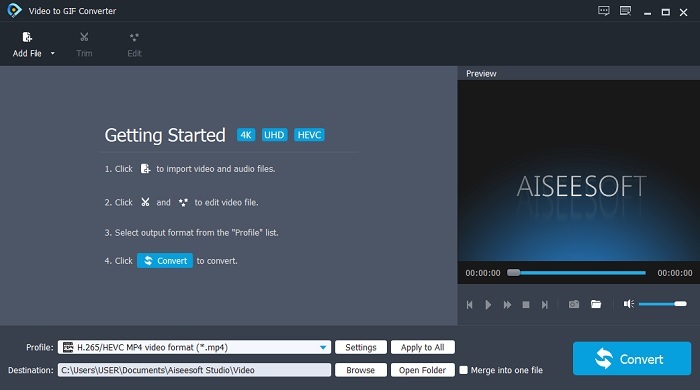
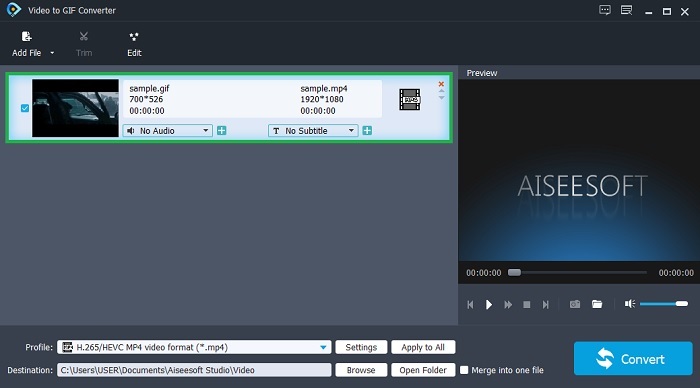
Adım 3. Dosya Ekle’ye tıklayın ve dönüştürmek istediğiniz GIF’i seçin. Arayüzde videoyu düzenleyebilir veya kırpabilirsiniz.
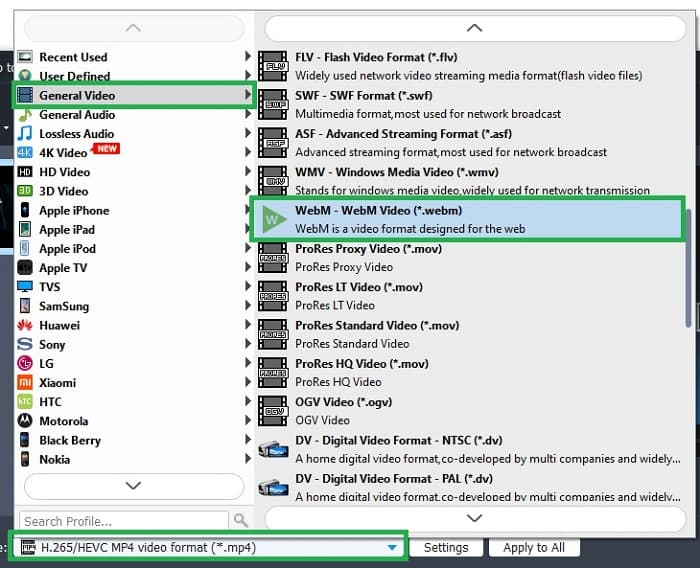
Adım 4. Açılır menüden WebM dosyasını ya da dönüştürmek istediğiniz başka bir formatı seçin. Dönüştürme işlemine başlamaya hazırsanız Dönüştür düğmesine basın.
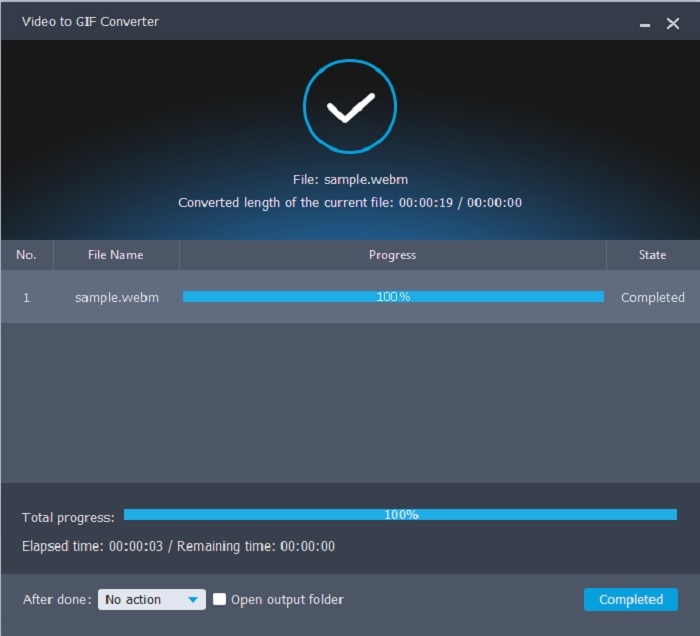
Adım 5. Dönüştürme işlemi bir dakikadan daha kısa sürecektir. Dönüştürme tamamlandığında son çıktıyı dosya yöneticisinden kontrol edebilirsiniz.
Artıları
- GIF oluşturma ve dönüştürme konusunda harikadır.
- On-nokta araçları bu nedenle bu aracın nasıl kullanılacağını öğrenme süreci her yaşta çok kolaydır.
- Aracı kullanmak için internet gerekmez.
Eksileri
- Nihai araçtaki ana özelliklerin çoğu burada mevcut değildir.
- Masaüstünüze yüklenmesi gerekiyor.
2. ÇevrimiçiDönüştürücü.com
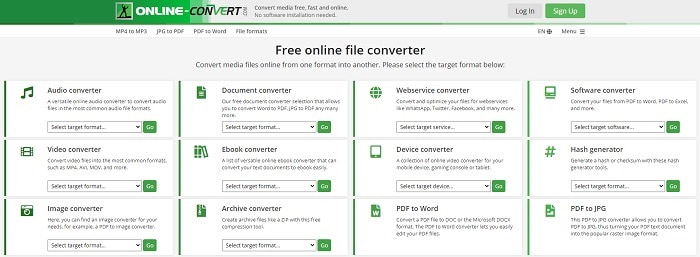
.webm’i .gif’e dönüştürün ve bunu OnlineConverter.com yardımıyla yapın. Sadece dönüştürme işlemini yapacak bir araç istiyorsanız mutlaka bu aracı denemelisiniz. Bu araç; belge, e-kitap ve arşiv gibi farklı dönüştürme türlerini destekler. Ancak bu aracın dezavantajı, en temel işlem dâhil hiçbir düzenleme özelliğini desteklememesidir. Bu aracı nasıl kullanacağınızı öğrenmek istiyorsanız aşağıdaki adımları takip edin.
Adım 1. Favori arama motorunuzda aracın ana web sayfasını aratın.
Adım 2. Video dönüştürücüsüne tıklayın ve dosyayı yerleştirin.
Adım 3. Dönüştürmeyi başlatmak için dönüştürmeyi başlat düğmesine tıklayın ve işlemin bitmesini bekleyin.
Artıları
- Çevrimiçi herkes tarafından kullanılabilecek Kolay Erişim.
- Kullanmak için ek dosya gerekmez.
- Farklı dönüşümleri de destekler.
Eksileri
- Çevrimiçi olarak dönüştürme işlemi, masaüstü tabanlı araçlardan daha fazla zaman alır.
- Birkaç reklamı ve sıkıcı bir web arayüzü var.
3. Dönüşüm
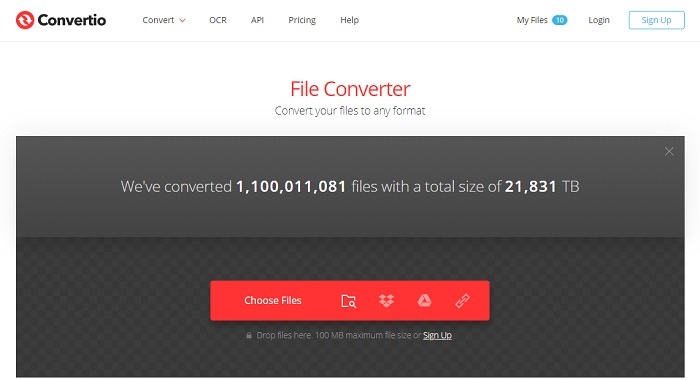
WebM’i GIF’e nasıl dönüştüreceğinizi ya da tam tersini mi öğrenmek istiyorsunuz? Yalnızca bu çevrimiçi Convertio’yu kullanarak her şeyi dönüştürebilirsiniz. Dönüştürme sizin için bir sorunsa, bu araç çözümünüz olabilir. Her ne kadar çevrimiçi araçta reklam bulunsa ve düzenleme özellikleri sunmasa da, çevrimiçi bulabileceğiniz en iyi dönüştürücülerden biridir. Bu aracı denemek isterseniz aşağıdaki adımları takip edin.
Adım 1. Çevrimiçi Convertio’nun ana web sayfasını bulun ve bağlantıya tıklayın.
Adım 2. Ana arayüzdeyseniz dönüştürmek istediğiniz GIF’i seçin.
Adım 3. İşlemi başlatmak için dönüştür’e tıklayın.
Artıları
- Yerinde nasıl kullanılacağı nedeniyle kullanımı kolaydır.
- Farklı platformları da destekler.
- İnternet üzerinden kolayca erişilebilir.
Eksileri
- İnternet kesintiye uğradığında dönüştürme sırasında büyük bir veri kaybetme şansına sahiptir.
- Web sitesinin kendisinde biraz can sıkıcı olabilecek reklamlar.
Bölüm 2. Ultimate Aracının Yardımıyla GIF'i WebM'ye Dönüştürmenin En İyi Yolu
Video Dönüştürücü Ultimate
Ancak FVC tarafından geliştirilen bu Video Converter Ultimate'ı kullanmayı düşünebilirsiniz. Bu aracın ücretsiz sürümü size en iyi çıktıyı sağlıyorsa, bu araç bundan çok daha fazlasıdır. Video kalitesini artırabilir ve ayrıca efektler ekleyebilir. Ses kalitesini iyileştirmek isterseniz, geliştirmek için bu aracı da kullanabilirsiniz. Bu nedenle, dönüşümünüzü bir sonraki seviyeye taşımak istiyorsanız, bu aracı kişisel seçiminiz olarak kullanmalısınız. Çünkü arkadaşlarınızı, ailenizi veya herhangi birini etkilemek için nihai bir nihai çıktı sağlayan doğru araçtır. Nihai bir çıktı oluşturmak için bu nihai aracı nasıl kullanacağınızı öğrenmek için aşağıdaki ayrıntılı adımları okuyun.
Adım 1. Aracı kullanmaya başlamak için, bilgisayarınıza doğru programı indirmeniz gerekir. İndir düğmesine tıklayın, kurulum adımlarını takip edin ve gerekirse değişiklik yapın. Aracı başlatmak için bitir’e tıklayın.
Ücretsiz İndirWindows 7 veya üstü içinGüvenli İndirme
Ücretsiz İndirMacOS 10.7 veya üstü içinGüvenli İndirme
Adım 2. Ekranınızda bunun gibi küçük bir arayüz görünecektir.
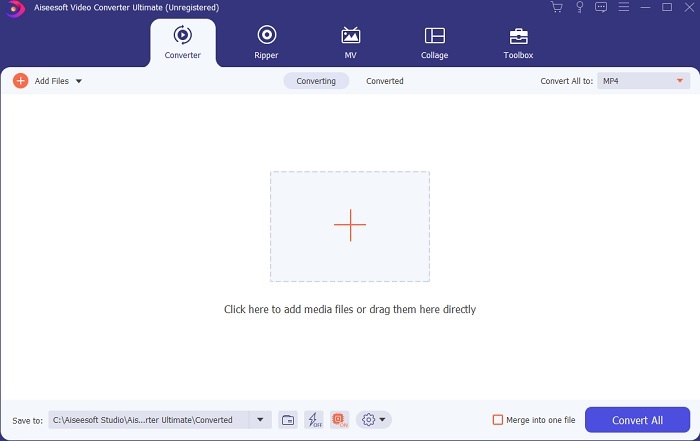
Adım 3. Dosya eklemek için arayüzün ortasındaki artı işaretine tıklayın. Birçok GIF dosyasını dönüştürmek istiyorsanız dosyaları arayüze sürükleyip bırakmanız çok daha iyi olacaktır.
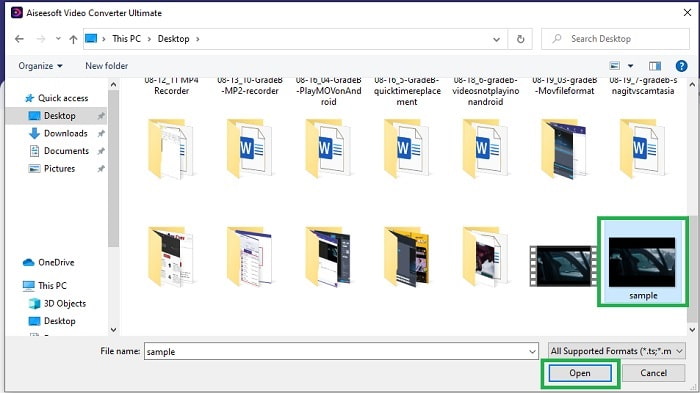
Adım 4. Tümünü Dönüştür menüsünü açtıktan sonra istediğiniz formatı seçin. Hazırsanız dönüştürme işlemini başlatmak için Tümünü Dönüştür düğmesine tıklayın.
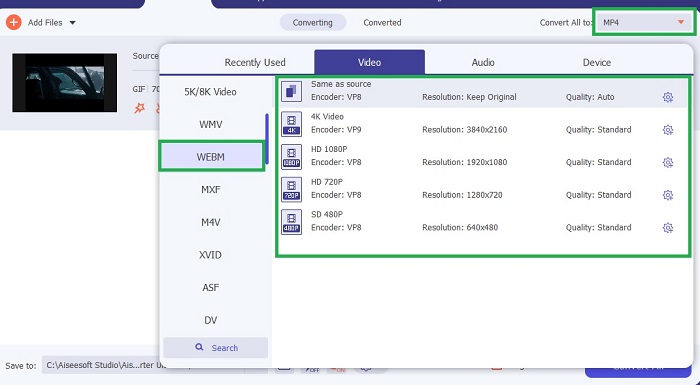
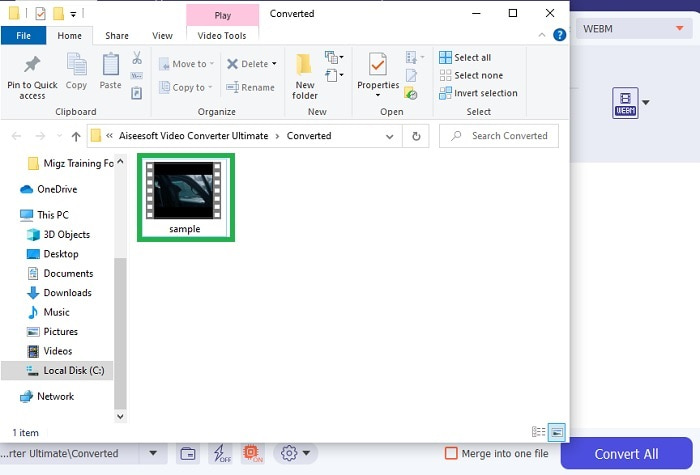
Adım 5. Dönüştürme işlemi çok fazla zamanınızı almaz. Çünkü ücretsiz araca göre 30 kat, diğer araçlara göre ise 100 kat daha hızlıdır. İşlem bittiğinde ekranınızda bir dosya yöneticisi açılır; videoyu izlemek için dosyaya tıklayın. İsterseniz daha sonra araç çubuğu üzerinden çıktıyı geliştirebilirsiniz.
Artıları
- Dönüştürülen videonuzu geliştirmek için daha fazla özellik sağlar.
- Sizin tarafınızdan bilinen veya bilinmeyen tüm formatları sağlar.
- Dönüştürme işlemi, burada bulunan herhangi bir dönüştürücü aracından çok daha hızlıdır.
Eksileri
- Aracı başlatmadan önce ek dosyalar indirmeniz gerekir, aksi takdirde çalışmayacaktır.
- Kullanmadan önce ödeme aracıdır.
Bölüm 3. GIF to WebM hakkında SSS
WebM'im neden web üzerinden oynanamıyor?
Bu son derece basittir; çünkü arama motorunuz güncel değildir. Örneğin Internet Explorer gibi eski web sürümlerinde hiçbir WebM oynatılamaz. Mevcut WebM oynatıcılar hakkında daha fazla bilgi edinmek için buraya tıklayın.
Hangisi daha iyi, GIF veya WebM?
Sesli videolar içermek istiyorsanız, WebM çok daha iyi bir formattır. Ancak statik görüntüler GIF formatı sizin tercihinizse.
WebM biçimini kim geliştirdi?
İlki On2, Xiph ve Matroska'dır ve daha sonra Google bunu geliştirir.
Sonuç
Artık GIF’i WebM’e dönüştürmenin özellikle de küçük dosya boyutu ve yüksek kaliteli video elde etmek istiyorsanız bir gereklilik olduğu bizim için çok daha net. Ve dönüştürme için en iyi araç, Video Converter Ultimate’tır. Daha da önemlisi, bu araç WebM’i GIF’e dönüştürmeyi de kolay ve hızlı bir şekilde destekler. Ücretsiz araçtan şüphe ediyorsanız bu premium aracı kullanmanız daha iyidir. Güvenli olmasının yanı sıra, dönüştürme ve düzenlemede 0’e yakın başarı sağlayabilir. Kısacası bu araç sizin başvuracağınız temel çözümdür. Harika bir dönüştürme sunan en iyi dönüştürücüyü kullanın.
-
 GIF'leri Kırpmak için Çevrimiçi ve Çevrimdışı En İyi GIF Kırpıcıyı Seçin [2021]
 En iyi kırpma aracını seçmek bir zorunluluktur ve bazı GIF yapımcıları bu özelliği sağlamamıştır. Ancak kullanılacak en iyi GIF kırpma aracı nedir ve nasıl kullanılır?
-
 PC ve Mac için GIF Kaydedicilerle GIF Formatını Kaydetmek İçin En İyi 5 Seçenek
 GIF'leri kaydetmek için kullanmanız gereken en iyi GIF kaydedici nedir? Aşağıdaki liste, hangisinin en iyi ekran kaydedici olduğuna dair kanıt sağlar.
-
 MPG'yi GIF Formatına Dönüştürme [Çevrimiçi ve Çevrimdışı]
 Çok daha iyi bir duygu ifade etmek ister misiniz? O zaman bunun yerine GIF kullanmalısın. Bu yazı, duygularınızı çok daha iyi ifade etmek için bir MPG dosyasını GIF'e nasıl dönüştüreceğinizi öğretecektir.
