


 Video Dönüştürücü Ultimate
 Ekran kaydedicisi
 Video Onarımı
MKV Video Dosyasını Çevrimiçi ve Çevrimdışı MP3'e Dönüştürmek için En İyi Dönüştürücüyü Seçin
MKV, dosya depolamak için kullanabileceğiniz en gelişmiş formatlardan biridir. Ancak sunduğu ileri seviye depolama yetenekleri nedeniyle dosya boyutu oldukça büyük olur. Bu tür bir dosyayı elinizde tutmak için bir sıkıştırma programı indirmeniz gerekir; fakat yanlış bir sıkıştırıcı seçerseniz, bu dosyanın içindeki bazı verilerin kaybolmasını bekleyebilirsiniz. Bunu, formatı MP3’e dönüştürerek değiştirmek mümkündür. Ayrıca MP3, tüm platformlarda desteklendiği için dönüştürme yapmanız açısından da en iyi formattır. Şimdi, hiçbir dosya kaybı olmadan MKV’yi MP3’e dönüştürme yollarını keşfetmek için bu makaleyi bir harita olarak kullanalım.

En İyi Ücretsiz Web Tabanlı MKV'den MP3'e Dönüştürücülerin Bölüm 1. 3'ü
1. FVC Ücretsiz Ses Dönüştürücü
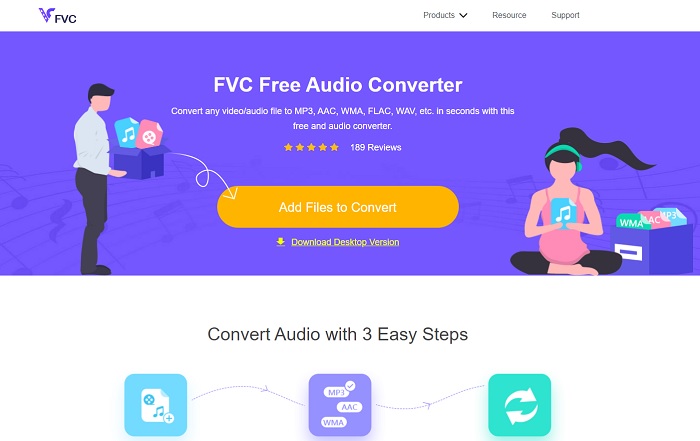
MKV video dosyasını çevrimiçi olarak MP3'e nasıl dönüştüreceğinizi öğrenmek istiyorsanız, burada kalın; çünkü en iyi çevrimiçi araçtan bahsedeceğiz. FVC Free Audio Converter, FVC tarafından, ücretli araçlarının bir örneği olarak geliştirilmiştir. Ücretsiz olmasına rağmen, bu araç burada tanıtılan diğer herhangi bir çevrimiçi araç gibi değildir. Burada herhangi bir formatı dönüştürmek çok kolay ve her zaman güvenlidir, ancak aynı anda çok sayıda dosya dönüştüremezsiniz. Ayrıca desteklenen formatlar sınırlıdır ve ücretli sürümde bulunan düzenleme özellikleri burada yoktur. Peki, FVC Free Audio Converter yardımıyla işlemin ne kadar hızlı yapıldığını görmek istiyor musunuz? Öyleyse, başarıyı garanti altına almak için verilen adımları takip etmelisiniz.
Adım 1. FVC tarafından sizin için sağlanan yukarıdaki bağlantıya tıklayın.
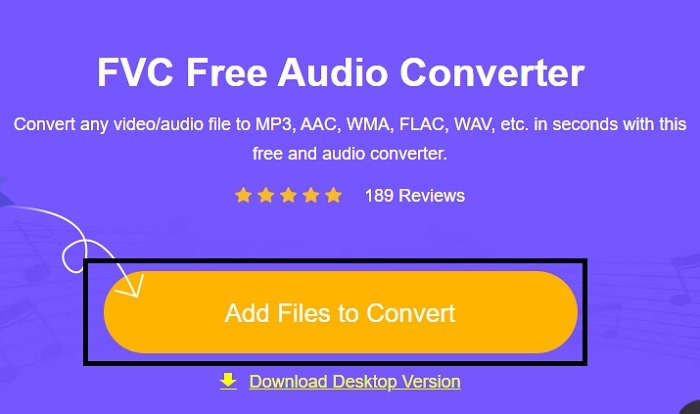
Adım 2. Artık ana siteye geçtiyseniz, aracı başlatmak için Add Files to Convert (Dönüştürülecek Dosya Ekle) seçeneğine tıklayın.
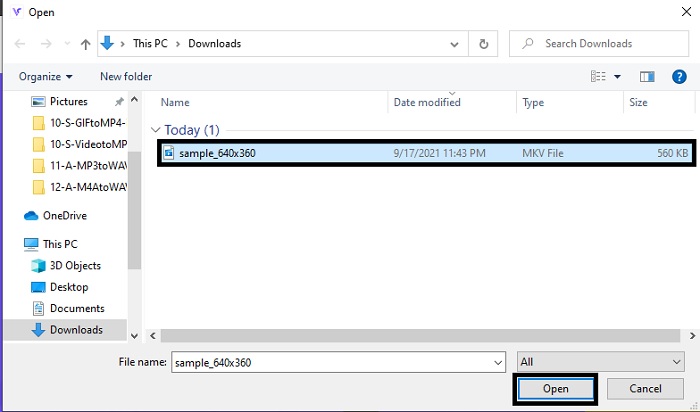
Adım 3. Ekranınızda bir klasör penceresi açılacaktır, dönüştürmek istediğiniz MKV dosyasını seçin ve ardından Open (Aç) düğmesine tıklayın.
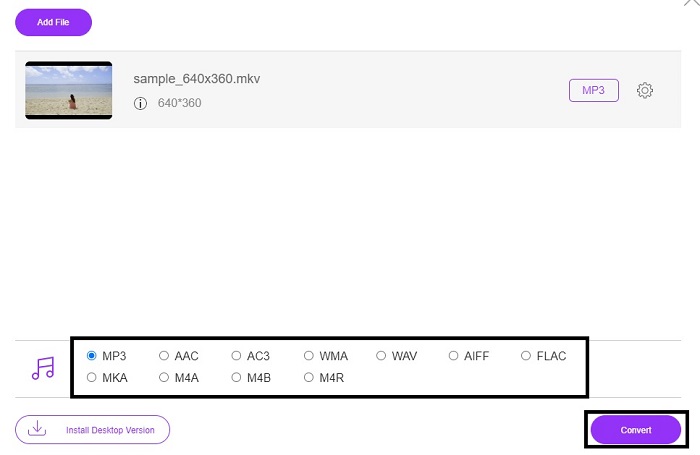
Adım 4. Aşağıdaki bölümden MKV formatını MP3’e ya da istediğiniz herhangi bir ses formatına dönüştürün. Tüm bu işlemlerden sonra, Convert (Dönüştür) düğmesine tıklayarak MKV formatını dönüştürme işlemini başlatalım.
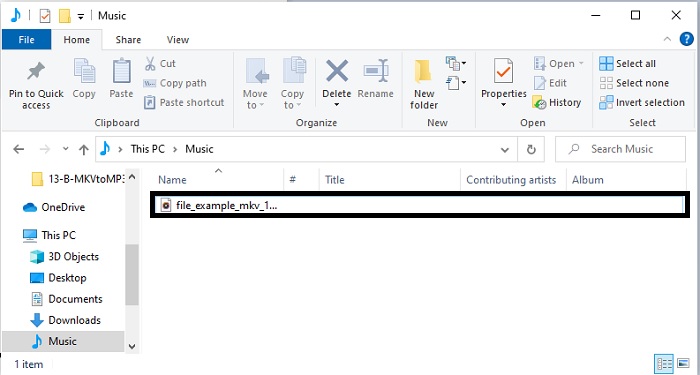
Adım 5. Az önce dönüştürdüğünüz dosyayı dosya yöneticisinde bulun, ardından tıklayıp yeni formatındaki dosyayı dinleyin.
2. Dönüştürücü Uygulaması
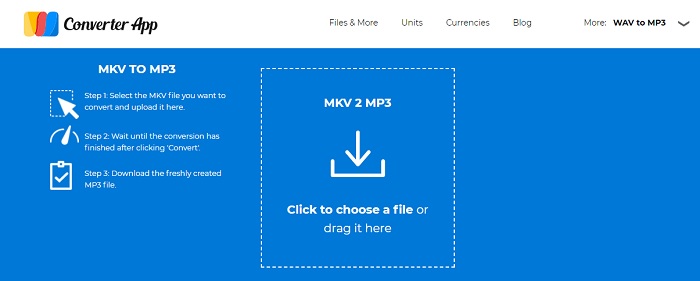
Çevrimiçi olarak kullanılabilen en iyi ücretsiz MKV’den MP3’e dönüştürücülerden biri de Converter App’tir. Dönüştürme sizin için bir sorun ise, bu aracı rahatlıkla kullanabilirsiniz; hem kullanımı kolaydır hem de tam isabetli sonuç verir. Ancak ilk araçtan farklı olarak, Converter App sitesinde sayfanın etrafında birçok can sıkıcı reklam bulunur. Ayrıca, dönüştürmek istediğiniz dosyayı yüklediğinizde, dosyanın kabul edilmesi için en az bir iki dakika beklemeniz gerekir. Dönüştürme işlemi de ayrı ilerlediği için, hızlı ve güvenli dönüşüm isteyen kullanıcılar açısından bu biraz zahmetlidir.
3. Aconvert.com
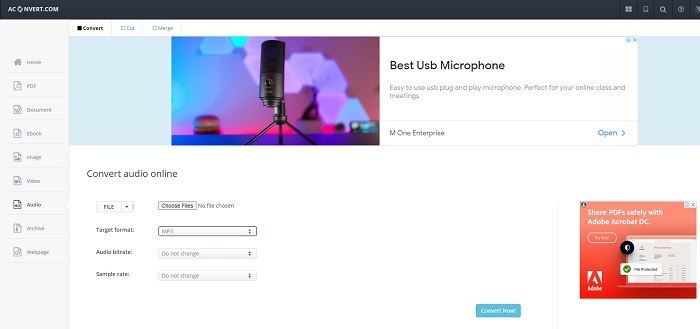
Aconvert.com'un yardımıyla herhangi bir ses, video, belge, elde etme, PDF ve daha fazlasını dönüştürün. Bu araç, burada yapabileceğiniz en iyi özellik olan herhangi bir medya dosyasını dönüştürebildiğinden. Ayrıca, iyi bir dönüştürülmüş dosya elde etmek için dosyanın bit hızını değiştirebilirsiniz. Dönüşüm için iyi bir araç olmasına rağmen, reklamlar bu web aracını öldürüyor. Çünkü aracı test etmek için yaptığımız her eylemde, her zaman bir anda ortaya çıkan bir reklam vardır. Bu nedenle, diğer web sitesine yönlendirilmemeye dikkat edin, çünkü sisteminize saldıracak bir virüs olma ihtimali vardır.
Bölüm 2. MKV'yi Kalite Kaybı Olmadan MP3'e Dönüştürmek İçin Kullanılan Hepsi Bir Arada Masaüstü Tabanlı Dönüştürücü
Hem çevrimiçi hem de çevrimdışı diğer dönüştürücülere üstünlük sağlayan FVC Video Converter Ultimate’ı tercih edin. Bunun, en iyi çevrimdışı MKV’den MP3’e dönüştürücü yazılım olduğu söylenir. Çünkü dönüştürme hızınız son derece yüksektir ve buna ek olarak gelişmiş düzenleme özellikleri de sunar. Örneğin, ses kalitenizi yükseltmek isterseniz araç çubuğuna gidip ses güçlendiriciyi (audio booster) tıklayabilirsiniz. Eğer videonuzla sesiniz senkron değilse, bunu düzeltmek için de bu aracı kullanabilirsiniz. Dahası, bu aracın sunabildiği diğer özel işlevlerden bahsetmeye kalksak, bu özellikleri açıklamak için iki ya da üç makaleden fazlası gerekirdi. Şimdi devam ederken, bilinen ve bilinmeyen tüm formatları destekleyen bu harika dönüştürücüyü nasıl kullanacağınıza dair adımları sunuyoruz.
Adım 1. MKV’yi MP3’e dönüştürmeden önce aracı indirmeniz gerekir. Araçtaki ayarları düzenleyin ve başlatmak için bitir (finish) düğmesine basın.
Ücretsiz İndirWindows 7 veya üstü içinGüvenli İndirme
Ücretsiz İndirMacOS 10.7 veya üstü içinGüvenli İndirme
Adım 2. Add Files (Dosya Ekle) bölümüne gidin veya artı simgesine tıklayarak MP3 formatına dönüştürmek istediğiniz MKV dosyasını seçin.
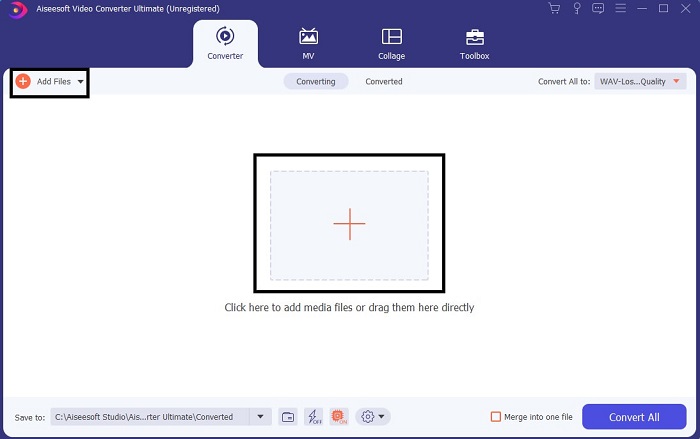
Adım 3. Ardından Convert All (Tümünü Dönüştür) seçeneklerinin alt menüsüne geçin ve formatı MP3 veya istediğiniz başka bir ses formatı olarak değiştirin.
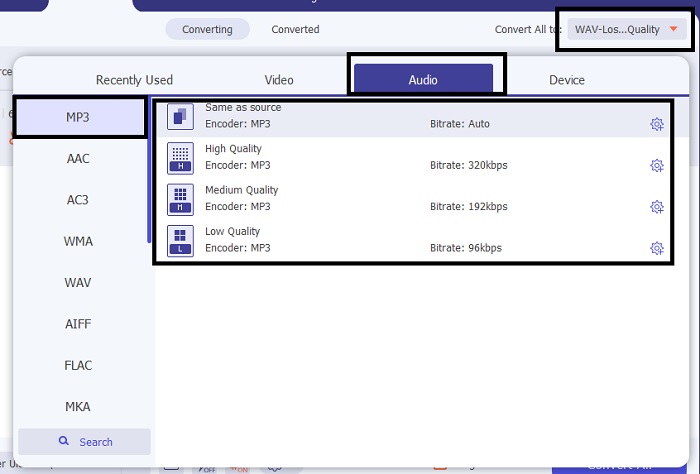
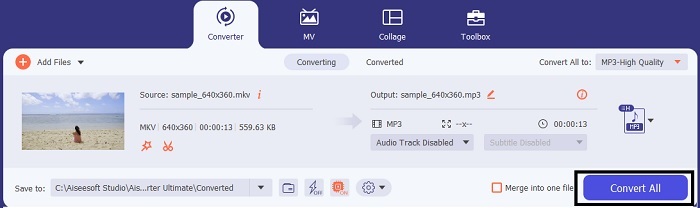
Adım 4. Dönüştürmeyi başlatmak için Convert All düğmesine tıklayın. Çok uzun süre beklemenize gerek yok; çünkü bu araç, kendi çevrimiçi sürümünden 30 kat ve diğer dönüştürücülerden 100 kat daha hızlıdır.
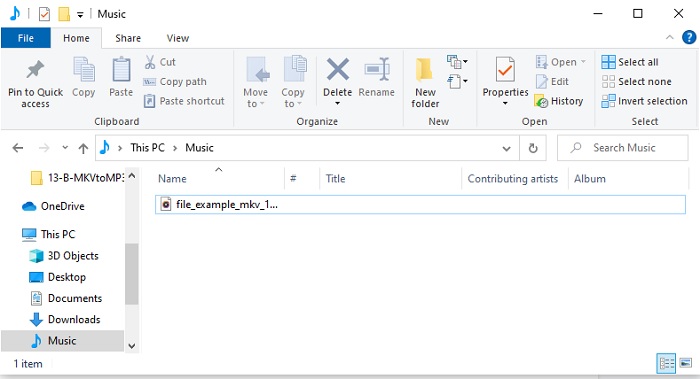
Adım 5. İşlem tamamlandığında, ekranda otomatik olarak bir klasör açılacaktır; dönüştürülmüş MKV dosyasına tıklayın ve dinleyin. Daha sonra değişiklik yapmak veya kaliteyi artırmak isterseniz, araç çubuğunu kontrol edin.
Bölüm 3. MKV'den MP3'e Dönüştürme hakkında SSS
Neden bilgisayarımda MKV videoları oynatamıyorum?
Bu sorun oldukça yaygındır; özellikle de MKV formatının hâlâ geliştirilme aşamasında bulunmasından dolayı. Bu da, tıpkı yerleşik medya oynatıcınızda olduğu gibi, tüm medya oynatıcıların bu formatı desteklemediği anlamına gelir. Dolayısıyla MKV dosyasını oynatabilmek için bu çevrimiçi MKV medya oynatıcısını kullanmanız gerekir. Bu araç, tanıdığınız ya da bilmediğiniz geniş bir format yelpazesini destekler. Öyleyse ne bekliyorsunuz? Bağlantıya tıklayın ve yüksek kaliteli video ve sesle dosyayı izleyin.
MKV ve AVI'nin benzerlikleri nelerdir?
MKV ve AVI'nin ikisi de sıkıştırılmamış dosyalardır; bu, bilgisayarınıza veya aygıtlarınıza bir dosya depolarsanız, büyük bir dosya boyutu beklersiniz. Ancak karşılaştıracak olursak MKV, AVI'den daha karmaşıktır.
MKV kayıplı mı yoksa kayıpsız mı?
MKV dosyası sıkıştırılmamış kayıpsız bir formattır.
Sonuç
Bu yolculuğun sonunda, incelediğimiz her bir dönüştürücünün sunduğu güzellikleri takdir etmemiz gerekir. Ancak içlerinden bir tanesi var ki ona gerçek bir 'mücevher' diyebiliriz; o da FVC Video Converter Ultimate, yani kayıp hazine. Bu makale, hazineyi bulma yolculuğunuzda bir harita görevi gördü ve artık hazineyi buldunuz. Bu araç, hem şimdi hem de gelecekte kullanabileceğiniz pek çok özellikle geliyor. Bu yüzden FVC Video Converter Ultimate'ı hemen indirin; çünkü MKV dosyalarını dilediğiniz herhangi bir formata dönüştürmek için kullanabileceğiniz en doğru araç budur. Örneğin, MKV’den MP4’e, MKV’den AVI’ye, MKV’den AAC’ye, MKV’den GIF’e vb. dilediğiniz şekilde dönüştürebilirsiniz.
-
 4 MOV'u Windows ve Mac'te MP3'e Kolayca Dönüştürmenin En İyi Yöntemleri
 MP3 ses dosyalarını MOV dosyalarından çıkarmak istediğinizde, makaleden istediğiniz dosyaları elde etmek için en verimli 4 MOV - MP3 dönüştürücü hakkında daha fazla bilgi edinebilirsiniz.
-
 M4V - MP3 Dönüştürücü - M4V Dosyalarından MP3 Ayıklamak için En İyi 4 Yöntem
 M4V videolarından MP3 sesini kolaylıkla çıkarmak istediğinizde, makaleden istediğiniz ses dosyalarını almak için en iyi 4 M4V - MP3 dönüştürücü hakkında daha fazla bilgi edinebilirsiniz.
-
 [2025] M2TS'yi MP3'e Dönüştürmenin En İyi 6 Ücretsiz ve Çevrimiçi Yolu
 Bir M2TS dosyası MP3'e dönüştürülebilir mi? Bu yazıda, M2TS'yi MP3, AAC, AIFF ve daha fazla ses formatına dönüştürmenize yardımcı olacak en iyi 6 ücretsiz ve çevrimiçi yolu listeledik.
