


 Video Dönüştürücü Ultimate
 Ekran kaydedicisi
 Video Onarımı
 Güvenli İndirme
Kaliteyi Kaybetmeden M2TS'yi MKV'ye Dönüştürme
“İyi bir dönüştürücü arıyorum. M2ts dosyalarımı MKV'ye dönüştürmem gerekiyor ancak altyazı seçeneklerini ve ses seçeneklerini korumak istiyorum. Bu dosyalar yaklaşık 40 GB boyutundadır ve onları daha küçük dosyalara dönüştürmek istiyorum, ancak kalite kaybı yok. Önerilen dönüştürücü var mı? "
M2TS dosyaları genellikle çok büyük yer kaplar, bu yüzden bazı medya oynatıcılarda oynatmak için M2TS’yi MKV’ye dönüştürmek isteyebilirsiniz. Bu yazıda, Windows ve Mac’te M2TS dosyasını kayıpsız bir şekilde MKV’ye dönüştürmenin en kolay yollarını göstereceğiz.

Bölüm 1. M2TS'yi MKV'ye Ücretsiz Dönüştürmenin En İyi Yolu
Piyasada pek çok dönüştürücü bulunsa da gerçekten işe yarayan ücretsiz M2TS’ten MKV’ye dönüştürücü sayısı azdır. Ancak bu FVC Free M2TS Converter aracına bir göz atabilirsiniz. Bu araç, M2TS dosyalarını MKV, MP4, AVI, MOV, MP3 vb. formatlara dönüştürmenizi sağlayan, hepsi bir arada bir M2TS dönüştürücü ve düzenleyicidir; böylece popüler medya oynatıcılarda sorunsuz oynatabilirsiniz.

Ücretsiz M2TS Dönüştürücü
112,345+ İndirme- M2TS'yi MKV, MP4, AVI, TS, VOB, WMV, FLV, SWF vb. Formatlara dönüştürün.
- M2TS dosyalarını cihaz ve ortam destekli dosya formatlarına dönüştürün.
- M2TS dosyasını birleştirme, sıkıştırma, tema ekleme ve 3B efektleri etkinleştirme gibi düzenleyin.
- Windows 10/8/7 / Vista / XP (SP2 veya üzeri) ile tam uyumlu.
Ücretsiz İndirWindows 7 veya üstü içinGüvenli İndirme
Ücretsiz İndirMacOS 10.7 veya üstü içinGüvenli İndirme
Adım 1. M2TS dosyası ekleyin
Bu Ücretsiz M2TS Dönüştürücüyü indirdikten sonra, Windows bilgisayarınıza kurun ve başlatın. M2TS dosyalarını içe aktarmak için "Dosya Ekle" düğmesine tıklayın. Birleştirilecek birkaç M2TS dosyanız varsa, alttaki "Bir dosyada birleştir" seçeneğini işaretleyebilirsiniz.

Adım 2. M2TS dosyasını düzenleyin
Arayüzün üst kısmındaki "Düzenle" düğmesine tıklayın ve açılış ve kapanışta tema, başlık, yazar, zaman ve sağlayıcı ekleyebileceksiniz.

Adım 3. M2TS'yi MKV'ye dönüştürün
Çıktı biçimi olarak MKV'yi seçmek için "Çıktı biçimi" altındaki açılır düğmeyi tıklayın. Hedef klasörü de ayarlayabilirsiniz. Bundan sonra, M2TS'yi MKV'ye ücretsiz olarak dönüştürmeye başlamak için "Dönüştür" düğmesine tıklayın.

Bölüm 2. MKV'yi M2TS'den Çevrimiçi Ücretsiz Olarak Dışa Aktarın
M2TS’yi hızlı bir şekilde MKV’ye dönüştürecek ücretsiz bir çevrimiçi araç mı arıyorsunuz? FVC Free Online Video Converter, M2TS dosyasını kolayca MKV’ye dönüştürebileceğiniz ücretsiz bir platform sunar. Ayrıca birden çok M2TS dosyasını toplu olarak MKV formatına dönüştürebilirsiniz. M2TS dosyasını çevrimiçi ve ücretsiz olarak MKV’ye dönüştürmenin ayrıntılı adımlarına göz atın.
1. Adım. Yukarıdaki bağlantıya tıklayarak web sitesine gidin. Add Files to Convert seçeneğini bulun ve FVC başlatıcısını indirin.

2. Adım. Kurup güncelledikten sonra videoyu ekleyin ve dönüştürmek için biçimi Convert bölümünden seçin.

3. Adım. Videonuzu kaydetmek istediğiniz klasörü yazın veya açın. Biraz bekleyin ve MKV videonuz hazır olacaktır.
Bölüm 3. FreeConvert.com ile M2TS'yi MKV'ye dönüştürün
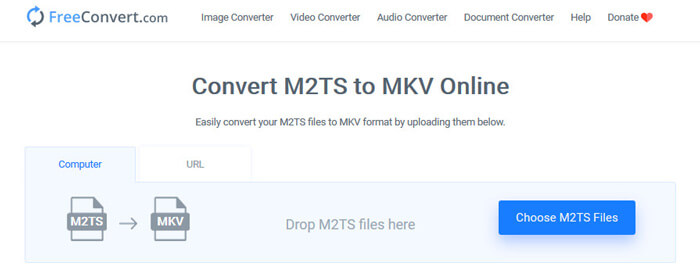
Veya dosyalarınızı (resim, video, belge ve müzik) bir formattan diğerine dönüştürmek için ücretsiz bir çevrimiçi dosya dönüştürme aracı olan FreeConvert.com'u deneyebilirsiniz.
1. Adım. M2TS dosyasını yükleme alanına sürükleyip bırakın. Ayrıca “Choose M2TS Files” düğmesine tıklayarak M2TS dosyasını içe aktarabilirsiniz.
2. Adım. Gelişmiş Ayarlar bölümünde video kodeğini, ekran boyutunu, en-boy oranını, kare hızını, video yönünü, ses kodeğini, bit hızını ayarlayabilirsiniz.
3. Adım. M2TS’yi MKV’ye dönüştürmek için “Convert To MKV” düğmesine tıklayın. Bu işlem birkaç saniye sürer. Ardından MKV dosyasını bilgisayara kaydetmek için “DOWNLOAD MKV” düğmesine tıklayın.
Bölüm 4. M2TS'yi HandBrake ile MKV'ye dönüştürün
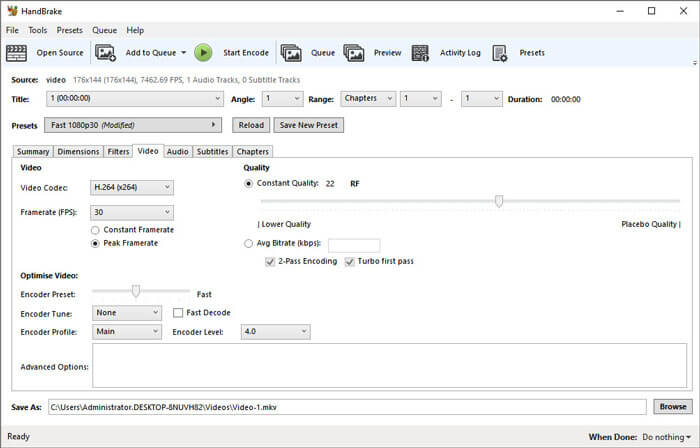
HandBrake, videoyu neredeyse tüm video formatlarından dönüştüren ücretsiz ve açık kaynaklı bir M2TS'den MKV'ye dönüştürücüdür. Windows, macOS ve Linux OS gibi birçok işletim sistemini destekler. HandBrake ile M2TS dosyasını MKV'ye dönüştürmek için adım adım kılavuzumuzu izleyin.
1. Adım. Bilgisayarınıza HandBrake’i indirin. Programda M2TS dosyasını yüklemek için “Open Source” düğmesine tıklayın.
2. Adım. Summary sekmesinde çıktı formatı olarak “MKV”yi seçin. Dimensions, Filters, Video, Audio, Subtitles, Chapters gibi diğer sekmelerde video filtreleri, kodek, kalite, bit hızı, altyazılar ve daha fazlasını ayarlayabilirsiniz.
3. Adım. M2TS dosyalarını MKV’ye dönüştürmeye başlamak için “Start Encode” düğmesine tıklayın.
Bölüm 5. MakeMKV ile M2TS'yi MKV olarak değiştirin
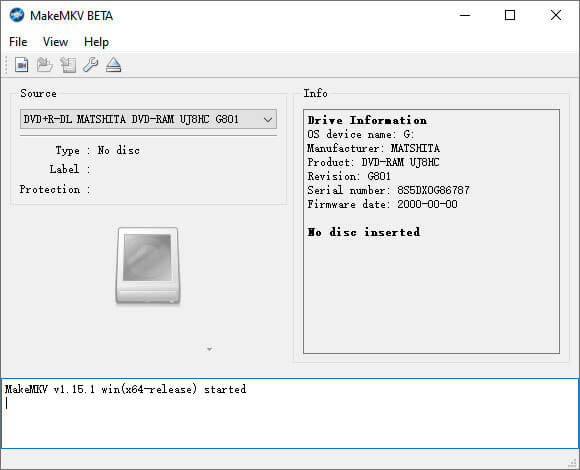
MakeMKV, M2TS'yi ücretsiz olarak MKV'ye dönüştürmek için tek tıkla çözümdür. MakeMKV'yi Windows 10 ve Mac'te M2TS'yi MKV'ye dönüştürmek için kullanabilirsiniz.
1. Adım. Bilgisayarınızda MakeMKV’yi açın. Programda M2TS dosyasını eklemek için “File” menüsünden “Open Files”ı seçin.
2. Adım. Eklediğiniz M2TS dosyasını seçin ve çıkış klasörünü belirlemek için Klasör simgesine tıklayın.
3. Adım. M2TS dosyasını ücretsiz olarak MKV’ye dönüştürmeye başlamak için “Make MKV” düğmesine tıklayın.
Bölüm 6. M2TS'yi MKV'ye Dönüştürme Hakkında SSS
M2TS formatlı video nedir?
M2TS, BDAV (Blu-ray Disc Audio-Video) MPEG-2 Transport Stream'in kısaltmasıdır. Blu-ray ve AVCHD (Gelişmiş Video Kodlama Yüksek Çözünürlük) için video, ses ve diğer akışları içeren bir dosya kapsayıcı dosya formatıdır.
Plex M2TS dosyalarını oynatabilir mi?
Hayır. Plex Media Server, çok sınırlı bir dış kodek desteğine sahip olduğu için M2TS dosyalarını oynatamaz. M2TS dosyalarını Plex ile oynatmak istiyorsanız, M2TS dosyasını FVC Free M2TS Converter ile Plex destekli formata dönüştürebilirsiniz.
YouTube, M2TS ve MTS'yi destekliyor mu?
Hayır. YouTube, M2TS veya MTS dosyalarını desteklemez. M2TS veya MTS dosyasını MP4 gibi desteklenen dosya biçimine dönüştürmeniz ve ardından bunları YouTube'a yüklemeniz gerekir.
Sonuç
Windows ve Mac’te M2TS’yi MKV’ye dönüştürmek için sunduğumuz tüm çözümler bunlar. FVC Free Video Converter, MKV dosyaları için kayıpsız çıktı almanızı sağlar. Tüm HD kameralarınızdan gelen M2TS videolarını kalite kaybı olmadan diğer video formatlarına kolayca dönüştürebilirsiniz. Deneme zamanı geldi.
-
 MTS Dosyası Nedir ve MTS Dosyası Nasıl Dönüştürülür / Oynatılır
 MTS dosyası nedir ve onu nasıl oynatabilirim? Bu gönderi size MTS dosyasının temel bir talimatını verir. Dahası, MTS dosyasını MP4, MOV, AVI, MPEG, MTS, MKV veya diğer formatlara yüksek kalitede dönüştürmek için 3 basit yol elde edebilirsiniz.
-
 2 MTS'yi MP3'e Ücretsiz Dönüştürmenin Basit Yolları
 MP3 sesini MTS dosyasından çıkarmanız gerekiyor, ancak nasıl yapılacağını bilmiyor musunuz? MP3 dönüştürücü için en iyi MTS nedir? Bu gönderi, MTS / M2TS'yi yüksek ses kalitesiyle MP3'e dönüştürmenize yardımcı olacak 2 kolay yolu paylaşıyor.
-
 Snagit ve En İyi Alternatifinin İncelenmesi
 Snagit'e en iyi alternatif nedir? Snagit gibi bir ekran yakalama aracı var mı? Bu gönderi Snagit'i inceleyecek ve ekranı yakalamak için Snagit'e en iyi alternatifi paylaşacaktır.
