


 Video Dönüştürücü Ultimate
 Ekran kaydedicisi
 Video Onarımı
 Güvenli İndirme
MTS'yi Anında M4V'ye Dönüştürmek İçin Olağanüstü Yöntemler
Cihazınız için etkili bir dönüştürücü mü istiyorsunuz? O halde bu makaledeki bilgilendirici ayrıntıları okuyarak bir fikir edinebilirsiniz. Mac ve Windows kullanarak MTS’yi M4V’ye dönüştürmenin çeşitli yollarını göstereceğiz. Ayrıca, daha fazla dosya dönüştürmek için deneyebileceğiniz bir çevrimiçi aracı da keşfedeceksiniz.

Bölüm 1: MTS ve M4V Arasındaki Farklar
Bu iki dosya biçimi arasındaki farkları görmek için aşağıdaki tablodaki ayrıntılara bakın.
| MTS | M4V | |
| Dosya uzantısı | Advanced Video Coding High Definition (AVCHD) video dosyasının dosya adı uzantısı MTS'dir. Bir .mts dosya adı uzantısına sahiptir ve JVC, Sony, Canon ve Sanyo dahil olmak üzere belirli video kamera markaları ve modelleriyle kaydedilmiş bir HD MPEG video içerir. Birçok yazılımda açılabilir ve 1080i x 720p'ye kadar HD videoları destekler. | Apple Inc., M4V dijital video kapsayıcı formatını yarattı. Yapı açısından, iyi bilinen MP4 ile makul ölçüde karşılaştırılabilir, ancak M4V dosyaları DRM ile gelebilir. Günümüzde iTunes Store'daki videolar için ana video formatı, birden fazla ses ve video verisini bir araya getirebilen M4V'dir. |
| Tarafından geliştirilmiş | Sony/Panasonic | Apple Inc. |
| İlişkili Programlar | VLC medya oynatıcı Apple Final Cut Pro X Roxio Creator NXT Pro 7 | Medya Oynatıcı Klasik KMPlayer VLC medya oynatıcı Yakınlaştırma Oyuncusu |
| MIME Türü | video/mp2t | video/x-m4v |
Bölüm 2: Mac Kullanarak Birden Çok MTS'yi M4V'ye Dönüştürmek İçin Mükemmel Yöntemler
Mac kullanarak MTS'yi M4V'ye dönüştürmek istiyorsanız, FVC Video Converter Ultimate'ı deneyebilirsiniz. Bu çevrimdışı araç, 30 kat daha hızlı dönüştürme hızına sahip olduğu için dosyaları anında dönüştürebilir. Ayrıca bu araç, birden çok dosya biçimini aynı anda dönüştürmeyi mümkün kılan toplu dönüştürme sunar. Ayrıca, MKV, MOV, MP4, FLV, AVI, SWF ve daha fazlası dahil olmak üzere çok sayıda dosya formatını desteklediği için bu uygulamada neredeyse tüm video formatları yüklenebilir. MTS video dosyanızı da düzenleyebilirsiniz. Birden fazla MTS dosyanız varsa ve bir video birleştirme aracı sunduğu için bunların birleştirilmesini istiyorsanız bu araca güvenebilirsiniz. Bu şekilde, birden fazla MTS videosunu tek bir parça halinde birleştirebilirsiniz. Ayrıca, MTS videonuzun ses seviyesini ayarlamak istiyorsanız, ses yükseltme aracını kullanabilirsiniz. Bu çevrimdışı uygulamanın yardımıyla videonuzun sesini kolayca değiştirebilirsiniz. Video Converter Ultimate'ı kullanarak keyfini çıkarabileceğiniz daha fazla özellik var.
Özellikler
◆ 100'den fazla video dosyası formatını dönüştürebilir.
◆ Birçok ücretsiz tema içeren Müzik Videoları oluşturucu sunar.
◆ Ücretsiz şablonlar ve filtrelerle bir Kolaj oluşturmak mümkündür.
◆ Bir video hız denetleyicisi, sıkıştırıcı ve kırpıcı gibi düzenleme araçları sunar.
◆ Bir videodan filigranları kaldırabilir.
Mac'inizde FVC Video Converter Ultimate kullanarak MTS video dosyanızı M4V formatına dönüştürmek için aşağıdaki temel adımları izleyin.
1. Adım: Mac’inizi kullanarak, aşağıdaki İndir düğmesine tıklayıp FVC Video Converter Ultimate programını indirin. Ardından uygulamayı başlatın.
Ücretsiz İndirWindows 7 veya üstü içinGüvenli İndirme
Ücretsiz İndirMacOS 10.7 veya üstü içinGüvenli İndirme
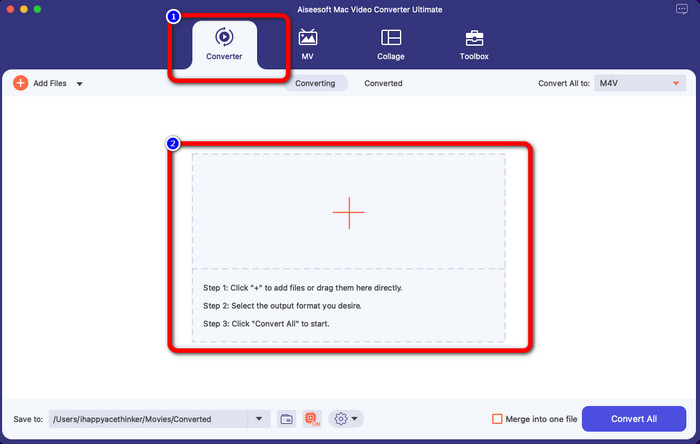
2. Adım: Arayüzün ortasındaki Artı simgesine tıklayarak MTS video dosyanızı ekleyin. Dosyayı doğrudan kutunun içine de sürükleyip bırakabilirsiniz.
3. Adım: Sonraki işlem için, arayüzün sağ üst kısmında Tümünü Dönüştür düğmesini göreceksiniz. Biçim seçeneklerini görmek için buna tıklayın ve ardından M4V dosya biçimini seçin. Birden fazla MTS dosyası eklemek için, arayüzün sol üst kısmındaki Dosya Ekle düğmesine basın.
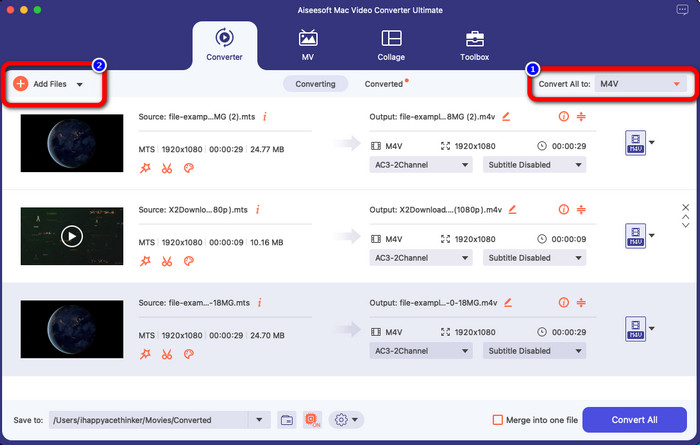
4. Adım: Tüm MTS dosyalarını M4V biçimine dönüştürdükten sonra, Tümünü Dönüştür düğmesine tıklayın ve son çıktınızı istediğiniz konuma kaydedin.
Bölüm 3: Birden Çok MTS dosyasını Windows'ta Ücretsiz Olarak M4V'ye Dönüştürme
Bu bölümde, birden çok MTS dosyasını Windows kullanarak tek bir M4V’ye nasıl dönüştüreceğinizi keşfedeceksiniz. MTS dosyalarını dönüştürmek için FVC Free TS Converter kullanabilirsiniz. Video dosyalarınızı ortalama dönüştürme hızından 10 kat daha hızlı dönüştürebilir. Birden çok dosyayı tek seferde dönüştürebileceğiniz toplu dönüştürme özelliği sunar. Bu sayede dosyaları tek tek dönüştürürken sıkılmazsınız. Ayrıca temel yöntemlere sahip sezgisel bir arayüze sahiptir ve bu da onu kullanıcılar için daha uygun hale getirir. Windows’ta FVC Free TS Converter kullanarak birden fazla MTS dosyasını M4V biçimine dönüştürmek istiyorsanız, aşağıdaki basit adımları kullanın.
Özellikler
◆ AVI, MOV, MPEG, MP4, DIVX, XVID, vb. gibi video dosyası formatlarını dönüştürün.
◆ Video İyileştirici sağlar.
◆ Ekran Kaydı Yapabilir.
◆ Herhangi bir Blu-ray diski oynatabilir.
◆ Toplu dönüştürme sunar.
1. Adım: Aşağıdaki İndir düğmesine tıklayarak Windows bilgisayarınıza FVC Free TS Converter programını indirin. Kurulum işleminden sonra uygulamayı başlatın.
Ücretsiz İndirWindows 7 veya üstü içinGüvenli İndirme
Ücretsiz İndirMacOS 10.7 veya üstü içinGüvenli İndirme
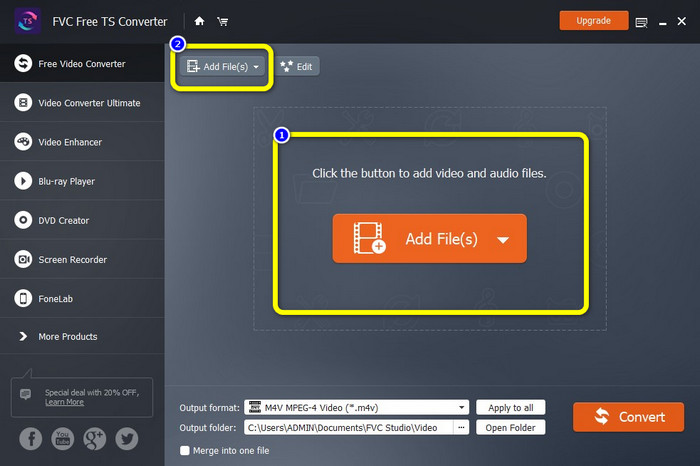
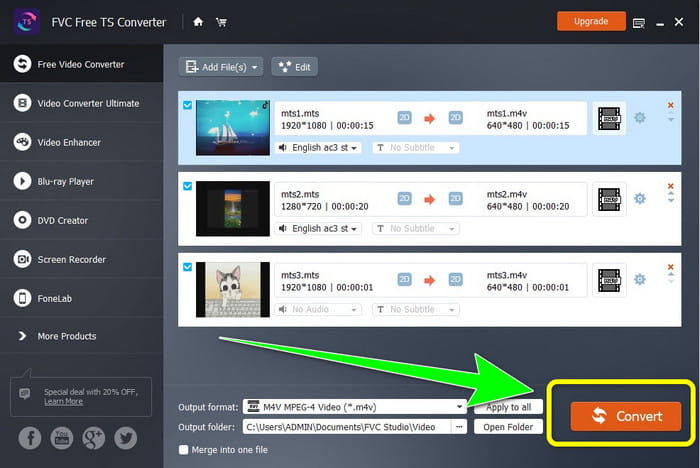
2. Adım: Uygulamayı başlattıktan sonra MTS dosyalarını yüklemek için ortadaki Dosya Ekle düğmesine basın. Dönüştürmek istediğiniz daha fazla MTS dosyası eklemek için arayüzün üst kısmındaki diğer Dosya Ekle düğmesine de tıklayabilirsiniz.
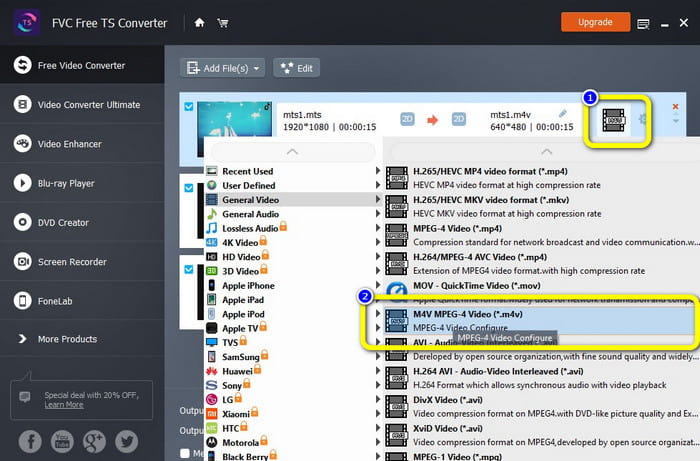
3. Adım: Arayüzün sağ tarafındaki biçim seçeneklerine tıklayın. Ardından, çıktı biçiminiz olarak M4V dosya biçimini seçin. Kalan MTS dosyaları için de aynı işlemi uygulayın.
4. Adım: Birden fazla MTS dosyasını M4V biçimine dönüştürmek için Dönüştür düğmesine tıklayın.
Bölüm 4: Çevrimiçi Uygulamayı Kullanarak MTS'yi M4V'ye Dönüştürmenin En İyi Yolları
MTS’yi çevrimiçi bir araçla M4V’ye dönüştürürken kullanabileceğiniz en iyi dönüştürücü FVC Free Video Converter Online’dır. Bu aracın yardımıyla MTS dosyanızı kolayca M4V’ye dönüştürebilirsiniz. Dosyaları dönüştürmek yalnızca üç adım sürer. Ayrıca bu çevrimiçi araç tamamen ücretsizdir. Öyleyse daha fazla uzatmadan MTS dosyanızı M4V dosya biçimine dönüştürelim. Sizin için sağladığımız adımları izleyin!
Özellikler
◆ MP4, FLV, WMA, MOV, MTS, M4V, vb. gibi birden çok dosyayı dönüştürün.
◆ Toplu dönüştürmeye izin verir.
◆ Hem Mac hem de Windows'ta erişilebilir.
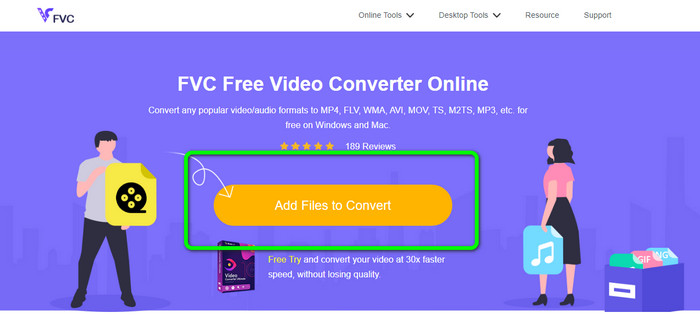
1. Adım: FVC Free Video Converter Online web sitesini ziyaret edin. Ardından, MTS videonuzu yüklemek için Dönüştürülecek Dosyaları Ekle düğmesine tıklayın.
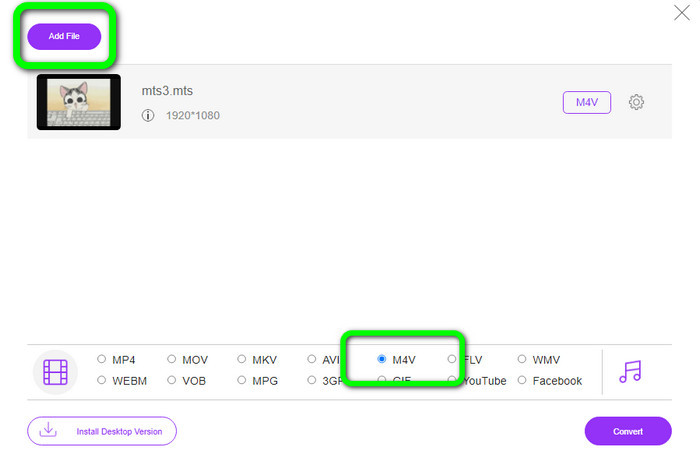
2. Adım: Sonraki adımda, arayüzün alt kısmındaki biçim seçeneklerinden M4V biçimini seçin. Birden fazla dosyayı dönüştürmek için Dosya Ekle düğmesine de tıklayabilirsiniz.
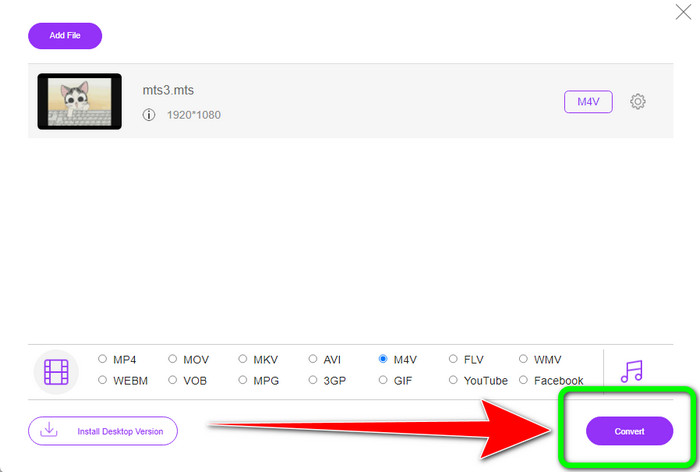
3. Adım: İstediğiniz biçimi seçtikten sonra, videonuzu M4V dosya biçiminde kaydetmek için Dönüştür düğmesine tıklayabilirsiniz.
Bölüm 5: MTS'yi M4V'ye Dönüştürmeyle İlgili SSS
1. MTS iyi bir biçim midir?
Evet. 720p ve 1080i HD video codec bileşenleri, yüksek tanımlı bir MPEG olan MTS ve H.264 aktarım akışı video formatı tarafından desteklenir. İnsanlar genellikle MTS dosyalarını Sony ve Panasonic tarafından ortaklaşa oluşturulan ve 2006 yılında yüksek kaliteli bir biçimde piyasaya sürülen AVCHD olarak adlandırır.
2. MTS'yi MP4'e nasıl dönüştürebilirim?
Yukarıda bahsedilen uygulamaları kullanabilirsiniz. Bu dönüştürücüler, MTS’yi MP4’e ve diğer dosya biçimlerine dönüştürmede etkili ve kullanışlıdır.
3. Neden M4V kullanmalısınız?
M4V dosyaları, korsanlığı durdurmak ve tüketicilerin dosyaları cihazlar arasında dağıtmasını zorlaştırmak için yumuşak altyazılara ve DRM korumasına sahip olabilir.
Sonuç
Yukarıdaki üç uygulama, cihazlarınızda kullanabileceğiniz en iyi dönüştürücülerdir. Windows kullanıcısıysanız FVC Video Converter Ultimate’ı kullanabilirsiniz. Mac kullanıyorsanız FVC Free TS Converter’ı deneyebilirsiniz. Son olarak, çevrimiçi bir uygulamayı tercih ediyorsanız FVC Free Video Converter Online’ı kullanabilirsiniz. Bu dönüştürücüler, MTS’yi M4V’ye dönüştürmeyi sorunsuz bir şekilde gerçekleştirebilir.
-
 MTS VS M2TS - MTS ve M2TS Arasındaki Fark
 MTS veya M2TS dosyası nedir? M2TS ve MTS arasındaki fark nedir? Kamera kayıtlı MTS veya M2TS dosyasını nasıl izleyebilirim? Bu yayındaki tüm cevapları bulun
-
 Bilmeniz Gereken Windows / Mac / Android / iOS için En İyi 5 M4V Oynatıcı
 M4V videolarınızı QuickTime Player'da oynatamadığınızda, bu makaleden Windows, Mac, Android ve iOS için 5 mükemmel M4V oynatıcı hakkında daha fazla bilgi edinmelisiniz.
-
 [Çözüldü] MTS'yi Orijinal Kalitede MKV'ye Dönüştürme
 MTS'yi ücretsiz olarak MKV'ye nasıl dönüştürebileceğinizi merak mı ediyorsunuz? Bu yazıda, en iyi ücretsiz MTS'den MKV'ye dönüştürücüleri listeledik
