


 Video Dönüştürücü Ultimate
 Ekran kaydedicisi
 Video Onarımı
MTS'yi MKV'ye Ücretsiz Olarak Hızlı Bir Şekilde Dönüştürme
Kısaca, MPEG Taşıma Sistemi için MTS dosyası, 720p ve 1080i videoları destekleyen standart bir dosya biçimidir. Ancak, bu dosya biçiminin çıktı dosya boyutu çok büyük olabilir. Bu nedenle, onu MKV biçimi gibi yaygın olarak desteklenen ve daha küçük dosya boyutuna sahip bir formata dönüştürmeniz gerekir. Bu yazıda ise, MTS’yi ücretsiz olarak MKV’ye dönüştürmenin en iyi yollarını sunuyoruz.

Bölüm 1. MTS'yi MKV'ye Dönüştüren En İyi 2 Ücretsiz Çevrimiçi Araç
FVC Ücretsiz Video Dönüştürücü Çevrimiçi
Günümüzde insanlar, yazılım kurmak yerine çevrim içi dönüştürücü kullanmayı tercih ediyor. FVC Free Online Video Converter, MTS’yi MKV, MP4, WMV, AVI, FLV ve daha birçok formata dönüştürmenize imkân tanıyan çevrim içi bir dönüştürücüdür. Ücretsiz bir çevrim içi dönüştürücü olmasına rağmen, dönüştürme sırasında dosyanızın kalitesi konusunda taviz vermez. Ayrıca, çözünürlüğü ve video ya da ses bit hızını düzenleyebileceğiniz özelliklere de sahiptir.
Bu ücretsiz çevrimiçi aracı kullanarak MTS dosyanızı MKV'ye nasıl dönüştüreceğinize ilişkin adımlar şunlardır:
1. Adım. Bu dönüştürücüyü kullanmak için, bu bağlantıya tıklayarak web sayfasına gidin.
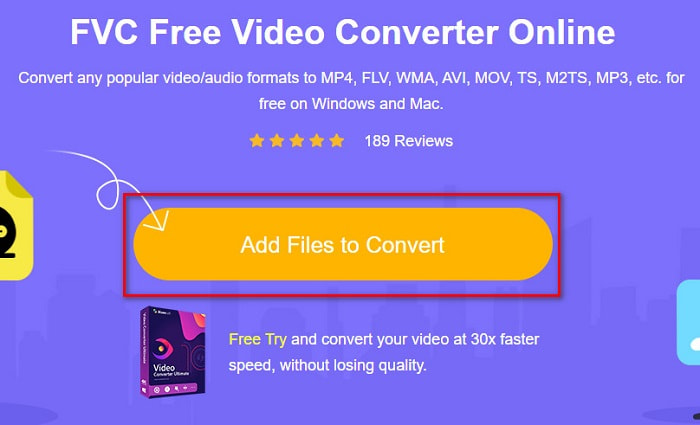
2. Adım. Sonraki adımda, başlatıcıyı indirmek için Add Files to Convert (Dönüştürülecek Dosyaları Ekle) düğmesine tıklayın. Başlatıcı indirildikten sonra bilgisayarınızdaki dosyalar görünecektir, ardından yüklemek için MTS dosyanızı seçin.
3. Adım. MTS dosyanızı seçtikten sonra, yazılımın arayüzünün alt kısmında bulunan MKV dosya biçimine tıklayın.
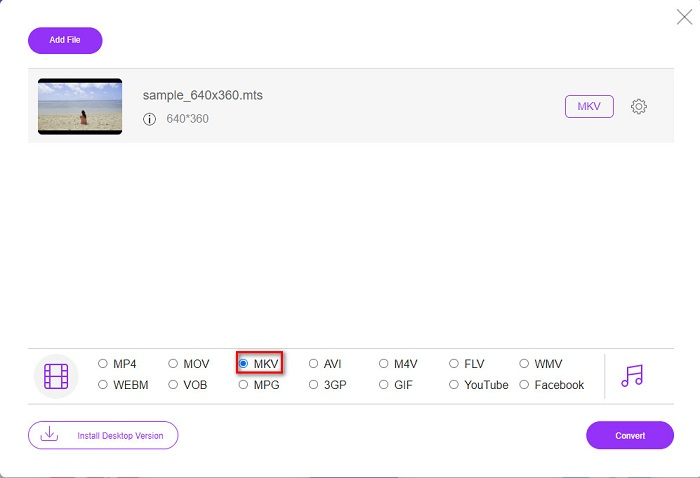
4. Adım. Son olarak, MTS dosyanızı MKV dosyasına dönüştürmek için Convert (Dönüştür) düğmesine tıklayın. Ardından dosyanızın dönüştürülmesini bekleyin.
Bu basit adımları izleyerek MTS'yi ücretsiz ve çevrimiçi olarak MKV'ye dönüştürebilirsiniz.
AnyDönüşüm
Kaliteden ödün vermeden dosya dönüştürmek için kullanabileceğiniz bir diğer çevrim içi dönüştürücü ise AnyConv File Converter’dır. Bu dönüştürücü, MTS’yi MKV, AVI, MP4, MOV, MPEG vb. birçok dosya biçimine dönüştürebilir. Ancak, yalnızca sınırlı özelliklere sahiptir. Dosyanızın çözünürlüğünü düzenleyemez veya değiştiremezsiniz. Ayrıca web tabanlıdır; bu nedenle yavaş dönüştürme yaşayabilirsiniz. Yine de kullanım kolaylığı sayesinde birçok kişi tarafından tercih edilmektedir.
AnyConv Dosya Dönüştürücüsünün nasıl kullanılacağına ilişkin adımlar:
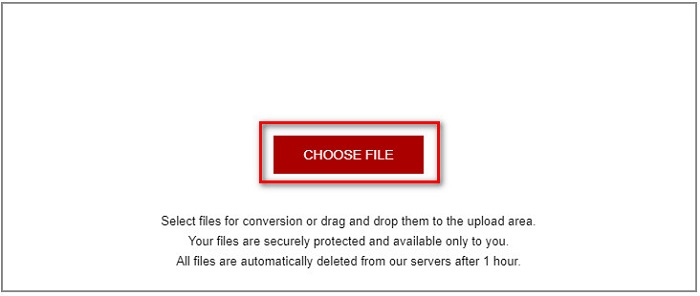
1. Adım. Tarayıcınızda AnyConv File Converter’ı arayın. Web sitesine girdikten sonra, bilgisayarınızdaki MTS dosyasını seçmek için Choose Files (Dosya Seç) düğmesine tıklayın.
2. Adım. MTS dosyanızı seçtikten sonra, açılır menü düğmesine tıklayın ve MKV dosya biçimini seçin.
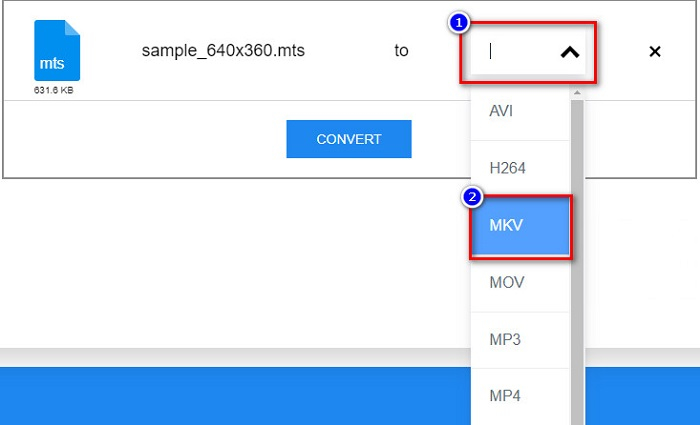
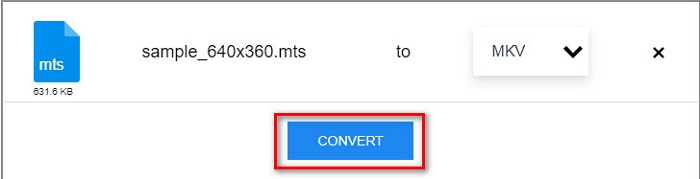
3. Adım. Son olarak, MTS’den MKV’ye dönüştürme işlemini başlatmak için Convert (Dönüştür) düğmesine tıklayın.
Bölüm 2. Windows 10/11'de MTS'yi MKV'ye Kayıpsız Dönüştürme
Windows 10/11'iniz için bir dönüştürücü arıyorsanız, FVC Video Converter Ultimate sizin için en iyi araçtır. Çeşitli dosya formatlarını destekler ve MTS'yi MKV, MP4, WebM, VOB, MPG, AVI ve çok daha fazlasına dönüştürebilir. Ayrıca bu dönüştürücü, GIF'ler oluşturabileceğiniz ve hatta bir 3D video oluşturabileceğiniz bir özelliğe sahiptir. Ayrıca dosyanızın kalitesini kaybetmeden MTS'yi MKV'ye hızlı ve zahmetsizce dönüştürebilirsiniz.

FVC Video Dönüştürücü Ultimate
5.689.200+ İndirme- Bu dönüştürücü ile dosyalarınızı toplu olarak dönüştürebilirsiniz.
- MTS, MKV, MP4, WMV vb. gibi çeşitli dosya biçimlerini dönüştürmenize olanak tanır.
- Ultra hızlı dönüşüme sahip olmanızı sağlayan bir özelliğe sahiptir.
Ücretsiz İndirWindows 7 veya üstü içinGüvenli İndirme
Ücretsiz İndirMacOS 10.7 veya üstü içinGüvenli İndirme
Bu basit adımlarla FVC Video Converter Ultimate'ı nasıl kullanabileceğiniz aşağıda açıklanmıştır:
1. Adım. Önce, aşağıdaki Download (İndir) düğmesine tıklayarak Windows için uygulamayı indirin. Ardından sonraki adıma geçmek için yazılımı çalıştırın.
Ücretsiz İndirWindows 7 veya üstü içinGüvenli İndirme
Ücretsiz İndirMacOS 10.7 veya üstü içinGüvenli İndirme
2. Adım. Dönüştürücüyü açtıktan sonra, Add Files (Dosya Ekle) düğmesine tıklayın veya MTS dosyanızı yüklemek için dosyanızı + işaretinin üzerine sürükleyip bırakın. Ardından dosyanız listeye eklenecektir.
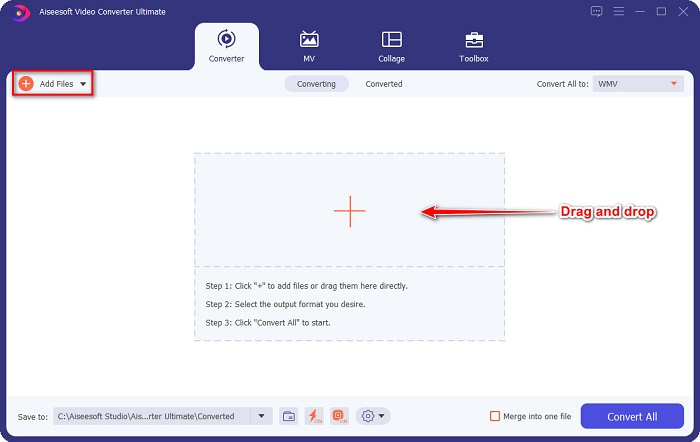
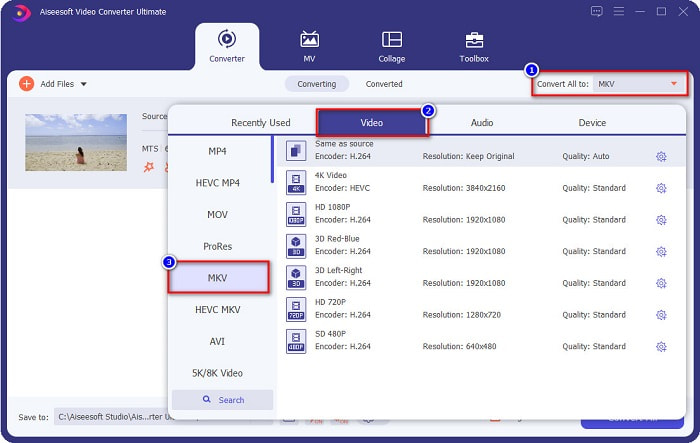
3. Adım. MTS dosyanızı hangi biçime dönüştürmek istediğinizi seçmek için, Convert All to (Tümünü Dönüştür) düğmesine tıklayın ve MKV dosya biçimini seçin.
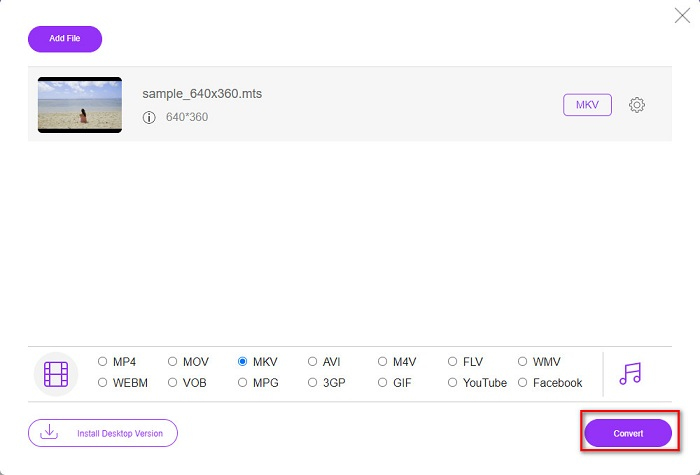
4. Adım. Bitirmek için, MTS dosyanızı MKV dosyasına dönüştürmeyi başlatmak üzere Convert All (Tümünü Dönüştür) düğmesine tıklayın. Ve işte bu kadar! Sadece birkaç saniye içinde dönüştürülmüş dosyanız hazır olacaktır.
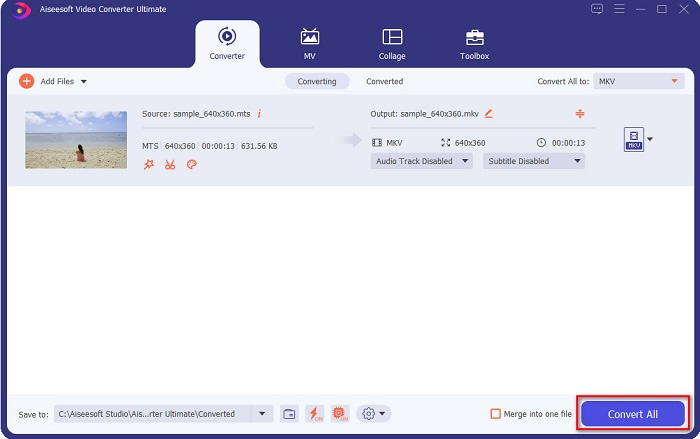
Bu basit adımları izleyerek MTS'yi 1-2-3 kadar hızlı bir şekilde MKV'ye dönüştürebilirsiniz!
Bölüm 3. Neden MTS Dosyasını MKV Dosya Biçimine Dönüştürün
MTS dosyası, kısaca MPEG Transport System, çoğunlukla SONY ve Panasonic HD video kameralar tarafından kullanılan standart bir dosya formatıdır. MPEG4/H.264 video sıkıştırmasını kullanan bir dosyadır. Ayrıca, diğer dosya biçimlerinin desteklemediği 720p ve 1080i videoları da destekler. Panasonic ve Sony bu dosyayı geliştirdiğinden, AVCHD dosya biçimiyle ilgili bir Gelişmiş Ses Kodlama Dosyası kullanır. Öte yandan, MKV dosyası veya Matroska, birçok ses ve video kodeğini destekleyen standart bir dosya biçimidir. Genellikle kısa video klipleri ve filmleri saklamak için kullanılır.
Ayrıca, altyazı parçalarını da destekler. Bu yüzden çok sayıda hayran abonesi olan kişi bu dosya biçimini kullanır. Öyleyse neden MTS'yi MKV'ye dönüştürelim? Basitçe, MKV'nin dosya boyutu, MTS dosya biçiminin içerdiğinden daha küçük olduğu için.
Bölüm 4. Çevrimiçi ve Çevrimdışı Dönüştürücülerle İlgili Karşılaştırma Tablosu
| ÖZELLİKLERİ | FVC Ücretsiz Çevrimiçi Dönüştürücü | AnyConv Dosya Dönüştürücü | FVC Video Dönüştürücü Ultimate |
| Dönüşüm Hızı | Normal | Normal | Çok hızlı |
| Dönüştürülecek Dosya Biçimleri | MKV, MP4, MTS, MPG, MOV, AVI, WMV, FLV ve diğer dosya formatları | MTS, MKV, AVI, MOV, MP4, MPEG ve diğer formatlar | 1000'den fazla dosya formatını destekler |
| Düzenleme Özellikleri | – | – |  |
| Toplu Dönüştürme | – | – | |
| İnternet bağlantısı | Gerekli | Gerekli | Gerekli değil |
Bölüm 5. MTS'yi MKV'ye Dönüştürme Hakkında SSS
Bir MTS dosyasının dosya boyutunu küçültebilir misiniz?
Evet. Bir MTS dosyasının boyutunu, çevrim içi ve çevrim dışı olarak kullanılabilen Free Video Compressor gibi sıkıştırma araçlarıyla küçültebilirsiniz.
MKV dosya formatlarını nerede oynatabilirsiniz?
MKV dosyalarını Windows Media Player’da, VLC Media Player’da, DivX Player’da, MX Player’da ve daha birçok oynatıcıda oynatabilirsiniz. Medya dosyalarını kodlayıp çözmek için medya codec’leri de kullanabilirsiniz. Ya da MKV dosyanızı MP4 biçimine dönüştürebilirsiniz; MP4 çok yaygın kullanılan bir formattır.
El Freni'nde MTS'yi MKV'ye dönüştürebilir misiniz?
Evet. Bu dönüştürücü ayrıca MTS dosyanızı MKV dosya formatına dönüştürmenize de olanak tanır. Ancak, birden fazla dosyayı desteklemez ve bunları tek bir dosyada birleştiremez.
Sonuç
Günümüzde piyasada çevrim içi ve çevrim dışı olarak kullanabileceğiniz pek çok dönüştürücü bulunmaktadır. Yukarıda listelediğimiz dönüştürücüler ise, birçok kişi tarafından kullanılan ve harika sonuç veren dönüştürücülerdendir. Ayrıca, bu dönüştürücülerin MTS’yi çevrim içi olarak ücretsiz bir şekilde MKV’ye dönüştürme konusunda farklı özellikleri ve yetenekleri vardır. Ancak, kullanımı pratik ve verimli bir dönüştürücü arıyorsanız, FVC Video Converter Ultimate kullanmanızı öneririz. Bu son derece hızlı dönüştürücü, beklentilerinizi boşa çıkarmayacaktır. Öyleyse, dosyalarınızı dönüştürmeye hazırsanız hemen indirin!
-
 [Ücretsiz ve Çevrimiçi] MTS'yi MP4'e Yüksek Kalitede Dönüştürmenin 6 Yolu
 MTS dosyasını MP4'e nasıl dönüştüreceğinizi bilmiyor musunuz? Bu kılavuzda, kalite kaybı olmadan Windows veya Mac'te MTS formatını MP4 olarak değiştirmenin 6 ücretsiz ve kolay yolunu bulacaksınız.
-
 Kaliteyi Kaybetmeden MTS'yi WMV'ye Dönüştürme
 Medya yürütücünüz MTS video formatını desteklemediği için en sevdiğiniz programı izlemekte zorlanıyor musunuz? Bu makalede bulunan bu yeni ve en iyi dönüştürücülerle onu WMV'ye dönüştürmeyi deneyin.
-
 Kalite Kaybı Olmadan MTS'yi MP3'e Dönüştürme (AVCHD'den MP3'e)
 MP3 sesini MTS dosyasından çıkarmanız gerekiyor, ancak nasıl yapılacağını bilmiyor musunuz? MP3 dönüştürücü için en iyi MTS nedir? Bu gönderi, MTS / M2TS'yi yüksek ses kalitesiyle MP3'e dönüştürmenize yardımcı olacak 2 kolay yolu paylaşıyor.
