


 Video Dönüştürücü Ultimate
 Ekran kaydedicisi
 Video Onarımı
 Güvenli İndirme
MTS'yi MOV'a Dönüştürmenin En İyi 4 Ücretsiz Yolu
Sony video kameramla MTS dosyalarını dışa aktaran bazı videolar çektim. MTS'nin medya oynatıcım ve iMovie tarafından desteklenemediğini fark ettim. Bir Mac kullanıyorum ve çekilen bu MTS videolarını düzenlemek istiyorum. Herhangi bir yardım? MTS'yi MOV'a dönüştürmenin özellikle ücretsiz bir yolu var mı?
MTS, AVCHD’nin (Advanced Video Coding High Definition) dosya uzantısı olarak Sony ve Panasonic video kameralarında yaygın şekilde kullanılan yüksek çözünürlüklü bir video biçimidir. Dijital kameranızla video kaydettikten sonra, büyük olasılıkla MTS uzantılı bir dosya elde edersiniz. 720p/1080i HD taşır ve daha yüksek bir video kalitesi sunabilir. Ancak MTS, çoğu medya oynatıcı veya düzenleyici tarafından desteklenen popüler bir format değildir.

MTS dosyasını iMovie’de düzenlemeniz veya bir medya oynatıcıda açmanız gerektiğinde, daha iyi uyumluluk için MTS’yi MOV’a ya da MP4’e dönüştürmeniz gerekir. Bu yazıda, MTS’yi MOV’a kolayca dönüştürmenize yardımcı olacak 4 ücretsiz MTS dönüştürücü göstereceğiz.
Bölüm 1. Kalite Kaybı Olmadan MTS'yi MOV'a Dönüştürmenin En İyi Ücretsiz Yolu
İnternette, MTS’yi yüksek kalitede MOV’a dönüştürmenize yardımcı olabilecek çok sayıda MTS dönüştürme aracı bulunmaktadır. İlk bölümde, size en iyi ücretsiz MTS’den MOV’a dönüştürme yazılımı olan Free MTS Converter programını önermek istiyoruz.
Her türlü dönüşümle başa çıkmak için özel olarak tasarlanmıştır. MP4, MOV, MKV, MTS, AVI, FLV, WMV, MP3, AAC, FLAC ve daha fazlası gibi hemen hemen tüm video ve ses formatlarıyla uyumludur. Ücretsiz indirebilir ve MTS'yi MOV'a ücretsiz dönüştürmek için aşağıdaki kılavuzu kullanabilirsiniz.
Ücretsiz İndirWindows 7 veya üstü içinGüvenli İndirme
Ücretsiz İndirMacOS 10.7 veya üstü içinGüvenli İndirme
Adım 1. Öncelikle, bu ücretsiz MTS'den MOV'a dönüştürücüyü bilgisayarınıza kurmanız ve çalıştırmanız gerekir. İndirmeniz için hem Windows hem de Mac sürümleri sunar.
Adım 2. Dönüştürmek istediğiniz MTS dosyalarını içe aktarmak için Add File(s) düğmesine tıklayın. Aynı anda bir veya birden fazla MTS dosyasını dönüştürmenize izin verilir.
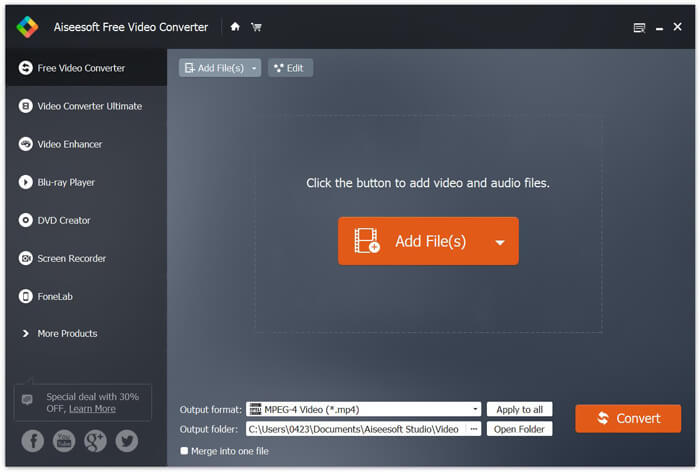
Adım 3. Output format listesinden hedef biçim olarak MOV seçin. Ardından MTS’yi MOV’a dönüştürme işlemini başlatmak için Convert düğmesine tıklayın.
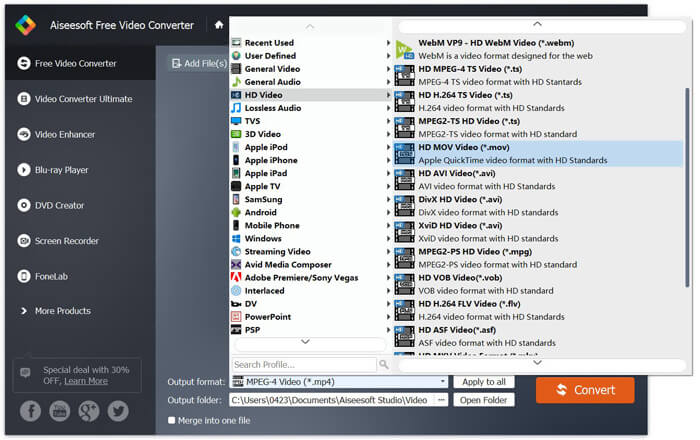
Yukarıdan da görebileceğiniz gibi, bu ücretsiz MTS'den MOV'a dönüştürücü aynı zamanda bazı temel düzenleme özelliklerini de taşır. Son dönüştürmeden önce, bunları MTS dosyanızı özelleştirmek için kullanabilirsiniz. Çevrimiçi dönüştürücülerle karşılaştırıldığında, bu Ücretsiz Video Dönüştürücü size daha hızlı dönüştürme hızı ve daha yüksek çıktı video kalitesi sağlayabilir. Bu yüzden onu ilk tavsiyemiz yapıyoruz.
Bölüm 2. Ücretsiz Çevrimiçi Dönüştürücü, Videoları Kolayca Dönüştürmenize Yardımcı Olur
Google’da MTS’yi MOV’a nasıl dönüştüreceğinizi aradığınızda, birçok ücretsiz çevrim içi dönüştürücü sonucu görebilirsiniz. Burada size kullanımı kolay, ücretsiz bir çevrim içi MTS’den MOV’a dönüştürücü olan FVC Free Online Video Converter’ı tanıtıyoruz. Herhangi bir yazılım kurmadan, yaygın tüm video formatlarını MP4, AVI, MOV vb. biçimlere ücretsiz olarak dönüştürebilirsiniz. Ayrıca endişelenmenize gerek yok, çünkü dönüştürme işlemi güvenli ve kararlıdır. Dönüştürme sürecinde hiçbir veri kaybolmaz.
Adım 1. Yukarıdaki bağlantıyı açın ve Add Files to Convert düğmesine tıklayın. Dönüştürmeden önce lütfen FVC launcher uygulamasını indirin ve kurun. Bu işlem yalnızca birkaç saniye sürer.

Adım 2. Başlatıcıyı yükleyip güncelledikten sonra, dönüştürmek istediğiniz videoyu seçin. Ardından ihtiyacınız olan formatı seçin ve Convert düğmesine basın.

Adım 3. Yukarıdaki bağlantıyı açın ve Add Files to Convert düğmesine tıklayın. Dönüştürmeden önce lütfen FVC launcher uygulamasını indirin ve kurun. Bu işlem yalnızca birkaç saniye sürer.
Bölüm 3. MTS'yi ZAMZAR ile Ücretsiz Çevrimiçi Olarak MOV'a Dönüştürme
ZAMZAR, MTS'yi MOV'a ücretsiz dönüştürmenize yardımcı olabilecek en popüler çevrimiçi video dönüştürme yazılımlarından biridir. Özlü arayüz ve basit dönüştürme özelliği ile tasarlanmıştır. MTS video dönüşümünü yapmak için aşağıdaki kılavuzu kullanabilirsiniz.
Adım 1. Tarayıcınızı açın ve ZAMZAR resmi sitesine gidin. Buradan doğrudan https://www.zamzar.com/convert/mts-to-mov/ sayfasına gidebilirsiniz. Burada, başka ayarlar yapmadan MTS'yi doğrudan MOV'a dönüştürmenize izin verilir.
Adım 2. Dönüştürmek istediğiniz MTS dosyasını yüklemek için Dosya Ekle düğmesine tıklayın. MTS dosyası yüklemek için sürükleyip bırakabilirsiniz. Bilmeniz gereken bir şey, bu ücretsiz çevrimiçi MTS dönüştürücüsünün yalnızca bir MTS dosyasını 150 MB'tan daha az dönüştürmenize izin verdiği.
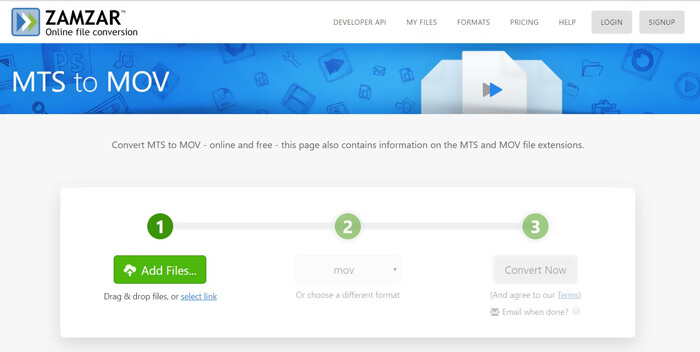
Adım 3. Yükleme tamamlandıktan sonra, MTS’yi çevrim içi ve ücretsiz olarak MOV’a dönüştürmeye başlamak için Convert Now düğmesine tıklayabilirsiniz.
Bölüm 4. FreeConvert ile MTS'yi MOV'a Dönüştürmenin Çevrimiçi Yolu
FreeConvert, MTS’den MOV’a video dönüştürme işlemini ücretsiz olarak yapabilen bir başka popüler çevrim içi video dönüştürücüdür. Bu ücretsiz MTS’den MOV’a dönüştürücü, MTS ve M2TS formatlarını yüksek düzeyde destekler. 1 GB’a kadar MTS dosyası yüklemenize olanak tanır. Ayrıca, dönüştürme için aynı anda 20 adede kadar MTS dosyası yüklemenize izin verir. Şimdi, MTS dosyalarınızı MOV’a dönüştürmek için aşağıdaki adımları takip edebilirsiniz.
Adım 1. Öncelikle tarayıcınızda FreeConvert.com sitesine gitmeniz gerekir. Dönüştürme işlemi için doğrudan https://www.freeconvert.com/mts-to-mov adresine de gidebilirsiniz.
Adım 2. MOV’a dönüştürmek istediğiniz MTS dosyasını yüklemek için büyük mavi Choose MTS Files düğmesine tıklayın. Yukarıda da belirtildiği gibi, burada dönüştürme için bir veya daha fazla MTS dosyası yüklemenize izin verilir.
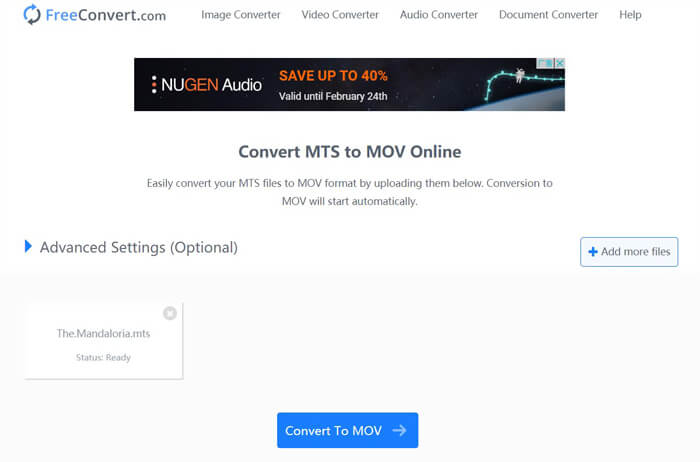
Adım 3. Yükleme ve dönüştürme sürecini başlatmak için Convert To MOV düğmesine tıklayın. Ardından, dönüştürülen dosyayı bilgisayarınıza kaydetmek için Download düğmesine tıklamanız gerekir.
MTS’yi MOV’a dönüştürmek için ücretsiz çevrim içi dönüştürücüler seçtiğinizde, yükleme ve dönüştürme için görece daha uzun bir zamana ihtiyaç duyarsınız. Bu yüzden çevrim içi dönüştürme yazılımlarıyla mümkünse boyutu küçük MTS dosyalarını dönüştürmeniz daha iyidir. Büyük boyutlu bir MTS veya M2TS videoyu dönüştürmek istiyorsanız, yüksek derecede önerilen Free Video Converter yazılımına güvenmelisiniz.
-
 Windows / Mac'te TS'yi AVI / MKV / MOV / WMV'ye Dönüştürmenin 6 Kolay Yolu
 TS dosyalarını hızla AVI / MKV / MOV / WMV'ye dönüştürmek ister misiniz? Bu makale, çevrimiçi ve çevrimdışı video dönüştürücülerini eksiksiz bir kılavuzla birlikte gösterir. Belki de en iyi ücretsiz TS dönüştürücüyü buradan edinebilirsiniz.
-
 MOV VS MP4 - Hangisi Daha İyi
 MOV VS MP4, hangisi daha iyi? Bu gönderi MP4 ve MOV arasındaki farkı anlatıyor, böylece video dosyalarınız için daha iyi bir seçim yapabilirsiniz.
-
 MOV (QuickTime) Dosyalarına Ücretsiz Nasıl Katılırım
 Yeni başlayanların birkaç MOV video klibine bir arada katılması zor olabilir. Peki, MOV dosyalarını birleştirmenin basit ve hızlı bir yolu var mı? Varsa, nasıl kullanılır? Bu gönderi, bu cevapları almanıza yardımcı olacaktır.
