


 Video Dönüştürücü Ultimate
 Ekran kaydedicisi
 Video Onarımı
 Güvenli İndirme
TS Dosyalarınızı Kalite Kaybı Olmadan FLV Formatına Dönüştürme
Bu kılavuz, TS'yi FLV'ye dönüştürme yöntemine odaklanır. Genel olarak konuşursak, video formatları yaygın kullanılanlar ve diğerleri olarak ikiye ayrılır. FLV, internet için geliştirilmiş yaygın video formatlarından biridir, TS ise ikinci gruba girer. Video Taşıma Akışı anlamına gelen TS, MPEG‑2 video verilerini depolamak için kullanılır. Genellikle DVD’lerde karşımıza çıkar. Neyse, şimdi yolculuğa başlayalım.

Bölüm 1: Masaüstünde TS'yi FLV'ye Dönüştürmenin En İyi 3 Kolay Yolu
1. Yol: Ücretsiz FLV Dönüştürücü ile TS'yi FLV'ye Dönüştürün
Adından da anlaşılacağı üzere, FVC Free FLV Converter, TS’yi FLV’ye dönüştürmek için ihtiyaç duyduğunuz FLV dönüştürücüsüdür; böylece dosyalarınızı izleyebilir veya sosyal medyada paylaşabilirsiniz. Tamamen ücretsizdir, filigran veya başka bir kısıtlama içermez. Hatta yalnızca ücretli yazılımlarda bulabileceğiniz bazı özellikler bile sunar.
En İyi FLV Dönüştürücünün Ana Özellikleri
- 1. FLV ve diğer video formatları arasında kolayca dönüştürün.
- 2. Dönüştürürken video ve ses kalitesini koruyun.
- 3. Aynı anda birden fazla TS video dosyasını toplu işleyin.
Ücretsiz İndirWindows 7 veya sonrası içinGüvenli İndirme
Ücretsiz İndirMacOS 10.7 veya sonrası içinGüvenli İndirme
TS Dosyalarını Ücretsiz Olarak FLV'ye Dönüştürme
Adım 1: TS dosyalarını içe aktarın
Bilgisayarınıza kurduktan sonra en iyi FLV dönüştürücüyü başlatın. Ardından, tüm TS dosyalarını DVD'nizden veya bilgisayarınızdan içe aktarmak için Dosya(lar) Ekle düğmesini tıklayın. Ardından videolar kütüphane alanında görünecektir.

Adım 2: Çıktı formatını ayarlayın
Videoları düzenlemeniz gerekiyorsa, video düzenleyici penceresini açmak için Düzenle düğmesine tıklayın. Gerek yoksa alta inin, Çıktı formatı seçeneğine tıklayıp açın. Ardından Genel Video sekmesinde FLV araması yapın ve seçin.

Adım 3: TS’yi FLV’ye dönüştürün
Sonraki adımda, Gözat düğmesine tıklayarak FLV çıktı dosyalarını kaydetmek için belirli bir klasör ayarlayın. Son olarak, TS’yi FLV’ye dönüştürmeye başlamak için sağ alt köşedeki Dönüştür düğmesine tıklayın.

2. Yol: VLC ile TS'yi FLV'ye Dönüştürme
VLC, açık kaynaklı bir proje olduğu için TS'yi FLV'ye ücretsiz olarak dönüştürmenin başka bir yoludur. PC, Mac ve Linux'ta kullanılabilir. Maliyetler belli. Çıktı kalitesi çok iyi değil ve prosedür karmaşık. Sakıncası yoksa aşağıdaki adımları uygulayın.
Adım 1: VLC’yi açın, Ortam menüsüne tıklayın ve Dönüştür/Kaydet seçeneğini seçin. Ortam açma ileti penceresi açılacaktır.
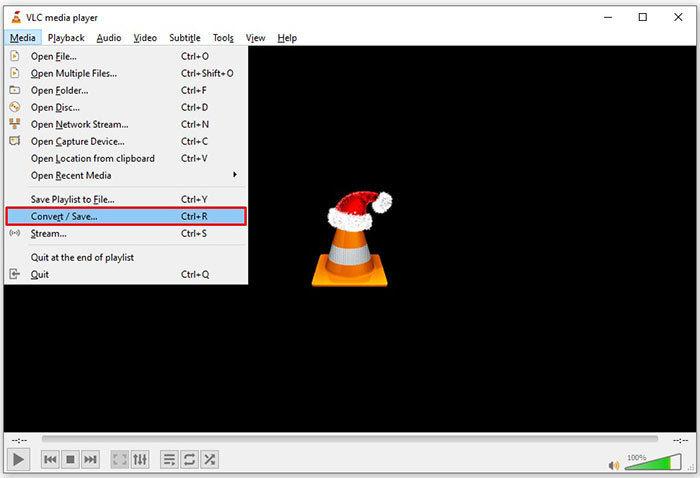
Adım 2: Ekle düğmesine tıklayın ve VLC’ye bir TS dosyası ekleyin. Devam etmek için Dönüştür/Kaydet düğmesine basın.
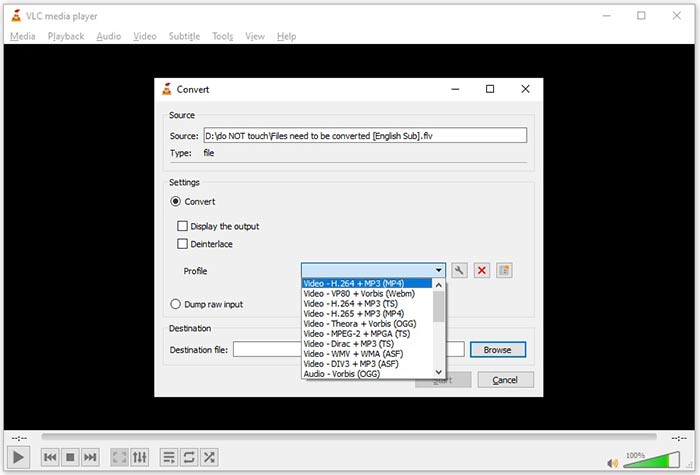
Adım 3: Profil seçeneğini açın ve çıktı formatını seçin. Profil içinde FLV bulamazsanız, Profil Düzenle düğmesine tıklayın, Profil Adı kutusuna FLV yazın, FLV seçin ve Oluştur düğmesine tıklayın. Ardından Profil bölümünden FLV seçin.
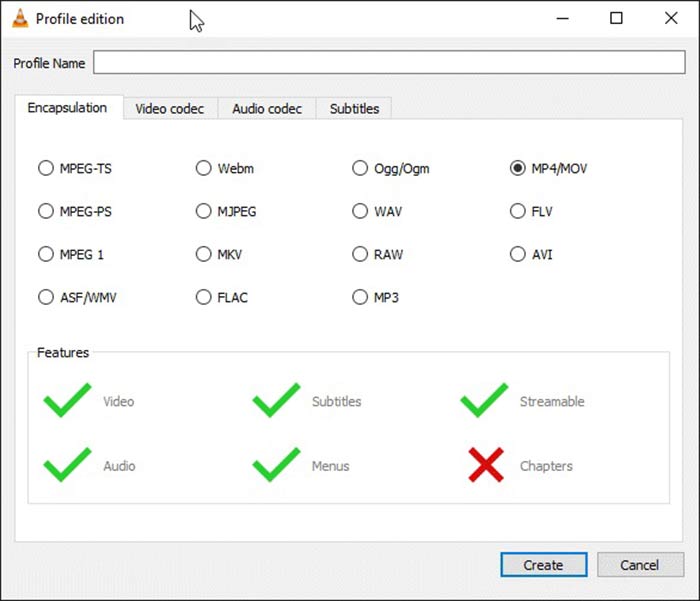
Adım 4: Hedef klasörü ayarlamak için Gözat düğmesine basın ve Başlat düğmesine tıklayın.
3. Yol: FormatFactory ile TS'yi FLV'ye Dönüştürme
FormatFactory, PC'ler için ücretsiz bir dosya dönüştürme programıdır. Bir kuruş ödemeden TS dosyalarını FLV'ye dönüştürmenizi sağlar. Ancak, yalnızca kayıplı dönüştürmeyi destekler. Bu, video kalitenizin düşürüleceği anlamına gelir. Ayrıca, Mac veya Linux'ta mevcut değildir.
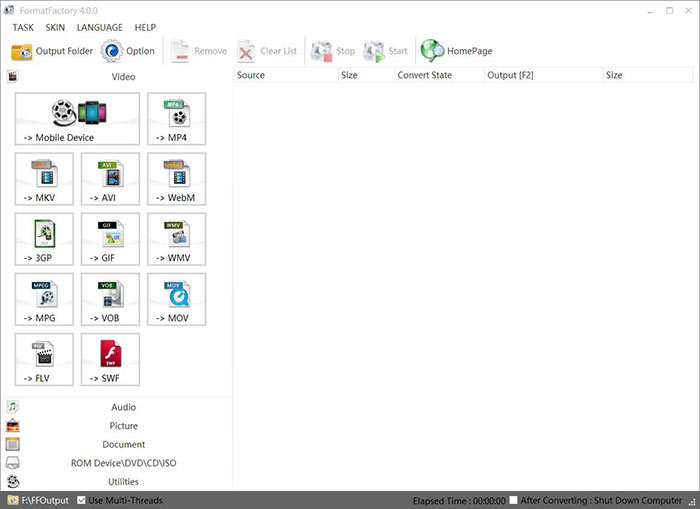
Adım 1: Ücretsiz TS’den FLV’ye dönüştürücüyü çalıştırın, Video bölümüne gidin ve FLVyi seçin.
Adım 2: Dosya Ekle düğmesine tıklayın ve bilgisayarınızdan TS video dosyalarını içe aktarın. Onaylamak için Tamam düğmesine basın.
Adım 3: Sonraki adımda, PC’de TS’yi FLV’ye dönüştürmeyi başlatmak için Başlat düğmesine tıklayın. Ücretsiz yazılım çok yavaş olduğundan bu biraz zaman alır. İşlem tamamlandığında, FLV dosyalarını bulmak için Çıktı bölümünün altındaki dizine gidebilirsiniz.
Bölüm 2: TS'yi FLV Online'a Dönüştürme
VLC ve diğer video dönüştürme yazılımlarının hepsinin sabit diskinize kurulması gerekir. Bu da dahili belleğinizde yer kaplar. Yazılım kurmadan TS’yi FLV’ye dönüştürüp dönüştüremeyeceğinizi merak edebilirsiniz. Cevap, FVC Free Online Video Converterdır. Çevrimiçi çalışır ve tamamen ücretsizdir. Ek özellikler sunmasa da video dönüştürme konusundaki temel ihtiyacınızı karşılamaya yeterlidir.
Adım 1: Bir web tarayıcısında https://www.free-videoconverter.net/free-online-video-converter/ adresini açın ve başlatıcıyı indirmek için Dönüştürülecek Dosyaları Ekle düğmesine tıklayın.

Adım 2: İndirme tamamlandığında başlatıcı açılacaktır. TS dosyalarını yüklemek için Dosya Ekle düğmesine tıklayın. Bu web uygulaması toplu dönüştürmeyi destekler. Alta gidin ve alttaki FLV seçeneğini işaretleyin.

Adım 3: Hazırsanız TS’den FLV’ye dönüştürmeyi başlatmak için Dönüştür düğmesine tıklayın. Uygulama hızlı çalışır, ancak gerçek süre internet bağlantınıza bağlıdır. Dönüştürme işleminin bitmesini bekleyin ve FLV çıktısını indirin.
Kaçırmayın:
- • TS'yi MP4'e Dönüştürme Hakkında Kapsamlı Kılavuz
- • TS Dosyasını Windows / Mac'te MP3, AIFF, ALAC, FLAC ve Diğer Ses Biçimlerine Dönüştürme
Bölüm 3: TS'yi FLV'ye Dönüştürme Hakkında SSS
TS'yi neden diğer biçimlere dönüştüremiyorum?
TS, DVD için video dosyası formatıdır. Çoğu ticari DVD şifrelenir ve telif hakkıyla korunur. Bu, uygun video dönüştürme yazılımına sahip değilseniz, TS dosyalarını dönüştürmenizi de engeller.
TS'yi Windows Media Player'da açabilir miyim?
Windows Media Player, DVD veya TS dosyalarını açamaz, bu nedenle TS'yi WMP'de oynatamazsınız. Alternatif olarak, VLC gibi bir üçüncü taraf video oynatıcı kullanabilirsiniz. Veya WMP için ekstra codec paketi yüklemeniz gerekiyor.
TS dosyaları nasıl izlenir?
Yalnızca birkaç medya oynatıcı, VLC gibi TS dosyalarını destekler. PC ve Mac'teki yerleşik medya oynatıcılar, Windows Media Player ve QuickTime Player, TS ile uyumlu değildir. TS dosyalarını izlemenin başka bir yolu da onları DVD'ye yazmaktır.
Sonuç
Şimdi, çevrimiçi paylaşmak veya dijital cihazlarda oynatmak için TS dosyalarını FLV videolarına dönüştürmenin en az dört yolunu öğrenmelisiniz. DVD filmler için video formatı olarak TS, bilgisayar veya mobil cihazlarda yaygın olarak kullanılmaz. Çoğu medya oynatıcısının açamaması mantıklı. FVC Ücretsiz FLV Dönüştürücü; ancak, TS'yi FLV'ye kolayca değiştirmenize yardımcı olur. Daha çok soru? Lütfen bunları bu gönderinin altına yazın, biz de cevaplayalım.
-
 Mac / Windows'ta Video _TS Dosyalarını / Klasörünü DVD'ye Yazmak için 3 Kolay Adım
 TS dosyalarını DVD diske nasıl dönüştürür ve yazarım? Bu adım adım kılavuz, TS dosyalarını ve klasörlerini Windows / Mac'te DVD'ye nasıl kopyalayacağınızı gösterecek, böylece TS dosyalarını DVD oynatıcıda veya TV'de izleyebilirsiniz.
-
 Windows / Mac'te TS'yi AVI / MKV / MOV / WMV'ye Dönüştürmenin 6 Kolay Yolu
 TS dosyalarını hızla AVI / MKV / MOV / WMV'ye dönüştürmek ister misiniz? Bu makale, çevrimiçi ve çevrimdışı video dönüştürücülerini eksiksiz bir kılavuzla birlikte gösterir. Belki de en iyi ücretsiz TS dönüştürücüyü buradan edinebilirsiniz.
-
 TS Video Dosyalarını Sıkıştırma - TS Dosyalarını Daha Küçük Boyutlara Sıkıştırma
 Cihazlarınıza yüksek tanımlı TS video dosyalarını kaydetmek istediğinizde, bu makaleden TS video dosyalarını daha küçük boyutlara nasıl sıkıştıracağınız hakkında daha fazla bilgi edinmelisiniz.
