


 Video Dönüştürücü Ultimate
 Ekran kaydedicisi
 Video Onarımı
3GP'yi FLV'ye Dönüştürmenin Belirgin ve Faydalı Yolları [Kanıtlanmış]
Ses ve video dosyaları, yaygın olarak 3G telefonlarda kullanılan 3GP formatında saklanabilir. 2G ve 4G telefonlarda da çalışır. İnternet üzerinden, MP4 tabanlı bu kap (container) multimedya dosyaları gönderip alır. Bununla birlikte, birçok çevrimiçi video ve ses akış hizmeti, Flash ile uyumlu bir video konteyneri olan FLV’yi kullanır. Adobe Flash Player’ın yanı sıra birçok başka video oynatıcı da FLV dosyalarını oynatabilir. 3GP dosyalarını daha erişilebilir ve boyut olarak daha küçük hale getirmek için, bunları FLV’ye dönüştürmenin birkaç basit yolu vardır. Aşağıda, 3GP’yi FLV’ye dönüştürmek için kullanmayı düşünmeniz gereken dönüştürücüler yer almaktadır.

Bölüm 1. 3GP'yi FLV'ye Dönüştürmenin Mükemmel Yöntemleri [Çevrimdışı]
Video Converter Ultimate, kaliteden ödün vermeden 3GP dosyalarını FLV'ye dönüştürmek için mükemmel bir araçtır. Kullanıcılar, programın SuperSpeed teknolojisini kullanarak büyük dosyaları bile dakikalar içinde dönüştürebilir. Ayrıca uygulama, dosyalarınızı uygun gördüğünüz şekilde düzenlemenize olanak tanır: videolarınızı kırpın, döndürün ve kırpın; renk parametrelerini ayarlayın; video çözünürlüğünü ve bit hızını değiştirin; veya altyazı ekleyin. iPhone, iPad, Android tabanlı cihazlar, Xbox ve PlayStation dahil olmak üzere en popüler cihazların tümü bu yazılım tarafından desteklenebilir. Artık bu yazılıma kısa bir giriş biliyorsunuz, bu yazılımı kullanarak 3GP'yi FLV'ye nasıl dönüştüreceğinizi anlamanızın zamanı geldi.
Adım 1: Aşağıda bulunan Ücretsiz İndir düğmesine tıklayarak önce yazılımı indirin. Windows veya Mac için indirme şansınız var. İndirdikten sonra, yazılımı bilgisayarınıza kurun ve yazılımı yükledikten sonra ekranınızda açılacak pencerede Şimdi Başlat seçeneğine tıklayarak çalıştırın.
Ücretsiz İndirWindows 7 veya üstü içinGüvenli İndirme
Ücretsiz İndirMacOS 10.7 veya üstü içinGüvenli İndirme
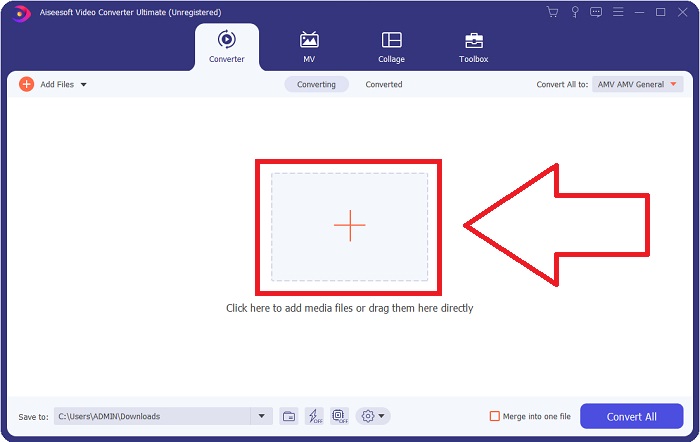
Adım 2: Dönüştürme işlemine başlamak için önce bir dosya yüklemeniz gerekir; bunu yapmak için, yazılım arayüzünün ortasındaki + düğmesine tıklayın veya video dosyalarınızı bilgisayarınızdan kolayca sürükleyip bırakın.
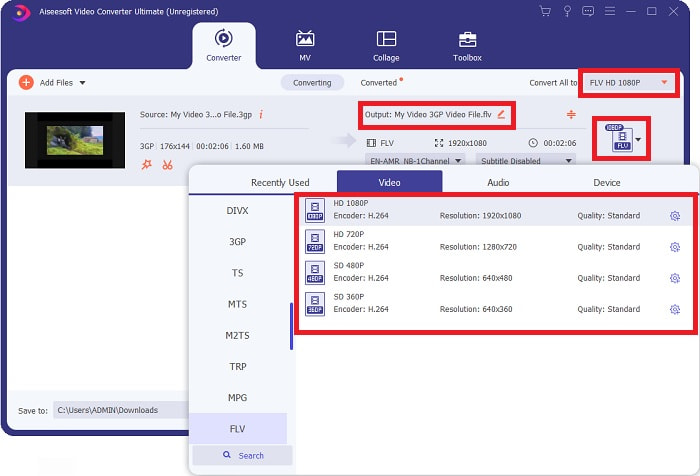
Adım 3: Bir dosya yükleme işlemine devam ettikten sonra, artık ekranınızın sağ köşesinde bulunan format seçimi kısmından FLV formatını seçebilirsiniz. Kullanmayı düşünebileceğiniz tüm olası nitelikler görüntüleneceği için istediğiniz kalite türünü seçebilirsiniz.
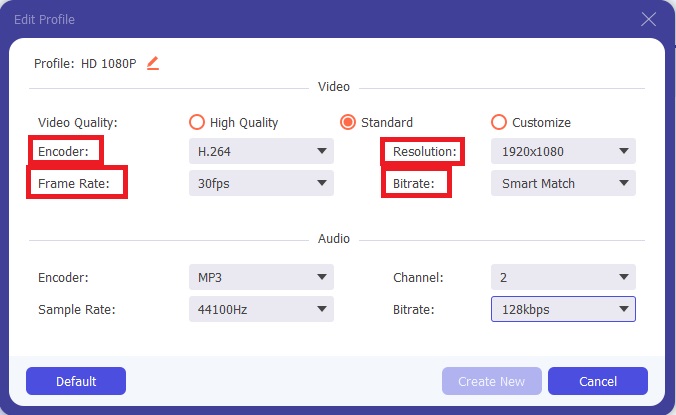
Adım 4: Sunulan kalite seçeneklerine rağmen, tercih ettiğiniz kalite seçenekler arasında yoksa kendi kalite ayarlarınızı oluşturabilirsiniz. Dişli simgesine tıklayın ve açılan pencerede görebildiğiniz tüm içerikleri ayarlayın. Çözünürlük, ekran görüntü kalitesiyle ve video oynatma sıklığı anlamına gelen kare hızıyla ilgilidir; bit hızı ise bir seferde kodlanan veri miktarı içindir. Son olarak, kodlayıcı (encoder) video formatının nasıl işlenip iletildiğiyle ilgilidir.
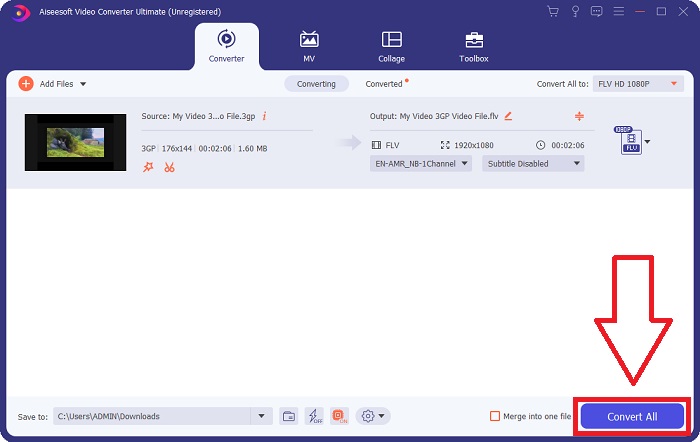
Adım 5: Video çıktınızda ihtiyaç duyduğunuz tüm ayarlamaları yaptıktan sonra, artık Tümünü Dönüştür düğmesine tıklayarak dönüştürme işlemine başlayabilirsiniz.
Bölüm 2. 3GP'yi FLV'ye Dönüştürmenin Başka Bir İlginç Yöntemi [Çevrimiçi]
Yazılım kısmı bu kadar; şimdi de 3GP’yi FLV’ye dönüştürmenize kesinlikle yardımcı olabilecek bu çevrimiçi araçtan bahsedelim. Karşınızda, 3GP ve FLV dâhil olmak üzere birçok formatı destekleyen Ücretsiz Çevrimiçi Video Dönüştürücü. Dosyayı bilgisayarınızdan yükleyerek doğrudan dönüştürebilirsiniz. 500 MB’tan büyük bir dosya yüklemek için de bu çevrimiçi aracı kullanarak 3GP’yi FLV’ye dönüştürebilirsiniz. Kullanıcılar, dönüştürme başlamadan önce birçok ayarı değiştirebilir. Örneğin, ses codec’ini ve ses seviyesini değiştirebilirsiniz. Video çözünürlüğünü de değiştirebilirsiniz. Tüm bu bilgilerin ardından, bilmeniz gereken tüm adımları şimdi öğrenelim.
Adım 1: Çevrimiçi araç için bağlantı burada. Tarayıcınızda ana web sayfasının açılması için buna tıklayın. Çevrimiçi aracı çalıştırmak için kullanacağınız başlatıcıyı indirmek üzere Dönüştürülecek Dosya Ekle seçeneğine tıklayın. Başlatıcıyı kurun ve bir dosya yüklemeye başlayın.
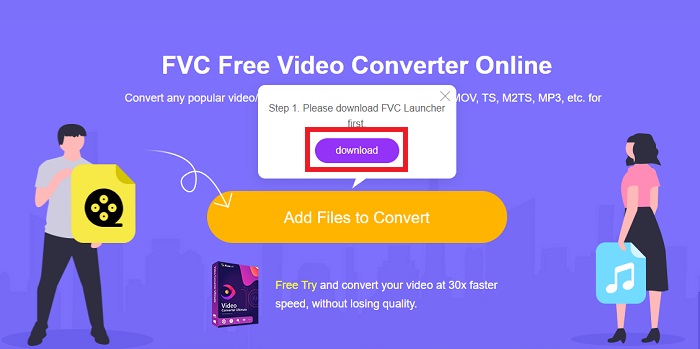
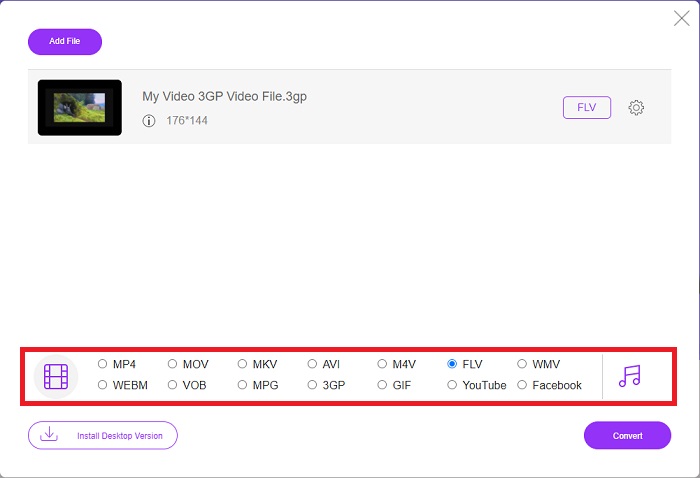
Adım 2: Bir dosya yüklemek için Dönüştürülecek Dosya Ekle seçeneğine tekrar tıklayın. Dosya yüklendikten sonra, pencerenin alt köşesinde yer alan video formatı seçeneklerinden FLV video formatını seçebilirsiniz.
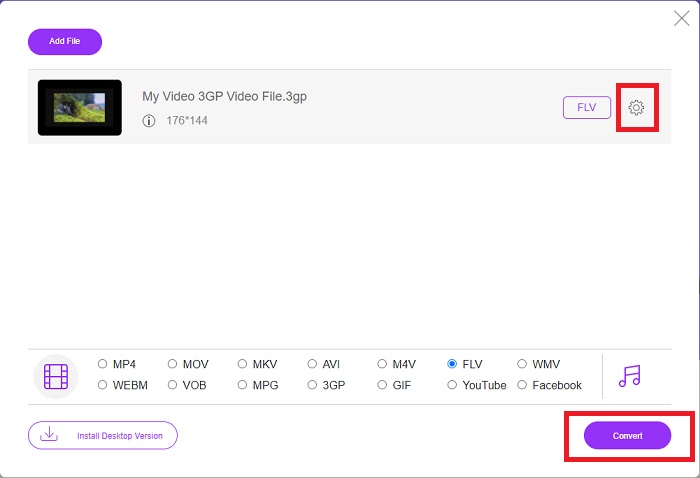
Adım 3: Seçtiğiniz video formatının hemen yanındaki dişli simgesine tıklayarak, çözünürlük, kare hızı veya bit hızı gibi video kalitesini ya da diğer özellikleri de düzenleyebilirsiniz; bu simge pencerenin sağ köşesinde yer alır. Çıktınız için tercih ettiğiniz tüm ayarları yaptıktan sonra, Dönüştür düğmesine tıklayarak dosyayı dönüştürebilirsiniz.
Bölüm 3. Genel Bakış: 3GP ve FLV
3GP formatında bir ses ve video klibi kaydetmek istediyseniz, doğru yere geldiniz! (3GPP). ISO medya dosyası formatı, bir multimedya kapsayıcı formatı olan 3GPP'nin temeli olarak hizmet eder. H.263 veya H.264 video akışları ve AMR-WB, AMR-WB+, AMR-NB, HE-AAC v1, AAC-LC veya Enhanced aacPlus ses akışlarının tümü desteklenir. Tipik olarak, 3GP dosyaları video çekmek için 3G cep telefonlarını kullanır, ancak kullanıcılar bunları bazı 2G ve 4G telefonlarda da oynatabilir. 3GP dosyaları hala kullanımda olmasına rağmen, daha verimli video formatları 3GPP formatının yerini aldığından popülerlikleri azalmıştır.
Ancak, Adobe Flash Video (FLV) kap biçiminde kaydedilen video dosyaları FLV belgeleridir. Ses ve video akışları, standart Flash ile aynı şekilde kodlanabilir. SWF formatı ve meta veri paketleri kısa bir başlık içerir. Flash Video Exporter eklentisi (Adobe Animate ile mevcuttur) veya FLV dosyalarını destekleyen bir uygulama, Flash Video içeriği üretebilir ve bunu FLV dosyaları olarak dışa aktarabilir. Adobe Media Encoder, videoyu QuickTime veya Windows Media formatlarında da kodlayabilir. Artık 3GP ve FLV hakkında bir fikriniz olduğuna göre, belirli konularda ayrıntıları bilmek için bir karşılaştırma tablosu sunuyoruz.
| Dosya uzantısı | 3GP | FLV |
| Dosya tipi | ISO Medya Dosyası | Flash Video Dosyası |
| Tarafından geliştirilmiş | Üçüncü Nesil Ortaklık Projesi | Adobe Sistemi |
| Artıları | 3GP dosya formatı video boyutunu ve ses bileşenlerini küçülttüğü için mobil kullanıcıların video dosyalarını paylaşması ve saklaması daha kolaydır. 3GP tasarımlı dosya formatı 3G özellikli cihazlar kullanıyor olsa da, birçok 2G ve 4G cihaz bu formatı oynatabilir. | Animasyon ve etkileşimli öğeler eklemek isteyen web siteleri için Adobe Flash mükemmel bir seçimdir. Uzun vadede, önemli bir etkisi olabilir. En yoğun döneminde Flash basit oyunlar kullandı. |
| Eksileri | Video ve ses akışları tek bir dosyaya sıkıştırılabilse de, kalite ve azaltılmış çözünürlük, kullanıcılar ses kalitesi, ekran çözünürlüğü, oynatma hızı vb. gibi diğer formatlara kıyasla kullanıcı deneyimini büyük ölçüde iyileştirebilir. | FLV'nin popülaritesinin son birkaç yılda azalması elbette bir dezavantaj. FLV içeriği oluşturmak çok zaman ve para gerektirir. Flash'ın bir başka dezavantajı, iOS cihazlarda görüntülenememesi ve yeni hayranları çekme yeteneğini ciddi şekilde sınırlandırmasıdır. |
| Programlar Video Formatını açar | ◆Hızlı Zaman Oyuncusu ◆Windows Medya Oynatıcı | ◆VLC Medya Oynatıcı ◆Adobe Flash Player |
Bölüm 4. 3GP'den FLV'ye Dönüştürme hakkında SSS
3GP kaliteli mi?
Değişken bit hızı ve kare hızı, tıpkı MP4'te olduğu gibi 3GP'yi destekler. 3GP, hala en yaygın iletişim biçimiyken, özellikli telefonlar için popüler bir biçimdi. Küçük bir videoya ihtiyacımız var çünkü geçmişte uzay bir lükstü. Kalite, o zamanlar telefonlarımızda bulunan patates kalitesinde kameralarla eşit, bu yüzden şaşırtıcı değil.
3GP neden oynamıyor?
Varsayılan medya oynatıcınız 3GP codec’lerini desteklemiyorsa, 3GP dosyasını varsayılan oynatıcınız yerine VLC Media Player’da oynatmayı deneyin. VLC, neredeyse her türlü video dosyasını oynatabildiği için mükemmel bir açık kaynak video oynatıcıdır. Windows ve iOS’un yanı sıra VLC, Linux ve Android için de mevcuttur.
FLV uygun bir kayıt formatı mı?
Adobe Flash Player, FLV dosya formatını kullanır. Evrensel olarak desteklenen bir video formatı olarak, en yaygın kullanılan formatlardan biridir. YouTube gibi çevrimiçi video akış platformları, FLV formatını kullanmaktan fayda sağlar. Küçük dosya boyutuna sahip oldukları için oldukça kullanışlıdır. İşte deneyebileceğiniz en iyi FLV kaydediciler.
Sonuç
Genel olarak konuşursak, sizin için sağlanan tüm dönüştürücüler, kullanmayı düşünmeniz gereken en iyi ve en çok önerilen yazılım ve çevrimiçi dönüştürücülerdir. Bu profesyonel ve kullanıcı dostu özelliklere sahip olduklarından, bu ikisini diğer yazılım ve çevrimiçi araçlarla karşılaştıramazsınız. Keyifle kullanın ve kullandıktan sonra yorum yazmayı unutmayın.
-
 3GP'yi AVI Formatına Dönüştürmenin En Etkili 4 Yolu [2025]
 3GP dosyalarımı AVI'ye dönüştürebilir miyim? 3GP'den AVI'ye dönüştürme probleminize olası tüm çözümleri bir araya getirdiğimiz için mevcut bu araçları denerseniz kolayca dönüştürebilirsiniz.
-
 VOB'u FLV'ye Dönüştürmenin En İyi Yolları [Ücretsiz ve Çevrimiçi Dahil]
 Bir VOB dosyasını bir FLV dosyasına dönüştürmek ister misiniz? Görevi masaüstü veya çevrimiçi dönüştürücülerle kolayca tamamlayabilirsiniz. Bu kılavuzu okuyun ve VOB'u FLV'ye nasıl kolay ve hızlı bir şekilde dönüştüreceğinizi öğrenin.
-
 DAT'yi Masaüstünde ve Çevrimiçi Olarak FLV'ye Dönüştürmenin En İyi 3 Yolu
 DAT'yi FLV'ye dönüştürmek istiyor ancak nasıl yapılacağını bilmiyor musunuz? Önerilen DAT - FLV video dönüştürücülerimizi kontrol edin ve işi kolayca tamamlamak için somut kılavuzumuzu izleyin.
