


 Video Dönüştürücü Ultimate
 Ekran kaydedicisi
 Video Onarımı
En İyi DivX Dönüştürücülerinden 2'si: Windows ve PC'de DivX'i FLV'ye Dönüştürme
DivX, DVD’lerde kullanılan ilk tescilli film konteynerlerinden biridir. Bu sıkıştırma formatı, yüksek depolama alanına ihtiyaç duymadan yüksek kaliteli videoları saklamaya yardımcı olur. DivX dosyaları alan dostu olsa da, oynatmak için yine de belirli bir kodlayıcı (codec) kurmanız gerekir. Ancak, dosyayı FLV’ye veya diğer desteklenen formatlara dönüştürerek bunu önleyebiliriz. DivX’i FLV’ye nasıl dönüştüreceğinizi bilmek ister misiniz? O hâlde aşağıdaki ayrıntıları okuyun ve size en uygun dönüştürücüyü belirleyin.

Bölüm 1. FVC Video Converter Ultimate ile DivX'i FLV'ye dönüştürün
Bu olağanüstü DivX dönüştürücü, arayüzü ve işleme süreci açısından diğer dönüştürücüler arasında en iyisine sahiptir. FVC Video Converter Ultimate, Windows veya Mac’inize indirebileceğiniz başlıca dönüştürücü hâline gelmiştir. Bu dönüştürücünün, donanım hızlandırma ve hızlı dönüştürme desteğiyle, dosya dönüştürme işlemi daha kolay ve daha hızlı hâle gelir. Çevrim içi kullanabildiğiniz veya indirilebilir araçların aksine, bu program son derece hafif ama bir o kadar da güçlüdür. Ayrıca, DivX dosyalarınızı FLV, MP4, MOV, AVI, MKV ve 200’den fazla formata dönüştürebilirsiniz. Şimdi bu aracı nasıl kullanacağınızı öğrenmek istiyor musunuz? O hâlde aşağıdaki adımları izleyin.
FVC Video Converter Ultimate yardımıyla DivX’i FLV’ye dönüştürme adımları:
Adım 1. Aşağıdaki indirme düğmesine tıklayarak FVC Video Converter Ultimate’ı masaüstünüze indirin. Dosyayı indirdikten sonra üzerine tıklayın, kurun ve hızlıca yapılandırın.
Ücretsiz İndirWindows 7 veya üstü içinGüvenli İndirme
Ücretsiz İndirMacOS 10.7 veya üstü içinGüvenli İndirme
Adım 2. Dosya eklemek için + düğmesine basın veya dönüştürmek istediğiniz dosya sayısı ikiden fazlaysa dosyaları arayüze sürükleyip bırakmanızı öneririz.
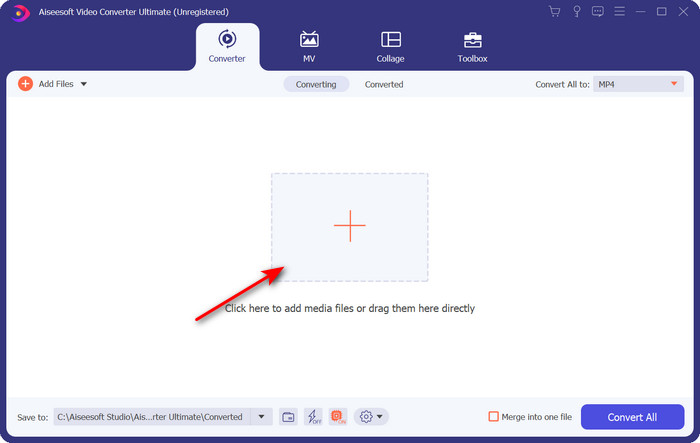
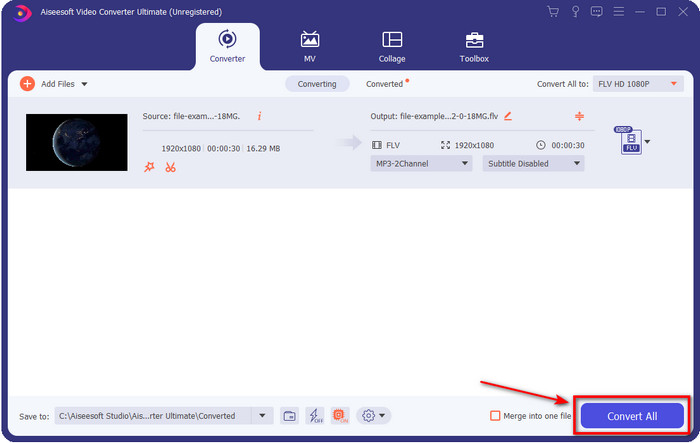
Adım 3. açılır liste düğmesine tıklayarak DivX formatınızı FLV olarak değiştirin.
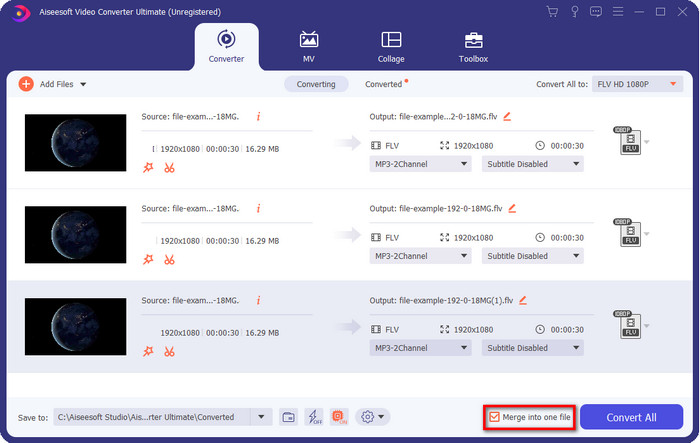
DivX dosyalarınızı birleştirip tek bir dosya yapmak istiyorsanız, dönüştürmeden sonra tüm DivX dosyalarını birbirine eklemek için kutuyu işaretleyin.
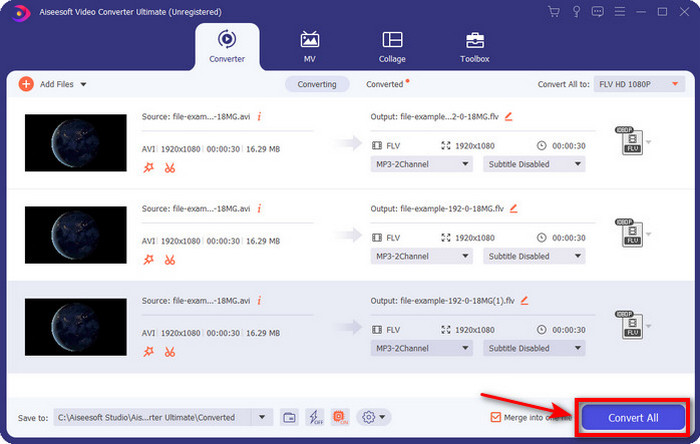
Adım 4. Dönüştürmeyi başlatmak için Convert All (Tümünü Dönüştür) düğmesine tıklayın. Beklemenize gerek yok, süreç bir dakikadan kısa sürecektir. İşlem bittiğinde, dönüştürülen .flv dosyasının bulunduğu klasör ekranınızda görünecektir.
Artıları
- DivX'i diğer çevrimiçi ve çevrimdışı dönüştürücülere kıyasla 30 kat daha hızlı bir şekilde FLV'ye dönüştürün.
- Windows ve Mac gibi tüm işletim sistemlerinde mevcuttur.
- Gelişmiş video düzenleme özellikleri mevcuttur.
- Toplu dönüştürme yardımıyla istediğiniz kadar dosyayı dönüştürün.
Eksileri
- Satın alınması ve bilgisayarınıza yüklenmesi gerekir.
Bölüm 2. FVC Free Video Converter Online ile DivX'i FLV'ye Dönüştürün
DivX dönüştürme sorununuza çevrim içi bir çözüm mü arıyorsunuz? O hâlde FVC Free Video Converter Online aracını kullanın. Bu web aracı orta düzeyde format desteğine sahiptir, tüm arama motorlarıyla uyumludur ve ücretsizdir. Çevrim içi bir dönüştürücü olmasına rağmen, web sitesinin arayüzünde can sıkıcı reklamlardan endişe etmenize gerek yoktur. Eğer bu çevrim içi çözümün sizin için en iyi yardım olduğunu düşünüyorsanız, aşağıdaki ayrıntılı adımları izleyin.
FVC Free Video Converter Online yardımıyla DivX’i FLV’ye dönüştürme adımları:
Adım 1. Öncelikle çevrim içi dönüştürücünün web sitesini açmak için bu bağlantıya tıklayın.
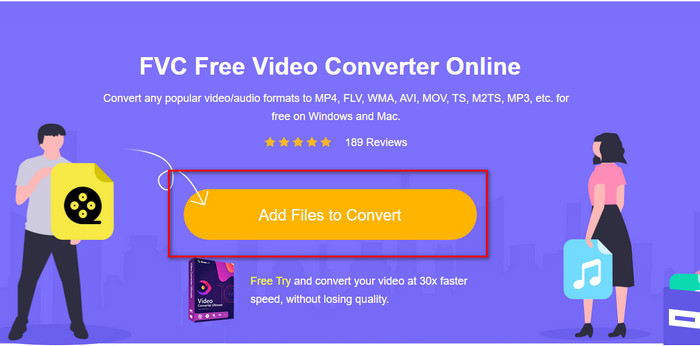
Adım 2. Ardından Add Files to Convert (Dönüştürülecek Dosyaları Ekle) düğmesine tıklayın ve aracın açılmasına izin verin. Klasörden dosyayı seçin ve Open (Aç) düğmesine basın.
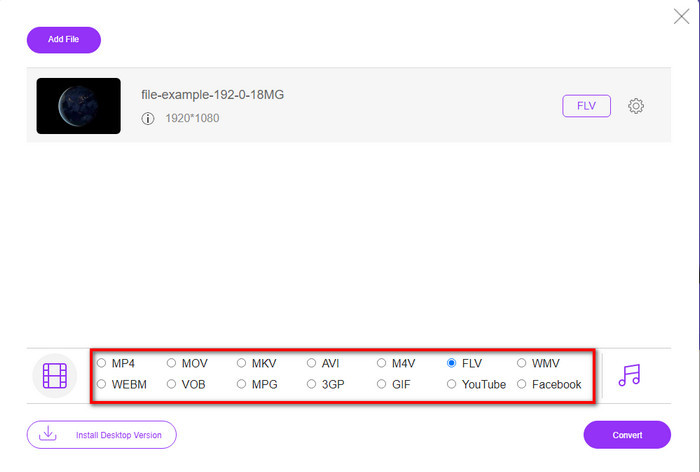
Adım 3. FLV formatını veya aşağıda bulunan diğer formatlardan birini seçin.
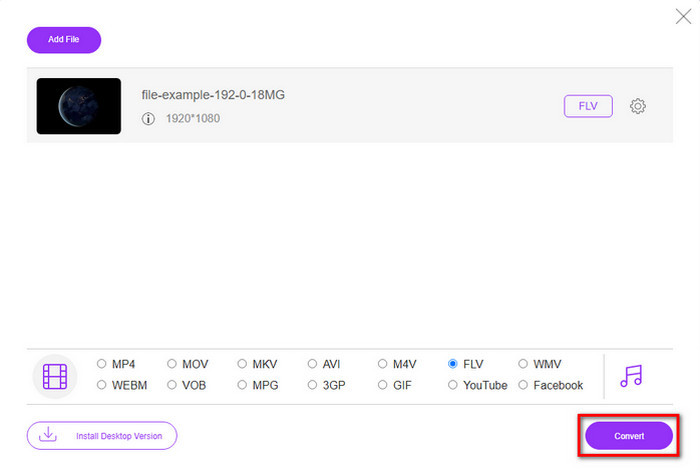
Adım 4. İşlem tamamlandığında dönüştürme sürecini başlatmak için Convert (Dönüştür) düğmesine tıklayın.
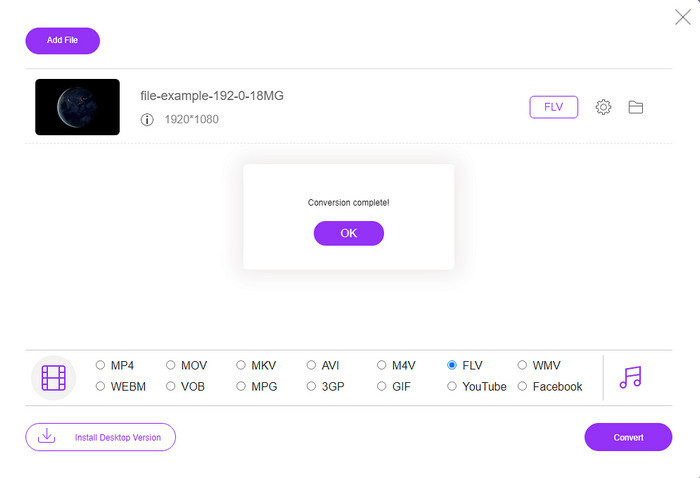
Adım 5. Dönüştürme tamamlandığında, klasör ve dosya ekranınızda görünecektir.
Artıları
- Yazılımı sürücünüze indirmenize gerek yok.
- Kötü amaçlı yazılım içermez ve arayüzde can sıkıcı reklamlar yoktur.
- Herkes için çevrimiçi dönüştürücülere sınırsız erişim.
Eksileri
- Dönüştürmek için sınırlı biçimleri ve kodlayıcıları destekler.
- FVC Video Converter Ultimate'ın sahip olduğu gelişmiş özelliklere sahip değildir.
Bölüm 3. DivX ve FLV
DivX
DivX'in kısaltması olan Digital Video Express, minimum kalite değişiklikleriyle yüksek sıkıştırmalı video akışları ve DVD'ler için en iyi formattır. Bu codec bileşeni neredeyse MPEG-4 gibi çalışır, ancak temel fark tescilli olmasıdır. Ayrıca, uygun yazılımın uygun yardımı olmadan bir .divx videosunu oynatamazsınız. Akıllı telefonlarda bile Windows veya Mac'inizde düzgün bir şekilde oynatmak yerine, yalnızca bu biçimin desteklenmediğine dair uyarılar alacaksınız. Formatın kullanımı biraz can sıkıcı olsa da, yine de sürücünüzde bant genişliği ve alandan tasarruf etmenize yardımcı olur.
FLV
Ancak, FLV veya Flash Video, HTML 5'te en çok kullanılan en üstteki seçim biçimidir. Bu biçim, medya dosyasını web üzerinde verimli bir şekilde dağıtmak için Adobe Air ve Flash Player desteğini kullandığından DivX'ten farklı çalışır. Ayrıca bu, medya dosyalarını içeren video paylaşım platformlarına video yerleştirmek için uzun standart biçim olmuştur. FLV, DivX'ten daha iyi olsa da, dosyayı sıkıştırmaktan bahsedecek olursak, DivX, FLV'den daha küçüktür. Ancak dosyanızı çevrimiçi olarak daha hızlı dağıtmak istiyorsanız dosya uzantınız .flv olmalıdır.
Bölüm 4. DivX'ten FLV'ye Dönüştürme hakkında SSS
DivX'i dönüştürdükten sonra kalitesi değişiyor mu?
DivX dosyaları eski sürüm biçiminde olmasına rağmen, yüksek kaliteli videoları küçük boyutlara sıkıştırılmış halde saklayabilir. Bu nedenle DivX'inizi FLV, MP4, MOV, AVI veya başka bir formata dönüştürdükten sonra DivX videonun kalitesi değişmemelidir. Ancak, yüksek kaliteli çıktıyı desteklemeyen yanlış aracı kullanırsanız kalite kaybı yaşayabilirsiniz. Ancak yukarıda bulunan araçları kullanarak bundan kaçınabiliriz.
DivX dosyalarını neden Windows Media Player'da oynatamıyorum?
DivX dosyaları internette popüler hâle gelse de, doğru codec’i indirirseniz bunları Windows Media Player’da oynatmanız mümkündür. Ancak bu zahmete girmek istemiyorsanız, bu makaleyi okuyun ve bu dosyaları oynatmak için kullanabileceğiniz 5 DivX oynatıcıyı öğrenin.
DivX dosyalarını dönüştürmek zaman alır mı?
DivX dosyanızın boyutuna bağlı. Her durumda, DivX dosyası ne kadar büyükse, dönüştürme işleminin tamamlanması için o kadar uzun süre beklersiniz. Donanım hızlandırma ve hızlı dönüştürme özelliğine sahip bir araç kullandığınızı varsayalım. Bu durumda, şanslısınız çünkü dosyayı dönüştürmek için beklemeniz veya çok fazla zaman harcamanız gerekmeyecek.
Sonuç
Sonuç olarak, yukarıda belirtilen ayrıntılı bilgiler, DivX’i neden FLV’ye dönüştürmemiz gerektiğini anlamamıza yardımcı olur. Herhangi bir aksaklık yaşamamak için en iyi çıktıyı elde etmenizi sağlayacak en iyi aracı kullanmanız şarttır. İnternette yaptığımız araştırma sonucunda, çevrim içi veya çevrim dışı kullanabileceğiniz en iyi dönüştürücüyü bulduk. Ayrıca, çevrim içi çözüm olarak FVC Free Video Converter Online aracını kullanmak istiyorsanız bağlantıya tıklamanız yeterlidir. Buna karşılık, 200’den fazla formatı destekleyen ve özel özelliklere sahip, son derece kaliteli bir nihai çıktı istiyorsanız, FVC Video Converter Ultimate yazılımını indirmeniz gerekir.
-
 DivX'i MOV'a Ücretsiz Dönüştürmenin 4 Yolu [Çevrimiçi ve Çevrimdışı]
 Bir DivX'in sınırlamaları ile mücadele ediyor musunuz veya bu formattaki videolara erişmek için medya oynatıcılarınız yok mu? MOV formatına dönüştürmek istiyorsanız, boşlukları doldurmak için bu makaleyi okumaya devam edin.
-
 M2TS'yi FLV Çevrimiçi ve Çevrimdışına Dönüştürmek için Olağanüstü Yaklaşım
 Hiç farklı bir platformda M2TS'yi FLV'ye dönüştürmeyi denediniz mi? M2TS'yi FLV'ye dönüştürmeyi düşünmeniz gereken, kullanımı kolay en iyi çevrimiçi araç ve yazılım hakkında daha fazla bilgi edinmek için bu makaleyi okuyun.
-
 3GP'yi FLV'ye Dönüştürmede Kullanılacak En İyi 3GP - FLV Dönüştürücü [2022]
 Hiç 3GP'yi FLV'ye dönüştürmeyi denediniz mi, ancak ne tür bir dönüştürücü kullanacağınızı bilmiyor musunuz? 3GP'yi FLV'ye dönüştürmeyle ilgili tüm ayrıntıları öğrenmek için bu makaleyi okuyun.
