


 Video Dönüştürücü Ultimate
 Ekran kaydedicisi
 Video Onarımı
Öğreticilerle F4V'yi FLV'ye Değiştirmek için Kullanılan 2 Önerilen Dönüştürücü
Adobe Flash Player, internetten içerik akışı için oynatma ortamı kapsayıcısı olarak F4V ve FLV formatlarını destekler. Biçim Adobe tabanlı olsa da, bu iki format birçok açıdan birbirinden farklıdır. Örneğin, FLV’de kodlanan veriler F4V ile aynı değildir çünkü FLV, SWF’ye benzer bir yapıya sahiptir. Ayrıca, F4V’yi FLV’ye dönüştürmek ve SWF benzeri bir kodlayıcı kullanmak istiyorsanız, daha fazlasını öğrenmek için bu makaleyi okuyun.

F4V'yi FLV'ye Dönüştürmek için En Çok Seçim Dönüştürücünün Bölüm 1. 2'si
1. Seçim. FVC Video Dönüştürücü Ultimate
FVC Video Converter Ultimate, Windows veya Mac’inize indirebileceğiniz, şiddetle tavsiye edilen F4V’den FLV’ye dönüştürücüdür. Bu araç, karşınıza çıkacak en hızlı ve en güvenilir dönüştürme sürecine sahiptir ve şimdiden milyonlarca kullanıcıyı memnun etmiştir. Dahası, biçim dönüştürme bu aracın tek güçlü yönü değildir. Ne dersiniz? Burada videoyu kesme, birleştirme, sesi yükseltme, kırpma ve daha fazlası gibi düzenlemeler de yapabilirsiniz. İhtiyaçlarınızı karşılayacak benzersiz bir dönüştürücü istiyorsanız, aradığınız yazılım budur. Aşağıdaki bilgiler, F4V dosyalarınızı birkaç dakika içinde FLV biçimine dönüştürme adımlarını içermektedir.
FVC Video Converter Ultimate yardımıyla F4V’yi FLV’ye dönüştürme nasıl yapılır:
Adım 1. Yazılımı bilgisayarınıza indirmek için indirme düğmesine tıklayın.
Ücretsiz İndirWindows 7 veya üstü içinGüvenli İndirme
Ücretsiz İndirMacOS 10.7 veya üstü içinGüvenli İndirme
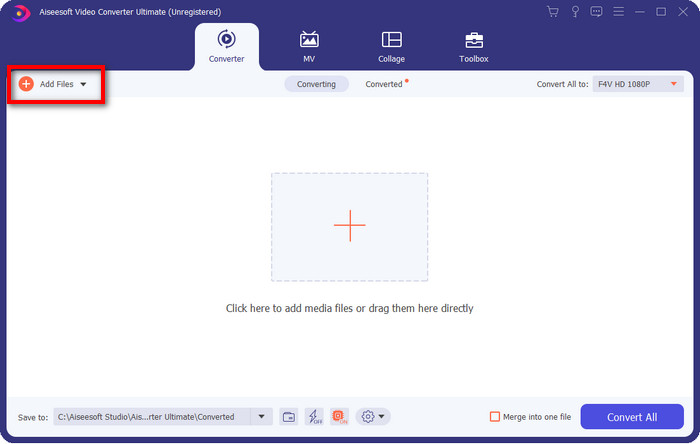
Adım 2. Yazılıma tıklayıp açın, dosyayı eklemek için arayüzün sağ üst kısmındaki Dosya Ekle düğmesine tıklayın ve dönüştürmek istediğiniz F4V dosyasını seçtikten sonra Aç’a basın.
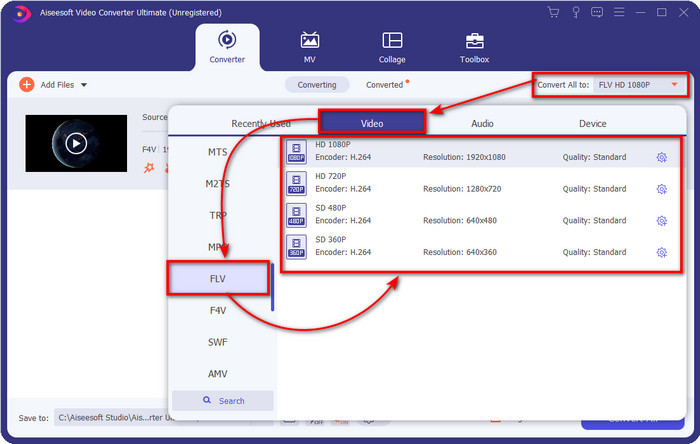
Adım 3. Tümünü Dönüştür seçeneğine tıklayın ve biçimi FLV olarak değiştirin.
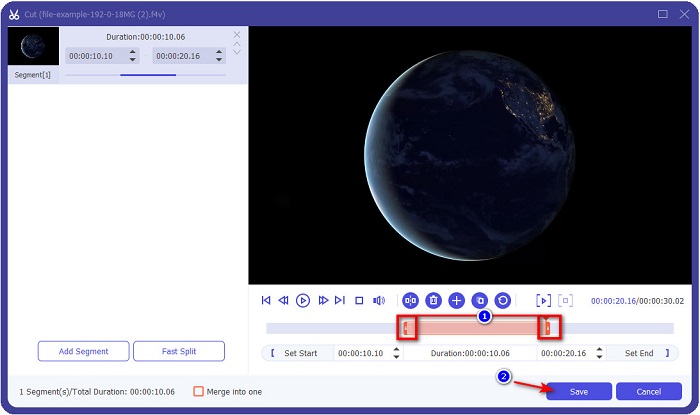
Videoyu kısaltmak mı istiyorsunuz? Öyleyse makas simgesine tıklayın. İstediğiniz uzunluğa göre tutamacı ayarlayın ve değişiklikleri kaydetmek için Kaydet’e tıklayın.
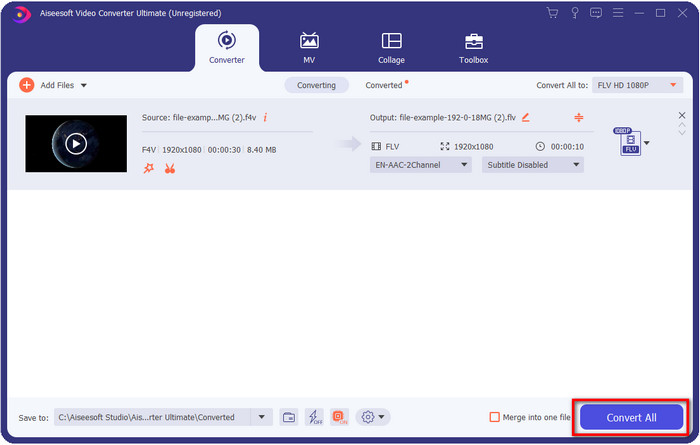
Adım 4. F4V’yi FLV’ye dönüştürmek için Tümünü Dönüştür’e tıklayın; işlem hızla başlayacaktır. Dosyanızın bulunduğu klasörü gösteren bir pencere açılacaktır.
Artıları
- Birden fazla F4V'yi FLV, AVI, MOV, MKV ve 200'den fazla formata zahmetsizce dönüştürür.
- Donanım hızlandırma ve hızlı dönüştürme, dönüştürmeyi daha hızlı hale getirmek için burada mevcuttur.
- Tüm Windows ve macOS'ta mevcuttur.
- Videonuzun olağanüstü görünmesini sağlamak için olağanüstü video düzenleme özellikleri Araç Kutusu'nun altındadır.
Eksileri
- Kullanmadan önce satın alınması gerekir.
- Dönüştürücüyü masaüstünüze indirmek gereklidir.
2. Seçim. FVC Ücretsiz Video Dönüştürücü Çevrimiçi
FVC Free Video Converter Online, dönüştürme işlemini çevrim içi olarak yapmanıza yardımcı olur. Bu araç, F4V’yi FLV’ye çevrimiçi ve sınırlama olmadan dönüştürmek için tüm tarayıcılarda kullanılabilir. Ancak, toplu dönüştürme burada desteklenmediği için kullanılamaz. Yine de, bu çevrim içi dönüştürücüyle istediğiniz biçimi elde edebilirsiniz. Nasıl yapılacağını bilmek ister misiniz? O zaman aşağıdaki adımları izleyin.
FVC Free Video Converter Online yardımıyla F4V’yi FLV’ye dönüştürme nasıl yapılır:
Adım 1. Web aracını açmak için bu bağlantıya tıklamanız gerekir.
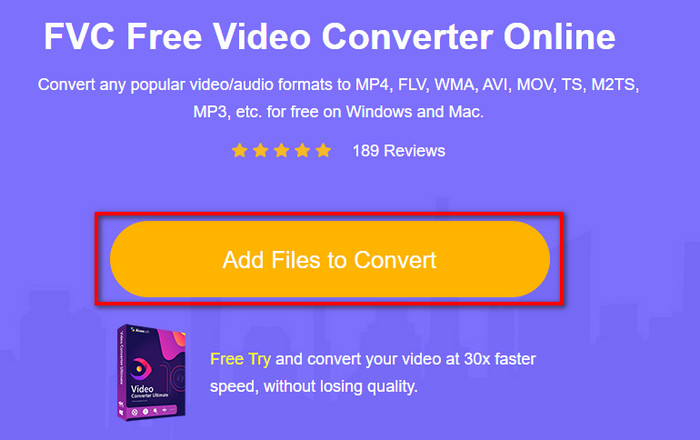
Adım 2. Ana çevrim içi dönüştürücü arayüzünde, Dosya Ekle ve Dönüştür düğmesine tıklayın. Açılacak klasörde F4V dosyasını bulun ve Aç’a basın.
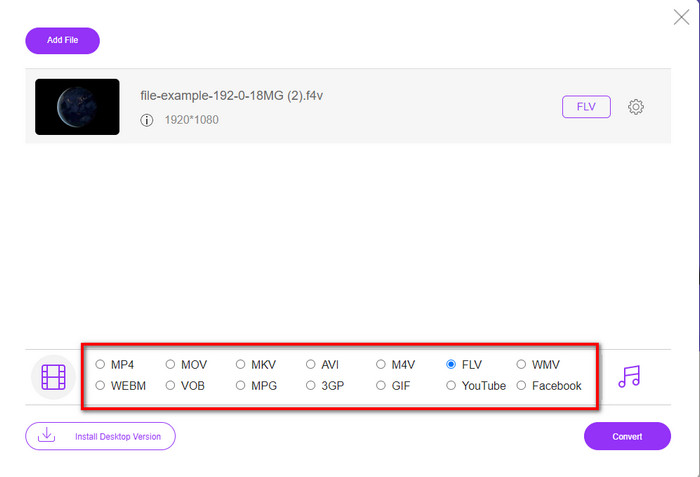
Adım 3. Alt kısımda seçebileceğiniz birçok biçim vardır; FLV’ye tıklayın.
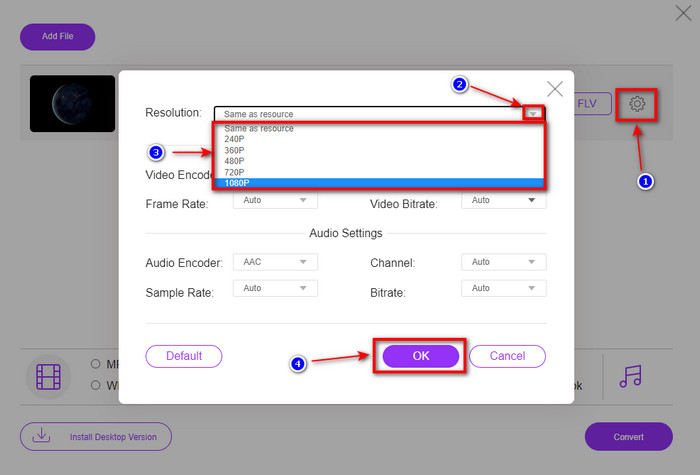
Videonun çözünürlüğünü değiştirmek mi istiyorsunuz? O zaman dişli simgesine tıklayın, açılır menüye basın ve video kalitesini seçin.
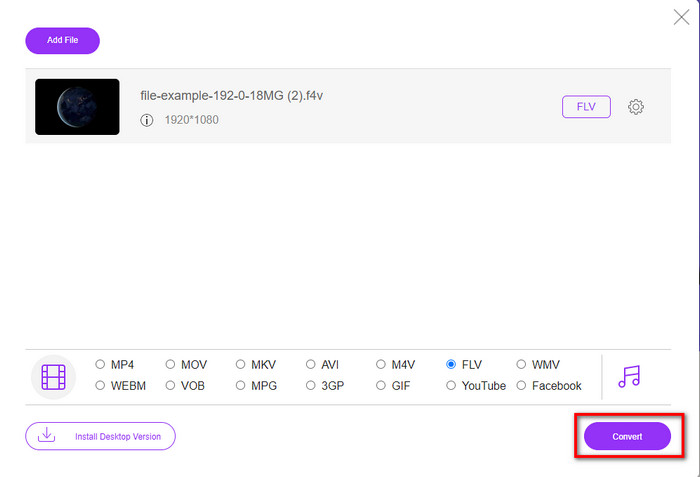
Adım 4. F4V’den FLV’ye dönüştürme işlemini başlatmak için Dönüştür’e tıklayın.
Artıları
- Sahip olduğunuz tüm web tarayıcılarında mevcuttur.
- Ücretsiz ve kullanımı kolay çevrimiçi dönüştürücü.
- Kötü amaçlı yazılım içermez ve ana web sitesinde reklam yoktur.
Eksileri
- İnternet bağlantısı bir zorunluluktur.
- FVC Video Converter Ultimate gibi video düzenleme özelliklerini desteklemez.
Bölüm 2. F4V vs. FLV: Hangi Format En İyisidir
Başta söylendiği gibi, bu iki biçim, bunları web'de dağıtmak için kullanabileceğiniz Adobe kapsayıcılarıdır. Ancak şimdi, aşağıdaki ayrıntıları okuyarak iki format arasındaki farkları karşılaştıralım.
F4V formatı, MP4 formatı gibi bir Quicktime kabıdır. İnternet üzerinden video akışı için bir ISO temel medya dosyası formatıdır. Ayrıca bu biçim, FLV'nin yükseltilmiş bir sürümüdür. Yine de, FLV'de video ve ses kodlamada birçok sorun var. Ayrıca, FLV'nin sizin için yapabileceği gibi bir HTML web sayfası oluşturamazsınız.
FLV, SWF ile hemen hemen aynı yapıya sahip dosyalardır. Bu biçim daha çok Adobe Flash Player'da ve çoğu HTML 5'te desteklenir. Sorenson Spark veya VP6 kodekleri gibi video ve ses sıkıştırmasını destekler. Ayrıca, web üzerinden bir video indirmeyi düşünüyorsanız, bu format en iyi seçimdir. F4V'den farklı olarak web sayfanızda HTML oluşturmak istiyorsanız bu format tam size göre.
F4V'de F4V'de bulunmayan faydaları FLV'de elde edeceğiniz için F4V'yi FLV'ye dönüştürmek en iyisidir. F4V'nin FLV'nin yeni versiyonu olduğu söylense de, yine de FLV'nin benzersizliği, F4V'nin birçok yönden kopyalayamayacağı türdendir.
Bölüm 3. F4V'den FLV'ye Dönüştürme hakkında SSS
F4V videolarını nasıl oynatabilirim?
Güçlü bir medya oynatıcının yardımıyla bunu zorlanmadan yapabilirsiniz; bunun en iyi örneği Aiseesoft Blu-ray Player’dır. F4V dosyalarını nasıl oynatacağınızı öğrenmek için şu basit adımları izleyin: İlk olarak yazılımı masaüstünüze indirin ve başlatın. Araçta Dosya Aç’a tıklayarak dosyayı yükleyin. Yükleme tamamlandıktan sonra dosya otomatik olarak oynatılacaktır.
Hangisi daha iyi? F4V veya MOV?
Bu, onu hangi amaçla kullanmak istediğinize bağlıdır. Örneğin, F4V, ortam dosyalarını web üzerinde kalite kaybı olmadan dağıtmak için harikadır. Ancak Mac’te video düzenlemek istiyorsanız, MOV’u tercih etmelisiniz. Yani, F4V videolarınızı Mac’te düzenlemek istiyorsanız, F4V’yi MOV’a nasıl dönüştüreceğinizi öğrenmeniz gerekir.
F4V yüksek kaliteli çıktı içeriyor mu?
F4V dosyaları 1080 veya 720 video kalitesi içerebilir, ancak dosya boyutu minimum düzeyde kalacaktır.
Sonuç
Artık dönüştürücüler yardımıyla F4V’yi FLV’ye nasıl çevireceğimizi öğrendiğimize göre, yorumlara dayanarak güvenilir dönüştürücünüzü seçmenin tam zamanı. Ücretsiz bir çevrim içi dönüştürme deneyimi yaşamak istiyorsanız, FVC Free Video Converter Online’ı kullanmalısınız. Ancak bu web aracı, yukarıdaki nihai dönüştürücünün yerini tutamaz. Tanıtıma gerek olmaksızın, dönüştürme işinizi kolay ve hızlı yaptığı için FVC Video Converter Ultimate’ı kullanmayı tercih ediyoruz. Bu olağanüstü dönüştürücü, benzersiz özellikleriyle birçok kullanıcıyı etkileyen eşsiz bir araçtır. Böylece, bu araçların yardımıyla artık başarıya bir adım daha yaklaştığımızı söyleyebiliriz.
-
 F4V'yi AVI Formatına Dönüştürmek için 4 En Yeni Çevrimiçi ve Çevrimdışı Dönüştürücü
 F4V'yi AVI'ye veya başka bir video formatına dönüştürmek için hangi dönüştürücüyü kullanmanız gerektiğine dair bir fikriniz yok mu? Ardından, mevcut araçla nasıl dönüştürüleceğini öğrenirken bu makaleyi okuyun.
-
 Kaliteyi Kaybetmeden F4V'yi MOV'a Dönüştürme [Çözüldü]
 F4V gibi bazı video formatlarını kabul etmekte zorlanıyorsanız. F4V ve MOV video formatı hakkında daha fazla bilgi edinmek ve farklı yöntemler kullanarak F4V'yi MOV'a nasıl dönüştüreceğinizi öğrenmek için bu makaleyi okuyun.
-
 En Kolay Çevrimdışı ve Çevrimiçi Yöntemlerle TRP'yi FLV'ye Dönüştürün
 TRP video dosyanızı hızlı ve sorunsuz bir şekilde FLV'ye dönüştürmek ister misiniz? Size duruma en uygun yazılımı ve çevrimiçi hizmeti sunmak için bu makaleyi okuyun.
