


 Video Dönüştürücü Ultimate
 Ekran kaydedicisi
 Video Onarımı
FLV Dosyalarınızı MKV'ye Dönüştürmek için En İyi 3 FLV - MKV Dönüştürücünün Ne Olduğunu Öğrenin
İnternette ücretsiz olarak FLV’yi MKV’ye dönüştürmenin en iyi yolunu aramaktan bıktınız mı? Tesadüf olabilir ama bugün kullanabileceğiniz en iyi FLV dönüştürücülerini bulduk; elbette yalnızca en iyilerini seçtik. Araştırmanızı çok daha kolay hale getirmek için, aşağıdaki makaleyi okuyarak devam etmelisiniz; çünkü FLV ve MKV hakkında ve kullanabileceğiniz dönüştürücülerle ilgili çok şey öğreneceksiniz.

Bölüm 1. FLV'yi MKV'ye Ücretsiz Dönüştürmenin 2 Yolu
1. Yol. FLV'yi MKV'ye Dönüştürmek için Çevrimiçi Dönüştürücüyü Kullanın
Bu çevrimiçi dönüştürücü, FLV’yi çevrimiçi olarak MKV’ye dönüştürmek için kesinlikle en önde gelen transkoderlerden biridir. FVC Free Video Converter Online, çevrimiçi olarak kullanabileceğiniz basit ve kolay anlaşılır bir dönüştürücüdür. Ancak bu araç internete bağımlıdır; yani internet bağlantınız yoksa dönüştürme için bu sizin son seçeneğiniz olmaz. Araç internet tabanlı olmasına rağmen, arayüzünde can sıkıcı reklamlar yoktur ve zararlı yazılımlardan tamamen uzaktır. Şimdi, bu aracı bizzat denemek istiyorsanız, aşağıdaki adımları takip etmelisiniz.
Adım 1. Yeni bir sekmede FVC Free Video Converter Online’ı açmak için bu bağlantıya tıklayın.
Adım 2. Kullandığınız bilgisayardaki klasörü açmak için Add Files to Convert (Dönüştürülecek Dosyaları Ekle) düğmesine tıklayın. Dönüştürmek istediğiniz FLV dosyasını seçin ve dosyayı yüklemek için Open (Aç) düğmesine basın.
Dosyaları toplu dönüştürmek için Masaüstü Sürümü indirin.
Adım 3. Aşağıda sunulan format listesinden MKV formatını seçin.
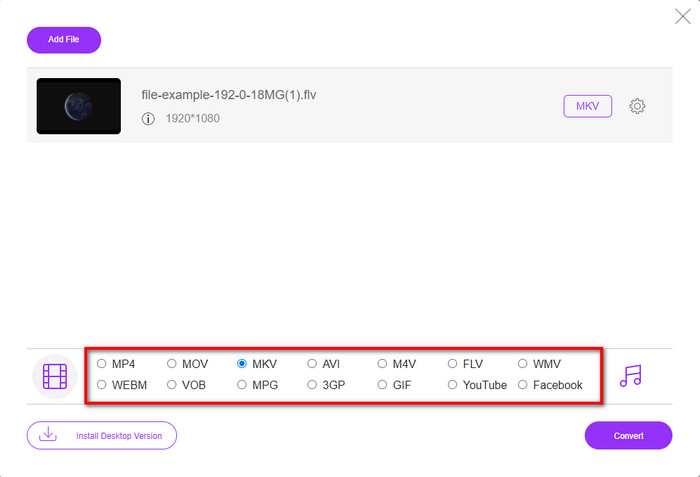
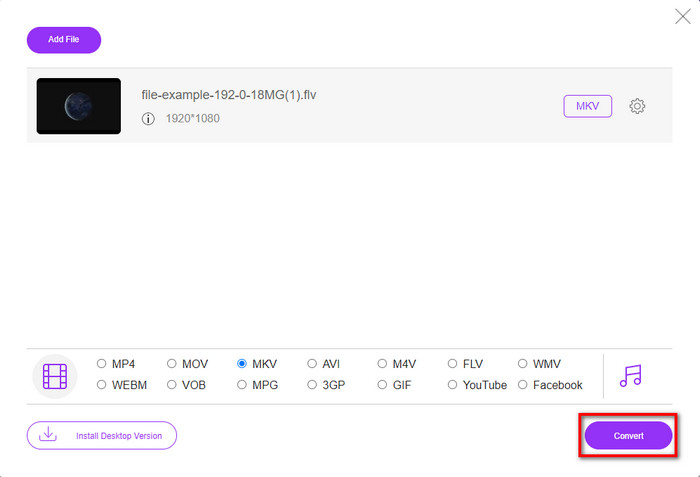
Adım 4. Convert (Dönüştür) düğmesine tıklayarak dönüştürme işlemini başlatın; işlem bittiğinde dönüştürülen dosya otomatik olarak bilgisayar sürücünüze kaydedilecektir.
2. Yol. Windows ve Mac'te İndirebileceğiniz Ücretsiz Dönüştürücüyü Kullanın
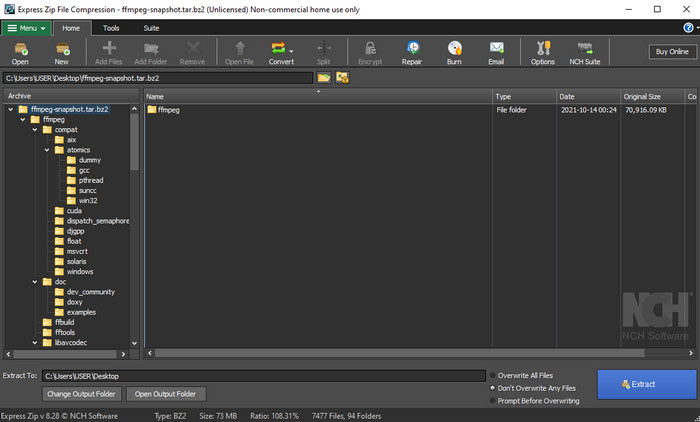
FFmpeg, alışık olduğunuz klasik dönüştürücü değildir. Sıradan bir dönüştürücü olmasa da FLV dosyanızı yine de dönüştürebilir. Peki bu aracı farklı kılan nedir? CLI tabanlı bir arayüz kullanmasıdır; yani dönüştürme işlemine başlamadan önce, kodlama yaparak ya da basitçe komut yazarak ona ne yapacağını söylemeniz gerekir. Bu dönüştürücü ilginizi çekiyorsa, FLV’den MKV’ye FFmpeg kullanmayı öğrenmek için aşağıdaki ayrıntıları okuyun ve adımları izleyin.
Adım 1. FFmpeg.exe’yi indirin ve açın.
Adım 2. Bilgisayarınızda Komut İstemi’ni açın.
Adım 3. FLV dosyasını CMD üzerinden bulun. Ardından şu komutu kopyalayıp Komut İstemi’ne yapıştırın: ffmpeg -i input.flv -vn -ar 44100 -ac 2 -b:a 192k output.mkv ve işlemin başlaması için klavyenizde Enter’a basın.
Bölüm 2. FLV'yi En İyi FLV'den MKV'ye Dönüştürücü ile Kayıpsız Bir Şekilde MKV'ye Dönüştürün
3. yol. FLV'yi WMV'ye Dönüştürmek için Profesyonel Dönüştürücüyü Kullanın
Yukarıda tanıtılan ilk iki dönüştürücü sizi hâlâ tatmin etmedi mi? Öyleyse FVC Video Converter Ultimate’ı mutlaka denemelisiniz. Neden mi? Çünkü dönüştürme için fazla çaba harcamasanız bile son derece profesyonel bir çıktı sunar. Ayrıca FLV dosyanızı MKV, AVI, MOV, AVI, MP4 ve 200’den fazla başka formata dönüştürmek için daha çok formatı destekler. Hâlâ etkilenmediniz mi? Belki videonuza biraz sihir katmak istersiniz? Bu durumda bu dönüştürücüye sahip olduğunuz için şanslısınız, çünkü kullanabileceğiniz gelişmiş video düzenleme özellikleri sunar. Aracın sizin için fazla karmaşık olabileceğinden mi şüphe ediyorsunuz? Öyleyse, bu FLV’den MKV’ye dönüştürücüyü nasıl kullanacağınızı deneyimlemek ve öğrenmek için aşağıda yazılı adımları izleyin.
Adım 1. Bu dönüştürücüyü kullanmadan önce, aşağıdaki indirme düğmesine tıklayarak indirmeniz gerekir. İndirdikten sonra kurulum yönergelerini takip edin ve programı başlatın.
Ücretsiz İndirWindows 7 veya üstü içinGüvenli İndirme
Ücretsiz İndirMacOS 10.7 veya üstü içinGüvenli İndirme
Adım 2. Dönüştürmek istediğiniz FLV dosyasını eklemek için + düğmesine basın. Arayüzünüzde açılacak klasörden FLV dosyasını bulun ve bir sonraki adıma geçmek için Open (Aç) düğmesine basın.
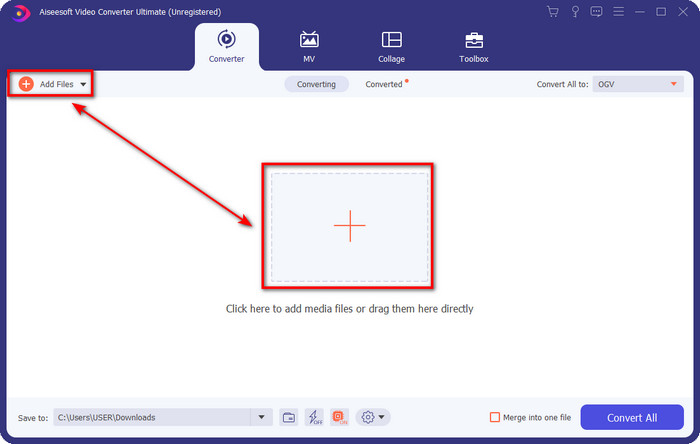
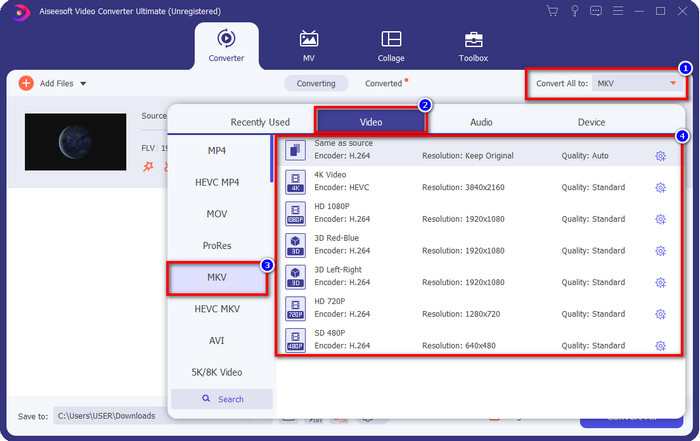
Adım 3. Ardından, kullanıcı arayüzünün sağ üst kısmındaki drop-down (açılır menü) düğmesine tıklayarak formatı MKV olarak değiştirelim.
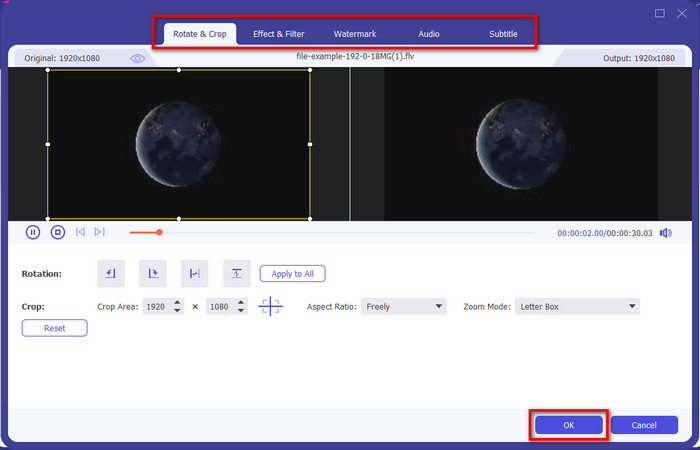
İsteğe bağlı. Belki videoyu düzenlemeniz gerekiyor; isterseniz wand (sihir değneği) düğmesine tıklayabilirsiniz. Yeni bir arayüz açılacaktır; bu arayüzde Rotate (Döndür), Crop (Kes), Effects (Efektler), Filter (Filtre), Watermark (Filigran), Audio (Ses) ve Subtitle (Altyazı) işlemlerini yapabilirsiniz. Hayal gücünüzü sınırlamayın, istediğiniz her şeyi yapın ve uyguladığınız tüm sihri kaydetmek için OK (Tamam) düğmesine tıklayın.
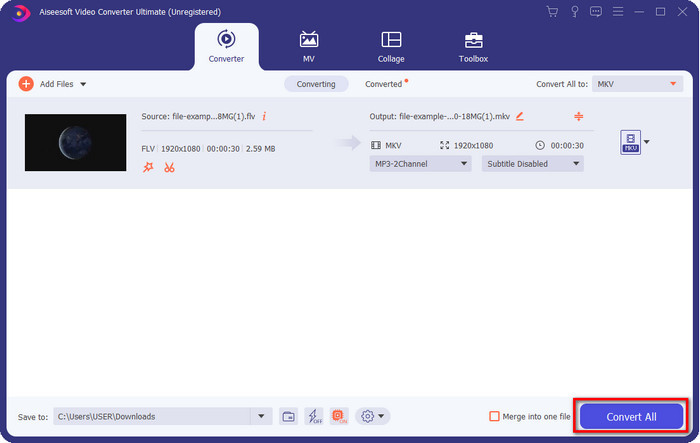
Adım 4. Son olarak, FLV’yi MKV formatına dönüştürmek için Convert All (Tümünü Dönüştür) düğmesine tıklayın. İşlem yalnızca bir dakikadan kısa sürecektir, bu yüzden uzun süre beklemenize gerek yok. Dönüştürülmüş FLV dosyasının bulunduğu bir klasör ekranınızda açılacaktır.
İlgili:
Bölüm 3. FLV ve MKV Arasındaki Fark Nedir?
FLV ve MKV, herkesin bildiği en iyi kaplar arasında olduğu bilinmektedir. Ancak her şeyden önce, iki format hakkında daha ayrıntılı bilgileri karşılaştıralım ve görelim.
FLV, tüm web sitelerinde bilinir, çünkü web sayfalarında popülerdir, özellikle de Adobe tarafından yaratılmıştır. Ayrıca, .flv, diğer biçime göre yüklenmesi çok daha kolay olduğu için video akışlarını çevrimiçi oynatır. Ayrıca, videoyu bu formatta görüntüleyebilmeniz veya izleyebilmeniz için veya Flash Player'ı kolayca indirebilmeniz için bu formatın bir eklentiye ihtiyacı vardır. Format mükemmel olsa da, kullandığı eklentiler çoktan kalktı, bu da formatın en iyi seçim olmadığı anlamına geliyor. Ancak, birçok medya oynatıcı hala bu formatı ve onu kullanan kullanıcıları desteklemektedir.
MKV, mevcut en geleceğe benzer format olarak bilinir. Karşılaştırmak üzere olsaydık, bu format pek çok anlamda başka bir formata benzemezdi. Örneğin, bu formatta oluşturulan yapı MP4 veya AVI ile aynı değildir, ancak farklıdır. Tasarım ve benzersiz medya dosyası depolaması onu daha etkileyici kılıyor. Günümüzde hangi formatın modası geçmiş olduğunu seçmek zor ve bunlardan biri MKV.
Daha fazla ayrıntıya inersek, FLV'yi MKV'ye dönüştürmeniz için birçok neden bulacağız. İki formatta medya içeriği bulunsa da MKV, FLV'den daha güçlüdür. Dolayısıyla, MKV'nin benzersiz gücüne sahip olmak istiyorsanız, dosyanızı bu formata dönüştürmelisiniz.
FLV ve MKV
Adobe Flash Player, filmler ve TV şovları gibi video içeriği sunmak için FLV'yi kullandı. Günümüzde Adobe, oynatıcıyı artık geliştirmiyor ve kullanıcılara güvenlik nedenleriyle onu kaldırmasını öneriyor. Ancak, Adobe/Macromedia dışındaki birçok programda FLV biçimini yine de kullanabilirsiniz.
2002'de piyasaya sürülen Matroska multimedya kap formatı, bir dizi video, ses, görüntü ve altyazı parçasını içerebilen açık kaynaklı bir formattır. Böylece kısa video klipleri, TV şovlarını ve filmleri kolayca saklamak için kullanabilirsiniz. Anime hayran aboneliği için oldukça popülerdir.
Bölüm 4. FLV'den MKV'ye Dönüştürme hakkında SSS
FLV'yi çevrimiçi olarak MKV'ye dönüştürmek güvenli midir?
Bir web aracı kullanıyorsanız, dönüştürme biçimi güvenli olmalıdır. Ancak, tüm çevrimiçi dönüştürücüler dosya biçiminizi dönüştürmek için güvenli değildir. Bazı eğilimler olduğu için, yanlış dönüştürücü kullandığınızda birçok beklenmedik hata olacaktır. Örneğin, kalite kaybı yaygın bir sorundur, dönüştürmeden sonra dosyayı indirdikten sonra oluşan virüsler, birden çok açılır reklam, bulaşıcı kötü amaçlı yazılımlar ve daha fazlası. Bu nedenle, çevrimiçi olarak güvenli bir dönüştürme işlemine sahip olmak istiyorsanız, bunun yerine FVC Free Video Converter Online'ı kullanmalısınız.
FLV'yi dönüştürmek zaman alacak mı?
Dönüştürme işlemi birçok faktöre bağlı olacaktır ve bunlardan biri kullandığınız araç ve dosya boyutudur. Büyük bir FLV dosyanız varsa, özellikle acele ederken FVC Video Converter Ultimate'ı kullanmalısınız. Bu araç yıldırım hızında bir işlem sağladığından, onu kullanmak için internet bağlantısına ihtiyacınız olmayacak. Ve şimdi, eğer formatınızı daha hızlı işleyebilecek bir dönüştürücü arıyorsanız, o zaman nihai araç seçimdir.
FLV dosyamı neden açamıyorum?
FLV dosyalarınızı açamamanızın birkaç nedeni vardır. Not alın; aşağıdaki ayrıntı, FLV dosyasını açamamanızın yüzüncü nedeninden biridir. Her şeyden önce, dosya kırılmışsa veya içinde virüs varsa bir FLV'yi açamazsınız. İkincisi, kullandığınız uygulamada video dosyasının desteklenmemesi en yaygın sorundur. Üçüncüsü, internetten bir FLV dosyası indirirseniz, dosyanın oynatmak için bazı hayati bilgileri kaybetmesi gibi bir durum olacaktır. Bu bir sorun olsa da, FLV'nizi başka bir formata dönüştürerek buna yardımcı olabiliriz. Ancak, hasarlı veya eksik olması durumunda biçimi değiştirerek FLV'yi geri yükleyemeyeceğinizi unutmayın.
Sonuç
FLV’yi MKV’ye dönüştürmek için gerekenleri farklı yollarla öğrenmiş olduk. Yukarıdaki araçlar, formatı yeni bir sürüme çevirmek istediğimizde kullanmak için harikadır. Artık formatınızı dönüştürürken size en uygun olduğunu düşündüğünüz aracı seçmek sizin elinizde. Yukarıdaki üç araçtan hangisini kullanırsanız kullanın başarı garantidir, ancak profesyonel bir çıktı ve video dosyanızdan en iyi sonucu almak istiyorsanız, FVC Video Converter Ultimate’ı tercih etmelisiniz. Ek bir açıklamaya gerek yok, çünkü bu araç ihtiyaçlarınız arasındaki tüm boşlukları dolduracaktır.
-
 FLV'yi Kayıpsız Olarak PSP'ye Dönüştürme Konusunda 3 Çözüm
 FLV'yi PSP'ye nasıl dönüştürebilirim? Burada, Windows ve Mac'te Flash videoları PSP destekli biçimlere (WMV, MP4, AVI, FLV, vb.) dönüştürmek için adım adım kılavuz bulacaksınız.
-
 FLV'yi WMA Audio'ya Dönüştürmenin 2 Yöntemi [Ücretsiz ve Çevrimiçi]
 FLV videodan WMA sesini çıkarmak ister misiniz? İşte Mac OS X ve Windows 10/8/7'de hızlı dönüştürme hızıyla FLV'yi (Flash Video) WMA'ya (Windows Media Audio) dönüştürmek için 2 ücretsiz WMA ses çıkarıcı.
-
 [Çözüldü] FLV Videolarını Animasyonlu GIF Dosyalarına Ücretsiz Dönüştürme
 Daha iyi göndermek için FLV video bölümlerinden GIF'ler oluşturmak istiyorsanız, bu makaleden FLV videolarını GIF dosyalarına nasıl kolayca dönüştürebileceğiniz hakkında daha fazla bilgi edinebilirsiniz.

