


 Video Dönüştürücü Ultimate
 Ekran kaydedicisi
 Video Onarımı
MKV'yi Ücretsiz Olarak FLV'ye Dönüştürmenin 5 Hızlı ve Zahmetsiz Yolu [Çevrimiçi ve Çevrimdışı]
MKV dosyalarınızı internet üzerinden paylaşamıyor musunuz, çünkü dosya boyutu çok mu büyük? Kaliteden ödün vermemek için dosyayı sıkıştırmak yerine neden dönüştürmüyorsunuz? Göndermeden önce aşağıdaki ayrıntıları okursanız bu sorun çözülecektir. Bu makaleyi okumak için bir saat harcamanıza gerek yok, öyleyse daha fazla uzatmadan, MKV’yi FLV’ye dönüştürmek için kullanabileceğiniz altı dönüştürücüyü keşfedelim.

Bölüm 1. En İyi MKV - FLV Dönüştürücü İndirmek İçin
FVC Video Converter Ultimate, MKV’yi FLV’ye zahmetsizce ve etkili bir şekilde çevirmenize yardımcı olabilir. Bu olağanüstü dönüştürücü, bu listedeki ya da hâlihazırda kullanıyor olabileceğiniz diğer dönüştürücülerden oldukça farklıdır. PC veya Mac’inize indirebileceğiniz, üst düzey bir kodlayıcı ve kod çözücüdür ve yüksek özellikli bir masaüstü kurulumunuz olmasa bile çevrimdışı olarak sorunsuz çalışır.

FVC Video Dönüştürücü Ultimate
4.987.355+ İndirme- MKV'yi FLV, AVI, MP4, MOV veya Windows ve Mac'te bulunan 200'den fazla formata dönüştürün.
- MKV formatınızı tüm masaüstleri ve cihazlarla uyumlu hale getirin.
- MKV formatlarınız veya diğer formatlarınız için toplu dönüştürme yapabilir.
- Herkes tarafından kullanmak için aptal geçirmez dönüştürücü.
- Yüksek tanımlı çıkışı ve hatta 4k'ye kadar video kalitesini destekler.
Ücretsiz İndirWindows 7 veya üstü içinGüvenli İndirme
Ücretsiz İndirMacOS 10.7 veya üstü içinGüvenli İndirme
FVC Video Converter Ultimate ile MKV’yi FLV’ye Nasıl Dönüştürürsünüz
Adım 1. Uygulamayı sürücünüze indirin ve ardından kurulum işlemini takip edin.
Ücretsiz İndirWindows 7 veya üstü içinGüvenli İndirme
Ücretsiz İndirMacOS 10.7 veya üstü içinGüvenli İndirme
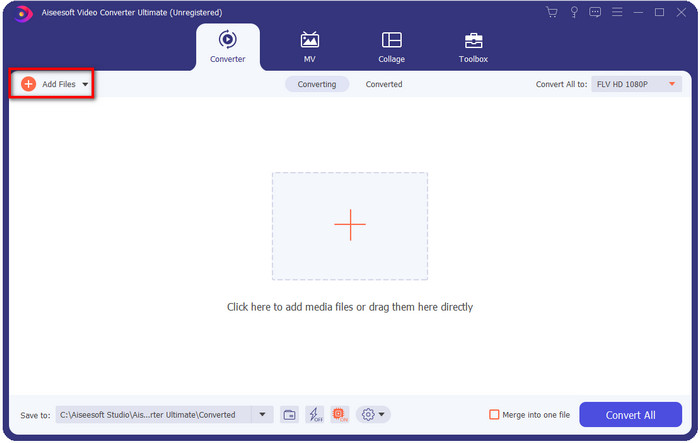
Adım 2. Kurulumdan sonra, MKV dosyalarını eklemek için uygulamayı açın; dosyayı arayüze sürükleyip bırakabilir veya Add Files düğmesine tıklayabilirsiniz.
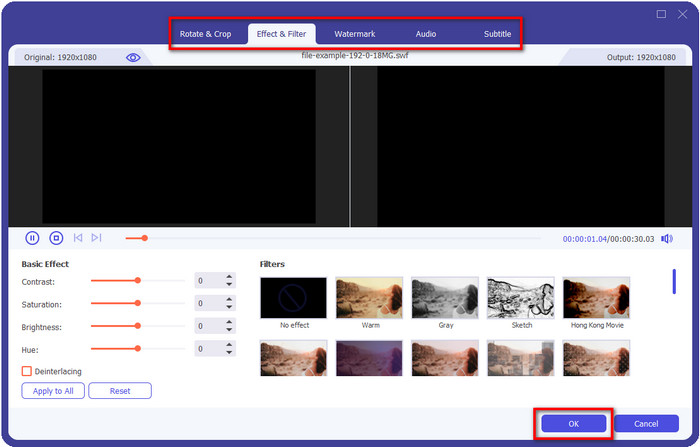
MKV dosyalarınızı dönüştürmeden önce düzenlemek isterseniz, çıktınıza sihir katmak için sihirli değnek düğmesine tıklayabilirsiniz; Örneğin Efekt ekleyebilir, Kırpabilir, Altyazı ekleyebilir ve daha fazlasını yapabilirsiniz. Videonuza eklediğiniz sihri kaydetmek için OK düğmesine tıklayın.
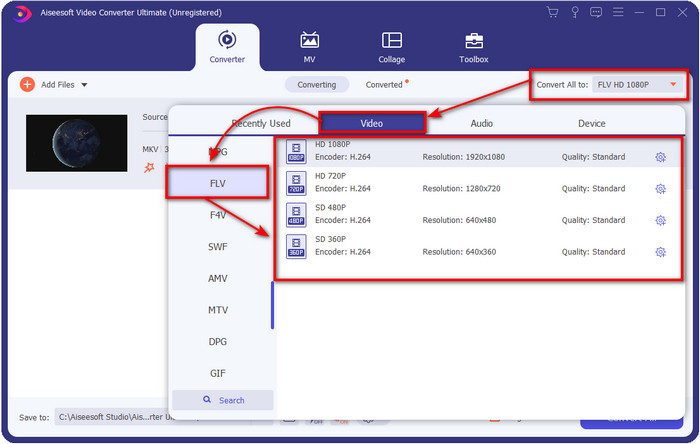
Adım 3. Açılır liste düğmesine tıklayın ve listeden FLV formatını seçin.
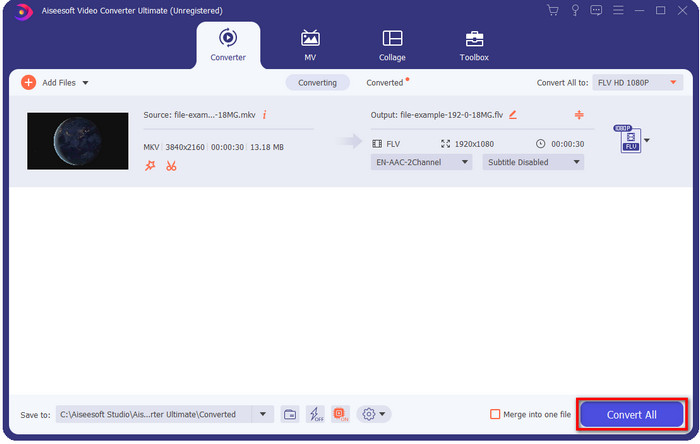
Adım 4. MKV’yi FLV’ye ücretsiz dönüştürmeye başlamak için Convert All düğmesine tıklayın. İşlemden sonra yeni FLV dosyasıyla birlikte bir klasör açılacaktır.
Bölüm 2. 4 En İyi Web Tabanlı MKV - FLV Dönüştürücü
1. FVC Ücretsiz Video Dönüştürücü Çevrimiçi
FVC Free Video Converter Online, tüm tarayıcılarda kullanılabilen, basit ama etkileyici bir ücretsiz çevrimiçi MKV’den FLV’ye dönüştürücü sunar. Ayrıca seçip yükleyebileceğiniz orta ölçekli formatları da destekler. Araç internete bağımlı olsa da, burada dosya dönüştürme ve yükleme işlemi daha kolay ve daha hızlıdır. Nasıl kullanacağınızı bilmek ister misiniz? O zaman aşağıdaki adımları takip edin.
Artıları
- İnterneti olan herkes tarafından kullanılabilir.
- Kullanıcı dostu ve anlaşılması kolay arayüz.
- Dosya boyutu için sınırlama yoktur.
- Video ve ses için gelişmiş ayarlar.
Eksileri
- Orta ölçekli format.
Adım 1. Çevrimiçi dönüştürücüyü açmak için bu bağlantıya tıklayın.
Adım 2. Bilgisayarınızın klasöründen dosya eklemek için Add Files to Convert düğmesine basın ve ardından Open’a tıklayın.
Dosyaları toplu dönüştürmek için Masaüstü Sürümü indirin.
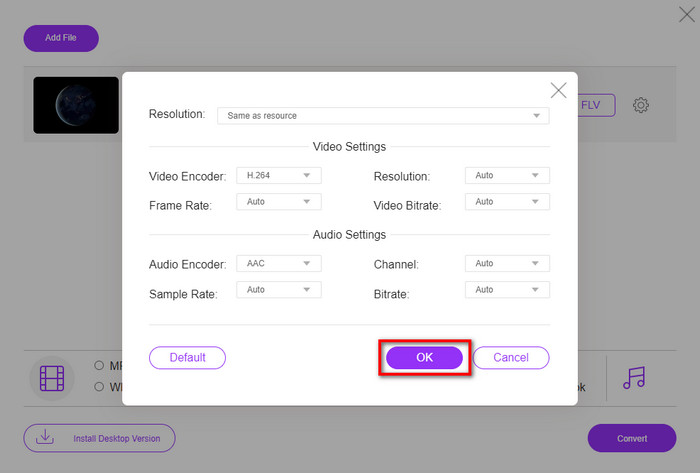
Burada videoları düzenleyemeseniz de, dişli düğmesine tıklayarak video ve ses ayarlarını değiştirebilirsiniz.
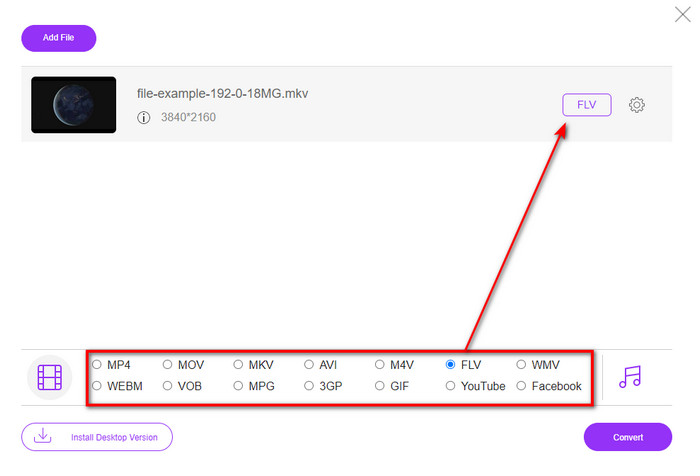
Adım 3. Listeden FLV formatını seçin.
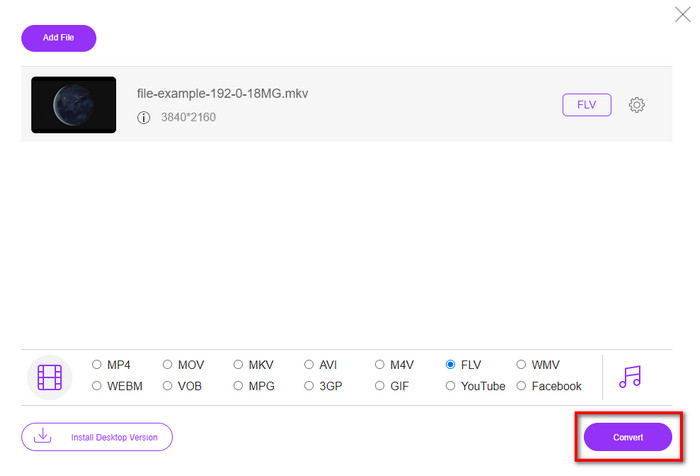
Adım 4. Dönüştürme işlemini başlatmak için Convert düğmesine tıklayın.
2. Mdönüştürücü
Çevrimiçi olarak kullanabileceğiniz en güvenli MKV’den FLV’ye dönüştürücülerden biri Mconverter’dır. Video ve ses formatlarını dönüştürmenin yanı sıra, burada görüntülerinizi, arşivlerinizi, belgelerinizi ve daha birçok medya formatını da dönüştürebilirsiniz. Bu dönüştürücü ücretsiz olmasına rağmen, ekleyebileceğiniz her dosya için bir sınır vardır.
Artıları
- Videoları, sesleri, belgeleri ve daha fazlasını çevrimiçi olarak dönüştürün.
- Birden çok dönüşümü destekler.
- Kullanımı kolay.
Eksileri
- Dosya boyutu 200 MB'ı geçmemelidir.
- Dosyayı dönüştürürken bazı reklamlar.
Adım 1. Tarayıcınızda Mconverter’ı açın, .mkv dosyasını sürükleyip kutunun içine bırakın.
Adım 2. FLV formatına tıklayın; işlem otomatik olarak başlayacaktır.
Adım 3. İşlem tamamlandığında, dosya otomatik olarak sürücünüze indirilecektir.
3. Freeconvert.com
Freeconvert.com, MKV’yi FLV’ye çevrimiçi ve ücretsiz olarak dönüştürmenize yardımcı olur. Bu web dönüştürücüsü, herkesin kullanabileceği kolay anlaşılır bir arayüze sahiptir. Ancak bu çevrimiçi dönüştürücü, seçebileceğiniz küçük ölçekli formatları destekler ve web arayüzünde oldukça fazla reklam bulunur.
Adım 1. Arama motorunuzda Freeconvert.com’u arayın.
Adım 2. .mkv dosyasını bilgisayarınızın klasöründen yüklemek için Choose File düğmesine tıklayın, ardından açılır liste düğmesine basıp FLV formatını seçin.
Adım 3. Dönüştürmeyi başlatmak için Convert FLV’ye tıklayın ve indirmek için Download FLV düğmesine tıklayın.
Artıları
- Kullanabileceğiniz ücretsiz bir çevrimiçi dönüştürücü.
- Güvenli ve basit web dönüştürücü.
- Dönüştürmek için 1GB'lık bir dosyayı destekler.
Eksileri
- Küçük ölçekli bir formatı destekler.
- Dönüştürme ve indirme işlemi çok zamanınızı alacaktır.
4. Movavi Çevrimiçi Video Dönüştürücü
Movavi Online Video Converter, MKV’yi FLV’ye çevrimiçi dönüştürmek için önerilen dönüştürücülerden biridir. Movavi Video Converter’ın, birçok kullanıcı tarafından tüm web’de kullanılan, ücretsiz web sürümüdür; sunduğu verimlilik ve profesyonel görünümü nedeniyle tercih edilir.
Adım 1. Favori tarayıcınızı açın ve Movavi’nin web sitesini arayın.
Adım 2. Dönüştürmek istediğiniz dosyayı eklemek için +Add Your Media düğmesine tıklayın. Açılır liste düğmesine tıklayıp Videoya basın; FLV formatını bulun ve tıklayın.
Adım 3. Dönüştürme sürecini başlatmak için Convert düğmesine basın.
Artıları
- Hiçbir reklam web arayüzü.
- Herkesin kullanabileceği basit dönüştürücü.
- Orta ölçekli bir formatı destekler.
Eksileri
- Biçimi dönüştürme işlemi daha fazla zaman alır.
- Diğer web dönüştürücüler gibi internete bağımlı.
Bölüm 3. Karşılaştırma Tablosu
| Özellikleri | FVC Video Dönüştürücü Ultimate | FVC Ücretsiz Video Dönüştürücü Çevrimiçi | Dönüştürücü | Freeconvert.com | Movavi Çevrimiçi Video Dönüştürücü |
| Biçim Yeteneklerini Dönüştürme |  | | | | |
| İnternete bağımlı |  | | | | |
| Toplu Dönüştürme | | | | | |
| Gelişmiş Düzenleme Özellikleri | | | | | |
| Mevcut Platformlar | Masaüstü Tabanlı Araç | Web Tabanlı Araç | Web Tabanlı Araç | Web Tabanlı Araç | Web Tabanlı Araç |
MKV ve FLV
2002'de piyasaya sürülen Matroska multimedya kap formatı, bir dizi video, ses, görüntü ve altyazı parçasını içerebilen açık kaynaklı bir formattır. Böylece kısa video klipleri, TV şovlarını ve filmleri kolayca saklamak için kullanabilirsiniz. Anime hayran aboneliği için oldukça popülerdir.
Adobe Flash Player, filmler ve TV şovları gibi video içeriği sunmak için FLV'yi kullandı. Günümüzde Adobe, oynatıcıyı artık geliştirmiyor ve kullanıcılara güvenlik nedenleriyle onu kaldırmasını öneriyor. Ancak, Adobe/Macromedia dışındaki birçok programda FLV biçimini yine de kullanabilirsiniz.
Bölüm 4. MKV'den FLV'ye Dönüştürme hakkında SSS
MKV dosyaları neden çok büyük?
MKV dosyalarının çok büyük olmasının iki temel nedeni vardır. Birincisi, bu formatın video, ses ve meta veriler gibi sınırsız içerik ve öğeyi tek bir dosyada barındırabilmesidir. İkincisi ise videonuz uzunsa, dosya boyutunun da doğal olarak artacak olmasıdır. Ancak bu MKV sıkıştırıcı sayesinde MKV dosyasını sıkıştırabilirsiniz. Fakat daha kolay bir yol istiyorsanız, MKV dosyalarını MP4, AVI, MOV, FLV vb. formatlara dönüştürmeyi düşünmelisiniz.
MKV, AVI'den daha mı iyi?
MKV ve AVI, yüksek çözünürlüklü video ve büyük dosya boyutlarını barındırabildikleri için neredeyse benzer formatlardır. Ancak bu kapsayıcıların onları benzersiz kılan farklı amaçları ve yapıları vardır. Örneğin AVI formatı, ham video içeriğini barındırabilen, oynatma amaçları için en uygun, sıkıştırılmamış bir formattır. Aynı zamanda MKV dosyasının geliştirilmesi için temel alınmıştır. MKV dosyalarının sıkıştırıcısı olmasına rağmen, içerik ve öğeleri AVI’nin barındırabileceğinden çok daha fazladır. Bu nedenle videolarınızın yüksek kalitesini korumak istiyorsanız MKV formatını tercih etmelisiniz. Ancak uyumluluk istiyorsanız, o zaman AVI doğru seçimdir. MKV’yi AVI’ye nasıl dönüştüreceğinizi öğrenmek istiyorsanız bu bağlantıya tıklayın.
El Freni, MKV'yi FLV'ye dönüştürmeyi işliyor mu?
El freni bu işi halledebilir, ancak bu dönüştürücü, 10'un üzerinde olmayan macOS ve Windows programlarını desteklemez.
Sonuç
Sonuç olarak, artık MKV’yi FLV’ye hem çevrimiçi hem de çevrimdışı nasıl dönüştüreceğinizi biliyorsunuz. Yukarıdaki araçlar rastgele seçilmedi; kullanıcıların tercihleri doğrultusunda seçtik. Araştırıp incelediğimizde, bu altı aracın dönüştürücü olarak işlerini en iyi şekilde yaptığını gördük. Ancak FVC Video Converter Ultimate, bir dönüştürücü olarak beklentilerimizin de ötesine geçiyor. Bu olağanüstü dönüştürücünün diğer yeteneklerini de öğrenmek ister misiniz? Öyleyse neyi bekliyorsunuz? Hemen indirmeniz gerekiyor.
-
 MKV'den MOV'a - MKV'yi MOV'a Dönüştürme
 Mac'te MKV'yi MOV'a nasıl dönüştürebilirim? İMovie, MKV'yi okuyabilir mi? MOV formatı ne anlama geliyor? Bu gönderi, ücretsiz çevrimiçi ve profesyonel video dönüştürücülerle MKV'yi MOV'a dönüştürmenize yardımcı olacak 2 basit yolu anlatıyor.
-
 Photoshop/FFmpeg olmadan MKV Videolarını Animasyonlu GIF'lere Dönüştürme
 MKV filmlerini bilgisayarınıza indirip izledikten sonra, harika anları arkadaşlarınızla veya internette GIF olarak paylaşmak isteyebilirsiniz. Bu makalede, MKV'yi GIF'e dönüştürmenin en kolay 2 yolunu öğrenebilirsiniz.
-
 MKV Dosyalarını MP3'e Nasıl Dönüştüreceğinize Dair İpuçları ve Püf Noktaları [2025]
 MKV'den MP3'e doğru dönüştürücüyü seçmekte sorun mu yaşıyorsunuz? Ardından, bir soruna farklı çözümler sunduğumuzdan bu yazıyı okumaya devam edin.

