


 Video Dönüştürücü Ultimate
 Ekran kaydedicisi
 Video Onarımı
XviD'yi FLV'ye Dönüştürmede Kullanılacak Olağanüstü Araçlar [Çevrimdışı ve Çevrimiçi]
GNU Genel Kamu Lisansı şartları altında dağıtılan, açık kaynaklı bir MPEG-4 video codec kitaplığı olan XviD, ücretsiz olarak indirilebilen bir video codec kitaplığıdır. Lisans kısıtlamalarına tabi olan ve bu nedenle yalnızca DivX Gelişmiş Araştırma Merkezi (DARC) üyeleri için kullanılabilen tescilli DivX Pro codec’ine rakip olarak geliştirilmiştir. Bu arada, .flv uzantılı bir dosya, Flash Video’nun kısaltmasıdır. FLV dosya uzantısı, Adobe Flash Player veya Adobe Air kullanılarak internet üzerinden iletilen bir video veya ses dosyasını ifade eder. Bu iki video formatı birbirinden farklıdır, ancak bunları birbirine dönüştürmeniz mümkündür. Aşağıda, XviD’i FLV’ye dönüştürmek için kullanmayı düşünmeniz gereken araçlar yer almaktadır.

Bölüm 1. XviD'yi FLV'ye Dönüştürmede Kullanılacak Etkili Yöntem [Çevrimdışı]
Sıfır kalite kaybıyla hepsi bir arada bir çözüm sunan Video Converter Ultimate sayesinde XviD'den FLV'ye dönüştürme hiç bu kadar kolay olmamıştı. Ayrıca arayüzün kullanımı kolaydır ve XviD dosyalarınızı sorunsuz bir şekilde FLV'ye kolayca dönüştürebilirsiniz. XviD'yi FLV'ye dönüştürme yeteneğinin yanı sıra Video Converter Ultimate, çok sayıda başka kullanışlı işlev sunar. Örneğin, bir videonun kalitesini artırabilir ve bir müzik videosu yapabilirsiniz. Artık bu yazılımı öğrendiğinize göre, aşağıda verilen prosedürleri izleyerek nasıl kullanacağınızı öğrenebilirsiniz:
Adım 1: Aşağıdaki Ücretsiz İndir düğmesine tıklayarak yazılımı indirmeye başlayın. Hem Mac hem de Windows için mevcuttur, bu yüzden hangi işletim sistemini kullandığınızı seçmeniz gerekir. Yazılımı indirdikten sonra bilgisayarınıza kurun.
Ücretsiz İndirWindows 7 veya üstü içinGüvenli İndirme
Ücretsiz İndirMacOS 10.7 veya üstü içinGüvenli İndirme
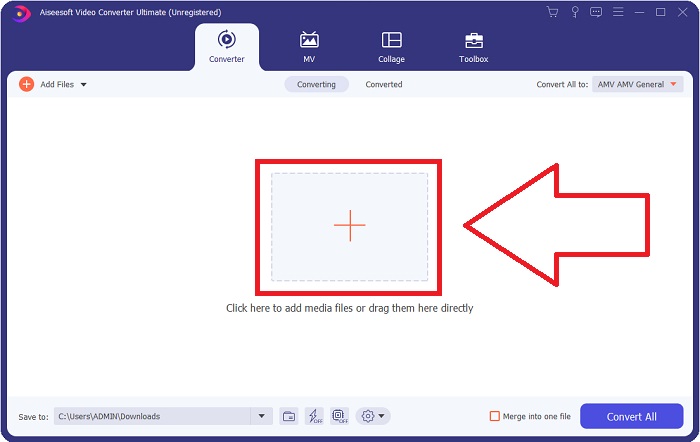
Adım 2: XviD’i FLV’ye dönüştürmeye başlamak için yazılımı başlatın. Yazılımı başlattıktan sonra, ekranda Dönüştürücü arayüzünü gösteren bir pencere açılacaktır. Pencerenin ortasında bulunan + düğmesine tıklayın veya bilgisayarınızdan dosya almak için videoları sürükleyip bırakın.
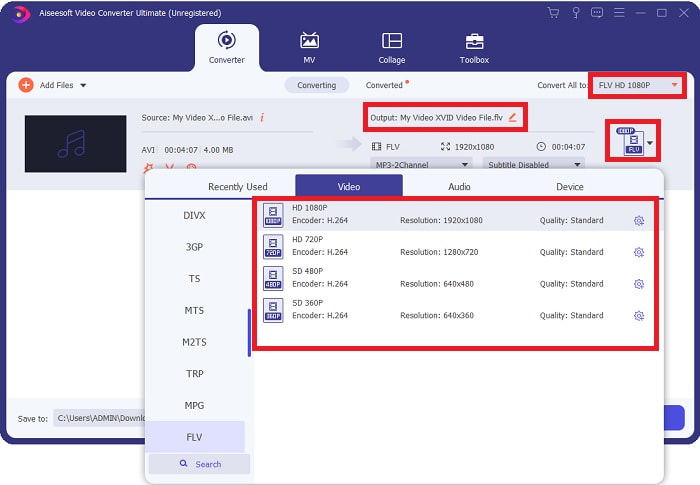
Adım 3: Ardından, başka bir pencere görünecektir. Ekranın sağ köşesindeki video formatı seçim kutusuna tıklayın. FLV video formatını bulun ve tercih ettiğiniz video kalitesine tıklayın.
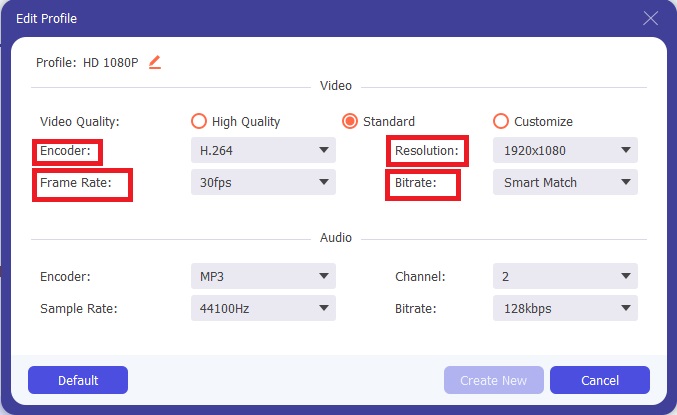
Adım 4: İstediğiniz kalite, yazılımın sunduğu video kaliteleri arasında yoksa, çözünürlük, bit hızı, kare hızı vb. ayarlayarak kendi video kalitenizi oluşturabilirsiniz. Bunu yapmak için, video formatınızı seçtikten sonra görüntülenen video kalitesinin hemen yanındaki dişli simgesine tıklayın. Ayarlamaları bitirdiğinizde Tamam’a tıklayın.
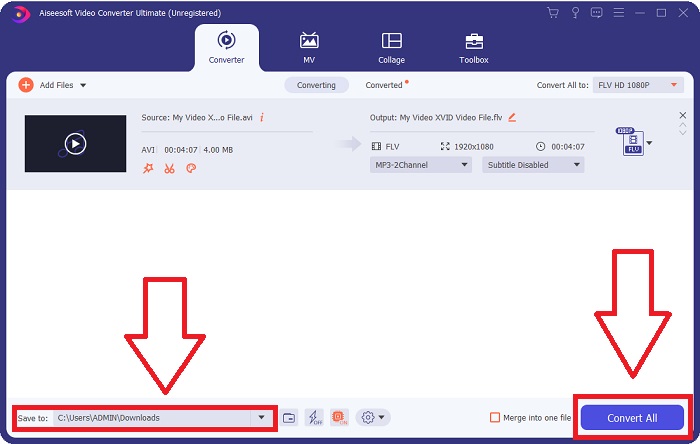
Adım 5: Tüm ayarlamalar yapıldıktan sonra, Tümünü Dönüştür düğmesine tıklayarak videoyu dönüştürebilirsiniz. Ayrıca Kaydet düğmesine tıklayarak dönüştürülmüş videolarınızın aktarılacağı klasörü belirleyebilirsiniz.
Bölüm 2. XviD'yi FLV'ye Dönüştürmede Mükemmel Bir Alternatif [Çevrimiçi]
Ücretsiz Çevrimiçi Video Dönüştürücü gibi çevrimiçi dönüştürücüler için herhangi bir yazılım indirmenize, kurmanıza veya kaydolmanıza gerek yoktur. Bu çevrimiçi aracı kullanarak dosyalarınızı doğrudan tarayıcı penceresinden kolayca ve hızlı biçimde dönüştürebilirsiniz. Birkaç saniye içinde HD videolarınızı, orijinal kalitelerini koruyarak MP4, FLV veya diğer popüler video formatlarına dönüştürebilirsiniz. Bu çevrimiçi araçlar her durumda işinize yarayabilir; bu yüzden aşağıda verilen adımları öğrenmeniz gerekir:
Adım 1: Ücretsiz Çevrimiçi Video Dönüştürücü’nün ana web sayfasına gitmek için bu bağlantıya tıklayın. Ana web sayfasına gittikten sonra Dönüştürülecek Dosyaları Ekle düğmesine tıklayın; ardından ekranın üst kısmında bir pencere görünecek ve çevrimiçi aracı kullanmak için başlatıcıyı indirmek üzere İndir’e tıklayın. Başlatıcıyı bilgisayarınıza kurun ve çevrimiçi aracı açmak için tekrar Dönüştürülecek Dosyaları Ekle düğmesine tıklayın.
Adım 2: Şimdi, aşağıda bulunan format seçimi bölümünden FLV video formatını seçebilirsiniz. Ardından, çözünürlük, kare hızı vb. gibi videonun tüm ayrıntılı özelliklerini ayarlamak için FLV video formatının hemen yanındaki dişli simgesine tıklayın. İşiniz bittiğinde Tamam’a tıklayın.
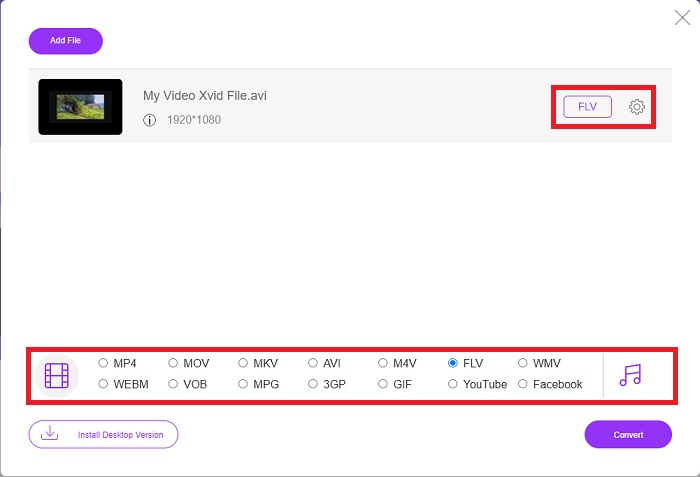
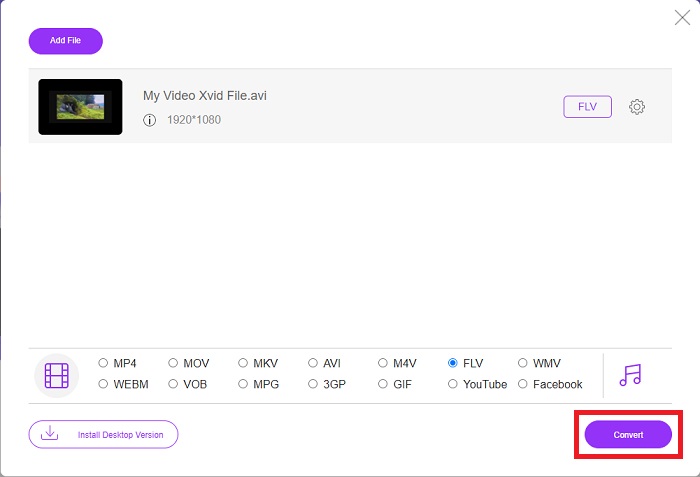
Adım 3: Son olarak, ekranın alt kısmındaki Dönüştür simgesine tıklayarak video dosyanızı dönüştürebilirsiniz. Bir iki dakika bekleyin; dönüştürme işleminizin tamamlandığını bildiren bir pencere açılacaktır.
Bu arada, bu aracı kullanarak FLV dosyalarınızı XviD’e dönüştürmeniz de son derece kolaydır.
Bölüm 3. Karşılaştırma Tablosu: XviD & FLV
XviD, XviD formatının codec bileşenini kullanır. Videoyu MP4 gibi bir video formatı yerine bir sıkıştırma standardı olan MPEG-4 ASP'ye sıkıştıran ve açan bir programdır. XviD içeriğinin sıkıştırma yetenekleri sayesinde, DVD kalitesini korurken tam uzunluktaki bir filmi CD'ye sığacak şekilde kısaltmak mümkündür. XviD video içeriği, .xvid dosya uzantısı kullanılsa bile çeşitli dosya kaplarında saklanabilir. Bir AVI dosyası, onu kimin oluşturduğuna bağlı olarak örneğin video.xvid.avi olarak adlandırılabilir. XviD, yazılım için ücretsiz ve açık kaynaklı bir lisans olan GPL kapsamındadır.
Ancak, Adobe Flash (FLV) kapsayıcı biçiminde kaydedilen Video dosyaları FLV dosyalarıdır. Standart Flash ile aynı şekilde ses ve kodlanmış video verileri akışları. Kısa başlıkta SWF formatı ve meta veri paketleri bulunur. Flash Video Exporter eklentisi (Adobe Animate ile birlikte gelir) veya FLV dosyalarını destekleyen başka bir uygulama ile, kullanıcılar Flash Video içeriklerini FLV formatında dışa aktarabilir. QuickTime ve Windows Media'ya ek olarak, Adobe Media Encoder diğer video formatlarını da kodlayabilir. Ayrıntılı karşılaştırma hakkında daha fazla bilgi sahibi olmanız için size aşağıda bir karşılaştırma tablosu sunuyoruz:
| Dosya uzantısı | XviD | FLV |
| Dosya tipi | MPEG-4 Bölüm 2 Uyumlu Video | Flash Video Dosyası |
| Tarafından geliştirilmiş | DivX, Inc. | Adobe Sistemi |
| Artıları | DivX, sıkıştırma açısından kalite ve dosya boyutu arasında hassas bir denge kurabilmesiyle ünlüdür. Sonuç olarak, ses ve video dosyalarını bir kaynaktan bilgisayarın sabit diskine kopyalama işlemi olan ve depolama ve dönüştürme için hazırlık olarak kopyalama işlemi için kullanılabilir. | Adobe Flash, animasyon ve etkileşimli öğeleri birleştirmek isteyen web siteleri için mükemmel bir seçimdir. Uzun vadede önemli bir etkiye sahip olma potansiyeline sahiptir. O zamanlar Flash'ın en popüler oyunları basitti. |
| Eksileri | Her platform için mevcut değildir. | Son birkaç yılda FLV'nin popülaritesi azaldı. FLV içeriğinin üretilmesi çok zaman ve para gerektirir. Flash'ın en büyük dezavantajlarından biri, iOS cihazlarda görüntülenememesi ve yeni takipçiler çekme yeteneğini ciddi şekilde sınırlandırmasıdır. |
| Programlar Video Formatını açar | ◆VLC Medya Oynatıcı◆ Windows Media Player& ◆ BS Oyuncu ◆ DivX Medya Oynatıcı ◆ Elmedia Oynatıcı | ◆ VLC Medya Oynatıcı ◆ Adobe Flash Player |
Bölüm 4. XviD'den FLV'ye Dönüştürme hakkında SSS
XviD codec bileşeni güvenli mi?
Xvid popüler ve etkili bir codec’tir ve kullanımı tamamen güvenlidir. Tanımadığınız veya güvenmediğiniz bir web sitesi ya da hizmetten Xvid codec’i indirmeniz iyi bir fikir değildir. Örneğin, bir bit torrent sitesinden codec paketi kurmanızı kesinlikle önermiyoruz; çünkü bunlar, meşru yazılım gibi görünen kötü amaçlı yazılımlar olabilir. İnternette video izlemeye çalışırken de aynı sorun ortaya çıkabilir. XviD dosyalarınızı oynatmak için deneyebileceğiniz en iyi XviD oynatıcılarına dair incelemeler burada yer almaktadır.
XviD codec bileşeni ücretsiz mi?
Xvid Codec Pack, ücretsiz bir video sıkıştırma ve kaliteli codec bileşenidir. Xvid, modern CPU'lar için optimize edebildiği için son derece hızlıdır. Bir kameradan gerçek zamanlı video kaydı ve sorunsuz HD video oynatımı sorun çıkarmaz. Bilgisayarınızın kalan gücü diğer şeyler için bol olacak!
FLV akışı nedir?
FLV, dosya tabanlı aşamalı akışı 'destekleyen' basit bir kapsayıcıdır, çünkü bir kişinin videoyu bütünüyle oynatırken bir videonun bayt aralığının yalnızca bir kısmını almasına izin verir (mp4 için, oynatma için Moov gibi metalara ihtiyacınız olacaktır). . )
Sonuç
Verilen tüm noktaları sonuçlandırmak için, yazılım ve çevrimiçi araçlar açısından bu iki en iyi ve kullanıcı dostu dönüştürücü sayesinde XviD'nin FLV'ye dönüştürülmesinin mümkün olduğunu biliyoruz. Bu makale, diğer yazılımlar ve çevrimiçi araçlarla karşılaştırılabilir bir araç olmadığı ve Windows'ta mı yoksa Mac'te mi kullanacağınızı seçmek zorunda olmadığınızdan, her iki işletim sisteminde de ücretsiz olarak kullanabileceğiniz için en çok bunu önerir.
-
 Masaüstünde / Çevrimiçi Olarak TS'yi FLV'ye Dönüştürmek İçin 4 Doğrulanmış Yöntemler
 Varsayılan olarak bilgisayarınızda veya cep telefonunuzda TS'yi açamazsınız. Video dosyalarını izlemenin tek yolu, somut kılavuzumuzla TS'yi FLV'ye veya diğer formatlara dönüştürmektir.
-
 MTS'yi Ücretsiz ve Çevrimiçi FLV'ye Dönüştürmek için 3 Çözüm
 MTS'yi FLV'ye dönüştürmek ister misiniz? Mac OS X ve Windows 10/8/7'de MTS'yi FLV'ye dönüştürmeyi deneyebileceğiniz 3 ücretsiz MTS'den FLV'ye dönüştürme yazılımı.
-
 VOB'u FLV'ye Dönüştürmenin En İyi Yolları [Ücretsiz ve Çevrimiçi Dahil]
 Bir VOB dosyasını bir FLV dosyasına dönüştürmek ister misiniz? Görevi masaüstü veya çevrimiçi dönüştürücülerle kolayca tamamlayabilirsiniz. Bu kılavuzu okuyun ve VOB'u FLV'ye nasıl kolay ve hızlı bir şekilde dönüştüreceğinizi öğrenin.
