


 Video Dönüştürücü Ultimate
 Ekran kaydedicisi
 Video Onarımı
 Güvenli İndirme
Bir GIF'i iPhone'da 5 İnanılmaz Yolla Video Olarak Kaydetme
Başka kim insanların çevrimiçi ortamda Grafik Değişim Biçimi ya da GIF aracılığıyla bu kadar ifade dolu etkileşim kurabileceğini tahmin ederdi? Bu dosyalar, küçük bir çözünürlükte ve animasyonlu video klipler olarak tasarlanmıştır. İster komik bir mesaja hava katmak isteyin ister sevdiklerinize sarılma göndermek isteyin, GIF’ler en büyük yardımcınız olacaktır. Bu yazıda, binlerce GIF’e erişebileceğiniz birkaç sosyal medya sitesini derledik ve size farklı platformlarda iPhone’da hareketli GIF nasıl kaydedilir öğreteceğiz.

Bölüm 1: GIF'leri iPhone'a Kaydetme [iOS16/17]
1.Safari
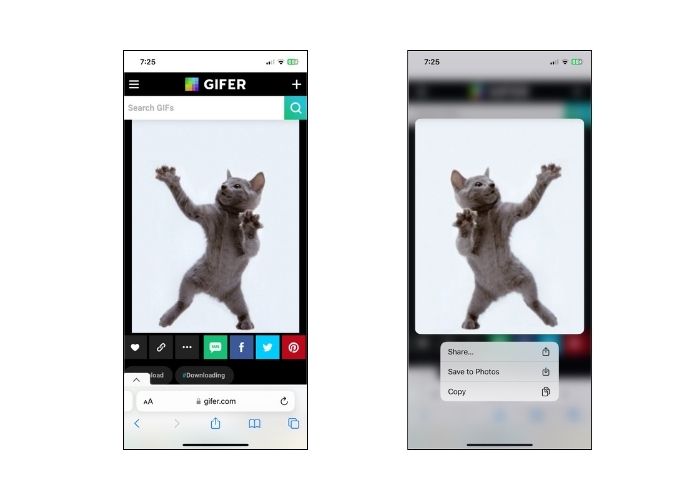
Diğer tarafa gitmeyelim ve ilk olarak herhangi bir iPhone modelinin yerel tarayıcısı olan Safari ile başlayalım. GIF'lerin iPhone'a Safari'den nasıl kaydedileceğine ilişkin adımları izleyin.
1. Adım. Telefonunuzda Safari uygulamasını açın ve istediğiniz GIF’i arayın.
2. Adım. Seçtiğiniz GIF paylaşım sitesinde hedef GIF’inize dokunup basılı tutun.
3. Adım. Ardından menüden Fotoğraflara Kaydet seçeneğine dokunun; GIF Fotoğraflar uygulamanıza kaydedilecektir.
2.Twitter
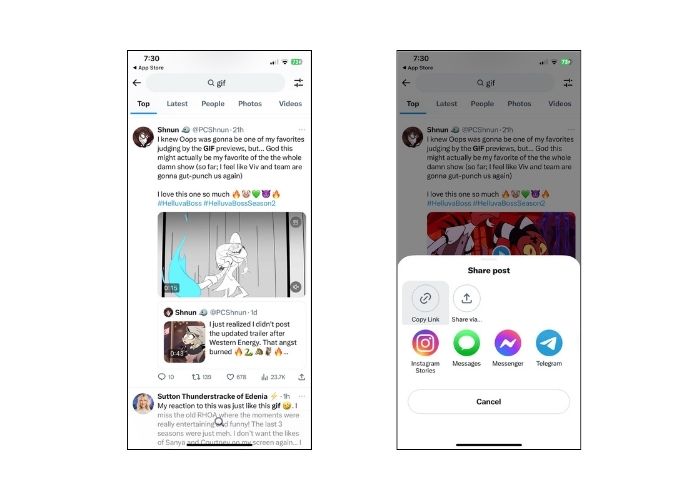
Benzersiz ve etkileyici GIF'ler bulmak istiyorsanız, bugün X olarak bilinen Twitter gibi bazı çevrimiçi sosyal ağ sitelerini denemek harika bir seçenektir. İnsanların tweet'lerinden hangisini seçeceğiniz konusunda gerçekten kapsamlı bir seçeneğe sahip olacaksınız. Twitter'dan bir iPhone'a GIF nasıl kaydedilir? Aşağıdaki kılavuzu izleyin.
1. Adım. iPhone’unuzda Twitter uygulamasını açın ve sahip olmak istediğiniz GIF’e gidin.
2. Adım. Hedef GIF içeren tweet’i seçtikten sonra Menüye dokunun ve bağlantıyı kopyalayın.
3. Adım. Son olarak bağlantıyı GIF indiricisine yapıştırın ve Kitaplığa Kaydet düğmesine basın.
3.Google
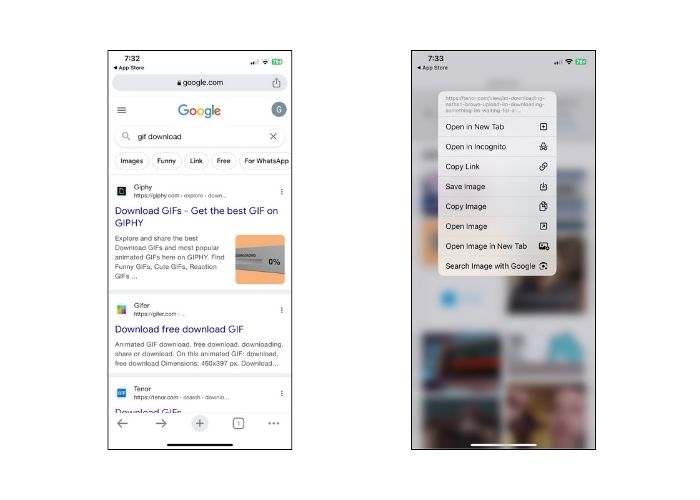
Arama motorlarına gelince, Google belki de dünya çapında en popülerlerden biri olarak kabul ediliyor. Üstelik bu arama motoru, web üzerindeki milyonlarca GIF'i görüntülemenize ve ihtiyacınız olanı size vermenize olanak tanır. GIF'leri Google'dan bir iPhone'a nasıl kaydedeceğiniz aşağıda açıklanmıştır.
1. Adım. iPhone cihazınızda Google Chrome’u açın. Arama çubuğuna kaydetmek istediğiniz GIF’i yazın.
2. Adım. GIF’i bulduğunuzda Menüye dokunun ve Resmi Kaydet seçeneğine basın.
3. Adım. Daha sonra, GIF’in Fotoğraflar uygulamanıza eklenmesine izin verip vermeyeceğinizi soran bir bildirim görmelisiniz. Devam etmek için TAMAMa dokunun.
4.GIPHY
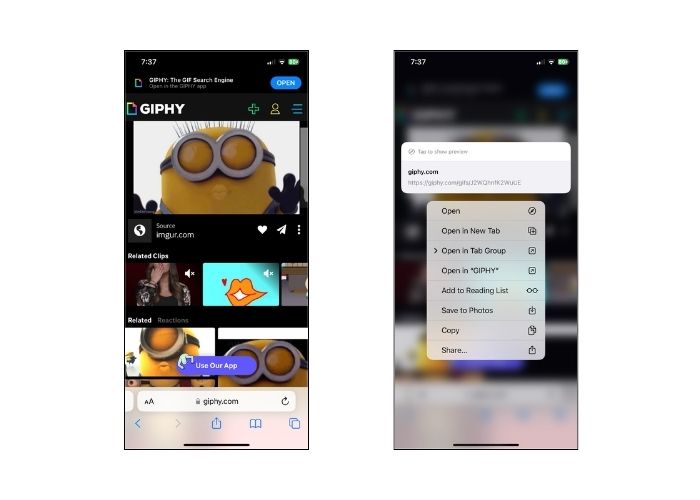
GIPHY, insanların her durumda çok sayıda GIF'e erişmesine olanak tanıyan çevrimiçi bir web sitesidir. GIPHY'den bir GIF'in iPhone'a nasıl kaydedileceğini bilmek istiyorsanız aşağıdaki kılavuzu izleyin.
1. Adım. Web tarayıcınızı açın ve GIPHY’nin resmi sitesine gidin. Ardından hedef GIF’inizi bir anahtar kelimeyle arayın veya listeden belirli bir kategoriyi seçin.
2. Adım. GIF’i seçtikten sonra, seçim görünene kadar GIF’e dokunup basılı tutun.
3. Adım. Son olarak Fotoğraflara Kaydet seçeneğini işaretleyin; GIF yerel dosya depolamanıza eklenecektir.
5.WhatsApp
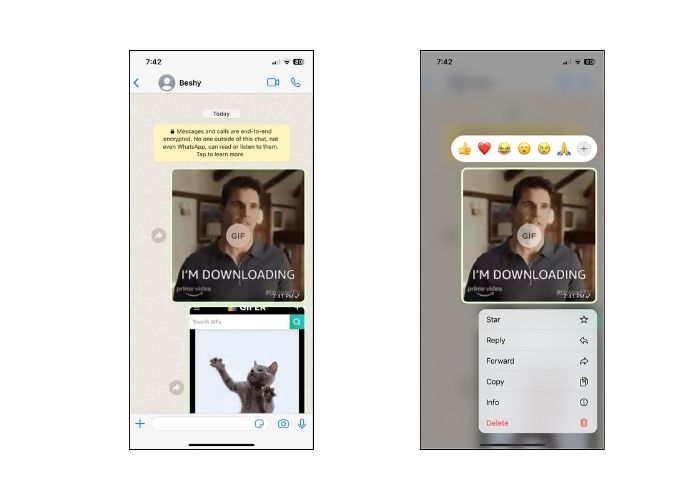
Günümüzde oldukça kötü şöhrete sahip olan bir diğer çevrimiçi iletişim platformu ise WhatsApp'tır. Diğer tüm dijital iletişim araçları gibi WhatsApp da arkadaşlarınızdan ve sevdiklerinizden GIF almak için en iyisidir. Ayrıca iPhone'da WhatsApp'tan bir GIF'in nasıl kaydedileceğine dair kapağımızı da aldık.
1. Adım. GIF’in bulunduğu sohbet kutusuna veya gruba gidin.
2. Adım. Kayıtlı Medya veya Sohbet içinde gezindikten sonra GIFe dokunun ve menü görünene kadar 3 saniye basılı tutun.
3. Adım. GIF’i dosyalarınıza eklemek için Kaydeti seçin.
Bölüm 2: GIF'leri neden iPhone'a kaydedemiyorum?
GIF'leri iPhone'a kaydetme girişimleri başarısız olduğunda çeşitli faktörlerin dikkate alınması gerekir. Aşağıdaki nedenlere bakın ve hangisinin suçlu olduğunu belirlemeye çalışın.
1. iPhone’da GIF kaydedemiyorsanız, bunun nedeni internet bağlantınız olabilir. Bu durumda, internetinizin çalışıp çalışmadığını görmek için Ayarlar > Wi‑Fi yoluna tıklayarak kontrol edin.
2. Ekran görüntülerini indiremiyor ve hatta alamıyorsanız iPhone'unuzu yeniden başlatmayı deneyin. Bu durumda telefonunuz sıfırlanacaktır.
3. Uygulamadan çıkmaya zorlamak da yararlı olabilir. Uygulamadan çıktıktan sonra aksaklığın çözüleceği durumlar vardır.
4. Son olarak depolama alanınızı kontrol edin. Dosyalarla doluysanız fotoğrafları, videoları silerek ve hatta kullanılmayan bazı uygulamaları kaldırarak bir miktar yer açmanız gerekebilir.
Bölüm 3. iPhone'da GIF'i Video Olarak Kaydetme
1. Video Dönüştürücü Ultimate
Bazen bir GIF’i videoya dönüştürmemiz gerekir, ancak bu durumda her GIF oluşturucu bunu yapamaz. Bu yüzden size yardımcı olacak harika bir platform var. Video Converter Ultimate, GIF’i bir video dosyasına sorunsuz ve hızlı bir şekilde dönüştüren, GPU hızlandırmalı bir araçtır. Ayrıca videoları MOV, FLV, MP4, ASV ve daha fazlası gibi başka dosya uzantılarına da dönüştürebilirsiniz. Tüm bunların yanı sıra, bu araç çekimlerinizin 1:1 oranlı kalitesini koruma konusunda da harikadır.
Adım 1. En İyi GIF’ten Videoya Dönüştürücüyü Kurun
Önce, işletim sisteminize uygun olan alttaki İndir düğmesine gidin. Ardından, dosyayı çalıştırarak bilgisayarınızda başlatın.
Ücretsiz İndirWindows 7 veya üzeri içinGüvenli İndirme
Ücretsiz İndirMacOS 10.7 veya üstü içinGüvenli İndirme
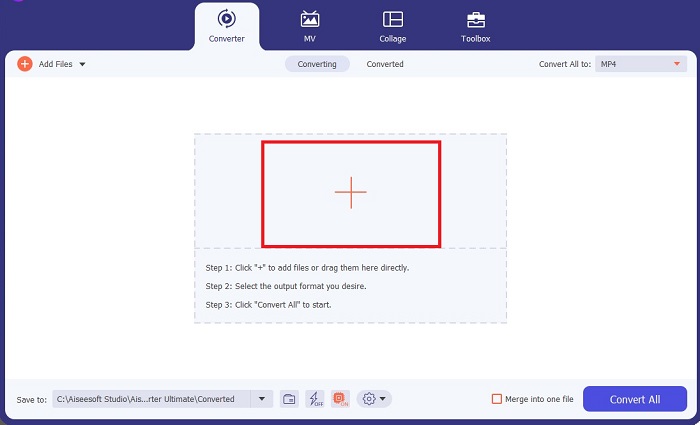
Adım 2. GIF dosyasını içe aktarın
GIF dosyanızı yüklemek için ekranın ortasındaki Artı düğmesine tıklayın. Bir klasör yükleyerek birden çok GIF dosyasını toplu hâlde de dönüştürebilirsiniz.
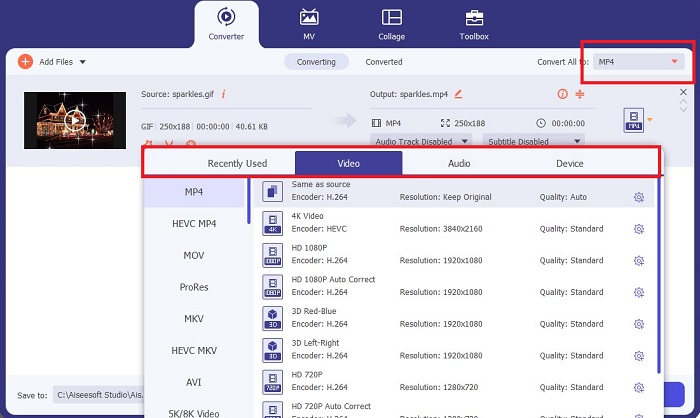
Adım 3. Video Biçimini Seçin
GIF’iniz ekranda göründüğünde, video biçimi listesini açmak için Çıktı sekmesini aşağı kaydırın. Dosyanızın uyumluluğunu korumak için MP4ü seçin.
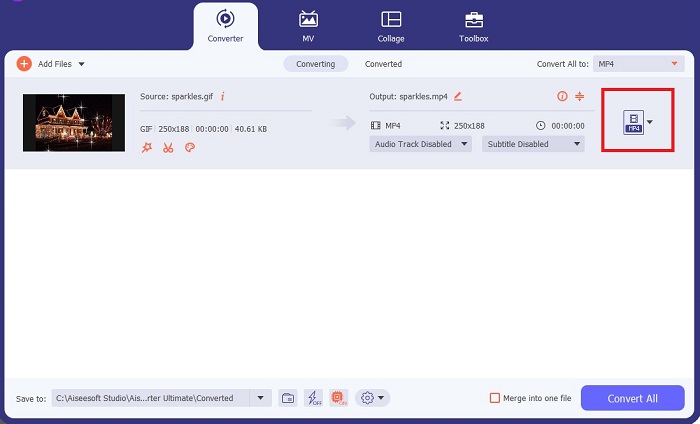
Adım 4. Projeyi Kaydedin
Son olarak, dönüştürme işlemini başlatmak için ekranın altındaki Dönüştür düğmesini işaretleyin. Ayrıca, dönüştürülen GIF’lerinizin kaydedildiği yerel dizine erişmek için Klasöre tıklayarak dosyanızı kontrol edebilirsiniz.
Daha Fazla Okuma:
Tüm Platformlarda GIF Yazısı Eklemenin Yenilmez Yöntemleri
Etkili ve Kullanışlı Araçlarla GIF Arka Planını Kaldırma
Bölüm 4. iPhone'a GIF Kaydetmenin Yolları Hakkında SSS
Bir e-postadan iPhone'unuza bir GIF kaydedebilir misiniz?
Kesinlikle! Bir e-postadaki herhangi bir GIF'i Film rulonuza kaydedebilirsiniz. Yalnızca e-postanızdaki Paylaş simgesine dokunun ve Dosyayı kaydet'i tıklayın.
iPhone'umda Twitter'da GIF yayınlayabilir miyim?
GIF'ler Tweeter dahil sosyal medya sitelerinde paylaşılabilir. Bunu bir resim yayınlayarak yapabilirsiniz.
İPhone'da kayıtlı GIF'ler nerede bulunur?
GIF'leri kaydettikten sonra iPhone'unuzda Dosya Gezgini'ne gidebilir veya Fotoğraflar uygulamasını yenileyebilirsiniz.
iPhone'daki film ruloma bir GIF kaydedebilir miyim?
Kesinlikle! Film rulonuza bir GIF dosyası kaydetmek istiyorsanız, bunu tipik bir görüntüde yaptığınız gibi kaydedebilirsiniz. Resme 3 saniye boyunca basın veya Menü'ye dokunun. Daha sonra Resmi Kaydet'e tıklayın.
Reddit gifleri iPhone'a nasıl kaydedilir?
Yukarıda belirtilen adımları kullanarak GIF'leri Reddit'ten kaydedebilirsiniz. GIF'inizi kameraya kaydettikten sonra, iPhone'da kayıtlı GIF'i bulmanın en iyi yolu Dosya dizininizi açmaktır. İndirdiğiniz fotoğraflarınızın veya GIF'lerinizin Fotoğraflar uygulamasında görünmediği durumlar olabileceğinden, yapılması en uygun şey budur.
Sonuç
GIF’leri dönüştürmek de dâhil olmak üzere nasıl düzenleyeceğinizi bilmek, dijital çağın dünyasında fark yaratmak istiyorsanız gereklidir. İşte farklı sosyal medya siteleri ve uygulamaları üzerinden iPhone’da GIF nasıl kaydedilir sorusuna yönelik yöntemler.
-
 Göz Alıcı GIF'ler Yapmak İçin Videoyu GIF'e Dönüştürme
 Özenle seçilmiş videodan GIF'e dönüştürücülerimiz ve izlemesi kolay videodan GIF'e sürecimizle videolarınızı nasıl zahmetsizce ilgi çekici GIF'lere dönüştüreceğinizi keşfedin.
-
 Özellikler ve Alternatiflerin Kapsamlı Ezgif İncelemesi
 Ezgif kullanıyorsanız ve hala ne olduğunu bilmiyorsanız. Bu Ezgif incelemesi bu konuda size yardımcı olacaktır. Daha fazlasını öğrenmek için okumaya devam edin.
-
 Masaüstü ve Çevrimiçi Kullanıcılar için En İyi 10 GIF Kompresörü
 Bu yazıda, büyük GIF dosyalarıyla ilgili sorununuzu çözmenize yardımcı olacak en iyi GIF sıkıştırıcılarını öğreneceksiniz. Bunları inceleyin ve en iyi bilgileri edinin.
