


 Video Dönüştürücü Ultimate
 Ekran kaydedicisi
 Video Onarımı
TS'yi GIF Çevrimiçi ve Çevrimdışı Olarak Değiştirmek için En İyi TS - GIF Dönüştürücüler
TS dosyaları MPEG taşıma akışları olarak bilinir, daha basit söylemek gerekirse taşıma akışıdır. Bu tür dosyalar, birden fazla oynatımı eşzamanlı hâle getirdikleri için en çok DVD’lerde görülür. Bu TS dosyası MPEG için standart bir dijital depolama biçimi olsa da TS, diğer formatlara göre daha düzdür. DVD’lerdeki kliplerin çoğu, dünya çapında kolayca aktarılabilmesi için .ts adı verilen bir formatta saklanır. Ancak bazı medya oynatıcılar, videonun, sesin ve diğer akışlı oynatmaların çoklanmış (multiplex) yapısı ve çoğu zaman dosya boyutunun çok büyük olması nedeniyle .ts dosyalarını oynatamaz. Dolayısıyla bu sorunu çözmenin ve ayrıca depolama alanından tasarruf edip dosyayı sürücünüzde saklayabilmenin yolu onu dönüştürmektir. Bu araç yardımıyla TS’yi GIF’e dönüştürmeyi ve iki format arasındaki farkı öğrenelim.

Bölüm 1. TS ve GIF
TS ve GIF'lerin her ikisi de medya dosyalarının kapsayıcılarıdır, ancak özellikle dosya formatının içerdiği önemli farklılıklara sahiptir.
Örneğin, TS dosyaları genellikle DVD'lerde, Blu-ray'de ve diğer çevrimiçi yayın ve akışlarda bulunur. Ancak aktarım akışı verileri, oynatmada verimli biçimlerden biri olmak için bir araya getirilmiş farklı bir öğeye sahiptir.
Bu öğeler şunlardır
● VIDEO_TS.VOB – ses ve video için veri kabı.
● VIDEO_TS.BUP – bilgileri yedeklemek için veri kabı.
● VIDEO_TS.ISO – menü, alt yazılar, alt yazılar ve daha fazlası gibi veriler burada.
● AUDIO_TS – en yaygın olarak boş veriler.
Ancak GIF'lerin TS dosyasındaki gibi bir öğesi yoktur. Ancak GIF'lere erişmek bu dosyadan daha kolaydır ve diğer formata kıyasla boyut olarak çok daha küçüktür. Ancak GIF dosyalarının dezavantajı, burada ses dosyalarını içerememenizdir. Çünkü GIF ses dosyaları içermez ve daha az fps'li renk paletlerinde daha azdır.
Bölüm 2. PC ve Mac'te TS'yi GIF'e Dönüştürme [Program ve Web Tabanlı Araçlar]
1. GIF Maker'a FVC Bedava Video
FVC Free Video'da GIF'ler oluşturun ve GIF Maker'a dönüştürün. Bu araç, halihazırda web'de karşılaştığınız herhangi bir çevrimiçi dönüştürücüden çok daha iyidir. Araç, sınırlı formatları desteklemesine rağmen, burada listelenen en iyi dönüştürücülerden biridir ve nihai dönüştürücünün yanındadır. Bu araç tarafından size getirilen dönüştürme işlemi, CloudConvert ve Convertio'dan çok daha hızlı ve daha güvenlidir, ancak çok daha hızlı istiyorsanız, aşağıdaki bir sonraki araca geçin. Çünkü bu araçtan 30 kat daha hızlı ve herhangi bir web veya program tabanlı araçtan 100 kat daha hızlı. Bu nedenle, bu TS'nin GIF dönüştürücüsüne dönüşümünü test etmek için aşağıdaki adımları izlemelisiniz.
Adım 1. Aracı sürücünüze indirin ve kurun.
Ücretsiz İndirWindows 7 veya sonrası içinGüvenli İndirme
Ücretsiz İndirMacOS 10.7 veya sonrası içinGüvenli İndirme
Adım 2. Kurulumu düzenleyip aracı başlattıktan sonra, arayüzün sol üst kısmındaki Dosya Ekle düğmesine tıklayın ve GIF dosyasını eklemek için aç seçeneğine tıklayın.
Adım 3. Ana arayüzde aşağıda Profil olduğunu göreceksiniz, ona tıklayın. Artık .ts dosyasını istediğiniz formata dönüştürebilirsiniz.
Adım 4. .ts dosyasını dönüştürmeyi başlatmak için Dönüştür düğmesine tıklayın ve devam edin.
Adım 5. Birkaç dakika bekleyin ve dönüştürmenin bitmesine izin verin. Ardından .gif dosyasını Dosya Gezgini’nde bulun ve keyfini çıkarın.
2. FVC Video Dönüştürücü Ultimate
Eğer sorun dönüştürme ise, o hâlde FVC Video Converter Ultimate en iyi çözümdür. Karşılaşabileceğiniz farklı dönüştürme sorunlarını her zaman çözer. Bu araç, oynatılamayan formatları oynatılabilir hâle getirebilir ve ardından bunları geliştirebilir. Bu üstün dönüştürücü, çevrimiçi olarak bir milyondan fazla kullanıcı tarafından kullanılmıştır ve kullanıcılar tarafından beğenilmektedir. Ancak bu şekilde çalışan her aracın ücretli olması gerekir, fakat pahalı şeylerden hoşlanmıyorsanız bu araç tam size göre. Ekonomik bir fiyata sahip olmasının yanı sıra, bu araç bir videoyu şimdiye kadar gördüğünüz en iyi GIF’e dönüştürebilir. O hâlde daha fazla uzatmadan, yalnızca sizin için verilen adımları izleyerek TS’yi GIF formatına dönüştürmenin ayrıntılı aşamalarına geçelim.
Adım 1. Bu üstün dönüştürücüye sahip olmanın ilk adımı onu PC veya Mac sürücünüze indirmektir. Kurun ve isterseniz ayarlarını değiştirin, ardından değişiklikleri kaydetmek için bitir’e tıklayın.
Ücretsiz İndirWindows 7 veya üstü içinGüvenli İndirme
Ücretsiz İndirMacOS 10.7 veya üstü içinGüvenli İndirme
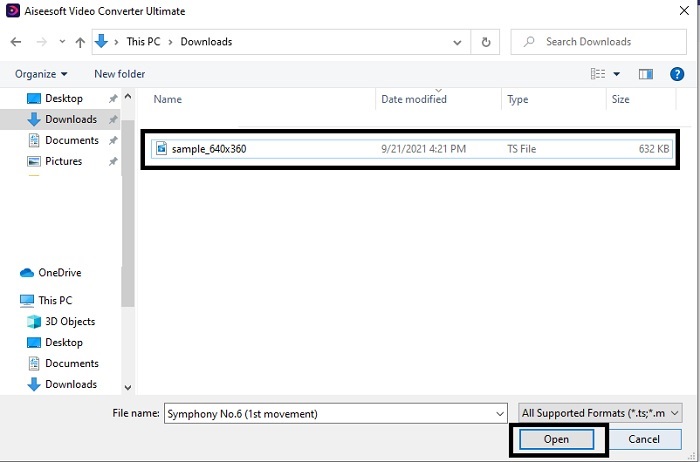
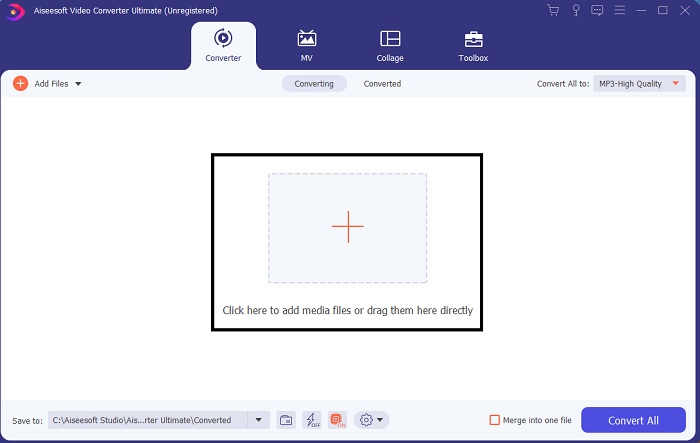
Adım 2. Arayüzün ortasındaki artı işaretine tıklayın. GIF’e dönüştürmek istediğiniz .ts dosyasını bulun ve araca yapıştırmak için aç seçeneğine tıklayın. Ek bilgi olarak, aynı anda çok sayıda .ts dosyası veya diğer dosyaları da ekleyebilirsiniz. Ayrıca bunları aynı formata dönüştürebilir ya da her birini ayrı ayrı değiştirebilirsiniz.
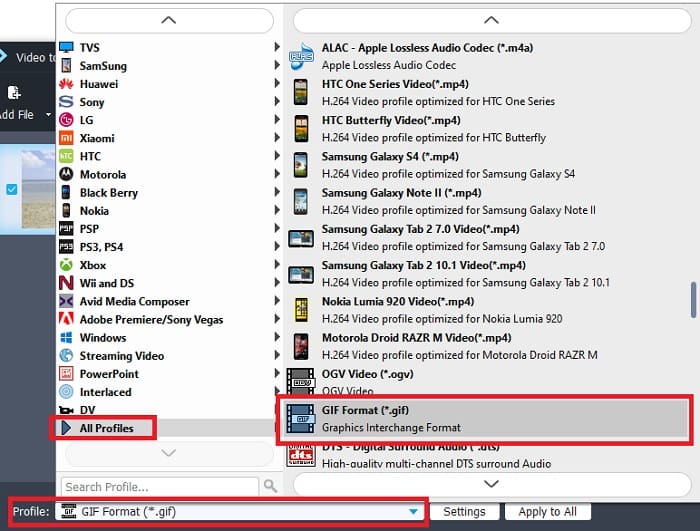
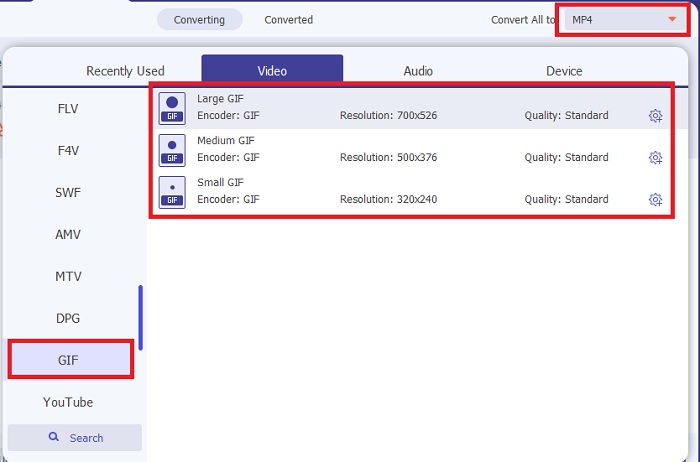
Adım 3. Ana arayüzde, sol taraftaki açılır liste düğmesine tıklayın. GIF formatını veya istediğiniz diğer formatı seçin.
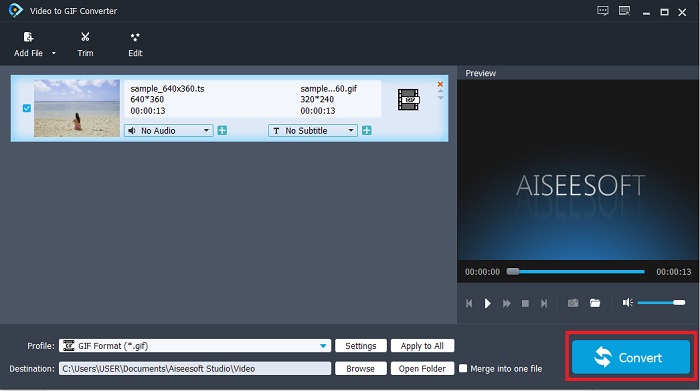
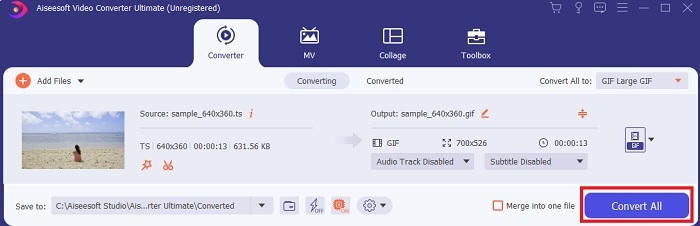
Adım 4. GIF formatını seçtikten sonra, TS dosyasının dönüştürülmesini başlatmak için Tümünü Dönüştür düğmesine tıklayın.
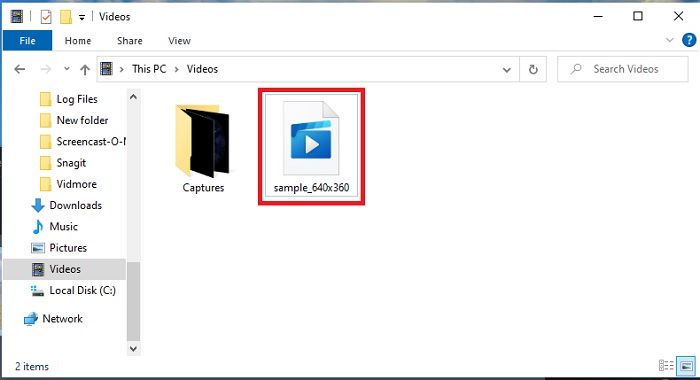
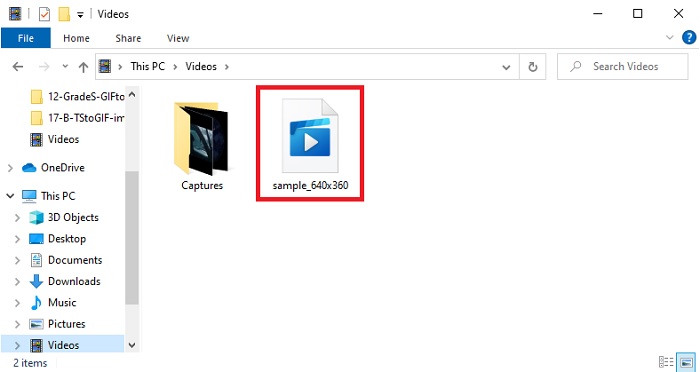
Adım 5. Dönüştürme tamamlandıktan sonra ekranınızda bir klasör açılacaktır. Az önce dönüştürdüğünüz dosyaya tıklayın ve hemen izleyin.
3. Bulut Dönüştürme
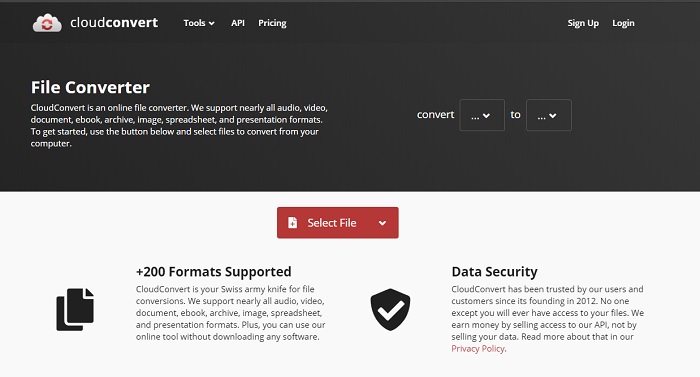
Yukarıdaki yazılım araçlarını indirmek istemiyorsanız, bunun yerine CloudConvert kullanabilirsiniz. İlk iki dönüştürücünün aksine bu web aracı tamamen internete bağımlıdır. Yani burada dönüştürme yapacaksanız, kesinti veya veri kaybını (bir sonraki araçta olduğu gibi) önlemek için stabil bir internet bağlantınız olmalıdır. Ancak CloudConvert yalnızca temel dönüştürme işlemlerini ve formatları destekler. Yukarıdaki iki araç gibi düzenleme özelliklerine sahip değildir. Fakat avantajı, depolama alanınıza indirmek zorunda olmamanızdır.
4. Convertio
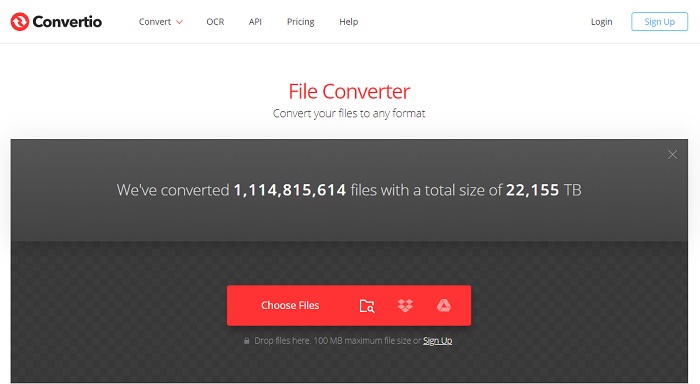
Bu araçta isterseniz birden fazla TS’yi GIF’e dönüştürme işlemi yapabilirsiniz, ancak önce kaydolmanız gerekir. Çünkü Convertio’nun aynı anda dönüştürülmesine izin verdiği dosya sayısı yalnızca ikidir. Ancak unutmayın ki bu araca kaydolursanız, kendi kişisel verilerinizi zaten paylaşmış olursunuz. Her ne kadar bu araçta veri sızıntısı yaşandığına dair bir haber olmasa da, yine de tedbiri elden bırakmamak gerekir. Ayrıca bu web aracı, harika sıkıştırma ve dönüştürme imkânı sunar, ancak ultimate araca kıyasla daha az formatı destekler.
Bölüm 3. TS'den GIF'e hakkında SSS
TS dosyaları sıkıştırılmış mı?
Evet, sıkıştırılmış video verileridir çünkü daha sonra aktarılmasını isterseniz korumak ve güvenli bir aktarım sağlamak için .mpeg sıkıştırması kullanır.
.ts dosyalarını nerede oynatabilirim?
Çoğu zaman .ts dosyalarını ne yerleşik medya oynatıcınızda ne de bazı üçüncü taraf araçlarda oynatamazsınız. Ancak .ts dosyalarını sinemadaymış gibi izlemek için kullanabileceğiniz bir medya oynatıcı vardır. Blu-ray Player, tüm formatları destekleyen ve bunların oynatımını izlemenizi sağlayan devrim niteliğinde medya oynatıcılardan biridir. Aşağıdaki bağlantılara tıklayarak aracı indirin ve .ts dosyalarını izleyin. PC için Blu-ray Player’ı İndir Mac için Blu-ray Player’ı İndir
Bir TS dosyasına dönüştürmek için en iyi format hangisidir?
Araştırmamızı yaptığımızda gördük ki TS dosyaları, tıpkı MP4 gibi ses ve video oynatımını eşzamanlar. Her ne kadar MP4 eşzamanlı dosyalar depolamasa da, yine de .ts dosyalarını dönüştürmek için kullanabileceğiniz en iyi formattır. TS dosyalarını MP4’e dönüştürdükten sonra, dosya tüm platformlarda ve medya oynatıcılarda oynatılabilir hâle gelir.
Sonuç
Konuyu sonlandırmak gerekirse, bu dönüştürme mücadelesinde kazananın FVC Video Converter Ultimate olması beklenen bir sonuçtur. Burada listelenen tüm araçlar TS’yi GIF’e dönüştürebilse de, ultimate dönüştürücü bunların arasında olağanüstü (fenomenal) bir dönüştürücüdür. Mükemmel bir dönüştürme istiyorsanız bu aracı indirin ve dönüştürmenin keyfini çıkarın.
-
 [Kılavuz] Windows/Mac'te M4V Videolarını Animasyonlu GIF'lere Dönüştürme
 Favori M4V videolarınızdan animasyonlu GIF dosyaları oluşturmak istiyorsanız, M4V videolarını özelleştirilmiş ayarlarla GIF'lere dönüştürmenin 2 kolay ve verimli yolunu öğrenebilirsiniz.
-
 WebM'den GIF'e – Kendi GIF'lerinizi Oluşturmak için 3 Ücretsiz WebM'den GIF'e Dönüştürücü
 WebM bir GIF mi? Bir video nasıl GIF'e dönüştürülür? Ücretsiz WebM'den GIF'e dönüştürücü var mı? Bu gönderi, WebM'yi GIF'e dönüştürmenize yardımcı olacak 3 ücretsiz yolu paylaşıyor.
-
 Photoshop/FFmpeg olmadan MKV Videolarını Animasyonlu GIF'lere Dönüştürme
 MKV filmlerini bilgisayarınıza indirip izledikten sonra, harika anları arkadaşlarınızla veya internette GIF olarak paylaşmak isteyebilirsiniz. Bu makalede, MKV'yi GIF'e dönüştürmenin en kolay 2 yolunu öğrenebilirsiniz.
