


 Video Dönüştürücü Ultimate
 Ekran kaydedicisi
 Video Onarımı
 Güvenli İndirme
JFIF'i JPG'ye Dönüştürme: Deneyebileceğiniz Verimli Yöntemleri Alın
Günümüzde JFIF dosya formatı nadir kullanılmaktadır. Bazı programlar bu dosya türünü desteklemez. Bu durumda bazı kullanıcılar JFIF görsellerini nasıl açacaklarını bilmezler. Ancak JFIF görüntünüzü görüntülemek istiyorsanız, uzantısını değiştirmeniz gerekir. Daha tanıdık ve yaygın bir dosya uzantısı istiyorsanız, görsellerinizi JPG’ye dönüştürebilirsiniz. Ek bilgi olarak, JPG kullanabileceğiniz en popüler görüntü dosya formatlarından biridir. Neredeyse tüm tarayıcılar ve programlar bu formatı destekler. Bu durumda, JFIF’i JPG’ye dönüştürmek istiyorsanız, bu rehberi okumanız en iyisi olacaktır. JFIF dosyanızı JPG’ye dönüştürmenin çeşitli yollarını sunabiliriz. Daha fazla uzatmadan, öğrenmek için makaleyi okuyun.

Bölüm 1. JFIF'i Çevrimiçi JPG'ye Dönüştürmenin En Kolay Yolları
Bonus: FVC Free Image Converter kullanarak JFIF'i JPG'ye Dönüştürme
FVC Free Image Converter kullanmak, JFIF’i JPG’ye dönüştürmenin en etkili yoludur. Görsel dosyalarını dönüştürme kararı vermekle isabetli bir tercih yapmış olursunuz. JPG, JPEG, PNG, SVG, BMP, TIFF ve GIF dahil olmak üzere birçok görüntü formatını destekler. Böylece, bazı araçların veya cihazların görsel dosyalarınızı açamaması konusunda endişelenmenize gerek kalmaz. Ayrıca, orijinal fotoğrafların mükemmel kalitesini koruyabilir. Dönüştürme işlemi sonrasında, dosyayı orijinalinden ayırt edemezsiniz. Dahası, bu görsel dosya dönüştürücü toplu dönüştürmeyi de destekler. Yani aynı anda 40'a kadar görüntü dosyasını dönüştürebilirsiniz. Diğer dönüştürücülerle karşılaştırıldığında bu çok daha pratik ve etkilidir. Ayrıca bu programı kullanmanın hiçbir maliyeti yoktur. Buradan ücretsiz bir görüntü dönüştürücüye erişebilirsiniz.
Ayrıca, onu kullanmak için bir hesap oluşturmanıza gerek yoktur. Sadece web sitesine gitmeniz ve dönüştürmeye başlamanız gerekiyor. Hepimizin bildiği gibi reklamlar can sıkıcıdır. Yine de, bu aracın reklamı yoktur ve huzur içinde dönüştürmenize olanak tanır. Chrome, Mozilla, Edge, Explorer ve daha fazlası gibi web tarayıcıları bu dönüştürücüye erişmenizi sağlar.
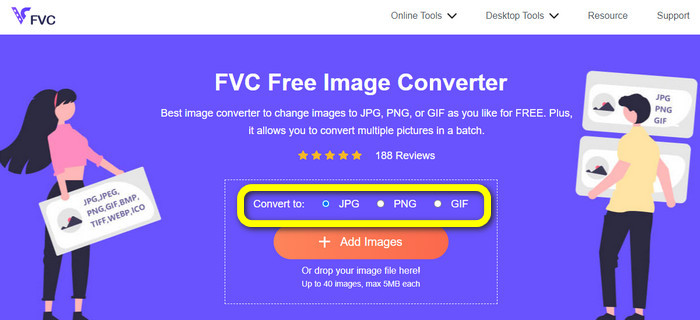
Adım 1. Bilgisayarınızda tarayıcınızı açın. Ardından FVC Free Image Converter resmi web sitesini ziyaret edin. Convert to seçeneğinden JPG dosya formatını seçin. Bunu, ekranınızın ortasında turuncu çubuk ve artı simgesiyle birlikte görebilirsiniz.
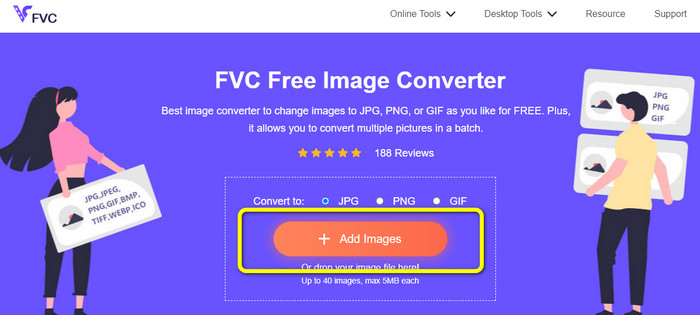
Adım 2. Dönüştürmek istediğiniz JFIF görselini yüklemek için Add Images düğmesine tıklayın. Birden fazla görüntü dosyası ekleyebilirsiniz. Yükleme işleminin ardından, görsel dosyanız otomatik olarak dönüştürülecektir.
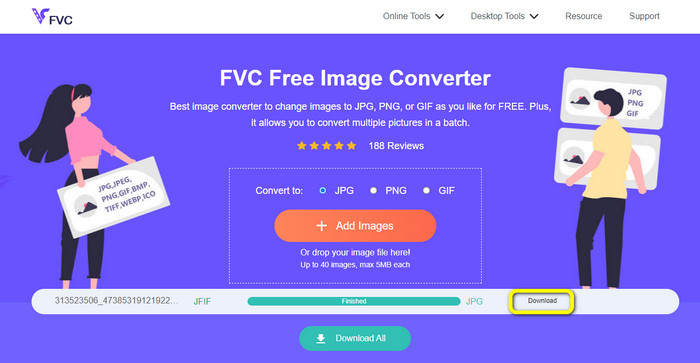
Adım 3. Son adım, dönüştürülmüş dosyanızı Download düğmesine tıklayarak kaydetmektir.
Convertio kullanarak JFIF'i JPG'ye Dönüştürme
Convertio, JFIF dosyalarını JPG’ye dönüştürmek için kullanabileceğiniz etkili çevrimiçi dönüştürücülerden biridir. Bu görüntü dönüştürücünün basit süreci sayesinde JFIF dosyalarınızı JPG dosyalarına dönüştürebilirsiniz. Kullanıcı dostu bir arayüz ve yerleşimlere sahiptir; bu da anlaşılmasını kolay kılar. Böylece hem deneyimli kullanıcılar hem de yeni başlayanlar bu web dönüştürücüyü rahatlıkla kullanabilir. Ayrıca bu uygulama, toplu dönüştürme özelliğine sahiptir. Sonuç olarak, aynı anda birden fazla resim formatını dönüştürebilirsiniz. Üstelik dönüşüm işlemi hızlıdır. Görseller birkaç saniye içinde dönüştürülebilir. Google, Firefox, Internet Explorer ve diğer popüler tarayıcılar Convertio’yu destekler. Convertio’nun başka özellikleri de vardır. Sadece görselleri değil, video, ses, belge ve daha fazlasını da dönüştürebilirsiniz.
Ancak Convertio'nun, özellikle ücretsiz sürümü kullanırken bazı kısıtlamaları vardır. Yalnızca 100 MB fotoğraf yüklenebilir. Bundan sonra resim dönüştürme artık mümkün değildir. Bu nedenle, tüm yeteneklerini kullanmak istiyorsanız, bir üyelik planına yatırım yapın. Ek olarak, ücretsiz sürüm, bir toplu dönüştürme işlemi gerçekleştirirken yalnızca iki dosya yüklemenize izin verir. Son olarak, üst düzey bir performans yaşamak için hızlı bir internet bağlantısı gerekir.
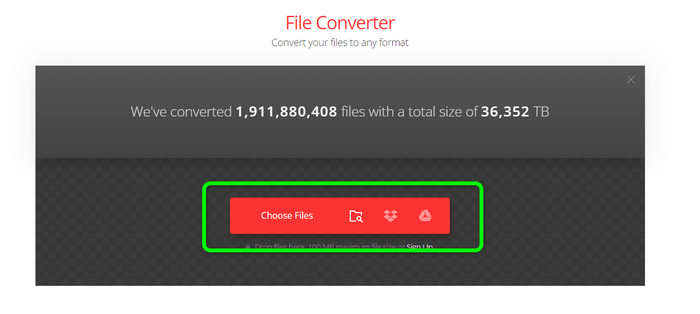
Adım 1. Bilgisayarınızdan herhangi bir tarayıcıyı kullanın ve Convertio web sitesine gidin. Choose Files düğmesine tıklayın. Bu düğme kırmızı çubuğun üzerindedir. Tıkladıktan sonra bilgisayar klasörü ekranda görünecektir. JFIF dosyasını açın ve araca yükleyin.
Adım 2. JFIF görselini yükledikten sonra format seçeneğine gidin. Ardından, çıktı dosya formatınız olarak JPG’yi seçin.
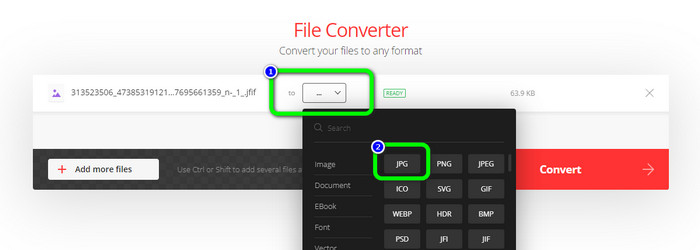
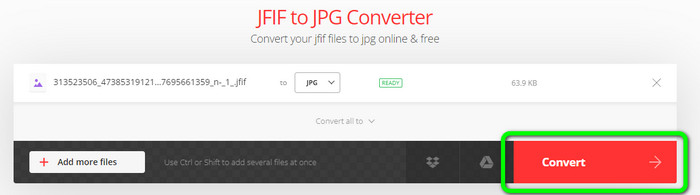
Adım 3. JPG formatını seçmeyi tamamladıktan sonra Convert düğmesine tıklayın. Dönüştürme işlemi için birkaç saniye bekleyin.
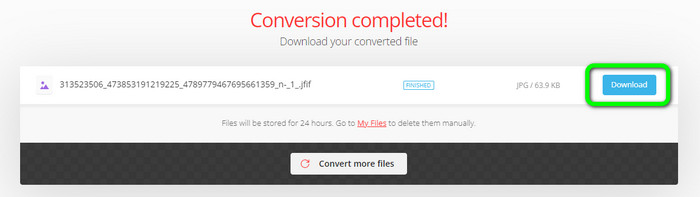
Adım 4. Dönüştürme işlemi bittiğinde Download düğmesine tıklayın. Bu sayede JFIF görselinizi cihazınızda kolayca açabilirsiniz.
Bölüm 2. Windows 11/10'da JFIF'i JPG'ye Dönüştürme
JFIF dosyanızı JPG görüntü formatında kaydetmek istiyorsanız, Bitrecover JFIF Converter Wizard kullanın. Bu çevrimdışı programı Windows üzerinde ücretsiz olarak indirebilirsiniz. Ayrıca çeşitli görüntü formatlarını destekler. Buna BMP, PNG, TIFF, PDF ve daha fazlası dahildir; bu da onu dönüştürme alanında daha kullanışlı kılar. Bunun yanında hızlı bir dönüştürme sürecine sahiptir; bu nedenle kullanıcıların zamanını fazla almaz. Ancak, dönüştürücüyü kullanırken karşılaşabileceğiniz bazı dezavantajlar vardır. Ücretsiz sürümde araç yalnızca 5 görüntü dosyasına kadar dönüştürmeye izin verir. Dolayısıyla beşten fazla görsel dönüştürmek istiyorsanız bir abonelik planı satın almalısınız.
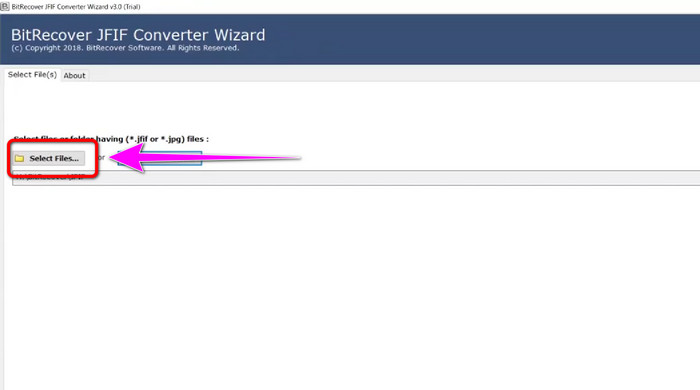
Adım 1. Bilgisayarınıza Bitrecover JFIF Converter Wizard’ı indirin. Ardından kurulum işlemi bittikten sonra programı başlatın.
Adım 2. Arayüz ekranda göründüğünde dönüştürmek istediğiniz JFIF dosyalarını eklemek için Select file seçeneğine tıklayın. Ardından arayüzün sol alt köşesindeki Next seçeneğine tıklayın.
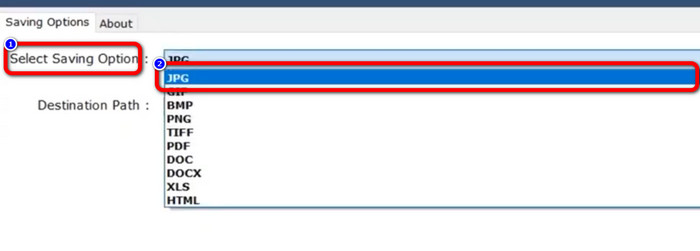
Adım 3. Bundan sonra Select Saving Option bölümüne gidin. Çıktı formatınız olarak JPG formatına tıklayın.
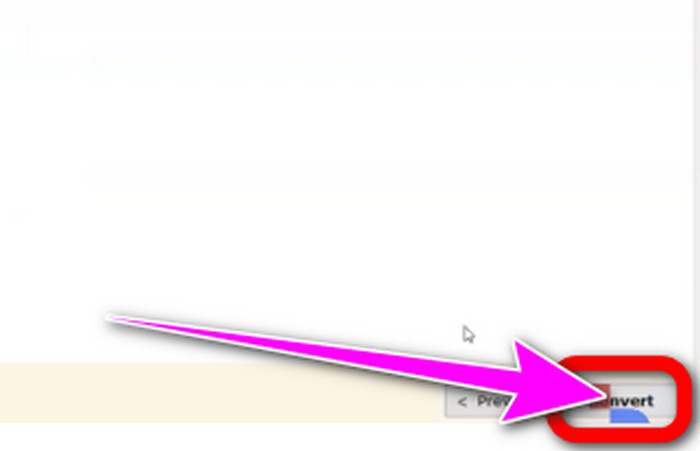
Adım 4. Son adım olarak arayüzün sağ alt köşesindeki Convert düğmesine tıklayın.
Bölüm 3. Mac'te JFIF'i JPG'ye Dönüştürmenin En İyi Yolu
Mac’in yerleşik programı olan Preview uygulamasını kullanarak JFIF’i JPG’ye dönüştürebilirsiniz. Bu çevrimdışı programın yardımıyla JFIF dosyasını JPG formatına çevirebilirsiniz. Ancak bir Mac kullanıcısı değilseniz veya cihaza aşina değilseniz, ekstra zaman harcamanız gerekebilir. Yine de öğrenmeye istekliyseniz, aşağıdaki adımlara bakın.
Adım 1. Dosyaya sağ tıklayın, açılan menüden Open With seçeneğini seçin ve ardından Preview’i tercih edin. Eğer bu dosya türü için seçenekler arasında Preview’ı görmüyorsanız, dosyaya çift tıklayın.
Adım 2. Belgeye erişmek için uygun bir uygulama olmadığına dair bir açılır mesaj belirecektir. Choose Application seçeneğine tıklayın.
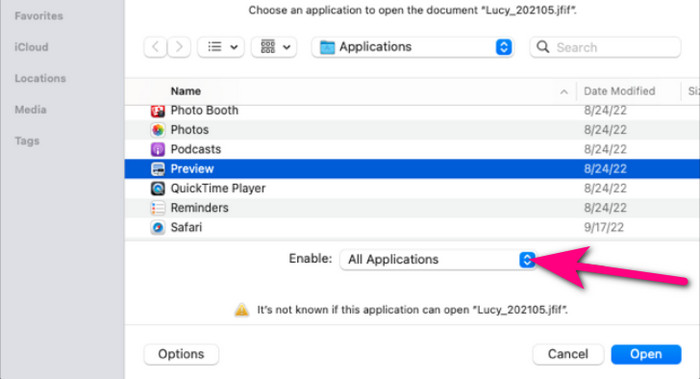
Adım 3. Uygulamalar klasörü açıldığında, alt kısımdaki Enable açılır kutusundan All Applications seçeneğini seçin. Ardından listeden Preview’i seçip Open seçeneğine tıklayın.
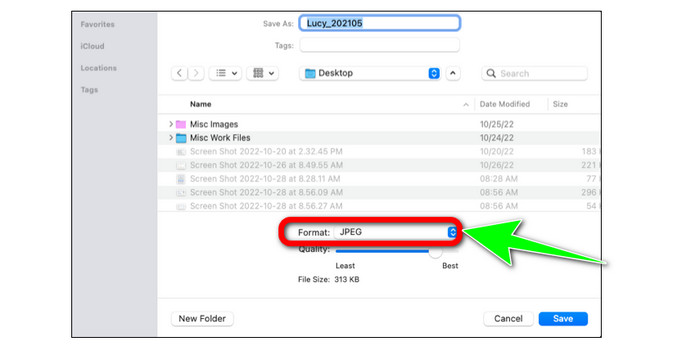
Adım 4. Ardından JFIF resminiz Preview içinde açılmalıdır. Option tuşunu basılı tutarken, menü çubuğundan File’a tıklayın ve ardından Save as seçeneğini seçin.
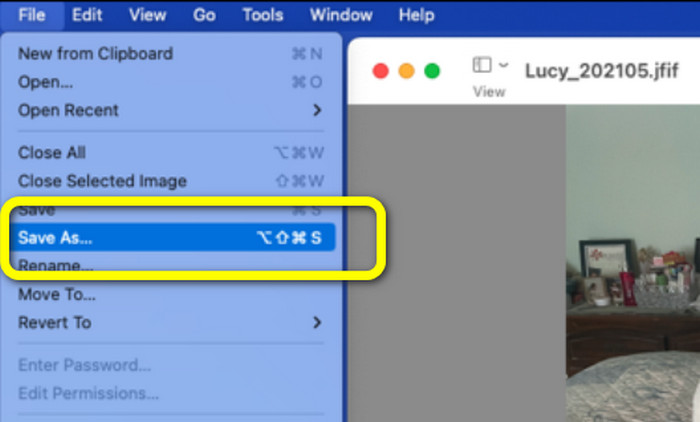
Adım 5. Save As iletişim kutusundaki Format açılır kutusundan JPEG’i seçin. İsteğe bağlı olarak kaliteyi kaydırıcıyı kullanarak değiştirebilirsiniz.
Bölüm 4. JFIF'i JPG'ye Dönüştürme Hakkında SSS
1. .jfif dosyası ile .jpeg dosyası arasındaki fark nedir?
JFIF dosyaları genellikle ham bilgisayar kodudur. Bazen erişilemeyen bir resim veya video dosyası değildir. Daha teknik bir ifadeyle JFIF dosyaları, JPG dosyasının kaynak kodlarıdır. JFIF, depolama için bit eşlemlenmiş JPG sanal dosya verileridir.
2. Bir JFIF dosyası kullanmanın faydaları nelerdir?
JFIF formatı, orijinal JPEG formatının atladığı birkaç özelliği tanımlar. Kullanıcılar, standart bir başlık, çözünürlük ve en boy oranı özellikleri ve renk modeli gibi temel özellikler belirlendikten sonra JPEG sıkıştırmasını kullanarak dosyaları kaydedebilir ve dağıtabilir. Birçok dijital fotoğraf makinesi, geçmişte fotoğrafları JFIF formatında depolamıştır.
3. Bir görüntünün JFIF olup olmadığını nasıl anlarım?
Resim dosyasını bulduktan sonra, birçok seçeneğin bulunduğu sağdaki uzantı çubuğuna ilerlemelisiniz. Bu uzantı menüsüne ulaştığınızda varsayılan olarak bir JFIF uzantısı seçilecektir. Bu, bir görüntüyü kaydettiğinizde JFIF'in varsayılan görüntü uzantısı veya formatı olarak seçildiği anlamına gelir.
Sonuç
Yukarıdaki bilgilerin tümü, JFIF’i JPG’ye dönüştürmenin en iyi yöntemleridir. Görselleri çevrimiçi yollarla dönüştürmeyi tercih ediyorsanız, FVC Free Image Converter kullanmanız daha iyi olacaktır. Diğer çevrimiçi dönüştürücülere kıyasla çok daha basit bir yönteme sahiptir.
-
 WebP'yi JPG'ye Hızla Dönüştürmek İçin En Kolay Yaklaşımları Öğrenin
 Hepimiz Web görüntülerini kolayca JPG'ye dönüştürmenin etkili yollarını öğrenelim. Bu makale size görüntü dosyalarını dönüştürmek için kullanabileceğiniz mükemmel görüntü dönüştürücüler sağlayacaktır.
-
 PNG'yi Hızlı Bir Şekilde JPG'ye Dönüştürmek İçin En İyi 5 Öncü Öğretici
 PNG dosyanızı JPG formatına dönüştürmeniz gerekiyorsa, en iyi yolları buradan öğrenebilirsiniz. PNG ve JPG dosya formatları arasındaki farkı da öğreneceksiniz.
-
 SVG'yi JPG Formatına Dönüştürmek İçin Zahmetsiz Yöntemler
 SVG'yi JPG'ye dönüştürmenin en iyi yolunu mu arıyorsunuz? Bu gönderi, deneyebileceğiniz bazı kesin öğreticiler verecektir. SVG'den JPG'ye dönüştürücüyü de sizin için keşfedeceksiniz.
